








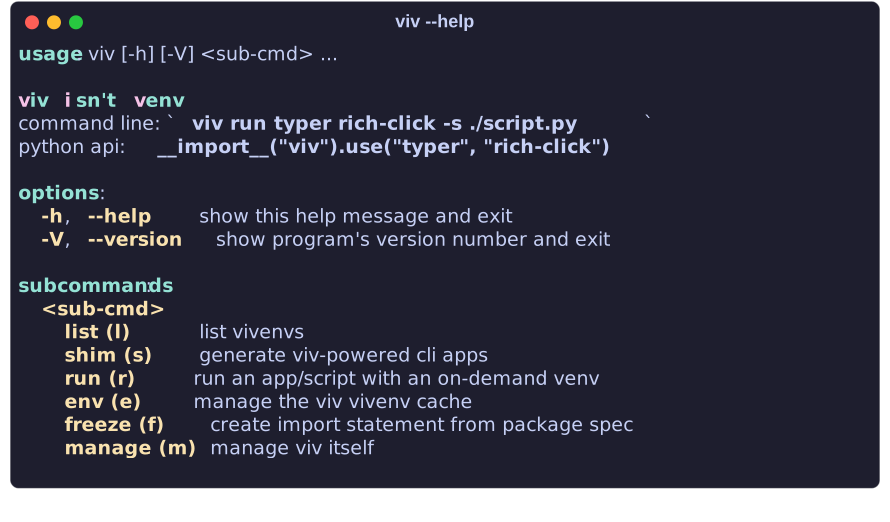
Try before you buy!
python3 <(curl -fsSL viv.dayl.in/viv.py) run frogmouth -- gh daylinmorgan/viv
Viv is a standalone dependency-free venv creator (just needs python + pip).
Viv helps you ignore silly things like managing temporary or rarely used virtual environments,
while still unleashing the full power of python scripting with it's entire ecosystem at your disposal.
Viv's uncompromising insistence on portability means that it will always,
only use the standard library and never exceed a single script.
See the documentation or the examples to get started.
Setup
Run the below command to install viv.
python3 <(curl -fsSL viv.dayl.in/viv.py) manage install
To access viv from within scripts you should add its location to your PYTHONPATH.
By default viv will be installed to $XDG_DATA_HOME/viv or ~/.local/share/viv;
you can customize this with --src.
export PYTHONPATH="$PYTHONPATH:$HOME/.local/share/viv"
Pypi (Not Recommended)
pip install viv
Why is this not recommended? Mainly because viv is all about hacking your sys.path.
Placing it in its own virtual environment or installing in a user site directory may complicate this endeavor.
Usage
In any Python script with external dependencies you can add this line
to automate vivenv creation and installation of dependencies.
As a cli:
viv run frogmouth -- gh daylinmorgan/viv
As a python module:
__import__("viv").use("click")
As an app installer:
viv shim ruff
To remove all vivenvs you can use the below command:
viv env remove $(viv list -q)
To remove viv altogether you can use the included purge command:
python3 <(curl -fsSL viv.dayl.in/viv.py) manage purge
Equivalent commands from alternatives
pip-run
pip-run cowsay -- -m cowsay "moove over, pip-run"
python3 <(curl -fsSL viv.dayl.in/viv.py) run cowsay -- "moove over, pip-run"
python -m pip-run requests -- -c "import requests; print(requests.get('https://pypi.org/project/pip-run').status_code)"
python -m viv run requests -b python -- -c "import requests; print(requests.get('https://pypi.org/project/viv').status_code)"
pipx
pipx install pycowsay
viv shim pycowsay
pipx run https://gist.githubusercontent.com/cs01/fa721a17a326e551ede048c5088f9e0f/raw/6bdfbb6e9c1132b1c38fdd2f195d4a24c540c324/pipx-demo.py
python3 <(curl -fsSL viv.dayl.in/viv.py) run \
  -s https://gist.githubusercontent.com/cs01/fa721a17a326e551ede048c5088f9e0f/raw/6bdfbb6e9c1132b1c38fdd2f195d4a24c540c324/pipx-demo.py
Bonus: use viv with just standalone snippet (37LOC)
--standalone will auto-generate a mini-function version of viv
to accomplish the same basic task as using a local copy of viv.
After generating this standalone shim you can freely use this script
across Unix machines which have Python > 3.8.
See examples/black
for output of the below command.
viv freeze also supports --standalone.
python3 <(curl -fsSL viv.dayl.in/viv.py) shim black -o ./black --standalone --freeze
1 maintainer

Release files for viv 2024.1005
For a detailed explanation of source distributions (sdists) and built distributions (wheels), please see the package formats documentation.
Source distribution (sdist)
| File | Size | Uploaded | |
|---|---|---|---|
| viv-2024.1005.tar.gz | 36.4 kB | Details |
Built distribution (wheel)
| File | Interpreter | ABI | Platform | Reset |
|---|---|---|---|---|
| viv-2024.1005-py3-none-any.whl | Python 3 | none | any | Details |
Total release size: 71.0 kB
Release files / viv-2024.1005.tar.gz
| Download URL | viv-2024.1005.tar.gz |
|---|---|
| Size | 36.4 kB |
| Tags | Source |
|
SHA-256 checksum How to use checksums |
a0f49d7a51d2952a8d317554c0e4a7673d232a894698381ea0dfafd1ba8e19f4
|
|
BLAKE2b-256 checksum How to use checksums |
4a42d1afe86649f4cec8011d2d1b17ff772ce417ebf358be61d8a23593183e48
|
| Upload date | |
|
Uploaded using Trusted Publishing? What is trusted publishing? |
Yes |
| Uploaded via |
twine/5.1.0 CPython/3.12.4
|
Release files / viv-2024.1005-py3-none-any.whl
| Download URL | viv-2024.1005-py3-none-any.whl |
|---|---|
| Size | 34.6 kB |
| Tags | Python 3 |
|
SHA-256 checksum How to use checksums |
b0e6db8fec975d11e51b06c9e47bc16354c31a00887133ce9969ac52ed3f061b
|
|
BLAKE2b-256 checksum How to use checksums |
fdb944e3c157114ccb88de02e7620503127aa720fd0b8024dae1d3c56020fbba
|
| Upload date | |
|
Uploaded using Trusted Publishing? What is trusted publishing? |
Yes |
| Uploaded via |
twine/5.1.0 CPython/3.12.4
|














