
vivintpy







Python library for interacting with a Vivint security and smart home system.
This was built to support the Vivint for Home Assistant integration but should work outside of it too. Currently, it can be utilized via HACS and is available as a default integration.
Credit
This was inspired by the great work done by Mike Reibard to reverse engineer the Vivint Sky API and Ovidiu Stateina for the repository from which this is forked and expanded on.
Features
It currently has support for the following device types:
- alarm panels
- cameras
- door locks
- garage doors
- switches
- binary
- multilevel
- thermostats
- wireless sensors
- carbon monoxide
- door/window
- flood
- glass break
- motion
- smoke/fire
- etc
It can also list and stream the recordings stored on a Vivint DVR (Smart Drive).
In addition, it integrates with PubNub to receive real-time updates for devices. This subscription stops receiving notifications around 15-20 minutes unless a call is made to the Vivint Sky API periodically. This might be related to the cookie expiration since it expires 20 minutes after the last API call was received. If another client connects, however, the notifications start to stream again for all currently connected clients.
Installation
Requires Python 3.11 or newer.
pip install vivintpy
Usage
The library is asynchronous. Everything starts from an Account, which holds your systems, and each system has its alarm panels and their devices.
import asyncio

from vivintpy.account import Account
from vivintpy.entity import UPDATE
from vivintpy.exceptions import VivintSkyApiMfaRequiredError


def on_panel_update(event: dict) -> None:
    panel = event["device"]
    print(panel.state.name, panel.changed_by)


async def main() -> None:
    account = Account(username="you@example.com")

    try:
        try:
            await account.connect(
                load_devices=True,
                subscribe_for_realtime_updates=True,
                password="your-password",
            )
        except VivintSkyApiMfaRequiredError:
            await account.verify_mfa(input("Enter MFA code: "))

        for system in account.systems:
            for panel in system.alarm_panels:
                print(f"{panel.name}: {panel.state.name}")

                for device in panel.devices:
                    print(f"  {device.name} ({type(device).__name__})")

                panel.on(UPDATE, on_panel_update)

        while True:
            await asyncio.sleep(300)
            await account.refresh()
    finally:
        await account.disconnect()


asyncio.run(main())
Controlling devices
Each device type has its own methods. For example, an alarm panel:
await panel.arm_stay()
await panel.arm_away()
await panel.disarm()
Listening for changes
on registers a callback for an event and returns a function that removes it. Every device has UPDATE, and some have their own events:
from vivintpy.devices.camera import MOTION_DETECTED

remove_listener = camera.on(MOTION_DETECTED, lambda event: print(event["device"]))
AlarmPanel.changed_by reports what last armed or disarmed a panel, such as a user's name, a key fob's name, panel or a rule. Vivint only reports a key fob as panel, so its name comes from the system's history a moment later. It shows panel until then, including during an exit delay, and stays panel if the history can't be read. AlarmPanel.changed_by_message has Vivint's own description from the history, such as Your home was disarmed by Sam from an Android device, which also says where the change came from. It is None until the history has the event, so it stays None during an exit delay. changed_by is None until the first change after connecting. It can arrive just before or just after the panel's state changes, so an update can briefly show the previous value. UPDATE also fires on refreshes, when nothing may have changed.
Recordings on the DVR
Systems with a Vivint DVR (Smart Drive) can also list and stream the continuous recordings stored on it. The DVR is reached over the local network using a short-lived client certificate that is issued to the signed-in account and renewed automatically.
await account.connect(load_devices=True)
if dvr := account.systems[0].dvr:  # None if the system has no DVR
    await dvr.connect()
    for recording in await dvr.get_recordings(camera_id):
        playlist = await dvr.get_playlist(camera_id, recording.id)  # HLS
        for segment in parse_playlist(playlist, recording):
            # aclosing releases the connection if the loop is left early
            async with aclosing(
                dvr.stream_segment(camera_id, recording.id, segment.number)
            ) as chunks:
                async for chunk in chunks:
                    ...
aclosing comes from contextlib, and parse_playlist comes from vivintpy.spacemonkey.
Staying logged in
The password you pass to connect is only used to log in, and vivintpy doesn't keep it. Save the refresh token from that first login, then use it to log in next time:
def save_token(token: str) -> None:
    """Store the token somewhere safe."""


# the first time
account = Account(username="you@example.com", on_refresh_token_changed=save_token)
await account.connect(password="your-password")

# after that
account = Account(
    username="you@example.com",
    refresh_token=saved_token,
    on_refresh_token_changed=save_token,
)
await account.connect()
Vivint's refresh tokens can only be used once. Each refresh returns a new one, and using an old one fails and also invalidates the newest one. So save every new token as soon as on_refresh_token_changed provides it, and don't share a token between running instances.
Passing password to Account still works, and it's kept so that vivintpy can log in with it again, but it's deprecated and will be removed in 2027.1.0.
Errors
Errors from vivintpy inherit from VivintError, in vivintpy.exceptions. Network problems can also raise aiohttp errors and TimeoutError, so catch those too if your program should keep running. VivintSkyApiAuthenticationError means Vivint rejected the login, and VivintSkyApiMfaRequiredError means a code is needed. Pass that code to verify_mfa. Calls to a DVR report every failure, including a network problem, as SpaceMonkeyError.
Account.refresh raises VivintSkyApiAuthenticationError if the session can't be renewed or no user data comes back. That usually means Vivint rejected the refresh token, so log in again with await account.connect(password="your-password"), which can also ask for an MFA code. Do this before calling disconnect, which closes the session, or afterward repeat the full setup from the example above with a new Account, including its connect options and listeners. If a lost connection or a VivintSkyApiError stops it getting your list of systems, refresh logs the error and carries on. Anything else is raised, including a server error such as an HTTP 500 and any error from refreshing a system, and that ends a loop like the one above unless you catch it.
See demo.py for a longer example.
❤️ Support Me
I maintain this python project in my spare time and provide it as-is, without guarantees. If you find it useful, consider supporting development:
- 💜 Sponsor me on GitHub
- ☕ Buy me a coffee / beer
- 💸 PayPal (direct support)
- ⭐ Star this project
- 📦 If you’d like to support in other ways, such as donating hardware for testing, feel free to reach out to me
If you don't already own a Vivint system, please consider using my referral code (35fr23sv) and get a free Doorbell Camera Pro from Vivint (as well as a tip to me in appreciation)! You can also call (855) 747-7199 and mention referral code 35fr23sv.
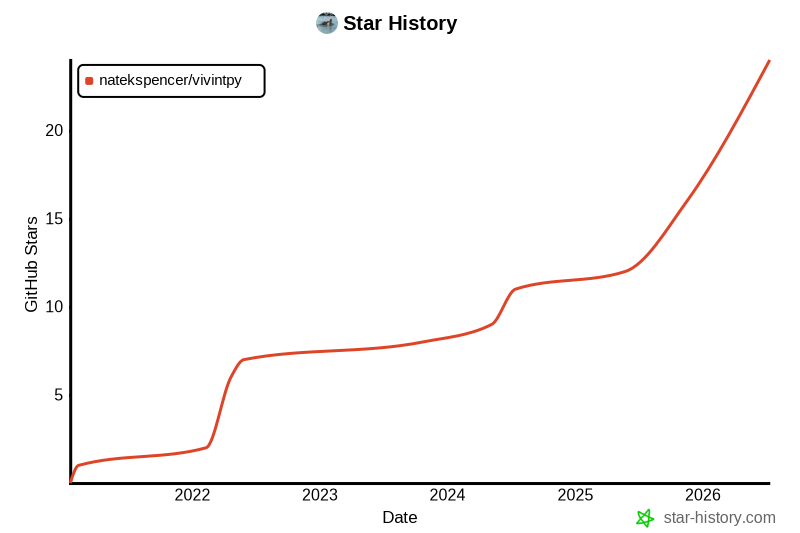
📈 Star History
1 maintainer

Metadata
1 maintainer
Release files for vivintpy 2026.4.0
For a detailed explanation of source distributions (sdists) and built distributions (wheels), please see the package formats documentation.
Source distribution (sdist)
| File | Size | Uploaded | Provenance | Actions |
|---|---|---|---|---|
| vivintpy-2026.4.0.tar.gz | 137.1 kB | Without provenance | Details for vivintpy-2026.4.0.tar.gz |
Built distribution (wheel)
| File | Interpreter | ABI | Platform | Actions Reset |
|---|---|---|---|---|
| vivintpy-2026.4.0-py3-none-any.whl | Python 3 | none | any | Details for vivintpy-2026.4.0-py3-none-any.whl |
Total release size: 274.8 kB
Release files / vivintpy-2026.4.0.tar.gz
| Download URL | vivintpy-2026.4.0.tar.gz |
|---|---|
| Size | 137.1 kB |
| Tags | Source |
|
SHA-256 checksum How to use checksums |
6dcbc09b1c17cb63d81f89a4a4cb738330c8d96632cfc76aef25ec805b7908ba
|
|
BLAKE2b-256 checksum How to use checksums |
a04c4f6c1d6b6b95751ed1489f3ee891c6c339082614d82e6becaf2a617ebcbe
|
| Upload date | |
|
Uploaded using Trusted Publishing? What is trusted publishing? |
Yes |
| Uploaded via |
uv/0.13.0 {"installer":{"name":"uv","version":"0.13.0","subcommand":["publish"]},"python":null,"implementation":{"name":null,"version":null},"distro":{"name":"Ubuntu","version":"26.04","id":"resolute","libc":null},"system":{"name":null,"release":null},"cpu":null,"openssl_version":null,"setuptools_version":null,"rustc_version":null,"ci":true}
|
Release files / vivintpy-2026.4.0-py3-none-any.whl
| Download URL | vivintpy-2026.4.0-py3-none-any.whl |
|---|---|
| Size | 137.7 kB |
| Tags | Python 3 |
|
SHA-256 checksum How to use checksums |
78fde55a1563bc85dd6756f380f4d36a9f5dea379fb9553d2a67a66259021592
|
|
BLAKE2b-256 checksum How to use checksums |
84aafc9c0c7433247aa029aaf79feee6abbc4418eb31065e161969da42411566
|
| Upload date | |
|
Uploaded using Trusted Publishing? What is trusted publishing? |
Yes |
| Uploaded via |
uv/0.13.0 {"installer":{"name":"uv","version":"0.13.0","subcommand":["publish"]},"python":null,"implementation":{"name":null,"version":null},"distro":{"name":"Ubuntu","version":"26.04","id":"resolute","libc":null},"system":{"name":null,"release":null},"cpu":null,"openssl_version":null,"setuptools_version":null,"rustc_version":null,"ci":true}
|
Security for vivintpy 2026.4.0
Provenance
Provenance describes where a file came from. On PyPI, provenance is shared via attestations, which provide a verifiable record of the build or publishing details. View details, limitations and caveats.
No provenance found
None of the files in this release were uploaded with provenance metadata.
A note on package security
PyPI is a repository for distributing packages, not a service for auditing them. While third-party security researchers and our staff do their best to detect and remove malicious packages, PyPI cannot guarantee the quality, security or suitability of any given package.
To learn more about protecting yourself from malicious actors, visit our package security documentation.














