
vizmath
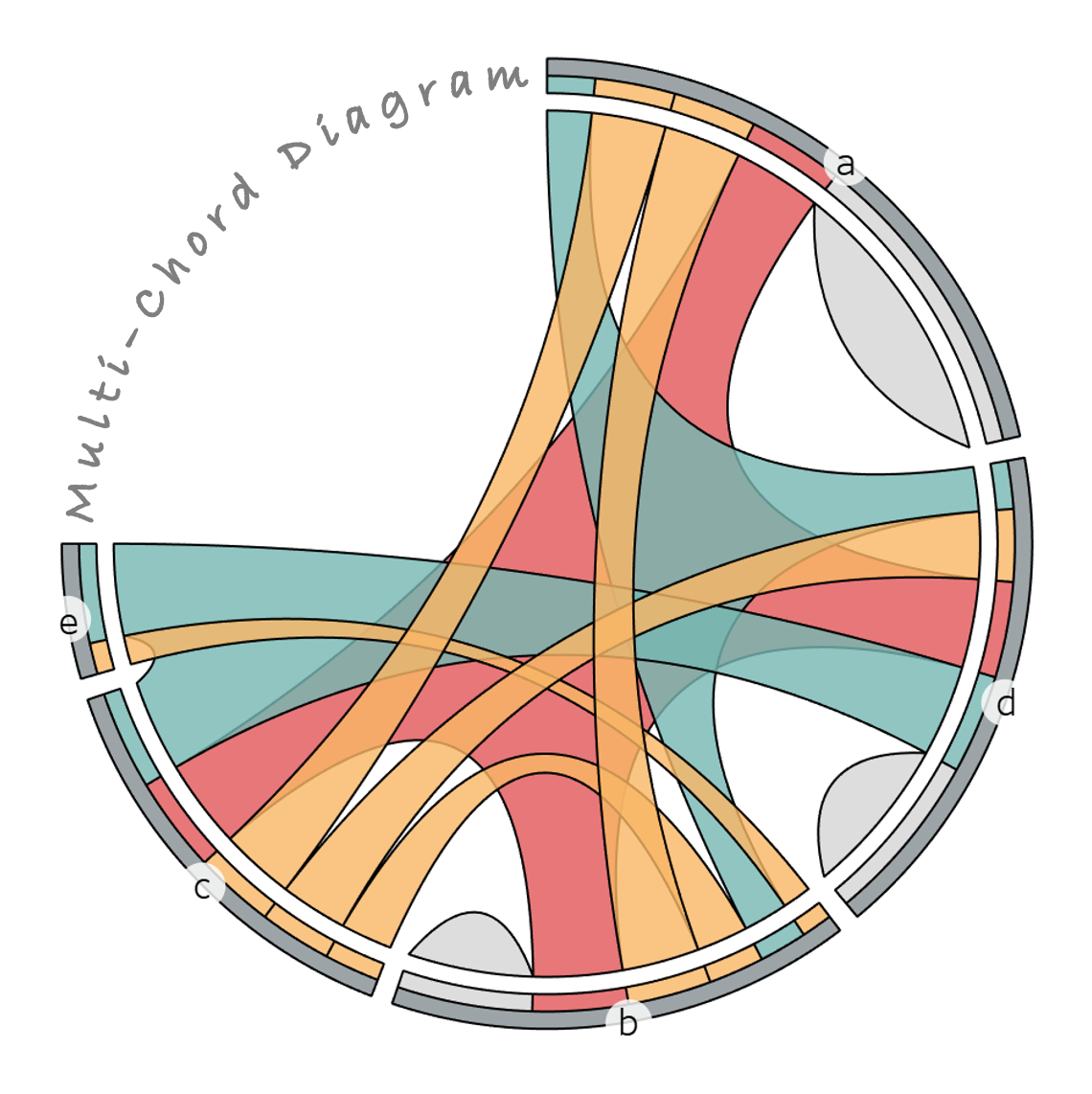
(Multichord Diagram)
Library of unique visualization algorithms. From time to time, I like to come up with fun new ways to visualize data and turn those ideas into python code!
Walkthroughs: https://towardsdatascience.com/author/nickgerend/
install
pip install vizmath
Dependencies:
pandasfor IO operationsnumpyfor computationsmatplotlibfor viz previewsscipywith .optimize, .interpolate, and .spatial for special operations
viz methods
Multichord Diagram
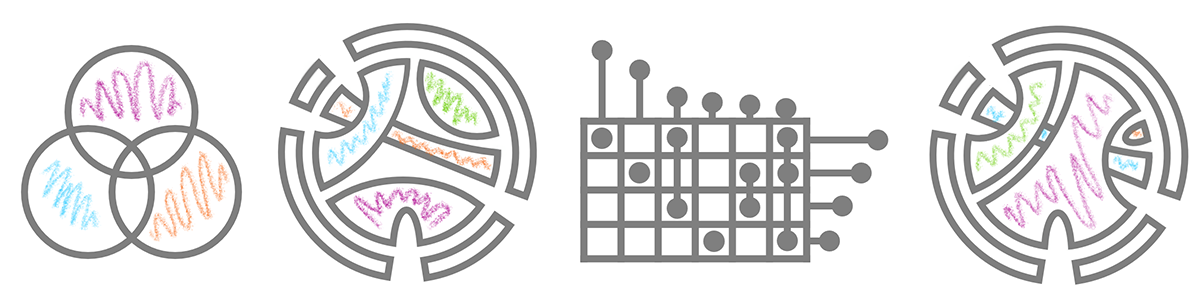
Evolution (Venn Diagram > Chord Diagram > UpSet Plot > Multichord Diagram):
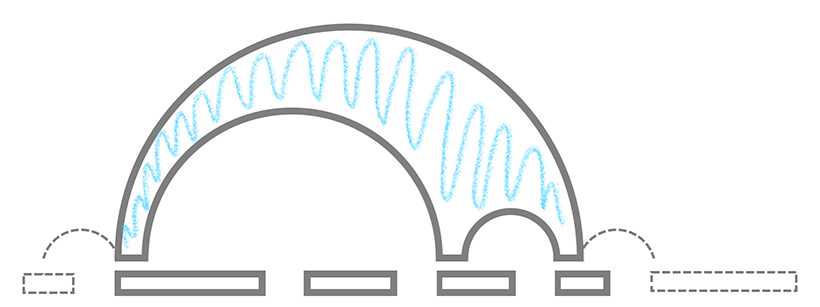
Multi-Arc Diagram Illustrating a Cartesian Layout of a Multichord:
Add multiset and set legends:
Input Data:
import pandas as pd
# setup unique multisets and their values
data = [['a,b,d', .000001], ['b,c', .000001], ['b,d', .000001], ['c', .000001]]
df = pd.DataFrame(data, columns = ['multiset', 'value'])
Multichord:
from vizmath.multichord_diagram import multichord
mc = multichord(df, multiset_field='multiset', value_field='value',
    percent=50., rotate_deg=-90)
mc.multichord_plot(level = 3, transparency = 0.5)
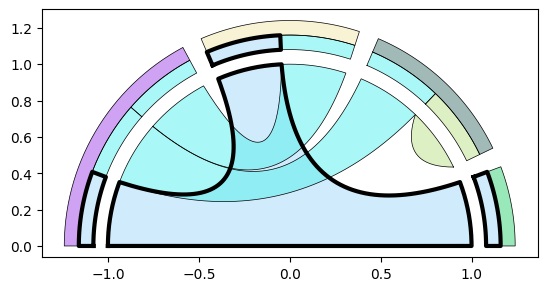
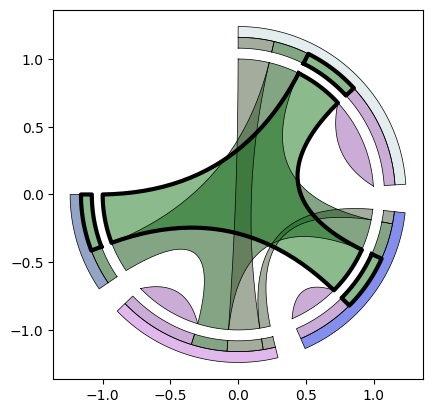
Random Multichord:
mc = multichord.random_multichord(num_sets=4, num_multisets=7, percent=75)
mc.multichord_plot(level=3)
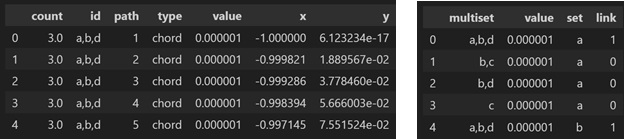
Outputs:
mc.o_multichord.df.head()
mc.upset_df.head()
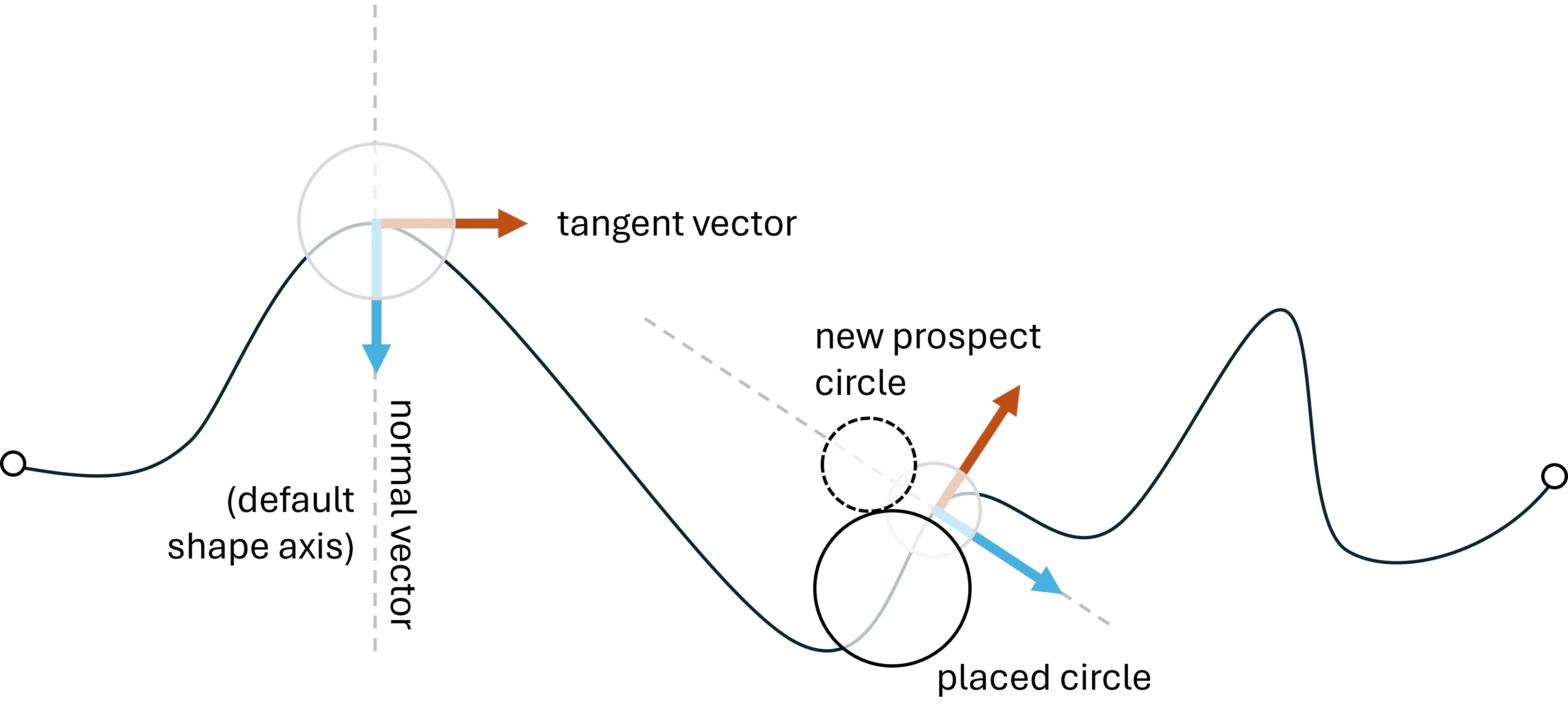
Path-Swarm
Elements:
Input data:
from vizmath.path_swarm import pathswarm as ps
import pandas as pd

data = {
    'id' : [str(i) for i in range(1, 16)],
    'position' : [0.36,0.36,0.32,0.14,0.96,0.24,
        0.3,0.44,0.92,0.26,1.46,0.6,0.24,1.38,1.04],
    'size' : [1.16,1.74,0.26,0.46,0.32,0.98,0.62,
        1.84,1.96,1.98,1.22,1.86,0.6,0.92,0.78]
}
df = pd.DataFrame(data)
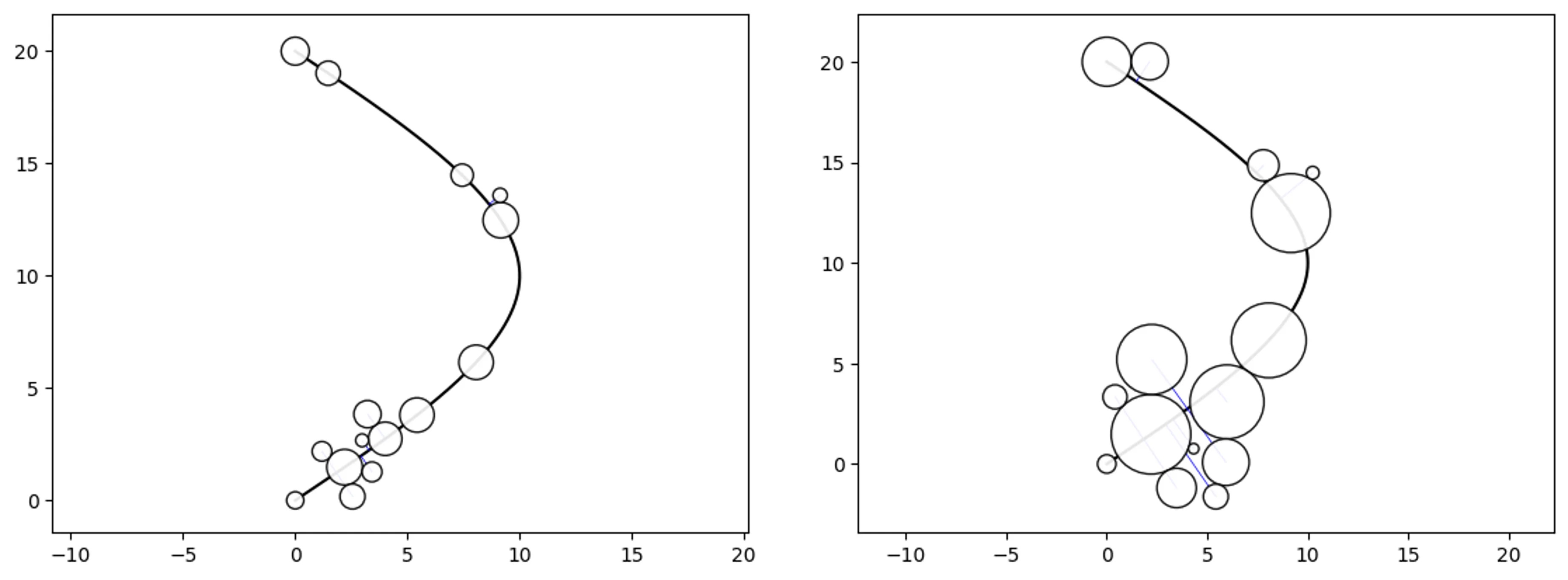
Simple Path-Swarm
# create a path and 2 path-swarm objects for different sizing
path = [(0,0),(10,10),(0,20)]
o_ps_area = ps(df=df, id_field='id', position_field='position',
    size_field='size', path=path, kwargs={'size_by':'area'})
o_ps_radius = ps(df=df, id_field='id', position_field='position',
    size_field='size', path=path, kwargs={'size_by':'radius'})

# plot the charts (sized by area and radius)
o_ps_area.plot_path_swarm()
o_ps_radius.plot_path_swarm()
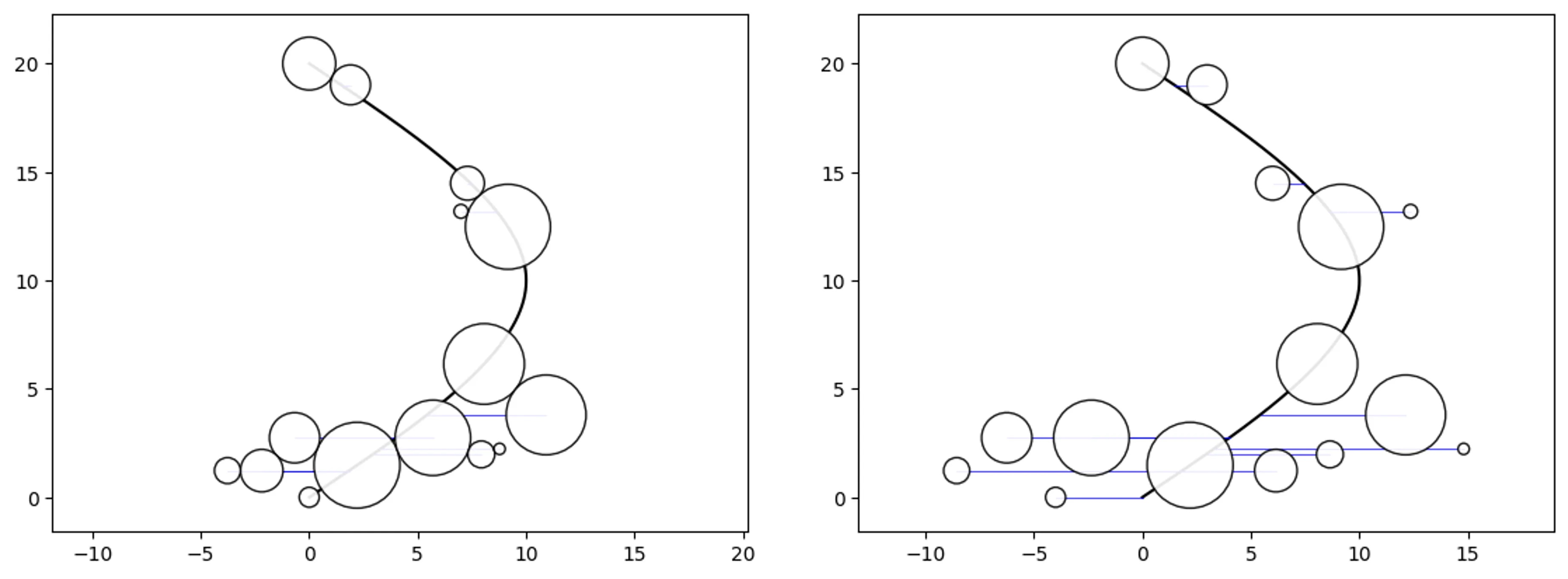
Shape-axis and Buffer properties:
o_ps_90 = ps(df=df, id_field='id', position_field='position',
    size_field='size', path=path, direction_override=90,
    kwargs={'size_by':'radius'})
o_ps_90_buffer = ps(df=df, id_field='id', position_field='position',
    size_field='size', path=path, direction_override=90,
    buffer=0.5, kwargs={'size_by':'radius'})

# plot the charts
o_ps_90.plot_path_swarm()
o_ps_90_buffer.plot_path_swarm()
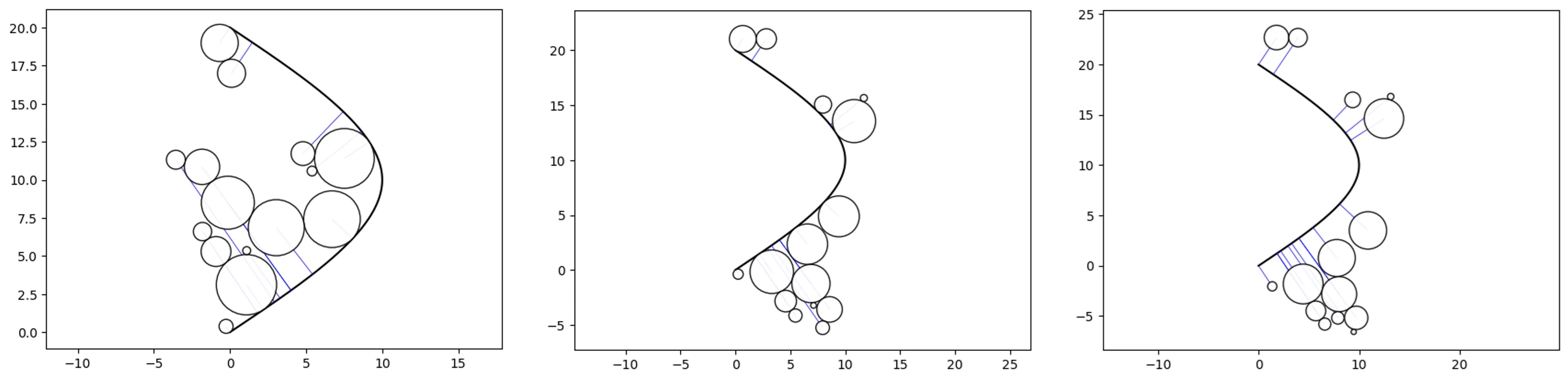
Horizon and Path-offset parameters:
o_ps_top = ps(df=df, id_field='id', position_field='position',
    size_field='size', path=path,
    kwargs={'size_by':'radius', 'horizon':'top'})
o_ps_bottom = ps(df=df, id_field='id', position_field='position',
    size_field='size', path=path,
    kwargs={'size_by':'radius', 'horizon':'bottom'})
o_ps_bottom_offset = ps(df=df, id_field='id', position_field='position',
    size_field='size', path=path,
    kwargs={'size_by':'radius', 'horizon':'bottom', 'offset':-2})

# plot the charts
o_ps_top.plot_path_swarm()
o_ps_bottom.plot_path_swarm()
o_ps_bottom_offset.plot_path_swarm()
Output:
o_ps.o_pathswarm.to_dataframe()
df = o_ps.o_pathswarm.df

# now we can review a sample of each type of output
df[df['type']=='path'][-6:]
df[df['type']=='node'][-6:]
df[df['type']=='connection'][-6:]

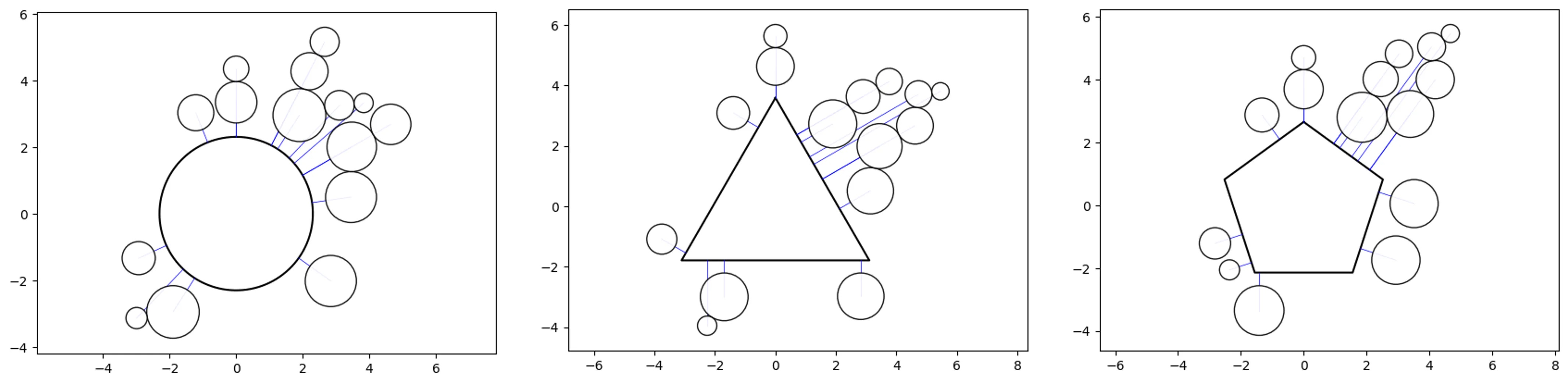
Super-Swarm:
# create a couple super swarm objects with different shapes
o_ss_circle = ss(df=df, id_field='id', position_field='position',
    size_field='size')
o_ss_triangle = ss(df=df, id_field='id', position_field='position',
    size_field='size', shape='p3')
o_ss_pentagon = ss(df=df, id_field='id', position_field='position',
    size_field='size', shape='p5')

# plot the charts
o_ss_circle.plot_super_swarm()
o_ss_triangle.plot_super_swarm()
o_ss_pentagon.plot_super_swarm()
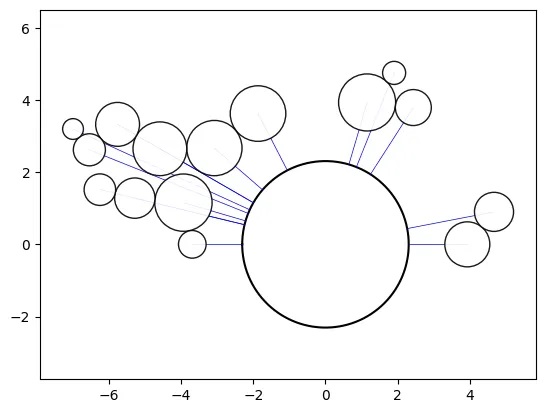
Max parameter:
# (the "min" parameter can be adjusted also)
min = df['position'].min()
delta=(df['position'].max()-df['position'].min())*2
o_ss_circle_half= ss(df=df, id_field='id', position_field='position',
    size_field='size', max=delta+min, kwargs={'offset':1}, rotation=-90)

# plot the chart
o_ss_circle_half.plot_super_swarm()
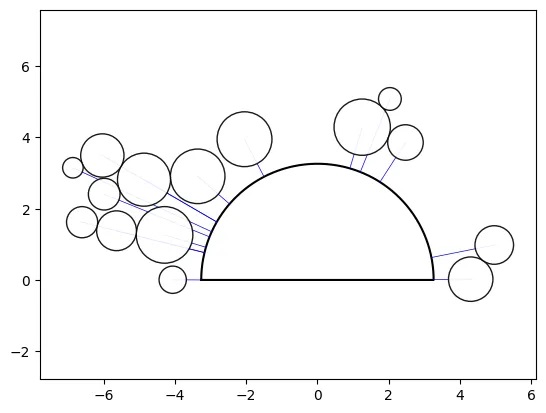
Custom Path Swarm:
# calculate the area for the central shape from the sum of the
# individual circle areas, assuming they are sized by area (deafult)
area = df['size'].sum()
# calculate the radius for an area equal to a half circle
r = (2*area/pi)**(1/2)
path = [(x,y) for x,y,_ in circle(0., 0., r=r, points=200,
    end_cap=True, spread=180)]
path.append(path[0]) # add the starting point to close the loop
offset = area/40. # add a small offset (equal to the super swarm default)
ratio = 2/pi # diameter to half circle ratio
min = df['position'].min()
delta = (df['position'].max()-df['position'].min())
# add a small offset (1e-5) for align last shape axis with the x-axis
max = min + (delta + delta*ratio) + 1e-5
# create a custom path swarm object to simulate a super swarm
o_ss_custom = ps(df=df, id_field='id', position_field='position',
    size_field='size', path=path, interp='linear', rotation=-90,
    kwargs={'horizon':'top', 'offset':offset}, max=max)

# plot the chart
o_ss_custom.plot_path_swarm()
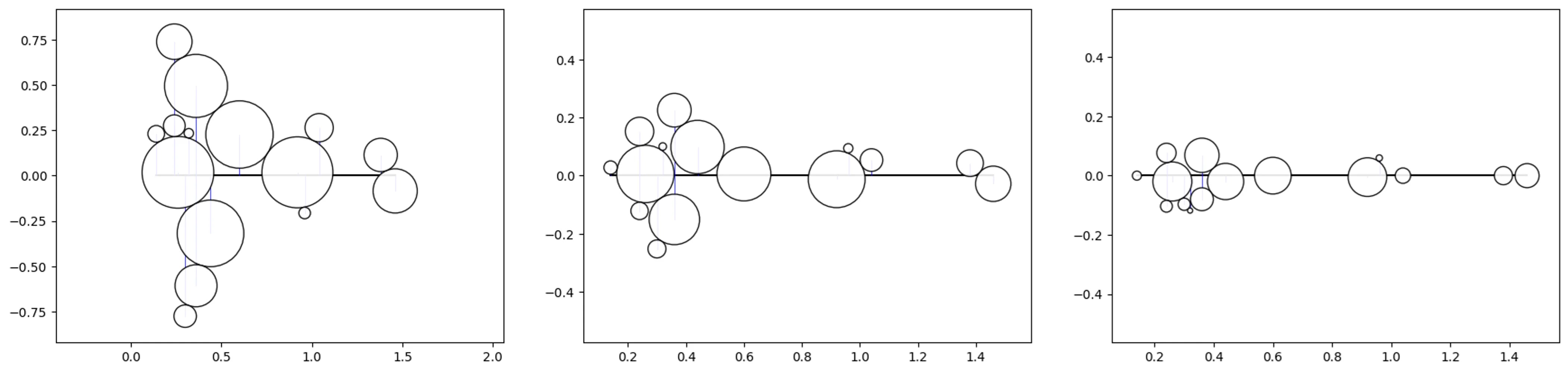
Bee-Swarm
# Let's test out 3 different sizes using the previous data
df_copy = df.copy(deep=True)
df['size'] = df_copy['size']/10 # /20, /30

# create a bee swarm object
o_bs = bs(df=df, id_field='id', position_field='position',
    size_field='size', kwargs={'size_by':'radius'})

# plot the chart (repeat for each sizing above)
o_bs.plot_bee_swarm()
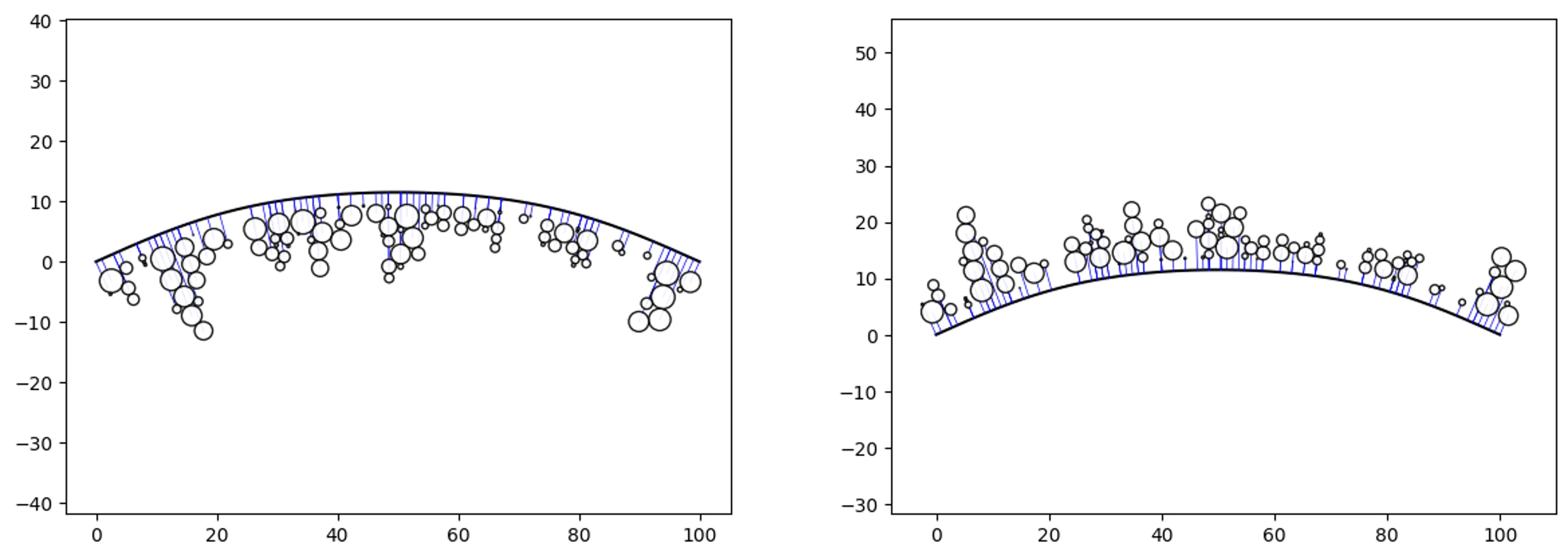
Boundary-Swarm
# create some random data and a boundary
df = ps.random_pathswarm(100).df
boundary = [(0,0),(30,10),(70,10),(100,0)]
offset = 2

# create some path swarm objects
o_ps_bottom = ps(df, 'id', 'position', size_field='size',
    path=boundary, kwargs={'horizon':'bottom',
    'size_by':'radius', 'offset':-offset})
o_ps_top = ps(df, 'id', 'position', size_field='size',
    path=boundary, kwargs={'horizon':'top',
    'size_by':'radius', 'offset':offset})

# plot the charts
o_ps_bottom.plot_path_swarm()
o_ps_top.plot_path_swarm()
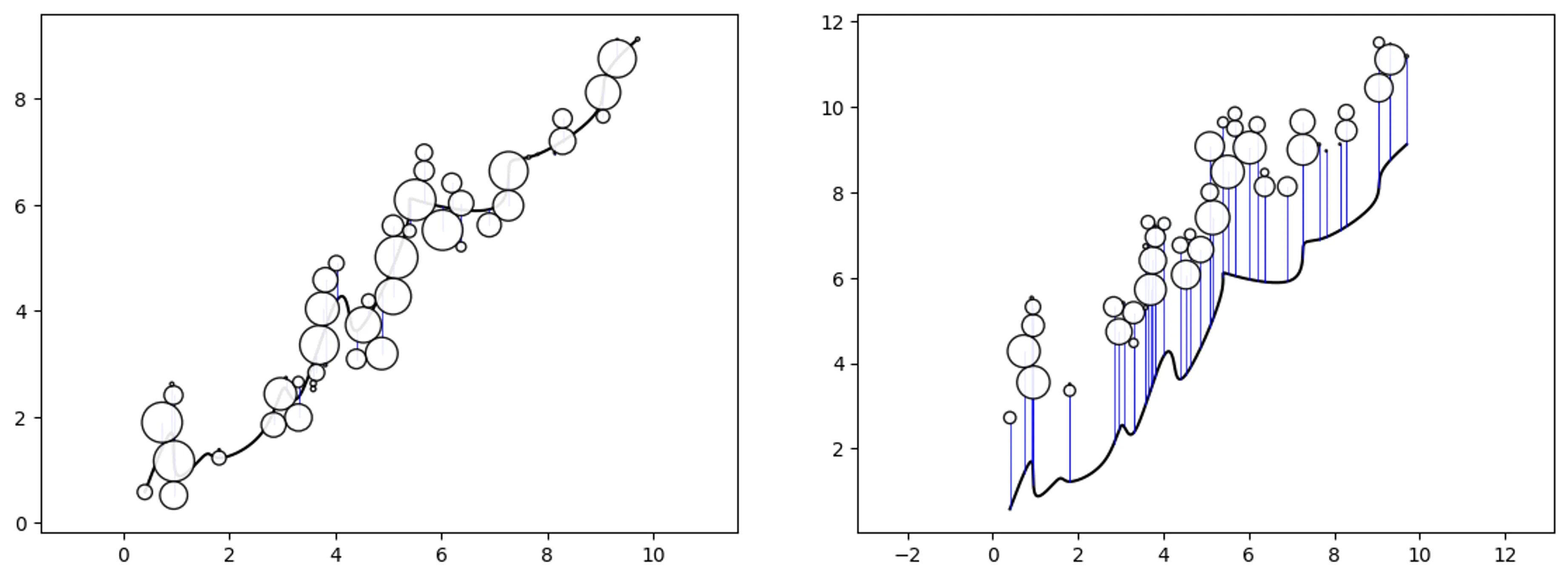
Trend-Swarm
# create some random data and a trend
df = ps.random_pathswarm(50).df
trend = [
    (0.404041, 0.582512),(0.909091, 1.697087),(1.010101, 0.910159),
    (1.515152, 1.263364),(1.818182, 1.226223),(2.626263, 1.717625),
    (3.030303, 2.546605),(3.333333, 2.413584),(3.939394, 4.031526),
    (4.242424, 4.023283),(4.545455, 3.761400),(5.353535, 5.621923),
    (5.555556, 6.075509),(6.969697, 5.934414),(7.272727, 6.727741),
    (7.777778, 6.938061),(8.888889, 7.703593),(9.090909, 8.424336),
    (9.696972, 9.124426)]

# adjust the deafault size to see the trend line better
df['event'] = df['size']/5

# create some path swarm objects
o_ps_trend = ps(df, 'id', 'position', size_field='event',
    path=trend, direction_override=0, kwargs={'size_by':'radius'})
o_ps_trend_offset = ps(df, 'id', 'position', size_field='event',
    path=trend, direction_override=0, kwargs={'size_by':'radius',
    'horizon':'top','offset':2})

# plot the charts
o_ps_trend.plot_path_swarm()
o_ps_trend_offset.plot_path_swarm()
Rad-Swarm
from vizmath.path_swarm import radswarm as rs

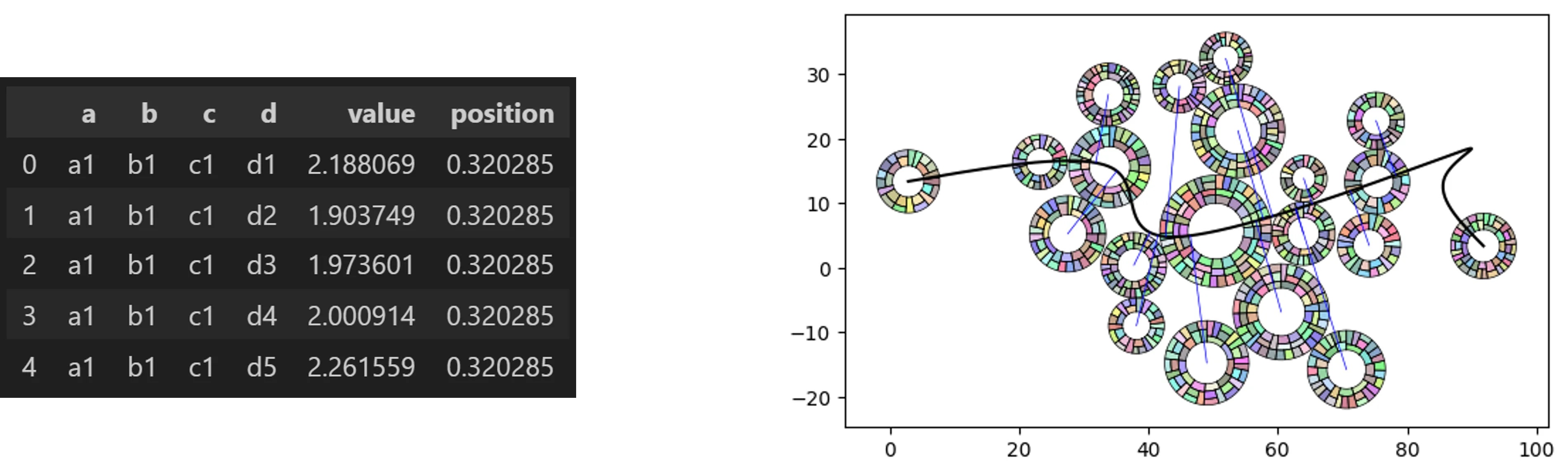
# a Path Swarm Radial Treemap with random hierarchical dummy data
o_rs_df = rs.random_radswarm(data_only=True)
o_rs_df.head()

# now let's make a Path Swarm Radial Treemap leverging random data
# and a random path

o_rs = rs.random_radswarm()
o_rs.plot_rad_swarm()

# the underlying path swarm and radial treemap inputs can be adjusted
# as needed to initialize a normal object: o_rs = rs(inputs...)
Look at each level:
# let's create a rad swarm object and plot each level
o_rs = rs.random_radswarm(10, 3, value_range_h=(.01,5),
    items_range_h=(5,8))
o_rs.plot_rad_swarm(level=1)
o_rs.plot_rad_swarm(level=2)
o_rs.plot_rad_swarm(level=3)

# rad swarm outputs:

# rad swarm data output
df_rad_swarm = o_rs.radtreemap.df_rad_treemap

# generate path swarm output
o_rs.pathswarm.o_pathswarm.to_dataframe()
df_path_swarm = o_rs.pathswarm.o_pathswarm.df

Hyper Swarm
from vizmath.path_swarm import hyperswarm as hs

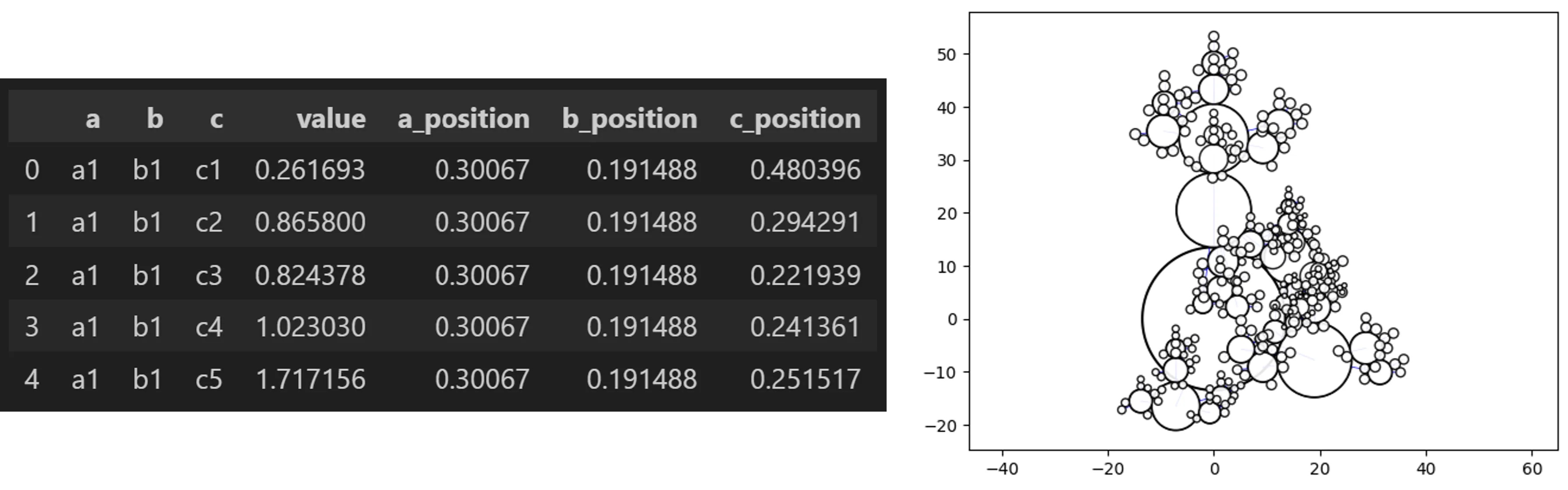
# a Hyper Swarm with random hierarchical dummy data
o_hs_df = hs.random_hyperswarm(data_only=True)
o_hs_df.head()

# now let's make a Hyper Swarm leverging random data

o_hs = hs.random_hyperswarm()
o_hs.plot_hyper_swarm()

# the underlying super swarm inputs can be adjusted as needed
# to initialize a normal object: o_hs = hs(inputs...)
Hyper-Path-Swarm
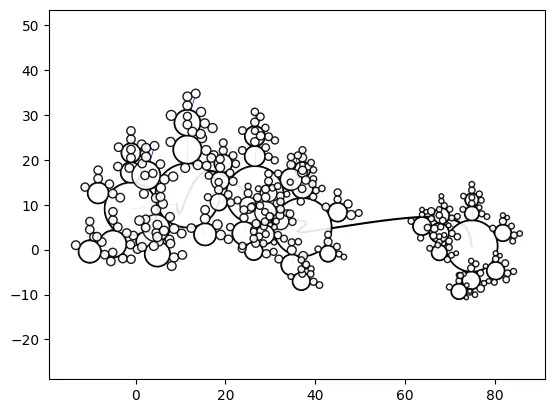
o_hs = hs.random_hyperswarm(top_level_as_path=True)
o_hs.plot_hyper_swarm()
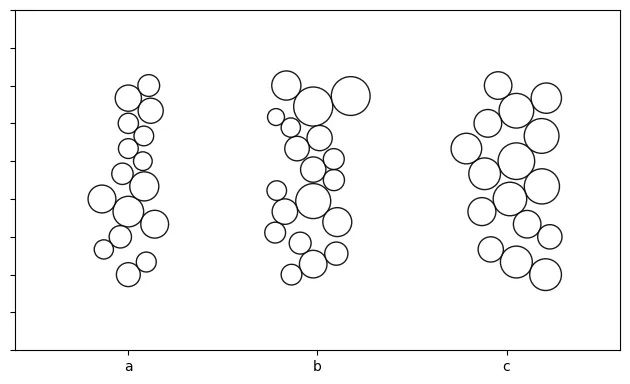
Jitter-Swarm
from vizmath.radial_treemap import rad_treemap as rt
from vizmath.path_swarm import beeswarm as bs
import numpy as np

import matplotlib.pyplot as plt
from matplotlib.patches import Circle

# let's create a function to create some dummy data
# we can utilize the hierarchical data creator from vizmath.radial_treemap
def ps_j_data(num_top_level_items, num_levels, value_range_h, sig_h,
    outlier_fraction_h, use_log_h, items_range_h, jitter_range):
    df_h = rt.random_rad_treemap(data_only=True,
        num_top_level_items=num_top_level_items,
        num_levels=num_levels, value_range=value_range_h, sig=sig_h,
        items_range=items_range_h, outlier_fraction=outlier_fraction_h,
        use_log=use_log_h)
    df_h = df_h.groupby('a').apply(
        lambda x: x.assign(position=np.linspace(jitter_range[0],
        jitter_range[1], len(x))), include_groups=False
        ).reset_index()
    return df_h

# dummy data inputs:
#   > 3 categories, 2 levels (3 categories with x items each)
#   > value range for the sizes (.1, 1)
#   > variability factor = 2(the smaller, the more variable)
#   > outliter fraction = .2, use a log transform for random values
#   > set x items for each category between (15, 20)
#   > create a jitter range (positions along the path) between (0, 5)
df = ps_j_data(3, 2, (.1,1), 2, .2, True, (15,20), (0,5))

# now we can create a bee swarm for each category and extract the plots
fig, axs = plt.subplots()
category = 0
step_size = 5
for a in df['a'].unique().tolist():
    df_ps = df[df['a']==a].copy(deep=True)
    o_ps = bs(df_ps, 'b', 'position', size_field='value',
        rotation=90, center_clusters=True)
    [setattr(n, 'node_x', n.node_x + category*step_size)
        for n in o_ps.pathswarm.nodes]
    fig_tmp, ax_tmp = o_ps.plot_bee_swarm(plot=False)
    for patch in ax_tmp.patches:
        if isinstance(patch, Circle):
            circle = Circle(patch.center, patch.radius,
                edgecolor=patch.get_edgecolor(),
                facecolor=patch.get_facecolor(),
                fill=patch.get_fill())
            axs.add_patch(circle)
    category += 1
    plt.close(fig_tmp)
axs.set_aspect('equal', 'box')
axs.set_xlim((-3,13)) # manually set for the example
axs.set_ylim((-7,2)) # manually set for the example
axs.set_xticks([0, 5, 10]) # manually set from the step size
axs.set_xticklabels(['a', 'b', 'c']) # manually set from the categories
axs.set_yticklabels([])
plt.tight_layout()
plt.show()
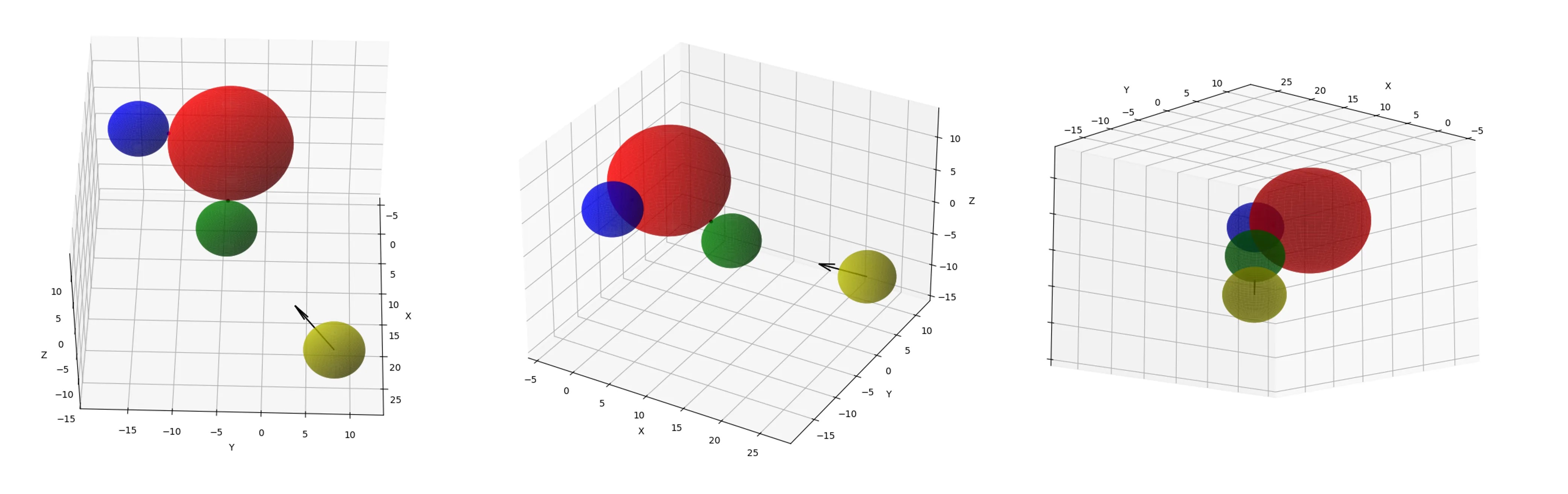
3D Swarm
import numpy as np
import matplotlib.pyplot as plt
%matplotlib qt # 3d interactive window

def check_for_collision(fx_sphere_c, fx_sphere_r,
    mv_sphere_ci, mv_sphere_r, direction_vector):
    # normalize the direction vector
    norm_direction = \
        direction_vector/np.linalg.norm(direction_vector)
    # vector from the initial position of the
    # moving sphere to the fixed sphere
    relative_position = fx_sphere_c - mv_sphere_ci
    projection_length = \
        np.dot(relative_position, norm_direction)
    # closest approach point along the direction vector
    closest_approach = \
        mv_sphere_ci+projection_length*norm_direction
    # distance from the closest approach point
    # to the fixed sphere center
    distance_to_center = \
        np.linalg.norm(closest_approach-fx_sphere_c)
    # check if the closest approach distance is
    # less than or equal to the sum of the radii
    if distance_to_center <= (fx_sphere_r+mv_sphere_r):
        return True, norm_direction
    else:
        return False, norm_direction

def calculate_final_positions(fx_sphere_c, fx_sphere_r,
    mv_sphere_ci, mv_sphere_r, norm_direction):
    # offset distance from the normal vector
    # to the moving sphere vector
    vector_to_center_dist = \
        np.linalg.norm(np.cross(norm_direction,fx_sphere_c-mv_sphere_ci))
    offset_distance = \
        np.sqrt((fx_sphere_r + mv_sphere_r)**2-vector_to_center_dist**2)
    # projection distance
    distance_to_travel_1 = \
        np.dot(fx_sphere_c-mv_sphere_ci,norm_direction)-offset_distance
    distance_to_travel_2 = \
        np.dot(fx_sphere_c-mv_sphere_ci,norm_direction)+offset_distance
    # final positions of the moving sphere on either side of
    # the fixed sphere (assuming offset_distance > 0)
    final_position_1 = mv_sphere_ci+norm_direction*distance_to_travel_1
    final_position_2 = mv_sphere_ci+norm_direction*distance_to_travel_2
    return final_position_1, final_position_2

def plot_spheres(fx_sphere_c, fx_sphere_r, mv_sphere_ci,
    mv_sphere_c1, mv_sphere_c2, mv_sphere_r,
    first_collision_point, second_collision_point,
    direction_vector, resolution=100):

    fig = plt.figure()
    ax = fig.add_subplot(111, projection='3d')

    # plot the fixed sphere
    u, v = np.mgrid[0:2*np.pi:complex(resolution),
        0:np.pi:complex(resolution)]
    x = fx_sphere_c[0] + fx_sphere_r * np.cos(u) * np.sin(v)
    y = fx_sphere_c[1] + fx_sphere_r * np.sin(u) * np.sin(v)
    z = fx_sphere_c[2] + fx_sphere_r * np.cos(v)
    ax.plot_surface(x, y, z, color='r', alpha=0.6)

    # plot initial moving sphere
    x = mv_sphere_ci[0] + mv_sphere_r * np.cos(u) * np.sin(v)
    y = mv_sphere_ci[1] + mv_sphere_r * np.sin(u) * np.sin(v)
    z = mv_sphere_ci[2] + mv_sphere_r * np.cos(v)
    ax.plot_surface(x, y, z, color='y', alpha=0.6)

    # plot final moving sphere (first position)
    x = mv_sphere_c1[0] + mv_sphere_r * np.cos(u) * np.sin(v)
    y = mv_sphere_c1[1] + mv_sphere_r * np.sin(u) * np.sin(v)
    z = mv_sphere_c1[2] + mv_sphere_r * np.cos(v)
    ax.plot_surface(x, y, z, color='g', alpha=0.6)

    # plot final moving sphere (second position)
    x = mv_sphere_c2[0] + mv_sphere_r * np.cos(u) * np.sin(v)
    y = mv_sphere_c2[1] + mv_sphere_r * np.sin(u) * np.sin(v)
    z = mv_sphere_c2[2] + mv_sphere_r * np.cos(v)
    ax.plot_surface(x, y, z, color='b', alpha=0.6)

    # plot collision points where the surfaces touch
    ax.scatter(*first_collision_point, color='k', s=10)
    ax.scatter(*second_collision_point, color='m', s=10)

    # plot direction vector
    ax.quiver(mv_sphere_ci[0], mv_sphere_ci[1],
        mv_sphere_ci[2], direction_vector[0], direction_vector[1],
        direction_vector[2], color='k',
        length=2*mv_sphere_r, normalize=True)

    ax.set_xlabel('X')
    ax.set_ylabel('Y')
    ax.set_zlabel('Z')

    plt.show()

# sample data, placing one (moving) sphere relative to another (fixed)
fx_sphere_c = np.array([3.2, -4.1, 5.3]) # fixed sphere center
fx_sphere_r = 7.2 # fixed sphere radius
mv_sphere_ci = np.array([23.2, 8.1, -10.4]) # moving sphere center
mv_sphere_r = 3.5 # moving sphere radius
direction_vector = np.array([-1.1, -1.2, 0.9]) # shape axis vector

# check for collision
collision_exists, norm_direction = \
    check_for_collision(fx_sphere_c, fx_sphere_r, mv_sphere_ci,
        mv_sphere_r, direction_vector)

if collision_exists:
    # calculate the final positions of the moving sphere
    mv_sphere_c1, mv_sphere_c2 = \
        calculate_final_positions(fx_sphere_c, fx_sphere_r,
            mv_sphere_ci, mv_sphere_r, norm_direction)
    # test placement (distance between centers should equal sum of radii)
    dist_after_collision = np.linalg.norm(mv_sphere_c1 - fx_sphere_c)

    # calculate the first collision point
    first_collision_point_surface = fx_sphere_c + \
        ((mv_sphere_c1-fx_sphere_c)*fx_sphere_r/dist_after_collision)

    # calculate the second collision point
    second_collision_point_surface = fx_sphere_c + \
        ((mv_sphere_c2-fx_sphere_c)*fx_sphere_r/dist_after_collision)

    # plot the spheres
    plot_spheres(fx_sphere_c, fx_sphere_r, mv_sphere_ci, mv_sphere_c1,
        mv_sphere_c2, mv_sphere_r, first_collision_point_surface,
        second_collision_point_surface, direction_vector)

    # print inputs and outputs
    print('First Moving Sphere Center:', mv_sphere_c1.tolist())
    print('Second Moving Sphere Center:', mv_sphere_c2.tolist())
    print('Distance After Collision:', dist_after_collision)
    print('Sum of Radii:', fx_sphere_r + mv_sphere_r)
else:
    print('No collision detected.')
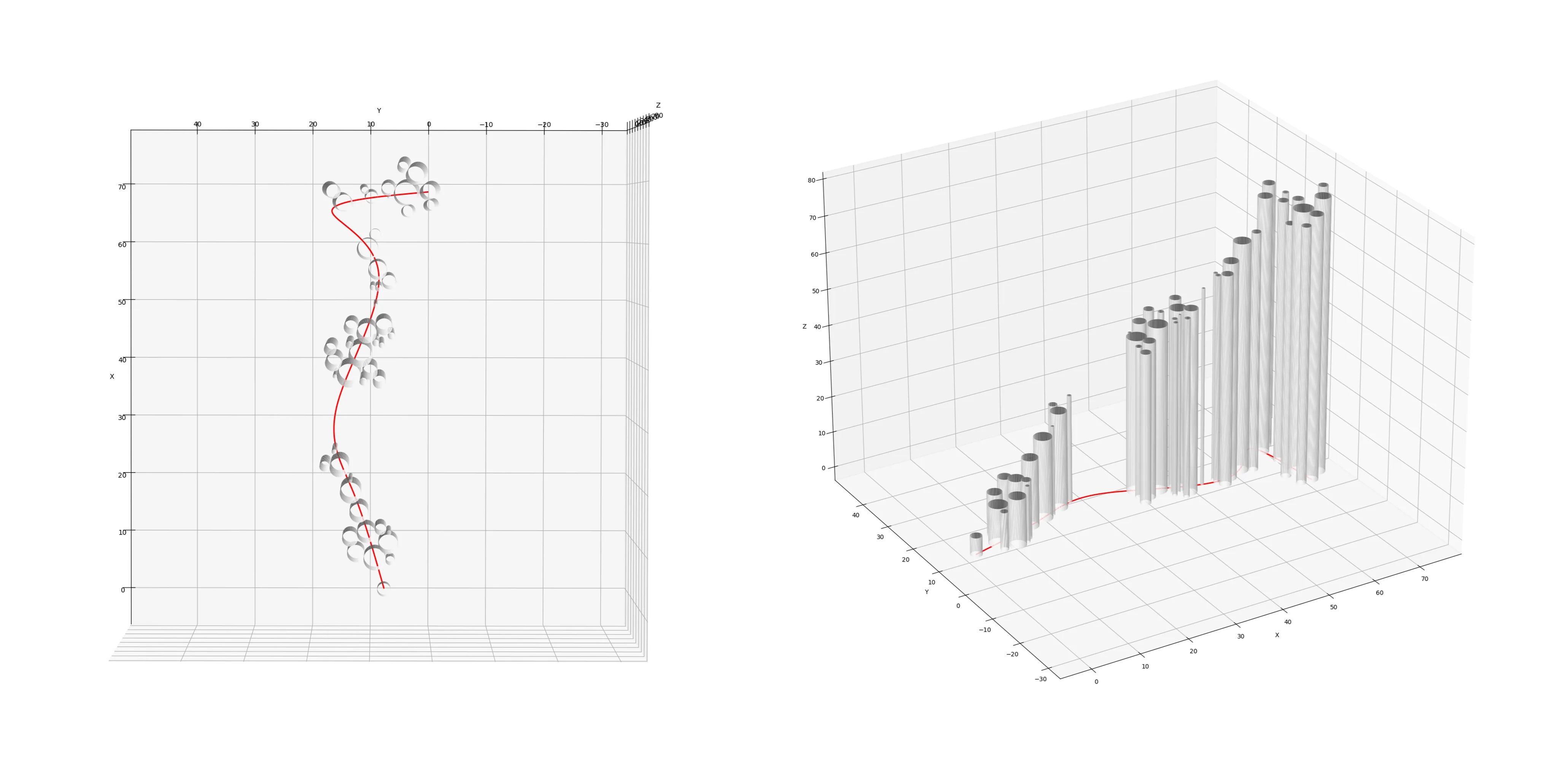
3D Path-Swarm projection
import matplotlib.pyplot as plt
import numpy as np
%matplotlib qt

def plot_cylinder(ax, x_center, y_center, radius, height, resolution=100):
    z = np.linspace(0, height, 2)
    theta = np.linspace(0, 2 * np.pi, resolution)
    theta_grid, z_grid = np.meshgrid(theta, z)
    x_grid = x_center + radius * np.cos(theta_grid)
    y_grid = y_center + radius * np.sin(theta_grid)
    ax.plot_surface(x_grid, y_grid, z_grid, color='w', alpha=0.9)

def set_axes_equal(ax):
    x_limits = ax.get_xlim3d()
    y_limits = ax.get_ylim3d()
    z_limits = ax.get_zlim3d()
    x_range = abs(x_limits[1] - x_limits[0])
    y_range = abs(y_limits[1] - y_limits[0])
    z_range = abs(z_limits[1] - z_limits[0])
    max_range = max([x_range, y_range, z_range])
    x_middle = np.mean(x_limits)
    y_middle = np.mean(y_limits)
    z_middle = np.mean(z_limits)
    ax.set_xlim3d([x_middle - max_range / 2, x_middle + max_range / 2])
    ax.set_ylim3d([y_middle - max_range / 2, y_middle + max_range / 2])
    ax.set_zlim3d([z_middle - max_range / 2, z_middle + max_range / 2])

# collect the node information
x, y, r = zip(*[(n.node_x, n.node_y, n.node_radius)
    for n in o_ps_elevation.nodes])

# collect the path information
path_x, path_y = zip(*o_ps_elevation.i_path)
path_z = [0 for _ in range(len(path_x))]

# plot path and cylinders
fig = plt.figure()
ax = fig.add_subplot(111, projection='3d')
ax.plot(path_x, path_y, path_z, color='r', linewidth=2)
for i in range(len(x)): # reuse x as a proxy for elevation
    plot_cylinder(ax, x[i], y[i], r[i], x[i]+5)
ax.set_xlabel('X')
ax.set_ylabel('Y')
ax.set_zlabel('Z')
set_axes_equal(ax)
plt.show()
Radial-Treemaps
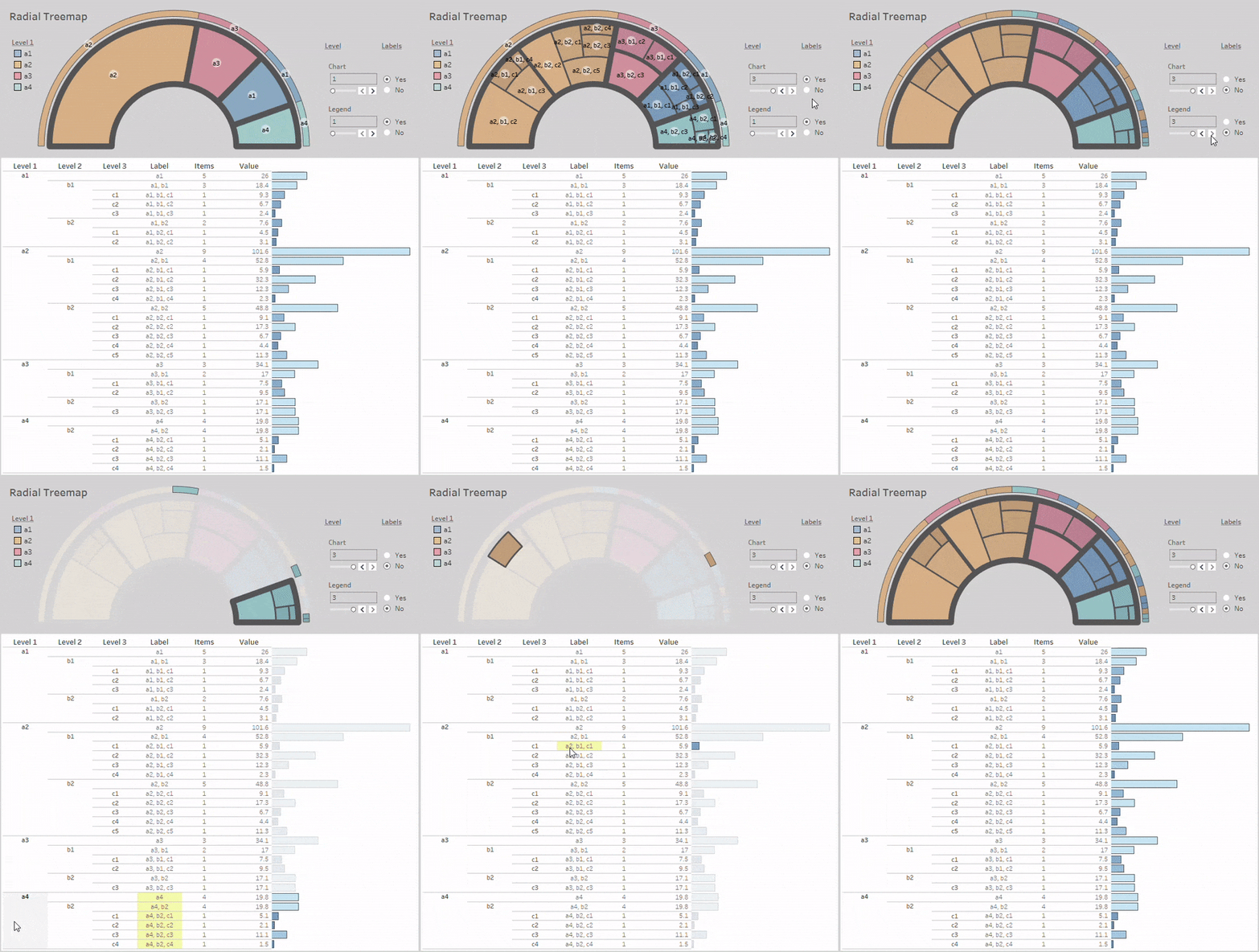
Layouts:
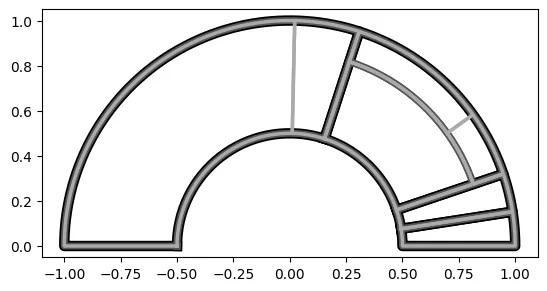
Simple Radial-Treemap:
from vizmath import rad_treemap as rt
import pandas as pd

# using the example data from above:
data = [
    ['a1', 'b1', 'c1', 12.3],
    ['a1', 'b2', 'c1', 4.5],
    ['a2', 'b1', 'c2', 32.3],
    ['a1', 'b2', 'c2', 2.1],
    ['a2', 'b1', 'c1', 5.9],
    ['a3', 'b1', 'c1', 3.5],
    ['a4', 'b2', 'c1', 3.1]]
df = pd.DataFrame(data, columns = ['a', 'b', 'c', 'value'])

# create a rad_treemap object
#   > df: DataFrame with 1 or more categorical columns of data
#     and an optional 'value' column for the areas
#     (otherwise groups counts are used for areas)
#   > groupers: group-by columns
#   > value: optional value column
#   > r1, r2: inner and outer radius positions
#   > a1, a2: start and end angle positions
#   > rotate_deg: overall rotation around the center
#   > mode: container orientation method
#   > other options: 'points', 'default_sort', 'default_sort_override',
#     'default_sort_override_reversed', 'mode', 'no_groups', 'full'
rt_1 = rt(df=df, groupers=['a','b','c'], value='value', r1=0.5, r2=1,
  a1=0, a2=180, rotate_deg=-90, mode='alternate')

# plot the Radial Treemap
rt_1.plot_levels(level=3, fill='w')
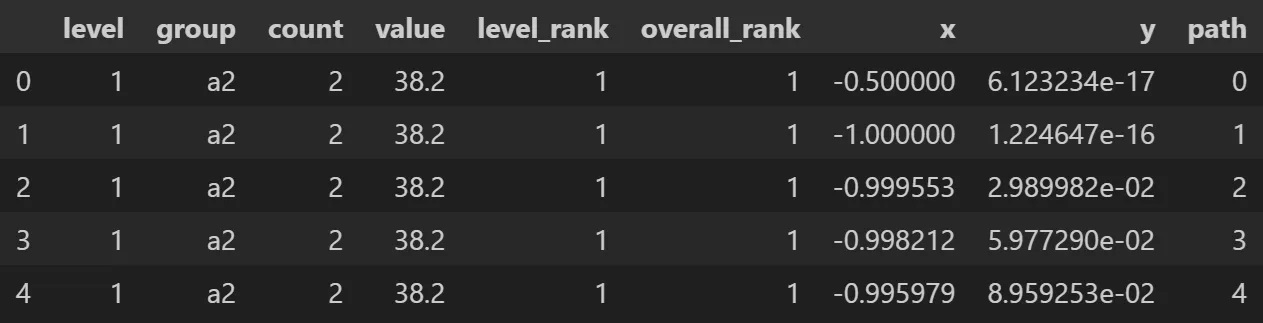
Output:
# sample the Radial Treemap DataFrame
rt_1.to_df()[['level','group','count','value',
    'level_rank','overall_rank','x','y','path']].head()
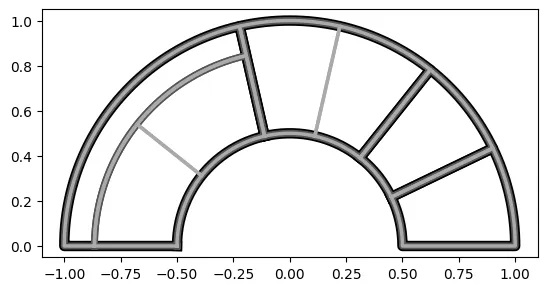
By counts:
# set 'value' to None or just leave it out since None is the default
# doing this sets the areas equal to the group counts
# in this case, each count will be one since there are no duplicates

rt_2 = rt(df=df, groupers=['a','b','c'], value=None, r1=0.5, r2=1,
  a1=0, a2=180, rotate_deg=-90, mode='alternate')

# plot the Radial Treemap
rt_2.plot_levels(level=3, fill='w')
Crystal-Bar
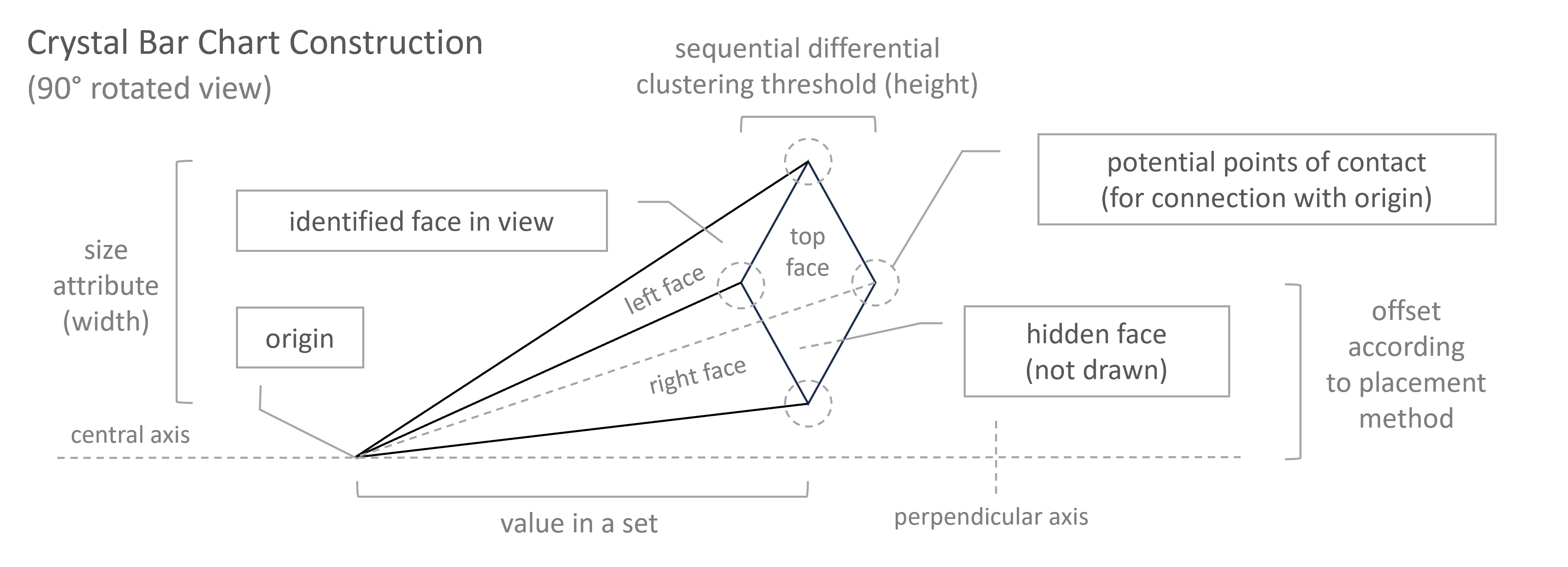
Elements:
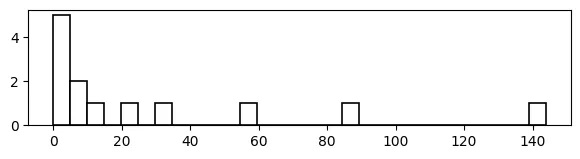
Sequential Differential Clustering:
sequence: [ 0 , 1 , 1 , 2 , 3 , 5 , 8 , 13 , 21 , 34 , 55 , 89 , 144 ]
val to val diff: [ _ , _ , 0 , 1 , 1 , 2 , 3 , 5 , 8 , 13 , 21 , 34 , 55 ]
threshold val: 5
With a Histogram:
# pandas histogram
import pandas as pd
import numpy as np
data = {'value' : [0,1,1,2,3,5,8,13,21,34,55,89,144]}
df = pd.DataFrame(data=data)
data_range = df['value'].max() - df['value'].min()
num_bins = np.ceil(data_range/5).astype(int)
print(num_bins) # 29
df['value'].hist(bins=num_bins, color='w', edgecolor='black',
  linewidth=1.2, grid=False, figsize=(7,1.5))
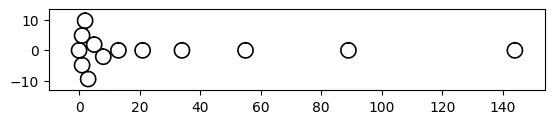
With a Bee-Swarm:
# vizmath (modified) beeswarm chart
from vizmath.beeswarm import swarm
from math import pi
data = {
    'id' : [str(i) for i in range(1, 14)],
    'value' : [0,1,1,2,3,5,8,13,21,34,55,89,144]
}
df = pd.DataFrame(data=data)
bs = swarm(df, 'id', 'value', None, size_override=pi*(5/2)**2)
bs.beeswarm_plot(color=False)
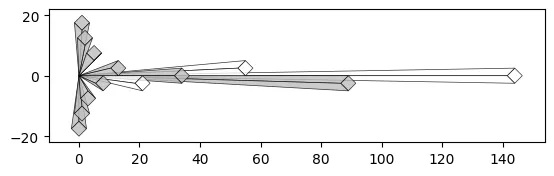
With a Crystal Bar Chart:
# vizmath crystal bar chart
from vizmath.crystal_bar_chart import crystals
data = {
    'id' : [str(i) for i in range(1, 14)],
    'value' : [0,1,1,2,3,5,8,13,21,34,55,89,144]
}
df = pd.DataFrame(data=data)
cbc = crystals(df, 'id', 'value', 5, width_override=5, rotation=90)
cbc.cbc_plot(legend=False, alternate_color=True, color=False)
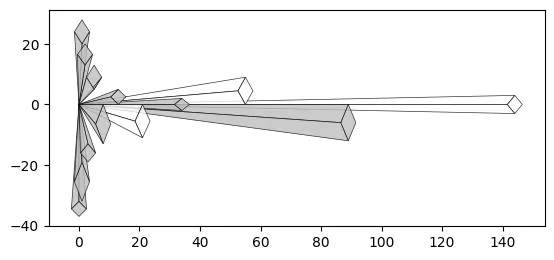
Size property:
# vizmath crystal bar chart with added width property
cbc = crystals(df, 'id', 'value', 5, width_field='size', rotation=90)
cbc.cbc_plot(legend=False, alternate_color=True, color=False)
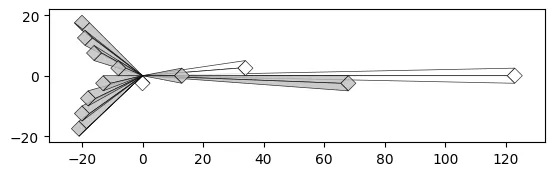
Offset property:
# vizmath crystal bar chart with adjusted origin
cbc = crystals(df, 'id', 'value', 5, width_override=5,
    rotation=90, offset=21) # new offset
cbc.cbc_plot(legend=False, alternate_color=True, color=False)
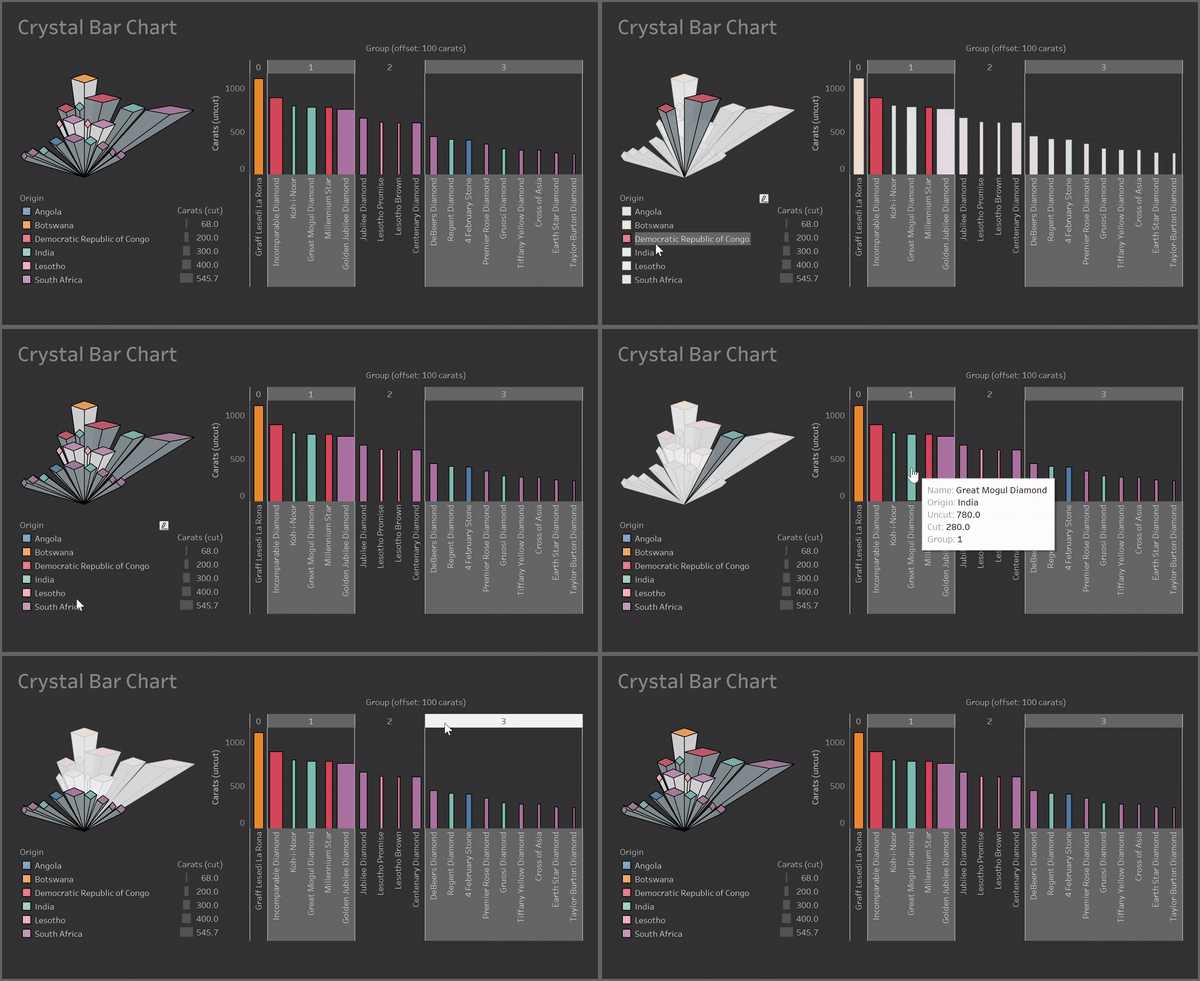
Clusters:
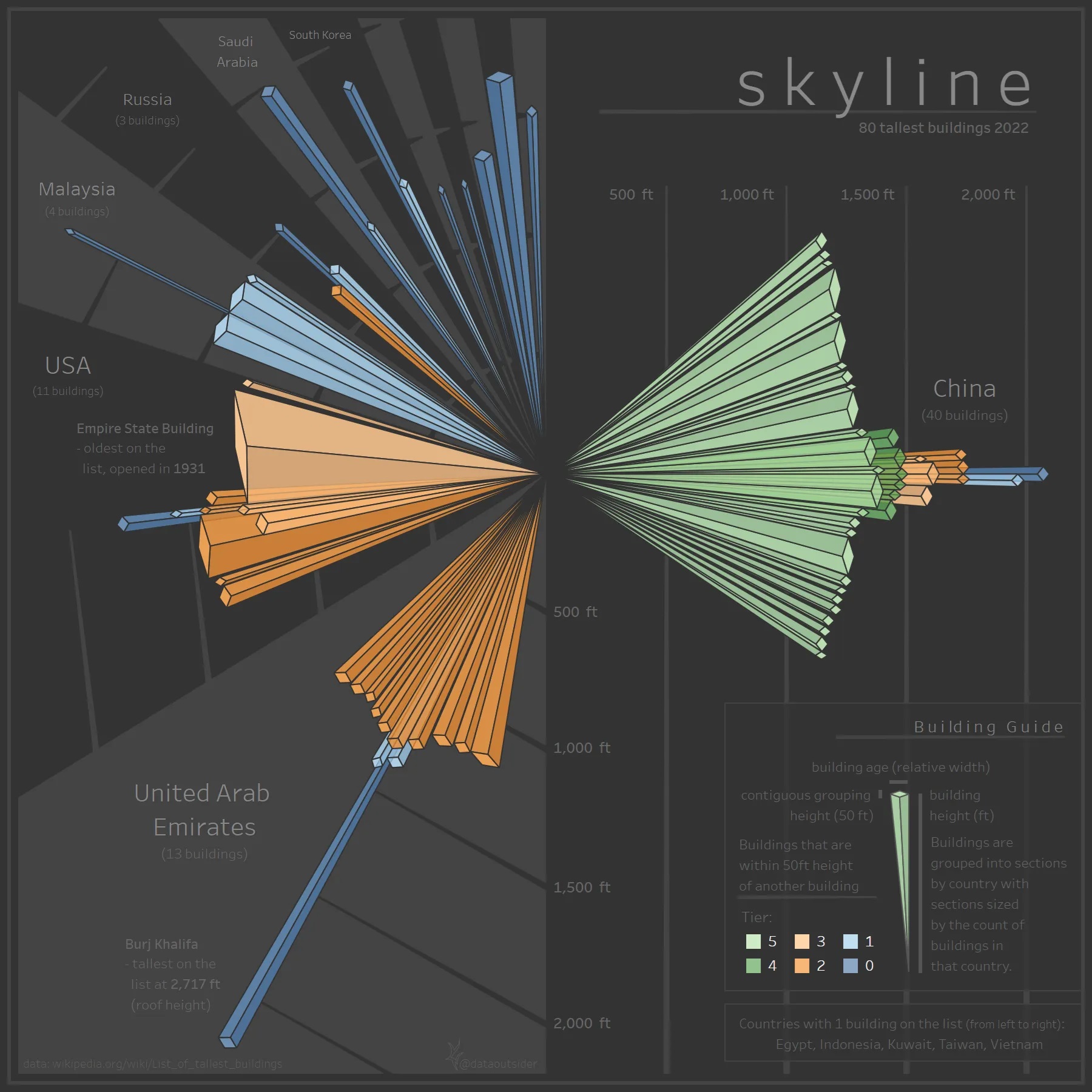
Containers:
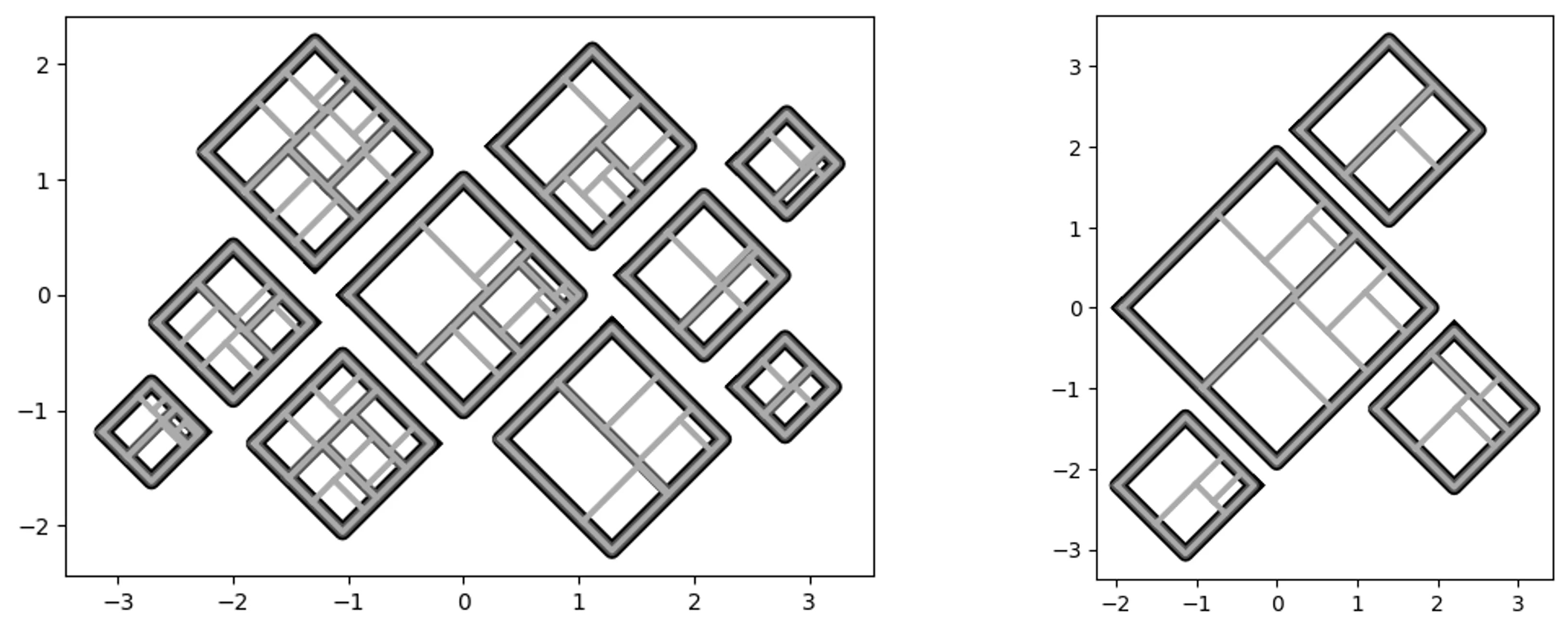
Quad-Tile
My initial approach (V1) didn’t consider a container, where the new approach (V2) does.
Quad-Tile V1
V1 Concept:
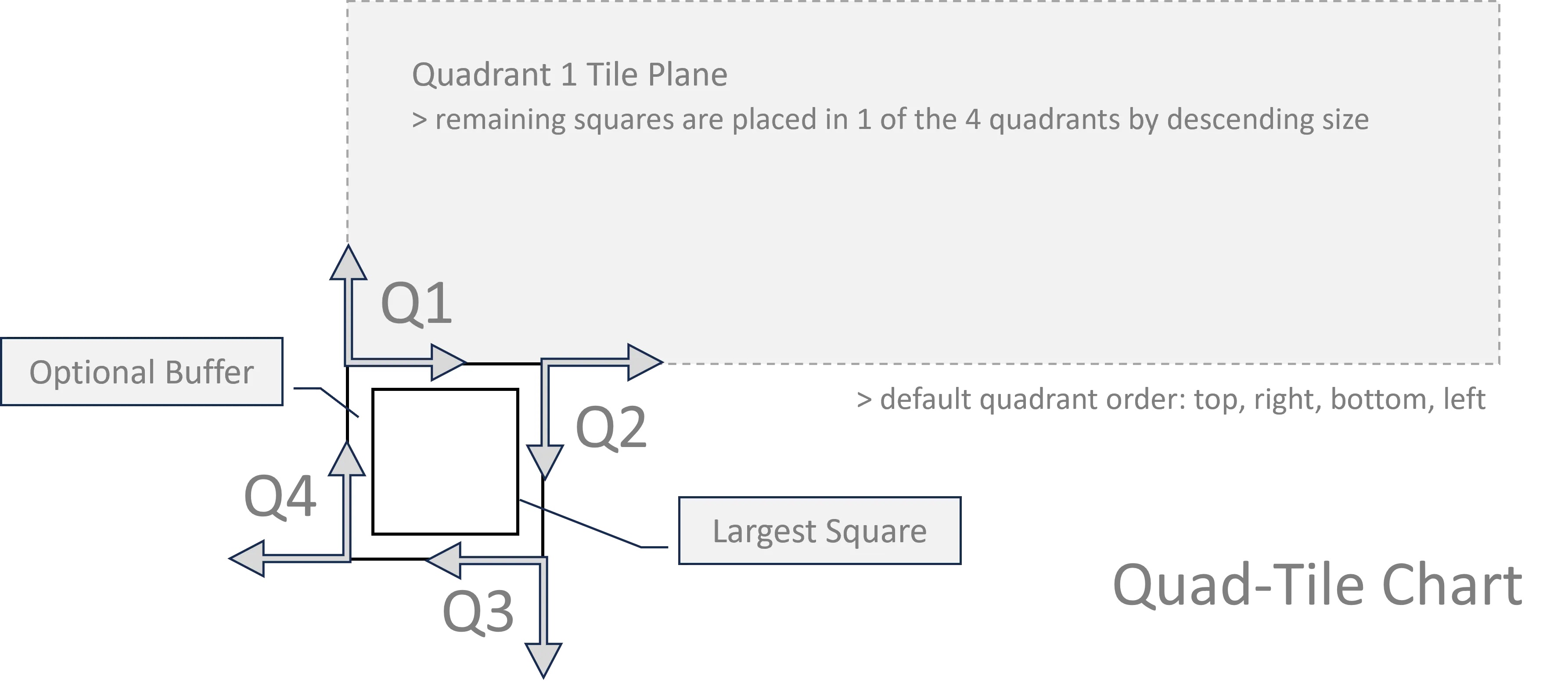
V1 Elements:
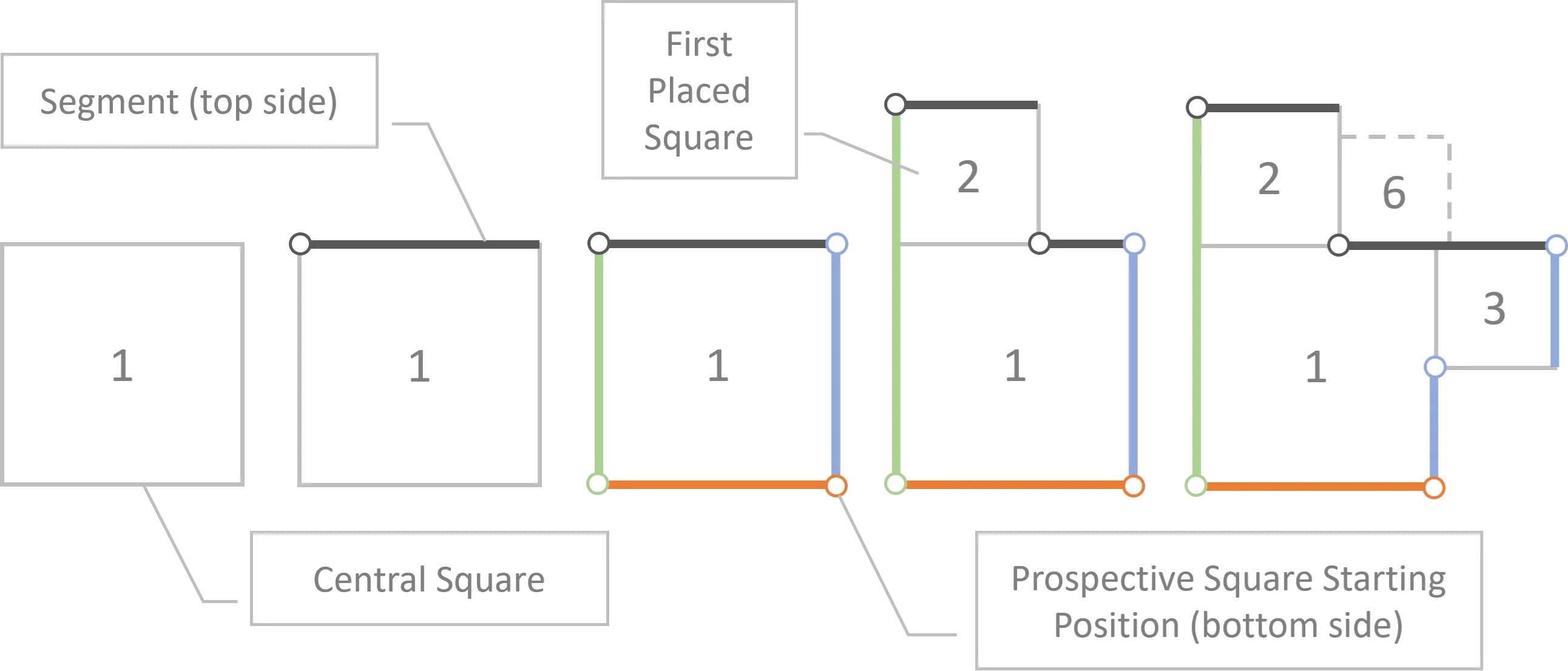
V1 Layouts:
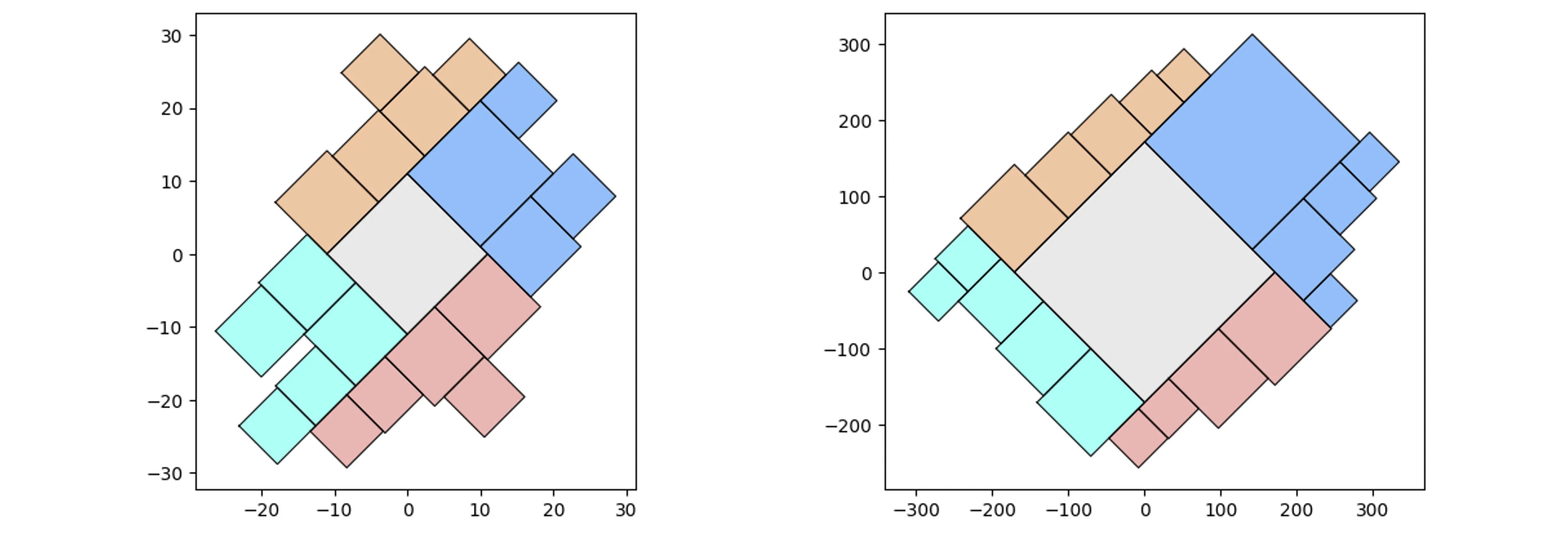
V1 Example:
# Quad-Tile Chart v1
from vizmath.quadtile_chart import quadtile as qt
import pandas as pd

data = {
    'id' : [str(i) for i in range(1, 21)],
    'speed' : [242,200,105,100,100,95,92.5,88,80,79,
        75,67.85,61.06,60,56,55,55,55,50,50]
}
df = pd.DataFrame(data)

# create a quadtile object
#   > df: DataFrame with 1 numerical column of data and an id field
#   > id_field: required identifier field (can be dummy values)
#   > value_field: required value column
#   > xo: x-axis origin
#   > yo: y-axis origin
#   > packing: packing method ('auto','inc','num','max','min')
#   > overflow: integer threshold for 'num','max','min' packing
#   > buffer: additive value for buffering a square's size
#   > rotate: degrees to rotate the chart by
#   > constraints: polygon to encourage growth inside the perimeter
#   > size_by: 'area' or 'width'
#   > poly_sort: enable/disable sorting polygon vertices (True, False)
qt_o_area = qt(df,'id','speed', size_by='area', buffer=0)
qt_o_width = qt(df,'id','speed', size_by='width', buffer=0)

# plot the charts (sized by area and width)
qt_o_area.quadtile_plot(color='quad', cw=0.75, opacity=.9)
qt_o_width.quadtile_plot(color='quad', cw=0.75, opacity=.9)
Quad-Tile V2
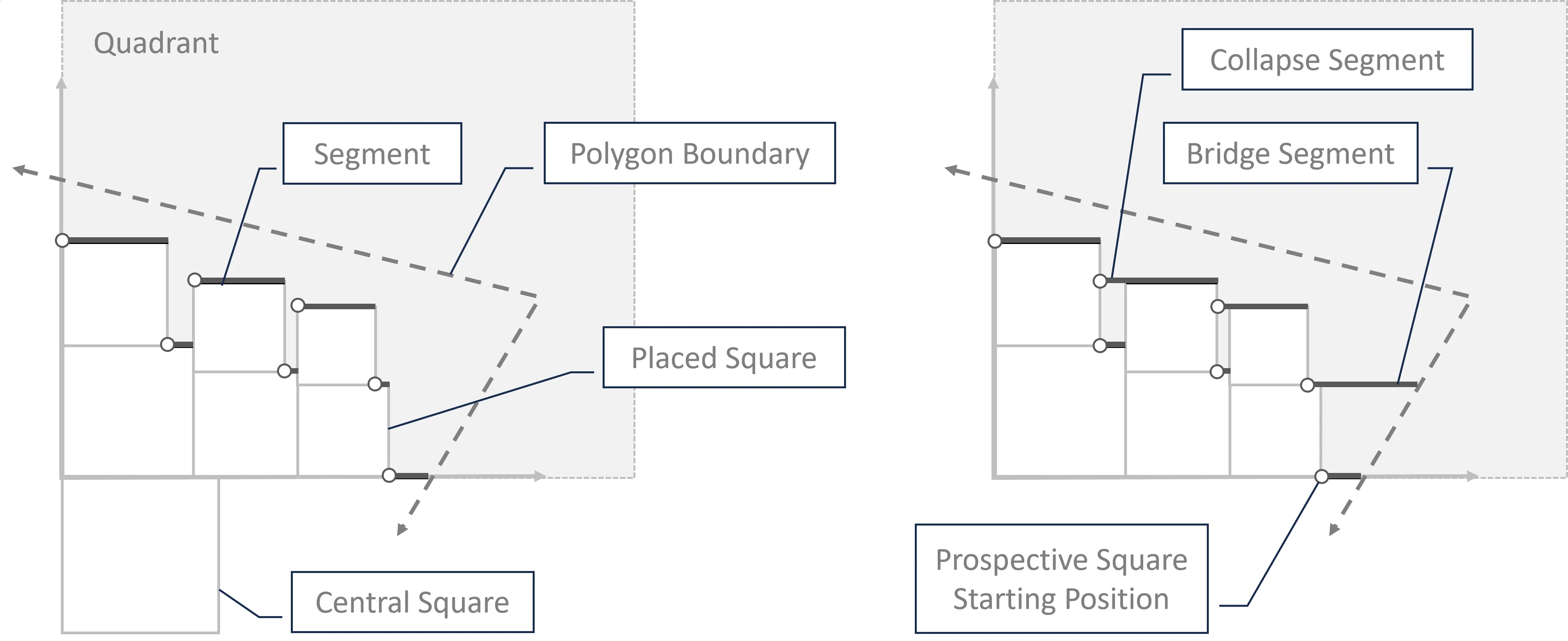
V2 Elements:
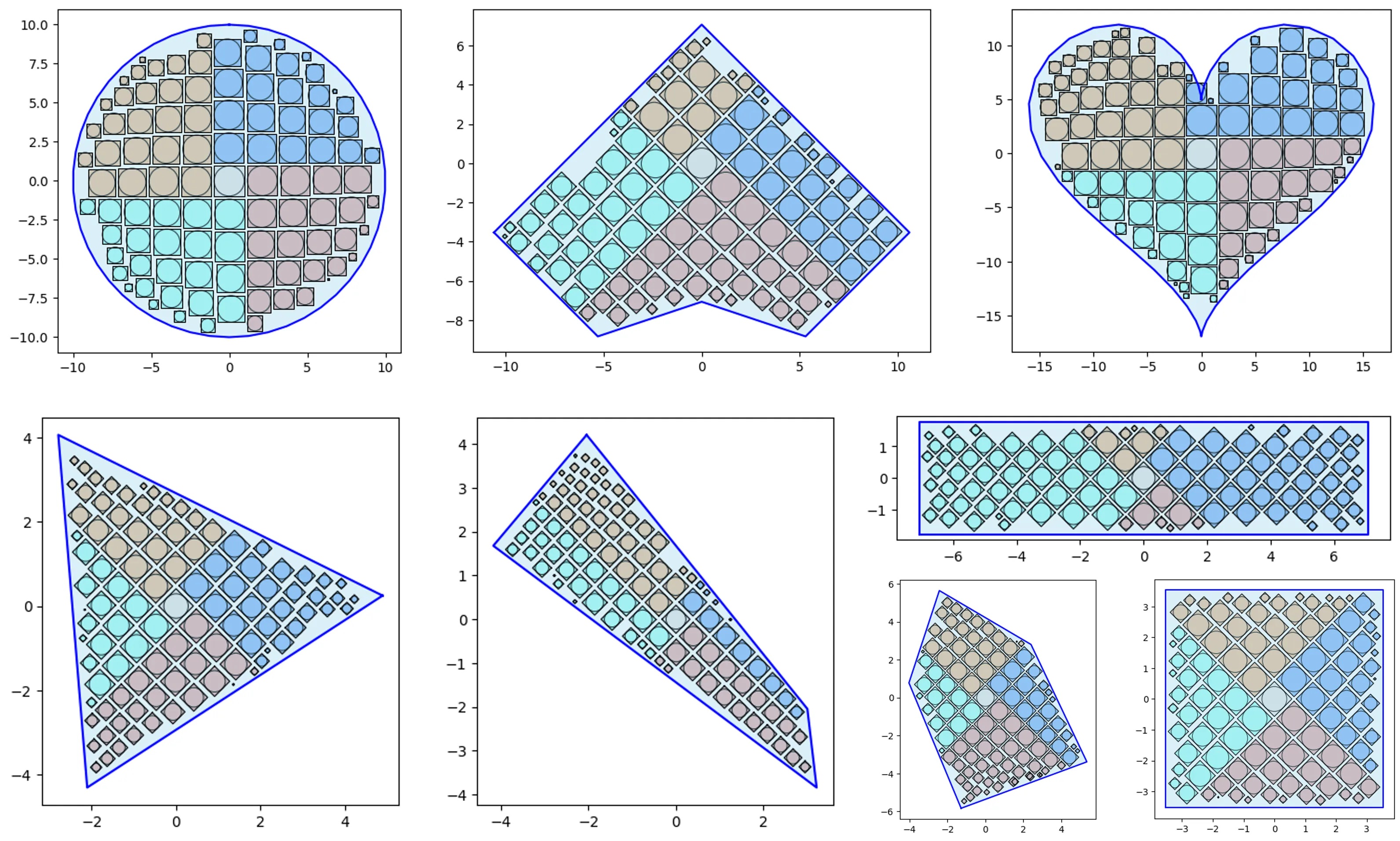
V2 Layouts:
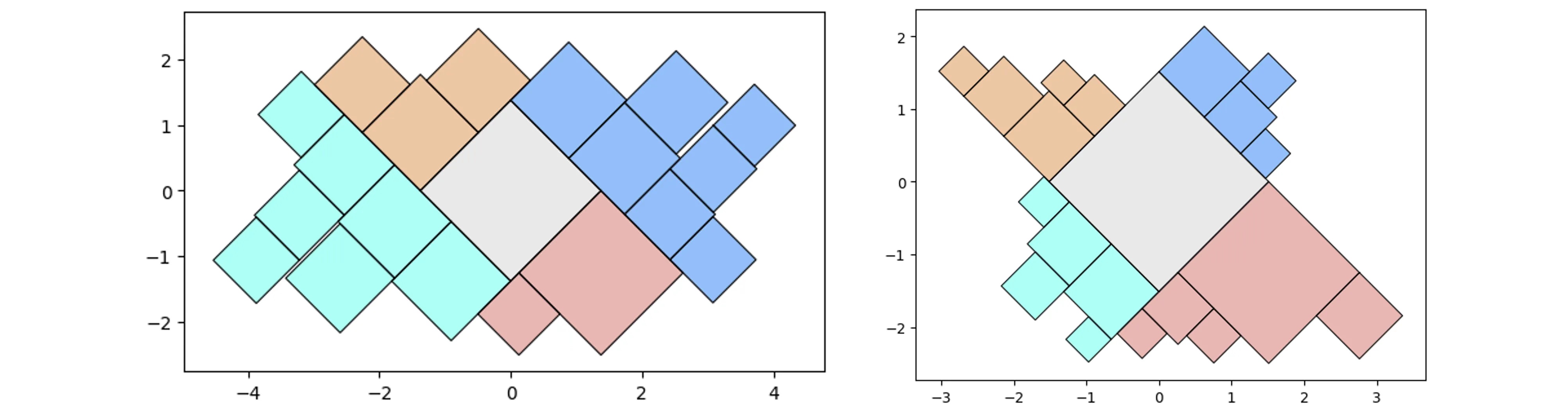
V2 Example:
# Quad-Tile Chart v2
from vizmath.quadtile_chart import polyquadtile as pqt
import pandas as pd

data = {
    'id' : [str(i) for i in range(1, 21)],
    'speed' : [242,200,105,100,100,95,92.5,88,80,79,
        75,67.85,61.06,60,56,55,55,55,50,50]
}
df = pd.DataFrame(data)

# create a quadtile object
#   > df: DataFrame with 1 numerical column of data and an id field
#   > id_field: required identifier field (can be dummy values)
#   > value_field: required value column
#   > xo: x-axis origin
#   > yo: y-axis origin
#   > buffer: additive value for buffering a square's size
#   > rotate: degrees to rotate the chart by
#   > sides: select sides to include ('top','right','bottom','left')
#   > collapse: enable/disable collapse (True, False)
#   > constraints: polygon container to pack
#   > xc: x-axis container offset value
#   > yc: y-axis container offset value
#   > size_by: 'area' or 'width'
#   > auto: enable/disable automatic packing (True, False)
#   > auto_max_iter: iterations for automatic packing
#   > auto_min_val: minimum multiplier for automatic packing
#   > auto_max_val: maximum multiplier for automatic packing
#   > poly_sort: enable/disable sorting polygon vertices (True, False)
pqt_o_area = pqt(df,'id','speed', size_by='area', buffer=0)
pqt_o_width = pqt(df,'id','speed', size_by='width', buffer=0)

# plot the charts (sized by area and width)
pqt_o_area.polyquadtile_plot(color='quad', cw=0.75, opacity=.9)
pqt_o_width.polyquadtile_plot(color='quad', cw=0.75, opacity=.9)
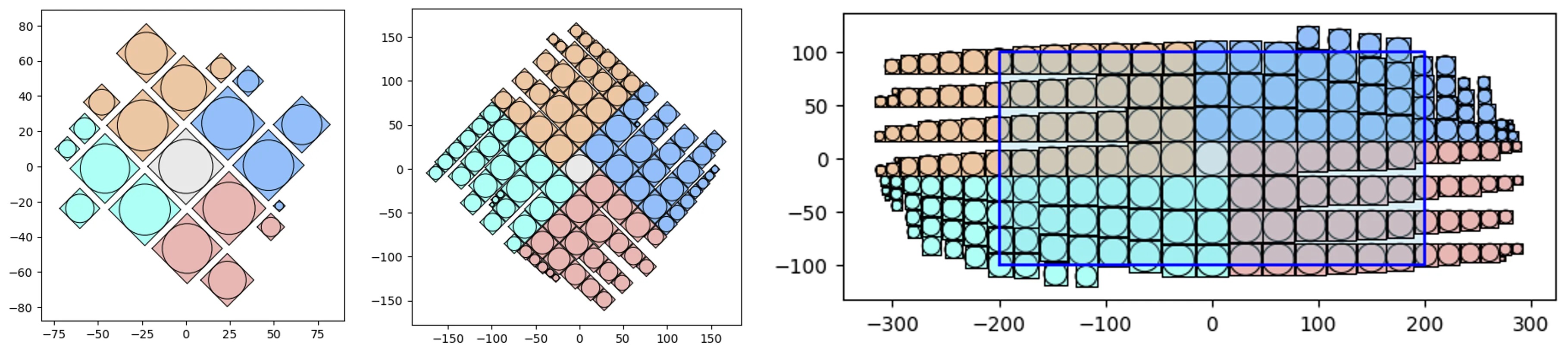
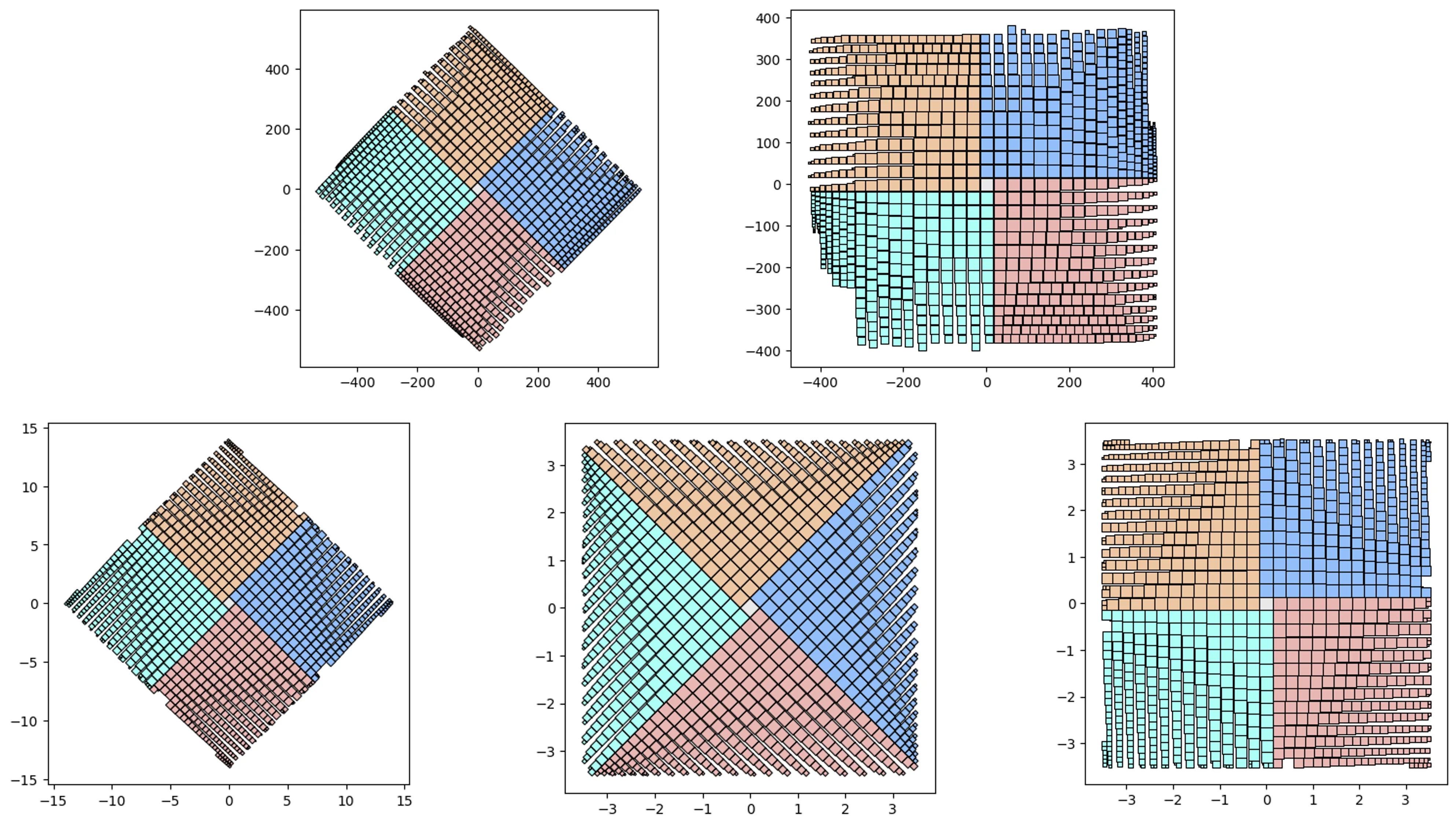
V1 vs V2 and simple containers:
# let's test 1000 randomly sized squares:
from vizmath.quadtile_chart import quadtile as qt
from vizmath.quadtile_chart import polyquadtile as pqt

# Quad-Tile Chart v1 that's rotated (top left below)
qt_o1 = qt.random_quadtile(1000, rotate=45)
qt_o1.quadtile_plot(color='quad', cw=0.75, opacity=.9)

# Quad-Tile Chart v1 that's not rotated (top right below)
qt_o2 = qt.random_quadtile(1000, rotate=0)
qt_o2.quadtile_plot(color='quad', cw=0.75, opacity=.9)

# Quad-Tile Chart v2 with a square container (bottom left below)
poly = [(-10,-10),(-10,10),(10,10),(10,-10)] # polygon container
pqt_o1 = pqt.random_polyquadtile(1000, constraints=poly, buffer=0)
pqt_o1.polyquadtile_plot(color='quad', cw=0.75, opacity=.9)

# Quad-Tile Chart v2 with a rotated aspect ratio of 1:1 (middle below)
pqt_o2 = pqt.random_polyquadtile(1000, constraints=[(1,1)], buffer=0)
pqt_o2.polyquadtile_plot(color='quad', cw=0.75, opacity=.9)

# Quad-Tile Chart v2 with an aspect ratio of 1:1 (bottom right below)
pqt_o3 = pqt.random_polyquadtile(1000, constraints=[(1,1)],
    buffer=0, rotate=0)
pqt_o3.polyquadtile_plot(color='quad', cw=0.75, opacity=.9, circles=False)
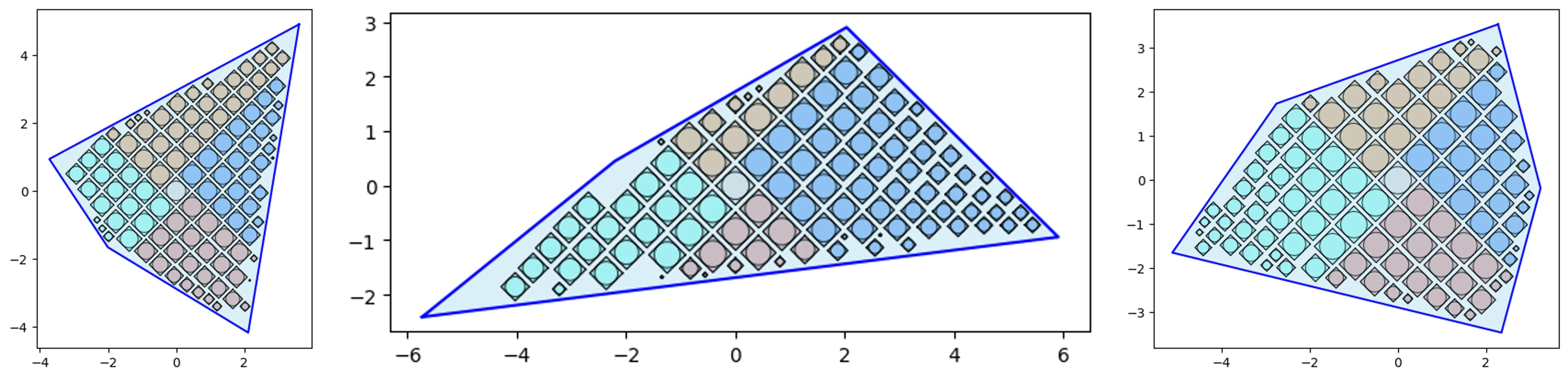
More complicated (random) containers examples:
pqt_o = pqt.random_polyquadtile(100, collapse=True)
pqt_o.polyquadtile_plot(color='quad', cw=0.75, opacity=.9, circles=True,
    show_constraints=True)

# keep executing for random containers with randomly sized squares
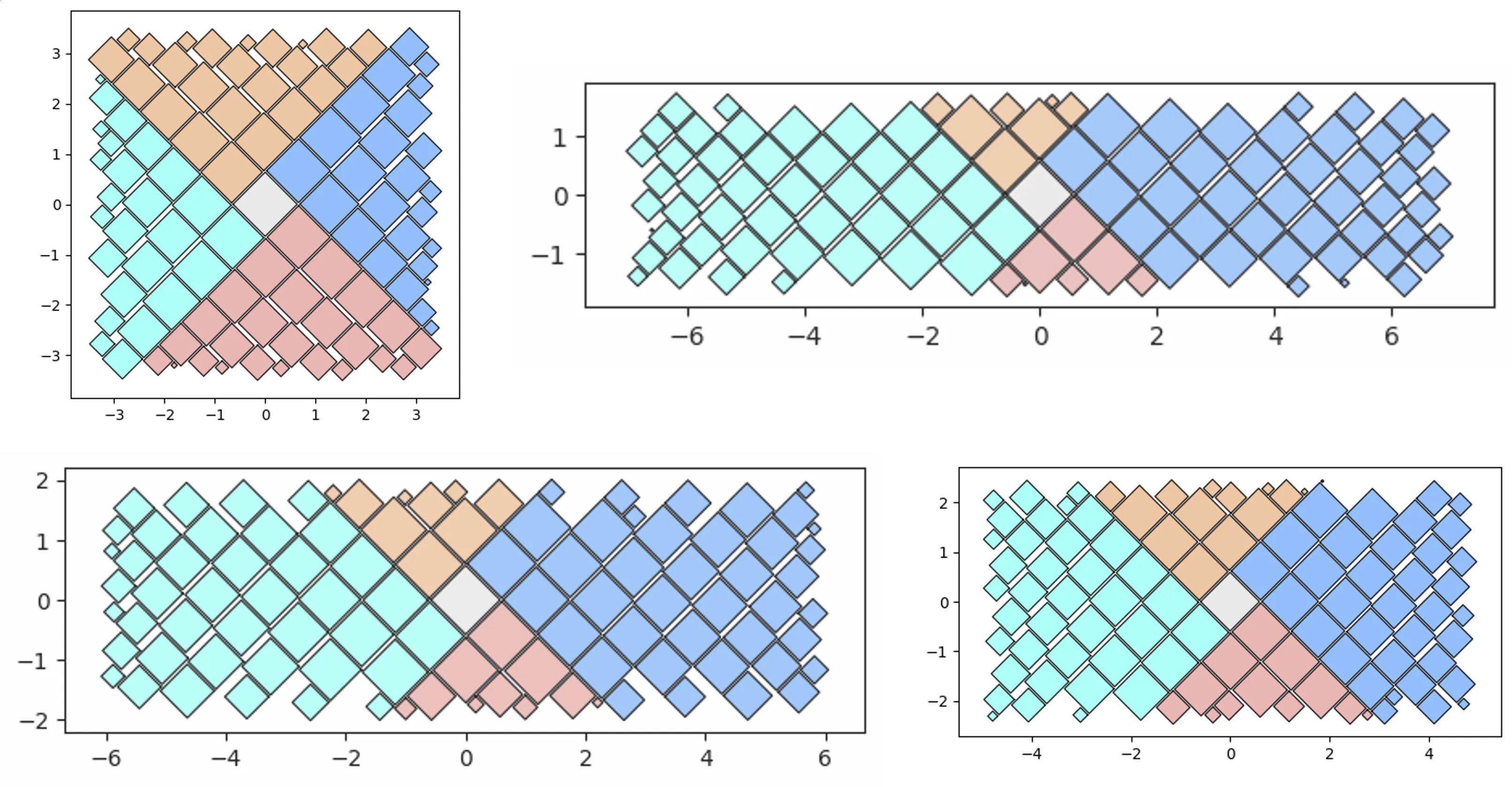
By aspect ratio:
aspect_ratio = (1,1) #(2,1) (3,1) (4,1)
pqt_o = pqt.random_polyquadtile(100, constraints=[aspect_ratio],
    rotate=45, collapse=True, buffer=.02)
pqt_o.polyquadtile_plot(color='quad', cw=0.75, opacity=.9)
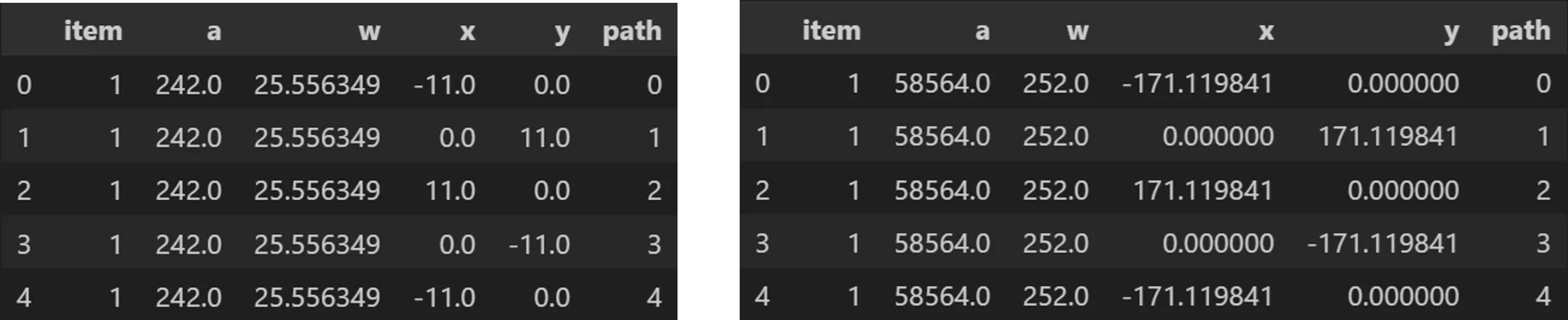
Outputs:
from vizmath.quadtile_chart import polyquadtile as pqt
import pandas as pd

# using the initial example data with no resizing (fit's in container):
data = {
    'id' : [str(i) for i in range(1, 21)],
    'speed' : [242,200,105,100,100,95,92.5,88,80,79,
        75,67.85,61.06,60,56,55,55,55,50,50]
}
poly = [(-1000,-1000),(-1000,1000),(1000,1000),
    (1000,-1000)] # big enough container (for explaining example output)
df = pd.DataFrame(data)
o_pq1 = pqt(df,'id','speed',buffer=5.0, collapse=True,
    constraints=poly, auto=False)
o_pq2 = pqt(df,'id','speed',buffer=5.0, collapse=True,
    constraints=poly, auto=False, size_by='width')

# size by area:
o_pq1.o_polyquadtile_chart.df[['id','item','a','w','x','y','path']].head()
# size by width:
o_pq2.o_polyquadtile_chart.df[['id','item','a','w','x','y','path']].head()
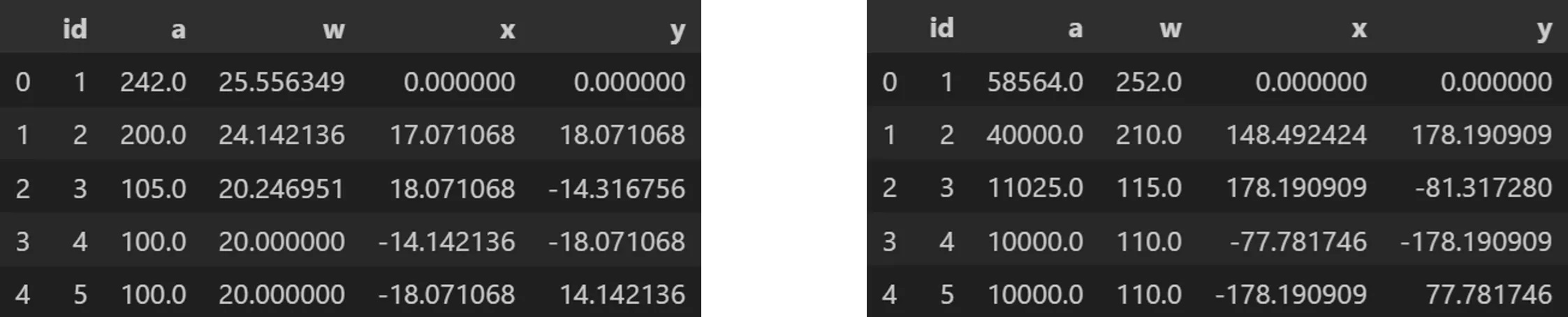
Centroids:
# size by area:
o_pq1.o_polysquares.df[['id','a','w','x','y']].head()
# size by width:
o_pq2.o_polysquares.df[['id','a','w','x','y']].head()
Squaremap
import pandas as pd
from vizmath.quadtile_chart import squaremap as sm

# generate a random square map
o_sm1 = sm.random_squaremap(num_levels=3, items_range=(2,4),
    value_range=(1,1000), sig=0.8)
o_sm1.o_squaremap.plot_levels(level=3, fill='w')

# create a square map from hierachical data
data = [
    ['a1', 'b1', 'c1', 9.3],
    ['a1', 'b1', 'c2', 6.7],
    ['a1', 'b1', 'c3', 2.4],
    ['a1', 'b2', 'c1', 4.5],
    ['a1', 'b2', 'c2', 3.1],

    ['a2', 'b1', 'c1', 5.9],
    ['a2', 'b1', 'c2', 32.3],
    ['a2', 'b1', 'c3', 12.3],
    ['a2', 'b1', 'c4', 2.3],
    ['a2', 'b2', 'c1', 9.1],
    ['a2', 'b2', 'c2', 17.3],
    ['a2', 'b2', 'c3', 6.7],
    ['a2', 'b2', 'c4', 4.4],
    ['a2', 'b2', 'c5', 11.3],

    ['a3', 'b1', 'c1', 7.5],
    ['a3', 'b1', 'c2', 9.5],
    ['a3', 'b2', 'c3', 17.1],

    ['a4', 'b2', 'c1', 5.1],
    ['a4', 'b2', 'c2', 2.1],
    ['a4', 'b2', 'c3', 11.1],
    ['a4', 'b2', 'c4', 1.5]]
df = pd.DataFrame(data, columns = ['a', 'b', 'c', 'value'])
o_sm2 = sm(df, ['a','b','c'], 'value', constraints=[(1,1)], buffer=.2)
o_sm2.o_squaremap.plot_levels(level=3, fill='w')
coming soon
Planning to retire the dataoutsider package and move over my multi-chord diagram to vizmath, with many more new algorithms to come! - as time permits :)
walkthroughs
Check out https://medium.com/@nickgerend for detailed tutorials and in-depth looks at the various method parameters (including Tableau Public tips!)
1 maintainer

Metadata
1 maintainer
Release files for vizmath 0.0.47
For a detailed explanation of source distributions (sdists) and built distributions (wheels), please see the package formats documentation.
Source distribution (sdist)
| File | Size | Uploaded | |
|---|---|---|---|
| vizmath-0.0.47.tar.gz | 66.4 kB | Details |
Built distribution (wheel)
| File | Interpreter | ABI | Platform | Reset |
|---|---|---|---|---|
| vizmath-0.0.47-py3-none-any.whl | Python 3 | none | any | Details |
Total release size: 120.9 kB
Release files / vizmath-0.0.47.tar.gz
| Download URL | vizmath-0.0.47.tar.gz |
|---|---|
| Size | 66.4 kB |
| Tags | Source |
|
SHA-256 checksum How to use checksums |
39720c6d14e67737b89b77cbda9d659bea3a84b352ecae85c5c433348912c863
|
|
BLAKE2b-256 checksum How to use checksums |
acdc112d54e698a60563a964de67571d98604239ad3c8a052640d9ef660d0e6f
|
| Upload date | |
|
Uploaded using Trusted Publishing? What is trusted publishing? |
No |
| Uploaded via |
twine/6.0.1 CPython/3.11.8
|
Release files / vizmath-0.0.47-py3-none-any.whl
| Download URL | vizmath-0.0.47-py3-none-any.whl |
|---|---|
| Size | 54.4 kB |
| Tags | Python 3 |
|
SHA-256 checksum How to use checksums |
fa7cb4d239c80a5bea3bb78f46b2e71034c5c05f18115afa7d255624cc1926c2
|
|
BLAKE2b-256 checksum How to use checksums |
06968b12dbee42eff76e46b39c8c4157c79221df09903d60bf3c40ae86609c43
|
| Upload date | |
|
Uploaded using Trusted Publishing? What is trusted publishing? |
No |
| Uploaded via |
twine/6.0.1 CPython/3.11.8
|














