



VLDT: High-Performance Data Validation for Python
VLDT is an open-source Python library written in C++ that uses annotated dataclasses to create robust data models. It comes with built-in support for validation, parsing, and custom serialization/deserialization. Designed for scenarios where performance matters, VLDT streamlines data handling in Python applications without compromising on flexibility or correctness.
1. Key Features
-
Type Validation:
Automatically checks that each field conforms to its expected type. -
Custom Validators:
- Field Validators: Run either before or after the main type validation, letting you adjust or verify individual field values.
- Model Validators: Validate or transform the entire model, either prior to or after type checks.
- Async Validators: Support asynchronous workflows via
AsyncDataModel.
-
Parsing Capabilities:
Easily convert Python dictionaries or JSON strings into validated models. -
Field Aliasing:
Define one or more alternate names for a field so that incoming data can use different keys. -
Custom Serialization/Deserialization:
Tailor how models are converted to and from dictionaries and JSON with a dedicated configuration system. -
Performance:
Thanks to its C++ implementation, VLDT delivers a significant speed boost in data parsing and validation.
2. Performance
VLDT is engineered for speed without sacrificing robust data validation. Our benchmarks focus on common operations—such as parsing, serialization, and list manipulation—where lower execution times indicate better performance.
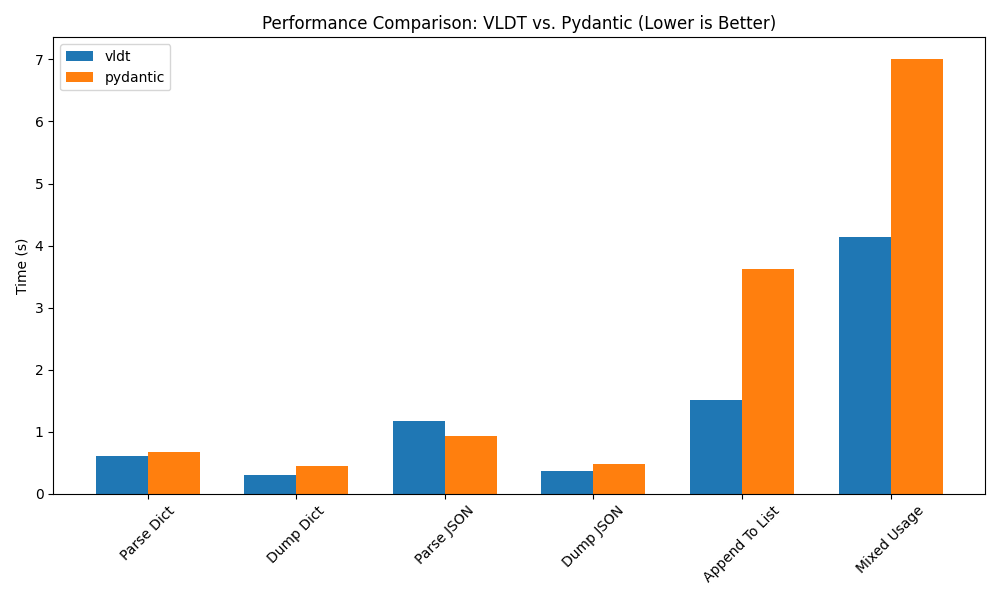
In our tests, VLDT consistently demonstrated efficiency, especially in iterative operations like appending model objects to a list. While both libraries perform well in parsing and serialization tasks, VLDT's performance advantages make it well-suited for high-load or time-sensitive applications.
For those interested in reproducing these results, the complete load test script is available in the repository here.
3. Installation
Installing VLDT is simple. Use pip to install it:
pip install vldt
4. How to Use
This section explains how to build, validate, and serialize data models using VLDT. The examples include everyday scenarios such as user profile management, order processing, and handling configuration data.
4.1 Defining a Data Model
Define a model by subclassing DataModel and specifying type-annotated fields.
Example: User Profile
from vldt import DataModel

class UserProfile(DataModel):
    username: str
    email: str
    age: int

# Create a simple user profile.
profile = UserProfile(username="alice123", email="alice@example.com", age=28)
print(profile.username, profile.email, profile.age)  # Output: alice123 alice@example.com 28
4.2 Default Values
Assign default values so fields always have a value, even if not provided explicitly.
Example: Default Country in a User Profile
from vldt import DataModel

class UserProfile(DataModel):
    username: str
    email: str
    country: str = "USA"  # Defaults to "USA" if not provided.

profile = UserProfile(username="bob", email="bob@example.com")
print(profile.country)  # Output: USA
For optional fields, the default is typically set to None.
from vldt import DataModel
from typing import Optional

class UserProfile(DataModel):
    username: str
    phone: Optional[str]  # Optional phone number

profile = UserProfile(username="carol", phone=None)
print(profile.phone)  # Output: None
4.3 Advanced Field Options
VLDT’s Field class offers fine-grained control over field behavior, including dynamic defaults and alternative aliases.
4.3.1 Default Values with Field
Example: Order Status
from vldt import DataModel, Field

class Order(DataModel):
    order_id: int
    status: str = Field(default="pending")  # Defaults to "pending" if not specified.

order = Order(order_id=101)
print(order.status)  # Output: pending

order2 = Order(order_id=102, status="shipped")
print(order2.status)  # Output: shipped
4.3.2 Default Factories for Dynamic Defaults
For fields that require a fresh instance (like lists or dictionaries), use default_factory.
Example: Daily Log Entries
from vldt import DataModel, Field

class DailyLog(DataModel):
    date: str
    entries: list = Field(default_factory=list)  # Creates a new empty list for each instance.

log1 = DailyLog(date="2025-03-01")
log1.entries.append("User login")
print(log1.entries)  # Output: ['User login']

log2 = DailyLog(date="2025-03-02")
print(log2.entries)  # Output: []
Or use a factory for computed defaults:
from random import randint
from vldt import DataModel, Field

class Session(DataModel):
    session_id: int = Field(default_factory=lambda: randint(1000, 9999))

session1 = Session()
session2 = Session()
print(session1.session_id, session2.session_id)  # Likely different random IDs.
4.3.3 Field Aliasing
Allow and single and multiple alternative names for a field, making it easier to work with data from different sources.
Example: Configuring a System
from vldt import DataModel, Field

class SystemConfig(DataModel):
    timeout: int = Field(default=30, alias=["timeout_seconds", "t_timeout"])

# Input data might use different keys.
config = SystemConfig.from_dict({"t_timeout": 60})
print(config.timeout)  # Output: 60
Single aliases can be used as well:
from vldt import DataModel, Field

class SystemConfig(DataModel):
    timeout: int = Field(default=30, alias="timeout_seconds")

config = SystemConfig.from_dict({"timeout_seconds": 45})
print(config.timeout)  # Output: 45
4.3.4 Round-Trip Behavior
Converting a model to a dictionary and back retains the canonical field names and values.
Example: Product Data
from vldt import DataModel, Field

class Product(DataModel):
    id: int = Field(default=0)
    name: str = Field(default_factory=lambda: "Unknown")
    price: float = Field(default=0.0, alias="cost")

data = {"id": 12, "name": "Gadget", "cost": 19.99}
product = Product.from_dict(data)
# Converting back to a dict returns the standard field names.
print(product.to_dict())  # Expected: {"id": 12, "name": "Gadget", "price": 19.99}
4.4 Union Types and Nested Models
VLDT accommodates fields that accept multiple types and supports nested models, useful for representing real-world objects like addresses or orders.
Example: Order with Shipping Address
from typing import Union, List, Optional
from vldt import DataModel

class Address(DataModel):
    street: str
    zipcode: Union[int, str]
    country: str = "USA"

class Order(DataModel):
    order_id: int
    items: List[str]
    shipping_address: Optional[Address] = None

# Creating an order with a shipping address.
address = Address(street="123 Main St", zipcode=90210)
order = Order(order_id=1001, items=["book", "pen"], shipping_address=address)
print(order.shipping_address.zipcode)  # Output: 90210
4.5 Collection Types
VLDT can validate elements inside containers like lists and dictionaries, ensuring every element meets the defined type.
Example: Validating an Inventory List
from typing import List, Dict
from vldt import DataModel

class Inventory(DataModel):
    items: List[str]
    quantities: Dict[str, int]

inventory = Inventory(items=["apple", "banana"], quantities={"apple": 10, "banana": 5})
Or working with other containers:
from typing import Tuple, Set
from vldt import DataModel

class Metrics(DataModel):
    dimensions: Tuple[int, int]
    unique_values: Set[float]

metrics = Metrics(dimensions=(1920, 1080), unique_values={3.14, 2.718})
4.6 Custom Validators
Custom validators let you incorporate business logic into your model validation. They can adjust data before the main validation or check values afterward.
4.6.1 Synchronous Validators
Example: Validating User Age and Name Format
from vldt import DataModel, field_validator, model_validator, ValidatorMode

class User(DataModel):
    name: str
    age: int

    # Convert string age to int and enforce a minimum age.
    @field_validator(mode=ValidatorMode.BEFORE)
    @classmethod
    def validate_age(cls, age):
        if isinstance(age, str):
            if not age.isdigit():
                raise ValueError("Age must be a number")
            age = int(age)
        if age < 18:
            raise ValueError("User must be at least 18 years old")
        return age

    # Ensure the name is properly capitalized.
    @field_validator(mode=ValidatorMode.AFTER)
    @classmethod
    def format_name(cls, name):
        return name.capitalize()

    # Example of a model-level adjustment.
    @model_validator(mode=ValidatorMode.BEFORE)
    @classmethod
    def adjust_user(cls, data: dict):
        # For example, trim whitespace in the username.
        if "name" in data:
            data["name"] = data["name"].strip()
        return data

user = User(name="  john  ", age="25")
print(user.name, user.age)  # Output: John 25
4.6.2 Asynchronous Validators
For workflows involving asynchronous operations (like external API calls), VLDT provides async validators. In this case the AsyncDataModel class is used. Such models can be created using await.
Example: Validating an Async User Registration
from vldt import AsyncDataModel, async_field_validator, async_model_validator, ValidatorMode
import asyncio

class AsyncUser(AsyncDataModel):
    name: str
    age: int

    @async_field_validator(mode=ValidatorMode.BEFORE)
    @classmethod
    async def check_age(cls, age):
        if isinstance(age, str):
            age = int(age)
        min_age = await get_minimum_age()  # Assume an async function to fetch the minimum age.
        if age < min_age:
            raise ValueError("User must be at least 18 years old")
        return age

    @async_field_validator(mode=ValidatorMode.AFTER)
    @classmethod
    async def check_name(cls, name):
        if await name_already_taken(name):  # Assume an async function to check if the name is taken.
            raise ValueError("Name already taken")
        return name

    @async_model_validator(mode=ValidatorMode.BEFORE)
    @classmethod
    async def adjust_user(cls, data: dict):
        is_correct = await check_user_data(data)  # Calling an async function.
        if not is_correct:
            raise ValueError("Invalid user data")
        return data

async def main():
    user = await AsyncUser(name="alice", age="30")  # await the model creation
    print(user.name, user.age)

asyncio.run(main())
4.7 Serialization and Deserialization
VLDT ensures that models can be accurately converted to dictionaries or JSON strings and then re-instantiated without loss of information. This round-trip conversion is essential for data storage, transmission, and integration with other systems. In addition to standard conversion, you can define custom rules for handling specific data types.
Dictionary Conversion
Convert a model to a dictionary using the to_dict method and re-instantiate it using from_dict.
Example: Converting a Customer Order
from vldt import DataModel

class Address(DataModel):
    street: str
    city: str
    postal_code: str

class CustomerOrder(DataModel):
    order_id: int
    customer: str
    address: Address
    notes: str

order_data = {
    "order_id": 5001,
    "customer": "Dana",
    "address": {"street": "456 Elm St", "city": "Metropolis", "postal_code": "54321"},
    "notes": "Leave package at the door.",
}

# Convert dictionary to model.
order_obj = CustomerOrder.from_dict(order_data)
# Serialize the model back to a dictionary.
order_dict = order_obj.to_dict()
print("Dictionary Conversion:", order_dict)
JSON Conversion
VLDT also provides built-in methods for converting models to JSON strings and back, useful for API communication or configuration storage.
Example: Converting a Customer Order to JSON and Back
import json
from vldt import DataModel

class Address(DataModel):
    street: str
    city: str
    postal_code: str

class CustomerOrder(DataModel):
    order_id: int
    customer: str
    address: Address
    notes: str

order_data = {
    "order_id": 5001,
    "customer": "Dana",
    "address": {"street": "456 Elm St", "city": "Metropolis", "postal_code": "54321"},
    "notes": "Leave package at the door.",
}

# Convert dictionary to model.
order_obj = CustomerOrder.from_dict(order_data)
# Serialize the model to a JSON string.
json_str = order_obj.to_json()
print("Serialized JSON:", json_str)

# Deserialize the JSON string back to a model.
order_obj2 = CustomerOrder.from_json(json_str)
print("Round-Trip JSON:", json.loads(order_obj2.to_json()))
Custom Serialization and Deserialization
The Config class in VLDT provides a way to customize how data is serialized and deserialized. By defining a Config instance within a DataModel, you can control how specific data types are transformed when converting models to and from dictionaries or JSON.
Understanding the Config Class
The Config class allows you to specify:
- Custom serialization rules: Define how certain data types should be converted to dictionaries or JSON.
- Custom deserialization rules: Specify how incoming data should be transformed back into the appropriate Python objects.
To apply custom serialization and deserialization behavior, a Config instance is assigned to the __vldt_config__ attribute within a DataModel.
Example 1: Custom DateTime Handling
By default, datetime objects may not serialize into JSON-friendly formats. With Config, we can ensure they are stored as ISO-formatted strings and correctly parsed back when deserializing.
from datetime import datetime
from vldt import DataModel, Config

def serialize_datetime(dt: datetime) -> str:
    return dt.isoformat()

def deserialize_datetime(value: str) -> datetime:
    return datetime.fromisoformat(value)

class Event(DataModel):
    name: str
    start_time: datetime

    __vldt_config__ = Config(
        dict_serializer={datetime: serialize_datetime},
        json_serializer={datetime: serialize_datetime},
        deserializer={
            datetime: {
                str: deserialize_datetime,
            }
        }
    )

event = Event(name="Conference", start_time=datetime(2025, 3, 15, 9, 0))
print("Serialized Event Dict:", event.to_dict())
json_str_event = event.to_json()
print("Serialized Event JSON:", json_str_event)

# Deserialize the JSON string back to an Event model.
event2 = Event.from_json(json_str_event)
print("Deserialized Event:", event2.name, event2.start_time)
Explanation:
- The
serialize_datetimefunction converts adatetimeobject to an ISO 8601 string. - The
deserialize_datetimefunction converts the string back into adatetimeobject. - The
Configclass is used to ensure this transformation is applied whenever the model is serialized or deserialized.
Example 2: Custom Currency Formatting
In financial applications, floating-point numbers are often displayed as formatted currency strings. The following example demonstrates how to format a float as a currency string when serializing and convert it back when deserializing.
from vldt import DataModel, Config

def serialize_currency(amount: float) -> str:
    return f"${amount:,.2f}"

def deserialize_currency(value: str) -> float:
    return float(value.replace("$", "").replace(",", ""))

class Invoice(DataModel):
    invoice_number: int
    total: float

    __vldt_config__ = Config(
        dict_serializer={float: serialize_currency},
        json_serializer={float: serialize_currency},
        deserializer={
            float: {
                str: deserialize_currency,
            }
        }
    )

invoice = Invoice(invoice_number=2025, total=1234.56)
print("Serialized Invoice Dict:", invoice.to_dict())
json_invoice = invoice.to_json()
print("Serialized Invoice JSON:", json_invoice)

# Deserialize the JSON back to an Invoice model.
invoice2 = Invoice.from_json(json_invoice)
print("Deserialized Invoice:", invoice2.invoice_number, invoice2.total)
Explanation:
- The
serialize_currencyfunction converts a float into a formatted string with a dollar sign and comma separators. - The
deserialize_currencyfunction reverses this transformation to extract a float value. - The
Configclass ensures that these transformations happen automatically whenever the model is serialized or deserialized.
4.8 Advanced Examples: Deeply Nested Structures and Complex Models
VLDT is capable of handling deeply nested data and complex models, which is common in real-world applications like configuration files or comprehensive business data.
Example: Inventory Management System
from typing import List, Dict, Union
from vldt import DataModel

class Warehouse(DataModel):
    name: str
    location: str

class InventoryItem(DataModel):
    sku: str
    quantity: int

class Inventory(DataModel):
    warehouses: Dict[str, Warehouse]
    items: List[InventoryItem]

inventory_data = {
    "warehouses": {
        "WH1": {"name": "Main Warehouse", "location": "New York"},
        "WH2": {"name": "Secondary Warehouse", "location": "Los Angeles"}
    },
    "items": [
        {"sku": "A123", "quantity": 100},
        {"sku": "B456", "quantity": 200}
    ]
}

inventory = Inventory.from_dict(inventory_data)
print(inventory.warehouses["WH2"].location)  # Output: Los Angeles
Example: Complex Model with Class Variables
from typing import ClassVar, List, Dict, Any, Optional
from vldt import DataModel

class ComplexModel(DataModel):
    MAX_ITEMS: ClassVar[int] = 100  # Example constant for business rules.
    TIMEOUT: ClassVar[float] = 5.0

    id: int
    metadata: Dict[str, Any]
    products: List[dict]  # Assume a product is represented as a dictionary.
    address: Optional[dict] = None
    history: List[int] = []

complex_obj = ComplexModel(
    id=1,
    metadata={"version": 1.0},
    products=[{"id": 1, "name": "Widget", "price": 9.99}],
    address={"street": "123 Main St", "zipcode": 90210}
)
Dependencies
VLDT uses rapidjson for JSON serialization and deserialization. The library is included as a submodule in the repository.
Minimal Python version is 3.11
1 maintainer

Metadata
1 maintainer
Release files for vldt 0.1.2
For a detailed explanation of source distributions (sdists) and built distributions (wheels), please see the package formats documentation.
Source distribution (sdist)
| File | Size | Uploaded | |
|---|---|---|---|
| vldt-0.1.2.tar.gz | 205.0 kB | Details |
Built distributions (wheels)
Total release size: 17.7 MB
Release files / vldt-0.1.2.tar.gz
| Download URL | vldt-0.1.2.tar.gz |
|---|---|
| Size | 205.0 kB |
| Tags | Source |
|
SHA-256 checksum How to use checksums |
7636197be05e0712c835df5c0163f91268c547e29050d4a9e0aedf173a74d4dc
|
|
BLAKE2b-256 checksum How to use checksums |
a8fe5fd0b69f1bf9f775400aa2a4d6216bd132ebce6b947b0de73d05a3f97046
|
| Upload date | |
|
Uploaded using Trusted Publishing? What is trusted publishing? |
Yes |
| Uploaded via |
twine/6.1.0 CPython/3.12.9
|
Provenance
Provenance describes where a file came from. On PyPI, provenance is shared via attestations, which provide a verifiable record of the build or publishing details. View details, limitations and caveats.


PyPI Publish Attestation
PyPI verified that this artifact, at this checksum, originated from the publisher listed below.
Signed by GitHub Actions, verified by PyPI on Mar 6, 2025.
Transparency logRelease files / vldt-0.1.2-cp313-cp313-win_amd64.whl
| Download URL | vldt-0.1.2-cp313-cp313-win_amd64.whl |
|---|---|
| Size | 89.7 kB |
| Tags | CPython 3.13 Windows x86-64 |
|
SHA-256 checksum How to use checksums |
467af4f2007f30c179a49096986ff7fbadaccc4b34e6d60319de9aaae1cb369d
|
|
BLAKE2b-256 checksum How to use checksums |
933791f8e3d97f7ebae50c36a0c8869719964c9a60d5396c4f4cddf379e7563c
|
| Upload date | |
|
Uploaded using Trusted Publishing? What is trusted publishing? |
Yes |
| Uploaded via |
twine/6.1.0 CPython/3.12.9
|
Provenance
Provenance describes where a file came from. On PyPI, provenance is shared via attestations, which provide a verifiable record of the build or publishing details. View details, limitations and caveats.
PyPI Publish Attestation
PyPI verified that this artifact, at this checksum, originated from the publisher listed below.
Signed by GitHub Actions, verified by PyPI on Mar 6, 2025.
Transparency logRelease files / vldt-0.1.2-cp313-cp313-win32.whl
| Download URL | vldt-0.1.2-cp313-cp313-win32.whl |
|---|---|
| Size | 85.4 kB |
| Tags | CPython 3.13 Windows x86-32 |
|
SHA-256 checksum How to use checksums |
a4bd8c97b79adf9f8efceb6360240a47f52e3734213c5d85c40953fda6aedd31
|
|
BLAKE2b-256 checksum How to use checksums |
a7d06911f8108f2ddf27c9043795cfa9afb4eef7bbe8307943009d74a14725b3
|
| Upload date | |
|
Uploaded using Trusted Publishing? What is trusted publishing? |
Yes |
| Uploaded via |
twine/6.1.0 CPython/3.12.9
|
Provenance
Provenance describes where a file came from. On PyPI, provenance is shared via attestations, which provide a verifiable record of the build or publishing details. View details, limitations and caveats.
PyPI Publish Attestation
PyPI verified that this artifact, at this checksum, originated from the publisher listed below.
Signed by GitHub Actions, verified by PyPI on Mar 6, 2025.
Transparency logRelease files / vldt-0.1.2-cp313-cp313-musllinux_1_2_x86_64.whl
| Download URL | vldt-0.1.2-cp313-cp313-musllinux_1_2_x86_64.whl |
|---|---|
| Size | 1.8 MB |
| Tags | CPython 3.13 Linux musl 1.2+ x86-64 |
|
SHA-256 checksum How to use checksums |
bb3af0d2a3112097b18b239c3d061e7f409977f314321b14385c2d265d31f6c7
|
|
BLAKE2b-256 checksum How to use checksums |
b8c832e27d5dad144bbe6d4bae846aa1aff60036577507bba2b95c3d4ec5b5e9
|
| Upload date | |
|
Uploaded using Trusted Publishing? What is trusted publishing? |
Yes |
| Uploaded via |
twine/6.1.0 CPython/3.12.9
|
Provenance
Provenance describes where a file came from. On PyPI, provenance is shared via attestations, which provide a verifiable record of the build or publishing details. View details, limitations and caveats.
PyPI Publish Attestation
PyPI verified that this artifact, at this checksum, originated from the publisher listed below.
Signed by GitHub Actions, verified by PyPI on Mar 6, 2025.
Transparency logRelease files / vldt-0.1.2-cp313-cp313-musllinux_1_2_i686.whl
| Download URL | vldt-0.1.2-cp313-cp313-musllinux_1_2_i686.whl |
|---|---|
| Size | 1.9 MB |
| Tags | CPython 3.13 Linux musl 1.2+ x86-32 |
|
SHA-256 checksum How to use checksums |
39146b5a3f8d49b8fc64ad7bbe9f8c8ee493437af44d3632a2cbd532942ba995
|
|
BLAKE2b-256 checksum How to use checksums |
e0fe1cf8fb588149ffc5957d5f27e2d7f22df4da5a1efe60b731b4f4f596c03a
|
| Upload date | |
|
Uploaded using Trusted Publishing? What is trusted publishing? |
Yes |
| Uploaded via |
twine/6.1.0 CPython/3.12.9
|
Provenance
Provenance describes where a file came from. On PyPI, provenance is shared via attestations, which provide a verifiable record of the build or publishing details. View details, limitations and caveats.
PyPI Publish Attestation
PyPI verified that this artifact, at this checksum, originated from the publisher listed below.
Signed by GitHub Actions, verified by PyPI on Mar 6, 2025.
Transparency logRelease files / vldt-0.1.2-cp313-cp313-manylinux_2_17_x86_64.manylinux2014_x86_64.whl
| Download URL | vldt-0.1.2-cp313-cp313-manylinux_2_17_x86_64.manylinux2014_x86_64.whl |
|---|---|
| Size | 856.0 kB |
| Tags | CPython 3.13 Linux glibc 2.17+ x86-64 |
|
SHA-256 checksum How to use checksums |
7e6de39cbb9b5430da433f23f63eaee73ad1cbb2379b2d64db1775beb60a8cb2
|
|
BLAKE2b-256 checksum How to use checksums |
b5c80702c870a6a4e9960902ed6efa0c6a1e1717bee54983eeb3ccb8fdbd2477
|
| Upload date | |
|
Uploaded using Trusted Publishing? What is trusted publishing? |
Yes |
| Uploaded via |
twine/6.1.0 CPython/3.12.9
|
Provenance
Provenance describes where a file came from. On PyPI, provenance is shared via attestations, which provide a verifiable record of the build or publishing details. View details, limitations and caveats.
PyPI Publish Attestation
PyPI verified that this artifact, at this checksum, originated from the publisher listed below.
Signed by GitHub Actions, verified by PyPI on Mar 6, 2025.
Transparency logRelease files / vldt-0.1.2-cp313-cp313-manylinux_2_17_i686.manylinux2014_i686.whl
| Download URL | vldt-0.1.2-cp313-cp313-manylinux_2_17_i686.manylinux2014_i686.whl |
|---|---|
| Size | 844.4 kB |
| Tags | CPython 3.13 Linux glibc 2.17+ x86-32 |
|
SHA-256 checksum How to use checksums |
27e7132a1d0139a9ab17a2998817d44ee9305aa9ac13abaa1467b52df5fda50a
|
|
BLAKE2b-256 checksum How to use checksums |
af27d76dfec8ce8f60d13dbdf5c02817ef1cd5ac05e580497a53603b39d2f670
|
| Upload date | |
|
Uploaded using Trusted Publishing? What is trusted publishing? |
Yes |
| Uploaded via |
twine/6.1.0 CPython/3.12.9
|
Provenance
Provenance describes where a file came from. On PyPI, provenance is shared via attestations, which provide a verifiable record of the build or publishing details. View details, limitations and caveats.
PyPI Publish Attestation
PyPI verified that this artifact, at this checksum, originated from the publisher listed below.
Signed by GitHub Actions, verified by PyPI on Mar 6, 2025.
Transparency logRelease files / vldt-0.1.2-cp313-cp313-macosx_11_0_arm64.whl
| Download URL | vldt-0.1.2-cp313-cp313-macosx_11_0_arm64.whl |
|---|---|
| Size | 93.4 kB |
| Tags | CPython 3.13 macOS 11.0+ ARM64 |
|
SHA-256 checksum How to use checksums |
eedc7fff99a9b6c0cb765ce8b908de25d6ddc3f1b49db261f6b6cd92ec6f1c83
|
|
BLAKE2b-256 checksum How to use checksums |
3b768134ba0f00748561609e63239fce8ef0b4a9b17f29963dd05ddcfe7870e9
|
| Upload date | |
|
Uploaded using Trusted Publishing? What is trusted publishing? |
Yes |
| Uploaded via |
twine/6.1.0 CPython/3.12.9
|
Provenance
Provenance describes where a file came from. On PyPI, provenance is shared via attestations, which provide a verifiable record of the build or publishing details. View details, limitations and caveats.
PyPI Publish Attestation
PyPI verified that this artifact, at this checksum, originated from the publisher listed below.
Signed by GitHub Actions, verified by PyPI on Mar 6, 2025.
Transparency logRelease files / vldt-0.1.2-cp313-cp313-macosx_10_13_x86_64.whl
| Download URL | vldt-0.1.2-cp313-cp313-macosx_10_13_x86_64.whl |
|---|---|
| Size | 95.0 kB |
| Tags | CPython 3.13 macOS 10.13+ x86-64 |
|
SHA-256 checksum How to use checksums |
28c17dfdabbc18633b8af6d03f29466cbd132306a29a8c3ea578ff91a1f1511b
|
|
BLAKE2b-256 checksum How to use checksums |
b0a6749b5ab6cdad3ac811ed44a74068787b78c904119b1987693b660ffc490f
|
| Upload date | |
|
Uploaded using Trusted Publishing? What is trusted publishing? |
Yes |
| Uploaded via |
twine/6.1.0 CPython/3.12.9
|
Provenance
Provenance describes where a file came from. On PyPI, provenance is shared via attestations, which provide a verifiable record of the build or publishing details. View details, limitations and caveats.
PyPI Publish Attestation
PyPI verified that this artifact, at this checksum, originated from the publisher listed below.
Signed by GitHub Actions, verified by PyPI on Mar 6, 2025.
Transparency logRelease files / vldt-0.1.2-cp313-cp313-macosx_10_13_universal2.whl
| Download URL | vldt-0.1.2-cp313-cp313-macosx_10_13_universal2.whl |
|---|---|
| Size | 147.9 kB |
| Tags | CPython 3.13 macOS 10.13+ universal2 (ARM64, x86-64) |
|
SHA-256 checksum How to use checksums |
99ad5013355bde271dd830239dcc8f76a0b5d104fa3adec6a4f63e95318f68ee
|
|
BLAKE2b-256 checksum How to use checksums |
bd7f75244abac7d3d25be30b67a2a627ac85d3684833eb95a24d0478206d7fe1
|
| Upload date | |
|
Uploaded using Trusted Publishing? What is trusted publishing? |
Yes |
| Uploaded via |
twine/6.1.0 CPython/3.12.9
|
Provenance
Provenance describes where a file came from. On PyPI, provenance is shared via attestations, which provide a verifiable record of the build or publishing details. View details, limitations and caveats.
PyPI Publish Attestation
PyPI verified that this artifact, at this checksum, originated from the publisher listed below.
Signed by GitHub Actions, verified by PyPI on Mar 6, 2025.
Transparency logRelease files / vldt-0.1.2-cp312-cp312-win_amd64.whl
| Download URL | vldt-0.1.2-cp312-cp312-win_amd64.whl |
|---|---|
| Size | 89.7 kB |
| Tags | CPython 3.12 Windows x86-64 |
|
SHA-256 checksum How to use checksums |
ff773fee1700bbe94501a3434ef2ace6629344901e33ecad24d724e2ba137e6a
|
|
BLAKE2b-256 checksum How to use checksums |
a4c3a97ecc8aa24f0273bf7cea48f2ce266936c8e957d1dc64367bc97030b8f7
|
| Upload date | |
|
Uploaded using Trusted Publishing? What is trusted publishing? |
Yes |
| Uploaded via |
twine/6.1.0 CPython/3.12.9
|
Provenance
Provenance describes where a file came from. On PyPI, provenance is shared via attestations, which provide a verifiable record of the build or publishing details. View details, limitations and caveats.
PyPI Publish Attestation
PyPI verified that this artifact, at this checksum, originated from the publisher listed below.
Signed by GitHub Actions, verified by PyPI on Mar 6, 2025.
Transparency logRelease files / vldt-0.1.2-cp312-cp312-win32.whl
| Download URL | vldt-0.1.2-cp312-cp312-win32.whl |
|---|---|
| Size | 85.4 kB |
| Tags | CPython 3.12 Windows x86-32 |
|
SHA-256 checksum How to use checksums |
fc6d5d5b70416034001b1ba687ce310b009e98abafa29cf97590a4f317369980
|
|
BLAKE2b-256 checksum How to use checksums |
f1d87ec72585c15103f362ed000dbd2ef10d5ee5eb8813751749323027b641ac
|
| Upload date | |
|
Uploaded using Trusted Publishing? What is trusted publishing? |
Yes |
| Uploaded via |
twine/6.1.0 CPython/3.12.9
|
Provenance
Provenance describes where a file came from. On PyPI, provenance is shared via attestations, which provide a verifiable record of the build or publishing details. View details, limitations and caveats.
PyPI Publish Attestation
PyPI verified that this artifact, at this checksum, originated from the publisher listed below.
Signed by GitHub Actions, verified by PyPI on Mar 6, 2025.
Transparency logRelease files / vldt-0.1.2-cp312-cp312-musllinux_1_2_x86_64.whl
| Download URL | vldt-0.1.2-cp312-cp312-musllinux_1_2_x86_64.whl |
|---|---|
| Size | 1.8 MB |
| Tags | CPython 3.12 Linux musl 1.2+ x86-64 |
|
SHA-256 checksum How to use checksums |
223ebdaa70267a25822866d6a502d773dbf3734588a587c1e876fbcab21c8f08
|
|
BLAKE2b-256 checksum How to use checksums |
1658dad3a953f654c14e97719672698519ceef192f83b44e716e691e87c5c006
|
| Upload date | |
|
Uploaded using Trusted Publishing? What is trusted publishing? |
Yes |
| Uploaded via |
twine/6.1.0 CPython/3.12.9
|
Provenance
Provenance describes where a file came from. On PyPI, provenance is shared via attestations, which provide a verifiable record of the build or publishing details. View details, limitations and caveats.
PyPI Publish Attestation
PyPI verified that this artifact, at this checksum, originated from the publisher listed below.
Signed by GitHub Actions, verified by PyPI on Mar 6, 2025.
Transparency logRelease files / vldt-0.1.2-cp312-cp312-musllinux_1_2_i686.whl
| Download URL | vldt-0.1.2-cp312-cp312-musllinux_1_2_i686.whl |
|---|---|
| Size | 1.9 MB |
| Tags | CPython 3.12 Linux musl 1.2+ x86-32 |
|
SHA-256 checksum How to use checksums |
a3846ca46ef01db2166ee06a1bd1473849c4d2987cde260e8abaea6acccc8001
|
|
BLAKE2b-256 checksum How to use checksums |
00defbe8ba99c9066f2ff27ef6fbc19633fe5df507177d35aefc9aa8b99809dc
|
| Upload date | |
|
Uploaded using Trusted Publishing? What is trusted publishing? |
Yes |
| Uploaded via |
twine/6.1.0 CPython/3.12.9
|
Provenance
Provenance describes where a file came from. On PyPI, provenance is shared via attestations, which provide a verifiable record of the build or publishing details. View details, limitations and caveats.
PyPI Publish Attestation
PyPI verified that this artifact, at this checksum, originated from the publisher listed below.
Signed by GitHub Actions, verified by PyPI on Mar 6, 2025.
Transparency logRelease files / vldt-0.1.2-cp312-cp312-manylinux_2_17_x86_64.manylinux2014_x86_64.whl
| Download URL | vldt-0.1.2-cp312-cp312-manylinux_2_17_x86_64.manylinux2014_x86_64.whl |
|---|---|
| Size | 854.0 kB |
| Tags | CPython 3.12 Linux glibc 2.17+ x86-64 |
|
SHA-256 checksum How to use checksums |
9e55102a25fd6bb7ce5b527f7a987885cc9d4ff2621a733f5f7ab68c523fbea2
|
|
BLAKE2b-256 checksum How to use checksums |
5a3706bf099785da98badd1e058d50c359c5eaaf019be4395060a829581075ed
|
| Upload date | |
|
Uploaded using Trusted Publishing? What is trusted publishing? |
Yes |
| Uploaded via |
twine/6.1.0 CPython/3.12.9
|
Provenance
Provenance describes where a file came from. On PyPI, provenance is shared via attestations, which provide a verifiable record of the build or publishing details. View details, limitations and caveats.
PyPI Publish Attestation
PyPI verified that this artifact, at this checksum, originated from the publisher listed below.
Signed by GitHub Actions, verified by PyPI on Mar 6, 2025.
Transparency logRelease files / vldt-0.1.2-cp312-cp312-manylinux_2_17_i686.manylinux2014_i686.whl
| Download URL | vldt-0.1.2-cp312-cp312-manylinux_2_17_i686.manylinux2014_i686.whl |
|---|---|
| Size | 842.4 kB |
| Tags | CPython 3.12 Linux glibc 2.17+ x86-32 |
|
SHA-256 checksum How to use checksums |
4f28ab79af5705a645c6dc725c1b32eb9e0562072ce6ba30db729b83289e3449
|
|
BLAKE2b-256 checksum How to use checksums |
d003127705234704e7e09a9d6be92362de4bbcabe6aa368a10f404a16e2b68e5
|
| Upload date | |
|
Uploaded using Trusted Publishing? What is trusted publishing? |
Yes |
| Uploaded via |
twine/6.1.0 CPython/3.12.9
|
Provenance
Provenance describes where a file came from. On PyPI, provenance is shared via attestations, which provide a verifiable record of the build or publishing details. View details, limitations and caveats.
PyPI Publish Attestation
PyPI verified that this artifact, at this checksum, originated from the publisher listed below.
Signed by GitHub Actions, verified by PyPI on Mar 6, 2025.
Transparency logRelease files / vldt-0.1.2-cp312-cp312-macosx_11_0_arm64.whl
| Download URL | vldt-0.1.2-cp312-cp312-macosx_11_0_arm64.whl |
|---|---|
| Size | 93.4 kB |
| Tags | CPython 3.12 macOS 11.0+ ARM64 |
|
SHA-256 checksum How to use checksums |
ce15e5a9b5e6aaad1dec9f1cf27be39b82999f5001173acfbfc4db5fccad0a16
|
|
BLAKE2b-256 checksum How to use checksums |
aee402427d5606064e270a1e567d6df7953f03909aa6f6cb1f260b494510b861
|
| Upload date | |
|
Uploaded using Trusted Publishing? What is trusted publishing? |
Yes |
| Uploaded via |
twine/6.1.0 CPython/3.12.9
|
Provenance
Provenance describes where a file came from. On PyPI, provenance is shared via attestations, which provide a verifiable record of the build or publishing details. View details, limitations and caveats.
PyPI Publish Attestation
PyPI verified that this artifact, at this checksum, originated from the publisher listed below.
Signed by GitHub Actions, verified by PyPI on Mar 6, 2025.
Transparency logRelease files / vldt-0.1.2-cp312-cp312-macosx_10_13_x86_64.whl
| Download URL | vldt-0.1.2-cp312-cp312-macosx_10_13_x86_64.whl |
|---|---|
| Size | 95.0 kB |
| Tags | CPython 3.12 macOS 10.13+ x86-64 |
|
SHA-256 checksum How to use checksums |
f80de98ec60df01f78e107b280362546913f162ec07d9c0fab362b9a0fdd83bd
|
|
BLAKE2b-256 checksum How to use checksums |
623b8305865f598681c448dc888bbc6756c61d9a9409c2b85fa2e5c91122af2e
|
| Upload date | |
|
Uploaded using Trusted Publishing? What is trusted publishing? |
Yes |
| Uploaded via |
twine/6.1.0 CPython/3.12.9
|
Provenance
Provenance describes where a file came from. On PyPI, provenance is shared via attestations, which provide a verifiable record of the build or publishing details. View details, limitations and caveats.
PyPI Publish Attestation
PyPI verified that this artifact, at this checksum, originated from the publisher listed below.
Signed by GitHub Actions, verified by PyPI on Mar 6, 2025.
Transparency logRelease files / vldt-0.1.2-cp312-cp312-macosx_10_13_universal2.whl
| Download URL | vldt-0.1.2-cp312-cp312-macosx_10_13_universal2.whl |
|---|---|
| Size | 147.9 kB |
| Tags | CPython 3.12 macOS 10.13+ universal2 (ARM64, x86-64) |
|
SHA-256 checksum How to use checksums |
26e0ab097aa16d3569267f490c1eafbf1c728c2b043f20b7eb97fd40b81337dc
|
|
BLAKE2b-256 checksum How to use checksums |
980e8c8e9fcc45d374b372d87858d8decc051dfb70d9782cbeefb030f7b6f7c4
|
| Upload date | |
|
Uploaded using Trusted Publishing? What is trusted publishing? |
Yes |
| Uploaded via |
twine/6.1.0 CPython/3.12.9
|
Provenance
Provenance describes where a file came from. On PyPI, provenance is shared via attestations, which provide a verifiable record of the build or publishing details. View details, limitations and caveats.
PyPI Publish Attestation
PyPI verified that this artifact, at this checksum, originated from the publisher listed below.
Signed by GitHub Actions, verified by PyPI on Mar 6, 2025.
Transparency logRelease files / vldt-0.1.2-cp311-cp311-win_amd64.whl
| Download URL | vldt-0.1.2-cp311-cp311-win_amd64.whl |
|---|---|
| Size | 89.4 kB |
| Tags | CPython 3.11 Windows x86-64 |
|
SHA-256 checksum How to use checksums |
745959a4a5a95511cd74d4f455b5134ef132b1988e3f42e9fd7e88cdfc9951eb
|
|
BLAKE2b-256 checksum How to use checksums |
c82e79c8f3db65820e7a6a1e14186bd054f2f7073349dc076bf08e6a829ccb54
|
| Upload date | |
|
Uploaded using Trusted Publishing? What is trusted publishing? |
Yes |
| Uploaded via |
twine/6.1.0 CPython/3.12.9
|
Provenance
Provenance describes where a file came from. On PyPI, provenance is shared via attestations, which provide a verifiable record of the build or publishing details. View details, limitations and caveats.
PyPI Publish Attestation
PyPI verified that this artifact, at this checksum, originated from the publisher listed below.
Signed by GitHub Actions, verified by PyPI on Mar 6, 2025.
Transparency logRelease files / vldt-0.1.2-cp311-cp311-win32.whl
| Download URL | vldt-0.1.2-cp311-cp311-win32.whl |
|---|---|
| Size | 84.7 kB |
| Tags | CPython 3.11 Windows x86-32 |
|
SHA-256 checksum How to use checksums |
dea9373a25171578564d469c360a13d9755692bbfb13adb692fb28819b3599e2
|
|
BLAKE2b-256 checksum How to use checksums |
da4e170341687818edbb30ab6385059dc17644c659f81973e08a0efc5d6f9c6e
|
| Upload date | |
|
Uploaded using Trusted Publishing? What is trusted publishing? |
Yes |
| Uploaded via |
twine/6.1.0 CPython/3.12.9
|
Provenance
Provenance describes where a file came from. On PyPI, provenance is shared via attestations, which provide a verifiable record of the build or publishing details. View details, limitations and caveats.
PyPI Publish Attestation
PyPI verified that this artifact, at this checksum, originated from the publisher listed below.
Signed by GitHub Actions, verified by PyPI on Mar 6, 2025.
Transparency logRelease files / vldt-0.1.2-cp311-cp311-musllinux_1_2_x86_64.whl
| Download URL | vldt-0.1.2-cp311-cp311-musllinux_1_2_x86_64.whl |
|---|---|
| Size | 1.8 MB |
| Tags | CPython 3.11 Linux musl 1.2+ x86-64 |
|
SHA-256 checksum How to use checksums |
29254b167cfe0caf2c8a750759b79d80ad5a5b15c87d5e9c9aa39b484f9b60db
|
|
BLAKE2b-256 checksum How to use checksums |
80930a7e431e0da7771ef7a0f61325e07df6a0070fcdba83b514dd60a9e9f309
|
| Upload date | |
|
Uploaded using Trusted Publishing? What is trusted publishing? |
Yes |
| Uploaded via |
twine/6.1.0 CPython/3.12.9
|
Provenance
Provenance describes where a file came from. On PyPI, provenance is shared via attestations, which provide a verifiable record of the build or publishing details. View details, limitations and caveats.
PyPI Publish Attestation
PyPI verified that this artifact, at this checksum, originated from the publisher listed below.
Signed by GitHub Actions, verified by PyPI on Mar 6, 2025.
Transparency logRelease files / vldt-0.1.2-cp311-cp311-musllinux_1_2_i686.whl
| Download URL | vldt-0.1.2-cp311-cp311-musllinux_1_2_i686.whl |
|---|---|
| Size | 1.9 MB |
| Tags | CPython 3.11 Linux musl 1.2+ x86-32 |
|
SHA-256 checksum How to use checksums |
a46615a47dc9ac401fde38c69db1700f92f79560210f29a2fe1673bf16188dd0
|
|
BLAKE2b-256 checksum How to use checksums |
b7b59fb1991ff8eca4feb081b679283aafebe237ab9461757e335d714255ade3
|
| Upload date | |
|
Uploaded using Trusted Publishing? What is trusted publishing? |
Yes |
| Uploaded via |
twine/6.1.0 CPython/3.12.9
|
Provenance
Provenance describes where a file came from. On PyPI, provenance is shared via attestations, which provide a verifiable record of the build or publishing details. View details, limitations and caveats.
PyPI Publish Attestation
PyPI verified that this artifact, at this checksum, originated from the publisher listed below.
Signed by GitHub Actions, verified by PyPI on Mar 6, 2025.
Transparency logRelease files / vldt-0.1.2-cp311-cp311-manylinux_2_17_x86_64.manylinux2014_x86_64.whl
| Download URL | vldt-0.1.2-cp311-cp311-manylinux_2_17_x86_64.manylinux2014_x86_64.whl |
|---|---|
| Size | 850.1 kB |
| Tags | CPython 3.11 Linux glibc 2.17+ x86-64 |
|
SHA-256 checksum How to use checksums |
a520621824d0f0c543875bc91e0af2696e396d9a362d5a60ff123bc4a12096ea
|
|
BLAKE2b-256 checksum How to use checksums |
a636acd24dd35b60c1becafafc07171f317fd362feb9a899a93861b3cde23335
|
| Upload date | |
|
Uploaded using Trusted Publishing? What is trusted publishing? |
Yes |
| Uploaded via |
twine/6.1.0 CPython/3.12.9
|
Provenance
Provenance describes where a file came from. On PyPI, provenance is shared via attestations, which provide a verifiable record of the build or publishing details. View details, limitations and caveats.
PyPI Publish Attestation
PyPI verified that this artifact, at this checksum, originated from the publisher listed below.
Signed by GitHub Actions, verified by PyPI on Mar 6, 2025.
Transparency logRelease files / vldt-0.1.2-cp311-cp311-manylinux_2_17_i686.manylinux2014_i686.whl
| Download URL | vldt-0.1.2-cp311-cp311-manylinux_2_17_i686.manylinux2014_i686.whl |
|---|---|
| Size | 840.5 kB |
| Tags | CPython 3.11 Linux glibc 2.17+ x86-32 |
|
SHA-256 checksum How to use checksums |
3e58d762279d2eef5c28699c4a0ab15751093c7c4f38bf00ef0db6a301f9ff69
|
|
BLAKE2b-256 checksum How to use checksums |
d5a2261099ff49ab91a61c4a4ec82932c116c8c12286b940841f858d4b4e6eb4
|
| Upload date | |
|
Uploaded using Trusted Publishing? What is trusted publishing? |
Yes |
| Uploaded via |
twine/6.1.0 CPython/3.12.9
|
Provenance
Provenance describes where a file came from. On PyPI, provenance is shared via attestations, which provide a verifiable record of the build or publishing details. View details, limitations and caveats.
PyPI Publish Attestation
PyPI verified that this artifact, at this checksum, originated from the publisher listed below.
Signed by GitHub Actions, verified by PyPI on Mar 6, 2025.
Transparency logRelease files / vldt-0.1.2-cp311-cp311-macosx_11_0_arm64.whl
| Download URL | vldt-0.1.2-cp311-cp311-macosx_11_0_arm64.whl |
|---|---|
| Size | 93.0 kB |
| Tags | CPython 3.11 macOS 11.0+ ARM64 |
|
SHA-256 checksum How to use checksums |
3e09a42fea00d08079f860ac1f48ffb317087bc9e9af56a3a45e4e58dba29cd1
|
|
BLAKE2b-256 checksum How to use checksums |
102f7f901a35e45ac26a2155803d40c4223662a38a8d736d4e02382982f55880
|
| Upload date | |
|
Uploaded using Trusted Publishing? What is trusted publishing? |
Yes |
| Uploaded via |
twine/6.1.0 CPython/3.12.9
|
Provenance
Provenance describes where a file came from. On PyPI, provenance is shared via attestations, which provide a verifiable record of the build or publishing details. View details, limitations and caveats.
PyPI Publish Attestation
PyPI verified that this artifact, at this checksum, originated from the publisher listed below.
Signed by GitHub Actions, verified by PyPI on Mar 6, 2025.
Transparency logRelease files / vldt-0.1.2-cp311-cp311-macosx_10_9_x86_64.whl
| Download URL | vldt-0.1.2-cp311-cp311-macosx_10_9_x86_64.whl |
|---|---|
| Size | 94.6 kB |
| Tags | CPython 3.11 macOS 10.9+ x86-64 |
|
SHA-256 checksum How to use checksums |
776937a08b8cd4407d3b879bac2d5260e9a3ee2083b20b6553d9870fe28abdf5
|
|
BLAKE2b-256 checksum How to use checksums |
43391564f0ac045e81c3e6f357091dc6755874d13e07d340f899f9323a0bb51f
|
| Upload date | |
|
Uploaded using Trusted Publishing? What is trusted publishing? |
Yes |
| Uploaded via |
twine/6.1.0 CPython/3.12.9
|
Provenance
Provenance describes where a file came from. On PyPI, provenance is shared via attestations, which provide a verifiable record of the build or publishing details. View details, limitations and caveats.
PyPI Publish Attestation
PyPI verified that this artifact, at this checksum, originated from the publisher listed below.
Signed by GitHub Actions, verified by PyPI on Mar 6, 2025.
Transparency logRelease files / vldt-0.1.2-cp311-cp311-macosx_10_9_universal2.whl
| Download URL | vldt-0.1.2-cp311-cp311-macosx_10_9_universal2.whl |
|---|---|
| Size | 147.0 kB |
| Tags | CPython 3.11 macOS 10.9+ universal2 (ARM64, x86-64) |
|
SHA-256 checksum How to use checksums |
9207aa8ea5516d8cc4d68f36518bdb73e8a434a0f1d386e1d013a64a92d1401e
|
|
BLAKE2b-256 checksum How to use checksums |
0bd753a6bc4e960b8ec028dbb6ac4702ac123cc89a466a1a7832e5b1448b6aa0
|
| Upload date | |
|
Uploaded using Trusted Publishing? What is trusted publishing? |
Yes |
| Uploaded via |
twine/6.1.0 CPython/3.12.9
|
Provenance
Provenance describes where a file came from. On PyPI, provenance is shared via attestations, which provide a verifiable record of the build or publishing details. View details, limitations and caveats.
PyPI Publish Attestation
PyPI verified that this artifact, at this checksum, originated from the publisher listed below.
Signed by GitHub Actions, verified by PyPI on Mar 6, 2025.
Transparency log













