
vllm-headroom
English | 中文
How much more traffic can your vLLM server take before it breaks its latency SLO?
vllm-headroom profiles a running vLLM server for about three minutes, fits a model of how long each
engine step takes, and simulates continuous batching to predict p95/p99 latency at any load. It
reports the highest request rate that still meets your SLO, with an uncertainty range, and checks its
own predictions against load it measured but did not fit on.
$ vllm-headroom analyze profile.json --slo ttft_p95=1 --slo tpot_p95=0.05 --current-rate 10 \
      --whatif max_num_seqs=128 --whatif replicas=2
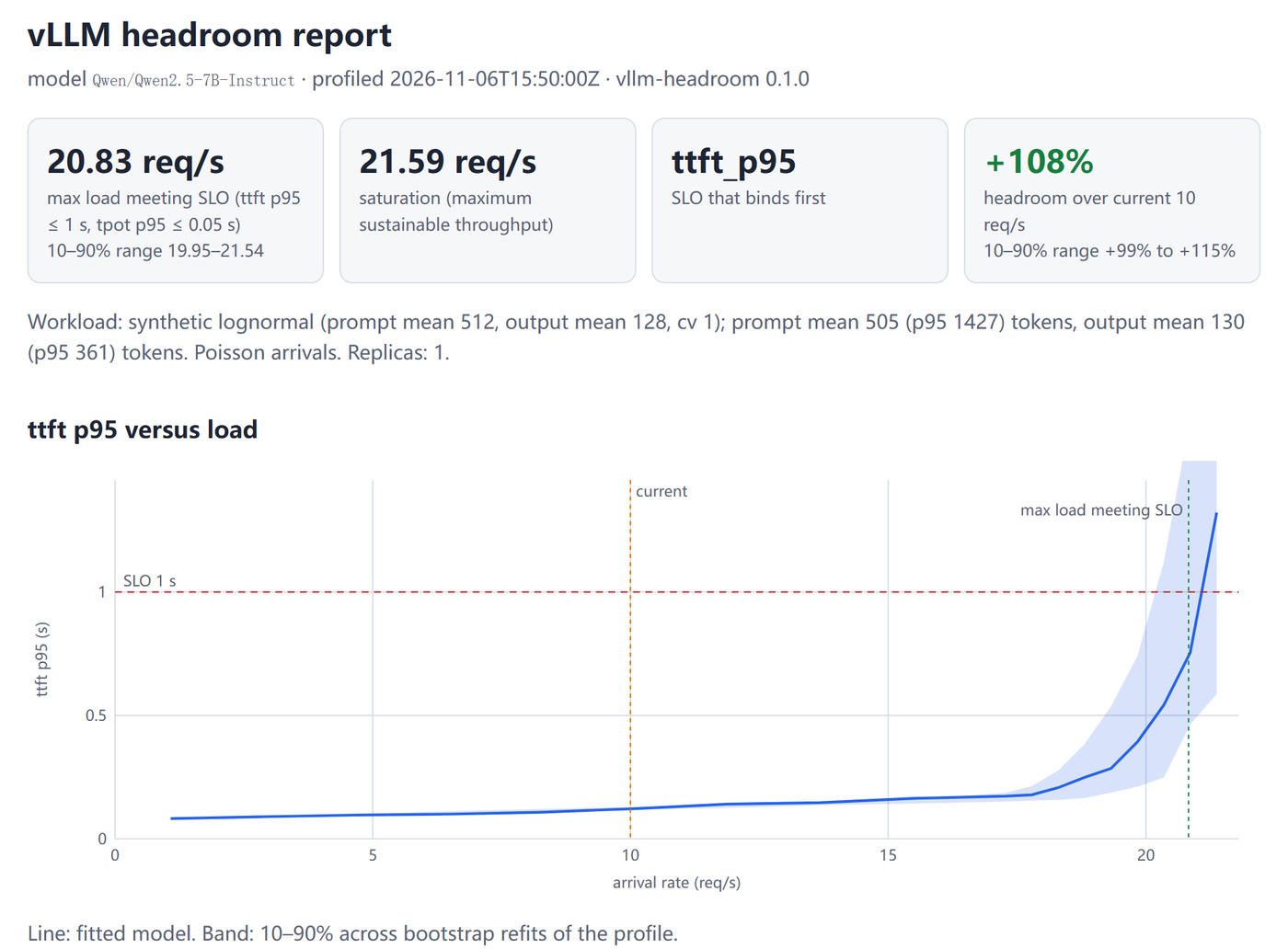
saturation:             21.589 req/s
max load meeting SLO:   20.827 req/s  (10-90%: 19.948-21.538; binding: ttft_p95)
headroom vs current:    +108%  (10-90%: +99% to +115%)
what-if max_num_seqs=128: max 27.745 req/s (saturation)
what-if replicas=2: max 42.475 req/s (saturation)
It writes a self-contained HTML report with latency-versus-load curves, the backtest and the fitted model. Nothing leaves your machine. See the full example report from a real 7B deployment.
Status: alpha (0.1). Tested against vLLM 0.31 on one GPU type; see Validation. Not affiliated with the vLLM project.
Why
Dashboards show what already happened, and forecasting tools extrapolate it. Neither tells you what
happens after you change something, such as more traffic, a different --max-num-seqs, one fewer
replica or a longer prompt mix, or how close you are to the point where latency falls off a cliff.
Load testing every option is slow. A model fitted to your server answers these questions in seconds.
Quick start
pip install vllm-headroom

# no GPU? profile a bundled simulated server and open the sample report (about 2-3 minutes)
vllm-headroom demo -o demo_report.html
Against a real server, ideally an idle replica or a staging copy:
# 1. profile (about 3-4 minutes); pass the server's own settings if you know them
vllm-headroom profile --url http://localhost:8000 \
    --max-num-seqs 256 --max-num-batched-tokens 8192 -o profile.json

# 2. analyse against your SLO and current traffic
vllm-headroom analyze profile.json --slo ttft_p95=2 --slo tpot_p95=0.1 \
    --current-rate 12 --workload my_requests.jsonl -o headroom.html

# 3. compare configurations quickly
vllm-headroom whatif profile.json --slo ttft_p95=2 \
    --change max_num_seqs=512 --change replicas=3 --change kv_scale=0.5
--workload is a JSONL file with one request per line, {"prompt_tokens": 812, "output_tokens": 230}
(OpenAI usage objects also work). Without it, --prompt-mean/--output-mean give a log-normal mix,
and the default is the mix used during profiling. SLO metrics are ttft (time to first token),
tpot (time per output token after the first) and e2e (end-to-end), each with any percentile:
ttft_p95=2, e2e_p99=30, tpot_p50=0.05.
How it works
1. Profile. Four phases against the OpenAI-compatible endpoint:
| phase | what is sent | what it identifies |
|---|---|---|
| prefill sweep | single requests, prompts from 128 to 8192 tokens, idle server | prefill cost per token and fixed overhead |
| decode waves | c identical requests at once, c = 1, 2, 4 ... 256, short and long prompts |
step time versus batch size and context length |
| admission probes | short requests sent while a wave decodes | how many steps a new request waits before it is scheduled |
| validation | open-loop Poisson load at 30, 50 and 70% of predicted saturation | nothing: held out for the backtest |
Prompts are random token ids, so prefix caching cannot shorten prefill and lengths are exact;
ignore_eos fixes output lengths. Streaming chunk timestamps give inter-token gaps; only gaps with no
prefill from another request are used for decode fitting. KV capacity is read from /metrics, and
max_num_seqs is inferred from the waves if you do not pass it.
2. Fit. Engine step time is modelled as
step = b0 + b_dec·(decoding sequences) + b_ctx·(their context tokens)
          + b_pf·(prefill tokens) + b_pfatt·(prefill attention term)
fitted with robust least squares, plus a client-visible overhead and an admit_lag (vLLM V1 plans
the next step while the current one runs, so a new request waits about one to two extra steps).
A bootstrap over profiling requests gives parameter uncertainty.
3. Simulate. A discrete-event simulator of vLLM-style continuous batching: chunked prefill under
max_num_batched_tokens, max_num_seqs, KV capacity with recompute preemption, several replicas
behind a least-loaded or round-robin router. Decode-only stretches are advanced in closed form, so a
1,500-request run takes well under a second.
4. Report. The maximum Poisson rate meeting every SLO (bisection), the saturation rate, latency curves with a 10–90% range across bootstrap refits, what-if comparisons and a backtest against the held-out validation load.
Validation
One run so far: Qwen2.5-7B-Instruct on vLLM 0.31.0, one NVIDIA RTX PRO 6000 Blackwell (96 GB),
--max-num-seqs 64 --max-num-batched-tokens 4096 --gpu-memory-utilization 0.5. The profile, report
and check script are in examples/qwen2.5-7b-vllm0.31. The workload
is the default log-normal mix (prompt mean 505, output mean 130 tokens). max_num_seqs was not passed
and was inferred correctly (64).
Backtest (held-out validation load from the same profiling run, never used for fitting):
| load (of predicted saturation) | requests | TTFT p50 | TTFT p95 | E2E p50 | E2E p95 |
|---|---|---|---|---|---|
| 30% (6.5 req/s) | 161 | +8% | +7% | +2% | +2% |
| 50% (10.8 req/s) | 268 | +9% | +12% | +2% | +2% |
| 70% (15.1 req/s) | 376 | +8% | +14% | +3% | +4% |
Near saturation (a separate later run against the same server with the fit frozen,
near_saturation_check.py):
| load | requests | TTFT p50 | TTFT p95 | E2E p50 | E2E p95 |
|---|---|---|---|---|---|
| 85% (18.5 req/s) | 833 | +7% | +5% | +3% | +5% |
| 95% (20.7 req/s) | 931 | 0% | −19% | −3% | 0% |
Entries are prediction error relative to measurement (positive = predicted slower). End-to-end latency is within 5% everywhere. TTFT is predicted somewhat pessimistically up to 85% load. At 95% load the TTFT tail is under-predicted by 19%, because close to saturation a small error in the rate moves the tail a lot. Treat the last few percent before saturation as unreliable and keep a margin. This is one model, one GPU and one workload; results on other setups may differ. If you run it on other hardware, please share your backtest: it is the most useful contribution right now.
The unit tests also check the simulator against a plain step-by-step reference implementation (identical results), recover known parameters from synthetic data, and run the full profile → fit → report pipeline over HTTP against the bundled simulated server.
Limits
- One replica is profiled; multiple replicas are modelled as identical copies.
- Arrivals are Poisson at a constant rate. Bursty traffic needs more headroom than reported.
- Not modelled: prefix-cache hits, speculative decoding, LoRA adapter switching, multi-model serving, disaggregated prefill/decode, pipeline-parallel bubbles, network between client and router.
- Batch sizes and prompt lengths beyond what was profiled are extrapolated.
- The uncertainty range reflects profiling noise, not every way production can differ.
- Profiling sends real load. Run it on a replica that is not serving users.
Output files
profile writes raw timings (no prompt or output text). analyze writes headroom.html and
headroom.json with the fitted parameters, curves, headroom, backtest and what-if results.
Development
pip install -e ".[dev]"
pytest -q
vllm-headroom mock-server --port 8001   # a simulated OpenAI-compatible server for experiments
License
Apache-2.0
1 maintainer

Metadata
1 maintainer
Release files for vllm-headroom 0.1.0
For a detailed explanation of source distributions (sdists) and built distributions (wheels), please see the package formats documentation.
Source distribution (sdist)
| File | Size | Uploaded | Provenance | Actions |
|---|---|---|---|---|
| vllm_headroom-0.1.0.tar.gz | 43.3 kB | Without provenance | Details for vllm_headroom-0.1.0.tar.gz |
Built distribution (wheel)
| File | Interpreter | ABI | Platform | Actions Reset |
|---|---|---|---|---|
| vllm_headroom-0.1.0-py3-none-any.whl | Python 3 | none | any | Details for vllm_headroom-0.1.0-py3-none-any.whl |
Total release size: 82.6 kB
Release files / vllm_headroom-0.1.0.tar.gz
| Download URL | vllm_headroom-0.1.0.tar.gz |
|---|---|
| Size | 43.3 kB |
| Tags | Source |
|
SHA-256 checksum How to use checksums |
ee15af8cda615fcdf7741c8cb061ecacce5127c6b8729457c79e70c853db5a87
|
|
BLAKE2b-256 checksum How to use checksums |
1beda33c24618a6e95d1a34e5845db623c0d4c4f3fafc64f9e254feda468384f
|
| Upload date | |
|
Uploaded using Trusted Publishing? What is trusted publishing? |
No |
| Uploaded via |
twine/7.0.0 CPython/3.12.4
|
Release files / vllm_headroom-0.1.0-py3-none-any.whl
| Download URL | vllm_headroom-0.1.0-py3-none-any.whl |
|---|---|
| Size | 39.3 kB |
| Tags | Python 3 |
|
SHA-256 checksum How to use checksums |
791f577558220445eafe0ef533a80b2d6750a87aa73f5aa886ac2e267109573f
|
|
BLAKE2b-256 checksum How to use checksums |
972df1688e0bf6153d4067fc04d4db6a3568e63eebe97391d16bc85cfc2b50e2
|
| Upload date | |
|
Uploaded using Trusted Publishing? What is trusted publishing? |
No |
| Uploaded via |
twine/7.0.0 CPython/3.12.4
|
Security for vllm-headroom 0.1.0
Provenance
Provenance describes where a file came from. On PyPI, provenance is shared via attestations, which provide a verifiable record of the build or publishing details. View details, limitations and caveats.
No provenance found
None of the files in this release were uploaded with provenance metadata.
A note on package security
PyPI is a repository for distributing packages, not a service for auditing them. While third-party security researchers and our staff do their best to detect and remove malicious packages, PyPI cannot guarantee the quality, security or suitability of any given package.
To learn more about protecting yourself from malicious actors, visit our package security documentation.













