
vllm-mlx
Continuous batching + OpenAI + Anthropic APIs in one server. Native Apple Silicon inference.
Read this in other languages: English · Español · Français · 中文






What is vllm-mlx?
A vLLM-style inference server for Apple Silicon Macs. Unlike Ollama or mlx-lm used directly, it ships continuous batching, paged KV cache, prefix caching, and SSD-tiered cache, and exposes both OpenAI /v1/* and Anthropic /v1/messages from a single process. Run LLMs, vision models, audio, and embeddings on Metal with unified memory, no conversion step.
Quick start (30 seconds)
pip install vllm-mlx
vllm-mlx serve mlx-community/Llama-3.2-3B-Instruct-4bit --port 8000 --continuous-batching
OpenAI SDK:
from openai import OpenAI
client = OpenAI(base_url="http://localhost:8000/v1", api_key="not-needed")
r = client.chat.completions.create(model="default", messages=[{"role": "user", "content": "Hi!"}])
print(r.choices[0].message.content)
Anthropic SDK / Claude Code:
export ANTHROPIC_BASE_URL=http://localhost:8000
export ANTHROPIC_API_KEY=not-needed
claude
Features
APIs
- OpenAI-compatible:
/v1/chat/completions,/v1/completions,/v1/embeddings,/v1/rerank,/v1/responses - Anthropic-compatible:
/v1/messages(streaming, tool use, system prompts) - MCP Tool Calling: 19 parsers (OpenAI, Anthropic, Gemini, Qwen, DeepSeek, Gemma, and more)
- Structured output: JSON Schema via
response_format(lm-format-enforcer)
Throughput & memory
- Continuous batching: high throughput for concurrent requests
- Paged KV cache: memory-efficient with prefix sharing
- SSD-tiered KV cache: spill prefix cache to disk for long-context agents (
--ssd-cache-dir) - Warm prompts: preload popular prefixes at startup (
--warm-prompts) for 1.3-2.25x TTFT - Prefix cache: trie-based, shared across requests
Multimodal
- Text + image + video + audio from one server
- Vision models: Gemma 3, Gemma 4, Qwen3-VL, Pixtral, Llama vision
- Audio input in chat (
audio_urlcontent blocks) - Native TTS: 11 voices, 15+ languages (Kokoro, Chatterbox, VibeVoice, VoxCPM)
- STT: Whisper family with RTF up to 197x on M4 Max
Reasoning & advanced
- Reasoning extraction: Qwen3, DeepSeek-R1, DeepSeek-V4 (
--reasoning-parser) - MoE expert reduction:
--moe-top-kfor +7-16% on Qwen3-30B-A3B - Speculative decoding:
--mtpfor Qwen3-Next - Sparse prefill: attention-based
--spec-prefillfor TTFT reduction
Observability
- Prometheus metrics:
/metricsendpoint with--metrics - Built-in benchmarker:
vllm-mlx bench-servefor prompt sweeps with CSV/JSON output
Native GPU acceleration
- Apple Silicon only (M1, M2, M3, M4, M5) with Metal kernels via MLX
- Unified memory, no model conversion
Performance
LLM decode (M4 Max, 128 GB, greedy, single stream):
| Model | Tok/s | Memory |
|---|---|---|
| Qwen3-0.6B-8bit | 417.9 | 0.7 GB |
| Llama-3.2-3B-Instruct-4bit | 205.6 | 1.8 GB |
| Qwen3-30B-A3B-4bit | 127.7 | ~18 GB |
Audio speech-to-text (M4 Max, RTF = real-time factor):
| Model | RTF | Use case |
|---|---|---|
| whisper-tiny | 197x | Real-time / low latency |
| whisper-large-v3-turbo | 55x | Quality + speed |
| whisper-large-v3 | 24x | Highest accuracy |
See docs/benchmarks/ for continuous-batching results, KV-cache quantization (4-bit / 8-bit / fp16), and MoE top-k sweeps.
Examples
Anthropic API (Claude Code, OpenCode)
vllm-mlx serve mlx-community/Qwen3-8B-4bit --port 8000
export ANTHROPIC_BASE_URL=http://localhost:8000
export ANTHROPIC_API_KEY=not-needed
claude
Reasoning models (Qwen3, DeepSeek-R1)
vllm-mlx serve mlx-community/Qwen3-8B-4bit --reasoning-parser qwen3
r = client.chat.completions.create(
    model="default",
    messages=[{"role": "user", "content": "What is 17 * 23?"}],
)
print("Thinking:", r.choices[0].message.reasoning)
print("Answer:",   r.choices[0].message.content)
Multimodal (image + text)
vllm-mlx serve mlx-community/Qwen3-VL-4B-Instruct-3bit --port 8000
r = client.chat.completions.create(
    model="default",
    messages=[{"role": "user", "content": [
        {"type": "text", "text": "What is in this image?"},
        {"type": "image_url", "image_url": {"url": "https://example.com/cat.jpg"}},
    ]}],
)
Structured output (JSON Schema)
r = client.chat.completions.create(
    model="default",
    messages=[{"role": "user", "content": "List 3 colors."}],
    response_format={
        "type": "json_schema",
        "json_schema": {
            "schema": {"type": "object", "properties": {"colors": {"type": "array", "items": {"type": "string"}}}}
        },
    },
)
Reranking (/v1/rerank)
curl http://localhost:8000/v1/rerank -H 'Content-Type: application/json' -d '{
  "model": "default",
  "query": "apple silicon inference",
  "documents": ["MLX is Apples framework", "Metal kernels on M-series", "CUDA on NVIDIA"]
}'
The built-in MLX reranker forward path supports standard BERT/XLM-RoBERTa
sequence-classification weights with gelu, gelu_new/gelu_fast, relu, or
silu/swish hidden_act values. Other activations fail explicitly so custom
reranker architectures can add a dedicated adapter instead of silently using the
wrong activation.
Embeddings
vllm-mlx serve <llm-model> --embedding-model mlx-community/all-MiniLM-L6-v2-4bit
emb = client.embeddings.create(model="mlx-community/all-MiniLM-L6-v2-4bit", input=["Hello", "World"])
Audio (TTS / STT)
pip install vllm-mlx[audio]
brew install espeak-ng        # macOS, needed for non-English TTS

python examples/tts_example.py "Hello, how are you?" --play
python examples/tts_multilingual.py "Hola mundo" --lang es --play
Built-in benchmarking
vllm-mlx bench-serve --url http://localhost:8000 --concurrency 5 --prompts prompts.txt --output results.csv

# Product-style workload with quality checks and metrics deltas
vllm-mlx bench-serve --url http://localhost:8000 --workload workload.json --repetitions 5 --output results.json

# Append workload rows into SQLite for longitudinal comparisons
vllm-mlx bench-serve --url http://localhost:8000 --workload workload.json --repetitions 5 --format sqlite --output bench.db
Model acquisition and conversion
# Inspect repo metadata, file sizes, config, and rough fit before downloading weights
vllm-mlx model inspect mlx-community/Llama-3.2-3B-Instruct-4bit

# Acquire with resumable Hugging Face transfer and write a local artifact manifest
vllm-mlx model acquire mlx-community/Llama-3.2-3B-Instruct-4bit --target-dir ./models/llama-3b-4bit

# Wrap mlx-lm conversion and record the exact recipe in the converted artifact
vllm-mlx model convert meta-llama/Llama-3.2-3B-Instruct --output ./models/llama-3b-mlx-q4 --quantize --q-bits 4 --q-group-size 64 --q-mode affine
Prometheus metrics
vllm-mlx serve <model> --metrics
curl http://localhost:8000/metrics
Installation
Using uv (recommended):
uv tool install vllm-mlx                 # CLI, system-wide
# or in a project
uv pip install vllm-mlx
Using pip:
pip install vllm-mlx

# Audio extras
pip install vllm-mlx[audio]
brew install espeak-ng
python -m spacy download en_core_web_sm
From source:
git clone https://github.com/waybarrios/vllm-mlx.git
cd vllm-mlx
pip install -e .
See Installation Guide for full options.
Documentation
Browse the complete documentation at vllm-mlx.is-a.dev.
- Getting started: Installation · Quick Start
- Servers & APIs: OpenAI server · Anthropic Messages API · Python API
- Features: Multimodal · Audio · Embeddings · Reasoning · MCP & Tool Calling · Tool Parsers
- Performance: Continuous Batching · Multi-Model Serving · Warm Prompts · MoE Top-K
- Reference: CLI · Models · Configuration
- Benchmarks: LLM · Image · Video · Audio
Architecture
┌─────────────────────────────────────────────────────────────────────────┐
│                           vllm-mlx Server                               │
│   OpenAI /v1/*  ·  Anthropic /v1/messages  ·  /v1/rerank  ·  /metrics   │
└─────────────────────────────────────────────────────────────────────────┘
                                   │
                                   ▼
┌─────────────────────────────────────────────────────────────────────────┐
│  Continuous batching · Paged KV cache · Prefix cache · SSD tiering      │
└─────────────────────────────────────────────────────────────────────────┘
                                   │
        ┌─────────────┬────────────┴────────────┬─────────────┐
        ▼             ▼                         ▼             ▼
┌───────────────┐ ┌───────────────┐ ┌───────────────┐ ┌───────────────┐
│    mlx-lm     │ │   mlx-vlm     │ │   mlx-audio   │ │mlx-embeddings │
│    (LLMs)     │ │  (Vision)     │ │  (TTS + STT)  │ │ (Embeddings)  │
└───────────────┘ └───────────────┘ └───────────────┘ └───────────────┘
                                   │
                                   ▼
┌─────────────────────────────────────────────────────────────────────────┐
│                   MLX · Metal kernels · Unified memory                  │
└─────────────────────────────────────────────────────────────────────────┘
Contributing
Bug fixes, perf work, docs, and benchmarks on different Apple Silicon chips all welcome. See the Contributing Guide.
License
Apache 2.0. See LICENSE.
Citation
@software{vllm_mlx2025,
  author = {Barrios, Wayner},
  title  = {vllm-mlx: Apple Silicon MLX Backend for vLLM},
  year   = {2025},
  url    = {https://github.com/waybarrios/vllm-mlx},
  note   = {Native GPU-accelerated LLM and vision-language model inference on Apple Silicon}
}
Acknowledgments
- MLX. Apple's ML framework.
- mlx-lm. LLM inference library.
- mlx-vlm. Vision-language models.
- mlx-audio. Text-to-Speech and Speech-to-Text.
- mlx-embeddings. Text embeddings.
- Rapid-MLX. Community fork of vllm-mlx.
- vLLM. High-throughput LLM serving. vllm-mlx is inspired by vLLM and adopts its continuous-batching and paged KV-cache design for Apple Silicon via MLX.
Star history
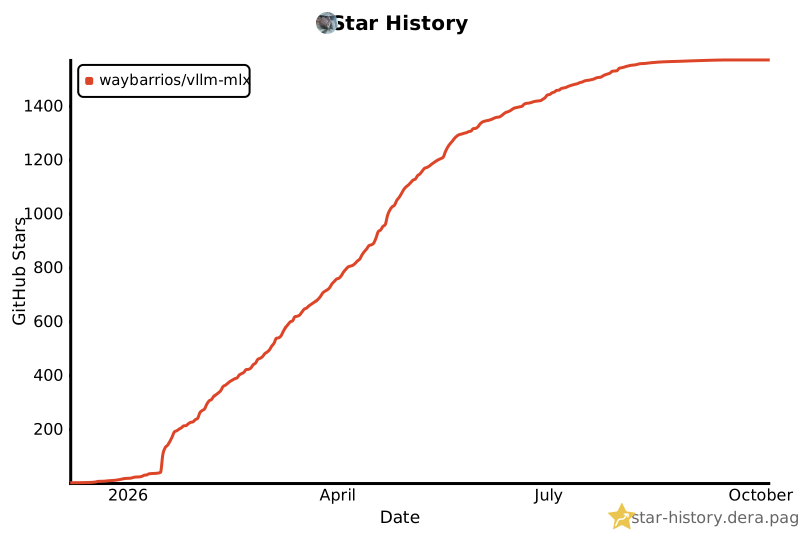
If vllm-mlx helped you, please star the repo. It helps more Apple Silicon devs find it.
1 maintainer

Metadata
1 maintainer
Release files for vllm-mlx 0.5.0
For a detailed explanation of source distributions (sdists) and built distributions (wheels), please see the package formats documentation.
Source distribution (sdist)
| File | Size | Uploaded | |
|---|---|---|---|
| vllm_mlx-0.5.0.tar.gz | 1.0 MB | Details |
Built distribution (wheel)
| File | Interpreter | ABI | Platform | Reset |
|---|---|---|---|---|
| vllm_mlx-0.5.0-py3-none-any.whl | Python 3 | none | any | Details |
Total release size: 1.7 MB
Release files / vllm_mlx-0.5.0.tar.gz
| Download URL | vllm_mlx-0.5.0.tar.gz |
|---|---|
| Size | 1.0 MB |
| Tags | Source |
|
SHA-256 checksum How to use checksums |
8d46a7725bbf7f8fff17ecd8c9c912d0a9d6472e8e0460135d0f984a73af24e1
|
|
BLAKE2b-256 checksum How to use checksums |
b3737a78ebb5657a723c92c092aa970141cd5213e509160904c406bd028bc6bb
|
| Upload date | |
|
Uploaded using Trusted Publishing? What is trusted publishing? |
Yes |
| Uploaded via |
twine/7.0.0 CPython/3.13.14
|
Provenance
Provenance describes where a file came from. On PyPI, provenance is shared via attestations, which provide a verifiable record of the build or publishing details. View details, limitations and caveats.


PyPI Publish Attestation
PyPI verified that this artifact, at this checksum, originated from the publisher listed below.
Signed by GitHub Actions, verified by PyPI on Sep 17, 2026.
Transparency logRelease files / vllm_mlx-0.5.0-py3-none-any.whl
| Download URL | vllm_mlx-0.5.0-py3-none-any.whl |
|---|---|
| Size | 682.9 kB |
| Tags | Python 3 |
|
SHA-256 checksum How to use checksums |
b2ca2e1dd680fa9e9383ad53c8768143e25b6cf222be943093494c1fb6ebb987
|
|
BLAKE2b-256 checksum How to use checksums |
1d19738f2b5b8a0cd09259a6a66a66e8816212dffb9fa970a07e2d2dd52c2b22
|
| Upload date | |
|
Uploaded using Trusted Publishing? What is trusted publishing? |
Yes |
| Uploaded via |
twine/7.0.0 CPython/3.13.14
|
Provenance
Provenance describes where a file came from. On PyPI, provenance is shared via attestations, which provide a verifiable record of the build or publishing details. View details, limitations and caveats.
PyPI Publish Attestation
PyPI verified that this artifact, at this checksum, originated from the publisher listed below.
Signed by GitHub Actions, verified by PyPI on Sep 17, 2026.
Transparency log













