
vLLora — Debug your agents in real time


Debug your Agents in Real Time
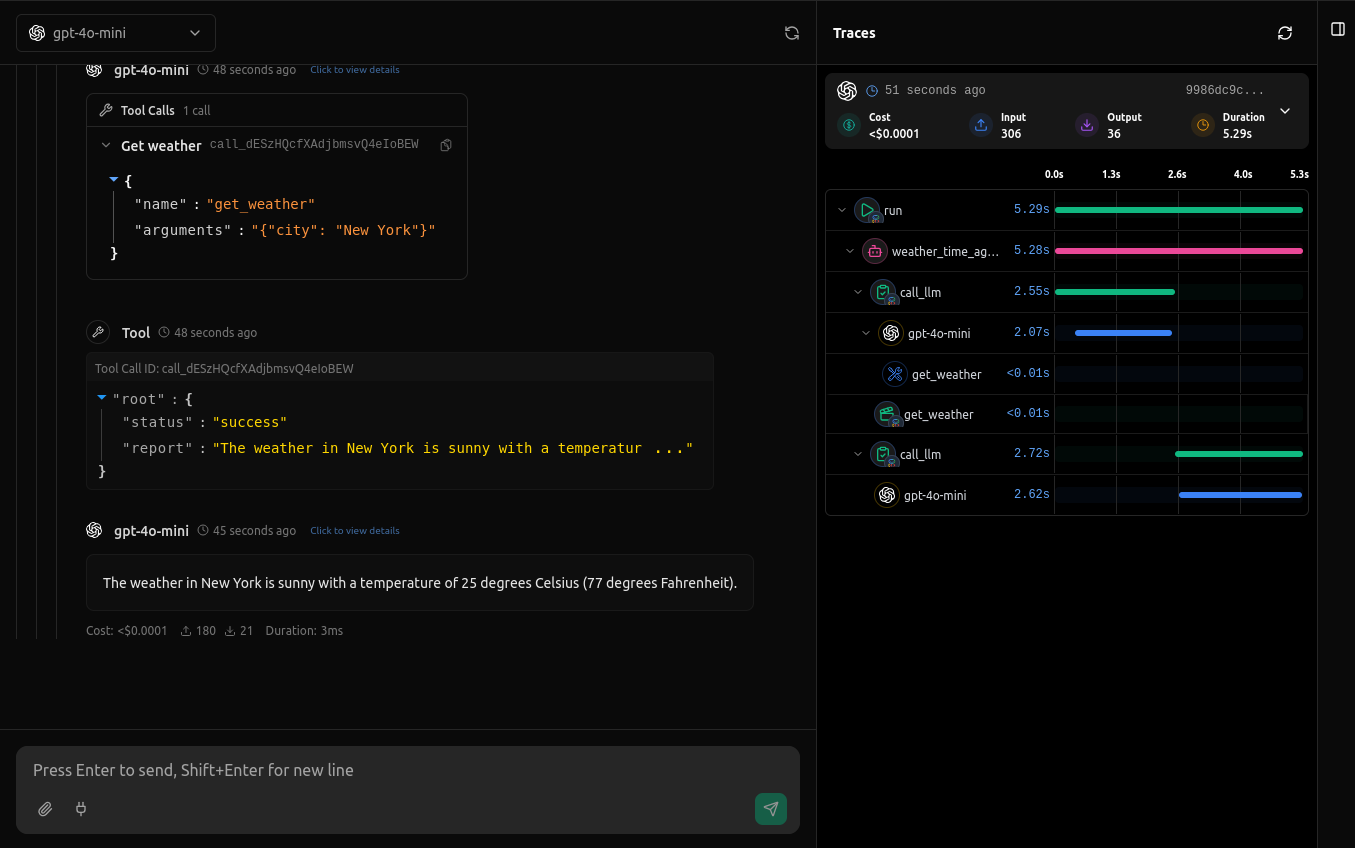
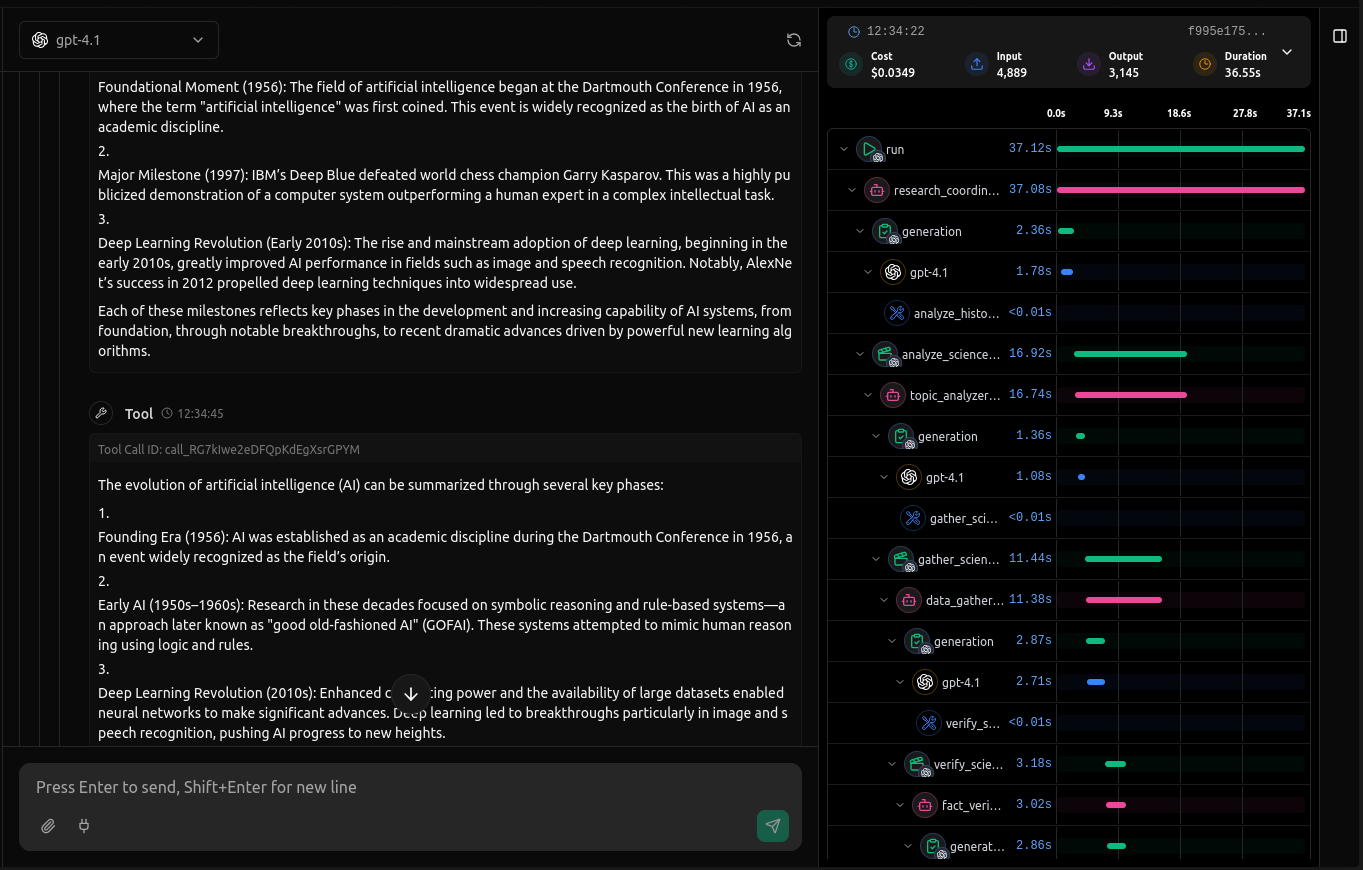
This Python package is an extension of vLLora — a lightweight, real-time debugging platform for AI agents. This package adds extra tracing and observability to your agent frameworks. It captures detailed framework-level metadata — decisions, latency, and cost — and sends it to your vLLora Gateway instance, giving you a complete picture of how your agents operate across LangChain, OpenAI Agents, Google ADK, CrewAI, and more.
⚡ Quick Start
Google ADK Tracing
pip install vllora[adk]
# Import and initialize vLLora tracing
# First initialize vLLora before defining any agents
from vllora.adk import init
init()

import datetime
from zoneinfo import ZoneInfo
from google.adk.agents import Agent

def get_weather(city: str) -> dict:
    if city.lower() != "new york":
        return {"status": "error", "error_message": f"Weather information for '{city}' is not available."}
    return {"status": "success", "report": "The weather in New York is sunny with a temperature of 25 degrees Celsius (77 degrees Fahrenheit)."}

def get_current_time(city: str) -> dict:
    if city.lower() != "new york":
        return {"status": "error", "error_message": f"Sorry, I don't have timezone information for {city}."}
    tz = ZoneInfo("America/New_York")
    now = datetime.datetime.now(tz)
    return {"status": "success", "report": f'The current time in {city} is {now.strftime("%Y-%m-%d %H:%M:%S %Z%z")}'}

root_agent = Agent(
    name="weather_time_agent",
    model="gemini-2.0-flash",
    description=("Agent to answer questions about the time and weather in a city." ),
    instruction=("You are a helpful agent who can answer user questions about the time and weather in a city."),
    tools=[get_weather, get_current_time],
)
OpenAI Agents Tracing
When you call vllora.openai.init(), the OpenAI client is automatically configured to use your vLLora gateway by setting the client's base_url to the value of VLLORA_API_BASE_URL.
pip install vllora[openai]
# Import and initialize vLLora tracing
from vllora.openai import init
init()

# Import agent components after initializing tracing
from agents import Agent, Runner, set_default_openai_client, RunConfig
from openai import AsyncOpenAI
import os

# Configure OpenAI client
client = AsyncOpenAI(
    api_key="no_key",
    base_url=os.environ.get("VLLORA_API_BASE_URL"),
)

set_default_openai_client(client)

agent = Agent(
    name="Math Tutor",
    model="gpt-4",
    instruction="You are a math tutor who can help students with their math homework.",
)

# Your agent will be automatically traced by vLLora
response = await Runner.run(agent, input="Hello World")
Note: Always initialize vLLora before importing any framework-specific classes to ensure proper instrumentation.
🛠️ Supported Frameworks
| Framework | Installation | Import Pattern | Status |
|---|---|---|---|
| Google ADK | pip install vllora[adk] |
from vllora.adk import init |
✅ Supported |
| OpenAI Agents | pip install vllora[openai] |
from vllora.openai import init |
✅ Supported |
| LangChain | pip install vllora[langchain] |
from vllora.langchain import init |
🚧 Coming Soon |
| CrewAI | pip install vllora[crewai] |
from vllora.crewai import init |
🚧 Coming Soon |
| Agno | pip install vllora[agno] |
from vllora.agno import init |
🚧 Coming Soon |
🔧 How It Works
vLLora uses intelligent monkey patching to instrument your AI frameworks at runtime:
👉 Click to see technical details for each framework
Google ADK
- Patches
Agent.__init__to inject callbacks - Tracks agent hierarchies and tool usage
- Maintains thread context across invocations
- Enriches spans with agent metadata
OpenAI Agents
- Intercepts agent execution via OpenInference instrumentation
- Tracks agent runs and LLM calls
- Propagates trace context through agent interactions
- Correlates spans across agent hierarchies
📦 Installation
# Install core vLLora package
pip install vllora

# For specific framework tracing - install framework extras
pip install vllora[adk]      # Google ADK tracing
pip install vllora[openai]   # OpenAI Agents tracing

# Install all supported frameworks
pip install vllora[all]
🔑 Configuration
Set your configuration (optional credentials can be passed directly to the init() function):
export VLLORA_API_BASE_URL="http://localhost:9090"
⚙️ Advanced Configuration
Environment Variables
| Variable | Description | Default |
|---|---|---|
VLLORA_API_BASE_URL |
Your vLLora gateway URL; used by vllora.openai.init() to set the OpenAI client's base_url |
Required |
VLLORA_API_KEY |
Your vLLora API key. Optional for OpenAI routing (falls back to "no_key"), but required if your gateway enforces auth or when using vllora.adk.vllora_llm. |
Optional |
VLLORA_TRACING |
Enable/disable tracing | true |
VLLORA_TRACING_EXPORTERS |
Comma-separated list of exporters | otlp |
API Reference
Initialization Functions
Each framework has a simple init() function that handles all necessary setup:
vllora.adk.init(): Patches Google ADK Agent class with vLLora callbacksvllora.openai.init(): Initializes OpenAI Agents tracing and sets OpenAI clientbase_urlfromVLLORA_API_BASE_URL
All init functions accept optional parameters for custom configuration (collector_endpoint, api_key, project_id)
🛟 Troubleshooting
Common Issues
- Missing Configuration: Ensure
VLLORA_API_BASE_URLis set to your vLLora instance - Tracing Not Working: Check that initialization functions are called before creating agents
- Framework Conflicts: Initialize vLLora integration before other instrumentation
Debug Mode
Enable console output for debugging:
export VLLORA_TRACING_EXPORTERS="otlp,console"
Disable tracing entirely:
export VLLORA_TRACING="false"
Development
Setting up the environment
- Clone the repository
- Create a
.envfile with your configuration:
VLLORA_API_BASE_URL="http://localhost:9090"
VLLORA_API_KEY="no_api_key"
Publishing
poetry build
poetry publish
Requirements
- Python >= 3.10
- Framework-specific dependencies (installed automatically)
- OpenTelemetry libraries (installed automatically)
License
This project is licensed under the MIT License - see the LICENSE file for details.
Support
- GitHub Issues: Report bugs and feature requests
- Documentation: vLLora Documentation
1 maintainer

Release files for vllora 0.0.2
For a detailed explanation of source distributions (sdists) and built distributions (wheels), please see the package formats documentation.
Source distribution (sdist)
| File | Size | Uploaded | |
|---|---|---|---|
| vllora-0.0.2.tar.gz | 15.2 kB | Details |
Built distribution (wheel)
| File | Interpreter | ABI | Platform | Reset |
|---|---|---|---|---|
| vllora-0.0.2-py3-none-any.whl | Python 3 | none | any | Details |
Total release size: 31.4 kB
Release files / vllora-0.0.2.tar.gz
| Download URL | vllora-0.0.2.tar.gz |
|---|---|
| Size | 15.2 kB |
| Tags | Source |
|
SHA-256 checksum How to use checksums |
144a5d56bc5a01061ae2ab4cb94bbe8106bbe01a9e031497d455386e827b8f4f
|
|
BLAKE2b-256 checksum How to use checksums |
5d7bc09d952d025b5ac53de84a56fc02942f21a3e0e061355231c30aa633e511
|
| Upload date | |
|
Uploaded using Trusted Publishing? What is trusted publishing? |
No |
| Uploaded via |
poetry/2.1.3 CPython/3.10.12 Linux/6.8.0-86-generic
|
Release files / vllora-0.0.2-py3-none-any.whl
| Download URL | vllora-0.0.2-py3-none-any.whl |
|---|---|
| Size | 16.2 kB |
| Tags | Python 3 |
|
SHA-256 checksum How to use checksums |
098652475503dea2d0ce726e850081e5ff2d25d4e3d46d39820af4fb4cf6c52b
|
|
BLAKE2b-256 checksum How to use checksums |
2c6e1e802ad54d49df8750237813a40249f74561f1bd78471110955a844d744f
|
| Upload date | |
|
Uploaded using Trusted Publishing? What is trusted publishing? |
No |
| Uploaded via |
poetry/2.1.3 CPython/3.10.12 Linux/6.8.0-86-generic
|














