
Local AI inference for Apple Silicon — Text, Image, Video & Audio generation on Mac

Project description

Local AI Engine for Apple Silicon
Run LLMs, VLMs, and image generation models entirely on your Mac.
OpenAI + Anthropic + Ollama compatible API. No cloud. No API keys. No data leaving your machine.







Quickstart • Models • Features • Image Gen • API • Desktop App • JANG • CLI • Config • Contributing • 한국어
JANG 2-bit destroys MLX 4-bit on MiniMax M2.5:
Quantization MMLU (200q) Size JANG_2L (2-bit) 74% 89 GB MLX 4-bit 26.5% 120 GB MLX 3-bit 24.5% 93 GB MLX 2-bit 25% 68 GB Adaptive mixed-precision keeps critical layers at higher precision. Scores at jangq.ai. Models at JANGQ-AI.
 |
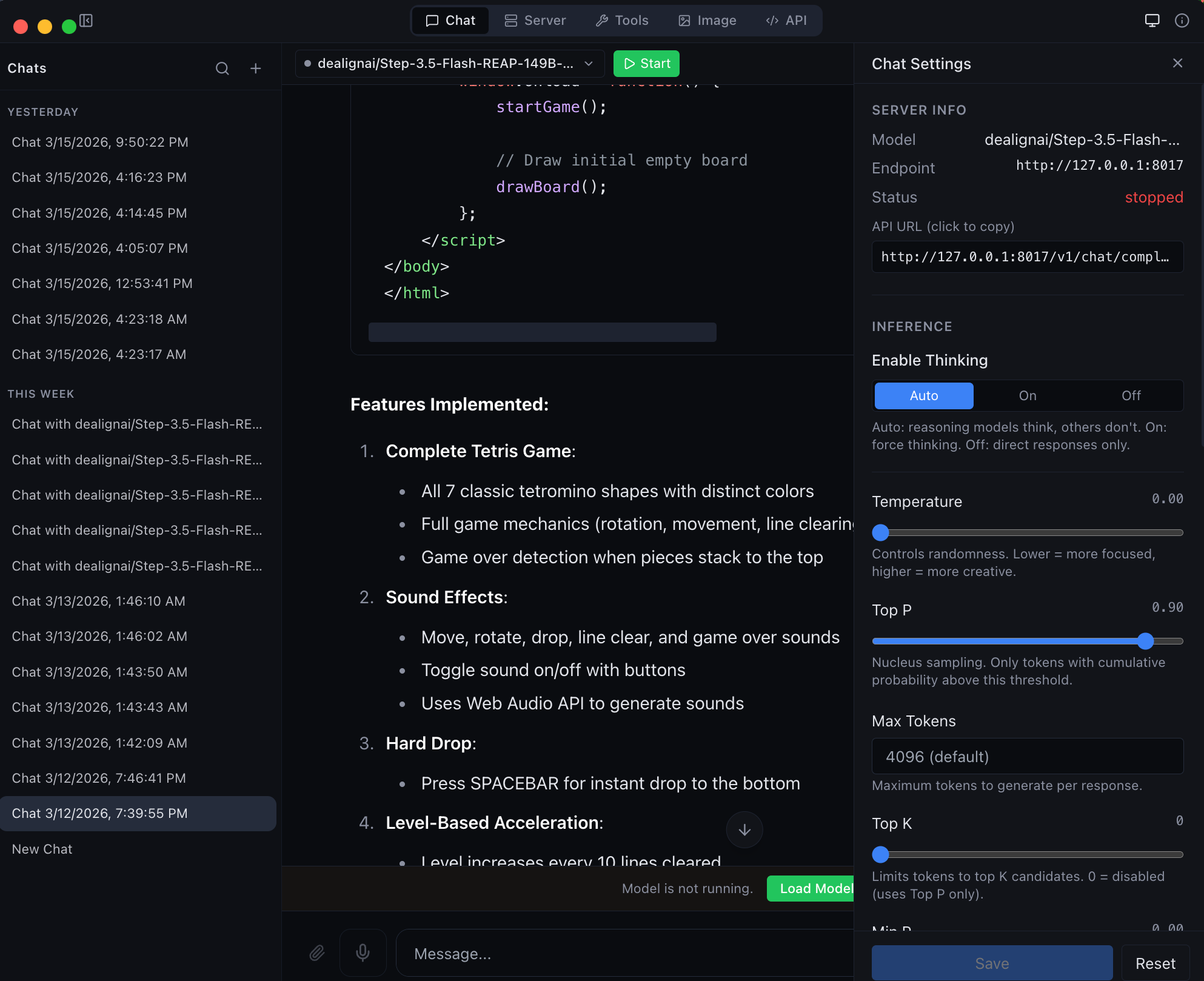 |
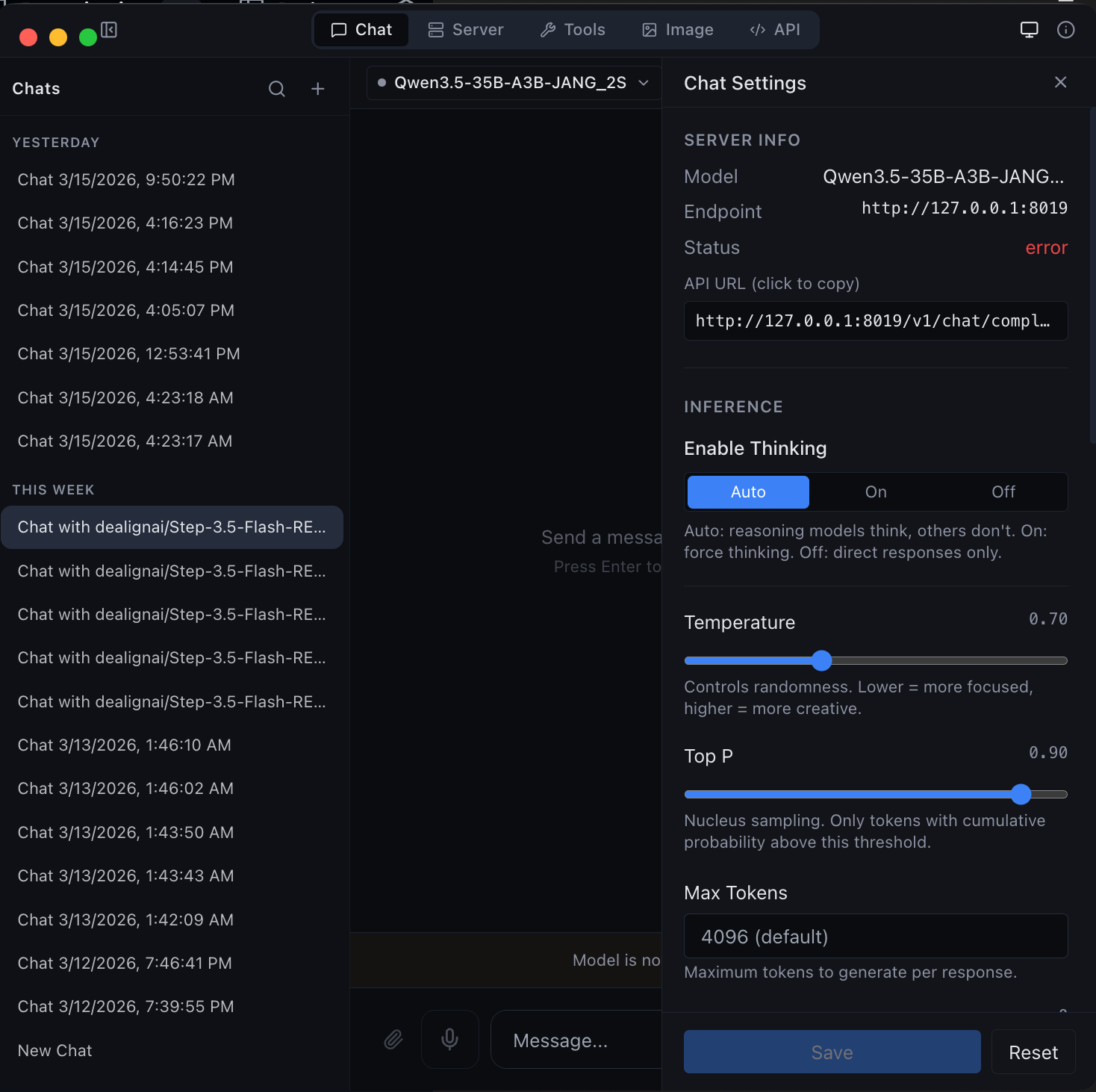
| Chat with any MLX model -- thinking mode, streaming, and syntax highlighting | Agentic chat with full coding capabilities -- tool use and structured output |
Quickstart
Install from PyPI
Published on PyPI as vmlx -- install and run in one command:
# Recommended: uv (fast, no venv hassle)
brew install uv
uv tool install vmlx
vmlx serve mlx-community/Qwen3-8B-4bit

# Or: pipx (isolates from system Python)
brew install pipx
pipx install vmlx
vmlx serve mlx-community/Qwen3-8B-4bit

# Or: pip in a virtual environment
python3 -m venv ~/.vmlx-env && source ~/.vmlx-env/bin/activate
pip install vmlx
vmlx serve mlx-community/Qwen3-8B-4bit
Note: On macOS 14+, bare
pip installfails with "externally-managed-environment". Useuv,pipx, or a venv.
Your local AI server is now running at http://0.0.0.0:8000 with an OpenAI + Anthropic compatible API. Works with any model from mlx-community -- thousands of models ready to go.
Or download the desktop app
Get MLX Studio -- a native macOS app with chat UI, model management, image generation, and developer tools. No terminal required. Just download the DMG and drag to Applications.
Use with OpenAI SDK
from openai import OpenAI

client = OpenAI(base_url="http://localhost:8000/v1", api_key="not-needed")
response = client.chat.completions.create(
    model="local",
    messages=[{"role": "user", "content": "Hello!"}],
    stream=True,
)
for chunk in response:
    print(chunk.choices[0].delta.content or "", end="", flush=True)
Use with Anthropic SDK
import anthropic

client = anthropic.Anthropic(base_url="http://localhost:8000/v1", api_key="not-needed")
message = client.messages.create(
    model="local",
    max_tokens=1024,
    messages=[{"role": "user", "content": "Hello!"}],
)
print(message.content[0].text)
Use with curl
curl http://localhost:8000/v1/chat/completions \
  -H "Content-Type: application/json" \
  -d '{
    "model": "local",
    "messages": [{"role": "user", "content": "Hello!"}],
    "stream": true
  }'
Model Support
vMLX runs any MLX model. Point it at a HuggingFace repo or local path and go.
| Type | Models |
|---|---|
| Text LLMs | Qwen 2/2.5/3/3.5, Llama 3/3.1/3.2/3.3/4, Mistral/Mixtral, Gemma 3, Phi-4, DeepSeek, GLM-4, MiniMax, Nemotron, StepFun, and any mlx-lm model |
| Vision LLMs | Qwen-VL, Qwen3.5-VL, Pixtral, InternVL, LLaVA, Gemma 3n |
| MoE Models | Qwen 3.5 MoE (A3B/A10B), Mixtral, DeepSeek V2/V3, MiniMax M2.5, Llama 4 |
| Hybrid SSM | Nemotron-H, Jamba, GatedDeltaNet (Mamba + Attention) |
| Image Gen | Flux Schnell/Dev, Z-Image Turbo (via mflux) |
| Image Edit | Qwen Image Edit (via mflux) |
| Embeddings | Any mlx-lm compatible embedding model |
| Reranking | Cross-encoder reranking models |
| Audio | Kokoro TTS, Whisper STT (via mlx-audio) |
Features
Inference Engine
| Feature | Description |
|---|---|
| Continuous Batching | Handle multiple concurrent requests efficiently |
| Prefix Cache | Reuse KV states for repeated prompts -- makes follow-up messages instant |
| Paged KV Cache | Block-based caching with content-addressable deduplication |
| KV Cache Quantization | Compress cached states to q4/q8 for 2-4x memory savings |
| Disk Cache (L2) | Persist prompt caches to SSD -- survives server restarts |
| Block Disk Cache | Per-block persistent cache paired with paged KV cache |
| Speculative Decoding | Small draft model proposes tokens for 20-90% speedup |
| Prompt Lookup Decoding | No draft model needed — reuses n-gram matches from the prompt/context. Best for structured or repetitive output (code, JSON, schemas). Enable with --enable-pld. |
| JIT Compilation | mx.compile Metal kernel fusion (experimental) |
| Hybrid SSM Support | Mamba/GatedDeltaNet layers handled correctly alongside attention |
| Distributed Compute | Pipeline parallelism across multiple Macs via Thunderbolt 5 / Ethernet / WiFi |
Distributed Inference (Multi-Mac)
Run models too large for a single Mac across 2+ machines. Each Mac loads a subset of transformer layers and they communicate hidden states over the network.
# On worker Macs:
pip install vmlx
vmlx-worker --secret mysecret

# On coordinator Mac (runs the server):
vmlx serve JANGQ-AI/Qwen3.5-Coder-Rerank-397B-A27B-JANG_2L --distributed --cluster-secret mysecret
| Feature | Description |
|---|---|
| Pipeline Parallelism | Split layers across nodes -- hidden state (~8KB/step) flows sequentially |
| Auto-Discovery | Bonjour mDNS, UDP broadcast, HTTP probes, Tailscale, cached peers, manual IP |
| Capability-Scored Election | Most powerful Mac becomes coordinator automatically |
| Any Network Works | TB5 (120 Gbps), 10GbE, 1GbE, WiFi, Tailscale -- PP is not bandwidth-bound |
| JANG Support | Each worker loads its layer range from JANG safetensors (mmap) |
| Live Node List | Desktop app shows discovered nodes, link type, latency, layer assignments |
| Cluster API | /v1/cluster/status, /v1/cluster/nodes, /v1/cluster/scan REST endpoints |
5-Layer Cache Architecture
Request -> Tokens
    |
L1: Memory-Aware Prefix Cache (or Paged Cache)
    | miss
L2: Disk Cache (or Block Disk Store)
    | miss
Inference -> float16 KV states
    |
KV Quantization -> q4/q8 for storage
    |
Store back into L1 + L2
Tool Calling
Auto-detected parsers for every major model family:
qwen - llama - mistral - hermes - deepseek - glm47 - minimax - nemotron - granite - functionary - xlam - kimi - step3p5
Reasoning / Thinking Mode
Auto-detected reasoning parsers that extract <think> blocks:
qwen3 (Qwen3, QwQ, MiniMax, StepFun) - deepseek_r1 (DeepSeek R1, Gemma 3, GLM, Phi-4) - openai_gptoss (GLM Flash, GPT-OSS)
Audio
| Feature | Description |
|---|---|
| Text-to-Speech | Kokoro TTS via mlx-audio -- multiple voices, streaming output |
| Speech-to-Text | Whisper STT via mlx-audio -- transcription and translation |
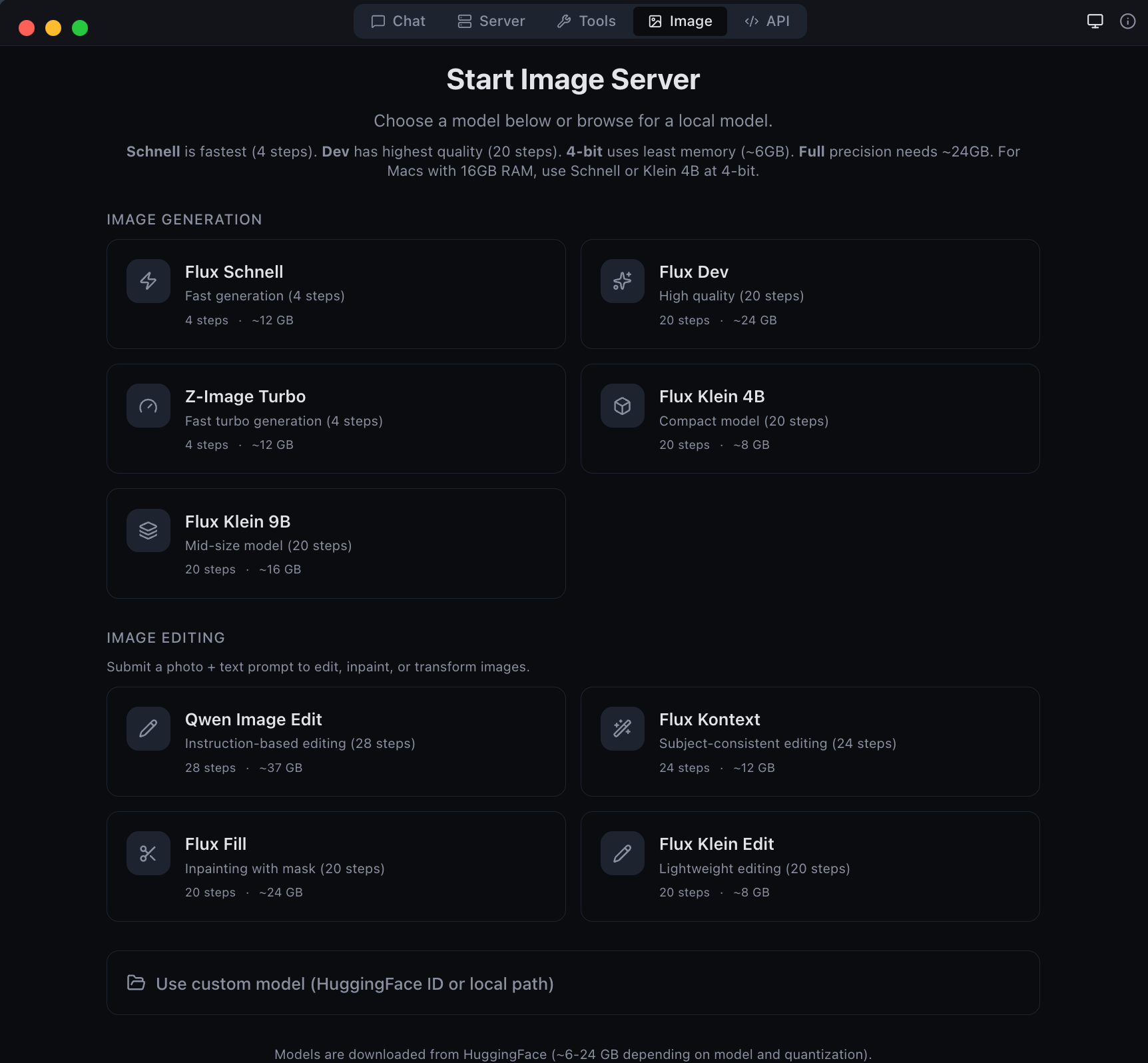
Image Generation & Editing
Generate and edit images locally with Flux models via mflux.
pip install vmlx[image]

# Image generation
vmlx serve schnell                    # or dev, z-image-turbo
vmlx serve ~/.mlxstudio/models/image/flux1-schnell-4bit

# Image editing
vmlx serve qwen-image-edit            # instruction-based editing
Generation API
curl http://localhost:8000/v1/images/generations \
  -H "Content-Type: application/json" \
  -d '{
    "model": "schnell",
    "prompt": "A cat astronaut floating in space with Earth in the background",
    "size": "1024x1024",
    "n": 1
  }'
# Python (OpenAI SDK)
response = client.images.generate(
    model="schnell",
    prompt="A cat astronaut floating in space",
    size="1024x1024",
    n=1,
)
Editing API
# Edit an image with a text prompt (Flux Kontext / Qwen Image Edit)
curl http://localhost:8000/v1/images/edits \
  -H "Content-Type: application/json" \
  -d '{
    "model": "flux-kontext",
    "prompt": "Change the background to a sunset",
    "image": "<base64-encoded-image>",
    "size": "1024x1024",
    "strength": 0.8
  }'
# Python
import base64
with open("source.png", "rb") as f:
    image_b64 = base64.b64encode(f.read()).decode()

response = requests.post("http://localhost:8000/v1/images/edits", json={
    "model": "flux-kontext",
    "prompt": "Make the sky purple",
    "image": image_b64,
    "size": "1024x1024",
    "strength": 0.8,
})
Supported Image Models
Generation Models:
| Model | Steps | Speed | Memory |
|---|---|---|---|
| Flux Schnell | 4 | Fastest | ~6-24 GB |
| Z-Image Turbo | 4 | Fast | ~6-24 GB |
| Flux Dev | 20 | Slow | ~6-24 GB |
Editing Models:
| Model | Steps | Type | Memory |
|---|---|---|---|
| Qwen Image Edit | 28 | Instruction-based editing | ~54 GB |
API Reference
API Gateway
The desktop app runs an API Gateway on a single port (default 8080) that routes requests to all loaded models by name. Run multiple models simultaneously and access them all through one URL.
# All models accessible through the gateway
curl http://localhost:8080/v1/chat/completions \
  -d '{"model": "Qwen3.5-122B", "messages": [{"role": "user", "content": "Hi"}]}'

# Works with Ollama CLI too
OLLAMA_HOST=http://localhost:8080 ollama run Qwen3.5-122B
The gateway supports OpenAI, Anthropic, and Ollama wire formats. Configure the port in the API tab.
Endpoints
OpenAI / Anthropic
| Method | Path | Description |
|---|---|---|
POST |
/v1/chat/completions |
OpenAI Chat Completions API (streaming + non-streaming) |
POST |
/v1/messages |
Anthropic Messages API |
POST |
/v1/responses |
OpenAI Responses API |
POST |
/v1/completions |
Text completions |
POST |
/v1/images/generations |
Image generation |
POST |
/v1/images/edits |
Image editing (Qwen Image Edit) |
POST |
/v1/embeddings |
Text embeddings |
POST |
/v1/rerank |
Document reranking |
POST |
/v1/audio/transcriptions |
Speech-to-text (Whisper) |
POST |
/v1/audio/speech |
Text-to-speech (Kokoro) |
GET |
/v1/models |
List loaded models |
GET |
/v1/cache/stats |
Cache statistics |
GET |
/health |
Server health check |
Ollama
| Method | Path | Description |
|---|---|---|
POST |
/api/chat |
Chat completion (NDJSON streaming) |
POST |
/api/generate |
Text generation (NDJSON streaming) |
GET |
/api/tags |
List loaded models |
POST |
/api/show |
Model details |
POST |
/api/embeddings |
Generate embeddings |
curl Examples
Chat completion (streaming)
curl http://localhost:8000/v1/chat/completions \
  -H "Content-Type: application/json" \
  -d '{
    "model": "local",
    "messages": [{"role": "user", "content": "Explain quantum computing in 3 sentences."}],
    "stream": true,
    "temperature": 0.7
  }'
Chat completion with thinking mode
curl http://localhost:8000/v1/chat/completions \
  -H "Content-Type: application/json" \
  -d '{
    "model": "local",
    "messages": [{"role": "user", "content": "Solve: what is 23 * 47?"}],
    "enable_thinking": true,
    "stream": true
  }'
Tool calling
curl http://localhost:8000/v1/chat/completions \
  -H "Content-Type: application/json" \
  -d '{
    "model": "local",
    "messages": [{"role": "user", "content": "What is the weather in Tokyo?"}],
    "tools": [{
      "type": "function",
      "function": {
        "name": "get_weather",
        "description": "Get current weather for a location",
        "parameters": {
          "type": "object",
          "properties": {
            "location": {"type": "string", "description": "City name"}
          },
          "required": ["location"]
        }
      }
    }]
  }'
Anthropic Messages API
curl http://localhost:8000/v1/messages \
  -H "Content-Type: application/json" \
  -H "x-api-key: not-needed" \
  -H "anthropic-version: 2023-06-01" \
  -d '{
    "model": "local",
    "max_tokens": 1024,
    "messages": [{"role": "user", "content": "Hello!"}]
  }'
Embeddings
curl http://localhost:8000/v1/embeddings \
  -H "Content-Type: application/json" \
  -d '{
    "model": "local",
    "input": "The quick brown fox jumps over the lazy dog"
  }'
Text-to-speech
curl http://localhost:8000/v1/audio/speech \
  -H "Content-Type: application/json" \
  -d '{
    "model": "kokoro",
    "input": "Hello, welcome to vMLX!",
    "voice": "af_heart"
  }' --output speech.wav
Speech-to-text
curl http://localhost:8000/v1/audio/transcriptions \
  -F file=@audio.wav \
  -F model=whisper
Image generation
curl http://localhost:8000/v1/images/generations \
  -H "Content-Type: application/json" \
  -d '{
    "model": "schnell",
    "prompt": "A mountain landscape at sunset",
    "size": "1024x1024"
  }'
Reranking
curl http://localhost:8000/v1/rerank \
  -H "Content-Type: application/json" \
  -d '{
    "model": "local",
    "query": "What is machine learning?",
    "documents": [
      "ML is a subset of AI",
      "The weather is sunny today",
      "Neural networks learn from data"
    ]
  }'
Cache stats
curl http://localhost:8000/v1/cache/stats
Health check
curl http://localhost:8000/health
Desktop App
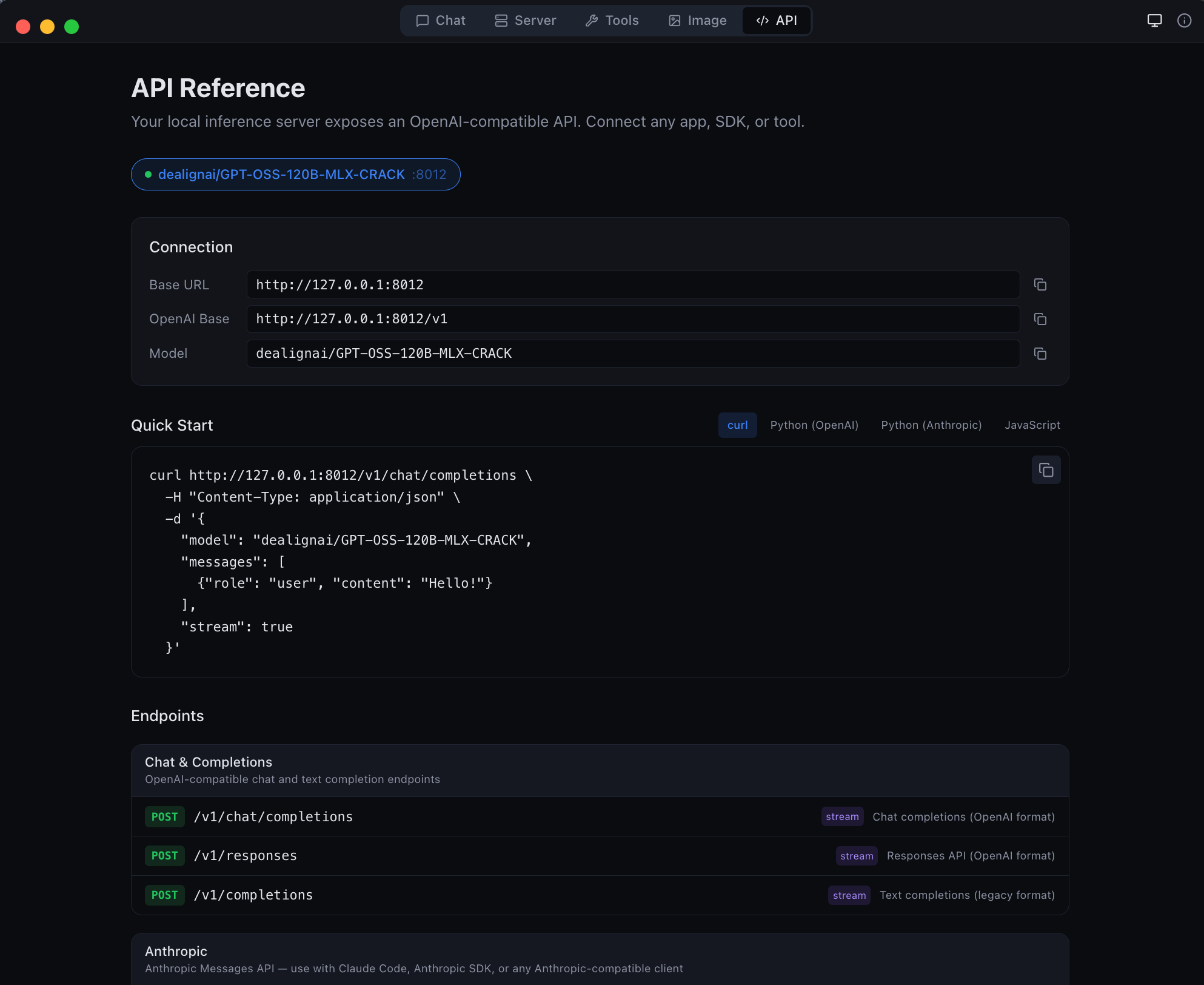
vMLX includes a native macOS desktop app (MLX Studio) with 5 modes:
| Mode | Description |
|---|---|
| Chat | Conversation interface with chat history, thinking mode, tool calling, agentic coding |
| Server | Manage model sessions -- start, stop, configure, monitor |
| Image | Text-to-image generation and image editing with Flux, Kontext, Qwen, and Fill models |
| Tools | Model converter, GGUF-to-MLX, inspector, diagnostics |
| API | Live endpoint reference with copy-pasteable code snippets |
 |
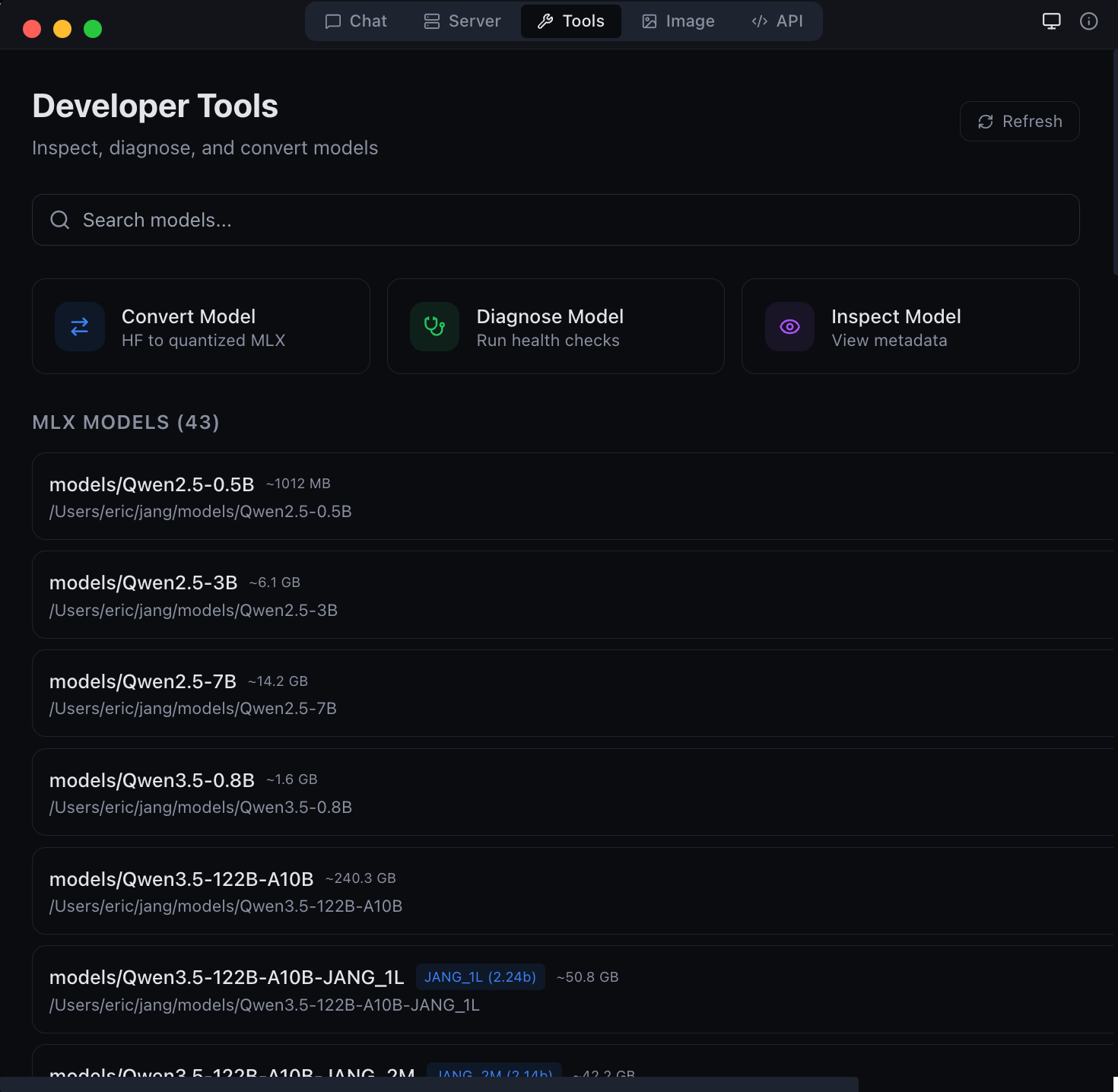 |
| Image generation and editing with Flux models | Developer tools -- model conversion and diagnostics |
 |
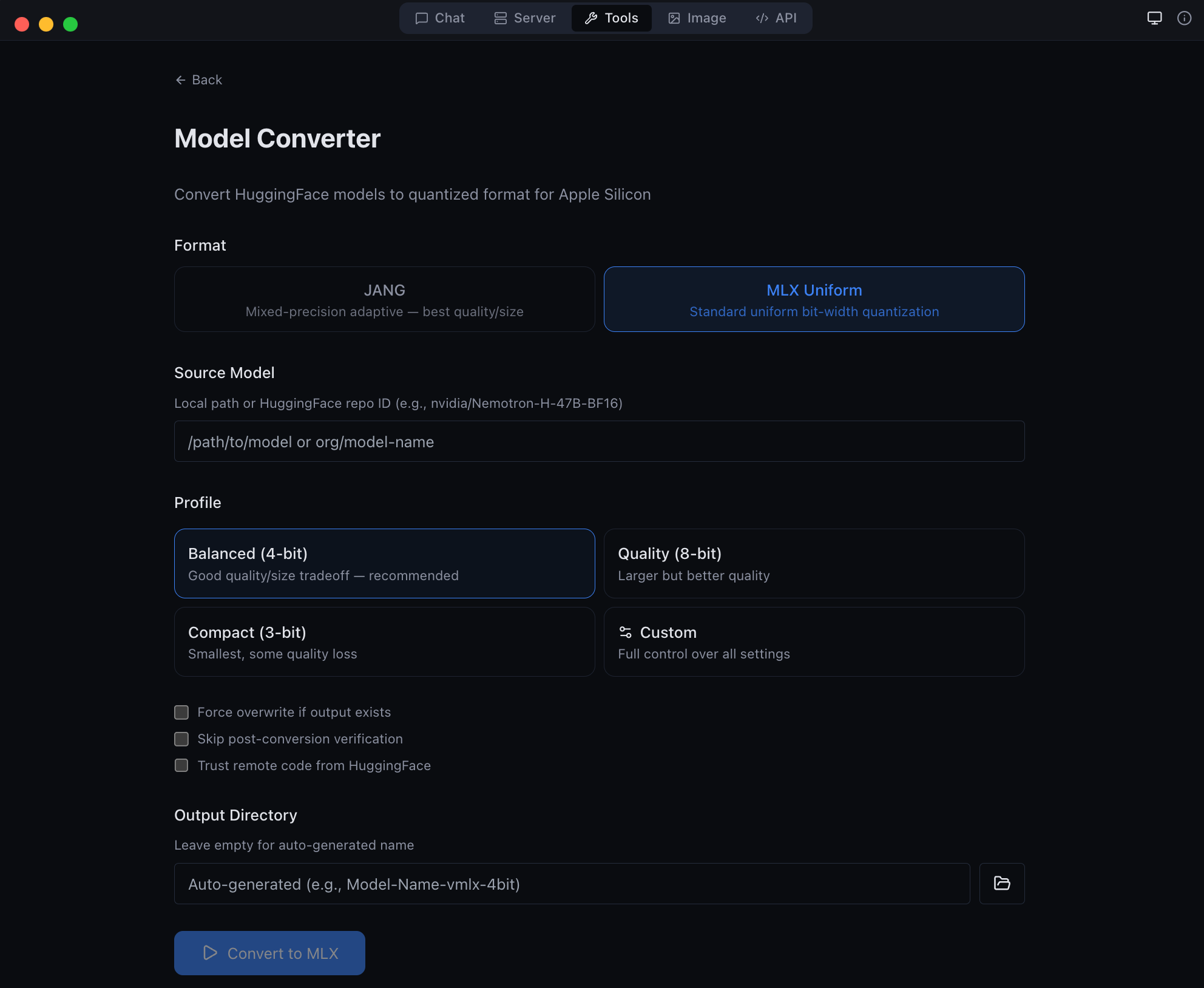 |
| Anthropic Messages API endpoint -- full compatibility | GGUF to MLX conversion -- bring your own models |
Download
Get the latest DMG from MLX Studio Releases, or build from source:
git clone https://github.com/jjang-ai/vmlx.git
cd vmlx/panel
npm install && npm run build
npx electron-builder --mac dmg
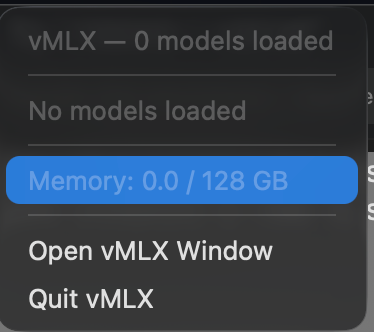
Menu Bar
vMLX lives in your menu bar showing all running models, GPU memory usage, and quick controls.
Advanced Quantization
vMLX supports standard MLX quantization (4-bit, 8-bit uniform) out of the box. For users who want to push further, JANG adaptive mixed-precision assigns different bit widths to different layer types -- attention gets more bits, MLP layers get fewer -- achieving better quality at the same model size.
JANG Profiles
| Profile | Attention | Embeddings | MLP | Avg Bits | Use Case |
|---|---|---|---|---|---|
JANG_2M |
8-bit | 4-bit | 2-bit | ~2.5 | Balanced compression |
JANG_2L |
8-bit | 6-bit | 2-bit | ~2.7 | Quality 2-bit |
JANG_3M |
8-bit | 3-bit | 3-bit | ~3.2 | Recommended |
JANG_4M |
8-bit | 4-bit | 4-bit | ~4.2 | Standard quality |
JANG_6M |
8-bit | 6-bit | 6-bit | ~6.2 | Near lossless |
Convert
pip install vmlx[jang]

# Standard MLX quantization
vmlx convert my-model --bits 4

# JANG adaptive quantization
vmlx convert my-model --jang-profile JANG_3M

# Activation-aware calibration (better at 2-3 bit)
vmlx convert my-model --jang-profile JANG_2L --calibration-method activations

# Serve the converted model
vmlx serve ./my-model-JANG_3M --continuous-batching --use-paged-cache
Pre-quantized JANG models are available at JANGQ-AI on HuggingFace.
Smelt Mode (Partial Expert Loading)
For MoE models that don't fit in RAM, Smelt loads only a subset of experts per layer from SSD and keeps the backbone resident. Routing is biased toward the resident experts, so response quality stays coherent while RAM usage drops. Trade-off: throughput scales inversely with expert % loaded, because expert swaps hit SSD on the hot path.
# Load 50% of experts per layer (default when --smelt alone)
vmlx serve ./MyMoE-JANG_4M --smelt --smelt-experts 50

# Aggressive: load 25% — smallest RAM, slowest
vmlx serve ./MyMoE-JANG_4M --smelt --smelt-experts 25
Benchmarks on Nemotron-Cascade-2-30B-A3B-JANG_4M (23 MoE layers × 128 experts, Apple M3 Ultra / 128 GB, dedicated machine, no parallel models):
--smelt-experts |
Active RAM | Decode tok/s | RAM saving | Coherent |
|---|---|---|---|---|
| off (baseline) | 17,408 MB | 89.9 | — | ✓ |
50 |
9,529 MB | 66.5 | −45% | ✓ |
25 |
5,590 MB | * | −68% | ✓ |
* Responses too short (2-5 tokens) for reliable steady-state tok/s measurement at 25 %. Subjectively responsive.
All three configurations produced coherent, non-looping output. No quality degradation observed — routing bias keeps the model on-topic.
Credit: Smelt mode is inspired by Anemll's flash-moe — a pure C / Objective‑C / Metal inference engine that showed huge MoE models (Qwen3.5-397B) can run on modest Apple Silicon hardware by streaming expert weights from SSD with
pread()on demand. vMLX Smelt takes a different implementation path: Python/MLX, tied to the JANG quantization format, and loading a fixed subset of experts per layer at startup (backbone resident, routing biased toward the loaded subset) rather than on-demand per-token. It plugs into the full vMLX server with continuous batching, paged cache, and OpenAI-compatible API. Different engine, same core insight — thanks to the flash-moe team for validating the approach.
Smelt is mutually exclusive with VLM mode. vMLX detects smelt and automatically disables --is-mllm (with a warning) because the vision tower is not wired through the partial-expert loader — image input on a smelt-loaded VLM would produce garbage logits. Use a text-only model when running smelt, or disable smelt when running a VLM.
Smelt requires an MoE model in JANG format. Not compatible with dense models (no experts to partial-load) or with non-JANG formats.
CLI Commands
vmlx serve <model>              # Start inference server
vmlx convert <model> --bits 4   # MLX uniform quantization
vmlx convert <model> -j JANG_3M # JANG adaptive quantization
vmlx info <model>               # Model metadata and config
vmlx doctor <model>             # Run diagnostics
vmlx bench <model>              # Performance benchmarks
vmlx-worker --secret <secret>   # Start distributed worker node
Configuration
Server Options
vmlx serve <model> \
  --host 0.0.0.0 \              # Bind address (default: 0.0.0.0)
  --port 8000 \                 # Port (default: 8000)
  --api-key sk-your-key \       # Optional API key authentication
  --continuous-batching \       # Enable concurrent request handling
  --enable-prefix-cache \       # Reuse KV states for repeated prompts
  --use-paged-cache \           # Block-based KV cache with dedup
  --kv-cache-quantization q8 \  # Quantize cache: q4 or q8
  --enable-disk-cache \         # Persist cache to SSD
  --enable-jit \                # JIT Metal kernel compilation
  --tool-call-parser auto \     # Auto-detect tool call format
  --reasoning-parser auto \     # Auto-detect thinking format
  --log-level INFO \            # Logging: DEBUG, INFO, WARNING, ERROR
  --max-model-len 8192 \        # Max context length
  --speculative-model <model> \ # Draft model for speculative decoding
  --enable-pld \                # Prompt Lookup Decoding — no draft model, best for code/JSON/schemas
  --distributed \               # Enable multi-Mac pipeline parallelism
  --cluster-secret <secret> \   # Shared auth secret for workers
  --distributed-mode pipeline \ # pipeline (default) or tensor (coming soon)
  --worker-nodes ip:port,... \  # Manual worker IPs (overrides auto-discovery)
  --cors-origins "*"            # CORS allowed origins
Quantization Options
vmlx convert <model> \
  --bits 4 \                    # Uniform quantization bits: 2, 3, 4, 6, 8
  --group-size 64 \             # Quantization group size (default: 64)
  --output ./output-dir \       # Output directory
  --jang-profile JANG_3M \      # JANG mixed-precision profile
  --calibration-method activations  # Activation-aware calibration
Image Generation & Editing Options
pip install vmlx[image]

# Generation models
vmlx serve schnell \            # or dev, z-image-turbo
  --image-quantize 4 \          # Quantization: 4, 8 (omit for full precision)
  --port 8001

# Editing models
vmlx serve qwen-image-edit \    # Instruction-based editing (full precision only)
  --port 8001

# Local model directory
vmlx serve ~/.mlxstudio/models/image/FLUX.1-schnell-mflux-4bit
Audio Options
TTS and STT require the mlx-audio package:
pip install mlx-audio

# TTS: serve Kokoro model
vmlx serve kokoro --port 8002

# STT: serve Whisper model
vmlx serve whisper --port 8003
Optional Dependencies
pip install vmlx              # Core: text LLMs, VLMs, embeddings, reranking
pip install vmlx[image]       # + Image generation (mflux)
pip install vmlx[jang]        # + JANG quantization tools
pip install vmlx[dev]         # + Development/testing tools
pip install vmlx[image,jang]  # Multiple extras
Architecture
+--------------------------------------------+
|          Desktop App (Electron)             |
|   Chat | Server | Image | Tools | API      |
+--------------------------------------------+
|          Session Manager (TypeScript)       |
|   Process spawn | Health monitor | Tray     |
+--------------------------------------------+
|         vMLX Engine (Python / FastAPI)       |
|  +--------+  +---------+  +-----------+    |
|  |Simple  |  | Batched |  | ImageGen  |    |
|  |Engine  |  | Engine  |  | Engine    |    |
|  +---+----+  +----+----+  +-----+-----+    |
|      |            |              |          |
|  +---+------------+--+    +-----+-----+    |
|  | mlx-lm / mlx-vlm  |    |  mflux    |    |
|  +--------+-----------+    +-----------+    |
|           |                                 |
|  +--------+----------------------------+    |
|  |       MLX Metal GPU Backend          |    |
|  | quantized_matmul | KV cache | SDPA   |    |
|  +--------------------------------------+    |
+--------------------------------------------+
|  L1: Prefix Cache (Memory-Aware / Paged)    |
|  L2: Disk Cache (Persistent / Block Store)  |
|  KV Quant: q4/q8 at storage boundary       |
+--------------------------------------------+
Contributing
Contributions are welcome. Here is how to set up a development environment:
git clone https://github.com/jjang-ai/vmlx.git
cd vmlx

# Python engine
python -m venv .venv && source .venv/bin/activate
pip install -e ".[dev,jang,image]"
pytest tests/ -k "not Async"    # 2000+ tests

# Electron desktop app
cd panel && npm install
npm run dev                      # Development mode with hot reload
npx vitest run                   # 1545+ tests
Project Structure
vmlx/
  vmlx_engine/          # Python inference engine (FastAPI server)
  panel/                # Electron desktop app (React + TypeScript)
    src/main/           # Electron main process
    src/renderer/       # React frontend
    src/preload/        # IPC bridge
  tests/                # Python test suite
  assets/               # Screenshots and logos
Guidelines
- Run the full test suite before submitting PRs
- Follow existing code style and patterns
- Include tests for new features
- Update documentation for user-facing changes
License
Apache License 2.0 -- see LICENSE.
Built by Jinho Jang (eric@jangq.ai)
JANGQ AI • PyPI • GitHub • Downloads
한국어 (Korean)
vMLX — Apple Silicon을 위한 로컬 AI 엔진
Mac에서 LLM, VLM, 이미지 생성 및 편집 모델을 완전히 로컬로 실행하세요. OpenAI + Anthropic 호환 API. 클라우드 없음. API 키 불필요. 데이터가 기기를 떠나지 않습니다.
빠른 시작
pip install vmlx
vmlx serve mlx-community/Llama-3.2-3B-Instruct-4bit
주요 기능
| 기능 | 설명 |
|---|---|
| 텍스트 생성 | MLX 및 JANG 형식의 LLM 추론 |
| 비전-언어 모델 | 이미지 + 텍스트 멀티모달 추론 |
| 이미지 생성 | Flux Schnell/Dev, Z-Image Turbo (mflux 기반) |
| 이미지 편집 | Qwen Image Edit (텍스트 지시 기반 이미지 편집) |
| 5단계 캐싱 | 프리픽스, 페이지드, KV 양자화, 디스크, 메모리 인식 캐시 |
| 연속 배칭 | 다중 동시 요청 처리 |
| 에이전트 도구 | 30개 내장 도구 (파일, 웹 검색, Git, 터미널) |
| OpenAI API | /v1/chat/completions, /v1/images/generations, /v1/images/edits |
| Anthropic API | /v1/messages (스트리밍, 도구 호출, 시스템 프롬프트) |
이미지 생성
pip install vmlx[image]
vmlx serve schnell          # 빠른 생성 (4 단계)
vmlx serve dev              # 고품질 생성 (20 단계)
이미지 편집
vmlx serve qwen-image-edit # 텍스트 지시 기반 이미지 편집
# 이미지 편집 API
curl http://localhost:8000/v1/images/edits \
  -H "Content-Type: application/json" \
  -d '{
    "model": "qwen-image-edit",
    "prompt": "배경을 해질녘으로 변경",
    "image": "<base64 인코딩된 이미지>",
    "size": "1024x1024",
    "strength": 0.8
  }'
데스크톱 앱 (MLX Studio)
macOS 네이티브 데스크톱 앱으로 5가지 모드를 제공합니다:
| 모드 | 설명 |
|---|---|
| 채팅 | 대화 인터페이스, 채팅 기록, 도구 호출, 에이전트 코딩 |
| 서버 | 모델 세션 관리 — 시작, 정지, 설정, 모니터링 |
| 이미지 | 텍스트-이미지 생성 및 이미지 편집 (Flux, Qwen 모델) |
| 도구 | 모델 변환기, GGUF-MLX 변환, 진단 |
| API | 실시간 엔드포인트 참조 및 코드 스니펫 |
설치
pip install vmlx              # 기본: 텍스트 LLM, VLM, 임베딩
pip install vmlx[image]       # + 이미지 생성/편집 (mflux)
pip install vmlx[jang]        # + JANG 양자화 도구
pip install vmlx[audio]       # + TTS/STT (mlx-audio)
라이선스
Apache License 2.0 — LICENSE 참조.
개발자: 장진호 (eric@jangq.ai)
JANGQ AI •
Ko-fi로 후원하기
Release history Release notifications | RSS feed


Download files
Download the file for your platform. If you're not sure which to choose, learn more about installing packages.
Source Distribution
Built Distribution
Filter files by name, interpreter, ABI, and platform.
If you're not sure about the file name format, learn more about wheel file names.
Copy a direct link to the current filters
File details
Details for the file vmlx-1.3.71.tar.gz.
File metadata
- Download URL: vmlx-1.3.71.tar.gz
- Upload date:
- Size: 1.0 MB
- Tags: Source
- Uploaded using Trusted Publishing? No
- Uploaded via: twine/6.2.0 CPython/3.14.2
File hashes
| Algorithm | Hash digest | |
|---|---|---|
| SHA256 |
b73a88040c218dd0b196a57ff4b11df81dcacb901847cfd0a8351df1d317ade1
|
|
| MD5 |
3a4b119fa7855f86966327a9da8b3871
|
|
| BLAKE2b-256 |
2d783511fa4035b32547508ef9f19c7ff7f7bc8784c3377cb2a3f4324de02ddc
|
File details
Details for the file vmlx-1.3.71-py3-none-any.whl.
File metadata
- Download URL: vmlx-1.3.71-py3-none-any.whl
- Upload date:
- Size: 728.9 kB
- Tags: Python 3
- Uploaded using Trusted Publishing? No
- Uploaded via: twine/6.2.0 CPython/3.14.2
File hashes
| Algorithm | Hash digest | |
|---|---|---|
| SHA256 |
4b9934e4ffc97a6b8a92a88b4e1a97d245f9fcb3cf949f8af6f47c9787670f5a
|
|
| MD5 |
0bf411f159b8b943f6cc5fcd8f9c44d7
|
|
| BLAKE2b-256 |
9322a6b1f160842697fd5ba4f9beaac8beb401f6dda5599962b86750ae0af981
|






