
Cluster manager


Project description
VmShepherd


Introduction
VmShepherd is an application that helps you maintain groups (clusters) of virtual machines. It keeps defined parameters (like count, image, etc.) by checking state in an IaaS layer, and tests underlying services with a specified health check.
Architecture
VmShepherd is designed to be easily extensible with plugins. Empowered by python3 and its asyncio module to facilitate scaling. The diagram below shows the base components of the app.
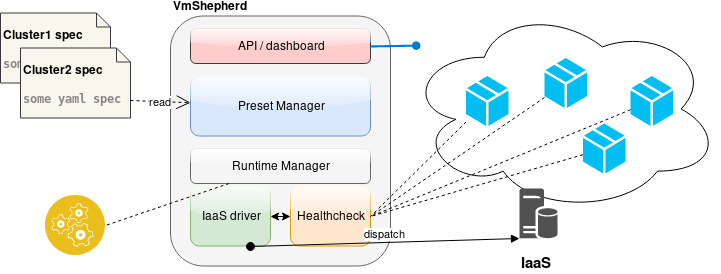
Preset Manager is responsible for fetching cluster spec/definition (preset). Built-in presets: DirectoryDriver and GitRepoDriver
Runtime Manger exposes functionality of locking preset, and holds intermediate states. Currently available: InMemoryDriver, PostgresDriver, ZookeeperDriver.
IaaS is a glue (api wrapper) to IaaS provider, OpenStackDriver is the first implemented.
Healthcheck allows to check service’s state, not only for existence of a virtual machine. HttpHealthcheckDriver is built-in.
For more information, please take look at the documentation.
Installation
Application requires python 3.6 or later. The latest stable version is available on Pypi.
pip install vmshepherd
Another way of installation for a VmShepherd is a docker. You can easily download latest version of our application from a docker hub.
docker pull dreamlabcloud/vmshepherd
Before you run a application, you need to prepare configuration files according to this rules.
When you create a configuration file, you can deploy a VmShepherd like that:
docker run -v $PATH_TO_CONFIG_DIRECTORY/:/home/shepherd -p 8888:8888 -it vmshepherd -c config/settings.example.yaml
Where PATH_TO_CONFIG_DIRECTORY is a localisation of a configuration files on your host
-c config/settings.example.yaml is a list of arguments passed to a VmShepherd in container
Example:
➜  VmShepherd/docker ✗ sudo docker run -v $(realpath ../)/:/home/shepherd -p   8888:8888 -it vmshepherd -c config/settings.example.yaml
INFO:root:Starting server, listening on 8888.
INFO:root:VmShepherd start cycle...
INFO:root:VMs Status: 1 expected, 0 in iaas, 0 running, 0 nearby shutdown, 0 pending, 0   after time shutdown, 0 terminated, 0 error, 0 unknown, 1 missing
INFO:root:VMs Status update: 0 terminated, 0 terminated by healthcheck, 1 created, 0 failed healthcheck
We also provide a Dockerfile which can be used during a development:
docker build -t vmshepherd .
docker run -it  -p 8888:8888 -p 8000:8000 vmshepherd run
Usage
After installation you need to create a main configuration file (check examples in config/ directory in this repo).
Run:
vmshepherd -c CONFIGFILE
Contributing to VmShepherd
Thank you for your interest in contributing to VmShepherd. Like always there are many ways to contribute, and we appreciate all of them.
Pull requests and issues are the primary mechanism we use to change VmShepherd. Github itself has a great documentation about using Pull Requests. We use the “fork and pull” model, where contributors push changes to their personal fork and create pull requests to bring those changes into the source repository.
If you want to find something to work on, please check issues in our roadmap.
Check out the documetation http://doc.dreamlab.pl/VmShepherd/development/index.html.
TL;DR
Pull requests will need:
Tests
Documentation
A logical series of well written commits
License
Changelog
1.1.0 (2018-06-13)
feature: adjustable timeout for http requests to iaas
1.0.1 (2018-06-08)
bugfix: API should use last cycle data
bugfix: OpenStackDriver refresh token
1.0.0 (2018-06-06)
preserve preset state (dashboard shows data from last cycle)
bump AsyncOpenStackClient (0.6.2)
docs
0.7.7 (2018-05-10)
bump AsyncOpenStackClient (0.5.2)
0.7.6 (2018-05-10)
bump AsyncOpenStackClient (0.5.1)
0.7.5 (2018-04-09)
runtime driver abstract fix
0.7.4 (2018-03-22)
cleanup, verify
0.7.3 (2018-03-22)
bump AsyncOpenStackClient (+ compat)
0.7.2 (2018-03-22)
user-data base64
0.7.1 (2018-03-21)
multiple network interfaces
0.7.0 (2018-03-20)
AsyncOpenStackClient
0.6.0 (2018-02-01)
web panel
rpc api
0.0.3 (2018-02-01)
initial
Release history Release notifications | RSS feed


Download files
Download the file for your platform. If you're not sure which to choose, learn more about installing packages.
Source Distribution
Built Distribution
Filter files by name, interpreter, ABI, and platform.
If you're not sure about the file name format, learn more about wheel file names.
Copy a direct link to the current filters
File details
Details for the file vmshepherd-1.2.0.tar.gz.
File metadata
- Download URL: vmshepherd-1.2.0.tar.gz
- Upload date:
- Size: 369.0 kB
- Tags: Source
- Uploaded using Trusted Publishing? No
- Uploaded via: twine/1.11.0 pkginfo/1.4.2 requests/2.19.1 setuptools/28.8.0 requests-toolbelt/0.8.0 tqdm/4.24.0 CPython/3.6.1
File hashes
| Algorithm | Hash digest | |
|---|---|---|
| SHA256 |
88370edd09435fa19fb32e307232b4bf4010207a14596e90bfcf9c3fe16e35ae
|
|
| MD5 |
987b656897573118656939a4b8cead67
|
|
| BLAKE2b-256 |
54db784430f3ed2f6780e673c51219c7588c18da6a4ef60113491138aeb22415
|
File details
Details for the file vmshepherd-1.2.0-py2.py3-none-any.whl.
File metadata
- Download URL: vmshepherd-1.2.0-py2.py3-none-any.whl
- Upload date:
- Size: 268.8 kB
- Tags: Python 2, Python 3
- Uploaded using Trusted Publishing? No
- Uploaded via: twine/1.11.0 pkginfo/1.4.2 requests/2.19.1 setuptools/28.8.0 requests-toolbelt/0.8.0 tqdm/4.24.0 CPython/3.6.1
File hashes
| Algorithm | Hash digest | |
|---|---|---|
| SHA256 |
7d4880e709e0abe3412ed623289a65c05e1fb6f35f601db436a444c6273ede72
|
|
| MD5 |
f9b4b6c37075d6781e29e30e6776c1ff
|
|
| BLAKE2b-256 |
cbffdfa77fb11110ff5ebe4f5af5a754df78169f42d2ce1b23ce8a740138c661
|






