
vnpt_data_governance
DBGraph (VNPT Data Governance SDK) helps you explore and find relevant data assets in a large, complex relational database. It introspects a schema, builds a navigable graph of tables/columns, classifies PII, flags quality issues, infers relationships, optionally enriches it with LLM-generated descriptions, and lets you search/render/traverse that graph.
This package is a standalone SDK extracted from the internal dbgraph
project, packaged for reuse across teams/services (originally built by
minhdenthedev, packaged as an SDK by hainamnguyen192).
Install
Core install (graph building + traversal only, no DB drivers or LLM client):
pip install vnpt_data_governance
Pick the extras you actually need — each one only pulls in the dependency for that piece:
pip install "vnpt_data_governance[postgres]"   # PostgresDataGateway
pip install "vnpt_data_governance[mysql]"      # MySQLDataGateway
pip install "vnpt_data_governance[trino]"      # TrinoDataGateway
pip install "vnpt_data_governance[openai]"     # OAICompatibleLLM
pip install "vnpt_data_governance[search]"     # BM25SearchEngine
pip install "vnpt_data_governance[all]"        # everything above
SQLite is supported out of the box (Python's built-in sqlite3), no extra
needed.
Quick start
The one-call entry point — introspects the database and returns a fully enriched graph (schema, statistics, PII classification, quality issues, normalization hints, inferred soft-FK/lineage relationships):
from pathlib import Path
import vnpt_data_governance

graph = vnpt_data_governance.analyze(
    vnpt_data_governance.SqliteDataGateway(Path("data/northwind.db")),
    save_json=Path("data/northwind-graph.json"),
)
analyze() depends only on the RDataGateway interface, never on a specific
database driver — pass PostgresDataGateway/MySQLDataGateway/
TrinoDataGateway instead to point it at a different database. Pass an llm=
to also get LLM-written descriptions and business-domain grouping, and/or
search_index_dir= to build a BM25 search index over the result in the same
call:
from vnpt_data_governance import OAICompatibleLLM

graph = vnpt_data_governance.analyze(
    vnpt_data_governance.SqliteDataGateway(Path("data/northwind.db")),
    llm=OAICompatibleLLM(model=..., base_url=..., api_key=...),  # requires the `openai` extra
    save_json=Path("data/northwind-graph.json"),
    search_index_dir=Path("data/northwind-index"),  # requires the `search` extra
)

# load a previously saved graph back later
graph = vnpt_data_governance.JSONGraphLoader(json_path=Path("data/northwind-graph.json")).load()

# search it (requires the `search` extra)
search_engine = vnpt_data_governance.BM25SearchEngine(Path("data/northwind-index"))
asset_ids = search_engine.search("restricted PII columns in the Sales domain")
Advanced: composing the pipeline yourself
analyze() is a thin wrapper around individually usable pieces — reach for
these instead if you need custom prompts, want to skip/reorder steps, or want
finer control than analyze()'s options give you:
from pathlib import Path

from vnpt_data_governance import (
    JSONGraphWriter,
    RGraphBuilder,
    SqliteDataGateway,
    SoftForeignKeyDetector,
    LineageDetector,
)

graph_builder = RGraphBuilder(SqliteDataGateway(Path("data/northwind.db")))
graph = graph_builder.build_graph()
graph = SoftForeignKeyDetector(SqliteDataGateway(Path("data/northwind.db"))).detect(graph)
graph = LineageDetector(SqliteDataGateway(Path("data/northwind.db"))).detect(graph)

# optional: generate semantic descriptions for assets via an LLM, with your
# own prompts
# from vnpt_data_governance import GraphDescriptorV1, OAICompatibleLLM
#
# graph_descriptor = GraphDescriptorV1(
#     llm=OAICompatibleLLM(model=..., base_url=..., api_key=...),
#     system_prompt=..., formating_prompt=..., target_prompt=...,
# )
# graph = graph_descriptor.rfill_semantic_aspects(graph)

JSONGraphWriter(json_path=Path("data/northwind-graph.json"), indent=2).write(graph)
For visualization purposes, here is a graph saved as JSON:
{
  "assets": [
    {
      "asset_id": "8ab5a624-0596-497e-a0ee-3996d95dbe63",
      "name": "Categories",
      "type": "table",
      "aspects": {
        "schema_properties": { "name": "Categories_table_schema", "pks": ["CategoryID"], "indices": {} },
        "statistical_properties": { "name": "Categories_table_stats", "num_columns": 4, "num_rows": 8 },
        "semantic_properties": {
          "name": "Categories_semantic",
          "description": "Stores product category definitions and metadata, serving as a lookup table for classifying products in the inventory system.",
          "keywords": ["categories", "product classification", "category definitions", "inventory groups", "product types"]
        }
      }
    }
  ],
  "links": [
    {
      "link_id": "db6bea93-a02c-4426-a2db-449e4a7bba8f",
      "name": "Categories_CategoryID",
      "type": "contain",
      "source_id": "8ab5a624-0596-497e-a0ee-3996d95dbe63",
      "destination_id": "04c20046-2808-4021-bbf1-99876e0eea6e",
      "aspects": {}
    }
  ]
}
Use cases
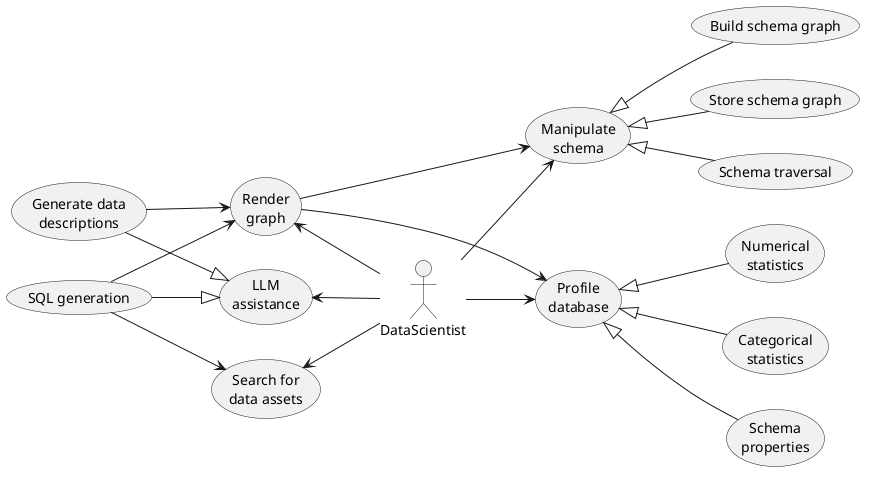
- Manipulating database schema — build the schema graph, store it, and use it to traverse the database, find join paths, get referenced tables, ...
- Profiling database — the
Aspectconcept represents different kinds of properties attached to a data asset (schema, statistics, semantics, ...). - Render graph — output a schema graph as Markdown/text to feed as LLM context.
- LLM assistance — use an LLM to generate data assets' descriptions/keywords, and as input for downstream SQL generation.
- Search for data assets — search assets via BM25 indexing/retrieval, over a document built from every enriched aspect (description/keywords, PII classification, quality issues, domain), not just the description.
Architecture
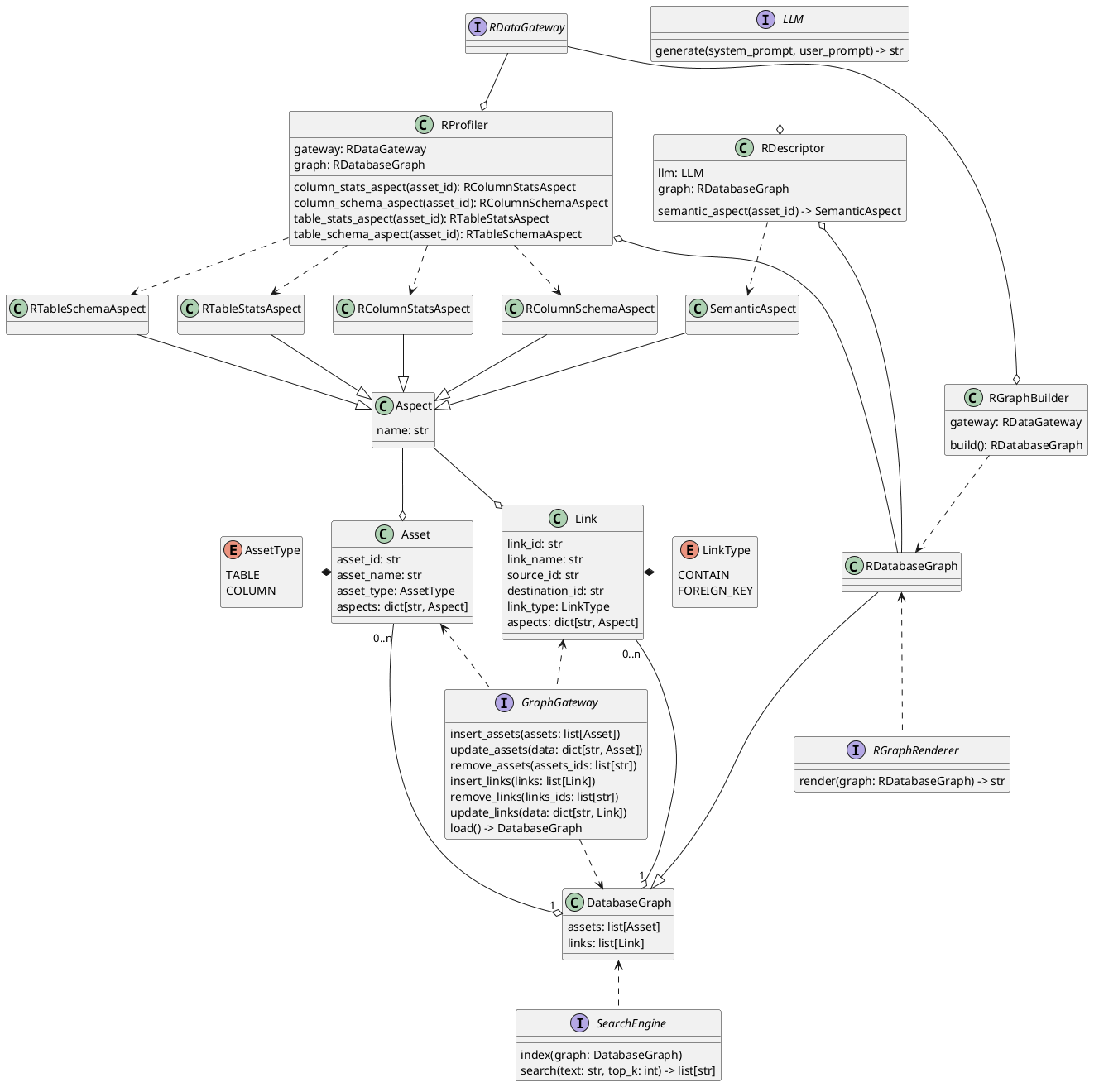
DBGraph is designed to be easy to extend:
- Core classes (entities) hold the shared business logic of database graphs (traversal, neighborhoods, ...) and core operations
(building graphs, profiling databases, ...). The prefix
R...stands for "Relational" (the only paradigm currently supported);D...,V...,G...are reserved for Document/Vector/Graph paradigms. - Interfaces (extensions) mark the parts of the system meant to be pluggable:
RGraphBuilderworks against any RDBMS via theRDataGatewayabstraction — implementations ship for SQLite, PostgreSQL, MySQL and Trino.LLMabstracts the model provider —OAICompatibleLLMis the bundled implementation ([openai]extra); bring your own by implementingLLM.generate/agenerate.GraphWriter/GraphLoaderabstract graph persistence —JSONGraphWriter/JSONGraphLoaderare the bundled implementation.SearchEngineabstracts indexing/retrieval —BM25SearchEngineis the bundled implementation ([search]extra).
Development
uv sync --group dev --all-extras
uv run pytest
uv run pylint vnpt_data_governance
uv run mypy vnpt_data_governance
uv run flake8 vnpt_data_governance
Tests that talk to Postgres/MySQL/Trino/OpenAI need real credentials (see
tests/) and are skipped/fail without them; the SQLite, entity and
loader/writer tests run standalone.
1 maintainer

Download files
Download the file for your platform. If you're not sure which to choose, learn more about installing packages.
Source Distribution
Built Distribution
Filter files by name, interpreter, ABI, and platform.
If you're not sure about the file name format, learn more about wheel file names.
Copy a direct link to the current filters
File details
Details for the file vnpt_data_governance-0.1.0.tar.gz.
File metadata
- Download URL: vnpt_data_governance-0.1.0.tar.gz
- Upload date:
- Size: 89.8 kB
- Tags: Source
- Uploaded using Trusted Publishing? No
- Uploaded via:
uv/0.11.31 {"installer":{"name":"uv","version":"0.11.31","subcommand":["publish"]},"python":null,"implementation":{"name":null,"version":null},"distro":null,"system":{"name":null,"release":null},"cpu":null,"openssl_version":null,"setuptools_version":null,"rustc_version":null,"ci":null}
File hashes
| Algorithm | Hash digest | |
|---|---|---|
| SHA256 |
81c7d6adf1d629e4500a487a85a56babf5eb9f4f4db639f9b5452bce3cf7e781
|
|
| MD5 |
77b9ea2554ead5c77840c114a7cf4ecd
|
|
| BLAKE2b-256 |
4c19f0fbaf5396ab688b898d62fd44c47d3b77a6a045eba78e0e5583134d6985
|
File details
Details for the file vnpt_data_governance-0.1.0-py3-none-any.whl.
File metadata
- Download URL: vnpt_data_governance-0.1.0-py3-none-any.whl
- Upload date:
- Size: 70.7 kB
- Tags: Python 3
- Uploaded using Trusted Publishing? No
- Uploaded via:
uv/0.11.31 {"installer":{"name":"uv","version":"0.11.31","subcommand":["publish"]},"python":null,"implementation":{"name":null,"version":null},"distro":null,"system":{"name":null,"release":null},"cpu":null,"openssl_version":null,"setuptools_version":null,"rustc_version":null,"ci":null}
File hashes
| Algorithm | Hash digest | |
|---|---|---|
| SHA256 |
971f456cf7bcc478b2fd845122b2a6f2830b157eea7e3d9efde047e0eeb92757
|
|
| MD5 |
6b27891b24267400e489c51b1a2e1a56
|
|
| BLAKE2b-256 |
ce14f60219945287cec388ef8e04421814dae7dd25e151580353d2679065b2e6
|







