
A beginner-friendly yet powerful Python toolkit for financial analysis and automation — built to make modern investing accessible to everyone

Project description
Vnstock - Giải pháp phân tích chứng khoán mở cho người Việt






⚠️ Note: This document begins in 🇻🇳 Vietnamese for our local community.
🌐 English version available below — scroll or use the TOC (top-right 🟰) to navigate.
🎤 Giới thiệu về Vnstock
Chào mừng bạn đến với Vnstock, bộ giải pháp mã nguồn mở toàn diện cho phân tích và tự động hóa đầu tư chứng khoán.
Với sứ mệnh "Mang dữ liệu chứng khoán và công cụ đầu tư đến gần hơn với tất cả mọi người", Vnstock liên tục cải tiến, tích hợp những công nghệ hiện đại để không chỉ đáp ứng nhu cầu cơ bản về dữ liệu, mà còn giúp bạn xây dựng các giải pháp phân tích tài chính thông minh và linh hoạt hơn bao giờ hết.
🚀 Tại sao chọn Vnstock?
- Hoàn toàn miễn phí & mã nguồn mở: Dễ dàng truy cập và sử dụng, phù hợp với nhà đầu tư cá nhân, nhà phân tích, và cộng đồng nghiên cứu.
- Giải pháp Python toàn diện: Các hàm chức năng thân thiện, dễ dàng tích hợp để xây dựng các công cụ phân tích, bot giao dịch tự động.
- Dữ liệu đa dạng, cập nhật liên tục: Bao gồm cổ phiếu, chứng quyền, chỉ số thị trường, hợp đồng tương lai, trái phiếu, ngoại hối, crypto và nhiều hơn thế nữa.
Bạn chính là một phần quan trọng trong hành trình chuyển đổi số thị trường tài chính Việt Nam. Hãy cùng Vnstock tạo nên những thay đổi tích cực và hiệu quả!
🤝 Tham gia cộng đồng cùng chúng tôi!
Tham gia ngay cộng đồng Vnstock để giao lưu, chia sẻ kinh nghiệm và cập nhật những tính năng mới nhất từ dự án:

II. Các nhóm tính năng chính
Vnstockgiúp rút ngắn thời gian xử lý dữ liệu, hỗ trợ học tập, nghiên cứu và xây dựng hệ thống phân tích giao dịch tài chính một cách hiệu quả – không chỉ là một công cụ trích xuất dữ liệu, mà là nền tảng để phát triển giải pháp đầu tư cá nhân thông minh. Thư viện được thiết kế dễ dàng sử dụng và tích hợp vào các hệ thống phân tích, nghiên cứu, trang tổng quan, hoặc bot chứng khoán.
- Truy xuất dữ liệu qua API đơn giản
Dễ dàng truy cập dữ liệu thông qua các hàm Python thân thiện, giúp tích hợp nhanh vào hệ thống phân tích tự động hoặc bot giao dịch.
- Dữ liệu cổ phiếu
Giá cổ phiếu thời gian thực, dữ liệu lịch sử, chỉ số tài chính và thông tin doanh nghiệp của các mã niêm yết.
- Bộ lọc cổ phiếu
Hỗ trợ lọc cổ phiếu theo tiêu chí tài chính, kỹ thuật hoặc thị trường để phục vụ phân tích. (tạm thời không hoạt động)
- Chỉ số thị trường (Index)
Theo dõi hiệu suất các chỉ số trong nước (VNIndex, HNXIndex, UPCOM) và một số chỉ số quốc tế.
- Chứng quyền (CW)
Thông tin chứng quyền bao gồm giá, ngày đáo hạn, tổ chức phát hành và trạng thái thị trường.
- Kim loại quý
Cập nhật giá vàng trong nước và thế giới.
- Hợp đồng tương lai (Phái sinh)
Dữ liệu hợp đồng tương lai như VN30F và các kỳ hạn giao dịch.
- Quỹ đầu tư (ETF & Quỹ mở)
Thông tin về danh mục, hiệu suất và các chỉ số liên quan của quỹ đầu tư.
- Trái phiếu
Dữ liệu trái phiếu Chính phủ và doanh nghiệp bao gồm kỳ hạn, lãi suất và khối lượng giao dịch.
- Ngoại hối (Forex)
Tỷ giá cập nhật theo thời gian thực của các cặp tiền tệ phổ biến.
- Tiền điện tử (Crypto)
Giá cả và biến động thị trường của các loại tiền điện tử lớn.
- Tin tức & sự kiện tài chính
Tự động cập nhật tin tức, công bố thông tin doanh nghiệp và lịch sự kiện thị trường.
III. Tuyên bố miễn trừ trách nhiệm
Dự án Vnstock được phát triển nhằm phục vụ mục đích nghiên cứu và sử dụng cá nhân. Dữ liệu cung cấp có thể không đầy đủ, không liên tục hoặc sai lệch so với thực tế, do đó không khuyến nghị sử dụng cho mục đích giao dịch thực tế, thuật toán đầu tư, hoặc ra quyết định tài chính khi bạn không hiểu rõ.
Các tác giả không chịu trách nhiệm đối với bất kỳ tổn thất hay thiệt hại nào phát sinh từ việc sử dụng dữ liệu hoặc mã nguồn này, bao gồm nhưng không giới hạn: sai lệch dữ liệu, mất mát tài chính, hoặc sử dụng sai mục đích.
Vnstock không cung cấp tư vấn đầu tư hay tín hiệu giao dịch. Người dùng hoàn toàn tự chịu trách nhiệm khi sử dụng dự án.
IV. 🔑 Giấy phép sử dụng (License)
Vnstock được phát hành theo giấy phép tuỳ chỉnh hướng đến cá nhân, không dành cho mục đích thương mại. Quyền sử dụng được quy định cụ thể trong giấy phép kèm theo. Nếu bạn hoặc tổ chức bạn đang làm việc muốn sử dụng Vnstock có thể liên hệ tác giả để hiểu rõ phạm vi sử dụng và được cấp phép chính thức.
Khi sử dụng Vnstock trong dự án của mình, bạn cần trích dẫn thông tin về tác giả và dự án theo hướng dẫn của Vnstock.
V. 🙏 Bạn đồng hành & tài trợ
Bạn đồng hành
Vnstock phát triển nhờ sự chung tay của cộng đồng những người yêu thích công nghệ và tài chính. Mỗi dòng code, mỗi bản sửa lỗi đều là minh chứng cho sự đóng góp quý giá của các bạn. Cảm ơn vì đã biến vnstock thành công cụ mạnh mẽ cho cộng đồng đầu tư Việt Nam!

❤️ Nhà tài trợ nổi bật
Từ tận đáy lòng, Vnstock gửi lời tri ân sâu sắc đến những người đã tin tưởng và ủng hộ vnstock. Sự đóng góp của các bạn không chỉ là nguồn lực tài chính – mà còn là niềm tin, sự khích lệ và là động lực mạnh mẽ để chúng tôi tiếp tục phát triển, tối ưu hóa và lan tỏa công cụ này đến cộng đồng đầu tư Việt Nam.
Dù lớn hay nhỏ, mỗi sự hỗ trợ đều là một lời nhắc nhở rằng chúng tôi không đi một mình. Các bạn là những đối tác đồng hành, những người tiên phong chung tay kiến tạo một hệ sinh thái dữ liệu tài chính dễ tiếp cận và minh bạch hơn cho mọi nhà đầu tư.



























Hỗ trợ dự án
Nếu vnstock đã mang lại giá trị cho bạn và bạn muốn trở thành một phần của cộng đồng những người ủng hộ, sự đóng góp của bạn sẽ là nguồn động lực vô cùng to lớn đối với chúng tôi. Mỗi nhà tài trợ giúp chúng tôi có thêm thời gian cải thiện tài liệu, phát triển tính năng mới và duy trì sự bền vững lâu dài cho dự án này.
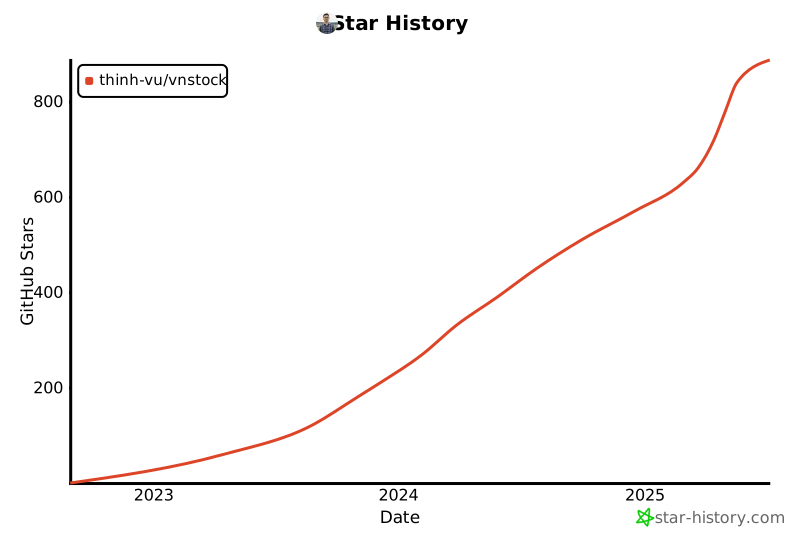
VI. Lịch sử lượt yêu thích
Bạn có thể hỗ trợ dự án bằng cách cực kỳ đơn giản là đánh dấu yêu thích để giúp dự án có thể tiếp cận tới nhiều người hơn. Dưới đây là lịch sử lượt yêu thích của dự án.
VII. ⏱️ Cập nhật đáng chú ý
- 16-01-2026: Cập nhật phiên bản trải nghiệm
3.4.0tại Github (chưa phát hành chính thức qua PyPI) - 20-03-2025: Ra mắt phiên bản Vnstock
3.2.0bổ sung thêm tính năng truy xuất dữ liệu Bộ lọc cổ phiếu. - 02-01-2025: Vnstock3 chính thức sử dụng tên nhận diện gói thư viện là vnstock tại trang phân phối chính thức pypi.org. Chi tiết tại đây
- 02-11-2024: Ra mắt Vnstock3 phiên bản 3.0.9. Chi tiết: tại đây
- 10-05-2024: Ra mắt phiên bản Vnstock
3.0.1với tên gói cài đặtvnstock3
Chi tiết cập nhật phần mềm và phiên bản tại đây
VIII. 📔 Tài liệu hướng dẫn
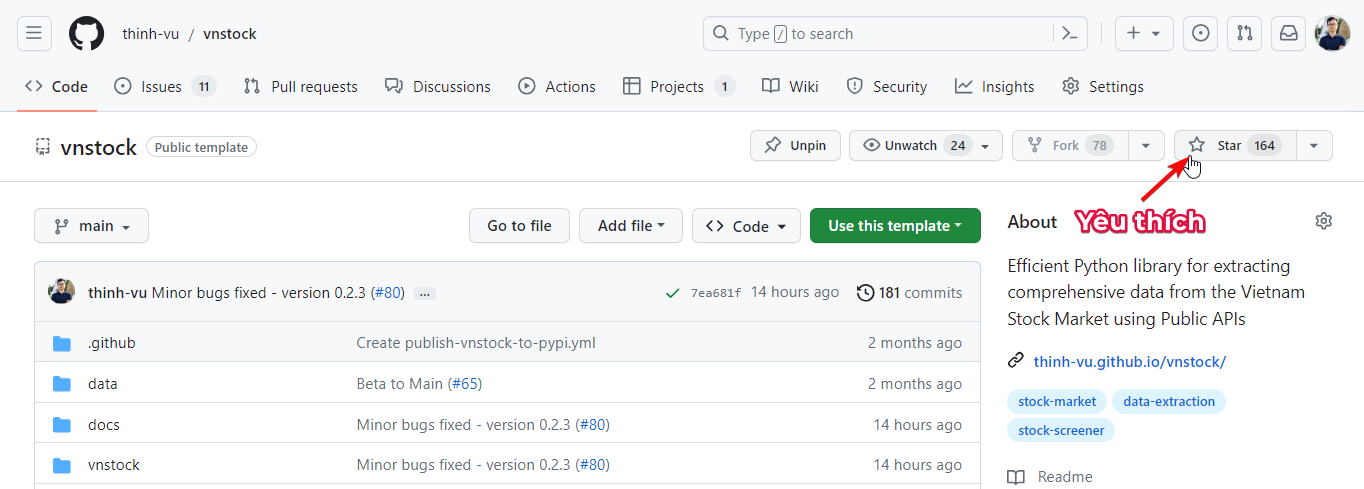
Trước khi bắt đầu, hãy đánh dấu yêu thích để giúp dự án có thể tiếp cận tới nhiều người hơn. Cám ơn bạn!
👉 Để hiểu rõ hơn về vnstock và hướng dẫn sử dụng toàn diện, bạn có thể truy cập vnstocks.com/docs.
👉 Để hiểu sử dụng tính năng MCP cho các trình soạn thảo lệnh chuyên nghiệp (IDE), thêm cấu hình MCP Context7 cho Vnstock để AI tạo code chính xác hơn.
Xem minh hoạ các tính năng thông qua Colab Notebook sau:

8.1. Cài đặt
Bạn có thể cài đặt thư viện bản phát hành ổn định qua PyPI với câu lệnh sau:
pip install -U vnstock
Bạn cũng có thể cài đặt bản phát hành thử nghiệm trên Github với câu lệnh:
pip install git+https://github.com/thinh-vu/vnstock
8.2. Nạp thư viện
Bạn cần nạp thư viện vào môi trường Python thông qua giao diện Jupyter Notebook hoặc Terminal để có thể gọi và sử dụng các hàm được cung cấp.
Xác thực người dùng
Phiên bản vnstock 3.4.0 bắt đầu hỗ trợ tính năng nhận diện người dùng miễn phí để mở khóa tính năng so với sử dụng theo chế độ khách.
🚀 Đăng ký API key để tăng giới hạn sử dụng:
- Khách (Guest):
- Phù hợp để thử nghiệm nhanh, xem thử tính năng. Quảng cáo hiện thường xuyên
- 20 requests/phút - không cần đăng ký
- Tải tối đa 4 kỳ báo cáo tài chính
- Cộng đồng (Community):
- Trải nghiệm tính năng thư viện, chưa muốn gắn bó. Quảng cáo hiện thường xuyên
- 60 requests/phút - đăng ký miễn phí
- Tải tối đa 8 kỳ báo cáo tài chính
- Tài trợ (Sponsor):
- Không quảng cáo
- 3-5x số lượt requests/phút so với bản miễn phí
- Truy cập đầy đủ các kỳ báo cáo tài chính
- Ủng hộ dự án phát triển công cụ & cộng đồng
🤖 Vibe Coding với AI để viết code Vnstock (nên thử ngay)
Đừng học code thủ công! Hãy để AI viết code chính xác cho bạn.
📌 Đăng nhập Google để tạo tài khoản và lấy API key miễn phí tại: https://vnstocks.com/login
# Chạy lệnh và nhập API key theo hướng dẫn
from vnstock import register_user
register_user()
hoặc nhập trực tiếp API key trong code
from vnstock import register_user
register_user(api_key='vnstock_RANDOM_KEY')
Bước 1: Clone Repository
git clone https://github.com/vnstock-hq/vnstock-agent-guide.git
cd vnstock-agent-guide
- Nếu máy tính của bạn chưa có git, hãy tải về cài đặt Git
- Nhập lệnh vào ứng dụng dòng lệnh: Terminal với macOS và Linux và là Command Prompt hoặc Powershell cho Windows 10 trở xuống, dùng Terminal nếu là Windows 11
Bước 2: Copy Instruction Files
Sau khi clone, sao chép các thư mục sau ra thư mục gốc của dự án để IDE hoặc AI nhận diện chính xác. Copy thủ công hoặc chạy lệnh dưới đây với macOS, Linux.
# Copy các thư mục instruction ra thư mục gốc
cp -r .agent ./
cp -r .cursor ./
cp AGENTS.md ./
cp CLAUDE.md ./
cp GEMINI.md ./
Bước 3: Sử Dụng Với AI Agents
| AI Agent | File Instruction | Đặt tại thư mục gốc | Link Tải IDE |
|---|---|---|---|
| Google Antigravity | .agent/rules/GEMINI.md |
✅ | Tải tại đây |
| Cursor IDE | .cursor/rules/instructions.md |
✅ | Tải tại đây |
| Windsurf IDE | AGENTS.md |
✅ | Tải tại đây |
| Claude Code | CLAUDE.md |
✅ | Tải tại đây |
| VS Code + Copilot | .github/copilot-instructions.md |
✅ | VS Code + Github Copilot |
| Google Colab | GEMINI.md |
✅ | Tải tại đây |
Bước 4: Bắt đầu viết code với AI
Sau khi thiết lập xong, bạn có thể yêu cầu AI viết code vnstock chính xác:
Ví dụ prompts cho AI:
- "Lấy dữ liệu giá cổ phiếu VNM từ 2024-01-01 đến nay"
- "Phân tích báo cáo tài chính quý gần nhất của FPT"
- "So sánh hiệu suất 5 cổ phiếu ngân hàng lớn nhất"
🎯 Điều kỳ diệu: AI sẽ tự động viết code chính xác với đúng cú pháp, tham số và cấu trúc dữ liệu vnstock mới nhất, tự động chạy chương trình và trả về kết quả mà không cần sự tham gia của bạn.
📚 Cách sử dụng truyền thống (Thủ công)
Nếu bạn muốn học và viết code thủ công, có 4 cách nạp thư viện vào môi trường làm việc như sau:
8.2.1. Nạp thông qua giao diện làm việc chính
Giao diện làm việc chính cho phép chuyển đổi nguồn và chỉ cần khai báo tên mã khi khởi động. Cấu trúc này phù hợp khi phân tích xuyên suốt 1 mã chứng khoán và nguồn dữ liệu đồng thời giúp tăng độ ổn định của mã nguồn trong tương lai khi các nguồn dữ mới được bổ sung hoặc nguồn cũ hết hiệu lực, bạn chỉ cần đổi tên nguồn để tiếp tục sử dụng.
from vnstock import Vnstock
stock = Vnstock().stock(symbol='VCI', source='KBS')
stock.quote.history(start='2020-01-01', end='2024-05-25')
8.2.2. Nạp thông qua các class tổng hợp
Bạn chọn nạp một trong các lớp chức năng chính. Các lớp chức năng này cho phép chuyển đổi dễ dàng nguồn dữ liệu được hỗ trợ trong khi giữ nguyên cấu trúc hàm. Cấu trúc này giúp tăng độ ổn định của mã nguồn trong tương lai khi các nguồn dữ mới được bổ sung hoặc nguồn cũ hết hiệu lực, bạn chỉ cần đổi tên nguồn để tiếp tục sử dụng.
from vnstock import Listing, Quote, Company, Finance, Trading
8.2.3. Nạp các lớp tính năng riêng lẻ theo nguồn dữ liệu cố định
Bạn cần tham khảo mã nguồn để sử dụng đúng các chức năng có sẵn trong thư viện.
from vnstock.explorer.vci import Listing, Quote, Company, Finance, Trading
hoặc
from vnstock.explorer.kbs import Quote, Company, Finance, Trading
8.3. Danh sách niêm yết
Danh sách các mã chứng khoán sử dụng trong việc thiết lập vòng lặp truy xuất dữ liệu từ các chức năng khác như Giá lịch sử, Thông tin công ty, Báo cáo tài chính, vv
from vnstock import Listing
listing = Listing(source='KBS')
listing.all_symbols()
8.7. Giá lịch sử & thống kê giao dịch
Giá lịch sử
from vnstock import Quote
quote = Quote(symbol='ACB', source='KBS')
quote.history(length='90', interval='d')
hoặc
from vnstock import Quote
quote = Quote(symbol='ACB', source='KBS')
quote.history(start='2024-01-01', end='2025-03-19', interval='d')
8.5. Intraday
Dữ liệu giao dịch khớp lệnh theo từng tick
quote.intraday(symbol='ACB', page_size=10_000, show_log=False)
Chi tiết vui lòng tham khảo tài liệu và Demo Notebook.
5.6. Bảng giá giao dịch
Thông tin sổ lệnh bid/ask hiển thị trên bảng giá.
from vnstock import Trading
Trading(source='KBS').price_board(['VCB','ACB','TCB','BID'])
8.7. Truy xuất thông tin công ty
from vnstock import Company
company = Company(symbol='ACB', source='KBS')
company.overview()
8.8. Truy xuất báo cáo tài chính
from vnstock import Finance
finance = Finance(symbol='VCI', source='KBS')
# Bảng cân đối kế toán - năm
finance.balance_sheet(period='year')
# Bảng cân đối kế toán - quý
finance.balance_sheet(period='quarter')
# Kết quả hoạt động kinh doanh
finance.income_statement(period='year')
# Lưu chuyển tiền tệ
finance.cash_flow(period='year')
# Chỉ số tài chính
finance.ratio(period='year', lang='vi')
8.9. Bộ lọc cổ phiếu
# Tạm thời không hoạt động do thay đổi API từ TCBS (không còn hỗ trợ code này)
8.10. Dữ liệu quỹ mở
from vnstock.explorer.fmarket.fund import Fund
fund = Fund()
fund.listing()
8.11. Dữ liệu thị trường quốc tế: Cổ phiếu, FX, Index
from vnstock import Vnstock
fx = Vnstock().fx(symbol='JPYVND', source='MSN')
df = fx.quote.history(start='2025-01-02', end='2025-03-20', interval='1D')
df
8.12. Tỷ giá & giá vàng
from vnstock.explorer.misc import *

# Tỷ giá ngoại tệ VCB
vcb_exchange_rate(date='2024-03-21')

# Giá vàng SJC
sjc_gold_price()
8.13. Xuất dữ liệu
Tất cả dữ liệu trả về từ Vnstock đều là Pandas DataFrame hoặc Series, do đó, bạn có thể mô hình hoá các thao tác phân tích của mình với lệnh Python dễ dàng nhờ hỗ trợ của AI. Nếu cần xuất dữ liệu sang các định dạng truyền thống, bạn chỉ cần gán các hàm mô tả ở trên với 1 tên biến và thực hiện xuất dữ liệu như dưới đây:
# Biến ratio_df lưu giá trị của phép tính vào bộ nhớ
ratio_df = finance.ratio(period='year', lang='vi', dropna=True)

# Xuất dữ liệu ra Excel
ratio_df.to_excel('/nơi_lưu_file_của_bạn/tên_file-ratio_df.xlsx`, index=False')
# Xuất dữ liệu ra CSV
ratio_df.to_csv('/nơi_lưu_file_của_bạn/tên_file-ratio_df.csv`, index=False')
Vnstock - The Open-Source Stock Analysis Toolkit for Investors in Vietnam

🎤 Introduction to Vnstock
Welcome to Vnstock, a comprehensive open-source solution for stock analysis and investment automation in Vietnam.
Driven by the mission "To bring financial data and investment tools closer to everyone", Vnstock continuously evolves by integrating modern technologies—not only meeting basic data needs but also empowering you to build flexible, intelligent financial analysis solutions.
🚀 Why Vnstock?
- Free & Open-Source: Accessible for all—investors, analysts, researchers, and educators.
- Full-Stack Python Support: Easy-to-use functions for building analysis tools or automated trading bots.
- Diverse, Continuously Updated Data: Covers stocks, warrants, indices, futures, bonds, forex, crypto, and more.
You are an important part of the digital transformation of Vietnam’s financial market. Let’s create impact together with Vnstock!
🤝 Join the Community
Join the Vnstock community to share knowledge, collaborate, and stay updated with the latest features:

II. Key Feature Groups
Vnstockreduces time-to-insight by streamlining data processing, enabling learners, researchers, and financial analysts to build their own smart investment solutions. It is more than a data extraction tool—it’s a flexible foundation for personal investing systems.
-
Easy API Access
Retrieve financial data through simple and intuitive Python functions.
-
Stock Data
Real-time prices, historical prices, financial indicators, and company profiles for listed stocks.
-
Stock Screener
Filter stocks based on financial, technical, or market criteria.
-
Market Indices
Track performance of Vietnamese indices (VNIndex, HNX, UPCOM) and select global indices.
-
Covered Warrants (CW)
Includes price, expiration, issuers, and market status of warrants.
-
Precious Metals
Domestic and international gold price updates.
-
Futures Contracts
Derivatives like VN30F and other trading terms.
-
Investment Funds (ETF & Mutual Funds)
Portfolio composition, performance, and key metrics.
-
Bonds
Government and corporate bond data, including yield, maturity, and volume.
-
Forex
Real-time exchange rates for major currency pairs.
-
Cryptocurrencies
Prices and market volatility for top cryptocurrencies.
-
Financial News & Events
Auto-updated financial news, disclosures, and market events calendar.
III. Disclaimer
Vnstock is developed for personal and research use only. The provided data may be incomplete, inconsistent, or inaccurate, and should not be used for live trading, algorithmic strategies, or financial decisions without proper due diligence.
The authors disclaim all responsibility for any loss, damage, or financial risk arising from the use of this library, including but not limited to: data errors, misinterpretation, or misuse.
Vnstock does not offer investment advice or trading signals. Users bear full responsibility for how they use this project.
IV. 🔑 License
Vnstock is distributed under a custom license focused on personal, non-commercial use. Usage terms are detailed in the LICENSE. For commercial or institutional use, please contact the author for official licensing.
When using Vnstock in your project, you are required to cite the author and project as per the citation guide provided.
V. 🙏 Contributors & Sponsors
Contributors
Vnstock thrives thanks to the collective efforts of tech and finance enthusiasts. Every line of code and every bug fix reflects your valuable contributions. Thank you for making vnstock a powerful tool for the investment community!
❤️ Featured Sponsors
From the bottom of our hearts, we want to express our deepest gratitude to all our incredible sponsors. Your generous support has been the backbone of this project, allowing us to dedicate more time and resources to improving vnstock. Each contribution, regardless of size, fuels our passion and helps us maintain and enhance this open-source tool for the entire investment community. You are not just sponsors – you are essential partners in our journey to democratize financial data access for all investors.
Support the Project
If you've found value in vnstock and would like to join our community of supporters, your contribution would mean the world to us. Every sponsor enables us to dedicate more time to improving documentation, adding new features, and ensuring the long-term sustainability of this project.
VI. Star History
You can support the project by simply starring it on GitHub—this helps the project reach more people. Here's the star history:
VII. ⏱️ Notable Updates
- 20-Mar-2025: Version
3.2.0released with Stock Screener data access. - 02-Jan-2025: Official package name for Vnstock3 updated to
vnstockon PyPI. Read more - 02-Nov-2024: Vnstock3 version
3.0.9released. Details - 10-May-2024: Initial release of Vnstock
3.0.1under package namevnstock3
Full changelog available here
VIII. 📔 Documentation
Before getting started, consider starring the project to support us—thank you!
👉 Full documentation and usage guide: vnstocks.com/docs
👉 To understand how to use the MCP feature with professional code editors (IDEs), add the Context7 MCP Configuration for Vnstock to help the AI generate more accurate code.
Example use cases in Colab Notebook:

🤖 AI-Powered Vibe Coding with Vnstock (Try Now)
Stop manual coding! Let AI write accurate code for you.
📌 Sign in with Google to create account and get free API key at: https://vnstocks.com/login
# Run command and follow instructions to enter API key
from vnstock import register_user
register_user()
or enter API key directly in code
from vnstock import register_user
register_user(api_key='vnstock_RANDOM_KEY')
Step 1: Clone Repository
git clone https://github.com/vnstock-hq/vnstock-agent-guide.git
cd vnstock-agent-guide
- If you don't have git installed, download and install Git
- Run command in: Terminal for macOS and Linux, Command Prompt or PowerShell for Windows 10 and below, use Terminal for Windows 11
Step 2: Copy Instruction Files
After cloning, copy the following directories to your project root so IDE or AI can recognize them accurately. Copy manually or run the commands below for macOS, Linux.
# Copy instruction directories to project root
cp -r .agent ./
cp -r .cursor ./
cp AGENTS.md ./
cp CLAUDE.md ./
cp GEMINI.md ./
Step 3: Use With AI Agents
| AI Agent | File Instruction | Place at Project Root | Download IDE Link |
|---|---|---|---|
| Google Antigravity | .agent/rules/GEMINI.md |
✅ | Download here |
| Cursor IDE | .cursor/rules/instructions.md |
✅ | Download here |
| Windsurf IDE | AGENTS.md |
✅ | Download here |
| Claude Code | CLAUDE.md |
✅ | Download here |
| VS Code + Copilot | .github/copilot-instructions.md |
✅ | VS Code + Github Copilot |
| Google Colab | GEMINI.md |
✅ | Download here |
Step 4: Start Writing Code with AI
After setup, you can ask AI to write accurate vnstock code:
Example AI prompts:
- "Get VNM stock price data from 2024-01-01 to present"
- "Analyze FPT's latest quarterly financial report"
- "Compare performance of top 5 banking stocks"
🎯 The Magic: AI will automatically write accurate code with correct syntax, parameters, and vnstock data structure, run the program and return results without your participation.
8.1 Installation
Install or upgrade to the latest version of Vnstock via pip:
pip install -U vnstock
You can also install the experimental release from GitHub using the command:
pip install git+https://github.com/thinh-vu/vnstock.git
8.2 Importing the Library
You can import Vnstock into your Python environment using Jupyter Notebook or any Python console.
User Authentication
Vnstock 3.4.0 introduces user authentication for free users to unlock enhanced features compared to guest mode.
🚀 Register API key to increase usage limits:
- Guest:
- Suitable for quick testing and feature trials. Ads displayed frequently
- 20 requests/minute - no registration required
- Download up to 4 financial reporting periods
- Community:
- Experience library features without long-term commitment. Ads displayed frequently
- 60 requests/minute - free registration
- Download up to 8 financial reporting periods
- Sponsor:
- No ads
- 3-5x more requests per minute compared to free tier
- Full access to all financial reporting periods
- Support project development & community
📌 Sign in with Google to create account and get free API key at: https://vnstocks.com/login
# Run command and enter API key as instructed
from vnstock import register_user
register_user()
There are four supported methods:
8.2.1. Import Main Functional Classes
Load from core modules that support dynamic switching between data providers:
from vnstock import Listing, Quote, Company, Finance, Trading
8.2.2. Import from Specific Data Providers
For advanced users needing fixed data sources. Refer to the source code for details:
from vnstock.explorer.vci import Listing, Quote, Company, Finance, Trading
or
from vnstock.explorer.kbs import Quote, Company, Finance, Trading
8.3 Listing Symbols
Used for generating lists of available tickers—essential for batch operations:
from vnstock import Listing
listing = Listing(source='KBS')
listing.all_symbols()
8.4 Historical Prices & Trading Stats
Historical Prices
from vnstock import Quote
quote = Quote(symbol='ACB', source='KBS')
quote.history(length='90', interval='d')
Or use:
from vnstock import Quote
quote = Quote(symbol='ACB', source='KBS')
quote.history(start='2024-01-01', end='2025-03-19', interval='d')
8.5 Intraday Tick Data
Retrieves granular trade data per tick:
stock.quote.intraday(symbol='ACB', page_size=10_000, show_log=False)
8.6 Market Price Board
Get real-time quotes for multiple tickers:
from vnstock import Trading
Trading(source='KBS').price_board(['VCB','ACB','TCB','BID'])
8.7 Company Information
from vnstock import Company
company = Company(symbol='ACB', source='KBS')
company.overview()
8.8 Financial Reports
from vnstock import Finance
finance = Finance(symbol='VCI', source='KBS')

# Balance Sheet - yearly
finance.balance_sheet(period='year')

# Balance Sheet - quarterly
finance.balance_sheet(period='quarter')

# Income Statement
finance.income_statement(period='year')

# Cash Flow Statement
finance.cash_flow(period='year')

# Financial Ratios
finance.ratio(period='year', lang='vi')
8.9 Stock Screener
# Currently not available due to TCBS API changes (no longer supported)
8.10 Mutual Fund Data
from vnstock.explorer.fmarket.fund import Fund
fund = Fund()
fund.listing()
8.11 International Markets: Stocks, FX, Indices
from vnstock import Vnstock
fx = Vnstock().fx(symbol='JPYVND', source='MSN')
df = fx.quote.history(start='2025-01-02', end='2025-03-20', interval='1D')
df
8.12 Exchange Rates & Gold Prices
from vnstock.explorer.misc import *

# VCB exchange rate
vcb_exchange_rate(date='2024-03-21')

# SJC gold price
sjc_gold_price()
8.13 Exporting Data
All data from Vnstock is returned as Pandas
DataFrameorSeries, making it AI-friendly and easy to process or export.
# Save ratio data to memory
ratio_df = finance.ratio(period='year', lang='vi', dropna=True)

# Export to Excel
ratio_df.to_excel('/your_save_path/ratio_df.xlsx', index=False)

# Export to CSV
ratio_df.to_csv('/your_save_path/ratio_df.csv', index=False)
Release history Release notifications | RSS feed


Download files
Download the file for your platform. If you're not sure which to choose, learn more about installing packages.
Source Distribution
Built Distribution
Filter files by name, interpreter, ABI, and platform.
If you're not sure about the file name format, learn more about wheel file names.
Copy a direct link to the current filters
File details
Details for the file vnstock-3.4.2.tar.gz.
File metadata
- Download URL: vnstock-3.4.2.tar.gz
- Upload date:
- Size: 250.1 kB
- Tags: Source
- Uploaded using Trusted Publishing? No
- Uploaded via: twine/6.2.0 CPython/3.11.9
File hashes
| Algorithm | Hash digest | |
|---|---|---|
| SHA256 |
9d98dcadfba9f1be42cf2ca61858ddd722fdcefb183dc55a713b069a087ad96b
|
|
| MD5 |
c5792cbb481636c65ec4e2f42b303ad6
|
|
| BLAKE2b-256 |
ae8f31f914fa3e399e973f7659d5164ee78eb93d4f944375e4e855e403fc4612
|
File details
Details for the file vnstock-3.4.2-py3-none-any.whl.
File metadata
- Download URL: vnstock-3.4.2-py3-none-any.whl
- Upload date:
- Size: 277.5 kB
- Tags: Python 3
- Uploaded using Trusted Publishing? No
- Uploaded via: twine/6.2.0 CPython/3.11.9
File hashes
| Algorithm | Hash digest | |
|---|---|---|
| SHA256 |
d5af31b2cb79e4bf0433ca5ae7e211cfaad4f46359f0f4592670c38219c5897a
|
|
| MD5 |
d4a70b66ecea27e85db9b231ed2acb90
|
|
| BLAKE2b-256 |
0f86d538895d1e2d092df80ccd80a6249814df24202b1146cb2be2c0d28ef03e
|






