

voice-coach-mcp
Give Claude ears. A local MCP server that listens to you sing, speak and read aloud, measures what it hears, and lets Claude coach your voice.


Claude cannot process audio. This server records from your microphone, analyzes the audio on your computer, and returns compact measurements that Claude turns into concrete coaching:
| Mode | What it measures |
|---|---|
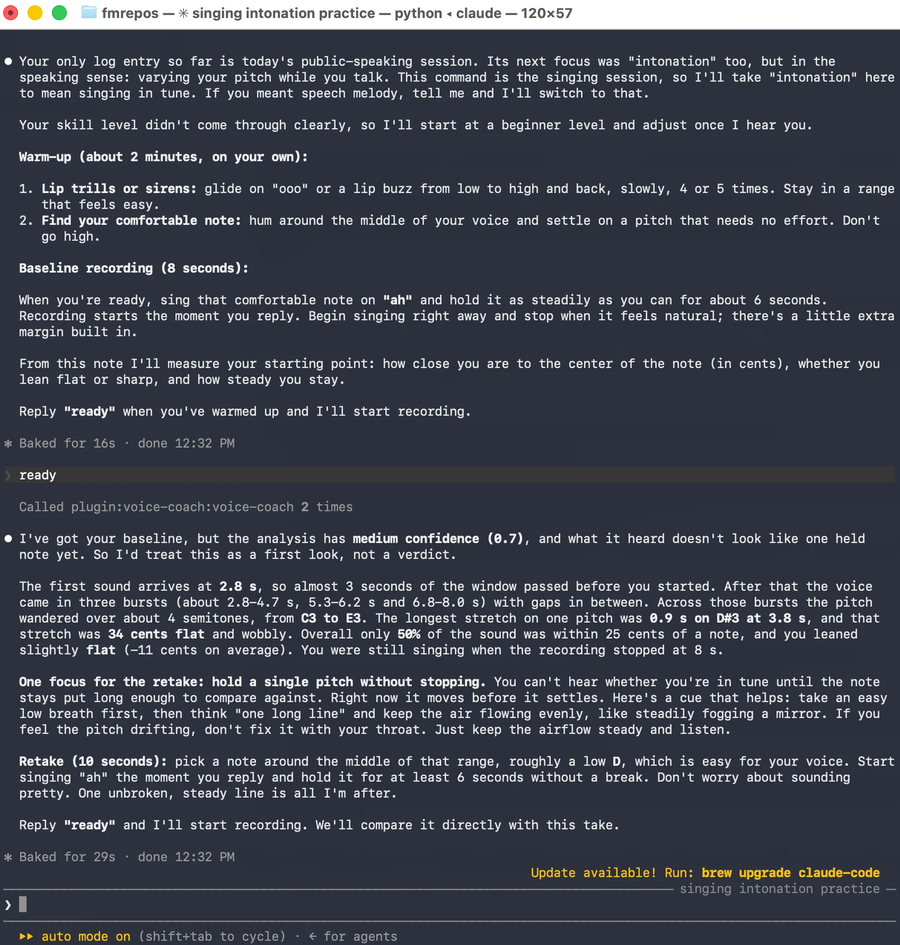
| 🎤 Singing | Pitch accuracy per note (cents), flat/sharp tendency, drift, stability and vibrato. Compares against equal temperament, a key, or a MIDI melody, including wrong, missed and late notes. |
| 🗣️ English pronunciation | Phoneme-level comparison of what you said against what you meant to read, with per-word scores and frequent confusions (θ → s, v → b, iː → ɪ…). |
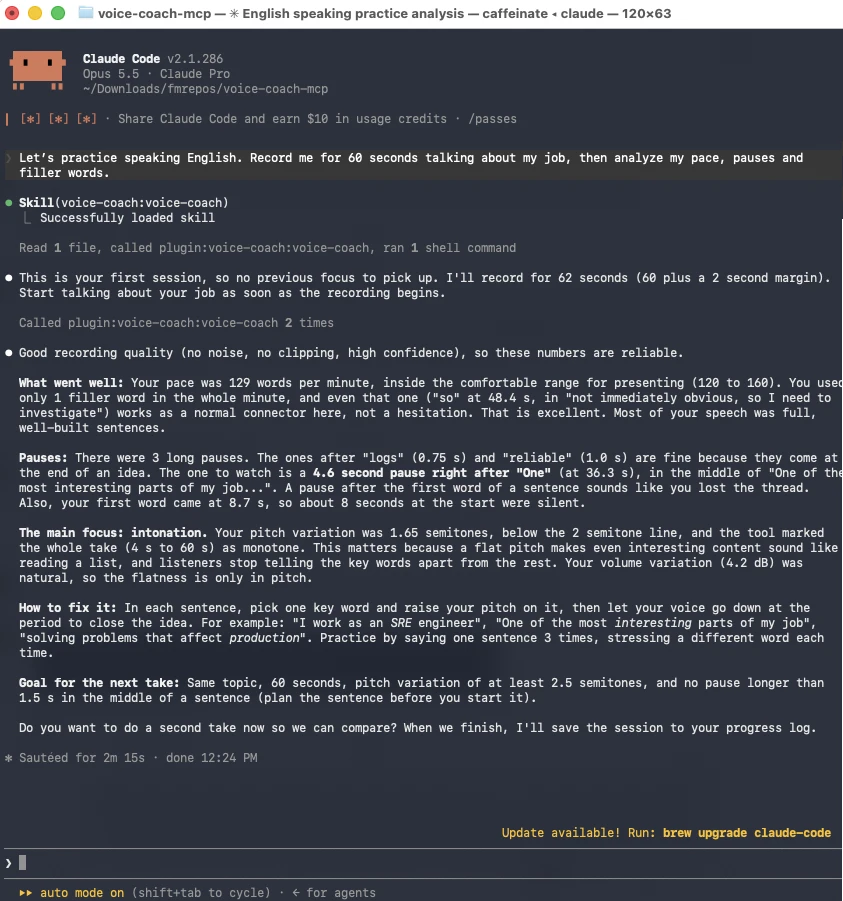
| 🎙️ Public speaking | Words per minute, long pauses, filler words (English and Spanish), pitch monotony and volume variation, with a timestamped transcript. |
A bundled skill turns Claude into a coach: it runs warm-up → exercise → analysis → feedback sessions, gives one concrete focus per take, and keeps a progress log across sessions. Claude replies in your language.
- Local and private: audio never leaves your computer (unless you opt into the Azure backend).
- Free: open-source models (faster-whisper, wav2vec2) and no API keys.
- Tools measure, Claude interprets: every response is compact JSON (≤ 2 KB) with
confidenceandwarnings, so Claude never coaches on bad audio.
Install
You need uv and, for pronunciation, espeak-ng:
brew install uv espeak-ng ffmpeg # macOS (ffmpeg is optional: m4a/aac input)
On Linux: install uv, then sudo apt install espeak-ng ffmpeg libportaudio2. Pronunciation
analysis on macOS needs Apple Silicon and macOS 14 or later (a PyTorch requirement).
Claude Code (plugin: server + skill)
claude plugin marketplace add FabianIMV/voice-coach-mcp
claude plugin install voice-coach@voice-coach
Or, inside a session: /plugin install voice-coach --marketplace FabianIMV/voice-coach-mcp.
The first start installs the Python dependencies with uv, which can take a minute or two (the
models download later, on first use). If /mcp shows voice-coach as failed right after
installing, reconnect it from /mcp once the installation finishes.
Claude Desktop (extension)
Download voice-coach.mcpb from the latest release
and double-click it (or drag it into Claude Desktop). For the coaching skill, also download
voice-coach-skill.zip and upload it in Settings → Capabilities → Skills.
Any MCP client (manual)
claude mcp add voice-coach --scope user -- uvx --from "voice-coach-mcp[speech,pronunciation]" voice-coach-mcp
For Claude Desktop's claude_desktop_config.json, use absolute paths (Desktop does not inherit
your shell PATH; which uvx prints it):
{
  "mcpServers": {
    "voice-coach": {
      "command": "/opt/homebrew/bin/uvx",
      "args": ["--from", "voice-coach-mcp[speech,pronunciation]", "voice-coach-mcp"]
    }
  }
}
Optional: run uvx --from "voice-coach-mcp[speech,pronunciation]" voice-coach-mcp download-models
once, so the first call does not wait for the models (~480 MB Whisper, ~1.3 GB phoneme model).
Microphone permission (macOS)
macOS grants the microphone to the app that launches the server: Claude Desktop, or the
terminal running Claude Code (Terminal, iTerm, Ghostty, VS Code…). If permission is denied,
macOS returns silence instead of an error and record_audio reports
no_microphone_permission. Fix it in System Settings → Privacy & Security → Microphone and
restart that app.
Use it
Just talk to Claude:
- "I want to practice singing in tune. I'm a beginner."
- "Record 30 seconds of me presenting my project and tell me how many filler words I use."
- "Help me pronounce 'th'. Give me sentences to read and score them."
- "Analyze this voice memo against melody.mid" (any wav/mp3/m4a path works).
- "How am I doing?" (Claude reads your progress log).
Real sessions in Claude Code: a 60-second talk about work, and a singing baseline on one held note.
Guided sessions are also available as MCP prompts: singing_session, pronunciation_session
and speaking_session (in Claude Code: /mcp__voice-coach__singing_session).
Tools
| Tool | Purpose |
|---|---|
record_audio(seconds, name?) |
Records a 16 kHz mono WAV to ~/VoiceCoach/recordings/ and reports levels, clipping and noise. |
analyze_pitch(audio, reference_midi?, key?, midi_track?) |
Pitch accuracy per note against equal temperament, a key ("A minor", "G major"…) or a MIDI melody. |
transcribe(audio, language?) |
Local transcription with segment and word timestamps. |
speech_metrics(audio, language, pause_threshold_s=0.7) |
Pace, long pauses, filler words, pitch monotony and volume variation. |
assess_pronunciation(audio, expected_text, language="en-US") |
Phoneme-level English pronunciation scores and errors. |
read_progress(entries=5) / log_progress(entry) |
Read and append sessions in ~/VoiceCoach/progress.md. |
Audio can be a path or the name returned by record_audio. When a result is too long, the most
relevant items are returned and everything else is saved next to the audio (full_details).
Example: analyze_pitch on a synthetic C major scale with known deviations
{"audio":"examples/audio/c_major_scale.wav","duration_s":7.36,"mode":"equal_temperament",
 "summary":{"notes":8,"range":"C4–C5","pct_within_25_cents":75.0,"mean_deviation_cents":-7.8,
   "mean_abs_deviation_cents":13.6,"tendency":"centered","drift_cents":-1.0,
   "stability":{"stable":7,"vibrato":1,"unstable":0}},
 "notes":[{"t":0.4,"dur":0.62,"note":"C4","cents":0,"stability":"stable"},
   {"t":1.84,"dur":0.62,"note":"E4","cents":-30,"stability":"stable"},
   {"t":4.72,"dur":0.62,"note":"B4","cents":-42,"stability":"stable"},
   {"t":5.44,"dur":1.43,"note":"C5","cents":-2,"stability":"vibrato","vibrato_hz":5.5,"vibrato_pp_cents":84}, "…"],
 "confidence":{"value":1.0,"level":"high"},"warnings":[]}
With a MIDI reference, the server detects
that the melody was sung an octave lower (octave_shift: -1), started 1 s late
(start_offset_ms: 1003), and that one note came in 134 ms late.
Example: assess_pronunciation — "I sink the berry best sings…" read for "I think the very best things in life are free"
{"backend":"wav2vec2-local",
 "summary":{"overall_score":90,"words":10,"words_with_errors":3,
   "errors":{"substitution":3,"deletion":0,"insertion":0},
   "frequent_confusions":[{"expected":"θ","detected":"s","count":2},{"expected":"v","detected":"b","count":1}]},
 "words":[{"word":"think","score":75,"t":0.56,"expected":"θ ɪ ŋ k","detected":"s ɪ ŋ k",
     "errors":[{"type":"substitution","expected":"θ","detected":"s"}]},
   {"word":"very","score":75,"t":0.96,"expected":"v ɛ ɹ i","detected":"b ɛ ɹ i",
     "errors":[{"type":"substitution","expected":"v","detected":"b"}]}, "…"],
 "confidence":{"value":1.0,"level":"high"},"warnings":[]}
Example: speech_metrics on a short synthetic talk with inserted pauses and fillers
{"language":"en",
 "pace":{"words":36,"speaking_time_s":14.9,"words_per_minute":145,"wpm_excluding_long_pauses":165},
 "pauses":{"threshold_s":0.7,"count":2,"total_s":1.9,"max_s":1.03,"per_minute":8.1,
   "items":[{"t":4.42,"dur":1.03,"after":"speaking"},{"t":12.1,"dur":0.83,"after":"normal"}]},
 "fillers":{"total":6,"per_minute":24.2,"by_type":{"um":1,"so":1,"uh":1,"you know":1,"like":1,"i mean":1}},
 "pitch":{"median_f0_hz":101,"std_semitones":1.53,"monotone":true,"monotone_stretches":[{"t":0.0,"end":12.0}]},
 "volume":{"mean_dbfs":-21.2,"std_between_words_db":2.4,"low_variation":true},
 "confidence":{"value":1.0,"level":"high"},"warnings":[]}
The synthetic voice is very flat, hence monotone: true. A Spanish example is also included.
All example outputs are real responses from the server over stdio, regenerated by
examples/generate_examples.py on synthetic audio; see
examples/outputs/.
How it works
- Pitch: pYIN (librosa) finds voiced frames; each frame is refined from its harmonic peaks
with parabolic interpolation (~1 cent accuracy from C2 to C6). Notes are split at silences,
energy dips and sustained pitch changes; vibrato does not split notes. With a MIDI reference,
the octave and offset are found by cross-correlation, notes are aligned with Needleman–Wunsch,
and a tempo line
t_sung = a·t_ref + bis fitted to judge each onset. - Speech: faster-whisper transcribes with word timestamps (an initial prompt keeps fillers). Pauses are measured from the audio energy, because Whisper stretches word endings into silence. Ambiguous fillers ("like", "so") only count when isolated by a comma or a pause.
- Pronunciation: phonemizer + espeak-ng give the expected IPA phonemes; the
facebook/wav2vec2-lv-60-espeak-cv-ftphoneme model gives what was said; both are aligned by edit distance. Normal American English variants (flap, schwa, linking r, glottal stop) are not counted as errors. - Quality first: clipping, background noise, silence and missing microphone permission are reported as warnings and lower the confidence.
Known limitations: one voice at a time (accompaniment degrades pitch detection); two identical notes sung in perfect legato count as one; the phoneme model uses sentence context and may occasionally "correct" a mispronounced word; pronunciation assessment is English-only.
Privacy and network access
Everything the plugin runs, writes and downloads:
- Runs:
uvstarts the server from the plugin folder (uv run --frozen, pinned byuv.lock); the server usesespeak-ngfor expected phonemes andffmpegonly to read m4a/aac files. - Microphone: only while
record_audioruns, for the number of seconds Claude asks for. - Writes: recordings and
progress.mdin~/VoiceCoach(orVOICE_COACH_DIR), and an analysis detail file<audio>.<tool>.jsonnext to each analyzed audio (or in~/VoiceCoach/analysisif that folder is read-only). Analyzing the same audio again replaces its detail file; nothing else is overwritten or deleted. - Downloads: the Python dependencies from PyPI on first start, then the models from Hugging
Face on first use: the faster-whisper model (
Systran/faster-whisper-smallby default) andfacebook/wav2vec2-lv-60-espeak-cv-ft. After that, models load from the local cache. - Sends: nothing by default. No telemetry, no accounts, no API keys. Only if you set
VOICE_COACH_PRONUNCIATION_BACKEND=azurewith your ownAZURE_SPEECH_KEYandAZURE_SPEECH_REGIONdoesassess_pronunciationsend that audio and the expected text to Azure Speech in your region.
Configuration
| Variable | Default | Purpose |
|---|---|---|
VOICE_COACH_DIR |
~/VoiceCoach |
Recordings, analysis details and progress.md |
VOICE_COACH_MAX_SECONDS |
120 |
Maximum record_audio length |
VOICE_COACH_A4_HZ |
440 |
Tuning reference |
VOICE_COACH_MAX_BYTES |
2048 |
Response size budget |
VOICE_COACH_WHISPER_MODEL |
small |
tiny, base, small, medium, large-v3… |
VOICE_COACH_WHISPER_DEVICE / _COMPUTE_TYPE |
cpu / int8 |
CTranslate2 settings |
VOICE_COACH_FILLERS |
— | Your own filler-word TOML (see fillers.toml) |
VOICE_COACH_PRONUNCIATION_BACKEND |
local |
local (wav2vec2) or azure |
VOICE_COACH_PRONUNCIATION_DEVICE |
auto |
auto (MPS when available), cpu or mps |
AZURE_SPEECH_KEY, AZURE_SPEECH_REGION |
— | Optional Azure Pronunciation Assessment backend (pip install voice-coach-mcp[azure]); the audio is then sent to Azure |
PHONEMIZER_ESPEAK_LIBRARY |
auto-detected | Path to libespeak-ng if it is not in Homebrew's default location |
Development
git clone https://github.com/FabianIMV/voice-coach-mcp.git && cd voice-coach-mcp
uv sync --extra speech --extra pronunciation
uv run pytest                 # fast suite: synthetic audio, simulated microphone
uv run pytest -m models       # real Whisper and wav2vec2 models on synthetic speech
uv run ruff check . && uv run ruff format --check .
See CONTRIBUTING.md for the design principles and the release process.
src/voice_coach_mcp/
  server.py         MCP tools and prompts (thin layer)
  audio/            loading, recording and quality checks
  singing/          pitch tracking, music theory, MIDI reference, pitch accuracy
  speech/           transcription, speech metrics, filler lists
  pronunciation/    expected phonemes, alignment, wav2vec2 and Azure backends
  output.py         2 KB response budget and details file
  progress.py       progress log
skills/voice-coach/ coaching skill (also bundled in the Python package)
examples/           synthetic audio and real tool outputs
License and credits
MIT © FabianIMV. Built on faster-whisper, librosa, wav2vec2 phoneme recognition and the official MCP Python SDK. The optional pronunciation extra uses phonemizer and espeak-ng, both GPL-3.0. Example voices were synthesized with espeak-ng and Piper (public-domain LJSpeech voice).
1 maintainer

Metadata
1 maintainer
Release files for voice-coach-mcp 0.1.1
For a detailed explanation of source distributions (sdists) and built distributions (wheels), please see the package formats documentation.
Source distribution (sdist)
| File | Size | Uploaded | Provenance | |
|---|---|---|---|---|
| voice_coach_mcp-0.1.1.tar.gz | 65.6 kB | With provenance | Details |
Built distribution (wheel)
| File | Interpreter | ABI | Platform | Reset |
|---|---|---|---|---|
| voice_coach_mcp-0.1.1-py3-none-any.whl | Python 3 | none | any | Details |
Total release size: 130.8 kB
Release files / voice_coach_mcp-0.1.1.tar.gz
| Download URL | voice_coach_mcp-0.1.1.tar.gz |
|---|---|
| Size | 65.6 kB |
| Tags | Source |
|
SHA-256 checksum How to use checksums |
fbce7b4c7721973c9b7e4ec9baa9ee824bd4e249c4a1ef9655f26ccc6e56687f
|
|
BLAKE2b-256 checksum How to use checksums |
504139088a687b804e1a7826695a319b4fa339bf432b204436350c828579087b
|
| Upload date | |
|
Uploaded using Trusted Publishing? What is trusted publishing? |
Yes |
| Uploaded via |
twine/7.0.0 CPython/3.13.16
|
Provenance
Provenance describes where a file came from. On PyPI, provenance is shared via attestations, which provide a verifiable record of the build or publishing details. View details, limitations and caveats.


PyPI Publish Attestation
PyPI verified that this artifact, at this checksum, originated from the publisher listed below.
Signed by GitHub Actions, verified by PyPI on Oct 23, 2026.
Transparency logRelease files / voice_coach_mcp-0.1.1-py3-none-any.whl
| Download URL | voice_coach_mcp-0.1.1-py3-none-any.whl |
|---|---|
| Size | 65.2 kB |
| Tags | Python 3 |
|
SHA-256 checksum How to use checksums |
1c08cd712cc60975f95841985235ace00a3f8f8fe27d63448008f0cfff5fed98
|
|
BLAKE2b-256 checksum How to use checksums |
a685abea481381fdb47a78d21fbc468da99c0dffcad64075d6f38ec127b4c14a
|
| Upload date | |
|
Uploaded using Trusted Publishing? What is trusted publishing? |
Yes |
| Uploaded via |
twine/7.0.0 CPython/3.13.16
|
Provenance
Provenance describes where a file came from. On PyPI, provenance is shared via attestations, which provide a verifiable record of the build or publishing details. View details, limitations and caveats.
PyPI Publish Attestation
PyPI verified that this artifact, at this checksum, originated from the publisher listed below.
Signed by GitHub Actions, verified by PyPI on Oct 23, 2026.
Transparency logSecurity for voice-coach-mcp 0.1.1
Provenance
Provenance describes where a file came from. On PyPI, provenance is shared via attestations, which provide a verifiable record of the build or publishing details. View details, limitations and caveats.
Full provenance
All 2 files in this release have been uploaded with provenance metadata.
Attestation for voice_coach_mcp-0.1.1.tar.gz
PyPI Publish Attestation
PyPI verified that this artifact, at this checksum, originated from the publisher listed below.
Signed by GitHub Actions, verified by PyPI on Oct 23, 2026.
Transparency logA note on package security
PyPI is a repository for distributing packages, not a service for auditing them. While third-party security researchers and our staff do their best to detect and remove malicious packages, PyPI cannot guarantee the quality, security or suitability of any given package.
To learn more about protecting yourself from malicious actors, visit our package security documentation.














