
Voiceprint
A small model that writes like you. Train it on a few pages of your writing, then draft from the terminal or any MCP client.



Quickstart · Examples · MCP · Evaluation · Issues
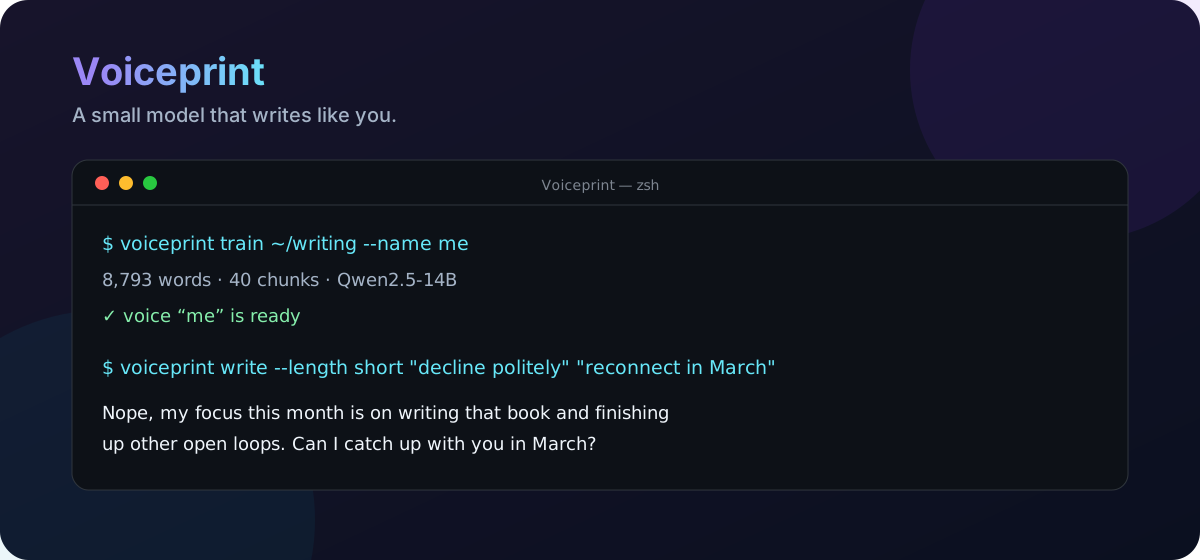
Voiceprint is built for first drafts: emails, posts, essays, and sections of longer work. It learns style from your prose while an agent or a set of notes supplies the facts and structure.
If Voiceprint is useful to you, star the repository so other writers and developers can find it.
Why Voiceprint
- Your voice, not AI slop. A LoRA adapter learns from prose you already wrote.
- A small corpus. About 1,000–2,000 words is enough for the tested setup.
- CLI and MCP. Use it directly or let Claude Code, Codex, or another MCP client call it.
- Runs in your account. Training and inference run in your own Modal workspace. There is no Voiceprint service or separate account.
- Measurable. The built-in evaluation checks style similarity and memorization on held-out text.
Quickstart
1. Install
Install Voiceprint with uv:
uv tool install voiceprint
Or use pip install voiceprint in a Python 3.10 or newer environment.
2. Deploy
Create a Modal account, then deploy the training and serving images:
modal token new
voiceprint deploy
voiceprint check
3. Train
Train a voice from Markdown or text files:
voiceprint train ~/my-writing --name me
4. Write
voiceprint write "the wedge is trust, not features" "our users are ops leads"
The first setup takes roughly 15 minutes in the measured configuration. Training continues as a
remote job if you close the terminal; reconnect with voiceprint resume.
What you can do
Draft from a brief
Pass each note as a separate argument:
voiceprint write \
  "the audience is engineering leaders" \
  "the wedge is trust, not features" \
  "end with an invitation to reply"
For longer briefs, use a file:
voiceprint write --notes-file brief.md
Continue a draft
Your existing words give the model both context and a strong style signal:
voiceprint write --continue-from draft.md
To write the next section from new notes:
voiceprint write --notes-file section3.md --continue-from section2.md
Rewrite existing text
voiceprint rewrite draft.md
pbpaste | voiceprint rewrite
Code blocks and headings pass through unchanged.
Generate short-form copy
voiceprint write --length short \
  "decline the intro politely" \
  "offer to reconnect in March"
Short-form works best when the training corpus includes short-form writing.
Use it from an agent
Voiceprint exposes an MCP server so an agent can research and plan while the adapter handles the prose. Register it with Claude Code:
claude mcp add voiceprint -- /full/path/to/.venv/bin/voiceprint mcp
cp SKILL.md ~/.claude/skills/voiceprint/SKILL.md
voiceprint check prints the MCP command with the path for your installation.
An agent can use Voiceprint in three ways:
- Continue text you already started.
- Turn an outline or brief into a draft.
- Interview you for the missing ideas and facts, then draft section by section.
The third workflow is useful for factual writing: your answers become notes instead of leaving the voice model to guess.
Prepare a good corpus
Use prose you wrote yourself. A directory of .md and .txt files works well:
voiceprint train ~/my-writing --name me
voiceprint train post.md --name me
The preparation step removes headings, code blocks, tables, quotes, and bulleted outlines. The CLI rejects fewer than 300 usable words and warns below 700.
Keep the corpus consistent. Use writing with the same voice, audience, and level of formality you want Voiceprint to reproduce. Mixing personal essays, corporate copy, academic prose, and heavily edited work gives the adapter conflicting signals.
Choose samples that match what you want to produce. Essays teach essay structure; short emails and posts teach short-form rhythm. Avoid transcripts, heavily co-edited work, and generic company copy.
How it works
Voiceprint builds training pairs from your corpus and trains a LoRA adapter on a Hugging Face base model. At generation time it:
- Formats the brief and optional draft prefix as a plain document rather than a chat turn.
- Generates multiple candidates with high-temperature min-p sampling.
- Ranks the candidates by stylometric similarity to your corpus.
- Returns the highest-scoring draft.
In tests, the style score flattened after roughly 700 words. The base model already knows how to write; the adapter is learning the distribution of choices that makes the writing sound like you.
Useful controls:
--allprints every candidate and its score.--candidates Nchanges the number of candidates.--tempcontrols variance. Lower values are more conservative; higher values vary more and make more mistakes.--voice NAMEselects a trained voice.--scorer pangramuses the Pangram ranker and requiresPANGRAM_API_KEY.
Evaluate the result
$ voiceprint eval me
voice: me  (5 drafts continuing held-out passages)
  stylometry   0.548   (your own unseen writing: 0.476)
  novelty      1.000   (1.000 = nothing lifted from the training text)
eval continues passages held out during training. Stylometry measures similarity to the corpus;
novelty checks whether the adapter repeats training text. A novelty score below 0.95 suggests
memorization.
The example comes from an 8,800-word corpus. Voiceprint selects the best of several candidates by style score, so its score is not directly comparable to a single human sample. Three training epochs are the default: in testing, eight epochs reduced novelty and made rewrites less faithful to their input.
Models and voices
Manage multiple voices from the CLI:
voiceprint voices
voiceprint use work
voiceprint write --voice work "..."
voiceprint delete old-voice
Two base-model presets have been tested:
| Preset | Model | Result |
|---|---|---|
qwen14b |
Qwen/Qwen2.5-14B |
Default; 0.548 style, 1.000 novelty |
qwen7b |
Qwen/Qwen2.5-7B |
Smaller; 0.541 style, 1.000 novelty |
Use a preset or another Hugging Face base-model ID:
voiceprint train ~/writing --name me --model qwen7b
voiceprint train ~/writing --name me --model someone/Their-Base-7B
Instruct and chat models are rejected. Voices that use the same base model share a serving
container. Training and serving default to an A100-80GB; change TRAIN_GPU and SERVE_GPU in
voiceprint/modal_app.py to use different hardware.
Privacy, accuracy, and cost
Source files stay on your machine. Derived training chunks are sent to the GPU container in your Modal account, and adapters and model weights are stored in your Modal volumes. The project has no hosted backend.
The sampling settings that preserve variation also increase factual errors. Put names, dates, numbers, and URLs in the notes, and verify the finished draft. Voiceprint is not a fact checker.
Voiceprint does not charge for usage. Modal bills your account for GPU time and storage.
| Operation | Measured result |
|---|---|
| Deploy the images | About 4 minutes, once |
| Train one voice | About 6 minutes on one A100 |
| Store one adapter | About 270 MB |
| Generate with a warm container | About 3 seconds |
| First generation after idle | 364 seconds in the measured run |
Serving containers stop after 10 minutes of inactivity. Model weights remain in a shared Modal volume, so a cold start loads them from storage rather than downloading them again.
Troubleshooting
| Symptom | Fix |
|---|---|
Voiceprint isn't deployed to your Modal workspace yet |
Run voiceprint deploy. |
The first write takes several minutes |
Wait for the container to start and load the model. |
| Deployed code looks stale | Run modal app stop voiceprint --yes, then deploy again. |
several voices exist |
Pass --voice or run voiceprint use <name>. |
| Training finds little usable prose | Add prose paragraphs; headings, code, tables, and outlines do not count. |
| The terminal disconnected during training | Run voiceprint resume. |
If the problem persists, open an issue with the command you ran and the full error output.
Contributing
Issues and pull requests are welcome. For local development:
uv pip install -e ".[dev]"
pytest
The prompt format and sampling defaults live in voiceprint/scaffold.py.
tests/test_scaffold.py verifies that training and generation build prompts the same way.
Before opening a pull request, run the test suite and explain any behavior or default that changes. For larger changes, start with an issue so the approach can be discussed first.
Responsible use
Only train on your own voice or a voice you have explicit permission to use. Do not use Voiceprint for impersonation, deceptive accounts or reviews, or work that must be written without assistance. See the use policy.
License
MIT © Voiceprint contributors
1 maintainer

Download files
Download the file for your platform. If you're not sure which to choose, learn more about installing packages.
Source Distribution
Built Distribution
Filter files by name, interpreter, ABI, and platform.
If you're not sure about the file name format, learn more about wheel file names.
Copy a direct link to the current filters
File details
Details for the file voiceprint-0.1.0.tar.gz.
File metadata
- Download URL: voiceprint-0.1.0.tar.gz
- Upload date:
- Size: 41.4 kB
- Tags: Source
- Uploaded using Trusted Publishing? Yes
- Uploaded via:
twine/7.0.0 CPython/3.13.14
File hashes
| Algorithm | Hash digest | |
|---|---|---|
| SHA256 |
e5367f99acefc7769073fe28173d4e03005e922d4e53df1c6c3f06baa42e3fe6
|
|
| MD5 |
574465aae3cab5247c956262b3fa9279
|
|
| BLAKE2b-256 |
e5248f720344b2f9338355d8c833e6c999489f5a821fd1cacdb243c7e491db87
|
Provenance
The following attestation bundles were made for voiceprint-0.1.0.tar.gz:
Publisher:
release.yml on samzliu/voiceprint
-
Statement:
-
Statement type:
https://in-toto.io/Statement/v1 -
Predicate type:
https://docs.pypi.org/attestations/publish/v1 -
Subject name:
voiceprint-0.1.0.tar.gz -
Subject digest:
e5367f99acefc7769073fe28173d4e03005e922d4e53df1c6c3f06baa42e3fe6 - Sigstore transparency entry: 2500348292
- Sigstore integration time:
-
Permalink:
samzliu/voiceprint@9d6cb92e664c9290dfeef9bdae02ab4427aac921 -
Branch / Tag:
refs/tags/v0.1.0 - Owner: https://github.com/samzliu
-
Access:
public
-
Token Issuer:
https://token.actions.githubusercontent.com -
Runner Environment:
github-hosted -
Publication workflow:
release.yml@9d6cb92e664c9290dfeef9bdae02ab4427aac921 -
Trigger Event:
push
-
Statement type:
File details
Details for the file voiceprint-0.1.0-py3-none-any.whl.
File metadata
- Download URL: voiceprint-0.1.0-py3-none-any.whl
- Upload date:
- Size: 39.0 kB
- Tags: Python 3
- Uploaded using Trusted Publishing? Yes
- Uploaded via:
twine/7.0.0 CPython/3.13.14
File hashes
| Algorithm | Hash digest | |
|---|---|---|
| SHA256 |
10c9b081b352b6e80134a71c39b9ce9016272dc09653da5f2fb35e90ff13aa79
|
|
| MD5 |
905f21b1865abe4ef1c507ae965eb8c8
|
|
| BLAKE2b-256 |
298f501d82ffec07067a86e46a4c3ac7a065b22cd802af5f6cd155e48009471c
|
Provenance
The following attestation bundles were made for voiceprint-0.1.0-py3-none-any.whl:
Publisher:
release.yml on samzliu/voiceprint
-
Statement:
-
Statement type:
https://in-toto.io/Statement/v1 -
Predicate type:
https://docs.pypi.org/attestations/publish/v1 -
Subject name:
voiceprint-0.1.0-py3-none-any.whl -
Subject digest:
10c9b081b352b6e80134a71c39b9ce9016272dc09653da5f2fb35e90ff13aa79 - Sigstore transparency entry: 2500348295
- Sigstore integration time:
-
Permalink:
samzliu/voiceprint@9d6cb92e664c9290dfeef9bdae02ab4427aac921 -
Branch / Tag:
refs/tags/v0.1.0 - Owner: https://github.com/samzliu
-
Access:
public
-
Token Issuer:
https://token.actions.githubusercontent.com -
Runner Environment:
github-hosted -
Publication workflow:
release.yml@9d6cb92e664c9290dfeef9bdae02ab4427aac921 -
Trigger Event:
push
-
Statement type:













