




Try it in your browser · Benchmark · Pipecat · LiveKit · Open WebUI · LiteLLM · Audio · Changelog
VoiceSafeKit
Your voice agent is sending card numbers to the LLM, and your PII filter can't see them.
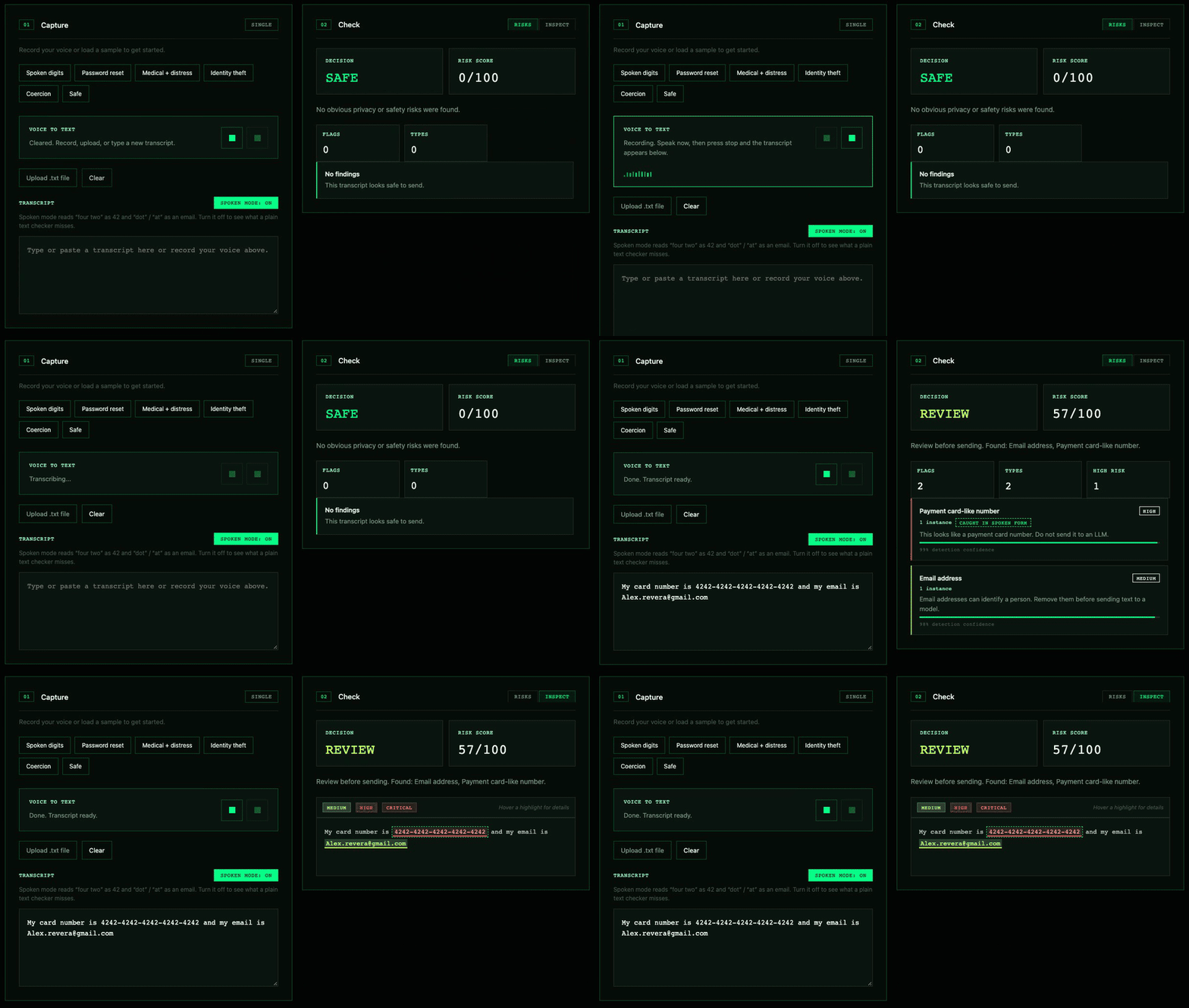
A voice says a card number and an email into the live app. Whisper runs on-device and both are caught. Recording sped up 5×.
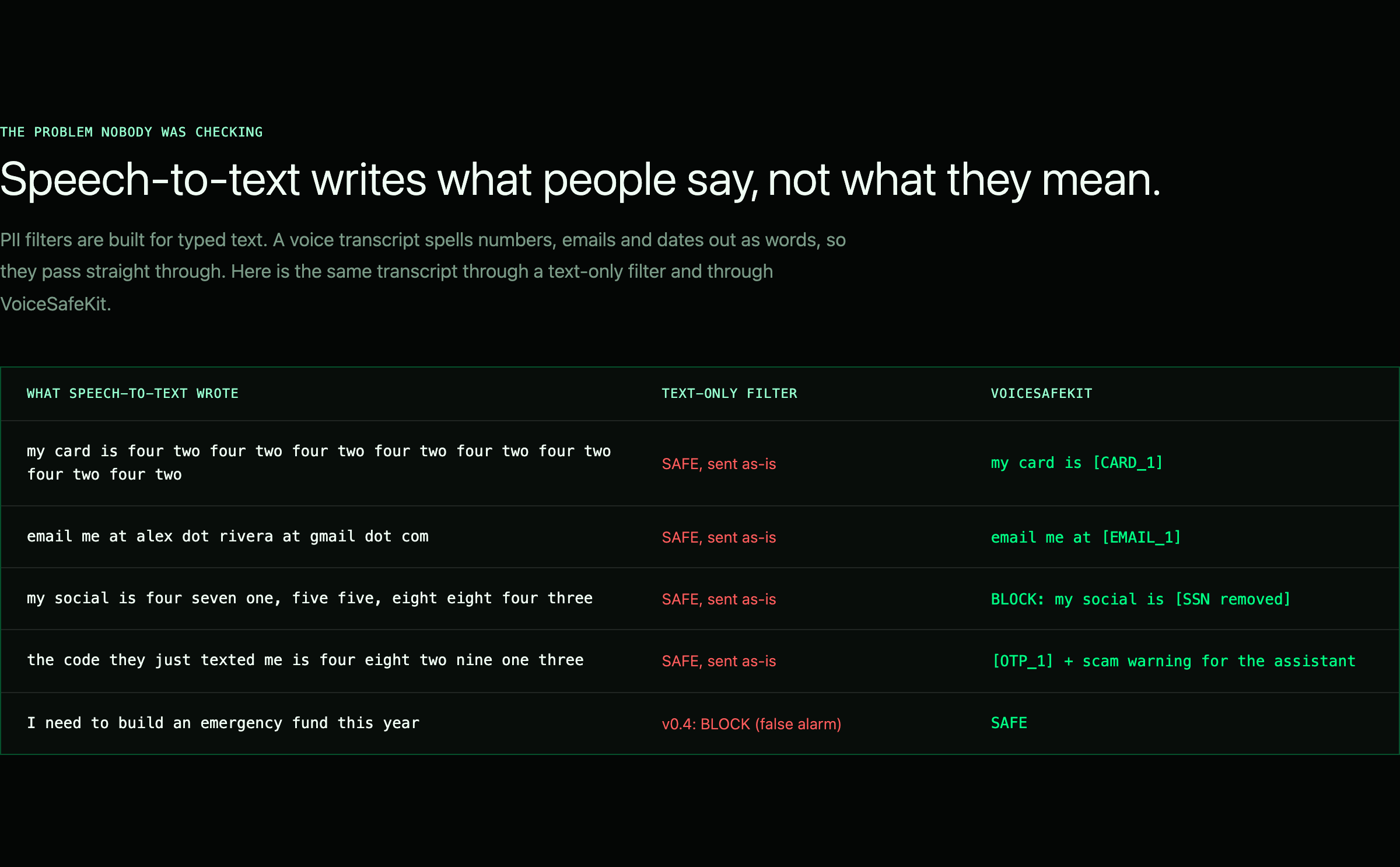
Speech-to-text writes what people say, not what they mean:
my card is four two four two four two four two four two four two four two four two
email me at alex dot rivera at gmail dot com
call me on oh seven seven double oh nine double oh one two three
Regex filters and NER models (Presidio, most guardrail libraries) are built for written text, so they pass all three straight through. VoiceSafeKit reads speech the way STT writes it, redacts the sensitive parts, and gives the values back when the agent needs to say them. It can also bleep them out of the call recording. Zero dependencies, about 0.06 ms per utterance, and drop-ins for Pipecat, LiveKit Agents, Open WebUI and LiteLLM.
User says    : Hi, my name is Alex Rivera. My card number is four two four two four two four two
               four two four two four two four two and my email is alex dot rivera at gmail dot com.
LLM receives : Hi, my name is [NAME_1]. My card number is [CARD_1] and my email is [EMAIL_1].
TTS says     : Thanks Alex Rivera. I'll send the receipt to alex dot rivera at gmail dot com.
Output of examples/pipecat/offline_demo.py, which runs without API keys.
Install
pip install voicesafekit
# or, before the first PyPI release: pip install git+https://github.com/MohamadKanso/VoiceSafeKit
# extras: [pipecat] [livekit] [openwebui] [litellm] [audio] [crypto]
echo "my pin is four eight two one" | voicesafekit redact
# my pin is [PIN removed]
See it
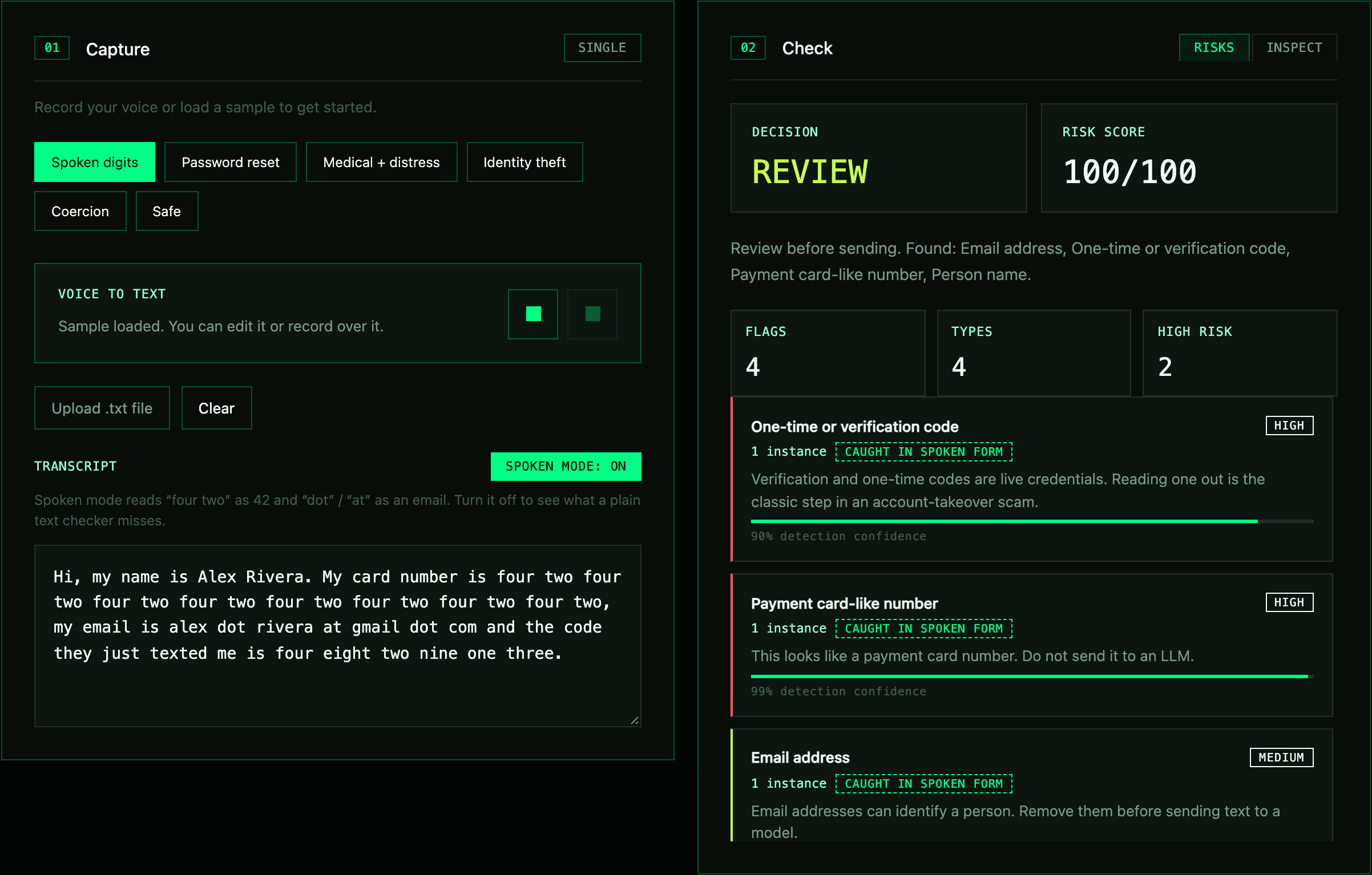
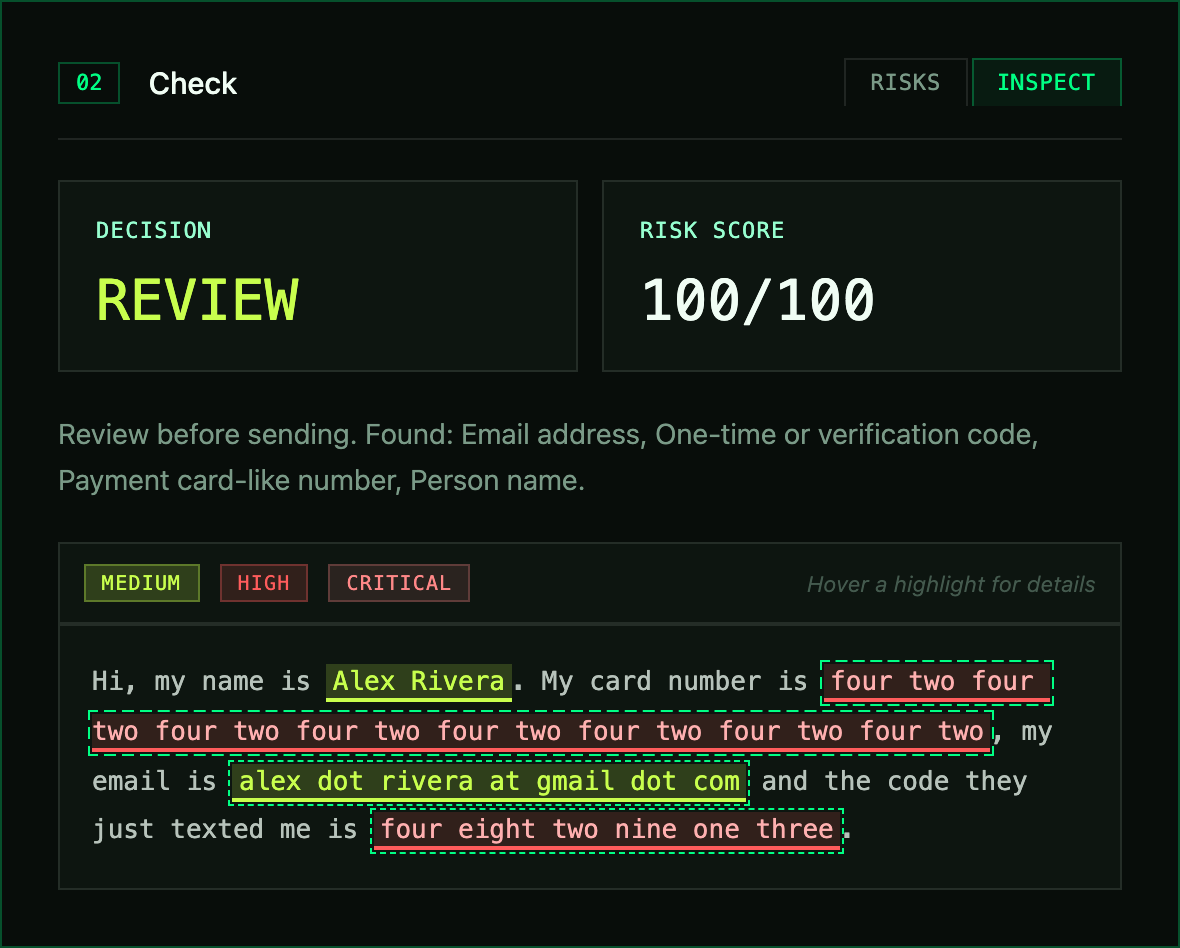
Spoken PII caught in the live app, with no digits or @ signs anywhere in the transcript:
 |
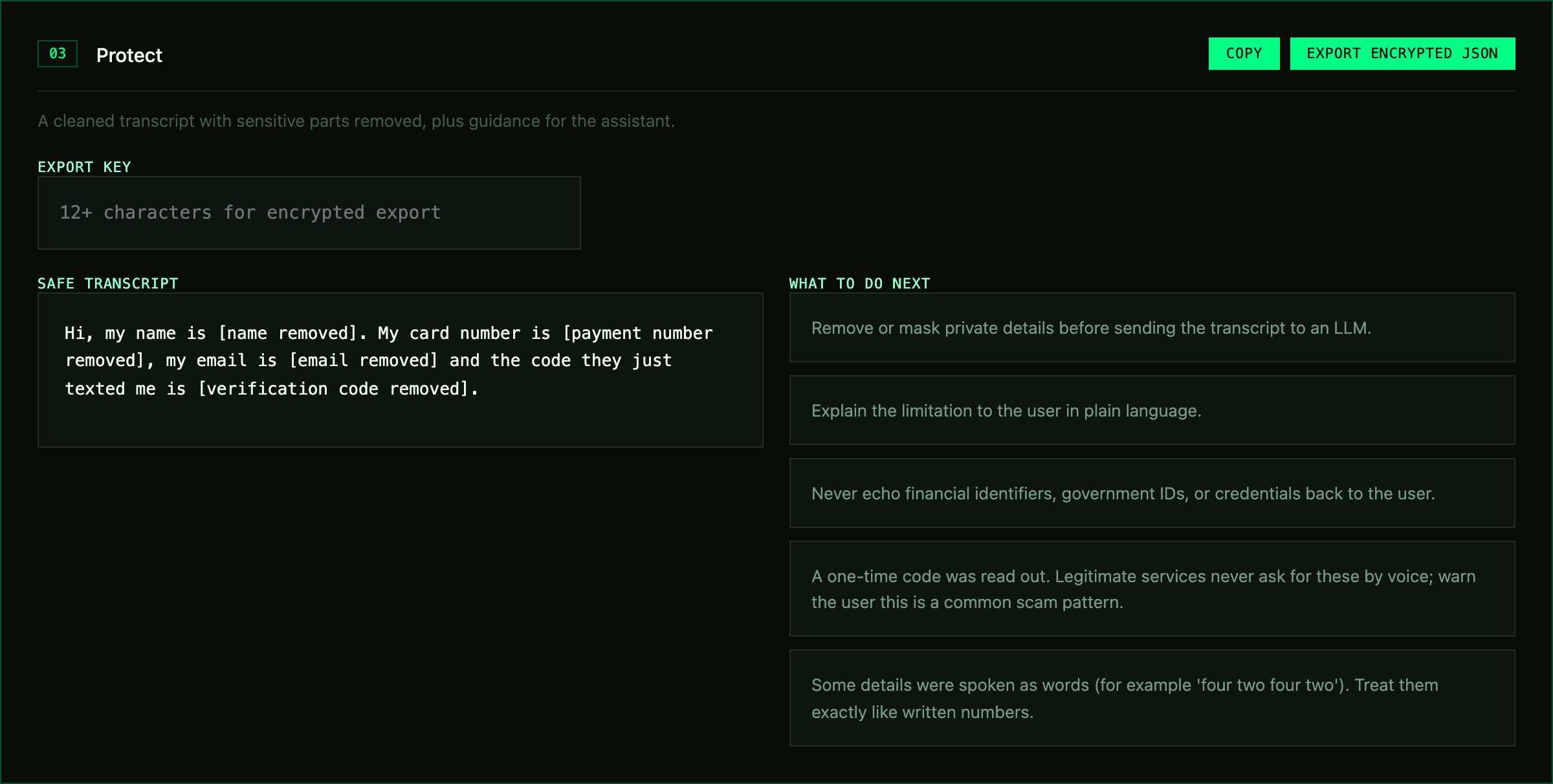 |
| Inspect: the exact spoken words that were flagged. | Protect: the safe transcript and guidance for the assistant. |
SpokenPII benchmark
No public benchmark measures PII as speech-to-text writes it, so this repo ships one.
Held-out real speech (the honest number). New scripts read aloud by a British TTS
voice (Daniel), transcribed by faster-whisper small.en, frozen before any 0.6 change
and never used for tuning. A sample counts as protected only if the value can't be
recovered from the redacted transcript.
| Detector | PII protected (not leaked) | False alarms on no-PII |
|---|---|---|
| VoiceSafeKit 0.6 | 98% (106/108) | 2% (1/40) |
| VoiceSafeKit 0.5 | 94% (102/108) | 2% (1/40) |
| VoiceSafeKit 0.6, spoken mode off | 87% (94/108) | 2% (1/40) |
| Microsoft Presidio 2.2 | 65% (70/108) | 42% (17/40) |
The three failures are published in
#9: a PIN Whisper wrote as money
($4,990), a comma before the birth year, and a mangled date read as a phone number.
First real-speech set (Samantha voice, Whisper base.en)
v0.5 protected 101/108 on this set. Its 7 misses (comma-split digit groups, SSN609507896,
digits written as decimals, "fin" for PIN) were fixed in 0.6
(#6), so 0.6 now scores 108/108
here. Because the fixes were written against these misses, this set is no longer held out.
Presidio: 79/108, 17/40 false alarms.
SpokenPII (synthetic). 540 labelled sentences, the same values written two ways, plus 40 tricky no-PII requests ("emergency fund", "call Sue", "twenty five minutes"). A span counts as protected only if at least 90% of it is masked.
| Detector | Written PII protected | Spoken PII protected | False alarms on no-PII | Median latency |
|---|---|---|---|---|
| VoiceSafeKit 0.6 | 100% | 100% | 0% | 0.06 ms |
| VoiceSafeKit 0.6, spoken mode off | 100% | 11% | 0% | 0.04 ms |
Microsoft Presidio 2.2 (spaCy en_core_web_lg) |
86% | 21% | 45% | ~3 ms |
Spoken PII protected, by type:
| Type | VoiceSafeKit | Presidio |
|---|---|---|
| Card number | 100% | 0% |
| SSN | 100% | 3% |
| Phone | 100% | 0% |
| 100% | 0% | |
| PIN | 100% | 13% |
| One-time code | 100% | 3% |
| Passport | 100% | 0% |
| Date of birth | 100% | 77% |
| Name | 100% | 97% |
Read these numbers honestly. I wrote the synthetic set and the detector, so 100% there
mostly shows the templates are covered; the held-out real-speech set is the fairer test. Presidio is a
general-purpose tool configured with its defaults, not tuned for speech. Its false alarms
are mostly DATE_TIME and PERSON hits on ordinary requests. Reproduce everything with
python benchmarks/run.py --presidio and
python benchmarks/asr.py score --presidio --data benchmarks/data/spokenpii-asr-heldout.jsonl.
Better still, add transcripts from your own STT engine.
What it catches
| Category | Detectors |
|---|---|
| Spoken forms | digits as words, "oh" / "double" / "triple", "plus four four", tens and hundreds, spoken emails, spoken dates |
| Payment | card number (Luhn + context), partial card ("ends in 4821"), CVV, PIN, IBAN (mod-97) |
| Identity | SSN (with or without dashes), passport, UK National Insurance, date of birth, self-introduced name |
| Contact | email, phone, street address, UK postcode, IP address |
| Credentials | passwords and secrets in speech, one-time / verification codes, API keys (OpenAI, AWS, GitHub, Slack, Google) |
| Safety signals | emergency, emotional distress, coercion, medical / legal / financial advice requests |
Every result has a decision (SAFE, REDACT, REVIEW, BLOCK), a 0-100 score,
per-finding confidence and spoken flags, a safe_transcript, a redaction_map and
plain-English assistant_guidance.
Python API
from voicesafekit import analyze_transcript

result = analyze_transcript("my social is four seven one, five five, eight eight four three")
result.decision            # "BLOCK"
result.safe_transcript     # "my social is [SSN removed]"
result.findings[0].spoken  # True
Reversible placeholders
Plain redaction breaks agents that need to say "I've sent it to your email". A
PrivacySession swaps values for placeholders, keeps the map in memory, and restores
them in the reply, including streamed tokens:
from voicesafekit import PrivacySession

session = PrivacySession()
safe = session.protect("email me at alex dot rivera at gmail dot com")
safe.text                       # "email me at [EMAIL_1]"
reply = llm(safe.text)          # "Done, I've emailed [EMAIL_1]."
session.restore(reply)          # "Done, I've emailed alex dot rivera at gmail dot com."

stream = session.stream()       # for token streams: "[EMA" + "IL_1]" restores correctly
The same value gets the same placeholder for the whole conversation, whether it was spoken or written. Passwords, PINs, CVVs, one-time codes and API keys are never stored, so the model can't make the voice read them back.
Pipecat
from voicesafekit.integrations.pipecat import voicesafe_processors

guard_in, restore_out, guard_context = voicesafe_processors()

pipeline = Pipeline([
    transport.input(), stt,
    guard_in,             # spoken PII -> [CARD_1], [EMAIL_1] before the LLM
    user_aggregator, llm,
    restore_out,          # real values back for the voice only
    tts, transport.output(),
    guard_context,        # stored assistant replies keep the placeholders
    assistant_aggregator,
])

@guard_in.event_handler("on_block")
async def on_block(processor, protected):
    ...  # emergencies, government IDs, CVVs: never forwarded, refusal is spoken
Many STT services send several final transcriptions per turn. When one ends mid-number near a sensitive word ("my card number is four two four two"), the processor holds it for up to 0.8 s and merges it with the next, so a card number split across frames is still caught.
LiveKit Agents
from voicesafekit.integrations.livekit import VoiceSafeAgent

class Assistant(VoiceSafeAgent):          # instead of Agent
    def __init__(self):
        super().__init__(instructions="You are a helpful voice assistant.")
VoiceSafeAgent protects each user turn in on_user_turn_completed, restores values in
tts_node, and stops blocked turns. VoiceSafeRedactor().redact(text) is a stateless,
idempotent redactor for transcript and log hooks. Full example: examples/livekit/agent.py.
Open WebUI
A Filter Function: Admin Panel > Functions > + > paste
examples/openwebui/voicesafekit_filter.py > Save,
then enable it. It installs VoiceSafeKit through its requirements: line.
- Every user message is protected before the model sees it ("my card is four two four two ..." becomes "my card is [CARD_1]"), and real values come back in the reply on the user's own screen, streamed or not.
- Placeholders stay consistent per chat and per user. A new message carrying a government
ID, card security code or emergency is stopped with a clear message (valve
block_on_critical). - Valves:
spoken,block_on_critical,restore_in_output,max_chats,priority.
Open WebUI's background tasks (title, tags, follow-ups, autocomplete) call the task model directly and skip filters, so turn them off or use a local task model for full privacy. Built against Open WebUI 0.13 and tested with the request shapes from its source.
LiteLLM
A custom guardrail for the LiteLLM proxy, so every app behind it gets the same protection:
guardrails:
  - guardrail_name: voicesafekit
    litellm_params:
      guardrail: voicesafekit.integrations.litellm.VoiceSafeGuardrail
      mode: [pre_call, post_call]   # redact before the model, restore after (streaming too)
      default_on: true
      block_on_critical: true       # HTTP 400 for government IDs, CVVs, emergencies
pip install "voicesafekit[litellm]"
litellm --config config.yaml
Tested on a running LiteLLM 1.108 proxy: the upstream model received my card is [CARD_1],
the client got the real values back (normal and streamed), and an SSN request returned
HTTP 400 without reaching the model. See examples/litellm/.
Bleep the recording, not just the transcript
Redacting the transcript still leaves the card number in the call recording. VoiceSafeKit bleeps it out of the audio too, locally and for free, with standard-library code once you have word timestamps.
pip install "voicesafekit[audio]"           # adds faster-whisper for word timestamps
voicesafekit bleep call.wav -o call.bleeped.wav
# Hi, my name is [name removed], my card number is [payment number removed] and my pin is [PIN removed].
#
# Bleeped 3 span(s) -> call.bleeped.wav
#   00:00.950 - 00:01.870  Person name
#   00:02.990 - 00:07.330  Payment card-like number
#   00:07.730 - 00:08.850  PIN
Already have word timings from Deepgram, Whisper or WhisperX? Pass them and no extras are needed:
from voicesafekit.audio import bleep_wav, redact_audio_spans, words_from_deepgram

redaction = redact_audio_spans(words_from_deepgram(response))   # PII -> time spans
bleep_wav("call.wav", "call.bleeped.wav", redaction)            # or mode="silence"
Checked end to end: transcribing the bleeped file with Whisper finds no card or PIN digits, while the rest of the sentence still comes through. PCM WAV (8/16/24/32-bit, any channel count), streamed in chunks; every sample outside the spans is copied byte for byte.
OpenVoiceOS
from voicesafekit.integrations.openvoiceos import protect_utterance

result = protect_utterance(utterance)
if result.should_continue:
    send_to_llm(result.safe_transcript)
CLI
voicesafekit check examples/transcripts/identity_theft.txt --pretty
voicesafekit redact --placeholders < transcript.txt
voicesafekit conversation turn1.txt turn2.txt --pretty
voicesafekit bleep call.wav -o call.bleeped.wav            # needs [audio] or --words
voicesafekit check transcript.txt --out result.enc.json   # AES-256-GCM, needs [crypto]
Browser app
The live app records your voice, transcribes it with Whisper on your device and runs the same rules in the browser. No server and no API key, and nothing leaves the page. Say a card number out loud and watch it disappear.
python3 -m http.server 8124 --directory docs # run it locally
Design principles
- Speech first. Rules run on what STT actually produces, not on tidy written text.
- Local and tiny. Pure Python, no dependencies, no network, no model download.
- Auditable. Every finding has a confidence score and maps to exact spans.
- Fail toward privacy. Credentials are never stored, blocked turns never reach the model.
- Honest scope. It is a fast first layer, not a full privacy programme or a compliance certification. Pair it with your own review for PCI DSS, HIPAA or GDPR work.
Contributing
The most valuable contribution is a transcript your STT engine produced that VoiceSafeKit missed (fake data only). Use the Missed spoken PII template. See CONTRIBUTING.md and the roadmap.
pip install -e ".[dev]" && pytest && python benchmarks/run.py
License
MIT. See LICENSE. Not legal, medical or security advice.
1 maintainer

Metadata
1 maintainer
Release files for voicesafekit 0.6.0
For a detailed explanation of source distributions (sdists) and built distributions (wheels), please see the package formats documentation.
Source distribution (sdist)
| File | Size | Uploaded | Provenance | Actions |
|---|---|---|---|---|
| voicesafekit-0.6.0.tar.gz | 67.6 kB | With provenance | Details for voicesafekit-0.6.0.tar.gz |
Built distribution (wheel)
| File | Interpreter | ABI | Platform | Actions Reset |
|---|---|---|---|---|
| voicesafekit-0.6.0-py3-none-any.whl | Python 3 | none | any | Details for voicesafekit-0.6.0-py3-none-any.whl |
Total release size: 119.4 kB
Release files / voicesafekit-0.6.0.tar.gz
| Download URL | voicesafekit-0.6.0.tar.gz |
|---|---|
| Size | 67.6 kB |
| Tags | Source |
|
SHA-256 checksum How to use checksums |
6eef9d0f50194a3dad7c49295f4a57edd8497c71980d28d252c47fa8018d2db2
|
|
BLAKE2b-256 checksum How to use checksums |
59b35268530201c05b1e8580d59c5e13eb6b9188c0102de53aa9e5a68a0982c4
|
| Upload date | |
|
Uploaded using Trusted Publishing? What is trusted publishing? |
Yes |
| Uploaded via |
twine/7.0.0 CPython/3.13.16
|
Provenance
Provenance describes where a file came from. On PyPI, provenance is shared via attestations, which provide a verifiable record of the build or publishing details. View details, limitations and caveats.


PyPI Publish Attestation
PyPI verified that this artifact, at this checksum, originated from the publisher listed below.
Signed by GitHub Actions, verified by PyPI on Nov 7, 2026.
Transparency logRelease files / voicesafekit-0.6.0-py3-none-any.whl
| Download URL | voicesafekit-0.6.0-py3-none-any.whl |
|---|---|
| Size | 51.8 kB |
| Tags | Python 3 |
|
SHA-256 checksum How to use checksums |
7980feb764db9f93940f3c0d18754fee22a4aebe3ca45bd6e5e60fac1f5697f4
|
|
BLAKE2b-256 checksum How to use checksums |
c5c6bbf3f88fab169d16bad8efa86e6bf853c938c33b784cd8ccfd2b511d210d
|
| Upload date | |
|
Uploaded using Trusted Publishing? What is trusted publishing? |
Yes |
| Uploaded via |
twine/7.0.0 CPython/3.13.16
|
Provenance
Provenance describes where a file came from. On PyPI, provenance is shared via attestations, which provide a verifiable record of the build or publishing details. View details, limitations and caveats.
PyPI Publish Attestation
PyPI verified that this artifact, at this checksum, originated from the publisher listed below.
Signed by GitHub Actions, verified by PyPI on Nov 7, 2026.
Transparency logSecurity for voicesafekit 0.6.0
Provenance
Provenance describes where a file came from. On PyPI, provenance is shared via attestations, which provide a verifiable record of the build or publishing details. View details, limitations and caveats.
Full provenance
Both files in this release have been uploaded with provenance metadata.
Attestation for voicesafekit-0.6.0.tar.gz
PyPI Publish Attestation
PyPI verified that this artifact, at this checksum, originated from the publisher listed below.
Signed by GitHub Actions, verified by PyPI on Nov 7, 2026.
Transparency logA note on package security
PyPI is a repository for distributing packages, not a service for auditing them. While third-party security researchers and our staff do their best to detect and remove malicious packages, PyPI cannot guarantee the quality, security or suitability of any given package.
To learn more about protecting yourself from malicious actors, visit our package security documentation.













