





English | 简体中文
High-performance, Rust-backed columnar kernel for stock / candlestick (OHLCV) time-series data.
volas is a Rust-backed, pandas-shaped DataFrame for live OHLCV pipelines: 254 trading-indicators, incremental O(lookback) refresh, and NumPy/Torch-ready output.
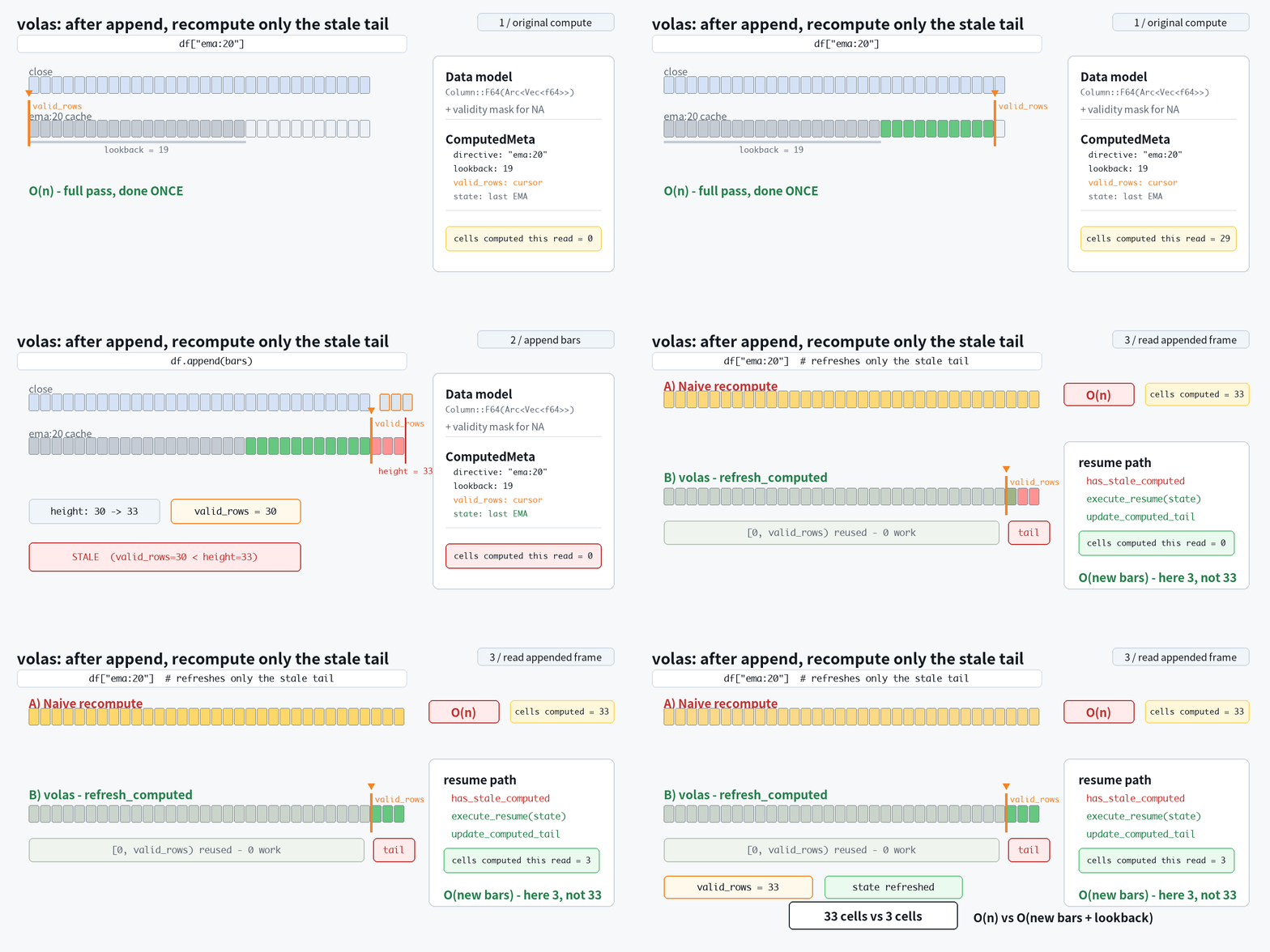
It is not a general-purpose pandas replacement. It is a narrow, fast DataFrame for candlestick / OHLCV workflows: append a new bar, keep indicator columns cached, and refresh only the stale tail.
volas is also a Rust crate.
from volas import read_csv

df = read_csv("aapl_1m.csv")

# Cache indicator directives as DataFrame columns.
df["rsi:14"]
df[["macd", "macd.signal", "atr:14"]]

# In a live loop:
df.append(new_bar)     # one-row OHLCV frame
df["rsi:14"]           # refreshes only the affected tail, O(lookback)
features = df.to_numpy()
- 254 built-in indicators and TA-Lib-compatible directives
- Incremental refresh after
append: O(lookback), not O(n) - Rust kernels, no pandas runtime dependency
- pandas-shaped indexing:
.loc/.iloc/.at/read_csv/to_numpy - NumPy / Torch-ready output
pip install volas
On our reproducible benchmark suite, volas is faster than pandas, polars, stock-pandas and TA-Lib on most live-update indicator workloads.
Why volas
- pandas-shaped API. The same
.loc/.iloc/.at,read_csv,to_numpyand resampling — for OHLCV workflows, change the import and keep your code. It is not a general-purpose pandas replacement. (See what's not covered) - Fast on live OHLCV indicator workloads, with reproducible benchmarks —
see the always-current live benchmark report.
- On the current published report, volas beats TA-Lib on 139 / 157
covered indicators by the default ratio — reproducible via
make benchmark. - On incremental update (each new bar), volas is the fastest of every library across all indicators — ~5× faster than TA-Lib, and up to ~360× faster than pandas.
- On the current published report, volas beats TA-Lib on 139 / 157
covered indicators by the default ratio — reproducible via
- Built for the live tick. A new bar touches only the affected tail
(
O(lookback), notO(n)); indicators refresh in microseconds, never a full recompute. - Rust inside, NumPy / Torch out. Compiled kernels — hot paths tuned down to the
assembly-instruction level — zero pandas at runtime;
to_numpy()feeds NumPy andtorch.Tensorpipelines.
Why I built volas
I've spent years building quantitative trading-signal systems, and for most of
that time pandas was just the tax I paid to get any work done. Loading a single
CSV of a few hundred thousand candlesticks, computing a handful of indicators,
cleaning them up, normalizing — that one data-processing pass routinely took 10
to 20 minutes before any real research could even begin.
Backtesting made it worse. To honestly simulate live trading you feed history in
one bar at a time — usually fine-grained bars, say 1-minute candles — appending
each new bar to the DataFrame and recomputing every indicator across the whole
frame again, bar after bar, to mimic the OHLCV stream a live system actually sees.
So much of that was pure waste — the same columns rebuilt from scratch on every
step — and across a few years of 1-minute data that redundant work alone could
drag a single backtest out by hours. Every idea I wanted to try, every parameter
I wanted to sweep, paid that tax again. The tooling, not the thinking, was setting
the pace of my research.
So I stopped patching around it and rebuilt the whole data layer from the ground
up, pandas thrown out entirely. The bet paid off: the data-processing pass that
used to take 10–20 minutes now finishes in seconds, and the per-bar recomputation
that used to drag those runs out collapsed to near nothing. A backtest still has
real work to do — strategy logic, fills, accounting — but the data layer stopped
being the thing I sit and wait on. volas is that layer: hundreds of times
faster where it counts, and finally fast enough to get out of the way.
When to reach for volas
volas is not a general-purpose pandas replacement — for plain dataframe analysis, keep pandas or polars. It is a narrow, fast DataFrame for the case where a new OHLCV bar arrives and indicators must refresh now:
| pandas | polars | TA-Lib | volas | |
|---|---|---|---|---|
pandas-shaped indexing (.loc / .iloc / .at) |
✅ | ❌ | ❌ | ✅ |
OHLCV-native indicator directives (df['rsi:14']) |
❌ | ❌ | ✅ | ✅ |
| Indicator cache owned by the frame | ❌ | ❌ | ❌ | ✅ |
Incremental O(lookback) refresh on a new bar |
❌ | ❌ | ❌ | ✅ |
| Rust-backed kernels, no pandas at runtime | ❌ | ✅ | C | ✅ |
| NumPy / Torch export | ✅ | ✅ | arrays | ✅ |
Table of Content
- Installation
- Quick start
- Usage
- Bounded rolling window
- Cumulation and DatetimeIndex
- TimeFrame
- Syntax of directive
- Indexing & selection
- Writing & assignment
- Timezones
- Missing values (
volas.NA) - pandas interop
- Arrow & DLPack interop (zero-copy)
- Error handling
- Built-in Indicators
- License
- For Developers
Installation
pip install volas
Requires Python >= 3.11. Wheels are published for Linux (x86_64 / aarch64), macOS (x86_64 / arm64) and Windows (x86_64). For a local build from source, see For Developers.
Verify the install in 30 seconds, then see the examples/ — each
is self-contained and prints an OK: line:


pip install volas
python examples/00_install_check.py
python examples/03_live_ohlcv_append.py   # append a bar, refresh only the stale tail
More docs: TA-Lib migration, pandas migration, directive cheat sheet, and when not to use volas.
Quick start
from volas import DataFrame

df = DataFrame({
    'open':   [2.0, 3.0, 4.0, 5.0, 6.0, 7.0],
    'high':   [12.0, 13.0, 14.0, 15.0, 16.0, 17.0],
    'low':    [1.0, 2.0, 3.0, 4.0, 5.0, 6.0],
    'close':  [3.0, 4.0, 5.0, 6.0, 7.0, 8.0],
    'volume': [100, 200, 300, 400, 500, 600],
})

# A plain column -> Series
df['close']
# 0    3.0
# 1    4.0
# 2    5.0
# 3    6.0
# 4    7.0
# 5    8.0
# Name: close, dtype: float64

# An indicator directive -> Series (2-period SMA of `close`)
df['ma:2']
# 0   <NA>
# 1    3.5
# 2    4.5
# 3    5.5
# 4    6.5
# 5    7.5
# Name: ma:2, dtype: float64

# A boolean directive -> bool Series, usable as a row mask
bullish = df['close > open']
df[bullish]                      # DataFrame of the rows where close > open

# Several directives at once -> DataFrame
df[['ma:2', 'ma:3', 'close > open']]

# Export to NumPy (and, zero-copy, to Arrow / DLPack — see the interop section)
df['close'].to_numpy()           # 1-D ndarray
df.to_numpy()                    # 2-D ndarray (rows x columns)
Usage
from volas import (
    DataFrame, Series, read_csv, to_datetime, TimeFrame, Timestamp,
)
The sub-sections below follow volas's public surface in order: the DataFrame
class, then its instance methods, its static methods, the other classes, and the
top-level package functions — closing with the rest of the pandas-compatible
API that behaves exactly as it does in pandas. (A top-level name imported from
volas, such as read_csv, is written without a volas.
prefix.)
DataFrame(data, columns=None, time_frame=None, cumulators=None)
DataFrame has a pandas-compatible API, so if you are familiar with
pandas.DataFrame, you are already ready to use volas. Unlike pandas, volas is
backed by a Rust kernel and has no pandas runtime dependency.
df = read_csv('stock.csv')
We can use [], which is called pandas indexing (a.k.a.
__getitem__ in python) to select out lower-dimensional slices. In addition to
indexing with colname (the column name of the DataFrame), we could also do
indexing by directives.
df[directive]                  # Gets a Series

df[[directive0, directive1]]   # Gets a DataFrame
We have an example to show the most basic indexing using [directive]
df = DataFrame({
    'open' : ...,
    'high' : ...,
    'low'  : ...,
    'close': [5, 6, 7, 8, 9]
})

df['ma:2']

# 0   <NA>
# 1    5.5
# 2    6.5
# 3    7.5
# 4    8.5
# Name: ma:2, dtype: float64
Which gets the 2-period simple moving average on column "close".
Parameters
-
data
dict[str, list | np.ndarray] | DataFramethe column data, one of:- a dict mapping each column name to an equal-length list or NumPy array
(
float,int,bool,datetime64, orstring); - another volas
DataFrame, which is then copied (likepandas.DataFrame(df)).
The constructor does not accept a
pandas.DataFrameor an Arrow object — bridge those with the dedicatedDataFrame.from_pandas/DataFrame.from_arrowinstead. To attach aDatetimeIndex, parse a column withto_datetime, promote it withset_index, then tag a zone withtz_localize/tz_convert. See Timezones. - a dict mapping each column name to an equal-length list or NumPy array
(
-
columns
Optional[list[str]] = NoneSelect and order the columns to keep — the same projection asdf[[...]]. A name not present raisesKeyError; an empty list or a duplicate name is rejected, and an absent column is never silently filled. -
time_frame
Optional[str | TimeFrame] = NoneIf set, makes this a tf-aware (cumulating) DataFrame at this bar interval: the given rows are taken as already-final bars at that frame, and laterappends fold finer bars into the forming bar. Requires aDatetimeIndex. See Cumulation and DatetimeIndex. -
cumulators
Optional[dict[str, str]] = NonePer-column aggregator overrides used when folding (e.g.{'amount': 'sum'}), only meaningful together withtime_frame. Defaults to OHLCV semantics (open=first,high=max,low=min,close=last,volume=sum; any other columnlast). Each dict value is one of:'first'— the first value in the bucket'last'— the last value in the bucket'max'— the maximum'min'— the minimum'sum'— the sum
-
window
Optional[int] = NoneMake this a bounded rolling-window frame showing only the lastwindowrows (see Bounded rolling window). Requiresmax_lookback. -
max_lookback
Optional[int | list[str]] = NoneRequired withwindow(and valid only with it): the hidden-history margin (window + max_lookback) that keeps cached indicators correct across the automatic front-drop. Recursive indicators (EMA/Wilder/ATR/RSI/MACD) stay bit-exact; finite-window ones (ma/wma/trima/stddev/…) match an unbounded frame to floating-point tolerance (~1e-13). Pass an int to state the largest indicator lookback you will use, or a list of indicator directives to derive it from the largest of their lookbacks (e.g.['atr:14', 'ma:50']→ margin 49), so you never hand-compute a compound indicator's warm-up. Each list entry must be an indicator directive ('ma:50'); a bare/typo'd name ('ma50') is rejected. Sizing the margin too small silently breaks the guarantee.
Bounded rolling window
Pass window= to cap the frame at the last window rows. This is the live-trading
/ NN-input shape: you keep append-ing bars forever, but memory stays bounded —
the frame transparently drops old rows once it has accumulated enough, while
retaining a hidden max_lookback-row margin so cached indicators stay consistent
across each drop — recursive indicators (EMA/ATR/RSI/…) are bit-exact with an unbounded
frame, finite-window ones (ma/wma/…) match it to floating-point tolerance (~1e-13).
# A bounded 30-bar window; the margin is sized from the indicators you declare.
wf = DataFrame(seed, time_frame='15m', window=30, max_lookback=['atr:14'])

for bar in feed:            # runs forever; memory never grows
    wf.append(bar)          # fold a 1m bar into the forming 15m bar
    wf.fulfill()            # refresh the cached atr:14 tail (O(lookback))
    if wf.ready:            # warmed up: all 30 rows have valid history
        x = wf[['close', 'atr:14']].to_numpy('float32')   # the 30×2 feature window
Every row-facing surface — len, shape, index, indexing ([] / .iloc /
.loc / .iat / .at), head / tail, reductions, to_numpy, to_csv,
to_pandas, repr — shows only the window rows; the margin is never visible.
ready — has the window warmed up?
ready (a property) is True once the frame holds window + max_lookback rows — so
every one of the window visible rows has a full indicator history behind it and the
cached indicators are valid end-to-end. During the initial warm-up it is False and
the visible rows are still filling in; gate your inference / training on it.
wf = DataFrame(seed, time_frame='15m', window=30, max_lookback=['atr:14'])
wf.ready          # False — fewer than 30 + 14 rows accumulated so far
...               # append until warmed
wf.ready          # True  — every visible row now has valid indicator history
An unbounded frame (no window=) has no warm-up contract and is always True.
fill_into(out, columns=None) — zero-allocation feature export
fill_into writes the window's values straight into a NumPy array you own, in
place — nothing is allocated per call. It is the export half of a live inference loop:
paired with one preallocated buffer, an append → fulfill → fill_into → infer loop
allocates nothing per bar (unlike to_numpy, which mints a fresh matrix every call).
Contract:
- Only already-cached columns, named by their canonical directive string. A
directive column must be materialized first — access it once and read the name
back (
name = wf['atr:14'].name), because a cached directive is stored under its canonical form (e.g.'MA: 5'→'ma:5'), not the string you passed, andcolumns=matches on the exact stored name. (max_lookback=['atr:14']only sizes the margin; it does not create the column, andfill_intoexports cached values, never computes them.) outmust be afloat32orfloat642-D array whose shape is exactly(len(df), k), wherekis the number of exported columns (strides are respected, so a non-contiguous or Fortran-order view works too). A wrong shape or dtype raises.columnsselects which columns to export, in order (default: every column). A string column has no float meaning and is rejected — list the numeric ones incolumns=to exclude it.- A missing / NA cell becomes
NaN. - An
appendleaves the cached indicators stale, so callfulfill()beforefill_into()— exporting with an unrefreshed directive column raises.
import numpy as np

wf = DataFrame(seed, time_frame='15m', window=30, max_lookback=['atr:14'])
atr = wf['atr:14'].name               # materialize the directive once, and read its column
                                      # name back: a cached directive lands under its CANONICAL
                                      # form (here 'atr:14', but e.g. 'MA: 5' -> 'ma:5'), not the
                                      # string you passed — and max_lookback only sized the margin
COLS = ['open', 'high', 'low', 'close', atr]    # k = 5 features

# One reusable buffer for the whole run — shape (window, k), the model's input tensor.
buf = np.empty((30, len(COLS)), dtype=np.float32)

for bar in feed:
    wf.append(bar)
    wf.fulfill()                      # refresh atr's stale tail before exporting
    if not wf.ready:
        continue                      # warming up: buf isn't (30, k) yet, indicators not valid
    wf.fill_into(buf, columns=COLS)   # zero-alloc write of the 30×5 window into `buf`
    prediction = model(buf)           # feed the model the same memory every bar
Shape note. The shape match is exact against
len(df), which grows during warm-up (1, 2, … up towindow) and only then settles atwindow. Gating onwf.ready(as above) sidesteps this: by the time it isTrue,len(df) == window, so a fixed(window, k)buffer always fits. To export mid-warm-up, sizeoutto the currentlen(df)instead.
fill_into is not windowed-only — on a plain frame it exports the whole logical view
the same way; the bounded window is just where reusing one buffer matters most.
DataFrame.from_pandas(pdf) -> DataFrame
A volas-specific static method that builds a DataFrame from a pandas.DataFrame
(pdf) — the inverse of df.to_pandas(). pandas is imported lazily (only here, so volas
stays pandas-free at import). A nullable column keeps its dtype + volas.NA, and a
DatetimeIndex (tz-aware too) round-trips. See pandas interop.
df = DataFrame.from_pandas(pandas_df) # pandas.DataFrame -> volas DataFrame
DataFrame.from_arrow(data) -> DataFrame
A volas-specific static method that builds a DataFrame from any object exposing
the Arrow C-Stream protocol (__arrow_c_stream__) — a pyarrow.Table /
RecordBatch / RecordBatchReader, a polars DataFrame, etc. The data buffers are
borrowed where the dtypes match (otherwise a column is copied), a multi-chunk source
is concatenated, and the result carries a fresh RangeIndex.
- data the Arrow source — any object implementing
__arrow_c_stream__.
df = DataFrame.from_arrow(pa_table)        # pyarrow.Table     -> DataFrame
df = DataFrame.from_arrow(polars_df)       # polars.DataFrame  -> DataFrame
Arrow is not accepted by the
DataFrame(data=...)constructor (which takes adictor anotherDataFrame); build from an Arrow object throughfrom_arrow.
df.exec(directive: str) -> np.ndarray
Evaluates the given directive and returns its values as a numpy ndarray. It is a pure, stateless evaluation — the frame is never modified (no column is created, and no cache is read or written).
# Compute the directive without touching the frame
df.exec('ma:20')
The difference between df[directive] and df.exec(directive) is that
df[directive]creates a column for the result and caches it (incrementally refreshed after an append), whiledf.exec(directive)computes fresh every time and leaves the frame untouched — for a cached ndarray, usedf[directive].to_numpy()df[directive]also accepts other indexing targets (a column name, a list, a boolean mask, a slice), whiledf.exec(directive)only accepts a valid volas directive stringdf[directive]returns aSeriesorDataFrameobject whiledf.exec(directive)returns annp.ndarray
df.get_column(key: str) -> Series
Directly gets the column value by key, returning a Series — and never
computes: unlike df[key], which parses an unknown key as an indicator
directive and executes it, get_column only fetches an existing column and
raises KeyError otherwise. Use it whenever the column name comes from
external data (CSV headers, user input, configuration), so a name that happens
to look like a directive (e.g. "ma:5") can never silently trigger a
computation.
df = DataFrame({
    'open' : ...,
    'high' : ...,
    'low'  : ...,
    'close': [5, 6, 7, 8, 9]
})

df.get_column('close')
# 0    5
# 1    6
# 2    7
# 3    8
# 4    9
# Name: close, dtype: int64
df.append(other: DataFrame | Row | dict) -> DataFrame
Appends rows of other to the end of the caller in place, returns the same
DataFrame, and applies the DatetimeIndex to the newly-appended row(s) if
possible. Use copy() first when the original frame must stay unchanged.
other is a DataFrame, a Row, or a scalar bar dict — one bar written as
{column: value} with the bar's timestamp under the key equal to the index's name
(a RangeIndex auto-increments). The dict form is the fast live path — it builds the
bar straight into the frame with no per-bar 1-row DataFrame:
df.append({'time_key': ts, 'open': o, 'high': h, 'low': l, 'close': c, 'volume': v})
It is strict: every data column must be provided (a missing one raises — unlike a
DataFrame / Row, where a missing column is NA-padded), and an unknown key raises.
Cached directive columns are not supplied — they are padded and refreshed automatically.
If the caller is a tf-aware DataFrame (one built with a time_frame, or
the result of cumulate), append instead folds each finer bar into the
forming bar rather than adding a row — see
Live cumulation.
append is lazy: it does not recompute the indicator columns of the new rows.
They stay stale until an indicator-column read refreshes them or df.fulfill()
is called (see below).
df.cumulate(time_frame: TimeFrame | str, cumulators: dict | None = None) -> DataFrame
Cumulate (resample) the data frame to a coarser time_frame, returning a new
DataFrame. Requires a DatetimeIndex.
- time_frame
TimeFrame | strthe target bar interval, e.g.TimeFrame.m5or'5m'. See TimeFrame. - cumulators?
dict[str, str] | None = Noneper-column aggregator overrides (e.g.{'amount': 'sum'}). Defaults to OHLCV semantics (open=first,high=max,low=min,close=last,volume=sum; any other columnlast). Each dict value is one of:'first'— the first value in the bucket'last'— the last value in the bucket'max'— the maximum'min'— the minimum'sum'— the sum
# from 1-minute klines to 5-minute klines
five_minute = one_minute.cumulate('5m')
fifteen_minute = one_minute.cumulate('15m')

five_minute.append(new_candle_1m)
# appending a 1-minute candle to a 5-minute DataFrame folds it into the 5m bar

fifteen_minute.append(new_candle_1m)
# so 1-minute data conveniently generates 5m and 15m test datasets
See Cumulation and DatetimeIndex for details.
df.fulfill() -> None
Batch-refresh every cached indicator column's stale tail in place
(O(lookback + new rows) each, not an O(n) recompute), and return None.
Since append is lazy, the cache becomes fresh in one of two ways:
- Reading an indicator column —
df['ma:20']ordf[['ma:20', 'rsi:14']]— auto-refreshes just those columns' stale tails on access, so a column read is always fresh and cheap. The single- and multi-column forms behave identically. - Every other read —
to_numpy(),.iloc/.loc/.at, the reductions (sum/mean/max/describe/ …),to_csv,repr, … — does not auto-refresh; while the frame is stale it raises, telling you to callfulfill()first. This is deliberate: a half-updated frame fails loud instead of silently returning stale values, and you control when the (bounded) refresh cost is paid — which matters on a latency-sensitive live path.
df['ma:20']              # cache + read the 20-period SMA (fresh)
df.append(new_bar)       # lazy: the new row's ma:20 is now stale
df['ma:20']              # a column read auto-refreshes only the tail (fresh again)

df.append(new_bar)       # stale again
df.fulfill()             # batch-refresh every cached column's tail
df.to_numpy()            # now fresh (a bulk read would have raised while stale)
df.is_computed(name: str) -> bool
Whether the column name is a directive (computed) column — one derived from
a directive (e.g. df['rsi:14']) and refreshed by fulfill — rather than a plain
data column you supply per bar. Raises KeyError if name is not a column.
Use it to tell the two kinds of column apart, e.g. to export only the raw columns:
df['ma:5']                                              # materialize a directive column
df.is_computed('ma:5')                                  # True
df.is_computed('close')                                 # False
raw = [c for c in df.columns if not df.is_computed(c)]  # ['open', 'high', 'low', 'close', 'volume']
df.to_numpy(dtype=None, na_value=...) -> np.ndarray
The frame as a 2-D NumPy array (rows × columns). It tracks pandas except for one
deliberate guard: an integer dtype over a frame that holds missing values
raises instead of silently writing garbage (NumPy cannot store NA in an
integer array) — give na_value to fill instead.
- dtype
str | None— an optional export cast.None(the default) gives the honest per-dtype representation; otherwise:'object'(or'O') — a lossless 2-D array of typed cells (number /str/Timestamp/volas.NA); the only dtype that keeps astror datetime column intact.'int64','int32','int16','int8'(and the unsigned'uint*') — the exacti64channel (a large int and a datetime's epoch-ns survive without afloatround trip). Over a frame with missing values this raises unlessna_valueis given.'float64','float32','float16'— the (lossy)floatchannel: a missing cell isNaN, a datetime past 2⁵³ ns quantises.'bool'— boolean.'datetime64[ns]'— datetime nanoseconds; aNaTcell is preserved.- A
strcolumn rejects every numeric / temporal dtype — use'object'.
- na_value
Any— the value substituted for each missing cell. Default: the NA-model representation (NaN/NaT/volas.NA).
df = DataFrame({'a': [1, 2, 3], 'b': [1.5, 2.5, 3.5]})

df.to_numpy()                 # -> float64 2-D array
df.to_numpy(dtype='int64')    # exact int64 cast (dense frame)
df.to_numpy(dtype='object')   # typed cells — lossless (numbers / str / Timestamp / volas.NA)

# an integer dtype over a missing value raises — unless na_value fills it
DataFrame({'a': [1, None]}).to_numpy(dtype='int64')               # ValueError
DataFrame({'a': [1, None]}).to_numpy(dtype='int64', na_value=0)   # -> [[1], [0]]  (int64)
Notes:
- The default (no
dtype) is the honest representation: an all-numeric/bool frame is afloat64matrix (a missing cell →NaN), a frame containingstror mixed dtypes is anobjectmatrix of typed cells, and a datetime frame isdatetime64[ns]. dtype='object'is always lossless — each cell keeps its own typed value (a number, astr, aTimestamp, orvolas.NA).- A
strcolumn has no numeric meaning, so any numeric/temporaldtyperaises — usedtype='object'to keep the strings. - A datetime column is exempt from the integer-NA raise: under
dtype='int64'aNaTexports as its exact epoch-ns sentinel (datetime never round-trips throughfloat);na_valueoverrides that sentinel when given. to_numpy()is a bulk read; it does not auto-refresh stale indicator columns and raises if any are stale — calldf.fulfill()first.
For a zero-copy hand-off to Arrow / DLPack consumers, see Arrow & DLPack interop.
df.to_arrow() -> pyarrow.Table
A volas-specific export to a pyarrow.Table, zero-copy where the dtypes
match — the numeric / string / datetime column buffers are shared with Arrow, while
bool and the null bitmap are repacked. Requires pyarrow (imported lazily, only
here). It is a convenience over volas's Arrow C-Stream bridge: any Arrow consumer
can read the frame directly through the standard __arrow_c_stream__ PyCapsule
protocol, with no to_arrow() call and without volas depending on pyarrow.
import pyarrow as pa
tbl = df.to_arrow()        # -> pyarrow.Table (shares the column buffers)
tbl = pa.table(df)         # identical, via the __arrow_c_stream__ protocol
pdf = pl.from_dataframe(df)  # polars reads it through the same protocol
Returns a pyarrow.Table. See Arrow & DLPack interop
for the full zero-copy contract and the DLPack export.
df.to_pandas(dtype_backend='numpy') -> pandas.DataFrame
Export to a pandas.DataFrame (pandas is imported lazily, only here — it is not a
runtime dependency). A DatetimeIndex round-trips, and the reverse bridge is
DataFrame.from_pandas.
- dtype_backend?
str = 'numpy'how a missing value is carried into pandas:'numpy'— the most ecosystem-compatible form: an int / bool column with a missing value becomesfloat64/objectwithNaN(likepandas.Int64.to_numpy()).'numpy_nullable'— a faithful, lossless masked round-trip: an int / bool / str column staysInt64/boolean/stringwith the hole aspandas.NA.
pdf = df.to_pandas()                                # 'numpy' backend (NaN-based)
pdf = df.to_pandas(dtype_backend='numpy_nullable')  # lossless masked Int64 / boolean / string
See pandas interop for the round-trip details.
df.to_csv(path=None, ...) -> str | None
Write the frame as CSV — a subset of pandas to_csv. With a path it writes the
file and returns None; with path=None it returns the CSV as a str.
- path?
str | os.PathLike | None = Nonethe output file;Nonereturns a string. - sep?
str = ','the field delimiter. - index?
bool = Truewrite the row index as the first column. - header?
bool = Truewrite the column-name header row. - na_rep?
str = ''the token written for a missing value. - columns?
list[str] | None = Nonethe columns to write, in order;None(the default) writes every column. - float_format?
str | None = Nonea printf-style float format, e.g.'%.2f'.
By default to_csv writes every column the frame holds — directive (computed)
columns included. A directive column like ma:3 is a real column once
materialized (it counts in df.columns), so it is exported alongside the raw
OHLCV columns; its warm-up rows render as the empty na_rep. Pass columns= to
choose exactly what to write — e.g. the raw columns only. Like every bulk read,
to_csv first requires the frame to be fresh: call fulfill() after an append,
or it raises while a cached column is stale.
from volas import DataFrame

df = DataFrame({
    'open':   [1.0, 2, 3, 4, 5],
    'high':   [2.0, 3, 4, 5, 6],
    'low':    [0.5, 1, 2, 3, 4],
    'close':  [1.5, 2.5, 3.5, 4.5, 5.5],
    'volume': [10, 20, 30, 40, 50.0],
})
df['ma:3']                                # materialize a directive (computed) column
df.fulfill()                              # refresh the cache before a bulk export

# Default: EVERY column is written — the ma:3 directive column included:
df.to_csv(index=False)
# 'open,high,low,close,volume,ma:3\n1.0,2.0,0.5,1.5,10.0,\n...,2.5\n...'
#                            ^^^^ directive column present; warm-up rows blank

# Pass columns= to write exactly what you want — here the raw columns only:
df.to_csv(index=False, columns=['open', 'high', 'low', 'close', 'volume'])
Series
df[col] and df[directive] return a Series — a named 1-D column whose API is
pandas-compatible: arithmetic / comparison / logical operators, .sum() /
.mean() / .std() / …, .shift() / .diff() / .fillna(), .iloc /
.loc, .to_numpy() / .to_list(). See
the rest of the pandas-compatible API
for the full list. There is no public Series constructor — a Series is
always obtained by indexing a DataFrame.
s = df['close']
s.name                 # 'close'
(s - s.shift(1)).mean()
df['ma:5 > ma:20']     # a directive likewise returns a Series (here a bool one)
Beyond pandas, a Series also exposes the 15 TA-Lib Math Transform functions
as methods — acos asin atan ceil cos cosh exp floor ln
log10 sin sinh sqrt tan tanh:
df['close'].ln()
df['high'].sqrt()
A datetime64[ns] Series exposes the pandas .dt accessor: calendar
components (year month day hour minute second microsecond
nanosecond quarter dayofweek dayofyear days_in_month), calendar
predicates (is_month_start … is_year_end, is_leap_year), names
(day_name() / month_name()), formatting (strftime(fmt)), bar alignment
(floor(freq) / ceil(freq) / round(freq) / normalize()), and
isocalendar(). A missing element yields NA in every component:
t = volas.to_datetime(df['time'])
t.dt.hour                  # int64 Series, 0..23
t.dt.dayofweek             # Monday=0 .. Sunday=6
t.dt.floor('15min')        # datetime Series aligned to the 15-minute bar
Series.from_arrow(data, name=None) -> Series
A volas-specific static method that builds a Series from any object exposing the
Arrow C-Data array protocol (__arrow_c_array__) — a pyarrow.Array, a polars
Series, etc. The data buffer is borrowed where the dtype matches (otherwise copied);
the result carries a fresh RangeIndex.
- data the Arrow source — any object implementing
__arrow_c_array__. - name?
str | None = Nonethe name for the resultingSeries.
s = Series.from_arrow(pa_array, name='close') # pyarrow.Array -> Series
series.to_numpy(dtype=None, na_value=...) -> np.ndarray
The column values as a 1-D NumPy array — pandas.Series.to_numpy semantics:
- dtype
str | None— an optional export cast.None(the default) gives the column's native representation; otherwise any NumPy dtype string accepted bynumpy.ndarray.astype, the common values being:'int64','int32','int16','int8'(and the unsigned'uint64','uint32','uint16','uint8') — integer. Over a column with missing values this raises unlessna_valueis given (an NA has no integer representation).'float64','float32','float16'— floating point; a missing cell isNaN.'bool'— boolean.'datetime64[ns]'— datetime nanoseconds; a missing cell isNaT.'object'(or'O') — Python objects, each cell its own typed value (lossless).
- na_value
Any— the value to substitute for each missing cell. Default: the NA-model representation (NaNfor the float export,Nonein an object array). With an explicit integerdtype, the values stay exact (a large int is not funnelled throughfloat64) and the holes becomena_value.
series = DataFrame({'qty': [1, None, 3]})['qty']    # int64 with a missing value

series.to_numpy()                          # -> array([ 1., nan,  3.])   (float64; a missing int -> NaN)
series.to_numpy(dtype='int64', na_value=0) # -> array([1, 0, 3])         (int64; NA filled, dtype kept)
series.to_numpy(na_value=-1)               # -> array([ 1., -1.,  3.])   (default float export, NA -> -1)

# without na_value, an integer dtype over a missing value raises
series.to_numpy(dtype='int64')
# ValueError: cannot convert a column with missing values to integer NumPy dtype 'int64' ...
Notes:
- The default (no
dtype, nona_value) is the dtype-specific export: a missing int / bool / datetime cell collapses toNaN/NaT(NumPy has noNA), while a dense column keeps its native dtype. A floatNaNis in-band, so a float column cast to an integer dtype likewise raises when any value isNaN(passna_value). - Like pandas,
na_valueonly changes the missing cells — without an explicitdtypean int column with NA still exportsfloat64(the default), andna_valuesimply fills theNaNslots. - For a lossless NA round-trip that keeps the native dtype and the missing
positions (no fill, no float collapse), use the Arrow path (
series.to_arrow()carries the null bitmap) orseries.to_pandas(dtype_backend='numpy_nullable'); the NA mask alone isseries.isna().to_numpy().
series.to_arrow() -> pyarrow.Array
A volas-specific export of the column to a pyarrow.Array, zero-copy where
the dtype matches (the numeric / string / datetime buffer is shared; bool and the
null bitmap are repacked). Requires pyarrow (imported lazily). It is a convenience
over volas's Arrow C-Data bridge: any Arrow consumer can read the series directly
through the standard __arrow_c_array__ PyCapsule protocol.
import pyarrow as pa
arr = series.to_arrow()    # -> pyarrow.Array (shares the buffer)
arr = pa.array(series)     # identical, via the __arrow_c_array__ protocol
Returns a pyarrow.Array. The column also exports zero-copy to NumPy / PyTorch / JAX
via DLPack (np.from_dlpack(series)) — see
Arrow & DLPack interop.
Row
df.iloc[i] and df.loc[label] return a Row — a single record whose .name
is its index label. A Row has no public constructor (Row(...) raises
TypeError: No constructor defined for Row); you only obtain one by indexing a
frame, and you may pass it to df.append.
row = df.iloc[-1]      # the latest bar
row.name               # its index label (e.g. a Timestamp for a DatetimeIndex)
row.to_dict()          # {column: value}
row.to_numpy()         # the numeric cells as a 1-D ndarray
Live cumulation — a tf-aware DataFrame
For live streaming, give a DataFrame a time_frame and append finer bars
into it, instead of re-cumulating the whole frame each tick. df.cumulate(tf)
returns such a frame (the forming period kept live), or build one directly with
DataFrame(data, time_frame=..., cumulators=...) (the given rows are taken as
already-final bars at that frame; requires a DatetimeIndex).
On a tf-aware frame:
- df.append(bar) folds the bar in: one in the open period updates the
forming last row (
df.iloc[-1]); one in a new period rolls over into a fresh row; a re-sent forming bar (same timestamp) updates rather than double-counts. - df.iloc[-1] is the current (still-open) period — the live bar.
- df[directive] / df.exec(directive) computes indicators over the
cumulated frame including the forming row — lazily, on read: an
appendonly marks them stale, and the next read recomputes just the tail. - df.cumulate(target) must be a whole multiple of the source frame (e.g.
5m→15m, not5m→7m; a week or 3-day bar does not nest into a month/year); the same frame is acopy().
df = history.cumulate('5m')   # a tf-aware 5m frame (history is finer, e.g. 1m)
for bar in stream:            # each `bar` is a finer DataFrame
    df.append(bar)            # folds into the forming 5m bar
    df.iloc[-1]               # the live, still-forming bar
    df['macd']               # indicators over the cumulated frame
See Cumulation and DatetimeIndex for details.
read_csv(path, sep=',', header=True, parse_dates=None, index_col=None, na_values=None, keep_default_na=True, tz=None, date_unit=None) -> DataFrame
A top-level function that reads a CSV file into a DataFrame, inferring per-column
dtypes — a fast, pandas-subset CSV reader.
- path
str | os.PathLikethe CSV file path — a string or anyos.PathLike(e.g.pathlib.Path). - sep?
str = ','the field delimiter (a single character);delimiteris an accepted alias. - header?
bool = TrueTrue(or omitted) treats the first row as the header;False/Nonemeans no header (columns are named'0'…'n-1'). - parse_dates?
list[str] | None = Nonecolumn names to parse into datetime columns. - index_col?
str | int | None = Nonea column name or integer position to move into the row index; applied afterparse_dates, so naming a parsed date column yields aDatetimeIndex. - na_values?
str | list[str] | None = Noneextra missing-value tokens. - keep_default_na?
bool = Truealso treat the default NA tokens as missing. - tz?
str | None = Nonethe timezone for theindex_coldatetime: a naive date string is read intz(stored UTC, the index tagged). Pass the date column viaindex_coland do not also list it inparse_dates. See Timezones. Accepts either:- a fixed UTC offset, e.g.
'+08:00'/'-05:00' - an IANA timezone name, e.g.
'America/New_York'/'Asia/Shanghai'/'UTC'
- a fixed UTC offset, e.g.
- date_unit?
str | None = Nonereadindex_colas an epoch integer in this unit (absolute UTC;tzthen only sets the display zone). One of:'s'— seconds'ms'— milliseconds'us'— microseconds'ns'— nanoseconds
from volas import read_csv

df = read_csv('klines.csv')                        # RangeIndex
df = read_csv('klines.csv',
              parse_dates=['time_key'],            # parse to datetime
              index_col='time_key')                # -> DatetimeIndex
df = read_csv('data.tsv', sep='\t', header=False,  # no header -> '0'..'n-1'
              na_values=['NA', 'null'])
to_datetime(obj, unit='ns', format=None) -> Series
A top-level function that converts epoch numbers or datetime strings to a
datetime Series, mirroring pandas.to_datetime. obj may be a Series, a 1-D
NumPy array, or a list. A missing input (a float NaN, or a volas.NA in an
int column) becomes NaT, like pd.to_datetime.
- obj the values to convert — numeric epochs, datetime strings, or an
already-datetime
Series(returned unchanged). - unit?
str = 'ns'the epoch unit for numeric input (sub-unit fractions are preserved, likepd.to_datetime). One of:'s'— seconds'ms'— milliseconds'us'— microseconds'ns'— nanoseconds (the default)
- format?
str | None = Nonean explicit datetime format for string input (pandasformat=, e.g.'%Y-%m-%d %H:%M:%S') — faster and unambiguous; ignored for numeric input. Anystrftime/strptimedirective string;Noneauto-infers.
Naive strings parse as UTC and offset-aware strings (…+08:00) are absolute. To
display the resulting index in a zone, make it the index and tag the zone with
tz_localize / tz_convert (see Timezones).
from volas import to_datetime

# parse an epoch-seconds column to datetime, then make it the index
df['time'] = to_datetime(df['time'], unit='s')
df = df.set_index('time')                       # -> DatetimeIndex
df = df.tz_localize('America/New_York')         # tag the display zone (see Timezones)
For an in-place, truncating cast (the NumPy / pandas astype idiom), use
df.astype({'time': 'datetime64[s]'}) instead.
directive_stringify(directive: str) -> str
Get the canonical full name of a directive — the actual column name volas caches
it under. The command name is lowercased and default arguments / series are dropped
to save space.
from volas import directive_stringify

directive_stringify('kdj.j')
# 'kdj.j'

directive_stringify('kdj.j:9,3,2,100@high,close,close')
# 'kdj.j:,,2,100@,close'

# command names are case-insensitive and canonicalize to lowercase
directive_stringify('MACD:12,26')
# 'macd'
directive_lookback(directive: str) -> int
Get the lookback period of a directive — the minimum number of prior data points
required before the indicator produces a valid result.
from volas import directive_lookback

directive_lookback('ma:20')
# 19

directive_lookback('boll')
# 19 (default period 20)

# Compound directive: lookback accumulates across nested expressions.
# repeat:5 needs 4 extra points, boll.upper (period 20) needs 19 -> 23
directive_lookback('repeat:5@(close > boll.upper)')
# 23
The rest of the pandas-compatible API
Everything below behaves like its pandas counterpart — if you know it from
pandas, it works the same in volas, except for the deliberate
NA-model divergences noted after
the listing.
# --- DataFrame: metadata --------------------------------------------------
df.columns / df.shape / len(df) / df.dtypes      # dtypes -> dict
df.index                          # row labels, as a NumPy array
col in df ; for col in df         # membership / iterate column names
df.tz / df.tz_localize(tz) / df.tz_convert(tz)   # DatetimeIndex tz; see Timezones

# --- DataFrame: selection -------------------------------------------------
df[col]                           # -> Series
df[[col, ...]]                    # -> DataFrame
df[bool_mask]                     # -> DataFrame (filter rows; mask = Series | ndarray)
df.iloc[...] / df.loc[...] / df.at[label, col] / df.iat[i, j]
df.head(n=5) / df.tail(n=5)

# --- DataFrame: reshaping & dtypes ----------------------------------------
df.drop([label, ...], axis=0)     # drop rows by label (axis=1 -> columns)
df.dropna(how='any') / df.sort_index(ascending=True) / df.reset_index(drop=False)
df.rename({old: new}) / df.astype({col: dtype}) / df.set_index(col)
df.astype({col: 'datetime64[s]'})  # numeric epoch -> datetime (unit s|ms|us|ns; truncating)
df.copy() / df.equals(other) / df.to_csv(path=None, ...)   # to_numpy: see its own section (dtype, na_value)

# --- DataFrame: writing ---------------------------------------------------
df[col] = scalar | array | Series          # add / replace a column (positional)
df.loc[mask, col] = value ; df.iloc[i, j] = value ; df.at[label, col] = value

# --- Series ---------------------------------------------------------------
s.name / s.dtype / len(s) / s.tz / s.index
s.to_list()                       # to_numpy has NA caveats -> see its own section (dtype, na_value)
s.iloc[...] / s.loc[...]
s + s, s - 1, -s, ...             # elementwise arithmetic
s > 0, s == t, s != t, ...        # comparison -> bool Series
s & t, s | t, ~s, s ^ t           # logical -> bool Series
s.sum() / s.mean() / s.min() / s.max() / s.std() / s.var() / s.median()   # skip missing
s.shift(n=1) / s.diff(n=1) / s.fillna(v) / s.ffill() / s.bfill()           # see Missing values: NA keeps the dtype
s.isna() / s.notna() / s.dropna() / s.equals(t)
Window operations (rolling / expanding / ewm) — compatibility only
This surface exists so pandas research / labeling code moves over verbatim. It is NOT the recommended way to compute indicators, and it should NOT be used in a live trading system: a window result is a plain Series — it does not join the directive cache and is not incrementally refreshed by
append()/fulfill(); every new bar costs a fullO(n)recompute. Prefer the equivalent directive (df['ma:20'],df['median:30'],df['stddev:20'], …): same kernels, plus caching andO(lookback)per-bar refresh.
s.rolling(window, min_periods=None, center=False)   # int window; min_periods defaults to window
s.expanding(min_periods=1)
s.ewm(com=|span=|halflife=|alpha=, min_periods=0, adjust=True, ignore_na=False)
                                                    # exactly ONE decay spelling

# Rolling / Expanding (pandas semantics: NA skipped, min_periods gates):
.count() .nunique()                                 # -> int64 Series (native NA)
.sum() .mean() .median() .min() .max()
.var(ddof=1) .std(ddof=1) .sem(ddof=1) .skew() .kurt()
.quantile(q, interpolation='linear') .rank(method='average', ascending=True, pct=False)
.first() .last()                                    # dtype-preserving
.corr(other) .cov(other, ddof=1)

# Ewm:
.mean() .sum() .var(bias=False) .std(bias=False) .corr(other) .cov(other, bias=False)
center=True labels each window at its center — it reads future bars
relative to the label. That is exactly what a labeling pass wants, and exactly
what a live signal must never do; it is supported for the former.
Time-based windows (rolling('5min') / a timedelta) are deliberately not
implemented. For multi-timeframe computation, maintain two tf-aware
DataFrames (see Cumulation) and append
each bar to both — that is the supported, O(lookback)-per-bar design;
emulating a coarser timeframe through window arithmetic recomputes everything
on every bar.
Not provided (pandas members that conflict with volas's model): apply /
agg / pipe (arbitrary-Python-per-window), win_type, step, on,
closed, method, ewm(times=...), ewm.online() — append() + directives
already cover the streaming use case.
Known pandas divergences (the volas.NA model)
A handful of APIs diverge from pandas by design, because volas stores missing
values natively as volas.NA (no object dtype, no
silent float upcast):
shift/diff/fillnaand friends keep the column's dtype — a missing value isvolas.NA, not an int/bool/str column upcast to float/object.- Comparisons (
==!=<<=>>=) return a non-nullable bool mask: a missing value comparesFalse(and!=comparesTrue), following IEEE / NumPy — not pandas-nullable's three-valuedNA. This keeps masks free ofNAsodf[mask]and assignment stay total. - Storage keeps the dtype. Where pandas upcasts an int/bool column with a missing
value to
float64/object, volas keeps itint64/booleanwith the hole asvolas.NA— soto_list()returns exact ints andvolas.NA. The numpy export (to_numpy()) still follows pandas 3.0 exactly: a missing cell becomesNaN/NaTby default, an integerdtype=over missing values raises, andna_value=fills — see the dedicateddf.to_numpy/series.to_numpysections above.
For the full picture — why volas's type system is built this way, where pandas's breaks, and the migration gotchas — see volas vs pandas — the type system.
The pandas-shaped indexing and writing details have their own sections — Indexing & selection and Writing & assignment.
Cumulation and DatetimeIndex
Suppose we have a csv file containing kline data of a stock in the 1-minute time frame:
csv = read_csv(csv_path)

print(csv)
                   date   open   high    low  close    volume
0   2020-01-01 00:00:00  329.4  331.6  327.6  328.8  14202519
1   2020-01-01 00:01:00  330.0  332.0  328.0  331.0  13953191
2   2020-01-01 00:02:00  332.8  332.8  328.4  331.0  10339120
3   2020-01-01 00:03:00  332.0  334.2  330.2  331.0   9904468
4   2020-01-01 00:04:00  329.6  330.2  324.9  324.9  13947162
5   2020-01-01 00:04:00  329.6  330.2  324.8  324.8  13947163    <- an update of
                                                                    2020-01-01 00:04:00
...
19  2020-01-01 00:19:00  327.0  327.2  322.0  323.0  15086985
Note that duplicated records of the same timestamp are not cumulated. All records except the latest one are discarded.
Read the same csv, but parse the date column into a DatetimeIndex:
df = read_csv(
    csv_path,
    parse_dates=['date'],
    index_col='date'
)

print(df)
                      open   high    low  close    volume
2020-01-01 00:00:00  329.4  331.6  327.6  328.8  14202519
2020-01-01 00:01:00  330.0  332.0  328.0  331.0  13953191
...
2020-01-01 00:19:00  327.0  327.2  322.0  323.0  15086985
You must have figured it out that the data frame now has a
DatetimeIndex.
But it will not become a 5-minute kline unless we cumulate it:
df_5m = df.cumulate('5m')

print(df_5m)
Now we get a 5-minute kline:
                      open   high    low  close      volume
2020-01-01 00:00:00  329.4  334.2  324.8  324.8  62346461.0
2020-01-01 00:05:00  325.0  327.8  316.2  322.0  82176419.0
2020-01-01 00:10:00  323.0  327.8  314.6  327.6  74409815.0
2020-01-01 00:15:00  330.0  335.2  322.0  323.0  82452902.0
cumulate defaults to OHLCV semantics — open=first, high=max, low=min,
close=last, volume=sum — and any other column falls back to last. Pass
cumulators= to override a column's aggregator; the common case is a non-OHLCV
column that should be summed, such as a turnover (amount) column that would
otherwise default to last:
df.cumulate('1h', cumulators={'amount': 'sum'})
The supported aggregators are first, max, min, last and sum.
The time_frame may be a string label or a TimeFrame constant — see
TimeFrame for the full list.
Bar labels are the period start
Every time frame lies on a fixed grid, and a cumulated bar is labelled with
its period's grid start — even when the first raw bar arrives mid-period. A
bar that opens with a 09:07 tick on a 15m frame is labelled 09:00, never
09:07, so volas bars line up exactly with exchange klines and with pandas
resample (label='left').
The grid origins per frame: intraday frames anchor at midnight of the
index's (timezone-aware) trading day — a 15m bar starts at :00/:15/:30/
:45, a 4h bar at 00:00/04:00/…; 1d starts at midnight; 1w on
Monday; 3d is a continuous grid from the Unix epoch; 1M / 1y on the
calendar month / year. If a daylight-saving transition removes or repeats a
period's boundary, the label resolves to the period's earliest real instant.
For live streaming you do not re-cumulate the whole history on every tick —
you keep the current 5-minute bar forming and update it as each finer bar
arrives. A tf-aware DataFrame does exactly that: it stays an ordinary
DataFrame (read columns, run directives, slice it), except append folds
each finer bar into the bar currently forming instead of adding a row. You make
one with df.cumulate('5m') or DataFrame(data, time_frame='5m'), and the live
loop is then just:
| step | call |
|---|---|
make a 5m frame |
cum = df.cumulate('5m') |
| feed it the next finer bar | cum.append(bar) |
| read the current forming bar | cum.iloc[-1] |
| read an indicator over it | cum['macd'] |
Watch the forming bar grow
Build the 5-minute frame from the 1-minute df above one bar at a time. Seed it
with the 00:00 bar, then fold in 00:01. Both fall in the same 00:00–00:05
window, so the frame still holds one row — the forming bar — now updated
(high rose to 332.0, close to 331.0, volume summed):
cum = df.iloc[0:1].cumulate('5m')   # seed the 5m frame with the 00:00 bar
cum.append(df.iloc[1:2])            # fold in 00:01 (same 5m window)

print(cum)
                      open   high    low  close      volume
2020-01-01 00:00:00  329.4  332.0  327.6  331.0  28155710.0
Fold in 00:02, 00:03 and 00:04 and the window fills up. That single forming
row is now the finished first 5-minute bar — identical to the first row of
the one-shot df.cumulate('5m') printed earlier:
for i in range(2, 5):
    cum.append(df.iloc[i:i + 1])

print(cum)
                      open   high    low  close      volume
2020-01-01 00:00:00  329.4  334.2  324.8  324.8  62346461.0
Now fold in 00:05. It opens the next window, so the 00:00 bar is finalized
and a fresh forming bar starts; the frame grows to two rows and cum.iloc[-1] is
the new, still-forming 00:05 bar:
cum.append(df.iloc[5:6])

print(cum)
                      open   high    low  close      volume
2020-01-01 00:00:00  329.4  334.2  324.8  324.8  62346461.0   <- finalized
2020-01-01 00:05:00  325.0  327.8  324.8  327.6  10448427.0   <- still forming
Two properties make this safe for a live feed:
- Indicators are lazy, and fresh on read.
appenddoes not recompute anything — it only flags the dependent directive columns as stale (their valid-row cursor now lags the frame height). The recompute happens when you readcum['ema:9'](or any directive): only the stale tail is refreshed —O(lookback), not the whole column — over the frame including the forming row, bit-identical to a one-shot cumulate-then-compute. (A bulk read such asto_numpy()does not auto-refresh; callcum.fulfill()first, or just read the directive.) - Re-sent bars do not double-count. Folding a bar whose timestamp you have already seen updates that period instead of adding to it — the same dedup rule shown at the top of this section — matching exchanges that revise their most recent bar.
See Live cumulation for the API summary.
TimeFrame
A TimeFrame names a bar interval. It is accepted anywhere volas resamples —
df.cumulate, the time_frame DataFrame argument, and the hv indicator —
either as a TimeFrame constant or as its equivalent string label. There is no TimeFrame(...)
constructor — use one of the constants below or a label string.
TimeFrame.m5            # the 5-minute frame
'5m'                    # the equivalent label string, accepted everywhere too

df.cumulate(TimeFrame.m5)     # identical to df.cumulate('5m')
Supported frames (constant ⇄ label):
| Constant | Label | Alignment |
|---|---|---|
TimeFrame.s1 |
'1s' |
Civil second. |
TimeFrame.m1 |
'1m' |
Civil minute. |
TimeFrame.m3 |
'3m' |
Minute-of-hour buckets starting at 00, 03, 06, ... |
TimeFrame.m5 |
'5m' |
Minute-of-hour buckets starting at 00, 05, 10, ... |
TimeFrame.m15 |
'15m' |
Minute-of-hour buckets starting at 00, 15, 30, 45. |
TimeFrame.m30 |
'30m' |
Minute-of-hour buckets starting at 00 and 30. |
TimeFrame.H1 |
'1h' |
Civil hour. |
TimeFrame.H2 |
'2h' |
Hour-of-day buckets starting at 00, 02, 04, ... |
TimeFrame.H4 |
'4h' |
Hour-of-day buckets starting at 00, 04, 08, ... |
TimeFrame.H6 |
'6h' |
Hour-of-day buckets starting at 00, 06, 12, 18. |
TimeFrame.H8 |
'8h' |
Hour-of-day buckets starting at 00, 08, 16. |
TimeFrame.H12 |
'12h' |
Hour-of-day buckets starting at 00 and 12. |
TimeFrame.D1 |
'1d' |
Civil day in the frame timezone. |
TimeFrame.D3 |
'3d' |
Continuous 3-day buckets anchored to the Unix epoch; they do not reset at month boundaries. |
TimeFrame.W1 |
'1w' |
Continuous Monday-start weeks, including runs that cross month boundaries. |
TimeFrame.M1 |
'1M' |
Civil calendar month in the frame timezone. |
TimeFrame.Y1 |
'1y' |
Civil calendar year in the frame timezone. |
Every bucket is aligned in the frame timezone's local wall-clock while storage
stays UTC: the hour-of-day frames (2h/4h/6h/8h/12h) start at local 00
and step in local hours; 3d counts continuous 3-local-civil-day buckets keyed
from the Unix epoch day in that zone (not reset at month boundaries); 1w is
Monday-start in local civil time. So a daily/weekly bar follows the local trading
day, and a named zone makes the hour buckets DST-aware.
Syntax of directive
command . sub : args @ series  op  command ...
   |      |     |      |
   |      |     |      └── operand column / sub-expression  (e.g. @open, @(boll))
   |      |     └── comma-separated arguments               (e.g. ma:20, kdj.k:9,3)
   |      └── sub-command                                   (e.g. macd.signal)
   └── indicator name                                       (e.g. ma, macd, boll)
directive Example
Here lists several use cases of column names
# The middle band of bollinger bands
#   which is actually a 20-period (default) moving average
df['boll']

# kdj j less than 0
# This returns a series of bool type
df['kdj.j < 0']

# kdj %K cross up kdj %D
df['kdj.k // kdj.d']

# 5-period simple moving average
df['ma:5']

# 10-period simple moving average on (@) open prices
df['ma:10@open']

# A DataFrame of 5-period, 10-period and 30-period ma
df[[
    'ma:5',
    'ma:10',
    'ma:30'
]]

# Which means we use the default values of the first and the second parameters,
# and specify the third parameter (for macd.signal)
df['macd.signal:,,10']

# We must wrap a parameter which is a nested command or directive
df['increase:3@(ma:20@close)']

# volas has a powerful directive parser,
# so we could even write directives like this:
df['''
repeat
    :   5
    @   (
            close > boll.upper
        )
''']
Operators
left operator right
//— whetherleftcrosses up throughright(from below to above), which we call a "gold cross":df['macd // macd.signal'].\\— whetherleftcrosses down throughright, a "dead cross". In a Python string the backslash must be escaped, so we write'macd \\ macd.signal'.><— whetherleftcrossesright, either up or down.<<===!=>=>— for the same record, the value comparison betweenleftandright, returning aboolseries.- arithmetic
+ - * /, logical& | ^, and unary~(not) /-(negate).
df[directive] caches the result as a real column (so repeated reads are
free), then auto-refreshes its stale tail on access after an append. Use
df.exec(directive) to compute a directive as a NumPy array without
caching it (see Usage).
Indexing & selection
A pandas-compatible subset for label and positional access. The row index may be
a range, a DatetimeIndex, an integer index, or a string index.
df.iloc[2]          # a Row by position (row.name is its index label)
df.iloc[10:]        # a DataFrame slice by position
df.loc[label]       # a Row by index label
df.loc[lo:hi]       # inclusive label slice (lexicographic for string indexes)
df.at[label, col]   # a scalar by label + column
df.iat[i, j]        # a scalar by position
df.index            # the row labels, as a NumPy array
String (symbol) index — set_index on a string column, then look up by symbol:
df = DataFrame({'sym': ['aa', 'bb', 'cc'], 'px': [1.0, 2.0, 3.0]}).set_index('sym')
df.loc['bb']           # the row keyed 'bb'
df.loc['aa':'bb']      # inclusive, lexicographic slice
df.at['cc', 'px']      # 3.0
df.drop(['bb'])        # drop by string label
Differences from pandas (vs pandas)
volas is pandas-shaped on the surface, but its type system is deliberately
different in more than the index: missing values keep their dtype, there is no
object dtype, value-returning methods stay Series, and a lossy conversion
raises instead of degrading silently. See
volas vs pandas — the type system for the full
comparison — why volas is built this way, where pandas's type system breaks, and
the migration gotchas.
The index specifically is a single level of one homogeneous label type. Relative to pandas, volas does not support:
MultiIndex(hierarchical / multi-level indexes), on rows or columns — columns are a flat list of unique string names.- Arbitrary label dtypes — an index is exactly one of range, datetime
(
datetime64[ns]), integer, or string. There is no float, categorical, interval, period, timedelta, or mixed-typeobjectindex. - Index algebra — reindexing, index set operations (union / intersection), and automatic alignment-on-index when combining frames.
- Duplicate-label lookups (label access assumes unique labels).
If your workflow needs any of these, keep using pandas; volas targets the single-level, OHLCV-shaped index that candlestick data uses.
Writing & assignment
Assign a whole column, or write into a positional / label / boolean selection (copy-on-write under the hood). Series assignment is positional (by row order, not index-aligned).
df['signal'] = 0.0                      # add / replace a column (scalar | array | Series)
df.iat[3, 0] = 99.0                     # one cell by position
df.at[label, 'close'] = 99.0            # one cell by label + column
df.iloc[10:20, 0] = 0.0                 # a column slice
df.loc[df['close'] > df['open'], 'signal'] = 1.0   # masked column assignment
Writing a fractional value into an integer column raises — the int dtype is
kept, and a lossy write errors rather than silently widening to float (see
Differences from pandas; writing volas.NA / None
keeps the int dtype and marks the cell missing). Writing into a cached directive
column drops its cached status, so a later fulfill() can never silently
overwrite your edit.
Timezones
Storage is always UTC epoch-nanoseconds — the universal axis on which US,
HK and A-share equity frames coexist and align on the absolute instant. A
DatetimeIndex additionally carries a per-frame timezone that governs how
those instants render, how bare-string labels match, and how cumulate aligns
day-and-coarser buckets. A timezone is either a fixed offset ('+08:00',
cheap; A-share / HK equities) or a named IANA zone ('America/New_York',
DST-aware via chrono-tz; US / EU). The default is UTC.
Here is the whole picture. Build a DatetimeIndex by parsing a column with
to_datetime, promoting it with set_index, then tagging the display zone with
tz_localize (reinterpret a naive wall-clock as that zone — the instant moves)
or tz_convert (keep the instant, restate the zone). A US exchange opens at 09:30
local on 2021-01-04, held as a naive local string:
from volas import DataFrame, to_datetime, Timestamp

# Parse the naive 't' strings to UTC instants and make them the index, then read
# the wall-clock *as New York local time* with tz_localize. The instant is stored
# UTC (14:30Z), but the index renders and matches in New York.
df = DataFrame({'t': ['2021-01-04 09:30:00'], 'close': [100.0]})
df['t'] = to_datetime(df['t'])
df = df.set_index('t').tz_localize('America/New_York')
df.tz       # 'America/New_York'
df.index    # ['2021-01-04T14:30:00.000000000']  (raw .index is UTC, matching pandas .values)

# The tz is what lets a bare local string match the right row — it is parsed in df.tz:
df.at['2021-01-04 09:30:00', 'close']   # 100.0

# A Timestamp is a typed, cross-tz label. The SAME instant in Shanghai is
# 22:30+08:00, and it still matches, regardless of df.tz:
ts = Timestamp('2021-01-04 22:30:00', tz='+08:00')   # == 09:30 New York
df.at[ts, 'close']                       # 100.0
ts.value                                 # its UTC epoch-nanoseconds (int)
ts.tz                                    # '+08:00'

# Integer epochs: to_datetime(unit=...) reads the unit. An epoch is *absolute* —
# anchor it as UTC, then restate the zone for display. 1609770600000 ms == 14:30Z:
e = DataFrame({'t': [1609770600000], 'close': [100.0]})
e['t'] = to_datetime(e['t'], unit='ms')
e.set_index('t').tz_localize('UTC').tz_convert('America/New_York').index
# ['2021-01-04T14:30:00.000000000']

# An offset-aware string is already absolute too — to_datetime resolves the offset:
o = DataFrame({'t': ['2021-01-04T09:30:00+08:00'], 'close': [1.0]})
o['t'] = to_datetime(o['t'])
o.set_index('t').index
# ['2021-01-04T01:30:00.000000000']  (09:30+08:00 == 01:30Z)
A frame's time axis is in one of two states (the pandas model): naive (an
unanchored wall-clock, df.tz is None) or tz-aware (anchored, df.tz names
the zone — 'UTC' included). tz_localize anchors a naive axis (the instant
moves to match the wall-clock in that zone); tz_convert restates an aware
axis in another zone (the instant is unchanged). Each refuses the other state —
converting an unanchored clock or re-anchoring an anchored one would silently
shift instants:
naive = df                                   # df.tz is None
aware = naive.tz_localize('America/New_York')   # anchor: instants move, wall-clock kept
aware.tz_convert('+08:00')                   # restate: instants kept, wall-clock moves
naive.tz_convert('+08:00')                   # TypeError — anchor with tz_localize first
aware.tz_localize('UTC')                     # TypeError — already anchored; use tz_convert
cumulate to a daily (or coarser) bar aligns buckets to the frame's local
trading day — DST-aware for a named zone — while the raw .index numpy export
stays UTC (matching pandas .values).
Missing values (volas.NA)
volas.NA is the single missing-value marker, and every dtype supports it —
crucially, a missing value never changes the column's dtype:
| dtype | how missing is stored | element access | console display |
|---|---|---|---|
float64 / float32 |
NaN, in-band |
np.float64(nan) |
<NA> |
int64 / int32 / bool / str |
a validity mask (dtype kept) | volas.NA |
<NA> |
datetime64[ns] |
NaT |
np.datetime64('NaT') |
<NA> |
Whatever the storage, the console always prints <NA> — one symbol for a
missing value, regardless of dtype (a float NaN, a datetime NaT, and an int /
bool / str hole all render identically; to_string(na_rep=...) overrides it).
Element access and to_numpy stay dtype-specific (a float hole reads back as
np.nan), so numpy / pandas interop is lossless.
This tracks pandas' own direction (PDEP-16) and means volas has no object
dtype: an int / bool / str column with a hole stays int / bool /
str, where pandas 3.0 upcasts to float64 / object.
import volas
s = volas.DataFrame({'a': [1, None, 3]})['a']
s.dtype                  # 'int64'        (pandas would give float64)
s[1]                     # <NA>           (s[1] is volas.NA; a float hole stays np.nan)
s.sum()                  # np.int64(4)    reductions skip NA
s.fillna(0).to_list()    # [1, 0, 3]
s.isna().to_numpy()      # [False, True, False]
print(s)                 # the missing cell prints as <NA>

# shift / diff keep the int dtype (pandas upcasts to float); the gap is NA:
volas.DataFrame({'a': [10, 20, 30]})['a'].shift(1).to_list()   # [<NA>, 10, 20]
- Producing NA —
None(orvolas.NA) in a constructor list, theshift/diffgap, and the default fill ofwhere/mask. - Consuming NA — reductions (
sum/mean/min/ …) andcountskip it; arithmetic propagates it (x ∘ NA = NA);~/&/|/^use Kleene three-valued logic (NA & False = False,NA | True = True);cumsum/abs/round/clip/ indexing carry it through;isna/notna/dropna/fillna/ffill/bfillwork on every dtype. - Comparisons treat a missing value IEEE / numpy style:
==,<,<=,>,>=involving NA compareFalse, while!=comparesTrue— so a boolean mask is always purebool, clean fordf[mask]. Note the!=exception:s != valuetherefore includes missing rows.
pandas interop
pandas is not a runtime dependency; these bridges import it lazily, only when
called, so import volas stays pandas-free.
from volas import DataFrame

df = DataFrame.from_pandas(pandas_df)  # numeric / bool / str / datetime native; a (tz-aware) DatetimeIndex round-trips;
                                   # a nullable Int64 / boolean / string column reads back as int / bool / str + volas.NA
pdf = df.to_pandas()               # -> pandas.DataFrame ('numpy' backend: an int/bool column with NA becomes float64 + NaN)
pdf = df.to_pandas(dtype_backend='numpy_nullable')  # faithful masked Int64 / boolean (a lossless NA round-trip)
df.to_csv('out.csv', index=True)   # subset of pandas to_csv; returns a str if path=None
to_pandas's dtype_backend ('numpy' vs the lossless 'numpy_nullable') governs
how a missing value crosses into pandas — see
df.to_pandas for the per-value
breakdown.
Arrow & DLPack interop (zero-copy)
A volas column owns one contiguous buffer per dtype (Arrow-native string layout included), so it crosses to Arrow and DLPack consumers without a copy — the consumer borrows the same bytes, kept alive by volas.
import pyarrow as pa, numpy as np

# Arrow C-Data / C-Stream — pyarrow, polars, … read volas directly via the
# standard PyCapsule protocols (__arrow_c_array__ / __arrow_c_stream__).
pa.array(df['close'])              # Series  -> pyarrow.Array  (shares the buffer)
pa.table(df)                       # DataFrame -> pyarrow.Table (one RecordBatch)
df['close'].to_arrow()             # convenience for pa.array(...)

Series.from_arrow(pa_array, name='close')   # Arrow array  -> Series (borrowed where dtypes match)
DataFrame.from_arrow(pa_table)              # Arrow table  -> DataFrame

# DLPack — NumPy / PyTorch / JAX borrow a dense numeric (or bool) column.
np.from_dlpack(df['close'])        # zero-copy ndarray view
The high-level entry points — df.to_arrow /
DataFrame.from_arrow,
series.to_arrow /
Series.from_arrow — are documented under
Usage. They sit on these standard protocol methods, which Arrow / array consumers
call automatically (so you rarely call them yourself):
Series.__arrow_c_array__— the Arrow C-Data array protocol; returns the(schema, array)PyCapsule pair, sopa.array(s)/pl.Series(s)read a column.Series.__arrow_c_schema__— the schema-only half (the column's Arrow dtype).DataFrame.__arrow_c_stream__— the Arrow C-Stream protocol; the frame as oneRecordBatch, sopa.table(df)/pl.from_dataframe(df)read a frame.Series.__dlpack__/Series.__dlpack_device__— the DLPack protocol, sonp.from_dlpack(s)/torch.from_dlpack(s)borrow a dense numeric / bool column. The borrowed view is read-only (a versioned-DLPack flag) so writing through it can't bypass copy-on-write and corrupt the frame; a pre-1.0 consumer that cannot receive the flag is given an independent copy instead.np.from_dlpack(s, copy=True)returns an independent writable copy. A non-CPU device or a stream is refused (BufferError); an int/bool column with a missing value (DLPack has no null mask) or a str/datetime column raises.
Zero-copy contract. The data buffer is shared (no copy) in both directions for
volas's native numeric (int32 / int64 / float32 / float64), string, and
nanosecond-datetime columns. The small repacks are:
bool— volas stores one byte per value, Arrow one bit;- the null bitmap (≤
n/8bytes) — including, on export, a one-pass scan that turns a missingfloat(in-bandNaN) into a real Arrow null; - on import only: a 32-bit-offset
Utf8(widened to 64-bit offsets) or astring_view(materialised to contiguous bytes), a coarser-than-ns timestamp (rescaled), aDecimal128/Decimal256(→f64, lossy past ~15 digits — keep prices as strings for exactness), a narrow / unsigned integer (→i64; aUInt64pasti64::MAXhas no lossless image and raises), a dictionary / categorical column (decoded to its values), a typelessNullcolumn (→ an all-NAf64column), or aDate32/Date64(→ ns datetime). Other Arrow types raise a clear error.
NA at the boundary. Every missing value — int, bool, and float — crosses as a
real Arrow null (a missing float is the in-band NaN, scanned into the null bitmap on
export), so a downstream is_null / null_count sees them all consistently. DLPack and
an integer to_numpy have no null channel, so they raise on a missing value — pass
na_value=, or use the Arrow path, which carries the null bitmap losslessly:
df['qty'].to_numpy(dtype='int64')                # raises if any value is NA (pandas-aligned)
df['qty'].to_numpy(dtype='int64', na_value=0)    # or fill the holes with na_value
pa.array(df['qty'])                              # lossless: keeps int64 + the null bitmap
Timezone. Arrow tables have no index, so the frame's index — and its timezone — is
not carried: a datetime column crosses as naive UTC nanoseconds (the absolute instant is
exact; only the display-zone label is dropped), and from_arrow returns a fresh
RangeIndex. Re-apply a zone after import with tz_localize / tz_convert.
Error handling
Directive problems raise typed exceptions. Both subclass DirectiveError and the
built-in ValueError, so existing except ValueError handling keeps working.
from volas import DirectiveSyntaxError, DirectiveValueError

try:
    df['ma:2,3']                 # too many arguments
except DirectiveValueError as e:
    ...                          # unknown command/sub-command, bad arg, bad value

try:
    df['a >']                    # malformed expression
except DirectiveSyntaxError as e:
    ...                          # message carries the line / column of the error
Built-in Indicators
The complete directive reference lives in INDICATORS.md. It covers Volas-exclusive indicators, built-in statistical commands, and TA-Lib-compatible directives.
Contributing & feedback
Issues, indicator requests, benchmark challenges, and PRs are welcome — see CONTRIBUTING.md and open an issue. The most useful feedback is on the API surface and the benchmark methodology.
If you build live OHLCV / technical-indicator pipelines in Python, star the repo to follow new indicators, benchmark results, and releases.
License
For Developers
Developer notes, local build commands, dependency groups, and benchmark report guidance live in DEVELOPMENT.md.
1 maintainer

Metadata
1 maintainer
Release files for volas 3.0.4
For a detailed explanation of source distributions (sdists) and built distributions (wheels), please see the package formats documentation.
Source distribution (sdist)
| File | Size | Uploaded | Provenance | |
|---|---|---|---|---|
| volas-3.0.4.tar.gz | 490.3 kB | With provenance | Details |
Built distributions (wheels)
Total release size: 65.1 MB
Release files / volas-3.0.4.tar.gz
| Download URL | volas-3.0.4.tar.gz |
|---|---|
| Size | 490.3 kB |
| Tags | Source |
|
SHA-256 checksum How to use checksums |
8fba3c232d5f801647b5996916c17c23fddcec0c13ac69abf3dcab1ceb6b445b
|
|
BLAKE2b-256 checksum How to use checksums |
8d7b40b0e689ca73c618558c64b081f66bc8c00cd1ed8280ec93b15a777bc57c
|
| Upload date | |
|
Uploaded using Trusted Publishing? What is trusted publishing? |
Yes |
| Uploaded via |
twine/6.1.0 CPython/3.13.12
|
Provenance
Provenance describes where a file came from. On PyPI, provenance is shared via attestations, which provide a verifiable record of the build or publishing details. View details, limitations and caveats.


PyPI Publish Attestation
PyPI verified that this artifact, at this checksum, originated from the publisher listed below.
Signed by GitHub Actions, verified by PyPI on Jul 19, 2026.
Transparency logRelease files / volas-3.0.4-cp314-cp314-win_amd64.whl
| Download URL | volas-3.0.4-cp314-cp314-win_amd64.whl |
|---|---|
| Size | 3.4 MB |
| Tags | CPython 3.14 Windows x86-64 |
|
SHA-256 checksum How to use checksums |
440f7b4046c728b5b4415ed955618e95a942f2789244d37c8444007af1ef639d
|
|
BLAKE2b-256 checksum How to use checksums |
25b06218273e0d3e1ae61fb796d1aa26b5be16b548ee360bfc163e334c95b373
|
| Upload date | |
|
Uploaded using Trusted Publishing? What is trusted publishing? |
Yes |
| Uploaded via |
twine/6.1.0 CPython/3.13.12
|
Provenance
Provenance describes where a file came from. On PyPI, provenance is shared via attestations, which provide a verifiable record of the build or publishing details. View details, limitations and caveats.
PyPI Publish Attestation
PyPI verified that this artifact, at this checksum, originated from the publisher listed below.
Signed by GitHub Actions, verified by PyPI on Jul 19, 2026.
Transparency logRelease files / volas-3.0.4-cp314-cp314-manylinux_2_17_x86_64.manylinux2014_x86_64.whl
| Download URL | volas-3.0.4-cp314-cp314-manylinux_2_17_x86_64.manylinux2014_x86_64.whl |
|---|---|
| Size | 3.4 MB |
| Tags | CPython 3.14 Linux glibc 2.17+ x86-64 |
|
SHA-256 checksum How to use checksums |
fdfd33f8b39bcd7bf6362d128fadba20b4dc63d1bdb68369bb84e5477fad6f38
|
|
BLAKE2b-256 checksum How to use checksums |
51de16a1b19e7005b1abed605ca0594ba20c6a92ea78c5700c78dfa71f7450bd
|
| Upload date | |
|
Uploaded using Trusted Publishing? What is trusted publishing? |
Yes |
| Uploaded via |
twine/6.1.0 CPython/3.13.12
|
Provenance
Provenance describes where a file came from. On PyPI, provenance is shared via attestations, which provide a verifiable record of the build or publishing details. View details, limitations and caveats.
PyPI Publish Attestation
PyPI verified that this artifact, at this checksum, originated from the publisher listed below.
Signed by GitHub Actions, verified by PyPI on Jul 19, 2026.
Transparency logRelease files / volas-3.0.4-cp314-cp314-manylinux_2_17_aarch64.manylinux2014_aarch64.whl
| Download URL | volas-3.0.4-cp314-cp314-manylinux_2_17_aarch64.manylinux2014_aarch64.whl |
|---|---|
| Size | 3.2 MB |
| Tags | CPython 3.14 Linux glibc 2.17+ ARM64 |
|
SHA-256 checksum How to use checksums |
b3161971385fb70db8e5e07f219fa22f02fdcdbfe41fb721f4a83cf451678d6e
|
|
BLAKE2b-256 checksum How to use checksums |
de23698685956ad745a78eb1bb82e1f858fdb4ce71c703e94c49308538d76296
|
| Upload date | |
|
Uploaded using Trusted Publishing? What is trusted publishing? |
Yes |
| Uploaded via |
twine/6.1.0 CPython/3.13.12
|
Provenance
Provenance describes where a file came from. On PyPI, provenance is shared via attestations, which provide a verifiable record of the build or publishing details. View details, limitations and caveats.
PyPI Publish Attestation
PyPI verified that this artifact, at this checksum, originated from the publisher listed below.
Signed by GitHub Actions, verified by PyPI on Jul 19, 2026.
Transparency logRelease files / volas-3.0.4-cp314-cp314-macosx_11_0_arm64.whl
| Download URL | volas-3.0.4-cp314-cp314-macosx_11_0_arm64.whl |
|---|---|
| Size | 3.0 MB |
| Tags | CPython 3.14 macOS 11.0+ ARM64 |
|
SHA-256 checksum How to use checksums |
1c593eac9687b3630567e47f40560673d1fea9e79c2c7b5f1f2a5d8571707d19
|
|
BLAKE2b-256 checksum How to use checksums |
c6adeb18fb7d0c6aea31f99d84a6b9a2a44f91019af457f21436263ff129d271
|
| Upload date | |
|
Uploaded using Trusted Publishing? What is trusted publishing? |
Yes |
| Uploaded via |
twine/6.1.0 CPython/3.13.12
|
Provenance
Provenance describes where a file came from. On PyPI, provenance is shared via attestations, which provide a verifiable record of the build or publishing details. View details, limitations and caveats.
PyPI Publish Attestation
PyPI verified that this artifact, at this checksum, originated from the publisher listed below.
Signed by GitHub Actions, verified by PyPI on Jul 19, 2026.
Transparency logRelease files / volas-3.0.4-cp314-cp314-macosx_10_12_x86_64.whl
| Download URL | volas-3.0.4-cp314-cp314-macosx_10_12_x86_64.whl |
|---|---|
| Size | 3.3 MB |
| Tags | CPython 3.14 macOS 10.12+ x86-64 |
|
SHA-256 checksum How to use checksums |
b69d7ded1382f15727cde533b08447cb7df2098c8952a6ba74790163c16c0cbb
|
|
BLAKE2b-256 checksum How to use checksums |
f6a955c3dc61de2c2b6c5ce1bde92a6049ad5a3b276ded21ee770c75ce2bc562
|
| Upload date | |
|
Uploaded using Trusted Publishing? What is trusted publishing? |
Yes |
| Uploaded via |
twine/6.1.0 CPython/3.13.12
|
Provenance
Provenance describes where a file came from. On PyPI, provenance is shared via attestations, which provide a verifiable record of the build or publishing details. View details, limitations and caveats.
PyPI Publish Attestation
PyPI verified that this artifact, at this checksum, originated from the publisher listed below.
Signed by GitHub Actions, verified by PyPI on Jul 19, 2026.
Transparency logRelease files / volas-3.0.4-cp313-cp313-win_amd64.whl
| Download URL | volas-3.0.4-cp313-cp313-win_amd64.whl |
|---|---|
| Size | 3.4 MB |
| Tags | CPython 3.13 Windows x86-64 |
|
SHA-256 checksum How to use checksums |
43a6819f78ccbe3121fb88781a971aba2c3e2cc2b7cc4a7ef72bfe9335a5eeff
|
|
BLAKE2b-256 checksum How to use checksums |
3e76957e6c9ccc35a7f8adbefb2525d430d6181a1d68030259b1a6ba522f1081
|
| Upload date | |
|
Uploaded using Trusted Publishing? What is trusted publishing? |
Yes |
| Uploaded via |
twine/6.1.0 CPython/3.13.12
|
Provenance
Provenance describes where a file came from. On PyPI, provenance is shared via attestations, which provide a verifiable record of the build or publishing details. View details, limitations and caveats.
PyPI Publish Attestation
PyPI verified that this artifact, at this checksum, originated from the publisher listed below.
Signed by GitHub Actions, verified by PyPI on Jul 19, 2026.
Transparency logRelease files / volas-3.0.4-cp313-cp313-manylinux_2_17_x86_64.manylinux2014_x86_64.whl
| Download URL | volas-3.0.4-cp313-cp313-manylinux_2_17_x86_64.manylinux2014_x86_64.whl |
|---|---|
| Size | 3.4 MB |
| Tags | CPython 3.13 Linux glibc 2.17+ x86-64 |
|
SHA-256 checksum How to use checksums |
7db78b3b34c0fc5a80a53f680b93b48949f3cbe532ecf7fd5cfa751fc0957d8d
|
|
BLAKE2b-256 checksum How to use checksums |
3df49c271d699878285c5756e40737cfcf5f0c06c05c9c6de425991c794e949d
|
| Upload date | |
|
Uploaded using Trusted Publishing? What is trusted publishing? |
Yes |
| Uploaded via |
twine/6.1.0 CPython/3.13.12
|
Provenance
Provenance describes where a file came from. On PyPI, provenance is shared via attestations, which provide a verifiable record of the build or publishing details. View details, limitations and caveats.
PyPI Publish Attestation
PyPI verified that this artifact, at this checksum, originated from the publisher listed below.
Signed by GitHub Actions, verified by PyPI on Jul 19, 2026.
Transparency logRelease files / volas-3.0.4-cp313-cp313-manylinux_2_17_aarch64.manylinux2014_aarch64.whl
| Download URL | volas-3.0.4-cp313-cp313-manylinux_2_17_aarch64.manylinux2014_aarch64.whl |
|---|---|
| Size | 3.1 MB |
| Tags | CPython 3.13 Linux glibc 2.17+ ARM64 |
|
SHA-256 checksum How to use checksums |
e47883a8f73b062e281fd564aa72003fa956af326590afb95abe2a755465cd2d
|
|
BLAKE2b-256 checksum How to use checksums |
7288504b564f08b18dd49c118992dd3073091fae8ef6a389dd3f0a3333b174ce
|
| Upload date | |
|
Uploaded using Trusted Publishing? What is trusted publishing? |
Yes |
| Uploaded via |
twine/6.1.0 CPython/3.13.12
|
Provenance
Provenance describes where a file came from. On PyPI, provenance is shared via attestations, which provide a verifiable record of the build or publishing details. View details, limitations and caveats.
PyPI Publish Attestation
PyPI verified that this artifact, at this checksum, originated from the publisher listed below.
Signed by GitHub Actions, verified by PyPI on Jul 19, 2026.
Transparency logRelease files / volas-3.0.4-cp313-cp313-macosx_11_0_arm64.whl
| Download URL | volas-3.0.4-cp313-cp313-macosx_11_0_arm64.whl |
|---|---|
| Size | 3.0 MB |
| Tags | CPython 3.13 macOS 11.0+ ARM64 |
|
SHA-256 checksum How to use checksums |
2f7dc59cc684316624b7c2033f34ec0a2bdb80c14188e29e3842e7afc49bfa4d
|
|
BLAKE2b-256 checksum How to use checksums |
4a1541ad5e68f05d057f25e732ea7734f6f6d2a124c1f244c9463f222cf1b870
|
| Upload date | |
|
Uploaded using Trusted Publishing? What is trusted publishing? |
Yes |
| Uploaded via |
twine/6.1.0 CPython/3.13.12
|
Provenance
Provenance describes where a file came from. On PyPI, provenance is shared via attestations, which provide a verifiable record of the build or publishing details. View details, limitations and caveats.
PyPI Publish Attestation
PyPI verified that this artifact, at this checksum, originated from the publisher listed below.
Signed by GitHub Actions, verified by PyPI on Jul 19, 2026.
Transparency logRelease files / volas-3.0.4-cp313-cp313-macosx_10_12_x86_64.whl
| Download URL | volas-3.0.4-cp313-cp313-macosx_10_12_x86_64.whl |
|---|---|
| Size | 3.2 MB |
| Tags | CPython 3.13 macOS 10.12+ x86-64 |
|
SHA-256 checksum How to use checksums |
565a84c4da052908a1e9a25a64cf301cec325eb61c350a7ae5fd1efd4d40a1cb
|
|
BLAKE2b-256 checksum How to use checksums |
38b23716258675ed92b724e096cb50794571f114f6ba8fe788b0a341b71a2cd9
|
| Upload date | |
|
Uploaded using Trusted Publishing? What is trusted publishing? |
Yes |
| Uploaded via |
twine/6.1.0 CPython/3.13.12
|
Provenance
Provenance describes where a file came from. On PyPI, provenance is shared via attestations, which provide a verifiable record of the build or publishing details. View details, limitations and caveats.
PyPI Publish Attestation
PyPI verified that this artifact, at this checksum, originated from the publisher listed below.
Signed by GitHub Actions, verified by PyPI on Jul 19, 2026.
Transparency logRelease files / volas-3.0.4-cp312-cp312-win_amd64.whl
| Download URL | volas-3.0.4-cp312-cp312-win_amd64.whl |
|---|---|
| Size | 3.4 MB |
| Tags | CPython 3.12 Windows x86-64 |
|
SHA-256 checksum How to use checksums |
5f37821b3bf7114f4ef46607ee8d66cf808159b87eacd41b49b9bfcc3a0b0e0c
|
|
BLAKE2b-256 checksum How to use checksums |
d0d84ac2840d54fcc77909b615cb48aa01429be5d0ae2288d1c4a6935d76bb56
|
| Upload date | |
|
Uploaded using Trusted Publishing? What is trusted publishing? |
Yes |
| Uploaded via |
twine/6.1.0 CPython/3.13.12
|
Provenance
Provenance describes where a file came from. On PyPI, provenance is shared via attestations, which provide a verifiable record of the build or publishing details. View details, limitations and caveats.
PyPI Publish Attestation
PyPI verified that this artifact, at this checksum, originated from the publisher listed below.
Signed by GitHub Actions, verified by PyPI on Jul 19, 2026.
Transparency logRelease files / volas-3.0.4-cp312-cp312-manylinux_2_17_x86_64.manylinux2014_x86_64.whl
| Download URL | volas-3.0.4-cp312-cp312-manylinux_2_17_x86_64.manylinux2014_x86_64.whl |
|---|---|
| Size | 3.4 MB |
| Tags | CPython 3.12 Linux glibc 2.17+ x86-64 |
|
SHA-256 checksum How to use checksums |
4085b38a2fbf2444964ae4bdfcc409a6f9c34b5bc56a0131d68d10b5317ba5fa
|
|
BLAKE2b-256 checksum How to use checksums |
13155d2e68d2d9569b08c6e7138277ec7a8ba3c3429d9509240a98675c0303ed
|
| Upload date | |
|
Uploaded using Trusted Publishing? What is trusted publishing? |
Yes |
| Uploaded via |
twine/6.1.0 CPython/3.13.12
|
Provenance
Provenance describes where a file came from. On PyPI, provenance is shared via attestations, which provide a verifiable record of the build or publishing details. View details, limitations and caveats.
PyPI Publish Attestation
PyPI verified that this artifact, at this checksum, originated from the publisher listed below.
Signed by GitHub Actions, verified by PyPI on Jul 19, 2026.
Transparency logRelease files / volas-3.0.4-cp312-cp312-manylinux_2_17_aarch64.manylinux2014_aarch64.whl
| Download URL | volas-3.0.4-cp312-cp312-manylinux_2_17_aarch64.manylinux2014_aarch64.whl |
|---|---|
| Size | 3.1 MB |
| Tags | CPython 3.12 Linux glibc 2.17+ ARM64 |
|
SHA-256 checksum How to use checksums |
1552619bf0a440a9807d360b48bbf9c7ad615a71144e4bed6d5792b104050369
|
|
BLAKE2b-256 checksum How to use checksums |
47eccc20177a3894939af665316a1d0bbae1ac90c08b118758fac5d3b75d7687
|
| Upload date | |
|
Uploaded using Trusted Publishing? What is trusted publishing? |
Yes |
| Uploaded via |
twine/6.1.0 CPython/3.13.12
|
Provenance
Provenance describes where a file came from. On PyPI, provenance is shared via attestations, which provide a verifiable record of the build or publishing details. View details, limitations and caveats.
PyPI Publish Attestation
PyPI verified that this artifact, at this checksum, originated from the publisher listed below.
Signed by GitHub Actions, verified by PyPI on Jul 19, 2026.
Transparency logRelease files / volas-3.0.4-cp312-cp312-macosx_11_0_arm64.whl
| Download URL | volas-3.0.4-cp312-cp312-macosx_11_0_arm64.whl |
|---|---|
| Size | 3.0 MB |
| Tags | CPython 3.12 macOS 11.0+ ARM64 |
|
SHA-256 checksum How to use checksums |
2b4585dbbe1d2e48216d322d6e3d77e96317ece77222b0361eff3773268cb532
|
|
BLAKE2b-256 checksum How to use checksums |
a01f4b6e811f4a84fe9af8a4e47e46984d47d42dd89e58b66fe8448b690ece5e
|
| Upload date | |
|
Uploaded using Trusted Publishing? What is trusted publishing? |
Yes |
| Uploaded via |
twine/6.1.0 CPython/3.13.12
|
Provenance
Provenance describes where a file came from. On PyPI, provenance is shared via attestations, which provide a verifiable record of the build or publishing details. View details, limitations and caveats.
PyPI Publish Attestation
PyPI verified that this artifact, at this checksum, originated from the publisher listed below.
Signed by GitHub Actions, verified by PyPI on Jul 19, 2026.
Transparency logRelease files / volas-3.0.4-cp312-cp312-macosx_10_12_x86_64.whl
| Download URL | volas-3.0.4-cp312-cp312-macosx_10_12_x86_64.whl |
|---|---|
| Size | 3.2 MB |
| Tags | CPython 3.12 macOS 10.12+ x86-64 |
|
SHA-256 checksum How to use checksums |
daab031f89e61113ee05f8543020aab8459d2e76bee104166b0ef00224081f46
|
|
BLAKE2b-256 checksum How to use checksums |
4fc109a0ae8c2cb22faaabe35a980e04c5270ca0009edfb3aa60d3f19c709fb6
|
| Upload date | |
|
Uploaded using Trusted Publishing? What is trusted publishing? |
Yes |
| Uploaded via |
twine/6.1.0 CPython/3.13.12
|
Provenance
Provenance describes where a file came from. On PyPI, provenance is shared via attestations, which provide a verifiable record of the build or publishing details. View details, limitations and caveats.
PyPI Publish Attestation
PyPI verified that this artifact, at this checksum, originated from the publisher listed below.
Signed by GitHub Actions, verified by PyPI on Jul 19, 2026.
Transparency logRelease files / volas-3.0.4-cp311-cp311-win_amd64.whl
| Download URL | volas-3.0.4-cp311-cp311-win_amd64.whl |
|---|---|
| Size | 3.4 MB |
| Tags | CPython 3.11 Windows x86-64 |
|
SHA-256 checksum How to use checksums |
a652f6b66abe574d39a84b376b99c405468189e23c572fb5d1a37aa20e9897e8
|
|
BLAKE2b-256 checksum How to use checksums |
810155763b1d5ad7362a0f3af028cd04fe8e8e612127f0b7eada4c8c2a8ad40b
|
| Upload date | |
|
Uploaded using Trusted Publishing? What is trusted publishing? |
Yes |
| Uploaded via |
twine/6.1.0 CPython/3.13.12
|
Provenance
Provenance describes where a file came from. On PyPI, provenance is shared via attestations, which provide a verifiable record of the build or publishing details. View details, limitations and caveats.
PyPI Publish Attestation
PyPI verified that this artifact, at this checksum, originated from the publisher listed below.
Signed by GitHub Actions, verified by PyPI on Jul 19, 2026.
Transparency logRelease files / volas-3.0.4-cp311-cp311-manylinux_2_17_x86_64.manylinux2014_x86_64.whl
| Download URL | volas-3.0.4-cp311-cp311-manylinux_2_17_x86_64.manylinux2014_x86_64.whl |
|---|---|
| Size | 3.4 MB |
| Tags | CPython 3.11 Linux glibc 2.17+ x86-64 |
|
SHA-256 checksum How to use checksums |
b66287684ba1f5bda8194ae5b814132a63414084805318cc9c32355346ba335f
|
|
BLAKE2b-256 checksum How to use checksums |
b82633baf1a5aa2e5c7863cf6c4228badb22e657d7296bdc6fb1d60315c418b7
|
| Upload date | |
|
Uploaded using Trusted Publishing? What is trusted publishing? |
Yes |
| Uploaded via |
twine/6.1.0 CPython/3.13.12
|
Provenance
Provenance describes where a file came from. On PyPI, provenance is shared via attestations, which provide a verifiable record of the build or publishing details. View details, limitations and caveats.
PyPI Publish Attestation
PyPI verified that this artifact, at this checksum, originated from the publisher listed below.
Signed by GitHub Actions, verified by PyPI on Jul 19, 2026.
Transparency logRelease files / volas-3.0.4-cp311-cp311-manylinux_2_17_aarch64.manylinux2014_aarch64.whl
| Download URL | volas-3.0.4-cp311-cp311-manylinux_2_17_aarch64.manylinux2014_aarch64.whl |
|---|---|
| Size | 3.1 MB |
| Tags | CPython 3.11 Linux glibc 2.17+ ARM64 |
|
SHA-256 checksum How to use checksums |
2aaaf22f17a1e8548a513ae8145f1e583b766860e18e884457471d90763c85bd
|
|
BLAKE2b-256 checksum How to use checksums |
99ee133d0b0e05f61739515165bf4b7b06dd97ed8b307b53f0c28b9fcf28a74d
|
| Upload date | |
|
Uploaded using Trusted Publishing? What is trusted publishing? |
Yes |
| Uploaded via |
twine/6.1.0 CPython/3.13.12
|
Provenance
Provenance describes where a file came from. On PyPI, provenance is shared via attestations, which provide a verifiable record of the build or publishing details. View details, limitations and caveats.
PyPI Publish Attestation
PyPI verified that this artifact, at this checksum, originated from the publisher listed below.
Signed by GitHub Actions, verified by PyPI on Jul 19, 2026.
Transparency logRelease files / volas-3.0.4-cp311-cp311-macosx_11_0_arm64.whl
| Download URL | volas-3.0.4-cp311-cp311-macosx_11_0_arm64.whl |
|---|---|
| Size | 3.0 MB |
| Tags | CPython 3.11 macOS 11.0+ ARM64 |
|
SHA-256 checksum How to use checksums |
60634275e59a228acd4b6cb411946fc3e420546a89ac4e5b457229a884547c58
|
|
BLAKE2b-256 checksum How to use checksums |
88d2b28a591afc9de7eec126dcdbe81143020f6e901857ec21c03204d494506b
|
| Upload date | |
|
Uploaded using Trusted Publishing? What is trusted publishing? |
Yes |
| Uploaded via |
twine/6.1.0 CPython/3.13.12
|
Provenance
Provenance describes where a file came from. On PyPI, provenance is shared via attestations, which provide a verifiable record of the build or publishing details. View details, limitations and caveats.
PyPI Publish Attestation
PyPI verified that this artifact, at this checksum, originated from the publisher listed below.
Signed by GitHub Actions, verified by PyPI on Jul 19, 2026.
Transparency logRelease files / volas-3.0.4-cp311-cp311-macosx_10_12_x86_64.whl
| Download URL | volas-3.0.4-cp311-cp311-macosx_10_12_x86_64.whl |
|---|---|
| Size | 3.2 MB |
| Tags | CPython 3.11 macOS 10.12+ x86-64 |
|
SHA-256 checksum How to use checksums |
9803db9f6ef2524177f9dcf86758a867441e83080241b7068ead6d1b8b21c1b0
|
|
BLAKE2b-256 checksum How to use checksums |
b1b8e8efbb508ff8a70733f574b36211b8f0be7ffbcf71aaf6771435bc708406
|
| Upload date | |
|
Uploaded using Trusted Publishing? What is trusted publishing? |
Yes |
| Uploaded via |
twine/6.1.0 CPython/3.13.12
|
Provenance
Provenance describes where a file came from. On PyPI, provenance is shared via attestations, which provide a verifiable record of the build or publishing details. View details, limitations and caveats.
PyPI Publish Attestation
PyPI verified that this artifact, at this checksum, originated from the publisher listed below.
Signed by GitHub Actions, verified by PyPI on Jul 19, 2026.
Transparency logSecurity for volas 3.0.4
Provenance
Provenance describes where a file came from. On PyPI, provenance is shared via attestations, which provide a verifiable record of the build or publishing details. View details, limitations and caveats.
Full provenance
All 21 files in this release have been uploaded with provenance metadata.
Attestation for volas-3.0.4.tar.gz
PyPI Publish Attestation
PyPI verified that this artifact, at this checksum, originated from the publisher listed below.
Signed by GitHub Actions, verified by PyPI on Jul 19, 2026.
Transparency logA note on package security
PyPI is a repository for distributing packages, not a service for auditing them. While third-party security researchers and our staff do their best to detect and remove malicious packages, PyPI cannot guarantee the quality, security or suitability of any given package.
To learn more about protecting yourself from malicious actors, visit our package security documentation.














