
voltage-verify



Bind an Intel TDX quote and an NVIDIA GPU attestation to the workload you meant to run, then verify the bundle on your own machine, without trusting the cloud provider.
voltage-verify is a small command line tool with three roles:
- On your machine, it writes a manifest: the container image digest, the digests of the model or files you care about, a free-text statement, and a fresh random challenge. Two hashes of that manifest become the commitments.
- Inside the confidential VM, it asks the hardware to sign those commitments: the Intel
TDX quote carries
SHA-512(manifest)as its 64-bytereport_data, and NVIDIA's Remote Attestation Service (NRAS) signs GPU claims over the nonceSHA-256(manifest). It writes one JSON bundle with the quote, the NVIDIA tokens and the public collateral needed to check them later. - Back on your machine, it verifies the bundle: Intel's signature chain to the pinned Intel SGX Root CA, that the Trust Domain does not run in debug mode, the platform's TCB status against Intel's published TCB info, the Quoting Enclave identity, revocation lists, NVIDIA's ES384 signatures against the NRAS JWKS carried by the bundle (each key trusted only through its x5c chain to a pinned NVIDIA NRAS intermediate, 004 or 005, listed once, so a bundle cannot bring its own signing key), the per-GPU claims (measurements ok, secure boot on, debug off), that every GPU token is one NVIDIA's verifier token lists, and above all that both proofs carry your commitments. Then it runs ten negative tests to show that any change to the manifest, the challenge, the quote or a GPU claim is rejected, and so are tokens re-signed with a key of the attacker's choosing, a GPU token added to pad the count, and a JWKS that lists the signing key twice or drops its certificate chain.
It was written by VoltageGPU so that tenants of its Confidential VMs can verify more than "this is a TDX VM with a confidential GPU": they can verify that the two hardware proofs were produced for the workload described in a manifest they wrote, on a challenge they chose. The trust chain ends at Intel and NVIDIA, never at VoltageGPU.
Try it in five minutes, no account
Verify a real bundle, captured by us inside a rented Intel TDX VM with an RTX PRO 6000 Blackwell on 17 September 2026, on your own machine. The challenge is the one written in the manifest of that run.
pip install "voltage-verify>=0.3.0"
curl -sLO https://raw.githubusercontent.com/VoltageGPU/confidential-gpu-attestation-evidence/main/rtx6000b-2026-09-17/bundle.json
curl -sLO https://raw.githubusercontent.com/VoltageGPU/confidential-gpu-attestation-evidence/main/rtx6000b-2026-09-17/manifest.json
voltage-verify verify bundle.json \
  --challenge "$(python3 -c "import json; print(json.load(open('manifest.json'))['challenge'])")" \
  --hwmodel GB20X --gpus 1
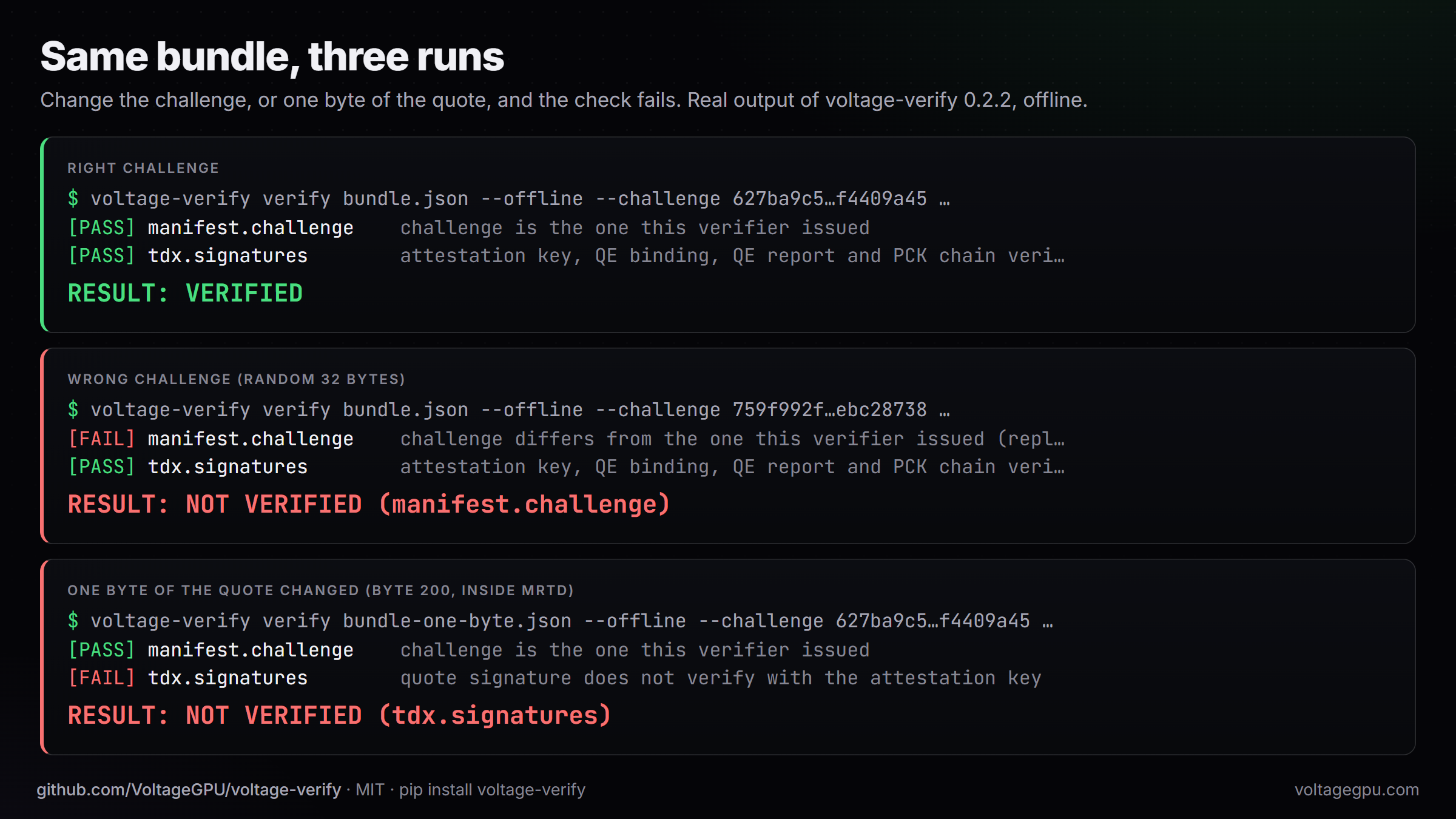
Expected last line: RESULT: VERIFIED, with the platform judged on Intel's collateral of today.
Change one character of the challenge and run it again: the result flips to NOT VERIFIED.
With --offline the tool uses the Intel collateral carried by the bundle instead: it must then
be at most 30 days old (this one is older: --max-collateral-age accepts it explicitly), and the
verdict says the TCB was not checked against Intel today, with exit code 3. More bundles, with
their dates and limits, in
confidential-gpu-attestation-evidence;
the field-by-field reading of the quote is in
this tutorial.
What it proves, and what it does not
Verified means:
- the TDX quote was produced inside a genuine Intel TDX Trust Domain that does not run in
debug mode (the host can read and modify the memory of a debug TD), on a platform whose
provisioning certificate chains to Intel's root, at an acceptable TCB level, by a genuine
Quoting Enclave, and it embeds
SHA-512of your manifest; - NVIDIA's service signed, over
SHA-256of your manifest, that the GPU(s) whose evidence answered that nonce passed attestation with secure boot on and debugging off; - both proofs were made after you issued the challenge, so they cannot be replayed from an
earlier session or copied from another tenant (with
--challenge; without it,manifest.challengewarns that freshness and replay are not checked).
Verified does not mean:
- that the GPU executed the image or model named in the manifest. Binding a manifest to a quote proves the hardware signed your description of the workload; proving that this exact code ran needs a measured launcher (for instance the Confidential Containers project with a key broker), which is outside this tool;
- anything about the VM's own software stack unless you pin its TDX measurements: pass
--expect-mrtd(and--expect-rtmr0to--expect-rtmr3) with the values of the image you trust. Without them the result still readsVERIFIED, andtdx.measurementswarnsTD software not pinned: pass --expect-mrtd to check it; - that the attested GPUs are attached to this VM: NVIDIA's tokens name no TD, and the quote and the tokens meet only in the manifest they both commit to;
- anything about a VM you did not attest yourself.
docs/WHAT_IT_PROVES.md goes through every check and its limit.
Install
# verifier machine: Python 3.10+, cryptography, PyJWT
pip install voltage-verify
# inside the VM: the NVIDIA SDK first (it pins cryptography and PyJWT), then the tool
pip install nv-attestation-sdk nvidia-ml-py
pip install --no-deps voltage-verify
Source and issues: https://github.com/VoltageGPU/voltage-verify. The same wheel and source
archive are mirrored with SHA-256 sums at https://voltagegpu.com/blog/two-proofs/voltage-verify/
for installs that must not touch PyPI (pip install <wheel URL>).
Reference run
examples/hello-workload/ holds a real bundle captured on 12 September 2026 on a VoltageGPU
h100-xlarge Confidential VM (8x H100, NVIDIA Protected PCIe mode), with its manifest and the
unedited run log. Replay the verification on your own machine:
voltage-verify verify examples/hello-workload/bundle-8xh100-2026-09-12.json \
    --challenge ef7f54c160627ee536a02b5e73896ac4b1ac2cdefdb7cfaaf2366a7d33cc8731 --hwmodel GH100 --gpus 8
voltage-verify selftest examples/hello-workload/bundle-8xh100-2026-09-12.json
Expected: every required check PASS (the WARN lines name what is not verified: the TD
software you did not pin, the NVSwitch fabric), platform TCB UpToDate, Quoting Enclave
UpToDate, eight GH100 devices with measres success, then ten mutations rejected. Read
those tokens for what they are: in Protected PCIe mode nvidia-smi reports CC State: OFF
next to Multi-GPU Mode: Protected PCIe (the normal reading for that mode, kept in the
bundle's environment section), NVIDIA attested each of the eight GPUs individually, the
NVSwitch fabric is not attested, and this is not the single-GPU CC State: ON mode of an H200
VM. docs/WHAT_IT_PROVES.md spells out the difference.
Use
On your machine, describe the workload and generate a challenge:
voltage-verify manifest --image ghcr.io/you/app:1.4.2 --artifact model.safetensors \
    --statement "inference run for customer X" -o manifest.json
Copy manifest.json into the VM (scp), then, as root inside the VM:
sudo -E python -m voltage_verify attest --manifest manifest.json -o bundle.json
Copy bundle.json back, then:
voltage-verify verify bundle.json --challenge <the challenge printed by `manifest`>
voltage-verify selftest bundle.json --challenge <same>
voltage-verify verify bundle.json --offline      # Intel collateral from the bundle, at most 30 days old
Exit code 0 means verified, 1 means a required check failed, 2 means the bundle or arguments
are unusable (an unusable bundle is reported as the failed check bundle.malformed, also in
--json), 3 means verified with a limit the verdict names: offline, the TCB was not checked
against Intel's collateral of today (--accept-offline-tcb accepts that, exit code 0); with
--health, the health report has warnings or untested parts (below).
--json prints the machine-readable report, with the same verdict and its limits.
Works with any Intel TDX host, any provider
Nothing here is VoltageGPU-specific, and the tool does not call VoltageGPU's API to attest or
to verify. manifest and verify run entirely on your own machine. attest reads the kernel's
own confidential-computing interface, /sys/kernel/config/tsm/report (configfs TSM, upstream
since Linux 6.7, present on any distribution with a recent kernel), and calls NVIDIA's own SDK,
nv-attestation-sdk, to talk to NVIDIA's Remote Attestation Service. Neither of those is a
VoltageGPU endpoint. So attest runs the same way inside a TDX guest on Azure, on GCP, on a bare
metal TDX host with a passthrough NVIDIA GPU, or on VoltageGPU: the interface is the Linux kernel
and NVIDIA's own service, not us. verify checks the bundle against Intel's and NVIDIA's public
collateral, also fetched from Intel and NVIDIA, never from VoltageGPU.
What this means in practice: if your workload runs on a TDX VM with an NVIDIA H100, H200, or
Blackwell GPU in confidential compute mode, anywhere, voltage-verify attest inside that VM and
voltage-verify verify on your laptop give you the same tenant-side proof this tool was built to
give VoltageGPU's own customers. We have not run this against every cloud ourselves (the
reference run above is on our own fleet, because that is the hardware we have),
so if you verify a bundle produced elsewhere, an issue or a pull request with what you saw, good
or bad, is exactly the kind of report SECURITY.md and this repository want.
Verify a quote from anywhere
quote takes a bare Intel TDX quote, from any provider, any tool, and runs the Intel half of
the checks on it: structure, the TD's debug bit, signature chain up to the pinned Intel root,
then TCB status, QE identity and revocation from Intel PCS. No manifest, no NVIDIA token, no
VoltageGPU anywhere in the path. The file can be the raw bytes written by
/sys/kernel/config/tsm/report, or hex, or base64.
voltage-verify quote quote.bin
voltage-verify quote quote.bin --report-data <64 bytes hex>   # bind it to the nonce you issued
voltage-verify quote quote.bin --offline                       # signatures only, TCB not checked: exit code 3
voltage-verify quote quote.bin --accept-out-of-date --json
voltage-verify quote quote.bin --allow-debug                   # a debug TD as a warning, development only
Tested on Google's production Sapphire Rapids quote from
go-tdx-guest
(vendored in tests/fixtures/third-party/, Apache 2.0). Output with --accept-out-of-date on
21 October 2026 (0.2.2):
[PASS] tdx.structure   TDX quote v4, TEE 0x81, 4935 bytes
[WARN] tdx.trailing    39 bytes after the signature data were ignored (not covered by any signature)
[PASS] tdx.debug       TD attributes 0000004000000000 (0x40000000), DEBUG (bit 0) off: not a debug TD
[PASS] tdx.signatures  attestation key, QE binding, QE report and PCK chain verify up to the pinned Intel SGX Root CA
[PASS] tdx.collateral  TCB info and QE identity signed by Intel (Intel PCS, fetched now)
[WARN] tdx.tcb         no TCB level in Intel's TCB info matches this platform (treat as OutOfDate)
Two things to read in that output. The trailing bytes are a marker Google appends on purpose
in its test vector; they sit outside the signed region and are reported, not silently dropped.
The TCB warning is real: that 2023 quote comes from a platform whose firmware level Intel no
longer lists, so a verifier must call it OutOfDate. Without --accept-out-of-date the exit
code is 1, which is the right answer for a quote you would rely on today.
tdx.debug reads bit 0 of the TD attributes in the TD report. A TD in debug mode gives no
confidentiality: the host can read and modify its memory and CPU state, yet Intel's Quoting
Enclave signs its quote like any other, so the signature chain alone does not catch it. quote
and verify fail on that bit; --allow-debug (both commands) turns the failure into a visible
warning, for development VMs only. Versions up to 0.2.1 reported the TD attributes in the
--json facts without checking them.
Hardware health check (health)
health checks the NVIDIA GPUs of the machine it runs on, the
way a stability test does on a desktop, for server GPUs under Linux: what is there, what the
error counters say, how the sensors behave under a load that changes, whether the GPU computes
right and whether its memory holds what is written to it. It runs on any Linux machine with an
NVIDIA GPU and the NVIDIA driver, not only in a TDX VM, as an ordinary user. It is local and
read-only: no root, no network, nothing about the machine is sent anywhere, nothing is
installed. The only file it writes is the -o report, readable by its owner only, since it
names the machine; PyTorch and the CUDA runtime may fill their own caches under the home
directory. It does not need root, and reads everything but the kernel log without it. Run as
root (to have errors.xid), it starts nvidia-smi, dmesg and the Python it runs under
from PATH and PYTHONPATH as they are, like any command run as root: do not use sudo -E
from an account whose environment you do not trust. Run it on a machine that does nothing else: for the length of the run the load
takes every GPU, and the VRAM test takes their free memory, so a job running next to it would
slow down or run out of memory.
voltage-verify health --quick                      # 60 seconds of load
voltage-verify health --expect-gpu "H100" --expect-gpus 8 --expect-vram 80 -o health.json
| Check | How | Verdict |
|---|---|---|
inventory.gpus |
nvidia-smi --query-gpu: model, count, VRAM, driver, vbios, PCI bus and device id |
FAIL if no GPU is visible; WARN on mixed models or MIG enabled |
inventory.model, inventory.count, inventory.vram |
only with --expect-gpu, --expect-gpus, --expect-vram: what the listing says against what the driver reports |
FAIL if a token of the listed name that carries a digit (4090, h100, 80gb) is missing from the reported name, if fewer GPUs are visible, or if the smallest GPU has under 93% of the listed VRAM (the driver reports less than the round figure of a spec sheet) |
errors.ecc |
ECC counters, retired pages and remapped rows, read before and after the load | FAIL on an uncorrected error since the driver loaded, a pending page retirement or row remap (the GPU needs a reset), a failed remap; WARN on ECC disabled, corrected errors during the test, lifetime uncorrected errors, retired or remapped memory; INFO when the GPU has no ECC (consumer cards) |
errors.xid |
dmesg, else journalctl -k; never sudo |
FAIL on a hardware Xid during the test (48, 62, 64, 74, 79, 92, 94, 95, 119, 120, 140 in NVIDIA's Xid catalog); WARN on another Xid during the test, or a hardware Xid earlier in this boot; SKIP when the kernel log is not readable without root |
sensors.thermal |
temperature, power draw, power limit and slowdown reasons, read every 2 s during the load (every 5 s past two minutes) | FAIL if hardware thermal slowdown or power brake is active in 5% of the samples or more on a GPU; WARN on any thermal or hardware slowdown, a power limit set under the GPU's default, or a GPU 10 C hotter than the median GPU. Reaching the power cap under full load is normal and not a warning |
sensors.clocks |
the same samples: SM clock, utilisation | WARN if a GPU's median SM clock under load is under 85% of the median GPU, or a GPU never reached 90% utilisation |
compute.matmul |
on every GPU at once, the same half-precision 8192x8192 matrix product again and again, each result compared with the first one; before it, a product of integer-valued float64 matrices compared with the CPU's (exact in any order of operations). The load is variable: bursts of 8, 4, 2 and 1 seconds with pauses in between, for the power and thermal transients a constant load never causes | FAIL if a GPU does not finish, returns non-finite values, returns other bits for the same product (silent data corruption), differs from the CPU on the exact product, or runs under half the median GPU; WARN under 85% of the median, or if two identical GPUs compute different results |
vram.pattern |
five patterns (random bytes that differ from block to block, 0x55, 0xAA, 0x00, 0xFF) written to at least 90% of the free VRAM, then read back |
FAIL on any wrong byte; WARN if less than 90% of the free VRAM could be tested |
topology.links |
nvidia-smi topo -m, nvidia-smi nvlink -s, PCIe link generation and width at their best during the run |
INFO only in this version |
multi.p2p |
only on a machine with two GPUs or more, once the load has ended: one more PyTorch process, which sees every GPU, copies 256 MiB from each GPU to every other one (56 ordered pairs on 8 GPUs): 3 warm-up copies, then 20 timed ones. The 3 warm-up copies and the last timed copy are compared byte for byte, on the destination, with what was sent; the 19 timed copies before the last one are overwritten unread. Throughput per pair, in MiB/s in the report, shown in GB/s (10^9 bytes per second, the unit of the NVLink line rates). About 1.3 GiB of VRAM per GPU and 256 MiB of host memory; stopped after 15 minutes | FAIL, whatever links the GPUs: on any wrong byte; if the test does not finish; if a pair has no valid result (missing, reported twice, or with a figure out of bounds); if the worker's closing record does not add up; if PyTorch initialises fewer GPUs than nvidia-smi lists, or nvidia-smi gives two GPUs the same index. Speed, when every pair reads NV<n> in nvidia-smi topo -m (a complete NVLink mesh), with the rules of hwcheck's acceptance.sh: FAIL if a pair is under 25% of the model's NVLink line rate per direction (450 GB/s for H100 SXM and H200, 300 for A100 SXM, 900 for B200 and B300: such a pair is not really on NVLink) or has no peer access; WARN if the median pair is under 75% of the line rate, or a pair under 90% of the median pair; a model without a known line rate: FAIL under 25% of the median pair, WARN under 90%. An NVLink model (H100 SXM, H200, A100 SXM, B200, B300) whose topology does not show a complete mesh, as when a VM gets part of a board: the same comparisons, but WARN at most, never FAIL on speed. Otherwise (GPUs over PCIe, NVLink between some pairs only, or a topology that cannot be read): INFO, the speed is measured and not judged, except WARN for a pair under 10% of the median pair. WARN if the worker ends badly after reporting every pair. SKIP without a CUDA build of PyTorch. A machine with one GPU gets no such line |
compute.matmul, vram.pattern and multi.p2p need a CUDA build of PyTorch in the Python
that runs the tool. health never installs it: without one, these lines read SKIP and say
why.
Each line reads PASS, FAIL, WARN, SKIP (could not run) or INFO (measured, with no
reference to judge it, or not applicable to this hardware). A SKIP never counts as a pass:
the last line names what was not tested.
RESULT: PASS
RESULT: WARN (sensors.clocks)
RESULT: INCOMPLETE (not tested: errors.xid, compute.matmul, vram.pattern)
RESULT: FAIL (errors.ecc, compute.matmul; not tested: errors.xid; warnings: sensors.clocks)
Exit code 0 for PASS, 1 for FAIL, 2 for unusable arguments, 3 for WARN and INCOMPLETE
(the verdict names the limit, as for verify). --burn-seconds N sets the length of the load
(10 to 3600 seconds; 300 by default, 60 with --quick). --json prints the report instead of
the lines. -o health.json writes it in its canonical form: schema voltage-verify/health/1,
the machine, the UTC time and the duration of the run, every check with the values it was
decided on, and every sensor sample as nvidia-smi printed it. The report holds no float, so
it has one canonical encoding, and sha256sum health.json is the digest the tool prints.
Read it before you publish it: it names the machine (host name, GPU UUIDs and serial numbers).
A real run on a Windows 11 desktop (RTX 3060 Ti, driver 610.88, PyTorch without CUDA) on 22 November 2026, with 0.4.0.dev0. Inventory and sensors work there too; the kernel log and the two PyTorch tests do not, and the verdict says so, with exit code 3:
[PASS] inventory.gpus   1x NVIDIA GeForce RTX 3060 Ti, 8192 MiB, driver 610.88, vbios 94.04.6b.00.4a, PCI 29:00.0 (id 10de:2489)
[INFO] errors.ecc       no ECC reported by these GPUs (consumer cards have none): not applicable
[SKIP] errors.xid       kernel log not readable (not root, a container, or not Linux): Xid errors not checked
[INFO] sensors.thermal  idle only, not judged under load: max 30 C (GPU 0), max 9 W, no slowdown flag active
[INFO] sensors.clocks   idle only, not judged under load: median SM clock 210 MHz, at most 1% busy
[SKIP] compute.matmul   PyTorch 2.3.1+cpu is installed but sees no CUDA device (a CPU-only build?): the compute test did not run (install a CUDA build of PyTorch to run it; nothing is installed for you)
[SKIP] vram.pattern     PyTorch 2.3.1+cpu is installed but sees no CUDA device (a CPU-only build?): the VRAM test did not run (install a CUDA build of PyTorch to run it; nothing is installed for you)
[INFO] topology.links   1 GPU, no GPU-to-GPU link; PCIe link at best Gen1 x16 (Gen3 x16 possible); read only: P2P copies and NCCL are not measured here (hwcheck's acceptance.sh does)

RESULT: INCOMPLETE (not tested: errors.xid, compute.matmul, vram.pattern)
Putting the report under the attestation
A manifest can commit to a health report. The TDX quote carries SHA-512(manifest) and the
NVIDIA tokens are issued over SHA-256(manifest), so both then cover the report as they cover
the image digest:
# in the VM, as an ordinary user
voltage-verify health -o health.json
# on your machine, with health.json copied back
voltage-verify manifest --image ghcr.io/you/app:1.4.2 --health health.json -o manifest.json
# in the VM, as root, with manifest.json copied in
sudo -E python -m voltage_verify attest --manifest manifest.json -o bundle.json
# on your machine
voltage-verify verify bundle.json --challenge <challenge> --health health.json
The manifest gets one more key, "health": {"schema": "voltage-verify/health/1", "sha256": "<hex>"}, the SHA-256 of the report in its canonical form. verify --health adds one line,
health.report: PASS when the file is the report the manifest commits to and its verdict is
PASS; WARN when the report has warnings or untested parts, and its verdict then becomes a
limit of the result, RESULT: VERIFIED (health report INCOMPLETE (not tested: errors.xid)),
with exit code 3; FAIL (RESULT: NOT VERIFIED (health.report), exit code 1) when the file
differs from the committed one by a single byte of content, when the manifest commits to no
report, or when the committed report itself failed. Without --health, a manifest that
commits to a report gets a WARN saying so, and the result names it: RESULT: VERIFIED (health report committed but not checked (no --health)), exit code 3, because the report nobody
looked at may say FAIL. Two more things keep a matching report from being a plain pass, each
named in the result with exit code 3: a report that leaves out one of the seven checks
(inventory.gpus, errors.ecc, errors.xid, sensors.thermal, sensors.clocks,
compute.matmul, vram.pattern), since a check left out is not a check that passed; and a
report dated more than 24 hours before the manifest, or after it. A manifest without --health is what 0.3.0 wrote, and a bundle whose
manifest commits to no report verifies exactly as before: same lines, same RESULT, same exit
code, same --json keys.
What health.report proves: the report you hold is, bit for bit, the one that was named when
the quote and the tokens were issued; nobody edited it afterwards, and no other report can take its
place under that quote. What it does not prove: that the report tells the truth, or that it
was measured on this machine. Nothing in the report is tied to the attested GPUs: whoever
builds the manifest chooses the report it commits to, and can commit to the report of another
machine (its date is only compared with the manifest's own). It is written by an unprivileged program inside the machine, which a host or a guest
image determined to lie can make say anything; the attestation covers its bytes, not the
honesty of the software that produced them (pin the TD measurements for that, see above). It
also precedes the challenge: the manifest hashes the report, so the report is written first,
and its date is the machine's own word.
What health shows, and what it does not
It shows that during this run every GPU was visible and matched the listing, computed the same product bit for bit under a load that kept changing, held five patterns across its free memory without a wrong byte, and raised no memory error, no Xid and no thermal or power slowdown. On a machine with several GPUs it also shows that the copies it compared between every GPU and every other one (per ordered pair, 3 warm-up copies and the last of 20 timed ones) arrived byte for byte, and, where the topology shows a complete NVLink mesh, at the speed of NVLink.
It does not show that the machine will hold for days (an Xid at hour 30 needs monitoring during
the job), nor the rest of what happens between GPUs: NCCL all-reduce bandwidth, the NVLink mesh
and PCIe link verdicts are measured by the acceptance test of
hwcheck (acceptance.sh), from which the rules and
thresholds above come; health only reads the topology, and runs no NCCL. multi.p2p is that
test's "P2P copies" line, except that a wrong byte fails over PCIe too (there it is only
listed), that a slow pair fails only when the topology shows a complete NVLink mesh (an NVLink
model without one, as in a VM that got part of a board, is warned: a failure written here may
end up under an attestation), that without NVLink a pair under 10% of the median pair is
warned (there nothing is judged), that host-to-GPU copies are not timed, that the matrix of
pairs is in the report and not printed, and that PyTorch is never downloaded. The thresholds
of 25%, 75% and 90% are hwcheck's, the last two set from one run on an 8x H100 SXM node
(24 October 2026); the 10% is this tool's own and comes from no measurement. multi.p2p
itself has been tested on recorded fixtures and on the CPU build of PyTorch, not yet on a
multi-GPU machine.
And like any program running on the machine, it reports what the driver tells it.
Bundle format
Documented in docs/BUNDLE_FORMAT.md. In short: the manifest verbatim, both commitments, the
raw TDX quote (base64), the NRAS token array as returned by the NVIDIA SDK, NRAS's JWKS and
Intel's TCB info, QE identity and CRLs as fetched at attestation time, plus a few facts about
the VM (kernel, driver, nvidia-smi conf-compute -q). The verifier trusts none of it: it
recomputes the commitments from the manifest and checks every signature.
Development
python -m venv .venv && . .venv/bin/activate
pip install -e ".[dev]"
pytest
ruff check src tests
The tests run offline against real evidence: a TDX quote captured on a VoltageGPU H200 VM on 4 September 2026, NRAS tokens from 4 and 10 September 2026 (single H200, 8x H100 node in NVIDIA Protected PCIe mode), and a snapshot of Intel's collateral and NVIDIA's JWKS.
See also
- docs/VERIFY_A_PUBLIC_BUNDLE.md: a five-minute walkthrough on a public bundle, no account needed, including two ways to make the verification fail.
- confidential-gpu-attestation-evidence:
every dated bundle this tool has verified on VoltageGPU's fleet since 4 September 2026,
including the runs that fail (NVSwitch fabric from a TDX guest), re-verifiable with
voltage-verify verify. - tdx-guest-probe: one script that lists what a TDX guest can observe and the host setting it cannot, useful before trusting any quote.
Security
See SECURITY.md. In one line: report anything that would make verify say yes when it
should say no to contact@voltagegpu.com, and expect an answer within two working days.
License
MIT. Copyright 2026 VOLTAGE EI (VoltageGPU).
1 maintainer

Metadata
1 maintainer
Release files for voltage-verify 0.4.0
For a detailed explanation of source distributions (sdists) and built distributions (wheels), please see the package formats documentation.
Source distribution (sdist)
| File | Size | Uploaded | Provenance | Actions |
|---|---|---|---|---|
| voltage_verify-0.4.0.tar.gz | 220.9 kB | Without provenance | Details for voltage_verify-0.4.0.tar.gz |
Built distribution (wheel)
| File | Interpreter | ABI | Platform | Actions Reset |
|---|---|---|---|---|
| voltage_verify-0.4.0-py3-none-any.whl | Python 3 | none | any | Details for voltage_verify-0.4.0-py3-none-any.whl |
Total release size: 323.9 kB
Release files / voltage_verify-0.4.0.tar.gz
| Download URL | voltage_verify-0.4.0.tar.gz |
|---|---|
| Size | 220.9 kB |
| Tags | Source |
|
SHA-256 checksum How to use checksums |
00deb9655364c87f85eeba7836bd64c7584ebcd9b65cde2b2a82add74c01d043
|
|
BLAKE2b-256 checksum How to use checksums |
fd920b5a60910f175c344a871560c9491d4cd8b5c18466452be3e48458ed404f
|
| Upload date | |
|
Uploaded using Trusted Publishing? What is trusted publishing? |
No |
| Uploaded via |
twine/7.0.0 CPython/3.12.4
|
Release files / voltage_verify-0.4.0-py3-none-any.whl
| Download URL | voltage_verify-0.4.0-py3-none-any.whl |
|---|---|
| Size | 103.0 kB |
| Tags | Python 3 |
|
SHA-256 checksum How to use checksums |
701a023705aa745d838b0ee1ae89020cfbf6d6ff444d53506ad20b3d6dd87221
|
|
BLAKE2b-256 checksum How to use checksums |
0ca248e8b2c10c557afa1c248344a9a376f81f4ff30727259e6ca34c4f17943f
|
| Upload date | |
|
Uploaded using Trusted Publishing? What is trusted publishing? |
No |
| Uploaded via |
twine/7.0.0 CPython/3.12.4
|
Security for voltage-verify 0.4.0
Provenance
Provenance describes where a file came from. On PyPI, provenance is shared via attestations, which provide a verifiable record of the build or publishing details. View details, limitations and caveats.
No provenance found
None of the files in this release were uploaded with provenance metadata.
A note on package security
PyPI is a repository for distributing packages, not a service for auditing them. While third-party security researchers and our staff do their best to detect and remove malicious packages, PyPI cannot guarantee the quality, security or suitability of any given package.
To learn more about protecting yourself from malicious actors, visit our package security documentation.














