



VoodooNet
Predicting liquid droplets in mixed-phase clouds beyond lidar attenuation using artificial neural nets and Doppler cloud radar spectra
VOODOO is a machine learning approach based convolutional neural networks (CNN) to relate Doppler spectra morphologies to the presence of (supercooled) liquid cloud droplets in mixed-phase clouds.
Installation
Prerequisites
VoodooNet requires Python 3.10.
Before installing VoodooNet, install PyTorch according to your infrastructure. For example on a Linux machine without GPU you might run:
pip3 install torch --extra-index-url https://download.pytorch.org/whl/cpu
From PyPI
pip3 install voodoonet
To log training runs with Weights & Biases, install the train extra:
pip3 install voodoonet[train]
Locally for development
pip3 install -e .[dev]
Citing
If you wish to acknowledge VoodooNet in your publication, please cite:
Schimmel et al. (2022). Identifying cloud droplets beyond lidar attenuation from vertically pointing cloud radar observations using artificial neural networks. Atmos. Meas. Tech., 15(18), 5343–5366. https://doi.org/10.5194/amt-15-5343-2022
Usage
Make predictions using the default model and settings
import glob
import voodoonet

rpg_files = glob.glob('/path/to/rpg/files/*.LV0')
probability_liquid = voodoonet.infer(rpg_files)
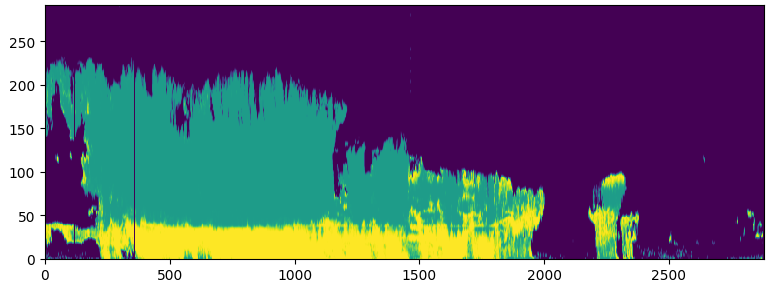
You can for example plot the resulting liquid probability:
import matplotlib.pyplot as plt

plt.pcolor(probability_liquid.T)
plt.show()
Generate a training data set
Download some RPG-FMCW-94 raw files and corresponding classification files from the Cloudnet data portal using cloudnet-api-client, which is installed with voodoonet. For example, for Leipzig LIM on 2021-01-10:
import voodoonet
from cloudnet_api_client import APIClient

client = APIClient()
rpg_meta = client.raw_files(
    site_id="leipzig-lim",
    instrument_id="rpg-fmcw-94",
    filename_suffix=".LV0",
    date="2021-01-10",
)
classification_meta = client.files(
    site_id="leipzig-lim",
    product_id="classification",
    date="2021-01-10",
)
rpg_files = client.download(rpg_meta, "data/")
classification_files = client.download(classification_meta, "data/")
voodoonet.generate_training_data(rpg_files, classification_files, 'training-data-set.pt')
Alternatively, just use N random days from a site. Files are downloaded into download_dir (default cloudnet-data) and reused on subsequent runs:
import voodoonet
voodoonet.generate_training_data_for_cloudnet('leipzig-lim', 'training-data-set.pt', n_days=5)
Train a VoodooNet model
import voodoonet

pre_computed_training_data_set = 'training-data-set.pt'
voodoonet.train(pre_computed_training_data_set, 'trained-model.pt')
Make predictions using the new model
import glob
import voodoonet
from voodoonet.utils import VoodooOptions

rpg_files = glob.glob('/path/to/rpg/files/*.LV0')
options = VoodooOptions(trained_model='new_model.pt')
probability_liquid = voodoonet.infer(rpg_files, options=options)
Metadata
Release files for voodoonet 0.2.0
For a detailed explanation of source distributions (sdists) and built distributions (wheels), please see the package formats documentation.
Source distribution (sdist)
| File | Size | Uploaded | |
|---|---|---|---|
| voodoonet-0.2.0.tar.gz | 10.6 MB | Details |
Built distribution (wheel)
| File | Interpreter | ABI | Platform | Reset |
|---|---|---|---|---|
| voodoonet-0.2.0-py3-none-any.whl | Python 3 | none | any | Details |
Total release size: 21.1 MB
Release files / voodoonet-0.2.0.tar.gz
| Download URL | voodoonet-0.2.0.tar.gz |
|---|---|
| Size | 10.6 MB |
| Tags | Source |
|
SHA-256 checksum How to use checksums |
4f5f87246826e744f7a3293500785f232339ac7bf7637dec75e5d39cdbfad784
|
|
BLAKE2b-256 checksum How to use checksums |
02a3764bcc9a1262b62d513c72cb5b581f424c52f66dd00b7b93d218e5220f76
|
| Upload date | |
|
Uploaded using Trusted Publishing? What is trusted publishing? |
Yes |
| Uploaded via |
twine/7.0.0 CPython/3.13.14
|
Provenance
Provenance describes where a file came from. On PyPI, provenance is shared via attestations, which provide a verifiable record of the build or publishing details. View details, limitations and caveats.


PyPI Publish Attestation
PyPI verified that this artifact, at this checksum, originated from the publisher listed below.
Signed by GitHub Actions, verified by PyPI on Sep 14, 2026.
Transparency logRelease files / voodoonet-0.2.0-py3-none-any.whl
| Download URL | voodoonet-0.2.0-py3-none-any.whl |
|---|---|
| Size | 10.6 MB |
| Tags | Python 3 |
|
SHA-256 checksum How to use checksums |
7f420b3a1f016306c798a7f7a7eb65288c0b5e892485168d44c0f3d22180c8ec
|
|
BLAKE2b-256 checksum How to use checksums |
b9feb2fdfa0f2f139f10f8a9e03bfc40f0894a3d6da60d1c341ef9782fcd84b2
|
| Upload date | |
|
Uploaded using Trusted Publishing? What is trusted publishing? |
Yes |
| Uploaded via |
twine/7.0.0 CPython/3.13.14
|
Provenance
Provenance describes where a file came from. On PyPI, provenance is shared via attestations, which provide a verifiable record of the build or publishing details. View details, limitations and caveats.
PyPI Publish Attestation
PyPI verified that this artifact, at this checksum, originated from the publisher listed below.
Signed by GitHub Actions, verified by PyPI on Sep 14, 2026.
Transparency log













