
vorflow




Voronoi mesh generation for MODFLOW 6 using Gmsh and GeoPandas.
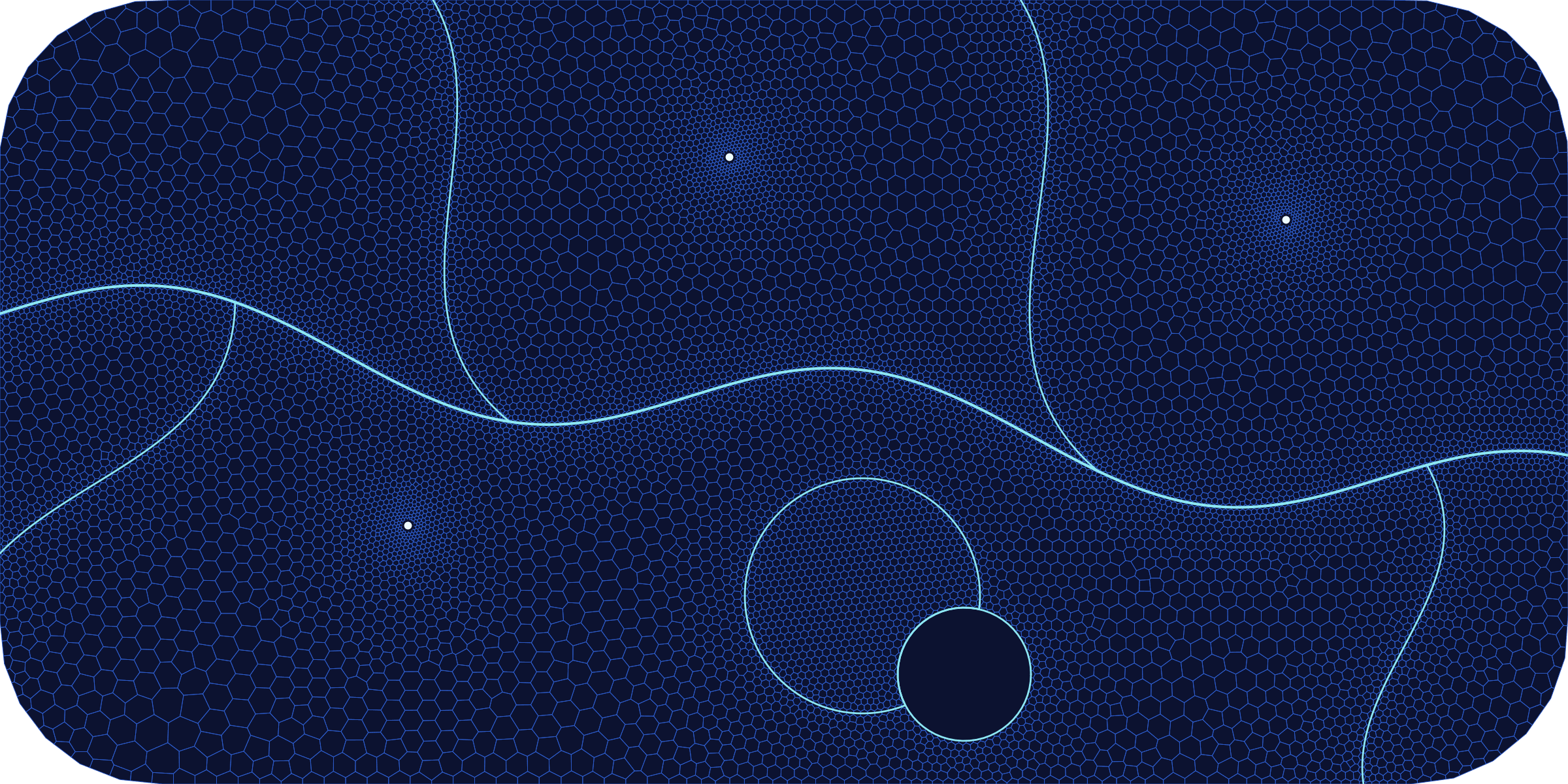
vorflow is a Python package for creating 2D unstructured Voronoi cell meshes for groundwater modeling, particularly for MODFLOW 6. It leverages the power of Gmsh for robust triangular meshing and Shapely/GeoPandas for geometric operations.
The process is designed to translate a conceptual model—defined by geometric features like polygons, lines, and points—into a high-quality Voronoi grid suitable for numerical simulation.
Core Components
The library is built around three main classes that work in sequence:
-
ConceptualMesh: A blueprinting tool to define the model domain and its features. You can add polygons (e.g., model boundary, refinement zones), lines (rivers, faults), and points (wells) and specify the desired mesh density and refinement behavior for each. -
MeshGenerator: This is the engine that generates a triangular mesh based on the blueprint fromConceptualMesh. It usesGmshas its backend to create a quality-conforming Delaunay triangulation. -
VoronoiTessellator: This class takes the triangular mesh fromMeshGeneratorand computes its dual: the Voronoi diagram. The result is a grid of polygonal cells. It includes logic to clip the grid to the domain boundary and enforce barrier features by cutting through cells.
Workflow
The typical workflow follows these steps:
- Define Geometry: Create
shapelyobjects for your model features (domain boundary, rivers, wells, etc.). - Create a Blueprint: Instantiate
ConceptualMeshand add your geometries, specifying parameters like mesh resolution, refinement distances, and feature types (e.g., barriers). - Generate Mesh: Instantiate
MeshGeneratorand call itsgenerate()method with the processed geometries from the blueprint. This produces a triangular mesh. - Tessellate to Voronoi: Instantiate
VoronoiTessellatorwith the generated mesh and the blueprint. Calling itsgenerate()method produces the finalGeoDataFrameof Voronoi cells. - Export: The resulting
GeoDataFramecan be easily saved to a shapefile or other formats.
Installation
vorflow requires Python 3.10 or newer. Install it from PyPI:
pip install vorflow
The examples and notebooks also need Matplotlib, which the examples extra
installs:
pip install "vorflow[examples]"
On Linux, the gmsh wheel from PyPI needs the system GLU library (for example
sudo apt-get install libglu1-mesa on Debian/Ubuntu). Alternatively, install
the geospatial stack and Gmsh from conda-forge first, then pip install vorflow
into that environment.
To try the latest unreleased changes, install from GitHub:
pip install "git+https://github.com/rhugman/vorflow.git"
Release candidates are published to TestPyPI before each release. To test one (dependencies still come from PyPI):
pip install --pre --index-url https://test.pypi.org/simple/ \
    --extra-index-url https://pypi.org/simple/ vorflow
Development installation
Clone the repository and install it in editable mode:
git clone https://github.com/rhugman/vorflow.git
cd vorflow
pip install -e ".[dev]"
For plotting examples and notebooks without all development tools:
pip install -e ".[examples]"
Alternatively, create the Conda development environment from
etc/environment.yml,
which installs the package in editable mode with the dev extra:
micromamba env create -f etc/environment.yml
Basic Usage
Here is a simple example of how to generate a non-empty Voronoi grid:
The complete runnable version is examples/basic_usage.py.
from shapely.geometry import LineString, Point, box

from vorflow import ConceptualMesh, MeshGenerator, VoronoiTessellator

domain = box(0, 0, 200, 200)
well_point = Point(25, 25)
fault_line = LineString([(100, 0), (100, 150)])

blueprint = ConceptualMesh(crs="EPSG:3857")
blueprint.add_polygon(domain, zone_id=1)
blueprint.add_point(
    well_point,
    point_id="Well-A",
    resolution=2,
    growth_factor=1.2,
)
blueprint.add_line(
    fault_line,
    line_id="Fault-1",
    resolution=1,
    is_barrier=True,
)

clean_polys, clean_lines, clean_pts = blueprint.generate()

mesher = MeshGenerator(background_lc=100)
mesher.generate(clean_polys, clean_lines, clean_pts)

tessellator = VoronoiTessellator(mesher, blueprint, clip_to_boundary=True)
grid_gdf = tessellator.generate()
if grid_gdf.empty:
    raise RuntimeError("Basic Usage generated an empty Voronoi grid")
Optional file export
GeoPandas writes formats such as Shapefile and GeoPackage through an I/O engine such as Pyogrio or Fiona. Install one of those engines before calling:
grid_gdf.to_file("mf6_grid.gpkg", driver="GPKG")
Mesh gradation
Feature resolutions use GeometricGrowthField by default. Its
growth_factor is an upper target for neighboring characteristic edge-length
growth, not cell area growth and not an exact guarantee for every generated
neighbor pair. The default growth_factor=1.2 uses the transparent spatial law
h(d) = feature_lc + (growth_factor - 1) * d.
For the continuous-metric convention, pass an explicit
GeometricGrowthField(growth_model="continuous_metric"); this uses the gentler
gradient log(growth_factor). In normal MeshGenerator use, the global
background field caps either result at background_lc.
Coordinate systems: always work in a projected CRS (e.g. UTM or a national grid) so mesh sizes are in real length units (meters/feet). Geographic coordinates (lat/lon degrees, e.g. EPSG:4326) produce physically meaningless MODFLOW grids — reproject your data first with
GeoDataFrame.to_crs().
Examples
The examples/ folder contains runnable scripts and notebooks covering field-based refinement, mesh quality diagnostics, structured quad buffers, active-domain workflows, and triangular element-grid export.
Roadmap
See ROADMAP.md for planned and completed milestones.
License
MIT — see LICENSE.
1 maintainer

Metadata
1 maintainer
Release files for vorflow 0.1.0
For a detailed explanation of source distributions (sdists) and built distributions (wheels), please see the package formats documentation.
Source distribution (sdist)
| File | Size | Uploaded | |
|---|---|---|---|
| vorflow-0.1.0.tar.gz | 91.7 kB | Details |
Built distribution (wheel)
| File | Interpreter | ABI | Platform | Reset |
|---|---|---|---|---|
| vorflow-0.1.0-py3-none-any.whl | Python 3 | none | any | Details |
Total release size: 184.3 kB
Release files / vorflow-0.1.0.tar.gz
| Download URL | vorflow-0.1.0.tar.gz |
|---|---|
| Size | 91.7 kB |
| Tags | Source |
|
SHA-256 checksum How to use checksums |
55fc1e32e450ff1d3b0c0b9501e8a9a7dc0a862a96c1a78e4e7d136235d86391
|
|
BLAKE2b-256 checksum How to use checksums |
7af8cf038f6c543b085bfd5e16bedfad863a311019214423976d86fbc2f7a01f
|
| Upload date | |
|
Uploaded using Trusted Publishing? What is trusted publishing? |
Yes |
| Uploaded via |
twine/7.0.0 CPython/3.13.14
|
Provenance
Provenance describes where a file came from. On PyPI, provenance is shared via attestations, which provide a verifiable record of the build or publishing details. View details, limitations and caveats.


PyPI Publish Attestation
PyPI verified that this artifact, at this checksum, originated from the publisher listed below.
Signed by GitHub Actions, verified by PyPI on Sep 30, 2026.
Transparency logRelease files / vorflow-0.1.0-py3-none-any.whl
| Download URL | vorflow-0.1.0-py3-none-any.whl |
|---|---|
| Size | 92.6 kB |
| Tags | Python 3 |
|
SHA-256 checksum How to use checksums |
fdb131ad68a5e50d4ca6e308547c94d23e2b37a8e081106f58c43a08fc92b70f
|
|
BLAKE2b-256 checksum How to use checksums |
b2b77def41ab0f750ef8eb1dba94c660c603eebd890691a6e1542590e6fd7199
|
| Upload date | |
|
Uploaded using Trusted Publishing? What is trusted publishing? |
Yes |
| Uploaded via |
twine/7.0.0 CPython/3.13.14
|
Provenance
Provenance describes where a file came from. On PyPI, provenance is shared via attestations, which provide a verifiable record of the build or publishing details. View details, limitations and caveats.
PyPI Publish Attestation
PyPI verified that this artifact, at this checksum, originated from the publisher listed below.
Signed by GitHub Actions, verified by PyPI on Sep 30, 2026.
Transparency log












