
Vorta - A Boring Open Source GUI for BorgBackup

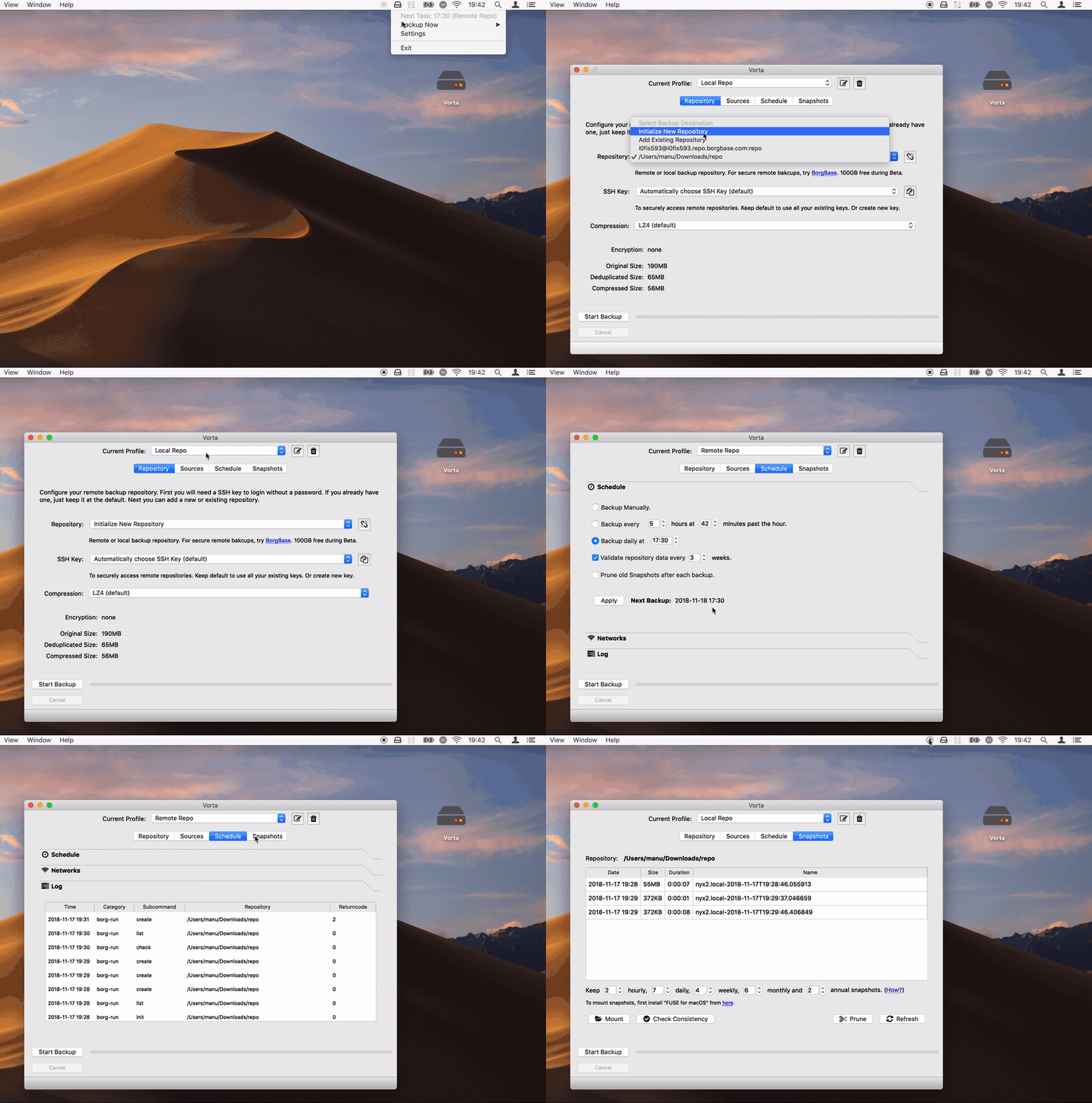
Vorta is an open source macOS/Linux GUI for BorgBackup. It's currently in beta status.
Main features
- Encrypted, deduplicated and compressed backups.
- Works with any local (NEW!) or remote Borg repo. Try BorgBase for advanced features like append-only repositories and monitoring.
- Add SSH keys and initialize repos directly from the GUI.
- Repo keys are securely stored in macOS Keychain, SecretService or KWallet.
- Mount existing snapshots via FUSE.
- Manage multiple backup profiles with different source folders, destinations and settings. (NEW!)
- Prune and check backups periodically.
- Flexible scheduling for automatic background backups. Only allow on certain Wifis.
- View a list of snapshots and action logs.
- Exclude options/patterns.
- Error notifications.
- Automatic updates using Sparkle. (NEW!)
Coming soon:
- Full test coverage (currently: ~60%)
- Packaging for Linux via Snapcraft
Installation and Download
Vorta should work on all platforms that support Qt and Borg. Currently Borg doesn't support Windows, but this may change in the future. Setting allowed Wifi networks is currently not supported on Linux, but everything else should work.
macOS
Download the pre-built macOS binary from Releases. Just download, unzip and run. If you want detailed steps, there is also a tutorial.
Linux
First install Borg and its dependencies. Then install Vorta from Pypi:
$ pip install vorta
After installation run with the vorta command.
$ vorta
Development
Install in development/editable mode while in the repo:
$ pip install -e .
Then run as Python script:
$ vorta
Install developer packages we use (pytest, tox, pyinstaller):
pip install -r requirements-dev.txt
Qt Creator is used to edit views. Install from their site or using Homebrew and then open the .ui files in vorta/UI:
$ brew cask install qt-creator
$ brew install qt
To build a macOS app package:
- add
Sparkle.frameworkfrom here andborgfrom here inbin/macosx64 - then uncomment or change the Apple signing profile to be used in
Makefile - finally run to
$ make Vorta.appto build the app into thedistfolder.
Testing (work in progress)
Tests are in the folder /tests. Testing happens at the level of UI components. Calls to borg are mocked and can be replaced with some example json-output. To run tests:
$ pytest
Why the Name?
Vorta are a race referenced in Star Trek. They serve the Dominion and are replaced by their clones if they die. Just like our backups.
Privacy Policy
- No personal data is ever stored or transmitted by this application.
- During beta, crash reports are sent to Sentry to quickly find bugs. You can disable this by setting the env variable
NO_SENTRY=1.
Author
(C) 2018 Manuel Riel for BorgBase.com
License and Credits
- Licensed under GPLv3. See LICENSE.txt for details.
- Uses the excellent BorgBackup
- Based on PyQt and Qt.
- Icons by FontAwesome
2 maintainers


Metadata
2 maintainers
Release files for vorta 0.4.3
For a detailed explanation of source distributions (sdists) and built distributions (wheels), please see the package formats documentation.
Source distribution (sdist)
| File | Size | Uploaded | Provenance | |
|---|---|---|---|---|
| vorta-0.4.3.tar.gz | 113.6 kB | Without provenance | Details |
Release files / vorta-0.4.3.tar.gz
| Download URL | vorta-0.4.3.tar.gz |
|---|---|
| Size | 113.6 kB |
| Tags | Source |
|
SHA-256 checksum How to use checksums |
f5459100f58076269740b02987648ebb3ea8be90b2a0496f9e19cde7ef90c381
|
|
BLAKE2b-256 checksum How to use checksums |
a79f6b1a2429e6d94e6ae4266b953311fc6f8c4d3f72802ce733f04762b6a4ac
|
| Upload date | |
|
Uploaded using Trusted Publishing? What is trusted publishing? |
No |
| Uploaded via |
twine/1.12.1 pkginfo/1.4.2 requests/2.20.1 setuptools/39.0.1 requests-toolbelt/0.8.0 tqdm/4.28.1 CPython/3.7.1
|
Security for vorta 0.4.3
Provenance
Provenance describes where a file came from. On PyPI, provenance is shared via attestations, which provide a verifiable record of the build or publishing details. View details, limitations and caveats.
No provenance found
None of the files in this release were uploaded with provenance metadata.
A note on package security
PyPI is a repository for distributing packages, not a service for auditing them. While third-party security researchers and our staff do their best to detect and remove malicious packages, PyPI cannot guarantee the quality, security or suitability of any given package.
To learn more about protecting yourself from malicious actors, visit our package security documentation.














