
A novel image encryption package based on time-reversible reaction-diffusion systems.

Project description
VortexCrypt 🖼️✨
A novel, high-security image encryption package based on time-reversible reaction-diffusion systems.
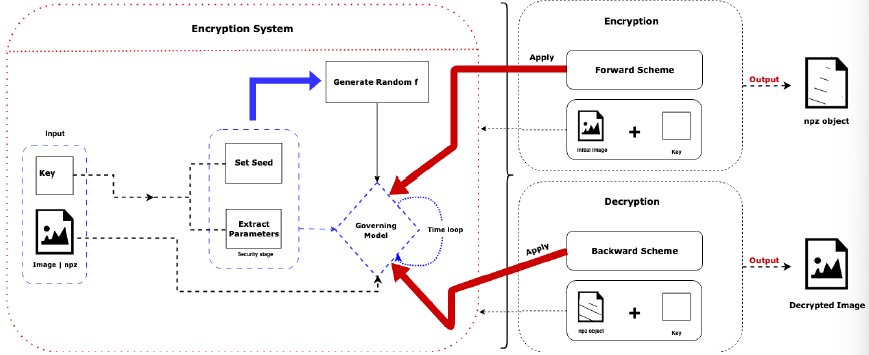
VortexCrypt provides a robust framework for encrypting and decrypting digital images using the principles of chemical morphogenesis, specifically the Gray-Scott model. By embedding the image's pixel data as the initial state of a chemical concentration and evolving it through a complex, chaotic simulation, it generates a highly complex and secure ciphertext.
The core of its security and functionality lies in a mathematically proven time-reversible numerical integrator (Strang-Splitting), which guarantees that the decryption process is a true inverse of the encryption, allowing for near-perfect reconstruction of the original image (limited only by floating-point precision).
Features
- High Security: Leverages the chaotic and unpredictable nature of reaction-diffusion systems.
- Key-Driven Dynamics: All simulation parameters are deterministically generated from your secret key using a cryptographic hash (SHA-256), ensuring a massive key space and high sensitivity.
- Reversibility: Utilizes a time-symmetric numerical scheme to ensure the encrypted state can be decrypted with the correct key.
- Color Image Support: Encrypts both grayscale and RGB images.
- Flexible Configuration: Allows advanced users to override simulation parameters via a JSON file.
- Easy-to-Use CLI: Simple and secure command-line interface for encryption and decryption.
Installation
You can install VortexCrypt using pip. It is recommended to install it in a virtual environment.
pip install vortexcrypt
Quick Start: Command-Line Interface (CLI)
The easiest way to use VortexCrypt is through its command-line interface.
Encrypt an Image
This command will encrypt my_image.png, prompt you securely for a password, and save the complete encrypted state to encrypted_data.npz. It will also save a visual preview as encrypted_data.png.
vortexcrypt encrypt my_image.png --output encrypted_data.npz
Decrypt an Image
This command will decrypt the encrypted_data.npz file using the same secret key and save the result to decrypted_image.png.
vortexcrypt decrypt encrypted_data.npz --output decrypted_image.png
Using a Configuration File
For advanced control, you can override the key-derived parameters with a config.json file.
# Encrypt with custom parameters
vortexcrypt encrypt my_image.png --key "my-secret" --config config.json

# You MUST use the same config file for decryption
vortexcrypt decrypt encrypted_state.npz --key "my-secret" --config config.json
Usage as a Python Library (API)
You can also integrate VortexCrypt directly into your Python projects.
import vortexcrypt
from PIL import Image

# Define paths and key
image_path = "path/to/my_image.png"
encrypted_path = "path/to/encrypted_state.npz"
decrypted_path = "path/to/decrypted_image.png"
secret_key = "this-is-a-very-secure-key"

# --- Encryption ---
vortexcrypt.encrypt(
    image_path=image_path,
    output_path_npz=encrypted_path,
    key=secret_key
)
print("Encryption complete.")

# --- Decryption ---
vortexcrypt.decrypt(
    encrypted_state_path_npz=encrypted_path,
    output_path_png=decrypted_path,
    key=secret_key
)
print("Decryption complete.")
Development
To install the package for development purposes:
- Clone this repository:
git clone https://github.com/FructueuxHollo/vortexcrypt.git - Navigate into the directory:
cd vortexcrypt - Install dependencies with Poetry:
poetry install - Activate the virtual environment:
poetry shell - You can now run the CLI using
vortexcrypt ...directly.
License
This project is licensed under the MIT License. See the LICENSE file for details.
Authors
Fructueux Hollo fructueuxhollo@gmail.com, Charbel Mamlankou charbelzeusmamlankou@gmail.com, Jude Agbodoyetin judeseruch@gmail.com, Ozias Deguenon deguenonamen@gmail.com, Marcellin Ogoungbe ogoungbemarcellin@yahoo.com, Jamal Adetola
Release history Release notifications | RSS feed


Download files
Download the file for your platform. If you're not sure which to choose, learn more about installing packages.
Source Distribution
Built Distribution
Filter files by name, interpreter, ABI, and platform.
If you're not sure about the file name format, learn more about wheel file names.
Copy a direct link to the current filters
File details
Details for the file vortexcrypt-1.0.7.tar.gz.
File metadata
- Download URL: vortexcrypt-1.0.7.tar.gz
- Upload date:
- Size: 11.4 kB
- Tags: Source
- Uploaded using Trusted Publishing? No
- Uploaded via: poetry/2.1.3 CPython/3.13.0 Windows/11
File hashes
| Algorithm | Hash digest | |
|---|---|---|
| SHA256 |
b3eea223673c664880afe906a632b4414af86d33852c20dcc6b9b4f2bf1bcbe5
|
|
| MD5 |
844e8a30f185185dc2dae8d266a83f53
|
|
| BLAKE2b-256 |
a8891ab8f7d286746fe7c65333aacb23527ac41049c08a283d7d3a4a372801e6
|
File details
Details for the file vortexcrypt-1.0.7-py3-none-any.whl.
File metadata
- Download URL: vortexcrypt-1.0.7-py3-none-any.whl
- Upload date:
- Size: 12.0 kB
- Tags: Python 3
- Uploaded using Trusted Publishing? No
- Uploaded via: poetry/2.1.3 CPython/3.13.0 Windows/11
File hashes
| Algorithm | Hash digest | |
|---|---|---|
| SHA256 |
ee14650633d8330c227f1d28113c2ba08212ff480b66d1deda5307c46b65420c
|
|
| MD5 |
21aaacac448431a4e5e1f5f85649cb3c
|
|
| BLAKE2b-256 |
8314acbe2e4db769a36caabeeeb336d9244ae4c70daddd4058dae811d9eae7ce
|






