
Voxa
Dub videos into other languages, in sync with the speaker.



Download for Windows · Install on macOS or Linux · voxa.servoogle.com
Voxa transcribes a video with Whisper, translates what was said, speaks the translation in a new voice and mixes it back under the picture. It runs on your own computer, and the default engines are free and need neither an account nor an API key.
What it does differently is timing. Every translated line starts where the original line started, so the dub is still with the speaker in the thirtieth minute, not only the first.
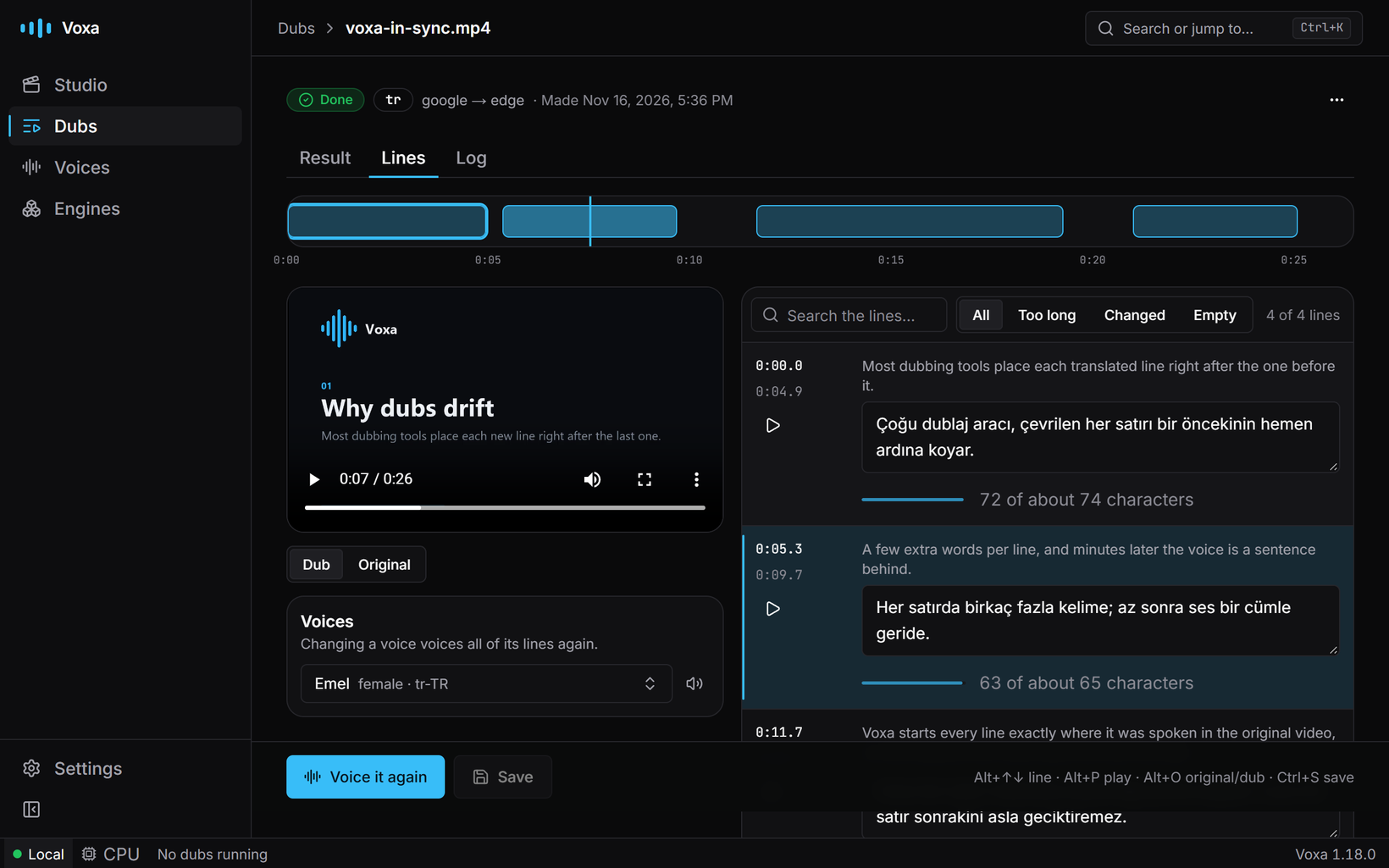
A finished dub in Voxa Studio. Each line sits next to the video at the moment it was
spoken; change one and only that line is voiced again.
Why the dub stays in sync
Most automatic dubbing places each new clip right after the one before it. A translated line is rarely as long as the original, so a clip that runs a little long pushes everything after it a little later, and the error adds up. On a three-minute clip we measured that approach ending 18 seconds behind the speaker.
Voxa keeps no running total. Each line starts where its original line started, and has until just before the next line begins. A long line can use the pause after it. If that isn't enough, it is played a little faster, never more than 1.25 times, and may start the next line up to 0.4 seconds late, which the next pause takes back, so the lag never adds up. A line that still doesn't fit is said again in fewer words by the LLM translator. Nothing that is said is cut off.
Two smaller choices follow from this. The LLM translators get a character budget for each line, so the translation is written to fit instead of being squeezed afterwards. And speech is only ever sped up, never slowed down, because slowed speech sounds dragged. ARCHITECTURE.md walks through the arithmetic and where it lives in the code.
Install
Windows
Download VoxaSetup.exe (11 MB) and run it. It installs Voxa Studio for your user, without administrator rights, along with the Python it needs, and FFmpeg if you don't have it. Setup downloads about 1 GB more, mostly PyTorch.
The installer isn't code-signed yet, so Windows will probably warn you about it. Choose More info, then Run anyway.
macOS and Linux
curl -fsSL https://voxa.servoogle.com/install.sh | sh
The same thing exists for Windows users who prefer a terminal:
irm https://voxa.servoogle.com/install.ps1 | iex.
With pipx or Docker
If you already have Python 3.10 or newer and FFmpeg:
pipx install "voxa-dub[studio]"
The package is called voxa-dub; the command is voxa. There is also a Docker image,
ghcr.io/akshinmrv/voxa. INSTALL.md covers every route, GPUs, the optional
engines and uninstalling.
Voxa Studio
Studio is the app. VoxaSetup adds it to the Start menu; anywhere else, voxa studio starts it.
It opens in a window of its own on Windows and macOS, and in your browser on Linux.
You add one or more videos, choose the languages and engines, and start. While a dub runs, its page shows the seven steps and the log. When it's done, the lines sit next to the video, each marked if it's longer than the time it has. Edit a line, save with Ctrl+S and voice it again; only the lines you changed are synthesized.
Some things worth knowing about:
- Preview the first 20 s dubs only the start, so you can hear the voice before you spend time on the whole video.
- Check the translation before it's voiced stops a dub once the lines are translated. You read and fix them, then press Voice it.
- The Voices page plays a voice before you pick it, and keeps short clips of your own (3 to 30 seconds of one person) for the cloning engines.
- The Engines page installs Chatterbox, VoxCPM2 and Demucs with one click, and says what each licence allows before you install it.
- The System page runs the same checks as
voxa doctorand shows the command that fixes anything missing.
Behind the window is a local server, voxa serve, which listens on 127.0.0.1 only and runs the
same voxa command you would type yourself.
The command line
Everything Studio does is also a command:
voxa talk.mp4 --target_lang ru                         # writes talk_dubbed_ru.mp4
voxa talk.mp4 --target_lang de --translator openai     # LLM translation (OPENAI_API_KEY)
voxa talk.mp4 --target_lang tr --tts chatterbox        # clone the speaker's voice
voxa talk.mp4 --target_lang fr --translator ollama --tts piper   # offline
voxa talk.mp4 --target_lang ru --preview               # the first 20 seconds
voxa talk.mp4 --target_lang de --review                # stop after translating
voxa talk.mp4 --target_lang es --subtitles-only        # subtitles, no voice
voxa interview.mp4 --target_lang de --diarize          # a voice for each speaker
voxa doctor                                            # what works and what's missing
The video itself is copied as it is; only the sound track is rebuilt. Every step is saved in
talk_work/, so an interrupted run carries on where it stopped and a second language reuses the
transcription. USAGE.md covers the rest: choosing voices, running your own
speech server, subtitles in the video, keeping the original's music, the quality gate,
configuration and costs.
Engines
| Stage | Default | Other options |
|---|---|---|
| Transcription | Whisper | faster-whisper, 2 to 4 times quicker |
| Translation | OpenAI, Anthropic, OpenRouter, Ollama (local) | |
| Speech | Microsoft Edge voices | OpenAI, Piper (offline), any server with OpenAI's speech API |
| Voice cloning | Chatterbox, VoxCPM2, XTTS | |
| Extras | a voice per speaker (pyannote), the original's music kept (Demucs), subtitles in the video, a quality gate that listens back to every line |
Which speech engine sounds best depends on the language, and the cloud doesn't always win. In
our runs Edge's native Azerbaijani voice was understood far better than OpenAI's. Voxa can
transcribe its own output and score it (--quality-gate), so you can compare engines on your
own videos instead of trusting ours.
What leaves your computer
Voxa has no account and no telemetry, and it never sends anything to us. What does go out depends on the engines you choose:
- Transcription runs on your machine.
- The text of each line goes to your translator: Google, OpenAI, Anthropic or OpenRouter. Ollama runs locally.
- Edge and OpenAI receive the translated text to speak it. Piper, XTTS, Chatterbox and VoxCPM2 run locally.
- Models are downloaded the first time they are needed.
- Studio,
voxa serveandvoxa doctorask PyPI once a day whether a newer Voxa exists.VOXA_NO_UPDATE_CHECK=1turns that off.
With Ollama and a local voice, a dub needs no network once the models are on disk.
Commercial use
Voxa's own code is MIT, and none of its required dependencies is GPL. The engines and models it drives have terms of their own, and some are stricter:
| Setup | Commercial use |
|---|---|
--translator openai with --tts openai |
Yes, under OpenAI's terms |
--tts chatterbox (MIT) or --tts voxcpm (Apache-2.0) |
Yes |
--tts piper |
Depends on the voice: 11 of the 15 languages allow it |
--translator ollama |
Depends on the model |
--tts edge and --translator google, the defaults |
Unclear: both use unofficial endpoints |
--tts xtts |
No, the weights are non-commercial |
--separate (Demucs) |
Check first: the licence of the weights is unclear |
NOTICE.md goes through it voice by voice. Read it before a dub goes into a product.
Known limits
- The Windows installer isn't code-signed yet, so SmartScreen warns about it.
- Voxa Studio is built and tested on Windows. The macOS window comes from the same code, but nobody has tried it on a Mac yet.
- Apple Silicon GPUs (
--device mps) are experimental and haven't been measured. - Cloning is slow without an NVIDIA GPU. On a laptop CPU, Chatterbox took 40 to 60 seconds per sentence and VoxCPM2 two to three minutes.
--diarizecan't start from existing subtitles, since it needs the audio.
If one of these is in your way, say so in an issue. It helps decide what to work on next.
Contributing
The most useful thing you can send is a bug report with the end of voxa.log attached. Pull
requests are welcome, and a first one gets an answer within 24 hours, even if the answer is a
list of changes. CONTRIBUTING.md explains the test suite, the golden files
that lock the timing arithmetic, and the two rules for dependencies: nothing GPL among the
required ones, and anything only one engine needs goes in an extra. A new speech engine is one
adapter and one line in a registry; the timeline and placement are already taken care of.
Documentation
- INSTALL.md: every way to install, GPUs, optional engines, Docker
- USAGE.md: the command line in detail
- ARCHITECTURE.md: how the pipeline and the timing work
- BENCHMARK.md: measuring engines on your own clips
- NOTICE.md: third-party licences and commercial use
- CHANGELOG.md
Credits
Voxa is built on other people's work: Whisper and faster-whisper for transcription; edge-tts, Piper, coqui-tts, Chatterbox and VoxCPM for speech; Demucs for separation; pyannote for telling speakers apart; FFmpeg for everything audio and video; and uv and pywebview for the installer and the app window.
Who makes Voxa
Voxa is written and maintained by Akshin Miranov at Servoogle, a digital engineering agency in Baku. We hold it to the same rule as our client work: a claim goes into the documentation once we have measured it. The drift figure, the engine timings and the licence table above come from our own runs, and where something hasn't been measured, the text says so.
Voxa is MIT-licensed because every dubbing tool has to keep a dub in sync, and that part shouldn't be locked inside a product. If you need Voxa inside yours, servoogle.com is where to find us.
1 maintainer

Metadata
1 maintainer
Release files for voxa-dub 2.1.0
For a detailed explanation of source distributions (sdists) and built distributions (wheels), please see the package formats documentation.
Source distribution (sdist)
| File | Size | Uploaded | Provenance | Actions |
|---|---|---|---|---|
| voxa_dub-2.1.0.tar.gz | 2.5 MB | With provenance | Details for voxa_dub-2.1.0.tar.gz |
Built distribution (wheel)
| File | Interpreter | ABI | Platform | Actions Reset |
|---|---|---|---|---|
| voxa_dub-2.1.0-py3-none-any.whl | Python 3 | none | any | Details for voxa_dub-2.1.0-py3-none-any.whl |
Total release size: 5.2 MB
Release files / voxa_dub-2.1.0.tar.gz
| Download URL | voxa_dub-2.1.0.tar.gz |
|---|---|
| Size | 2.5 MB |
| Tags | Source |
|
SHA-256 checksum How to use checksums |
d9d40173b9b90fba6874399c95885ac34c975861a96996cb18a38ed7acd26bf1
|
|
BLAKE2b-256 checksum How to use checksums |
22821aca8b0f9dc397f150bc060d2161976eabffc7479bc381d64152ebce2d4e
|
| Upload date | |
|
Uploaded using Trusted Publishing? What is trusted publishing? |
Yes |
| Uploaded via |
twine/7.0.0 CPython/3.13.16
|
Provenance
Provenance describes where a file came from. On PyPI, provenance is shared via attestations, which provide a verifiable record of the build or publishing details. View details, limitations and caveats.


PyPI Publish Attestation
PyPI verified that this artifact, at this checksum, originated from the publisher listed below.
Signed by GitHub Actions, verified by PyPI on Nov 23, 2026.
Transparency logRelease files / voxa_dub-2.1.0-py3-none-any.whl
| Download URL | voxa_dub-2.1.0-py3-none-any.whl |
|---|---|
| Size | 2.6 MB |
| Tags | Python 3 |
|
SHA-256 checksum How to use checksums |
587337b85317477a0ee972fa6fb3e81e0203996f6ca2c1993068bf2c6a61e5b2
|
|
BLAKE2b-256 checksum How to use checksums |
e76902b88a766a24ff5855b9381d9378b19405606ee5e5acce24c5f1d56cc30d
|
| Upload date | |
|
Uploaded using Trusted Publishing? What is trusted publishing? |
Yes |
| Uploaded via |
twine/7.0.0 CPython/3.13.16
|
Provenance
Provenance describes where a file came from. On PyPI, provenance is shared via attestations, which provide a verifiable record of the build or publishing details. View details, limitations and caveats.
PyPI Publish Attestation
PyPI verified that this artifact, at this checksum, originated from the publisher listed below.
Signed by GitHub Actions, verified by PyPI on Nov 23, 2026.
Transparency logSecurity for voxa-dub 2.1.0
Provenance
Provenance describes where a file came from. On PyPI, provenance is shared via attestations, which provide a verifiable record of the build or publishing details. View details, limitations and caveats.
Full provenance
Both files in this release have been uploaded with provenance metadata.
Attestation for voxa_dub-2.1.0.tar.gz
PyPI Publish Attestation
PyPI verified that this artifact, at this checksum, originated from the publisher listed below.
Signed by GitHub Actions, verified by PyPI on Nov 23, 2026.
Transparency logA note on package security
PyPI is a repository for distributing packages, not a service for auditing them. While third-party security researchers and our staff do their best to detect and remove malicious packages, PyPI cannot guarantee the quality, security or suitability of any given package.
To learn more about protecting yourself from malicious actors, visit our package security documentation.














