
An evaluation arena for realtime voice agents.
Verified details
These details have been verified by PyPIProject links
GitHub Statistics
Maintainers

Project description

An evaluation arena for realtime voice agents.




VoxArena is a reproducible benchmarking harness for realtime voice agents. Run the same scripted conversation across Gemini Live, OpenAI Realtime, and other Pipecat-supported providers — and compare them apples-to-apples on latency, tool-call accuracy, and hallucinations.
Drop it into your CI pipeline, your dev loop, or the bundled control panel.
📚 Interactive Documentation Guide: A visual dashboard guide with an interactive CLI command builder is located in the docs/ directory (hostable on GitHub Pages).
🚀 CI & Pipeline Integration
VoxArena ships a voxarena CLI designed for headless use in your build pipeline. It returns a non-zero exit code when metrics fall below thresholds you define, and emits JUnit XML for native CI reporting.
pip install voxarena

voxarena run \
  --provider gemini \
  --script ./script/utterances.json \
  --min-tool-accuracy 0.9 \
  --max-hallucinations 0 \
  --max-avg-ttfa-ms 1500 \
  --output result.json \
  --junit voxarena.xml
# exit 0 if every threshold passes, 1 otherwise
Compare two providers in one shot
voxarena compare \
  --gemini-model gemini-3.1-flash-live-preview \
  --openai-model gpt-realtime-2 \
  --num-turns 5 \
  --min-tool-accuracy 0.9 \
  --output compare.json
GitHub Actions
- name: Voice agent regression check
  env:
    GOOGLE_API_KEY: ${{ secrets.GOOGLE_API_KEY }}
  run: |
    pip install voxarena
    voxarena run --provider gemini \
      --min-tool-accuracy 0.92 --max-hallucinations 0 \
      --junit voxarena.xml --quiet

- uses: mikepenz/action-junit-report@v4
  if: always()
  with:
    report_paths: voxarena.xml
Subcommands
| Command | What it does |
|---|---|
voxarena run |
Single-provider scripted run; exits 0/1 against thresholds. |
voxarena compare |
Runs Gemini and OpenAI in parallel against the same script. |
voxarena report |
Generates a markdown comparison report from past runs. |
Run voxarena <command> --help for the full flag set.
🖥️ Web Control Panel UI (Zero Setup)
You can configure credentials, build test scripts, and run the benchmark suite entirely from your web browser:
pip install voxarena
voxarena ui
This starts a local server and automatically opens the dashboard in your default browser at http://127.0.0.1:8000.
From the UI, you can:
- Set Up API Keys: Add and save Google Gemini and OpenAI API keys securely in the local database.
- Select Models: Pick from preloaded Gemini and OpenAI realtime models, or write in your own custom model identifiers.
- Edit Test Utterances: Create, edit, and delete turns in your test scripts using the interactive visual list editor (no raw YAML/JSON formatting needed).
- Run & Inspect: Start live comparison runs and watch real-time transcripts, metrics, audio playbacks, and tool-call correctness side-by-side.
Note: If you run voxarena ui in a clean, empty directory, it will automatically bootstrap default script files and pre-recorded audio so you can run benchmarks immediately.
Features
- 🎙️ Provider-agnostic agent — one Pipecat pipeline drives every provider; swap models without re-implementing your agent
- 🔁 Scripted conversations — multi-turn JSON or YAML scripts with pre-recorded WAV inputs and expected tool calls / response content
- 📊 Automated scoring — tool-call correctness, response matching, hallucination counts, time-to-first-audio, interruption-stop latency
- 🆚 Side-by-side comparisons — run multiple providers in parallel against the same script
- 🗄️ Persistent run history — JSON manifests on disk, indexed in SQLite
- 🖥️ Web control panel — React UI to launch runs, watch live status, browse results, and edit scripts
- 🧩 Extensible — add a new provider by implementing one adapter class
Architecture
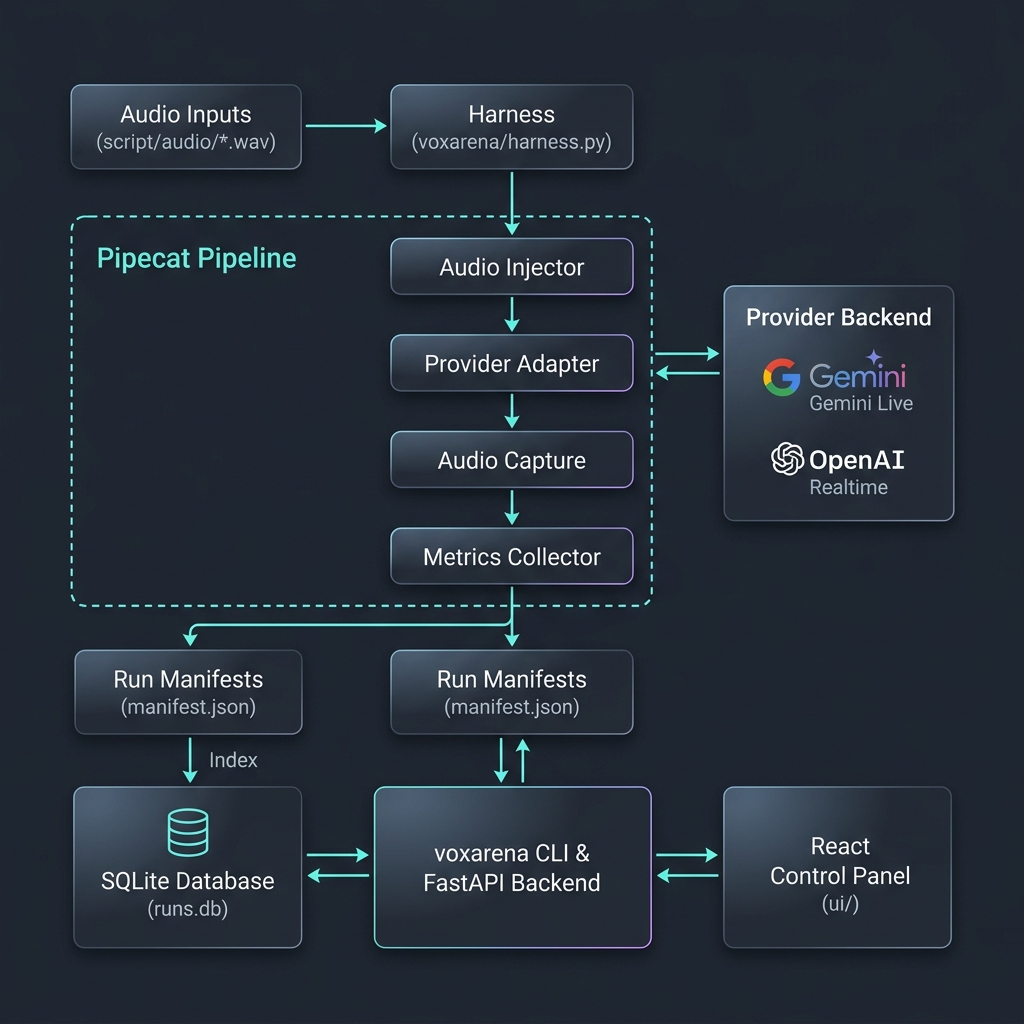
Local Dev (with UI)
git clone https://github.com/simkeyur/vox-arena.git
cd vox-arena
cp .env.example .env  # add GOOGLE_API_KEY / OPENAI_API_KEY

python3 -m venv .venv && source .venv/bin/activate
pip install -e .

uvicorn voxarena.main:app --reload --port 8000
Then in another terminal:
cd ui && npm install && npm run dev
Open the control panel at http://localhost:5173.
Bring Your Own Agent
The demo ships with the "Saffron Leaf" restaurant agent so you can run end-to-end on day one. To evaluate your own:
- Replace the system prompt and tool schemas in
voxarena/agent.py - Implement (or stub) your tools in
voxarena/tools.py - Re-record
script/audio/*.wavand updatescript/utterances.yamlto reflect your real workload - Run the arena as normal — every provider gets scored against your scripts
Scripted Conversations
Conversations live in either JSON or YAML script files (e.g., script/utterances.json or script/utterances.yaml). Each turn pairs an utterance ID with an expect block describing the correct tool call and/or response content:
- id: u04
  text: "Are you open on Sundays?"
  expect:
    tool: get_hours
    args:
      day: sunday
    response_contains:
      - "closed"
The harness plays script/audio/{id}.wav into the pipeline and scores the agent's actual tool calls and transcript against expect.
Configuration
| Variable | Description |
|---|---|
GOOGLE_API_KEY / OPENAI_API_KEY |
Provider credentials |
GEMINI_MODEL / OPENAI_MODEL |
Realtime model under test |
GEMINI_EVAL_MODEL / OPENAI_EVAL_MODEL |
Cheaper text models for grading |
PORT |
FastAPI server port |
BASE_DIR |
Override workdir (CLI: --workdir) |
Contributing
To add a new provider: implement an adapter in voxarena/providers/ following the pattern in gemini.py / openai.py, wire it into voxarena/harness.py and voxarena/config.py, and open a PR.
For bugs and feature requests, please open an issue.
License
MIT.
Project details
Verified details
These details have been verified by PyPIProject links
GitHub Statistics
Maintainers
Release history Release notifications | RSS feed


Download files
Download the file for your platform. If you're not sure which to choose, learn more about installing packages.
Source Distribution
Built Distribution
Filter files by name, interpreter, ABI, and platform.
If you're not sure about the file name format, learn more about wheel file names.
Copy a direct link to the current filters
File details
Details for the file voxarena-0.1.9.tar.gz.
File metadata
- Download URL: voxarena-0.1.9.tar.gz
- Upload date:
- Size: 1.6 MB
- Tags: Source
- Uploaded using Trusted Publishing? Yes
- Uploaded via: twine/6.1.0 CPython/3.13.12
File hashes
| Algorithm | Hash digest | |
|---|---|---|
| SHA256 |
e2f7e53df19f4ade4528c591d4bcb4b8e38ad82992842854a577b215bc02f5f7
|
|
| MD5 |
dacdff6531202a251d516f97a6910592
|
|
| BLAKE2b-256 |
ff3775fca0f32f8f7e70d868c26cb9ed8f7f5bf5fdac43d940c02ac04e2c96d0
|
Provenance
The following attestation bundles were made for voxarena-0.1.9.tar.gz:
Publisher:
publish.yml on simkeyur/vox-arena
-
Statement:
-
Statement type:
https://in-toto.io/Statement/v1 -
Predicate type:
https://docs.pypi.org/attestations/publish/v1 -
Subject name:
voxarena-0.1.9.tar.gz -
Subject digest:
e2f7e53df19f4ade4528c591d4bcb4b8e38ad82992842854a577b215bc02f5f7 - Sigstore transparency entry: 1811510398
- Sigstore integration time:
-
Permalink:
simkeyur/vox-arena@63b3c797e38a108a7850a3c6c431265f10b05e4f -
Branch / Tag:
refs/tags/v0.1.9 - Owner: https://github.com/simkeyur
-
Access:
public
-
Token Issuer:
https://token.actions.githubusercontent.com -
Runner Environment:
github-hosted -
Publication workflow:
publish.yml@63b3c797e38a108a7850a3c6c431265f10b05e4f -
Trigger Event:
push
-
Statement type:
File details
Details for the file voxarena-0.1.9-py3-none-any.whl.
File metadata
- Download URL: voxarena-0.1.9-py3-none-any.whl
- Upload date:
- Size: 1.6 MB
- Tags: Python 3
- Uploaded using Trusted Publishing? Yes
- Uploaded via: twine/6.1.0 CPython/3.13.12
File hashes
| Algorithm | Hash digest | |
|---|---|---|
| SHA256 |
0fbc0264d7e536559e7898a8c223dadfa9e8af378517380094ce00fdebb5ecde
|
|
| MD5 |
c160fe5481fffe8cca8b3b9c53d7451a
|
|
| BLAKE2b-256 |
7273ea492b73b35dd2170c8ecbbd97b7344a08e309fad3f16aa8acc298a70606
|
Provenance
The following attestation bundles were made for voxarena-0.1.9-py3-none-any.whl:
Publisher:
publish.yml on simkeyur/vox-arena
-
Statement:
-
Statement type:
https://in-toto.io/Statement/v1 -
Predicate type:
https://docs.pypi.org/attestations/publish/v1 -
Subject name:
voxarena-0.1.9-py3-none-any.whl -
Subject digest:
0fbc0264d7e536559e7898a8c223dadfa9e8af378517380094ce00fdebb5ecde - Sigstore transparency entry: 1811510552
- Sigstore integration time:
-
Permalink:
simkeyur/vox-arena@63b3c797e38a108a7850a3c6c431265f10b05e4f -
Branch / Tag:
refs/tags/v0.1.9 - Owner: https://github.com/simkeyur
-
Access:
public
-
Token Issuer:
https://token.actions.githubusercontent.com -
Runner Environment:
github-hosted -
Publication workflow:
publish.yml@63b3c797e38a108a7850a3c6c431265f10b05e4f -
Trigger Event:
push
-
Statement type:






