
A researcher-friendly, declarative speech data processing toolkit
Verified details
These details have been verified by PyPIProject links
GitHub Statistics
Maintainers

Project description

VoxKitchen
Turn raw speech recordings into clean, inspectable training datasets.
VoxKitchen handles the repetitive audio prep around ASR, TTS, speaker analysis, and data cleaning: convert, segment, label, filter, and export from one Docker-backed YAML pipeline.





Status: Pre-alpha. APIs and Docker image contents may change between releases.
Use VoxKitchen when you want to:
- turn long recordings into ASR training data;
- prepare and inspect TTS datasets;
- diarize speakers, tag languages, or run speech quality checks;
- clean, filter, and package audio without maintaining one-off scripts.
Why VoxKitchen
Speech data preparation is usually a chain of fragile scripts: convert audio, split speech, denoise, transcribe, diarize, filter, and export. VoxKitchen makes that chain explicit and repeatable:
- Docker-first execution: prebuilt runtimes avoid local dependency conflicts.
- One YAML pipeline: define ingest, stages, filters, and output packs in one file.
- 51 built-in operators: audio prep, VAD, ASR, diarization, TTS, quality metrics, and packing.
- Resumable by design: every stage checkpoints under
./work. - Inspectable outputs: reports, cut statistics, provenance, and per-stage errors.
Quick Start
Requirements:
- Docker
- Python 3.10+ for the lightweight
vkitlauncher
Install the vkit launcher from PyPI:
pipx install voxkitchen      # recommended — isolates the launcher
# or
pip install voxkitchen
This installs only the lightweight launcher and inspection commands (a few MB, no torch / ASR / TTS dependencies). All pipeline runtime dependencies stay inside the prebuilt Docker images.
Run the included demo with the smallest runtime image. No repository clone is required; the published image includes the demo pipeline and demo audio.
vkit docker pull --tag slim
vkit docker run --tag slim examples/pipelines/demo-no-asr.yaml
vkit inspect run ./work/demo-no-asr
vkit docker run writes run artifacts under ./work and exported datasets
under ./output with your host user ID. It also mounts ./data automatically
when that directory exists.
What You Can Build
| Goal | Start with | Runtime image |
|---|---|---|
| Clean and filter raw speech audio | vkit init my-cleaning --template cleaning |
slim |
| Build ASR training manifests | vkit init my-asr --template asr |
asr |
| Analyze speakers and languages | vkit init my-speakers --template speaker |
latest |
| Prepare TTS training data (quality gate) | vkit init my-tts --template tts |
asr |
| Synthesize speech from text (built-in voices, 3-sec voice cloning) | see TTS Synthesis tutorial | tts |
| Voice cloning with Fish-Speech (44.1 kHz) | create a pipeline with tts_fish_speech |
fish-speech |
How It Works
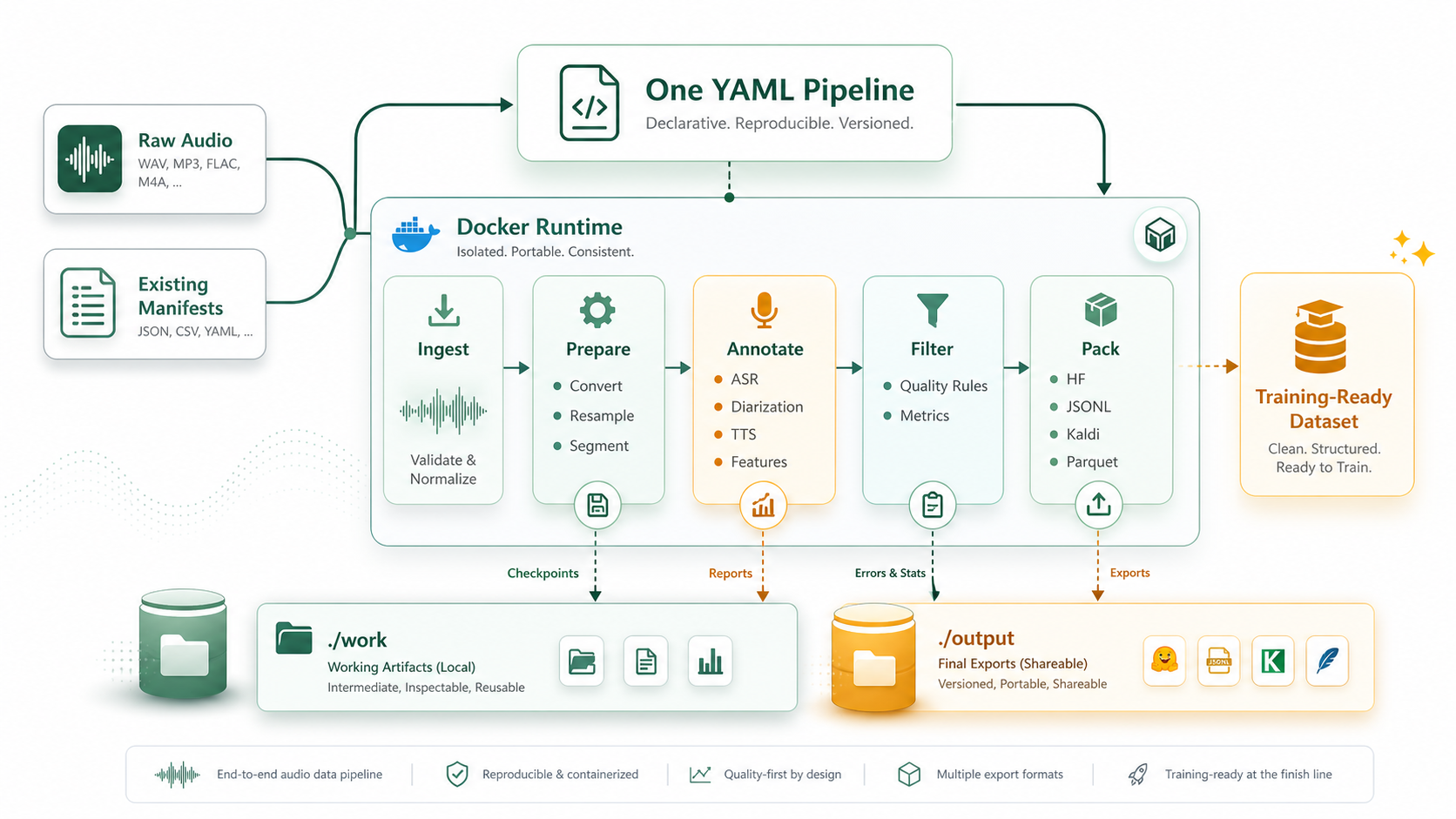
A pipeline is a YAML file. Each stage reads a CutSet, writes a checkpoint,
and passes the result to the next stage.
version: "0.1"
name: my-pipeline
work_dir: ./work/${name}-${run_id}

ingest:
  source: dir
  args:
    root: ./data
    recursive: true

stages:
  - name: resample
    op: resample
    args: { target_sr: 16000, target_channels: 1 }

  - name: vad
    op: silero_vad
    args: { threshold: 0.5 }

  - name: asr
    op: faster_whisper_asr
    args: { model: large-v3, compute_type: float16 }

  - name: filter
    op: quality_score_filter
    args:
      conditions: ["duration > 1", "duration < 30", "metrics.snr > 10"]

  - name: pack
    op: pack_jsonl
Interrupted runs resume from completed checkpoints.
Create A Project
vkit init my-project --template asr
cd my-project

# Put your audio files in ./data first.
vkit validate pipeline.yaml
vkit docker run --tag asr pipeline.yaml --dry-run
vkit docker run --tag asr pipeline.yaml
vkit inspect run work/
List templates:
vkit init --list-templates
Not sure which image a pipeline needs? Run:
vkit validate pipeline.yaml
It prints the recommended vkit docker pull --tag ... and
vkit docker run --tag ... commands for that YAML.
Runtime Images
Every vkit docker command accepts --tag <name>:
| Tag | Use when | GPU | Approx. size |
|---|---|---|---|
slim |
CPU-friendly cleaning, VAD, quality, pack, enhancement | no | ~13 GB |
asr |
Faster-Whisper, FunASR, Qwen3-ASR, forced alignment | yes | ~48 GB |
diarize |
Pyannote speaker diarization | yes | ~32 GB |
tts |
Kokoro, ChatTTS, CosyVoice | yes | ~44 GB |
fish-speech |
Fish-Speech isolated runtime | yes | ~57 GB |
latest |
Mixed pipelines across ASR, diarization, TTS, or Fish-Speech | yes | ~123 GB |
Use latest when one pipeline mixes multiple runtime families, such as ASR
plus diarization or ASR plus TTS. Otherwise, prefer the smallest image that
contains the operators you need.
Useful checks:
vkit docker pull --tag asr
vkit docker doctor --tag asr --expect asr
vkit docker doctor --tag latest
Configuration
Some operators require API tokens. Create ./.env; vkit docker run passes it
into the container automatically.
cp .env.example .env
| Variable | Required by | Notes |
|---|---|---|
HF_TOKEN |
pyannote_diarize |
Accept the pyannote model agreement on HuggingFace first. |
Common Commands
vkit init <path> --template asr           # Scaffold a project
vkit validate pipeline.yaml               # Validate YAML and recommend an image
vkit docker run --tag asr pipeline.yaml --dry-run
vkit docker run --tag asr pipeline.yaml
vkit inspect run work/                    # Stage summary
vkit inspect cuts <cuts.jsonl.gz>          # CutSet statistics
vkit inspect errors work/                  # Per-stage failed cuts
vkit operators search <keyword>            # Find operators by name or summary
vkit operators --category quality          # List one category's operators
vkit schema export --out pipeline.schema.json  # Editor autocompletion for YAML
vkit recipes                               # List dataset recipes
vkit docker download --tag slim librispeech --root ./data/librispeech --subsets dev-clean
vkit docker doctor --tag latest            # Check image health
Documentation
- Getting Started
- Examples & Use Cases
- Pipeline YAML
- Recipes & Download
- CLI reference
- Operators reference
- Docker build guide
- Contributing
Agent Skill
The repo includes an agent-neutral VoxKitchen skill at skill/. Claude,
Codex, and other SKILL.md-compatible agents can copy, symlink, or import that
folder into their own skill search path. The skill follows the Docker-first
vkit workflow in this README.
License
Apache 2.0. See LICENSE.
Project details
Verified details
These details have been verified by PyPIProject links
GitHub Statistics
Maintainers
Release history Release notifications | RSS feed


Download files
Download the file for your platform. If you're not sure which to choose, learn more about installing packages.
Source Distribution
Built Distribution
Filter files by name, interpreter, ABI, and platform.
If you're not sure about the file name format, learn more about wheel file names.
Copy a direct link to the current filters
File details
Details for the file voxkitchen-0.2.1.dev38.tar.gz.
File metadata
- Download URL: voxkitchen-0.2.1.dev38.tar.gz
- Upload date:
- Size: 2.0 MB
- Tags: Source
- Uploaded using Trusted Publishing? Yes
- Uploaded via: twine/6.1.0 CPython/3.13.12
File hashes
| Algorithm | Hash digest | |
|---|---|---|
| SHA256 |
602bbbb835f132c1fc338a9a66d9dcc61f9091e2f0955a4bc23744ca2e660556
|
|
| MD5 |
245102f05a1f49c4f5f56da428a43ba7
|
|
| BLAKE2b-256 |
7ff5c1d119ca8f92d7b065d5d13eea5d056420f8b676092809c53971914ccb95
|
Provenance
The following attestation bundles were made for voxkitchen-0.2.1.dev38.tar.gz:
Publisher:
publish.yml on XqFeng-Josie/VoxKitchen
-
Statement:
-
Statement type:
https://in-toto.io/Statement/v1 -
Predicate type:
https://docs.pypi.org/attestations/publish/v1 -
Subject name:
voxkitchen-0.2.1.dev38.tar.gz -
Subject digest:
602bbbb835f132c1fc338a9a66d9dcc61f9091e2f0955a4bc23744ca2e660556 - Sigstore transparency entry: 1598910956
- Sigstore integration time:
-
Permalink:
XqFeng-Josie/VoxKitchen@63b91c1db6fe550c8e4c300ae0be0479680bdb26 -
Branch / Tag:
refs/heads/main - Owner: https://github.com/XqFeng-Josie
-
Access:
public
-
Token Issuer:
https://token.actions.githubusercontent.com -
Runner Environment:
github-hosted -
Publication workflow:
publish.yml@63b91c1db6fe550c8e4c300ae0be0479680bdb26 -
Trigger Event:
workflow_dispatch
-
Statement type:
File details
Details for the file voxkitchen-0.2.1.dev38-py3-none-any.whl.
File metadata
- Download URL: voxkitchen-0.2.1.dev38-py3-none-any.whl
- Upload date:
- Size: 222.9 kB
- Tags: Python 3
- Uploaded using Trusted Publishing? Yes
- Uploaded via: twine/6.1.0 CPython/3.13.12
File hashes
| Algorithm | Hash digest | |
|---|---|---|
| SHA256 |
cf371bfb5fc9a08424c4e24451d1bad9fee4248e2598c89edaa5d6d095f44f19
|
|
| MD5 |
b3a6cbbfc881020c38917c139c8cae3f
|
|
| BLAKE2b-256 |
ffd8647960af0d5c6894af6709651c1ab0f296585807d7dd6e15033ad2492ddc
|
Provenance
The following attestation bundles were made for voxkitchen-0.2.1.dev38-py3-none-any.whl:
Publisher:
publish.yml on XqFeng-Josie/VoxKitchen
-
Statement:
-
Statement type:
https://in-toto.io/Statement/v1 -
Predicate type:
https://docs.pypi.org/attestations/publish/v1 -
Subject name:
voxkitchen-0.2.1.dev38-py3-none-any.whl -
Subject digest:
cf371bfb5fc9a08424c4e24451d1bad9fee4248e2598c89edaa5d6d095f44f19 - Sigstore transparency entry: 1598911037
- Sigstore integration time:
-
Permalink:
XqFeng-Josie/VoxKitchen@63b91c1db6fe550c8e4c300ae0be0479680bdb26 -
Branch / Tag:
refs/heads/main - Owner: https://github.com/XqFeng-Josie
-
Access:
public
-
Token Issuer:
https://token.actions.githubusercontent.com -
Runner Environment:
github-hosted -
Publication workflow:
publish.yml@63b91c1db6fe550c8e4c300ae0be0479680bdb26 -
Trigger Event:
workflow_dispatch
-
Statement type:






