

VoxWeave
BGM-robust subtitles for anime, film, and clips.
Vocal separation and song-skip so ASR never hallucinates on background music, OP/ED, or insert songs. Local-first Qwen3 ASR, word-level forced alignment, speaker labels, and edit-and-resync — CJK-aware.





https://github.com/user-attachments/assets/e75b6dd3-fa37-4afe-89db-b6ee2c28f6bc
Sliced clip under heavy BGM · voxweave Test.mp4 · Qwen3-ASR-1.7B
VoxWeave derives from the WhisperX "edit-and-resync" workflow: transcribe once, then edit the text and re-align it against the original audio for word-level timestamps. Where it differs is the front end — vocal separation and song-skip keep background music out of the ASR, and a CJK-aware layout/alignment stack (MMS-300m for Japanese, BudouX/jieba for line breaks) handles Chinese/Japanese/English as first-class.
Why VoxWeave
- BGM removal before ASR. A Mel-Band Roformer vocal separator (pure torch, full-band 44.1k) strips music first, so ASR doesn't transcribe lyrics or hallucinate on score.
- Song-skip. PANNs detects singing/music on the separated vocals and skips OP/ED and
insert songs before ASR — on by default,
--no-skip-songsto keep them. - Local Qwen3 ASR + forced alignment. Text and word-level timestamps in one pass, fully on-device — in-process PyTorch on NVIDIA, or the native MLX Qwen3 models on Apple Silicon. A Whisper hybrid engine is also available for when you prefer Whisper text (faster-whisper on NVIDIA, the native MLX Whisper port on Apple Silicon).
- Word-level timestamps. Each word gets its own start and end from CTC forced alignment against the audio (MMS-300m for Japanese, wav2vec2 for English, Qwen3-ForcedAligner for Chinese), not from ASR segment times. Cue edges then snap to shot changes under Netflix timing rules.
- Speaker labels.
--diarizesplits cues at speaker changes and sets short two-person exchanges as Netflix-linepairs.voxweave speakers serveopens a page where you audition each speaker, name them, and split two people that were merged. Enrolled voices go into one library, so names carry over to later episodes. Opt-in; needs a Hugging Face token for the gated pyannote model (see Setup). - Edit-and-resync. Fix the transcript by hand, then
alignre-derives timestamps from the audio — timestamps are never hand-written. - CJK-aware. Japanese aligns with MMS-300m + uroman (zero-OOV, immune to the per-cue drift that breaks wav2vec2-xlsr on rare kanji); line breaks use BudouX phrase atoms + jieba.
- Optional LLM steps.
correctcleans up ASR typos/garbled names before alignment;translatedoes whole-episode context-aware translation while preserving cue count (dual-speaker-line/-linecues are translated one speaker at a time and re-assembled). - Ship the result.
packsoft-muxes finished VTTs into the media as titled subtitle tracks (instant stream copy);burnhardcodes them at constant quality with NVENC / VideoToolbox acceleration, matching the source bit depth.
Pipeline at a glance
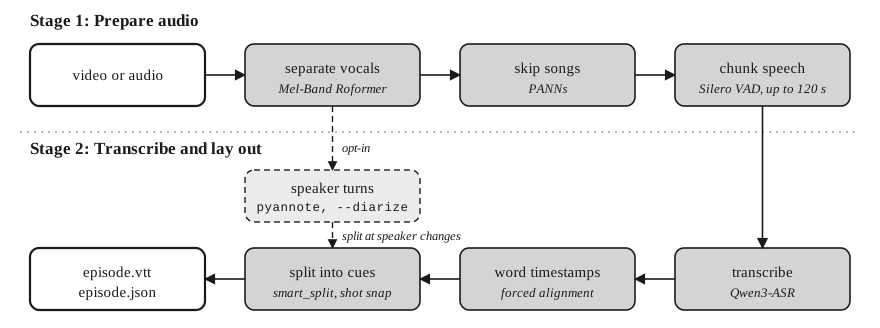
Fig. 1. Processing pipeline. Solid lines carry the audio and text; the dashed box and lines
are the optional --diarize branch. Every stage runs locally; see
How it works.
Install
# NVIDIA / Linux
uv tool install --torch-backend=cu128 \
  --overrides <(printf "onnxruntime; sys_platform == 'darwin'\n") \
  "voxweave[cuda]"
# Apple Silicon / macOS
uv tool install "voxweave[mps]"
From a clone, make install does the same and picks the variant, the torch build and the
overrides for you (make reinstall after pulling new code).
Both variants need ffmpeg on PATH. The default pipeline fits in about 8 GB of VRAM.
--diarize also needs a Hugging Face token for a gated model; see
Speaker models. Everything else about installing
(variants, CUDA notes, overrides, dependencies) is in Setup.
Quickstart
# Transcribe a video to a timestamped VTT (+ a JSON source of truth)
voxweave episode.mkv

# Opt in to speaker diarization (requires gated-model access; see Setup)
voxweave interview.mkv --diarize

# Stay on the older 3.1 pipeline if that is the gate you have accepted
voxweave interview.mkv --diarize --diarize-model 3.1

# ...edit episode.vtt by hand (fix wording, line breaks)...

# Re-align the edited text against the original audio
voxweave align episode.vtt

# Optionally translate the aligned subtitles to Chinese
voxweave translate episode.vtt --target zh
Recipes
A meeting or interview recording, with named speakers in the subtitles. Audio files work
as well as video. When the background is clean, --no-separate skips the vocal separator.
Bound the speaker count if you know it: --max-speakers is the best lever against one person
being split into two (see Transcribe).
voxweave meeting.m4a --no-separate --diarize --max-speakers 4

# Listen to each speaker, type a name, press Save.
voxweave speakers serve meeting.m4a
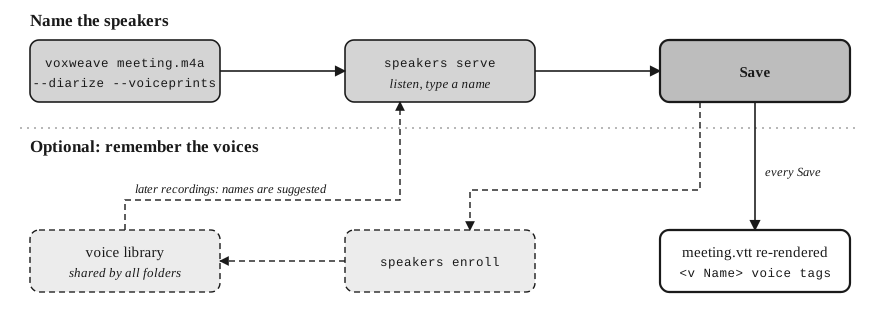
Fig. 2. Naming speakers. Each Save re-renders the VTT; the dashed boxes are the optional voice library, which suggests the names again in later recordings.
Each Save re-renders meeting.vtt with the names as <v Name> voice tags. If two people
share one speaker card, use Split this speaker; it needs --voiceprints on the first run
(see Label speakers).
A recurring group (a weekly meeting, a show with a fixed cast). Name people once, and later recordings suggest the names:
voxweave week1.m4a --no-separate --diarize --voiceprints
voxweave speakers serve week1.m4a      # name and Save
voxweave speakers enroll week1.m4a     # store the names in the voice library

voxweave week2.m4a --no-separate --diarize --voiceprints
voxweave speakers serve week2.m4a      # names are suggested; check them, then Save
Anime or film with music. The default pipeline separates vocals and skips OP/ED and insert songs, so no flags are needed:
voxweave episode.mkv
voxweave episode.mkv --diarize         # add speaker labels
Fix the text, keep the timing. Edit episode.vtt by hand, then re-align:
voxweave align episode.vtt
Ship the result:
voxweave translate episode.vtt --target zh
voxweave pack episode.zh.vtt           # soft track, stream copy
voxweave burn episode.zh.vtt           # hard subtitles
Commands
| Command | What it does |
|---|---|
voxweave <media> |
Transcribe: separate vocals, skip songs, ASR, align, split into cues. Writes <stem>.vtt and <stem>.json. |
voxweave speakers serve <media> |
Open the page where you name the speakers; each Save re-renders the VTT. |
voxweave speakers enroll <media> |
Store the named voices in the shared voice library. |
voxweave align <vtt> |
Re-derive timestamps from the audio after you edit the text. |
voxweave render <media> |
Re-split cues from the saved JSON, without any model. |
voxweave correct <vtt> |
Optional LLM pass that fixes obvious ASR errors before alignment. |
voxweave translate <subtitle> --target zh |
Whole-episode translation; the cue count stays the same. |
voxweave export <subtitle> --to srt |
Convert between VTT, SRT and ASS. |
voxweave pack <subtitle> / voxweave burn <subtitle> |
Add subtitles to the media as tracks, or burn them into the picture. |
Options and details: Commands.
Documentation
| Page | Covers |
|---|---|
| Setup | Install variants, CUDA and Apple Silicon notes, dependencies |
| Commands | Every command with its options |
| Speakers | Diarization models, voiceprints, the speaker page, the voice library |
| How it works | The edit-and-resync workflow and the pipeline stages |
| Configuration | voxweave.conf, environment variables, performance knobs |
| Data contract | Files written next to the media, JSON schema, tests |
| Migration notes | Changes between releases |
Support
If VoxWeave saves you time, you can support development here:
License
MIT — see LICENSE.
Acknowledgments
- WhisperX — the forced-alignment + edit-and-resync
workflow this project builds on; the Japanese MMS full-file alignment path is a faithful
port of its
ctcalign backend. - stable-ts — inspiration for timestamp post-processing and documentation structure.
- Qwen3-ASR / Qwen3-ForcedAligner (Alibaba) — local ASR + aligner.
- MMS-300m (Meta) via ctc-forced-aligner — zero-OOV CJK alignment.
- Mel-Band Roformer (lucidrains) + KimberleyJSN weights — vocal separation.
- BudouX, jieba, PySBD — CJK/sentence line-break.
- PANNs — song/music detection.
- Silero VAD — voice activity detection.
- ReDimNet2 (Palabra.ai) — the default voiceprint embedder; SpeechBrain ECAPA-TDNN with the anime voice-actor weights (litagin) — the Japanese one.
1 maintainer

Metadata
1 maintainer
Release files for voxweave 0.19.0
For a detailed explanation of source distributions (sdists) and built distributions (wheels), please see the package formats documentation.
Source distribution (sdist)
| File | Size | Uploaded | Provenance | Actions |
|---|---|---|---|---|
| voxweave-0.19.0.tar.gz | 869.3 kB | Without provenance | Details for voxweave-0.19.0.tar.gz |
Built distribution (wheel)
| File | Interpreter | ABI | Platform | Actions Reset |
|---|---|---|---|---|
| voxweave-0.19.0-py3-none-any.whl | Python 3 | none | any | Details for voxweave-0.19.0-py3-none-any.whl |
Total release size: 1.8 MB
Release files / voxweave-0.19.0.tar.gz
| Download URL | voxweave-0.19.0.tar.gz |
|---|---|
| Size | 869.3 kB |
| Tags | Source |
|
SHA-256 checksum How to use checksums |
1b9778acfe2c47dcf177acb2a5c1af386d04a8339b4d03a589da0fa983cec70c
|
|
BLAKE2b-256 checksum How to use checksums |
c69b9d76c5b3ac55324ae830a2d3814c4d6d59f60690b67aca591fafa672271a
|
| Upload date | |
|
Uploaded using Trusted Publishing? What is trusted publishing? |
Yes |
| Uploaded via |
uv/0.13.5 {"installer":{"name":"uv","version":"0.13.5","subcommand":["publish"]},"python":null,"implementation":{"name":null,"version":null},"distro":{"name":"Ubuntu","version":"24.04","id":"noble","libc":null},"system":{"name":null,"release":null},"cpu":null,"openssl_version":null,"setuptools_version":null,"rustc_version":null,"ci":true}
|
Release files / voxweave-0.19.0-py3-none-any.whl
| Download URL | voxweave-0.19.0-py3-none-any.whl |
|---|---|
| Size | 947.6 kB |
| Tags | Python 3 |
|
SHA-256 checksum How to use checksums |
450e2627528f049ff3c25c63a95fe5d2c26529e594f2c3b0c6ad0842224deda1
|
|
BLAKE2b-256 checksum How to use checksums |
0a25bf07e06f578c04ebaa3f096ff3297dc2c8eb10c646d7c1f6a8b862853f73
|
| Upload date | |
|
Uploaded using Trusted Publishing? What is trusted publishing? |
Yes |
| Uploaded via |
uv/0.13.5 {"installer":{"name":"uv","version":"0.13.5","subcommand":["publish"]},"python":null,"implementation":{"name":null,"version":null},"distro":{"name":"Ubuntu","version":"24.04","id":"noble","libc":null},"system":{"name":null,"release":null},"cpu":null,"openssl_version":null,"setuptools_version":null,"rustc_version":null,"ci":true}
|
Security for voxweave 0.19.0
Provenance
Provenance describes where a file came from. On PyPI, provenance is shared via attestations, which provide a verifiable record of the build or publishing details. View details, limitations and caveats.
No provenance found
None of the files in this release were uploaded with provenance metadata.
A note on package security
PyPI is a repository for distributing packages, not a service for auditing them. While third-party security researchers and our staff do their best to detect and remove malicious packages, PyPI cannot guarantee the quality, security or suitability of any given package.
To learn more about protecting yourself from malicious actors, visit our package security documentation.














