
 _    ______  ______    _____             __
| |  / / __ \/ ____/   / ___/__  ______  / /_____ __  __
| | / / /_/ / __/      \__ \/ / / / __ \/ __/ __ `/ |/_/  Syntax highlighing
| |/ / ____/ /___     ___/ / /_/ / / / / /_/ /_/ />  <    using Tree-sitter
|___/_/   /_____/____/____/\__, /_/ /_/\__/\__,_/_/|_|
                            /____/
Welcome to the Tree-sitter support for Vim.
- status:
This is version 0.2.1
This is alpha software, but I use it all the time and it has been behaving reliably for me.
Built in support for Python and C code. The documentation added in version 0.2 provided guidelines on how to add other languages. Submissions for additional languages support gratefully received.
News
Version 0.2 significant changes:
Some initial documentation at https://vpe-syntax.readthedocs.io/en/latest/. This is in its very early stages, but does include a tutorial on adding languages.
Any feedback is welcome at https://github.com/paul-ollis/vpe_syntax, either as issues or discussions.
A (hopefully) well defined set of highlight groups (modelled on NeoVim’s set). This should support suitably rich colour schemes.
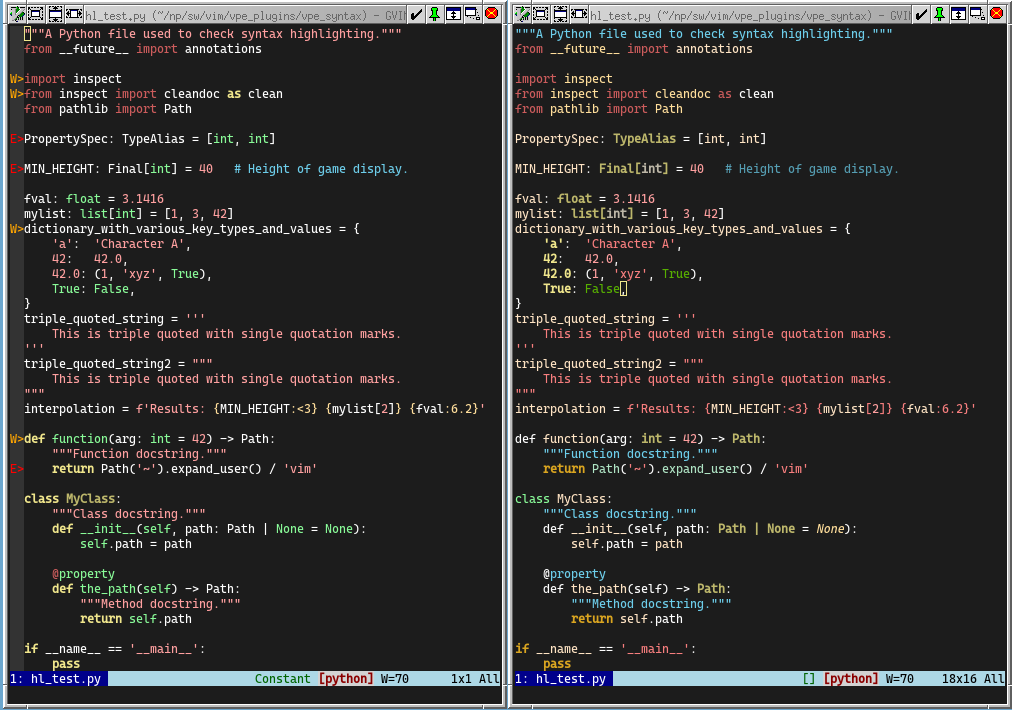
The right hand side Vim session above is using VPE-Syntax with the colour scheme in examples/colour_scheme.vim.
A functional colour scheme editor is available. Start it with the command:
Synsit tweak
https://github.com/user-attachments/assets/52d80562-0ce1-43e4-857e-f7be479cec6c
This version uses version 0.2 of VPE-Sitter, which has New code to work around the way older versions of Vim (before 9.1.1782) buffer changes when using the listener_add function.
Several days of running with this change suggest that it is stable, providing solid syntax highlighting.
Requirements
You will need Vim 9.0 or greater and obviously it will have to have been built with Python 3 support, at least version 3.11.
Limitations
No support for selective spell checking.
Vim’s regular expression based syntax highlighting provides a mechanism to mark only some parts of a buffer (e.g. comments) to be spell checked. VPE_Syntax uses text properties to provide highlighting. Text properties do not currently provide support for this. I hope to supply a pull request to get this added to Vim.
If possible, release 0.3 will contain a work around.
No support for embedded languages. This is planned work.
Installation
I have only used this on Linux and Windows.
Linux
As advised for VPE, it is recommended that you use a virtual environment, hosted within your Vim configuration tree. You may find it useful to read the VPE Linux installation instructions for some background. The following assumes that your Vim configuration directory is $HOME/.vim.
If you do not already have a virtual environment then create one:
# Make sure you are in your $HOME directory
python -m venv .vim/lib/python
Activate the virtual environment and install vpe_syntax.
# Activate the virtual environment.
source .vim/lib/python/bin/activate

# Install VPE.
python -m pip install vpe_syntax
If you did not already have VPE installed then you will need to perform additional one-off installation of support Vim plugin code. Follow the VPE first installations, steps 2 to 4.
Windows
A user install is recommended.
Install using the command.
# Install VPE.
python -m pip install --user vpe_syntax
If you did not already have VPE installed then you will need to perform additional one-off installation of support Vim plugin code. Follow the VPE first installations, steps 2 to 4.
Install Tree-sitter parsers
The above steps should install all the direct dependencies of VPE_Syntax, but you will need to separately install parsers for the languages you wish to highlight. Assuming you want to use both supported languages then before you exit the virtual environment do:
python3 -m pip install tree-sitter-python==0.23.6 tree-sitter-c==0.21.4
The Tree-sitter API seems to be somewhat fast moving, so I recommend using the exact versions given above.
You can then deactivate the virtual environment.
deactivate
Using Vpe_Syntax
One everything is correctly installed, you should find that your Vim has gained a Synsit command. The important form of this is:
Synsit on
Which will enable Tree-sitter based highlighting in the current buffer, provided it contains C or Python code. If everything is working you will likely see some differences in the way your code is coloured, but by an large things will be quite similar.
1 maintainer

Metadata
1 maintainer
Release files for vpe-syntax 0.2.1
For a detailed explanation of source distributions (sdists) and built distributions (wheels), please see the package formats documentation.
Source distribution (sdist)
| File | Size | Uploaded | Provenance | |
|---|---|---|---|---|
| vpe_syntax-0.2.1.tar.gz | 45.8 kB | Without provenance | Details |
Built distribution (wheel)
| File | Interpreter | ABI | Platform | Reset |
|---|---|---|---|---|
| vpe_syntax-0.2.1-py3-none-any.whl | Python 3 | none | any | Details |
Total release size: 91.1 kB
Release files / vpe_syntax-0.2.1.tar.gz
| Download URL | vpe_syntax-0.2.1.tar.gz |
|---|---|
| Size | 45.8 kB |
| Tags | Source |
|
SHA-256 checksum How to use checksums |
043d32030bfa03d50a2135ec9031fff936dff50a2cba5264c2056f79ed48a745
|
|
BLAKE2b-256 checksum How to use checksums |
51f74820fc106938f98ac94f0d70f9c7c89d1fa0900aac9252ffe5d44b8d0668
|
| Upload date | |
|
Uploaded using Trusted Publishing? What is trusted publishing? |
No |
| Uploaded via |
twine/6.1.0 CPython/3.11.3
|
Release files / vpe_syntax-0.2.1-py3-none-any.whl
| Download URL | vpe_syntax-0.2.1-py3-none-any.whl |
|---|---|
| Size | 45.3 kB |
| Tags | Python 3 |
|
SHA-256 checksum How to use checksums |
c18ea8dcf94334984c8839a32cd9c42a56acd2536345d56420fa36a94b19bb62
|
|
BLAKE2b-256 checksum How to use checksums |
e353f71b491a366778cc46bfae45276509d708e2241ec664ced897790dfc245f
|
| Upload date | |
|
Uploaded using Trusted Publishing? What is trusted publishing? |
No |
| Uploaded via |
twine/6.1.0 CPython/3.11.3
|
Security for vpe-syntax 0.2.1
Provenance
Provenance describes where a file came from. On PyPI, provenance is shared via attestations, which provide a verifiable record of the build or publishing details. View details, limitations and caveats.
No provenance found
None of the files in this release were uploaded with provenance metadata.
A note on package security
PyPI is a repository for distributing packages, not a service for auditing them. While third-party security researchers and our staff do their best to detect and remove malicious packages, PyPI cannot guarantee the quality, security or suitability of any given package.
To learn more about protecting yourself from malicious actors, visit our package security documentation.














