
A terminal UI for managing OpenVPN connections with 2FA support

Project description
vpnx
| Status | |
|---|---|
| CI checks |  |
| Latest version |  |
| Release date |  |
| Python |  |
| License |  |
| Open issues |  |
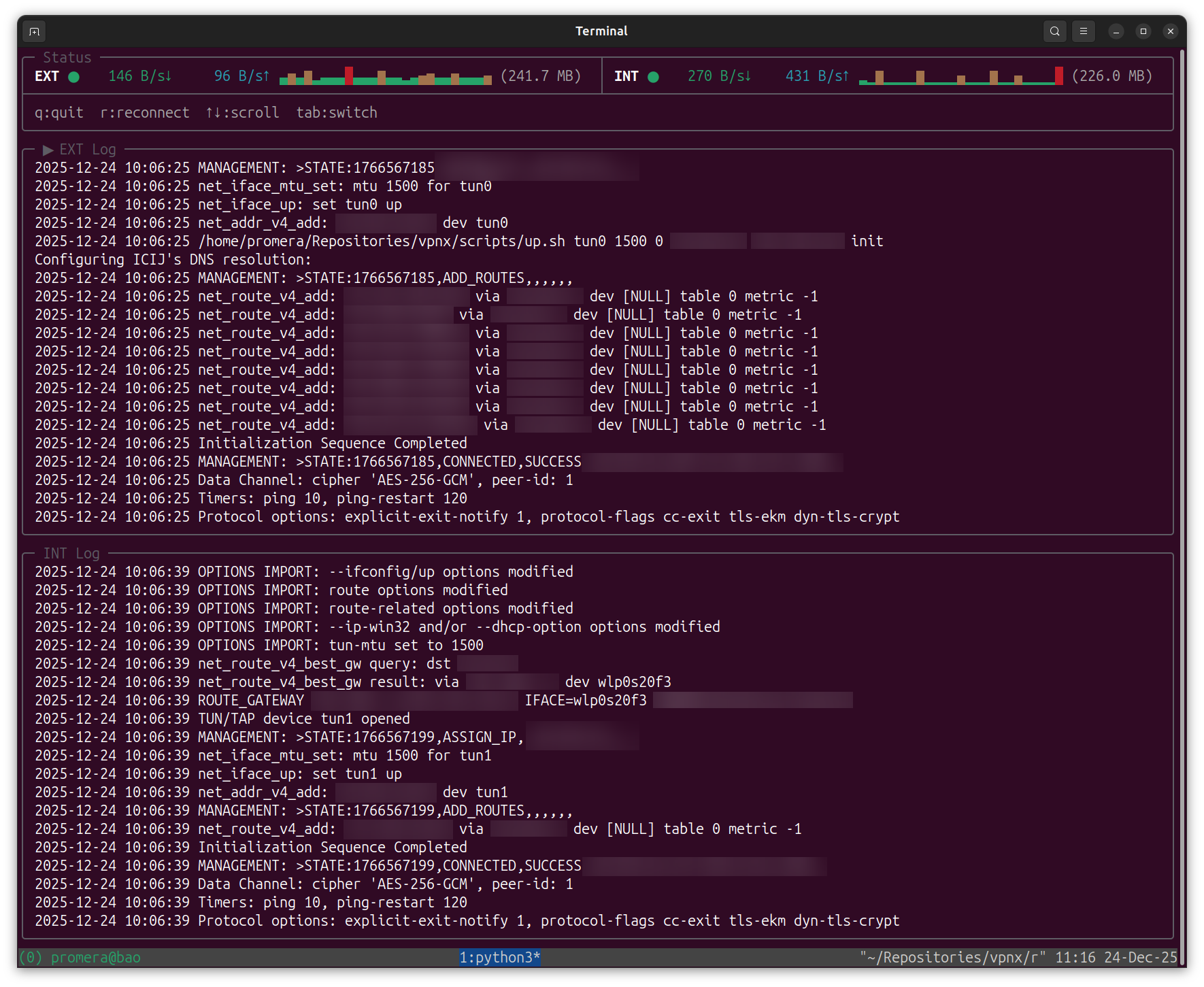
A terminal UI for managing OpenVPN connections with 2FA support.
Features
- Interactive setup wizard for configuring multiple VPNs
- Full-screen TUI with real-time connection status and bandwidth monitoring
- Secure credential storage using GPG encryption
- Support for up scripts (DNS/routing configuration)
- XDG Base Directory compliant configuration
Requirements
- Python 3.8+
- openvpn
- gpg (for encrypted password storage)
# macOS
brew install openvpn gnupg

# Debian/Ubuntu
sudo apt install openvpn gnupg

# Fedora
sudo dnf install openvpn gnupg2

# Arch
sudo pacman -S openvpn gnupg
Installation
Using pipx (recommended):
pipx install vpnx
Or with pip:
pip install vpnx
Setup
vpnx setup
The setup wizard will guide you through:
- Adding VPN configurations (name, path to .ovpn file, up/down scripts)
- Setting your username (optional - will prompt at connection if not set)
- Configuring the password store (GPG key for secure credential storage)
Usage
# Connect to all configured VPNs
vpnx all

# Connect to a specific VPN
vpnx connect <vpn-name>

# List configured VPNs
vpnx list
Configuration
Configuration is stored in XDG-compliant directories:
~/.config/vpnx/
├── config.yaml        # Main configuration
└── up.sh              # Optional default up script

~/.local/share/vpnx/
├── credentials.gpg    # GPG-encrypted password
└── credentials.gpg-id # GPG key ID

~/.cache/vpnx/
└── logs/              # Connection logs
config.yaml format
username: your-username                            # optional, will prompt if not set
credentials_path: ~/.local/share/vpnx/credentials  # path to GPG-encrypted password
up_script: /path/to/up.sh                          # optional, global up script
down_script: /path/to/down.sh                      # optional, global down script

vpns:
  - name: PROD
    display: Production VPN
    config_path: /path/to/prod.ovpn
    needs_up_script: true
    up_script: /path/to/prod-up.sh      # optional, per-VPN override
    needs_down_script: true
    down_script: /path/to/prod-down.sh  # optional, per-VPN override
    needs_2fa: true                     # default: true
  - name: DEV
    display: Development VPN
    config_path: /path/to/dev.ovpn
    needs_up_script: false
    needs_down_script: false
    needs_2fa: false
Build from source
git clone https://github.com/pirhoo/vpnx.git
cd vpnx
pip install -e ".[dev]"
Then use make targets to run the project and development tasks:
make setup          # Configure VPN client
make all            # Connect to all configured VPNs
make connect VPN=x  # Connect to a specific VPN
make list           # List configured VPNs

make test           # Run tests
make lint           # Check code style
make format         # Auto-format code
make clean          # Remove cache files
Project Structure
├── vpnx/
│   ├── domain/          # Business logic (entities, services)
│   ├── application/     # Use cases (commands, handlers)
│   ├── infrastructure/  # External integrations (OpenVPN, GPG)
│   └── presentation/    # UI components (TUI, CLI)
└── tests/               # Unit tests


Download files
Download the file for your platform. If you're not sure which to choose, learn more about installing packages.
Source Distribution
Built Distribution
Filter files by name, interpreter, ABI, and platform.
If you're not sure about the file name format, learn more about wheel file names.
Copy a direct link to the current filters
File details
Details for the file vpnx-0.2.0.tar.gz.
File metadata
- Download URL: vpnx-0.2.0.tar.gz
- Upload date:
- Size: 45.4 kB
- Tags: Source
- Uploaded using Trusted Publishing? Yes
- Uploaded via: twine/6.1.0 CPython/3.13.12
File hashes
| Algorithm | Hash digest | |
|---|---|---|
| SHA256 |
c9795e383e6d0f8dd7e679d683655d2d7eaeb450ad913e03936692ad3a5285cc
|
|
| MD5 |
519285f4cb6500bad18d35a1b89bea44
|
|
| BLAKE2b-256 |
8ed2b88d02a3d5ffc4dd4473f6031c6a9d84145c38b494387eb4a44dfae429cd
|
Provenance
The following attestation bundles were made for vpnx-0.2.0.tar.gz:
Publisher:
ci.yml on pirhoo/vpnx
-
Statement:
-
Statement type:
https://in-toto.io/Statement/v1 -
Predicate type:
https://docs.pypi.org/attestations/publish/v1 -
Subject name:
vpnx-0.2.0.tar.gz -
Subject digest:
c9795e383e6d0f8dd7e679d683655d2d7eaeb450ad913e03936692ad3a5285cc - Sigstore transparency entry: 1306941767
- Sigstore integration time:
-
Permalink:
pirhoo/vpnx@3ab8133297c0f9bfa853c5a0c4574d5813073ecb -
Branch / Tag:
refs/tags/v0.2.0 - Owner: https://github.com/pirhoo
-
Access:
public
-
Token Issuer:
https://token.actions.githubusercontent.com -
Runner Environment:
github-hosted -
Publication workflow:
ci.yml@3ab8133297c0f9bfa853c5a0c4574d5813073ecb -
Trigger Event:
release
-
Statement type:
File details
Details for the file vpnx-0.2.0-py3-none-any.whl.
File metadata
- Download URL: vpnx-0.2.0-py3-none-any.whl
- Upload date:
- Size: 40.2 kB
- Tags: Python 3
- Uploaded using Trusted Publishing? Yes
- Uploaded via: twine/6.1.0 CPython/3.13.12
File hashes
| Algorithm | Hash digest | |
|---|---|---|
| SHA256 |
cddb058f0b54cb46524ac34c1452ee0fc52f43e29a7ae6283355fbc9806fbb1a
|
|
| MD5 |
727e2a15106b58bbdf0752b918fba0e7
|
|
| BLAKE2b-256 |
df53105535ead24df793aa01f1121109990bf506d8a53a89fac3fadaa8622f0f
|
Provenance
The following attestation bundles were made for vpnx-0.2.0-py3-none-any.whl:
Publisher:
ci.yml on pirhoo/vpnx
-
Statement:
-
Statement type:
https://in-toto.io/Statement/v1 -
Predicate type:
https://docs.pypi.org/attestations/publish/v1 -
Subject name:
vpnx-0.2.0-py3-none-any.whl -
Subject digest:
cddb058f0b54cb46524ac34c1452ee0fc52f43e29a7ae6283355fbc9806fbb1a - Sigstore transparency entry: 1306941901
- Sigstore integration time:
-
Permalink:
pirhoo/vpnx@3ab8133297c0f9bfa853c5a0c4574d5813073ecb -
Branch / Tag:
refs/tags/v0.2.0 - Owner: https://github.com/pirhoo
-
Access:
public
-
Token Issuer:
https://token.actions.githubusercontent.com -
Runner Environment:
github-hosted -
Publication workflow:
ci.yml@3ab8133297c0f9bfa853c5a0c4574d5813073ecb -
Trigger Event:
release
-
Statement type:






