
Visualize and interactively select time-series data from a pandas DataFrame.

Project description
vpselector
The Visual Pandas Selector is a tool to visually select portions of numeric time-series data from a pandas dataframe. The tool is intended to provide an fast interactive way for manual data selection, as can be very useful in for example machine learning, regression or system identification.
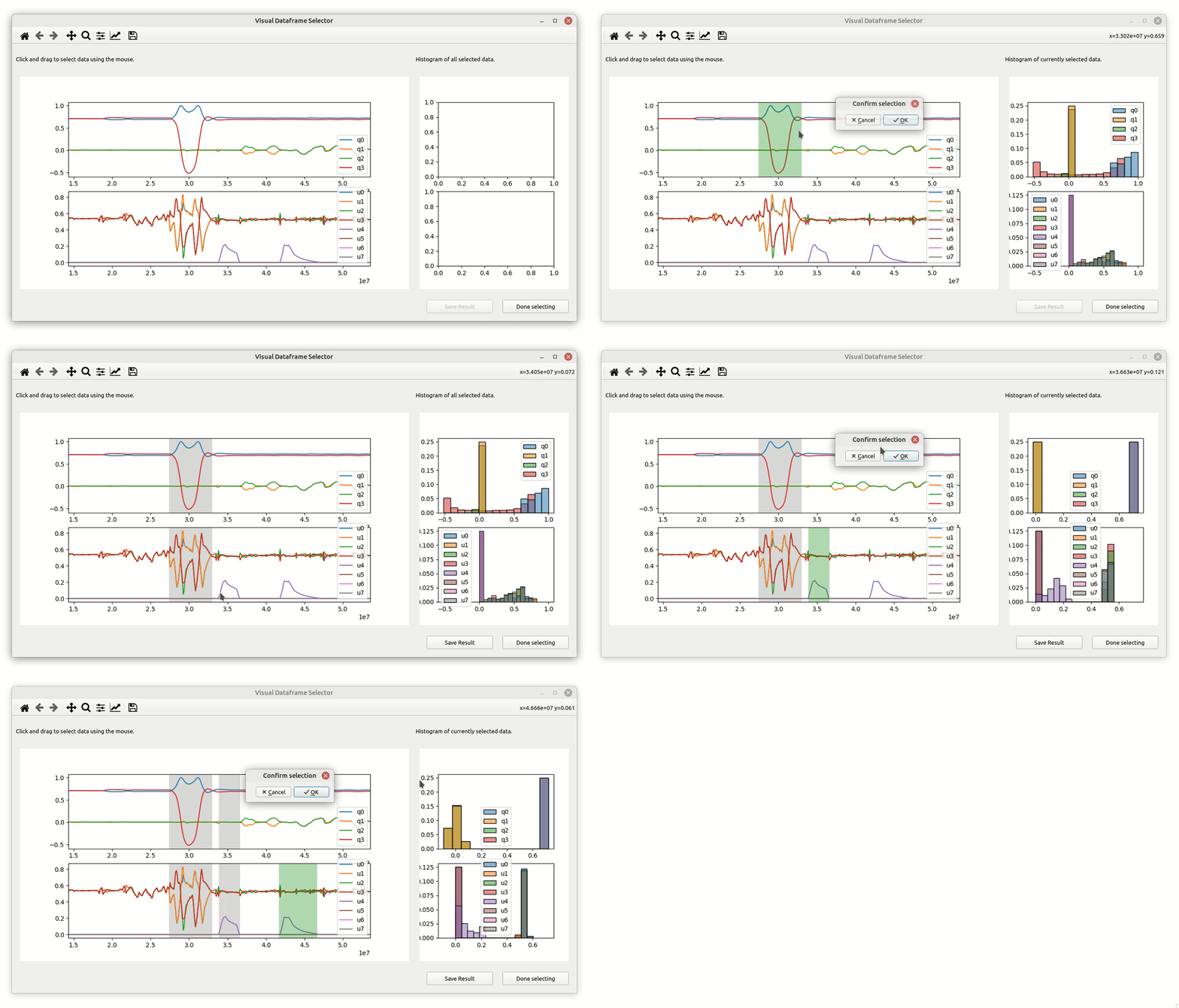
Easily configure the tool to plot dataframe columns in vertically stacked subplots and view data distributions with the included histogram feature. With a simple click and drag, you can then select horizontal data windows, and let the tool automatically combine them into a new dataframe.
The user can subsequentially select different horizontal data windows via click and drag and he tool then automatically combines the visually selected sections into a new dataframe.
Install
Install the package using:
pip install vpselector
Use in your project
Then simply import it using import vpselector. Then simply use:
-
If your project does not contain a pyqt application:
vpselector.select_visual_data(data : pd.DataFrame, plot_config : dict) -
To add the vpselector to an existing pyqt application:
vpselector.select_visual_data_in_pyqt_app(data : pd.DataFrame, plot_config : dict, pyqt_app)
Run the Example
python3 vpselector_example.py
Use the Tool
- Left click with your mouse and drag to define the desired horizontal window of the data to be selected.
- The current selection distribution is now visualized in the histogram plot on the right.
- Confirm or cancel data selection.
- The already selected data is now marked by a grey span in the plot on the left.
- The plot on the right contains now the histogram of all selected data.
- repeat as many times as needed.
- Once you could select all desired horizontal data windows click "Done selecting"


Download files
Download the file for your platform. If you're not sure which to choose, learn more about installing packages.
Source Distribution
Built Distribution
Filter files by name, interpreter, ABI, and platform.
If you're not sure about the file name format, learn more about wheel file names.
Copy a direct link to the current filters
File details
Details for the file vpselector-1.0.0.tar.gz.
File metadata
- Download URL: vpselector-1.0.0.tar.gz
- Upload date:
- Size: 820.8 kB
- Tags: Source
- Uploaded using Trusted Publishing? No
- Uploaded via: twine/4.0.2 CPython/3.10.12
File hashes
| Algorithm | Hash digest | |
|---|---|---|
| SHA256 |
0e8135cccf867ef971c07d45f1be0068df76615b3d4eba116a53aa91c2e6a43b
|
|
| MD5 |
d02b6890814fa2463f61270b219b1b8e
|
|
| BLAKE2b-256 |
54f6e072bcba554b5374ebd382b297ddd6dcca00130af7d19bf314e27743660b
|
File details
Details for the file vpselector-1.0.0-py3-none-any.whl.
File metadata
- Download URL: vpselector-1.0.0-py3-none-any.whl
- Upload date:
- Size: 12.6 kB
- Tags: Python 3
- Uploaded using Trusted Publishing? No
- Uploaded via: twine/4.0.2 CPython/3.10.12
File hashes
| Algorithm | Hash digest | |
|---|---|---|
| SHA256 |
66a8f2879dd14104019fde853126910c9fc726c9795439c4e822eec33030c409
|
|
| MD5 |
8d71ca37f5ce417921b4d29c5cf65ad0
|
|
| BLAKE2b-256 |
bdc9c434f715a21eb4a3b687df38dee333a9559f1ab6c817bda5a5076897beee
|






