
Native GPU memory diagnostics for local AI.
Know whether your workflow fits in VRAM before it crashes with out-of-memory.





VRAM Suite talks to NVIDIA libraries directly (NVML, CUDA driver and runtime, cuBLAS, cuBLASLt) and shows what is really happening with GPU memory: what the card is, who holds VRAM, how big a model is, and how fast weights move over PCIe.
Install
pip install vramsuite
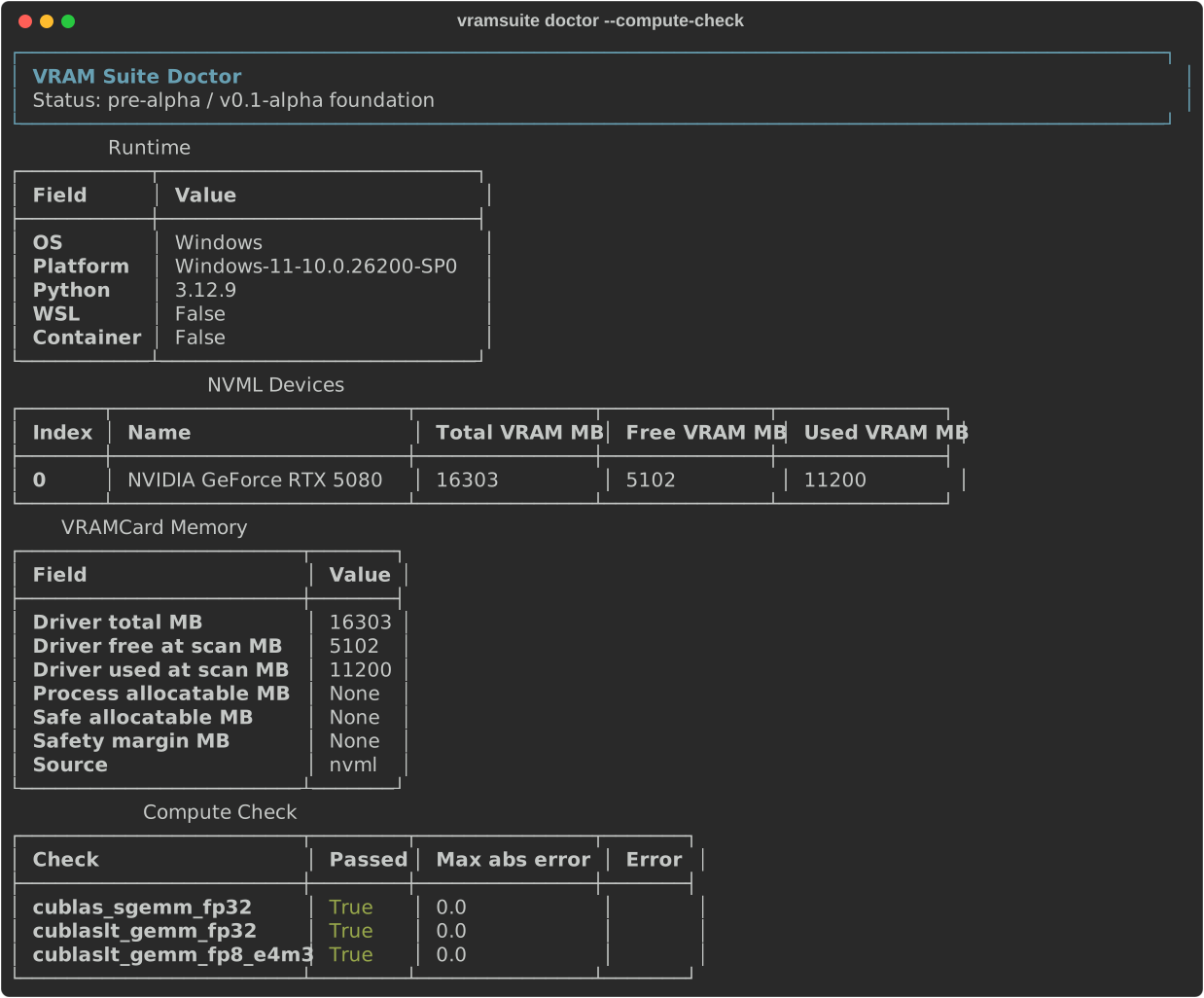
vramsuite doctor
Only the NVIDIA driver is needed: no PyTorch, no CUDA Toolkit. The cuBLAS / cuBLASLt compute checks (doctor --compute-check) need cuBLAS, from the CUDA Toolkit or from NVIDIA's wheels:
pip install "vramsuite[compute]"
No Python? Download vramsuite.exe (Windows) from Releases and run vramsuite.exe doctor in a terminal, or double-click it.
From source:
git clone https://github.com/k1n0F/vramsuite
cd vramsuite
uv sync
uv run vramsuite doctor
Commands
| Command | What it does | Docs |
|---|---|---|
vramsuite doctor |
GPU profile, driver memory, .vramcard file |
Device profile |
vramsuite doctor --compute-check |
cuBLAS / cuBLASLt FP32 and FP8 GEMM correctness | Compute check |
vramsuite doctor --probe --estimate-mb N |
Safe allocatable budget and OOM risk | Probe and risk |
vramsuite inspect <model> |
Exact weight sizes per dtype from .safetensors headers |
Model inspection |
vramsuite processes [--watch S] |
VRAM per process, with peaks | Process tracking |
vramsuite transfer |
Real RAM <-> VRAM bandwidth over PCIe | Transfer benchmark |
vramsuite estimate <models> |
Will models fit in VRAM, and what offloading the rest costs per step | Memory estimate |
vramsuite estimate --workflow <file.json> |
The same for a ComfyUI workflow, with suggestions: FP8 encoder, size that fits, offload and reload cost | Memory estimate |
vramsuite profile |
Records peak VRAM and run time of the next ComfyUI prompts; estimate uses them |
Workflow profiles |
vramsuite analyze-workflow <file or folder> |
Models, resolution / frames / steps, config hash and risky patterns of ComfyUI workflows | Workflow analysis |
vramsuite compare a b |
Diff of two .vramcard profiles |
.vramcard format |
vramsuite validate card.json |
Structure and sanity check of a .vramcard (exit code 1 if invalid) |
.vramcard format |
vramsuite bundle |
Anonymized zip of the card, its validation and workflow profiles, to share | Bundle |
Every command supports --json. Full documentation: docs/.
Why native
- No PyTorch, no Triton. A diagnostic tool should not load gigabytes of framework and its own CUDA libraries just to read how much memory is free. PyTorch is only detected from package metadata.
- No DLL conflicts. Importing torch makes Windows bind cuBLAS to torch's copy of cuBLASLt by name. VRAM Suite never imports it, so its numbers are not affected by a second CUDA stack.
- Observes from outside. ComfyUI, games and browsers are measured through OS and driver counters; nothing has to run inside them.
- Explicit and bounded. Nothing heavy runs by default, every allocation is released, and a value that cannot be read is reported with a reason instead of disappearing.
More: Native backends.
See it work
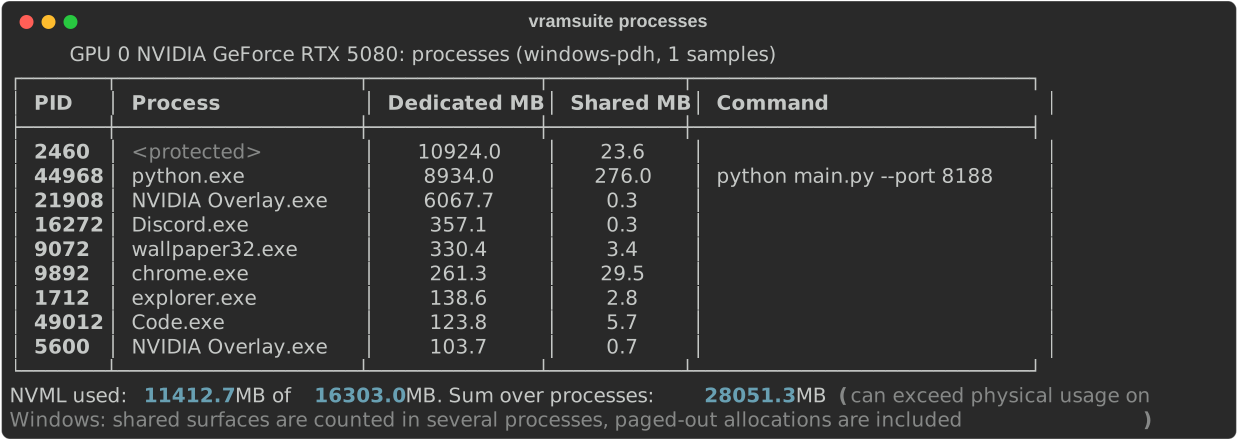
Who holds VRAM right now — vramsuite processes
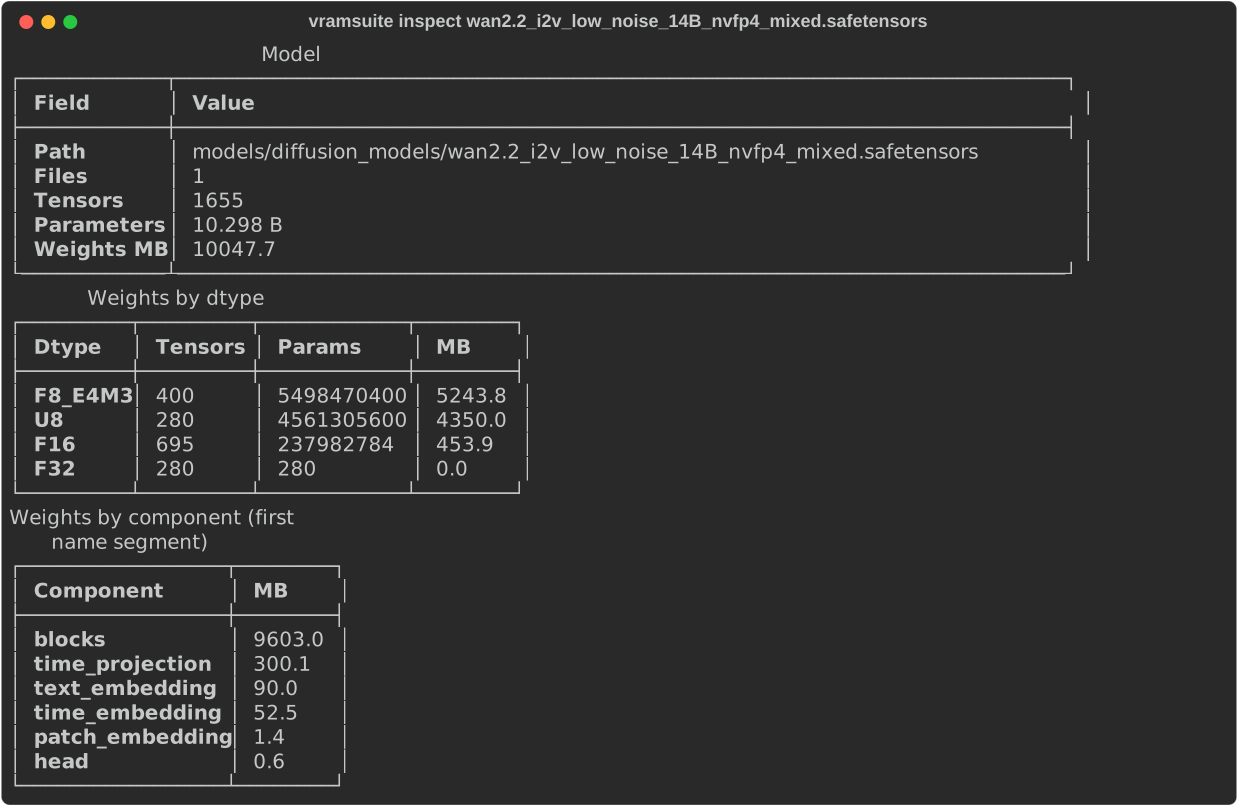
How big a model really is — vramsuite inspect on a WAN 2.2 14B NVFP4 checkpoint: FP8 and packed FP4 weights, read from the header in milliseconds
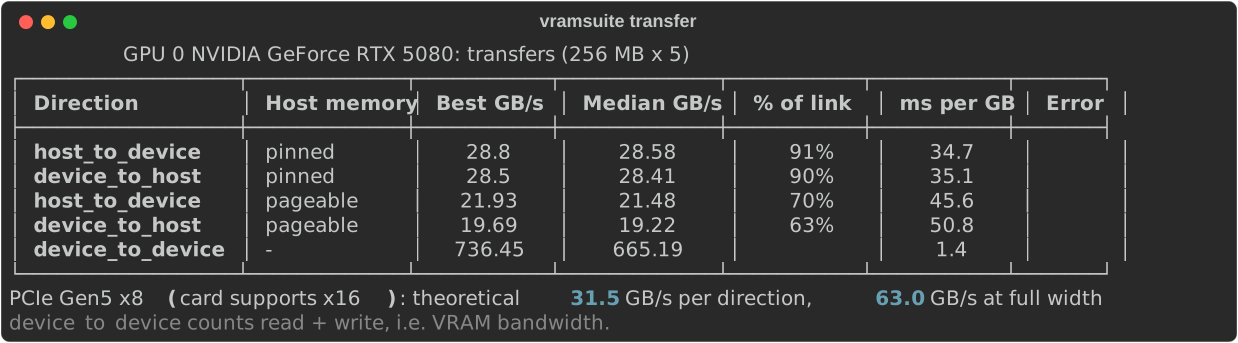
What offloading costs — vramsuite transfer
Real numbers
Measured on an RTX 5080 in a slot that runs at PCIe Gen5 x8:
| Bandwidth | Time per GB | |
|---|---|---|
| VRAM (device to device) | ~800 GB/s | 1.2 ms |
| PCIe, pinned memory | 28.5 GB/s | 35 ms |
| PCIe, pageable memory | ~19 GB/s | ~52 ms |
VRAM is about 30 times faster than the link to system RAM. That gap is why a model that does not fit in VRAM slows down so much when its weights are offloaded, and why VRAM Suite measures both.
Architecture
flowchart LR
    CLI["CLI<br/>vramsuite ..."] --> CORE
    API["Python API<br/>import vramsuite"] --> CORE

    subgraph CORE["core"]
        direction TB
        doctor["doctor / vramcard"]
        inspect["model_inspect"]
        processes["processes"]
        transfer["transfer"]
        estimate["estimate"]
        workflow["workflow (ComfyUI)"]
        probe["probe / risk"]
    end

    subgraph BACKENDS["backends (ctypes)"]
        direction TB
        nvml["nvml"]
        driver["cuda driver"]
        cuda["cuda runtime"]
        blas["cublas / cublaslt"]
        win["windows_gpu"]
    end

    CORE --> BACKENDS
    nvml --> NV["nvml.dll / libnvidia-ml.so"]
    driver --> DRV["nvcuda.dll / libcuda.so"]
    cuda --> RT["cudart"]
    blas --> BL["cuBLAS / cuBLASLt"]
    win --> OS["pdh / gdi32 / ntdll"]
vramsuite/
  __init__.py          Public Python API
  cli/main.py          CLI entrypoint
  core/
    doctor.py          Structured diagnostics API (+ native compute checks)
    fingerprint.py     Runtime, NVML, CUDA runtime, cuBLAS, torch-metadata fingerprint
    vramcard.py        .vramcard creation, GPU matching (NVML <-> CUDA by PCI)
    probe.py           Bounded allocation probe (cuMemAlloc)
    risk.py            Basic OOM risk estimation
    model_inspect.py   .safetensors header reader (exact weight sizes)
    processes.py       Per-process VRAM usage and peaks
    transfer.py        Host <-> device bandwidth benchmark
    estimate.py        Workflow memory estimate and offloading cost
    workflow.py        ComfyUI workflow JSON -> models, settings, hashes, warnings -> estimate
    profile.py         Passive ComfyUI run capture: peak VRAM + run time per config hash
    advise.py          Suggestions with numbers for a workflow estimate
    comfy.py           Workflow file -> analysis + profile + estimate + suggestions
    bundle.py          Anonymized zip of card, validation and profiles
    compare.py         .vramcard comparison
    reports.py         Rich terminal report rendering
    runtime.py         OS/Python/WSL/container detection
  backends/
    native_loader.py   DLL/.so discovery (CUDA Toolkit first, venv fallback)
    nvml.py            NVML: memory, device details, PCIe, clocks, power, processes
    cuda.py            CUDA runtime: memory, device attributes, malloc/memcpy, pinned memory
    cuda_driver.py     CUDA driver API: probe and transfers with only the NVIDIA driver installed
    cublas.py          cuBLAS handle and SGEMM
    cublaslt/          cuBLASLt descriptors, heuristics, matmul
    windows_gpu.py     Windows PDH GPU counters, LUID -> PCI, process info
  compute/
    compute_math.py    cuBLAS SGEMM sanity check
    cublaslt_math.py   cuBLASLt FP32 / FP8 GEMM checks
    minifloat.py       Pure-Python FP8 / FP4 encode/decode
Python API
import vramsuite

result = vramsuite.run_doctor(with_compute_check=True)
print(result["gpu"])
print(result["memory"])

card = vramsuite.create_vramcard()
vramsuite.save_vramcard("system.vramcard.json", card=card)
from vramsuite.core.model_inspect import inspect_model
from vramsuite.core.processes import watch_gpu_processes
from vramsuite.core.transfer import run_transfer_benchmark

print(inspect_model("model.safetensors")["total_mb"])
print(watch_gpu_processes(seconds=30)["processes"][:3])
print(run_transfer_benchmark()["results"])
Roadmap
- Native CUDA runtime, cuBLAS and cuBLASLt backends (no PyTorch)
- CUDA driver API backend: probe and transfers without the CUDA Toolkit
- Device profile in
.vramcard, NVML <-> CUDA matching by PCI address - Compute check layer (cuBLAS / cuBLASLt FP32, FP8)
- Model file inspection from
.safetensorsheaders - Per-process VRAM tracking (Windows PDH / Linux NVML)
- Host <-> device transfer benchmark
- Workflow memory estimation: weights + activations + offloading cost vs the device profile
- ComfyUI workflow analysis
- Profile validation and schema checks
- Offline workflow analysis: settings, graph / config hashes, risky patterns (v0.2)
- Workflow profiles: real peak VRAM and run time from ComfyUI, used by estimate (v0.3)
- Suggestions with numbers: FP8 variants on disk, largest size that fits, offload and reload cost (v0.4)
- PyPI package with a
[compute]extra, Windows exe on GitHub Releases, anonymized bundle (v0.5)
Out of scope (separate kernel project): custom attention kernels, FP4 block-scaled GEMM, kernel autotuning.
Tested on
| GPU | NVIDIA GeForce RTX 5080 (Blackwell, sm_120, 16 GB) |
| Driver | 617.14, CUDA driver 13.4 |
| CUDA Toolkit | 13.0 (only needed for doctor --compute-check) |
| OS | Windows 11 (WDDM), WSL2 |
| Python | 3.12 via uv |
Other NVIDIA GPUs should work; FP8 compute checks need Ada (sm_89) or newer.
Status
Alpha (v0.5). The CLI, .vramcard format and Python API can still change between versions.
License
MIT © k1n0F
1 maintainer

Metadata
1 maintainer
Release files for vramsuite 0.5.0
For a detailed explanation of source distributions (sdists) and built distributions (wheels), please see the package formats documentation.
Source distribution (sdist)
| File | Size | Uploaded | Provenance | Actions |
|---|---|---|---|---|
| vramsuite-0.5.0.tar.gz | 102.2 kB | With provenance | Details for vramsuite-0.5.0.tar.gz |
Built distribution (wheel)
| File | Interpreter | ABI | Platform | Actions Reset |
|---|---|---|---|---|
| vramsuite-0.5.0-py3-none-any.whl | Python 3 | none | any | Details for vramsuite-0.5.0-py3-none-any.whl |
Total release size: 191.4 kB
Release files / vramsuite-0.5.0.tar.gz
| Download URL | vramsuite-0.5.0.tar.gz |
|---|---|
| Size | 102.2 kB |
| Tags | Source |
|
SHA-256 checksum How to use checksums |
5a96053d8e9ef32e7cd08ced5f402a87480778c474de4649f927ff2668454343
|
|
BLAKE2b-256 checksum How to use checksums |
14835b74f85acc0c1f2194a5954ff6dba2969503871f2d1a2373812f11b4ff56
|
| Upload date | |
|
Uploaded using Trusted Publishing? What is trusted publishing? |
Yes |
| Uploaded via |
twine/7.0.0 CPython/3.13.16
|
Provenance
Provenance describes where a file came from. On PyPI, provenance is shared via attestations, which provide a verifiable record of the build or publishing details. View details, limitations and caveats.


PyPI Publish Attestation
PyPI verified that this artifact, at this checksum, originated from the publisher listed below.
Signed by GitHub Actions, verified by PyPI on Nov 2, 2026.
Transparency logRelease files / vramsuite-0.5.0-py3-none-any.whl
| Download URL | vramsuite-0.5.0-py3-none-any.whl |
|---|---|
| Size | 89.2 kB |
| Tags | Python 3 |
|
SHA-256 checksum How to use checksums |
9389bd240c803397b6d3e2f351ae141a92d8c1956a35a9cf49a7efa998ad4c92
|
|
BLAKE2b-256 checksum How to use checksums |
74360dafa7e59db1abaffcbcd27508a9c8dcd9a10c2b1a9ac804e5cdbb31b8ae
|
| Upload date | |
|
Uploaded using Trusted Publishing? What is trusted publishing? |
Yes |
| Uploaded via |
twine/7.0.0 CPython/3.13.16
|
Provenance
Provenance describes where a file came from. On PyPI, provenance is shared via attestations, which provide a verifiable record of the build or publishing details. View details, limitations and caveats.
PyPI Publish Attestation
PyPI verified that this artifact, at this checksum, originated from the publisher listed below.
Signed by GitHub Actions, verified by PyPI on Nov 2, 2026.
Transparency logSecurity for vramsuite 0.5.0
Provenance
Provenance describes where a file came from. On PyPI, provenance is shared via attestations, which provide a verifiable record of the build or publishing details. View details, limitations and caveats.
Full provenance
Both files in this release have been uploaded with provenance metadata.
Attestation for vramsuite-0.5.0.tar.gz
PyPI Publish Attestation
PyPI verified that this artifact, at this checksum, originated from the publisher listed below.
Signed by GitHub Actions, verified by PyPI on Nov 2, 2026.
Transparency logA note on package security
PyPI is a repository for distributing packages, not a service for auditing them. While third-party security researchers and our staff do their best to detect and remove malicious packages, PyPI cannot guarantee the quality, security or suitability of any given package.
To learn more about protecting yourself from malicious actors, visit our package security documentation.













