







Demo
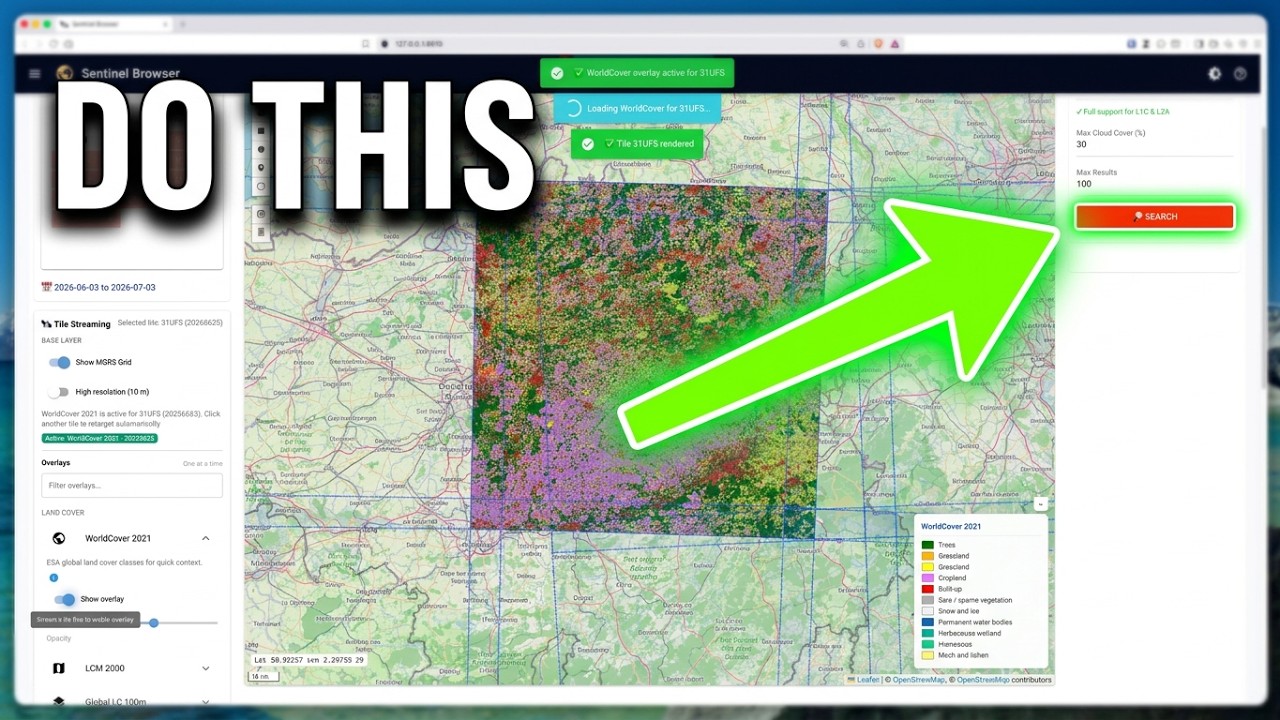
Features
- 🗺️ Interactive Map Interface — visually search and filter satellite products
- 🔓 No Account Needed to Explore — catalogue search, tile streaming and the coloured grid all work anonymously; credentials are only needed to download
- 🎯 Click-to-Stream — click any MGRS grid tile to stream its latest True Color Image (TCI), picking the scene from a chooser with thumbnails
- 🟦 Coverage at a Glance — MGRS tiles are coloured by how many Sentinel-2 L2A products per month cover them in your exact date range (colour-blind-safe palette, tiles with no products dashed in orange). Zoomed out, the ~1,200 MGRS grid zones are coloured instead, so you can scan the whole world at once. Counts come from the public s2-stac-geoparquet index on Source Cooperative
- 🔀 Two Streaming Sources — with CDSE S3 keys, tiles stream from CDSE; without them, from AWS Open Data (Element84 Earth Search). Override with
VRESTO_STREAM_SOURCE - 🛰️ High-Resolution Tile Server — visualize full-resolution product bands on the map (via
localtileserver) - 🌍 13 Contextual Overlays — land cover (WorldCover, LCM, LC100, TCD), terrain (Copernicus DEM), vegetation & productivity (NDVI climatology, FAPAR, Dry Matter Productivity), thermal (hourly LST), water & soil (Soil Moisture, Soil Water Index, Water Bodies), and hazard layers (Burned Area)
- 🔎 Point Inspector — turn on Inspect values and click a streamed tile to read the exact value under the cursor (land-cover class, NDVI, temperature, soil moisture, elevation, …)
- 🔍 Smart Search — filter by location, date range, cloud cover, and product type
- 📦 Granular Downloads — Band-Resolution matrix for precise data selection and de-duplicated downloads
- 🔌 Dual Backend Support — discovery via OData or STAC APIs
- 🐍 Professional API — clean Python API for programmatic access
- 🔐 Secure — handle S3 credentials safely with static key support
- ⚡ Efficient — batch operations and smart caching
Requirements
- Python 3.11+
- Docker and Docker Compose (optional, for the Docker setup)
uvpackage manager (optional, recommended for development)
Credentials: Searching the Copernicus catalogues works without an account, and so does tile streaming: without S3 keys, tiles come from AWS Open Data (Element84 Earth Search). Downloading products needs free Copernicus credentials, and streaming from CDSE needs S3 keys — get them at https://dataspace.copernicus.eu/. See the Setup Guide for configuration details.
Installation
From PyPI:
pip install vresto
For development:
git clone https://github.com/kalfasyan/vresto.git
cd vresto
uv sync --extra dev
Usage
Docker
The fastest way to run vresto:
git clone https://github.com/kalfasyan/vresto.git && cd vresto
make docker-up
The dashboard opens at http://localhost:8610. Add your Copernicus credentials anytime via the ☰ menu → Settings, or provide them up front in a .env file (see .env.example). Use make docker-rebuild after pulling changes.
Python
Launch the app:
vresto # or: uv run vresto / pixi run vresto / make app
Search and download from Python (searching needs no credentials; downloading does):
from vresto.api import CatalogSearch, CopernicusConfig
from vresto.products import ProductsManager

config = CopernicusConfig()
catalog = CatalogSearch(config=config)
manager = ProductsManager(config=config)

# Search for a product by name (works anonymously)
products = catalog.search_products_by_name("S2A_MSIL2A", max_results=5)

# Download specific bands (Red, Green, Blue) — needs Copernicus credentials
manager.download_product_bands(
    product=products[0].name,
    bands=["B04", "B03", "B02"],
    resolution=10,
    dest_dir="./data",
)
CLI
vresto-cli search-name "S2A_MSIL2A" --max-results 5
vresto-cli download-bands "S2A_MSIL2A_20200612T023601_N0500_R089_T50NKJ_20230327T190018" "B04,B03,B02" --resolution 10 --output ./data
Documentation
- Setup Guide ⭐ start here — installation, credentials, configuration
- Web Interface Guide — map search, tile streaming, grid colours, overlays
- API Guide — programmatic usage
- CLI Guide — command-line reference
- Catalog Providers — OData vs STAC
- AWS CLI Guide — direct S3 access
- Contributing — development setup
License
This project is licensed under the terms in LICENSE.txt.
1 maintainer

Metadata
1 maintainer
Release files for vresto 0.4.7
For a detailed explanation of source distributions (sdists) and built distributions (wheels), please see the package formats documentation.
Source distribution (sdist)
| File | Size | Uploaded | |
|---|---|---|---|
| vresto-0.4.7.tar.gz | 810.0 kB | Details |
Built distribution (wheel)
| File | Interpreter | ABI | Platform | Reset |
|---|---|---|---|---|
| vresto-0.4.7-py3-none-any.whl | Python 3 | none | any | Details |
Total release size: 1.1 MB
Release files / vresto-0.4.7.tar.gz
| Download URL | vresto-0.4.7.tar.gz |
|---|---|
| Size | 810.0 kB |
| Tags | Source |
|
SHA-256 checksum How to use checksums |
0c6573f940497f0b25f37909e077b043ceba9c9e7631bf72fb4b717ad2c05893
|
|
BLAKE2b-256 checksum How to use checksums |
3d1c11aa8684b3608e913e0689242f3baf11a8784d6c0b7c7a1d9a1ab74e7fbe
|
| Upload date | |
|
Uploaded using Trusted Publishing? What is trusted publishing? |
Yes |
| Uploaded via |
twine/7.0.0 CPython/3.13.14
|
Provenance
Provenance describes where a file came from. On PyPI, provenance is shared via attestations, which provide a verifiable record of the build or publishing details. View details, limitations and caveats.


PyPI Publish Attestation
PyPI verified that this artifact, at this checksum, originated from the publisher listed below.
Signed by GitHub Actions, verified by PyPI on Oct 13, 2026.
Transparency logRelease files / vresto-0.4.7-py3-none-any.whl
| Download URL | vresto-0.4.7-py3-none-any.whl |
|---|---|
| Size | 247.9 kB |
| Tags | Python 3 |
|
SHA-256 checksum How to use checksums |
a38f9896a4e9933917cca63111c10e1801514cef081c3934586d4485332203ab
|
|
BLAKE2b-256 checksum How to use checksums |
67beadb67324593358763e95a82cd4bb9b6957a89e4ccabb2370ab463dadbbe9
|
| Upload date | |
|
Uploaded using Trusted Publishing? What is trusted publishing? |
Yes |
| Uploaded via |
twine/7.0.0 CPython/3.13.14
|
Provenance
Provenance describes where a file came from. On PyPI, provenance is shared via attestations, which provide a verifiable record of the build or publishing details. View details, limitations and caveats.
PyPI Publish Attestation
PyPI verified that this artifact, at this checksum, originated from the publisher listed below.
Signed by GitHub Actions, verified by PyPI on Oct 13, 2026.
Transparency log













