
🚀 VritraAI - AI-Powered Terminal Shell





An intelligent, AI-enhanced terminal shell with advanced features, beautiful theming, and powerful command execution capabilities.
Features • Installation • Quick Start • Documentation • Contributing
📑 Table of Contents
- Overview
- Key Features
- Preview
- Installation
- Requirements
- Quick Start
- Command-Line Flags
- Interactive Shell Overview
- Built-In Commands
- AI Features
- Explain Last Command System
- Multi-Command Execution Rules
- Themes
- Prompt Styles
- Configuration System
- API Setup
- Error Recovery System
- File Management Capabilities
- System Commands Overview
- Security Notes
- Termux Compatibility Notes
- Linux Compatibility Notes
- Known Limitations
- Project Structure
- Contributing
- License
- Author & Credits
- Community & Support
🎯 Overview
VritraAI is a next-generation AI-powered terminal shell that combines the power of traditional Unix commands with cutting-edge artificial intelligence. Built from scratch by Alex Butler of Vritra Security Organization, VritraAI transforms your terminal experience with intelligent command explanations, code analysis, project management, and a beautiful, customizable interface.
What Makes VritraAI Special?
- 🤖 AI-Powered Assistance: Get intelligent explanations for commands, code reviews, and project analysis
- 🎨 37 Beautiful Themes: Customize your terminal with professional color schemes
- 💬 60+ Prompt Styles: Express your personality with creative prompt designs
- 🔍 Smart Command Logging: Automatically track and explain system commands
- 🛡️ Error Recovery: Intelligent error handling with AI-powered suggestions
- 📦 Project Intelligence: Automatic project type detection and dependency management
- 🔐 Security Features: Built-in dangerous command warnings and safe mode
✨ Key Features
🧠 AI-Powered Features
- Natural Language AI Assistant: Chat with AI using
ai <prompt>for any question or task - Command Explanation: Understand what any command does with
explain <command>orexplain_last - Code Review & Analysis: Comprehensive AI-powered code review with
review <file|directory> - Security Scanning: AI-powered security vulnerability detection with
security_scan <file|directory> - Code Optimization: Get AI optimization suggestions with
optimize_code <file> - Code Refactoring: AI-powered refactoring suggestions with
refactor <file> <description> - Project Intelligence: Enhanced project type detection, health analysis, and optimization
- Interactive Learning: AI tutoring system with
learn <topic>for any programming concept - Cheat Sheets: Generate command cheatsheets with
cheat <topic> - Content Generation: AI content generation helper with
generate <description> - Documentation Generator: Auto-generate README, docstrings, tutorials, and architecture diagrams
- File/Directory Analysis: AI-powered analysis with
summarize [path]for deep insights
🎨 Customization
- 37 Color Themes: From dark/light to cyberpunk, matrix, galaxy, and more
- 60+ Prompt Styles: Hacker, pirate, ninja, robot, superhero, and many more
- Customizable Banners: Professional MOTD banners with system stats
- Rich Formatting: Beautiful terminal output with syntax highlighting
🛠️ Advanced Tools
- File Management: Create, edit, read, search, and manage files
- Code Formatting: Automatic code formatting with black/autopep8
- Network Tools: Complete network diagnostics and monitoring
- System Monitoring: Real-time system information and performance metrics
- Project Templates: Quick project scaffolding for various frameworks
🔒 Security & Safety
- Dangerous Command Warnings: Confirmation prompts for risky operations
- Safe Mode: Enhanced protection for critical operations
- Command Validation: Intelligent command validation before execution
- Session Logging: Complete command history and session tracking
📸 Preview
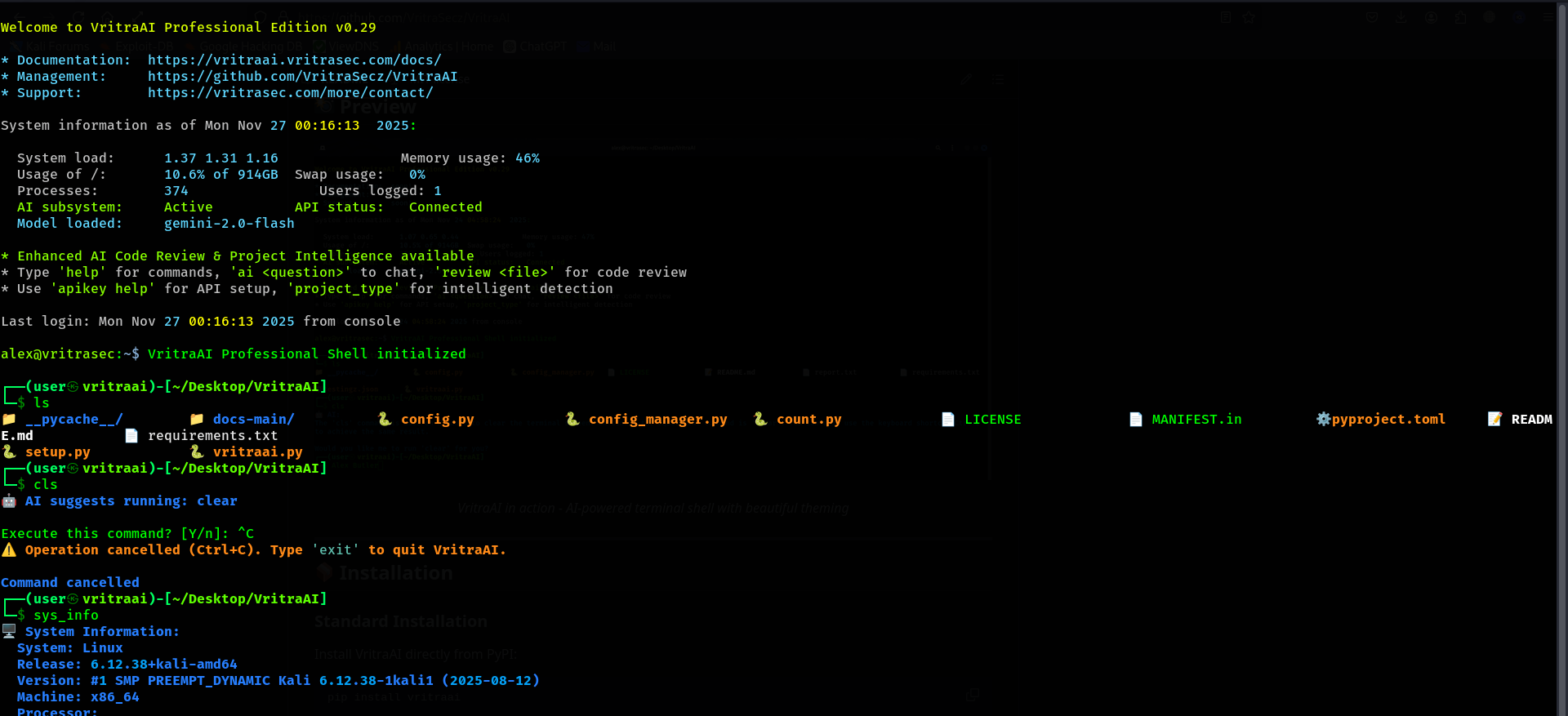
VritraAI in action - AI-powered terminal shell with beautiful theming
📦 Installation
Standard Installation
Install VritraAI directly from PyPI:
pip install vritraai
Development Installation
For development or to get the latest features:
# Clone the repository
git clone https://github.com/VritraSecz/VritraAI.git
cd VritraAI

# Install dependencies
pip install -r requirements.txt

# Run directly
python vritraai.py
Requirements
- Python: 3.7+ (3.8+ recommended)
- Operating System: Linux, macOS, or Termux (Android)
- Dependencies: See Requirements section
📋 Requirements
Core Dependencies (Required)
openai==0.28.0- OpenAI API client for OpenRouter integrationrequests>=2.28.0- HTTP library for API requestsprompt-toolkit>=3.0.0- Advanced terminal UI library
Recommended Dependencies
rich>=13.0.0- Rich text and beautiful terminal formatting
Optional Dependencies
pygments>=2.13.0- Syntax highlighting for code displaypsutil>=5.9.0- System and process utilitiesblack>=23.0.0- Python code formatter (forformat_filecommand)autopep8>=2.0.0- Alternative Python code formatter
Installation Commands
# Install all dependencies
pip install -r requirements.txt

# Install only core dependencies
pip install openai requests prompt-toolkit rich

# Install with optional features
pip install openai requests prompt-toolkit rich pygments psutil black autopep8
🚀 Quick Start
1. Launch VritraAI
# After installation
vritraai

# Or run directly
python vritraai.py
2. Configure API Keys
# Set up Gemini API (default)
apikey gemini YOUR_GEMINI_API_KEY

# Or set up OpenRouter API
apikey openrouter YOUR_OPENROUTER_API_KEY
3. Start Using AI Features
# Ask AI questions
ai How do I use git rebase?

# Explain last command
ls -la
explain_last

# Review code
review myfile.py

# Learn something new
learn "bash loops"
4. Customize Your Experience
# Change theme
theme cyberpunk

# Change prompt style
prompt hacker

# View all options
theme
prompt
🎛️ Command-Line Flags
VritraAI supports the following command-line flags:
| Flag | Long Form | Description |
|---|---|---|
-h |
--help |
Show help message and exit |
-v |
--version |
Show version information and exit |
-i |
--interactive |
Launch in interactive mode (default) |
Examples
# Show help
python vritraai.py -h
python vritraai.py --help

# Show version
python vritraai.py -v
python vritraai.py --version

# Launch interactive mode (default)
python vritraai.py -i
python vritraai.py --interactive

# Launch without flags (same as -i)
python vritraai.py
Note: Only one flag can be used at a time. Using multiple flags will result in an error.
💻 Interactive Shell Overview
VritraAI provides a powerful interactive shell with:
- Command History: Full command history with arrow key navigation
- Auto-completion: Intelligent command and path completion
- Syntax Highlighting: Beautiful code syntax highlighting
- Rich Output: Formatted tables, panels, and colored output
- Session Tracking: Complete session logging and analytics
Shell Features
- Tab Completion: Press
Tabto autocomplete commands and paths - History Navigation: Use
↑/↓arrows to navigate command history - Multi-line Commands: Use
\for line continuation - Command Chaining: Use
;or&&to chain commands - Pipes: Full support for Unix pipes (
|)
📚 Built-In Commands (Master List)
VritraAI includes 100+ built-in commands. Here are the top 20 most commonly used commands:
| Command | Description |
|---|---|
ai <prompt> |
Natural language AI assistant |
explain_last |
Explain the last executed command |
review <file|directory> |
AI-powered code review |
ls [path] |
Colored directory listing |
read_file <file> |
Read file with syntax highlighting |
edit_file <file> |
Open file in editor or create new |
cd <directory> |
Change directory |
theme [name] |
Change color theme (37 available) |
prompt [style] |
Change prompt style (60+ available) |
config |
Show current configuration |
apikey <provider> <key> |
Set API key (gemini/openrouter) |
model [list|set|search] |
Manage AI models |
project_type |
Detect project type automatically |
sys_info |
Comprehensive system information |
search_file <pattern> [path] |
Search for files by name |
find_files <pattern> [path] |
Advanced file search with regex |
summarize [path] |
AI-powered directory/file analysis |
learn <topic> |
Interactive AI tutoring |
doc readme |
Generate README.md for project |
history |
View command history |
💡 Note: For a complete list of all commands, use the
helpcommand in VritraAI or visit vritraai.vritrasec.com/ for detailed documentation.
🤖 AI Features
AI-Powered Command Explanation
VritraAI can explain any system command you execute:
# Execute a command
ls -lah /usr/bin

# Get AI explanation
explain_last
The AI will provide:
- What the command did
- Why it succeeded or failed
- Optimization tips
- Related commands
- Fix suggestions (if errors occurred)
Code Review
Get intelligent code analysis:
review myfile.py
Features:
- Code quality assessment
- Security vulnerability detection
- Performance optimization suggestions
- Best practices recommendations
- Bug detection
Project Intelligence
Automatic project analysis:
# Detect project type
project_type

# Check dependencies
dependencies_check

# Analyze project health
project_health
Learning Assistant
Interactive learning:
learn "bash loops"
learn "git rebase"
learn "python decorators"
Provides:
- Brief explanations
- Common use cases
- Practical examples
- Best practices
- Common mistakes to avoid
🔍 Explain Last Command System
The explain_last command provides intelligent analysis of your last executed command.
How It Works
- Command Logging: System commands and whitelisted built-ins are automatically logged
- Output Capture: Command output is captured including Rich-formatted output
- AI Analysis: AI analyzes the command, output, and context
- Detailed Explanation: Provides comprehensive explanation with fixes and recommendations
Whitelisted Commands
The following built-in commands are automatically logged:
ls,dir,search_file,find_fileshash,validate,formatsearch_regex,cd,sys_infodisk_usage,env,path,whichuptime,memory,processestime,calc,templateencode,decode
Usage
# Execute any system command
grep -r "pattern" /path/to/search

# Get explanation
explain_last
Features
- ✅ Automatic command logging
- ✅ Rich output capture
- ✅ Context-aware analysis
- ✅ Error diagnosis
- ✅ Fix suggestions
- ✅ Optimization tips
🔗 Multi-Command Execution Rules
VritraAI supports command chaining with strict validation for safety.
Supported Separators
;- Sequential execution (always executes)&&- Conditional execution (executes if previous succeeds)
Rules
- Only System Commands: Multi-command sequences only allow system commands and whitelisted built-ins
- No AI Commands: AI commands must be executed separately
- Validation: Each command in the sequence is validated before execution
- Labeled Output: Each command's output is labeled for clarity
Allowed Commands in Multi-Command
File Operations:
ls,dir,read_file,search_file,mkdir,create_dirfind_files,compare,diff,hash,validate,format,tree
System Commands:
cd,clear,exit,help,sys_info,disk_usageenv,path,which,uptime,memory,processestime,calc,config,template,theme,promptencode,decode,network,analyze_system
API/Model Management:
apikey,api_base,model
Examples
# Valid: System commands
ls -la; cd /tmp; pwd

# Valid: Mixed system and built-ins
ls; sys_info; memory

# Invalid: AI commands (must be separate)
ls; ai "what is this?"  # ❌ Error: AI command detected

# Valid: Pipes work normally
ls -la | grep ".py"
🎨 Themes (37 Themes Showcase)
VritraAI includes 37 professionally designed color themes. Here are the top 10 most popular themes:
| Theme | Description |
|---|---|
| dark | Default dark terminal theme |
| light | Light theme with classic colors |
| matrix | Matrix-style green hacker terminal |
| cyberpunk | High-contrast cyberpunk palette |
| galaxy | Space/galaxy purples and blues |
| ocean | Cool blue ocean-inspired theme |
| neon | Bright neon accents for high contrast |
| retro | Retro neon green-on-black look |
| hacker_green | Aggressive hacker green-on-black |
| synthwave | 80s synthwave neon palette |
💡 Note: VritraAI includes 27 more themes! Use
themecommand to see all available themes, or visit vritraai.vritrasec.com/ for the complete list.
Usage
# List all themes
theme

# Change theme
theme cyberpunk

# Reset to default
theme reset
💬 Prompt Styles
VritraAI offers 60+ creative prompt styles to personalize your terminal:
Popular Styles
- hacker - Hacker-style multi-line:
┌──(user㉿vritraai)-[path]\n└─$ - matrix - Matrix style:
wake up, neo:// path $ - cyberpunk - Cyberpunk style:
▶ path ◀ - ninja - Ninja style:
⚡ path ⚡ - pirate - Pirate style:
🏴☠️ [CAPTAIN] @ path ⚓ - superhero - Superhero style:
🦸 [HERO] :: path >> - robot - Robot style:
🤖 [SYSTEM] :: path >> - alien - Alien style:
👽 [PROBE] ~~ path 🛸
Categories
Classic Styles:
classic,minimal,modern,powerline,git,elegant
Tech Styles:
hacker,cyberpunk,matrix,code_matrix,terminal_classic
Fun Styles:
ninja,pirate,superhero,robot,alien,magicalmedieval,western,steampunk,gaming
Professional Styles:
corporate,professional,elegant,minimal_zen
Nature Styles:
space,fire,water,earth,airmountain,jungle,desert,arctic
And many more!
💡 Note: VritraAI includes 60+ prompt styles! Use
promptcommand to see all available styles, or visit vritraai.vritrasec.com/ for the complete list.
Usage
# List all prompt styles
prompt

# Change prompt style
prompt hacker

# Reset to default
prompt reset
⚙️ Configuration System
VritraAI uses a unified configuration system with automatic persistence.
Configuration Location
- Config Directory:
~/.config-vritrasecz/vritraai/ - Config File:
~/.config-vritrasecz/vritraai/config.json - History File:
~/.config-vritrasecz/vritraai/history - Session Log:
~/.config-vritrasecz/vritraai/session.log - Last Command Log:
~/.config-vritrasecz/vritraai/lastcmd.log - Learning Notes:
~/.config-vritrasecz/vritraai/learning.md - Version Info:
~/.config-vritrasecz/vritraai/vritraai-version.json - Config Backup:
~/.config-vritrasecz/vritraai/config.json.backup(automatic backup)
Viewing Configuration
# Show current configuration
config
Configuration Management
Configuration is automatically saved when you:
- Change themes (
theme <name>) - Change prompt styles (
prompt <style>) - Set API keys (
apikey <provider> <key>) - Switch API bases (
api_base <provider>) - Change models (
model set <id>)
🔑 API Setup (OpenRouter / Gemini)
VritraAI supports two AI providers: Gemini (default) and OpenRouter.
Gemini API (Default)
- Get API Key: Visit Google AI Studio
- Set API Key:
apikey gemini YOUR_GEMINI_API_KEY
- Available Models:
gf1- Gemini 2.0 Flash (default)gf2- Gemini 2.5 Flashgf3- Gemini 2.5 Flash Litegf4- Gemini Flash Latestgp1- Gemini 2.5 Pro
OpenRouter API
- Get API Key: Visit OpenRouter
- Set API Key:
apikey openrouter YOUR_OPENROUTER_API_KEY
- Switch API Base:
api_base openrouter - Available Models: 20+ models including:
- DeepSeek (Chat, Prover)
- Meta LLaMA (3.3, 3.1, 3.2)
- Mistral AI (7B, Nemo, Pixtral)
- Google Gemma
- OpenAI GPT
- Qwen, Z-AI, and more
Model Management
# List available models
model list

# Set model
model set gf1

# Search models
model search flash
API Key Management
# Set Gemini API key
apikey gemini YOUR_KEY

# Set OpenRouter API key
apikey openrouter YOUR_KEY

# View API key help
apikey help
🛡️ Error Recovery System
VritraAI includes an intelligent error recovery system with AI-powered suggestions.
Features
- Automatic Error Detection: Catches exceptions and errors automatically
- Context Analysis: Analyzes error context, traceback, and code
- AI-Powered Suggestions: Provides specific fix suggestions
- Interactive Recovery: Menu-driven error recovery options
- Retry Mechanism: Automatic retry with fixes applied
Error Recovery Options
When an error occurs, you'll see:
- Error Details: Full error message and traceback
- Context Information: File, line number, and code snippet
- AI Suggestions: Specific fix recommendations
- Recovery Options:
- Apply suggested fix
- Retry operation
- Skip and continue
- Get more help
Example
# If an error occurs during file operation
edit_file nonexistent.py

# VritraAI will:
# 1. Detect the error
# 2. Analyze the context
# 3. Suggest fixes (e.g., "File doesn't exist. Create it?")
# 4. Offer recovery options
📁 File Management Capabilities
VritraAI provides comprehensive file management features:
File Operations
- Read Files: Syntax-highlighted file viewing
- Edit Files: Open in default editor or create new files
- Create Files: Quick file creation with templates
- Search Files: Pattern-based and regex file search
- Compare Files: Side-by-side file comparison
- Format Files: Automatic code formatting
- Hash Files: Calculate file checksums
Code Templates
Quick project scaffolding:
# Create Python template
template python my_script.py

# Create Bash template
template bash script.sh

# Create HTML template
template html index.html

# Create README template
template readme README.md
File Search
# Search by pattern
search_file "*.py"

# Advanced search
find_files "test.*\.py$"

# Regex search
search_regex "def.*test" *.py
🖥️ System Commands Overview
VritraAI enhances standard system commands with additional features:
Enhanced Commands
ls: Colored output with file type indicatorscd: Smart directory navigation with error recoverygrep: Highlighted search resultscat: Syntax-highlighted file display
System Information
# Comprehensive system info
sys_info

# Disk usage
disk_usage /home

# Memory stats
memory

# Process list
processes

# System uptime
uptime
Environment Management
# View environment variable
env PATH

# Set environment variable
env MY_VAR "value"

# PATH management
path add /new/path
🔒 Security Notes
Built-in Security Features
- Dangerous Command Warnings: Confirmation prompts for risky operations
- Command Validation: Pre-execution validation
- Safe Mode: Enhanced protection mode
- Session Logging: Complete audit trail
Dangerous Commands
The following commands require confirmation:
rm -rf,rm -rfv,rm *dd,mkfs,fdiskshutdown,reboot,haltchmod 777,chown -Rsudo rm,sudo dd> /dev/null,truncate,shred
API Key Security
- API keys are stored in
~/.config-vritrasecz/vritraai/config.json - File permissions are automatically set to user-only access
- Never share your API keys or config files
Best Practices
- Review commands before execution
- Use safe mode for critical operations
- Keep API keys secure
- Regularly review session logs
- Don't execute untrusted commands
📱 Termux Compatibility Notes
VritraAI is fully compatible with Termux on Android.
Termux-Specific Features
- ✅ Full command support
- ✅ File system access
- ✅ Network tools
- ✅ AI features
- ✅ Theme customization
Installation on Termux
# Update packages
pkg update && pkg upgrade

# Install Python
pkg install python

# Install pip packages
pip install vritraai

# Or clone and install
git clone https://github.com/VritraSecz/VritraAI.git
cd VritraAI
pip install -r requirements.txt
Termux Considerations
- Some system commands may have limited functionality
- File permissions follow Android security model
- Network tools work within Termux environment
- All AI features are fully functional
🐧 Linux Compatibility Notes
VritraAI is designed primarily for Linux systems.
Supported Distributions
- ✅ Ubuntu/Debian
- ✅ Fedora/RHEL/CentOS
- ✅ Arch Linux
- ✅ openSUSE
- ✅ Other Linux distributions
Linux-Specific Features
- Full system command support
- Complete file system access
- Network diagnostics
- Process management
- System monitoring
Installation on Linux
# Using pip (recommended)
pip install vritraai

# Or from source
git clone https://github.com/VritraSecz/VritraAI.git
cd VritraAI
pip install -r requirements.txt
Dependencies
Most Linux distributions include Python 3.7+ by default. Install additional dependencies as needed:
# Ubuntu/Debian
sudo apt-get install python3-pip python3-venv

# Fedora
sudo dnf install python3-pip

# Arch Linux
sudo pacman -S python-pip
⚠️ Known Limitations
Current Limitations
- Windows Support: Limited Windows support (primarily Linux/Termux)
- Multi-line Commands: Some complex multi-line commands may need adjustment
- Interactive Commands: Some interactive commands may not work perfectly
- API Rate Limits: Subject to API provider rate limits
- Large Files: Very large files may take time to process
Workarounds
- Use Linux or Termux for best experience
- Break complex commands into simpler ones
- Use non-interactive alternatives when possible
- Monitor API usage to avoid rate limits
- Use
headortailfor large files
📂 Project Structure
VritraAI/
├── vritraai.py          # Main application file
├── config_manager.py    # Unified configuration system
├── config.py            # Legacy configuration (fallback)
├── requirements.txt     # Python dependencies
├── setup.py             # PyPI package setup script
├── pyproject.toml       # Modern Python project configuration
├── MANIFEST.in          # Package manifest for PyPI
├── README.md            # This file
├── LICENSE              # MIT License file
└── CHANGELOG.md         # Version history and changelog

User Configuration Directory:
~/.config-vritrasecz/vritraai/
├── config.json              # Configuration file
├── config.json.backup       # Automatic config backup
├── .config.lock             # Configuration lock file (internal)
├── history                  # Command history
├── session.log              # Session log
├── lastcmd.log              # Last command log
├── learning.md              # Learning notes (from `learn` command)
└── vritraai-version.json    # Version information file
Key Files
vritraai.py: Main application (13,820+ lines)config_manager.py: Configuration management systemconfig.py: Legacy configuration fallbackrequirements.txt: All project dependenciessetup.py: PyPI package setup scriptpyproject.toml: Modern Python project configuration (PEP 518)MANIFEST.in: Package manifest for including files in PyPI distributionLICENSE: MIT License fileCHANGELOG.md: Version history and changelog documenting all notable changes
🤝 Contributing
We welcome contributions to VritraAI! This is an open-source project built from scratch, and your contributions help make it better.
How to Contribute
-
Fork the Repository
git clone https://github.com/VritraSecz/VritraAI.git
cd VritraAI
-
Create a Branch
git checkout -b feature/your-feature-name
-
Make Your Changes
- Follow existing code style
- Add comments for complex logic
- Test your changes thoroughly
-
Commit Your Changes
git commit -m "Add: Description of your changes"
-
Push to Your Fork
git push origin feature/your-feature-name
-
Create a Pull Request
- Go to the GitHub repository
- Click "New Pull Request"
- Describe your changes clearly
Contribution Guidelines
- ✅ Follow PEP 8 style guidelines
- ✅ Add docstrings to new functions
- ✅ Test your changes before submitting
- ✅ Update documentation if needed (see vritraai.vritrasec.com/)
- ✅ Keep commits focused and atomic
Areas for Contribution
- 🐛 Bug fixes
- ✨ New features
- 📚 Documentation improvements (vritraai.vritrasec.com/)
- 🎨 New themes or prompt styles
- 🔧 Performance optimizations
- 🧪 Test coverage
- 🌐 Translations
Development Setup
# Clone repository
git clone https://github.com/VritraSecz/VritraAI.git
cd VritraAI

# Create virtual environment
python3 -m venv venv
source venv/bin/activate  # On Windows: venv\Scripts\activate

# Install dependencies
pip install -r requirements.txt

# Run in development mode
python vritraai.py
📄 License
This project is licensed under the MIT License.
MIT License

Copyright (c) 2024 Alex Butler, Vritra Security Organization

Permission is hereby granted, free of charge, to any person obtaining a copy
of this software and associated documentation files (the "Software"), to deal
in the Software without restriction, including without limitation the rights
to use, copy, modify, merge, publish, distribute, sublicense, and/or sell
copies of the Software, and to permit persons to whom the Software is
furnished to do so, subject to the following conditions:

The above copyright notice and this permission notice shall be included in all
copies or substantial portions of the Software.

THE SOFTWARE IS PROVIDED "AS IS", WITHOUT WARRANTY OF ANY KIND, EXPRESS OR
IMPLIED, INCLUDING BUT NOT LIMITED TO THE WARRANTIES OF MERCHANTABILITY,
FITNESS FOR A PARTICULAR PURPOSE AND NONINFRINGEMENT. IN NO EVENT SHALL THE
AUTHORS OR COPYRIGHT HOLDERS BE LIABLE FOR ANY CLAIM, DAMAGES OR OTHER
LIABILITY, WHETHER IN AN ACTION OF CONTRACT, TORT OR OTHERWISE, ARISING FROM,
OUT OF OR IN CONNECTION WITH THE SOFTWARE OR THE USE OR OTHER DEALINGS IN THE
SOFTWARE.
👤 Author & Credits
Author
Alex Butler
Owner, Vritra Security Organization
Project Information
- Original Project: Built from scratch by Alex Butler
- Organization: Vritra Security Organization
- Version: v0.30.1
- Status: Active Development
Acknowledgments
- Built with ❤️ from scratch
- Inspired by modern terminal tools and AI assistants
- Thanks to all contributors and users
Contact
- GitHub: @VritraSecz
- Repository: VritraAI
💬 Community & Support
Getting Help
- 📖 Documentation: Detailed documentation available at vritraai.vritrasec.com/
- 📖 Inline Help: Use
helpcommand in VritraAI for comprehensive command reference - 🐛 Bug Reports: GitHub Issues
- 💡 Feature Requests: GitHub Issues
- 🤝 Contributions: See Contributing section
Community Resources
- GitHub Repository: VritraSecz/VritraAI
- Documentation Website: vritraai.vritrasec.com/
- Main Website: vritrasec.com
- Contact: link.vritrasec.com
- Email: contact@vritrasec.com
Support Channels
- 📧 Email: contact@vritrasec.com
- 🌐 Contact Form: link.vritrasec.com
- 🐛 GitHub Issues: For bug reports and feature requests
- 📖 Documentation: vritraai.vritrasec.com/ for detailed guides
Feedback
We value your feedback! Please:
- ⭐ Star the repository if you find it useful
- 🐛 Report bugs with detailed information
- 💡 Suggest new features
- 📝 Improve documentation (vritraai.vritrasec.com/)
- 🤝 Contribute code
Made with ❤️ by Alex Butler | Vritra Security Organization
1 maintainer

Download files
Download the file for your platform. If you're not sure which to choose, learn more about installing packages.
Source Distribution
Built Distribution
Filter files by name, interpreter, ABI, and platform.
If you're not sure about the file name format, learn more about wheel file names.
Copy a direct link to the current filters
File details
Details for the file vritraai-0.30.1.tar.gz.
File metadata
- Download URL: vritraai-0.30.1.tar.gz
- Upload date:
- Size: 190.4 kB
- Tags: Source
- Uploaded using Trusted Publishing? No
- Uploaded via:
twine/6.1.0 CPython/3.13.9
File hashes
| Algorithm | Hash digest | |
|---|---|---|
| SHA256 |
aab9af2ac5abe3a76e05adacd19416c2a35b718ce1217fb2751ca0c32e35e260
|
|
| MD5 |
22ac3a3ab5ebecf45955f9851a9ffad3
|
|
| BLAKE2b-256 |
6d4a2e3703c16cfc60aa8e82bef9a4165da41ce802ee18865317c543f397fb24
|
File details
Details for the file vritraai-0.30.1-py3-none-any.whl.
File metadata
- Download URL: vritraai-0.30.1-py3-none-any.whl
- Upload date:
- Size: 167.3 kB
- Tags: Python 3
- Uploaded using Trusted Publishing? No
- Uploaded via:
twine/6.1.0 CPython/3.13.9
File hashes
| Algorithm | Hash digest | |
|---|---|---|
| SHA256 |
d40439c54d35f2bed5f48fb3ae1565e0740d699a73822a1532b2d6a1de3a6054
|
|
| MD5 |
9b4a7179445dfd744ea07db8bc181097
|
|
| BLAKE2b-256 |
23fbcd157f5435df966ebec32ee341cc745525e8aefaa5474e449def6780246d
|














