
Add Degradations in VapourSynth
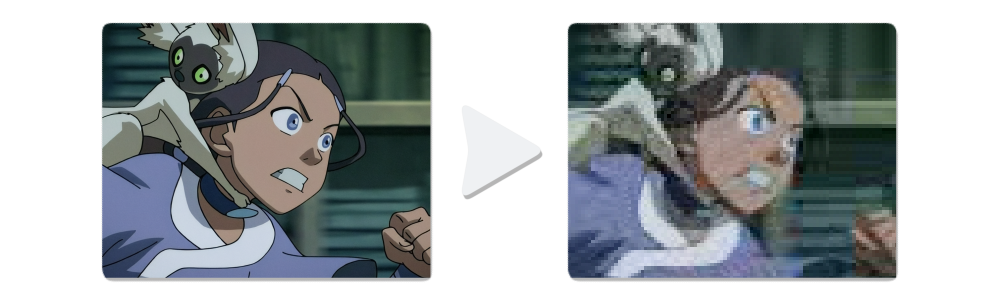
Mainly to generate datasets without the need for intermediates. Maybe useful to compare encoding settings.
Installation
pip install -U vs_degrade
- Jpeg Degradation requires libjpeg-turbo (optional):
Windows: Download & installlibjpeg-turbo-X.X.X-vc-x64.exe
Linux: Via package manager e.g.apt install libturbojpeg - FFmpeg Degradation requires ffmpeg (optional):
Download and add to PATH, or set the path manually via the path parameter.
Jpeg Degradation
Degrades a YUV clip directly as is, without upsampling chroma or doing any format/color conversions, since Jpeg also works in YUV. Adds purely spatial compression artifacts very fast.
import vs_degrade
clip = vs_degrade.jpeg(clip, quality=50, fields=False, seed=0, planes=[0, 1, 2], path=None)
clip
Clip to degrade. Jpeg supports YUV420P8, YUV422P8, and YUV444P8 formats.
quality
Image quality in the range 1-100 with 1 being the worst.
Can be a constant value or randomized each frame by providing a range: quality=[30, 80]
fields (optional)
Will separate the clip into fields, degrade each field seperately, then put them back together.
This creates interlacing artifacts like combing and more mosquito noise.
seed (optional)
Seed used for quality randomization.
planes (optional)
Which planes to degrade. Any unmentioned planes will simply be copied.
If nothing is set, all planes will be degraded.
path (optional)
Path to libjpeg-turbo (turbojpeg.dll on Windows, libturbojpeg.so on Linux), if not auto-detected.
FFmpeg Degradation
Runs randomizable FFmpeg commands in chunks directly on a YUV clip as is, without upsampling chroma or doing any format/color conversions. Adds spatial and temporal compression artifacts.
import vs_degrade
clip = vs_degrade.ffmpeg(clip, temp_window=10, args="-c:v mpeg2video -q:v 10", fields=False, seed=0, planes=[0, 1, 2], path=None)
clip
Clip to degrade. Supports YUV420P8/P10, YUV422P8/P10, YUV444P8/P10 formats.
temp_window
Temporal window length. The amount of frames to encode at once.
args
The video encoding arguments of an FFmpeg command.
- Simplest example using the MPEG-2 codec with quality 10:
args = "-c:v mpeg2video -q:v 10"
- Arguments can optionally be randomized per temporal window:
{rand(5,50)}sets randomizer range for int values
{randf(-0.5,0.9)}sets randomizer range for float values
{choice(veryfast,medium,veryslow)}chooses randomly from a list
Example using the H.264 codec with random crf and preset:args = "-c:v libx264 -crf {rand(5,50)} -preset {choice(veryfast,medium,veryslow)}"
- Multiple full commands can be randomized per temporal window by providing a list:
args = ["-c:v mpeg2video -q:v {rand(5,30)}",
        "-c:v libx264 -crf {rand(5,50)} -x264-params bframes={rand(0,16)}",
        "-c:v libx265 -crf {rand(5,50)} -preset {choice(veryfast,medium,veryslow)}",
        "-c:v libvpx-vp9 -crf {rand(5,60)} -b:v 0"]
clip = vs_degrade.ffmpeg(clip, temp_window=10, args=args)
- FFmpeg filters can also be applied. This one for example randomly sharpens before compressing:
args = "-vf unsharp=5:5:{randf(0.0,1.0)} -c:v mpeg2video -q:v 10"
This adds gibbs ringing and skips compression.{w}{h}gets the input dimensions:args = "-vf 'scale={w}*0.85:{h}*0.85:sws_flags=sinc,scale={w}:{h}:sws_flags=sinc' -c:v rawvideo"
- You may want to add additional interlacing flags if
fields=True, but it is not strictly necessary:args = "-c:v mpeg2video -q:v 10 -flags +ildct+ilme -top 1"
seed (optional)
Seed used ffmpeg args randomization.
fields (optional)
Will seperate the clip into fields, degrade with FFmpeg, then put them back together.
This creates interlacing artifacts like combing and more mosquito noise.
planes (optional)
Which planes to degrade. Any unmentioned planes will simply be copied.
If nothing is set, all planes will be degraded.
path (optional)
Path to FFmpeg (ffmpeg.exe on Windows, just ffmpeg on Linux), if not auto-detected.
1 maintainer

Metadata
1 maintainer
Release files for vs-degrade 1.2.0
For a detailed explanation of source distributions (sdists) and built distributions (wheels), please see the package formats documentation.
Source distribution (sdist)
| File | Size | Uploaded | Provenance | Actions |
|---|---|---|---|---|
| vs_degrade-1.2.0.tar.gz | 293.9 kB | With provenance | Details for vs_degrade-1.2.0.tar.gz |
Built distribution (wheel)
| File | Interpreter | ABI | Platform | Actions Reset |
|---|---|---|---|---|
| vs_degrade-1.2.0-py3-none-any.whl | Python 3 | none | any | Details for vs_degrade-1.2.0-py3-none-any.whl |
Total release size: 304.2 kB
Release files / vs_degrade-1.2.0.tar.gz
| Download URL | vs_degrade-1.2.0.tar.gz |
|---|---|
| Size | 293.9 kB |
| Tags | Source |
|
SHA-256 checksum How to use checksums |
e7dcde6b68d076365784f284532cd97bc190040b91dc15f0c510f461c9e0ed88
|
|
BLAKE2b-256 checksum How to use checksums |
b6a470f8e84cfb04a54e54c9a93258c5671fa8ac010bc3040da2da9ba46a6ef9
|
| Upload date | |
|
Uploaded using Trusted Publishing? What is trusted publishing? |
Yes |
| Uploaded via |
twine/7.0.0 CPython/3.13.14
|
Provenance
Provenance describes where a file came from. On PyPI, provenance is shared via attestations, which provide a verifiable record of the build or publishing details. View details, limitations and caveats.


PyPI Publish Attestation
PyPI verified that this artifact, at this checksum, originated from the publisher listed below.
Signed by GitHub Actions, verified by PyPI on Aug 7, 2026.
Transparency logRelease files / vs_degrade-1.2.0-py3-none-any.whl
| Download URL | vs_degrade-1.2.0-py3-none-any.whl |
|---|---|
| Size | 10.3 kB |
| Tags | Python 3 |
|
SHA-256 checksum How to use checksums |
8d462f7ab15395eaf679d9c029758fa134cccb65ac525db425226d0f9ec31e34
|
|
BLAKE2b-256 checksum How to use checksums |
7c13f25e932cd2f7867f8da778e495dc20a2f8baf596b601b4e2f85404bd4433
|
| Upload date | |
|
Uploaded using Trusted Publishing? What is trusted publishing? |
Yes |
| Uploaded via |
twine/7.0.0 CPython/3.13.14
|
Provenance
Provenance describes where a file came from. On PyPI, provenance is shared via attestations, which provide a verifiable record of the build or publishing details. View details, limitations and caveats.
PyPI Publish Attestation
PyPI verified that this artifact, at this checksum, originated from the publisher listed below.
Signed by GitHub Actions, verified by PyPI on Aug 7, 2026.
Transparency logSecurity for vs-degrade 1.2.0
Provenance
Provenance describes where a file came from. On PyPI, provenance is shared via attestations, which provide a verifiable record of the build or publishing details. View details, limitations and caveats.
Full provenance
All 2 files in this release have been uploaded with provenance metadata.
Attestation for vs_degrade-1.2.0.tar.gz
PyPI Publish Attestation
PyPI verified that this artifact, at this checksum, originated from the publisher listed below.
Signed by GitHub Actions, verified by PyPI on Aug 7, 2026.
Transparency logA note on package security
PyPI is a repository for distributing packages, not a service for auditing them. While third-party security researchers and our staff do their best to detect and remove malicious packages, PyPI cannot guarantee the quality, security or suitability of any given package.
To learn more about protecting yourself from malicious actors, visit our package security documentation.













