
vsce-downloads
获取 VSCode Marketplace 扩展的下载量、安装量、评分等统计数据。
vsce-downloads 可以作为 Python 功能包使用,也可以作为命令行工具使用。
安装
从 PyPI 安装:
pip install vsce-downloads
安装后可以在 Python 中导入:
import vsce_downloads
也可以使用命令行工具 vsced。
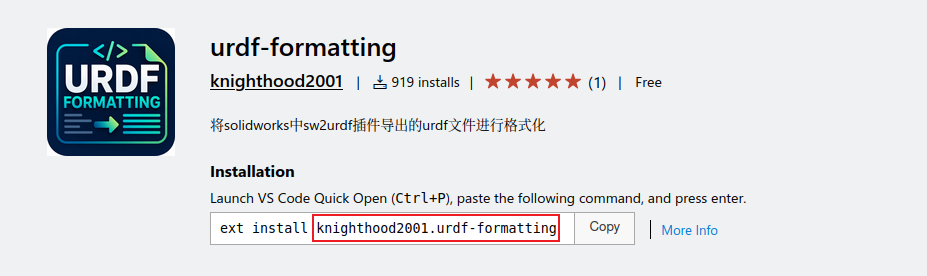
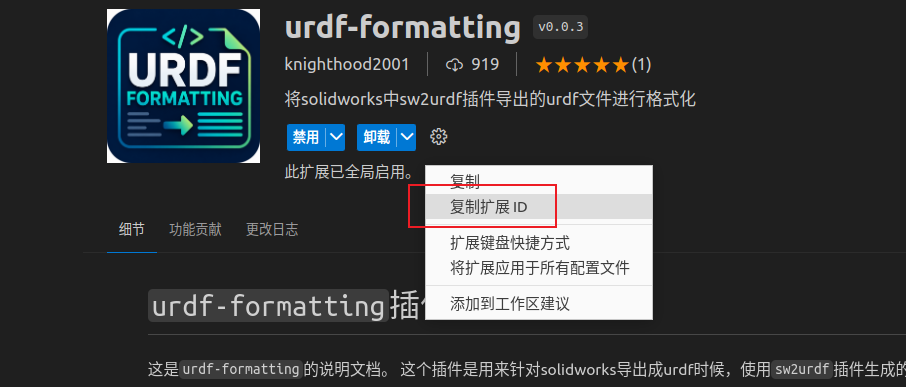
VSCode扩展ID获取
- VSCode Marketplace中
Python 用法
输入VSCode扩展ID,格式化打印扩展统计信息:
from vsce_downloads import print_stats

print_stats("knighthood2001.urdf-formatting")
输出示例:
==== VSCode 扩展统计信息 ====
扩展ID:knighthood2001.urdf-formatting
总安装量:1270
VSCode 编辑器内下载量:919
VSIX 离线包网页下载量:351
总更新次数:146
平均评分:5.0
评分人数:1
当日新增安装:0.0
周日均新增:1.09
月日均新增:4.58
如果你想在代码里继续处理数据,可以使用 get_extension_stats():
from vsce_downloads import get_extension_stats

stats = get_extension_stats("knighthood2001.urdf-formatting")
print(stats["total_install"])
print(stats["vscode_download"])
print(stats["vsix_download"])
返回值是一个字典:
{
  "vscode_download": 919,
  "vsix_download": 351,
  "total_install": 1270,
  "update_count": 146,
  "trending_daily": 0.0,
  "trending_weekly": 1.0893246187363834,
  "trending_monthly": 4.57516339869281,
  "average_rating": 5.0,
  "rating_count": 1
}
命令行用法
通过 VSCode 扩展 ID 查询统计数据:
vsced knighthood2001.urdf-formatting
输出 JSON,便于脚本处理:
vsced knighthood2001.urdf-formatting --json
输出示例:
{
  "vscode_download": 919,
  "vsix_download": 351,
  "total_install": 1270,
  "update_count": 146,
  "trending_daily": 0.0,
  "trending_weekly": 1.0893246187363834,
  "trending_monthly": 4.57516339869281,
  "average_rating": 5.0,
  "rating_count": 1
}
查看已安装的 CLI 版本:
vsced --version
开发与打包
如果你是这个项目的维护者,可以从源码安装:
pip install .
构建源码包和 wheel 包:
python3 -m build
如果本地 Python 环境缺少 venv,或者 setuptools 版本不够新,也可以使用下面的旧式命令构建:
python3 setup.py sdist bdist_wheel
构建产物会生成到 dist/ 目录。
项目信息
- 包名:
vsce-downloads - 导入名:
vsce_downloads - CLI 命令:
vsced - Python:
>=3.7 - 运行时依赖:
requests>=2.25.0
1 maintainer

Metadata
1 maintainer
Release files for vsce-downloads 0.1.3
For a detailed explanation of source distributions (sdists) and built distributions (wheels), please see the package formats documentation.
Built distribution (wheel)
| File | Interpreter | ABI | Platform | Actions Reset |
|---|---|---|---|---|
| vsce_downloads-0.1.3-py3-none-any.whl | Python 3 | none | any | Details for vsce_downloads-0.1.3-py3-none-any.whl |
Release files / vsce_downloads-0.1.3-py3-none-any.whl
| Download URL | vsce_downloads-0.1.3-py3-none-any.whl |
|---|---|
| Size | 6.1 kB |
| Tags | Python 3 |
|
SHA-256 checksum How to use checksums |
156a598bd0c96e429f6b6abebe0e576a028d1eeaa59a03ea2aff5e218e344864
|
|
BLAKE2b-256 checksum How to use checksums |
83fc435a0a44b900b435ad17fed3bc6f16669aff60ff23fa2399f95c90044d21
|
| Upload date | |
|
Uploaded using Trusted Publishing? What is trusted publishing? |
No |
| Uploaded via |
twine/6.2.0 CPython/3.10.12
|
Security for vsce-downloads 0.1.3
Provenance
Provenance describes where a file came from. On PyPI, provenance is shared via attestations, which provide a verifiable record of the build or publishing details. View details, limitations and caveats.
No provenance found
None of the files in this release were uploaded with provenance metadata.
A note on package security
PyPI is a repository for distributing packages, not a service for auditing them. While third-party security researchers and our staff do their best to detect and remove malicious packages, PyPI cannot guarantee the quality, security or suitability of any given package.
To learn more about protecting yourself from malicious actors, visit our package security documentation.














