
Create VSCode Extensions with python
Verified details
These details have been verified by PyPIProject links
GitHub Statistics
Maintainers

Project description
Original project: https://github.com/CodeWithSwastik/vscode.py
I'm reviving this project.
About
Create vscode extensions with python.
Installation
Stable version:
pip install vscode.py2
Why use vscode.py?
Why should you use this for building VScode extensions when you can use typescript? Here are some reasons:
- vscode.py builds the package.json for you! No need to switch between your extension.py and package.json in order to add commands. It also handles adding Activity Bars, Keybinds and Views.
- vscode.py provides a pythonic way of creating the extension. Python has some powerful modules that Javascript doesn't and you can include these with vscode.py
- vscode.py extensions work perfectly with vsce and you can publish your extensions just like you would publish any other extension.
Example Extension
import vscode
from vscode import InfoMessage

ext = vscode.Extension(name="Test Extension")

@ext.event
async def on_activate():
    vscode.log(f"The Extension '{ext.name}' has started")


@ext.command()
async def hello_world(ctx):
    return await ctx.show(InfoMessage(f"Hello World from {ext.name}"))

ext.run()
Tutorial
Step 1
Create a python file inside a folder.

Step 2
Write the code for your extension. For this tutorial we have used the Example Extension
Step 3
Run the python file. It will build the required extension files.

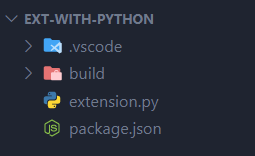
Step 4
Press F5. This will run the extension and open a new vscode window in development mode.
Step 5
Finally, test your command.
- Open the command palette with Ctrl+P in the development window.

- Type
>Hello World

- It should show a popup like this in the bottom right corner

Extensions built using vscode.py
Here's a list of some extensions built using vscode.py. If you'd like to include your extension here feel free to create a PR.
Documentation
The docs are coming soon! In the meantime you can look at the examples in order to learn how vscode.py works and what it offers!
Project details
Verified details
These details have been verified by PyPIProject links
GitHub Statistics
Maintainers


Download files
Download the file for your platform. If you're not sure which to choose, learn more about installing packages.
Source Distribution
Built Distribution
Filter files by name, interpreter, ABI, and platform.
If you're not sure about the file name format, learn more about wheel file names.
Copy a direct link to the current filters
File details
Details for the file vscode_py2-2.0.3.tar.gz.
File metadata
- Download URL: vscode_py2-2.0.3.tar.gz
- Upload date:
- Size: 18.3 kB
- Tags: Source
- Uploaded using Trusted Publishing? Yes
- Uploaded via: twine/5.1.0 CPython/3.12.5
File hashes
| Algorithm | Hash digest | |
|---|---|---|
| SHA256 |
eb8ee2cb3459d40c696437aba2db0bd561dee85815df9523cb99a590a9786986
|
|
| MD5 |
e1ab6895ad65586629b71f1af60132a4
|
|
| BLAKE2b-256 |
7774644862434f4b847ca32ab2bd2bf494efda0296ab5206d542cf76ea521cef
|
File details
Details for the file vscode.py2-2.0.3-py3-none-any.whl.
File metadata
- Download URL: vscode.py2-2.0.3-py3-none-any.whl
- Upload date:
- Size: 20.2 kB
- Tags: Python 3
- Uploaded using Trusted Publishing? Yes
- Uploaded via: twine/5.1.0 CPython/3.12.5
File hashes
| Algorithm | Hash digest | |
|---|---|---|
| SHA256 |
271488d271ee985cd3f05632e4216d0af5b6b6d1d25baffbcdc839776eb7642f
|
|
| MD5 |
ff356de865aa7e2421c177ed20c4cbd0
|
|
| BLAKE2b-256 |
5ebb1e394db33fc2f3e76e0f998e2cd2f8cb64c931b35a04a36e1546dc5a8fe6
|






