
ITS Private Cloud Command Line Interface


Project description
ITS Private Cloud Command Line Interface vss-cli




The ITS Private Cloud Command-Line Interface vss-cli simplifies the interaction with the
ITS Private Cloud RESTful API to manage your virtual machines and other services.
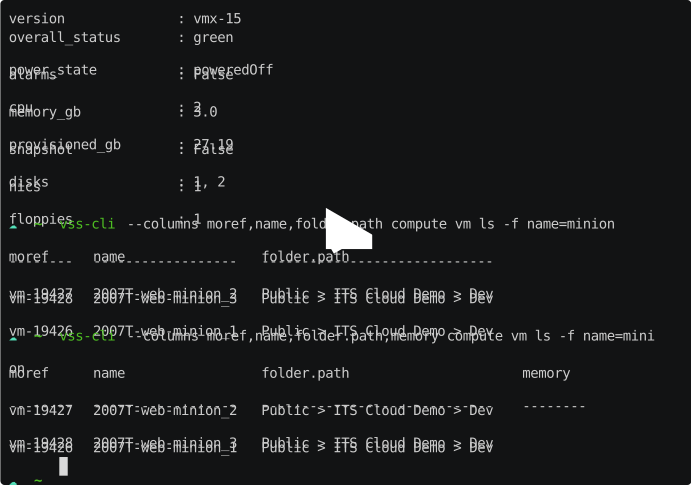
Documentation
Package documentation is now available at docs.
Installation
Windows users, follow the installation instructions [Installing Python on Windows][Installing Python on Windows] and add
%USERPROFILE%\AppData\Roaming\Python\Python37\ScriptstoPATHenvironment variable prior running pip.
The fastest way to install VSS CLI is to use pip:
pip install vss-cli
If you are planning to interact with vskey-stor execute the following command
pip install vss-cli[stor]
The command will install webdavclient3 package from PyPI and Linux operating systems require libxml2.
Windows users, please install
windows-cursesandvss-clias follows:pip install --user vss-cli windows-curses.
If you have the VSS CLI installed and want to upgrade to the latest version you can run:
pip install --upgrade vss-cli
This will install VSS CLI as well as all dependencies. You can also just download the tarball.
Once you have the vss-cli directory structure on your workstation, you can just run:
cd path_to_vss-cli
python setup.py install
Docker
If you do not have a Python setup you can try using vss-cli via a container using Docker.
docker run uofteis/vss-cli
docker-vss-cli is a helpful script to run the vss-cli within a
docker container. Just download or move the file and update the environment variables if required,
give execution permission and move it to your $PATH:
curl https://gitlab-ee.eis.utoronto.ca/vss/vss-cli/raw/master/docker/docker-vss-cli > vss-cli
chmod +x vss-cli
CLI Releases
The release notes for the VSS CLI can be found CHANGELOG in the gitlab repo.
Getting Started
Before using VSS CLI, you need setup your VSS credentials. You can do this in a couple of ways:
- Configuration file
- Environment variables
- Command Line Input
The quickest way to get started is to run the vss-cli configure mk command:
vss-cli configure mk

Endpoint [https://cloud-api.eis.utoronto.ca]:
Username: jm
Password:
Repeat for confirmation:
To use environment variables, set VSS_USER and VSS_USER_PASS or VSS_TOKEN:
export VSS_USER=USER
export VSS_USER_PASS=superstrongpassword
# or
export VSS_TOKEN=JWT_TOKEN
For detailed information about the vss-cli configuration, please refer to the
official documentation site.
JSON Parameter Input
VSS CLI options vary from simple string, boolean or numeric values to JSON data structures as input parameters on the command line.
For example, consider the following command to deploy a new virtual machine from a given template and provide a guest operating system specification to reconfigure hostname, domain, dns, ip, subnet and gateway:
vss compute vm mk from-template --source c5916abb-def3-4d4d-8abe-2240b0a6c265 \
      --description 'New virtual machine' \
      --custom-spec '{"hostname": "fe1", "domain": "eis.utoronto.ca", "interfaces": [{"dhcp": true}]}'
Auto-completion
Bash completion support is provided by Click and will complete sub commands and parameters. Sub commands are always listed whereas parameters only if at least a dash has been provided. Example:
vss-cli compute <TAB><TAB>
account    compute    configure  request    stor       token

vss-cli -<TAB><TAB>
--config      --no-verbose  --output      --verbose     --version     -c            -o
Activating bash or zsh completion can be done by executing the following commands:
For bash:
source <(vss-cli completion bash)
For zsh:
source <(vss-cli completion zsh)
For fish
_VSS_CLI_COMPLETE=fish_source vss-cli > ~/.config/fish/completions/vss-cli-complete.fish
If you do it from your .bashrc or .zshrc it is recommend to use the form below
as that does not trigger a run of vss-cli itself.
For bash:
eval "$(_VSS_CLI_COMPLETE=bash_source vss-cli)"
For zsh:
eval "$(_VSS_CLI_COMPLETE=zsh_source vss-cli)"
For fish:
eval (env _VSS_CLI_COMPLETE=fish_source vss-cli)
VSS Shell
The VSS CLI provides a REPL interactive shell with tab-completion, suggestions and command history.
Usage: vss shell [OPTIONS]

  REPL interactive shell.

Options:
  -i, --history TEXT  File path to save history
  --help              Show this message and exit.
To enter the shell just execute vss shell and you will get the following welcome message:
    __   _____ ___
    \ \ / / __/ __|      API Endpoint: https://cloud-api.eis.utoronto.ca/v2
     \ V /\__ \__ \      Tab-completion & suggestions
      \_/ |___/___/      Prefix external commands with "!"
       CLI v20xx.0.0      History is saved: /Users/user/.vss-cli/history

    Exit shell with :exit, :q, :quit, ctrl+d

vss (cloud-api) >
Getting Help
We use GitLab issues for tracking bugs, enhancements and feature requests. If it turns out that you may have found a bug, please open a new issue.
vss-cli --help

Usage: vss-cli [OPTIONS] COMMAND [ARGS]...

  Command line interface for the ITS Private Cloud.

Options:
  -e, --endpoint TEXT             The Cloud API endpoint URL
  -c, --config TEXT               Configuration file
  -t, --token TEXT                The Bearer token for the VSS API.
  -u, --username TEXT             The API username for VSS API.
  -p, --password TEXT             The API password for VSS API.
  --timeout INTEGER               Timeout for network operations.
  -l, --loglevel LVL              Either CRITICAL, ERROR, WARNING, INFO or
                                  DEBUG
  -v, --verbose                   Enables verbose mode.
  --debug                         Enables debug mode.
  -x                              Print back traces when exception occurs.
  -o, --output [json|yaml|table|auto|ndjson]
                                  Output format (default: auto).
  --table-format TEXT             Which table format to use (default: simple)
  --columns TEXT                  Custom columns key=value list. Example:
                                  VM=moref,PROVISIONED=storage.provisionedGB
  --columns-width INTEGER         Truncates column values (0: auto, -1:
                                  disable).
  --wait / --no-wait              wait for request(s) to complete
  -n, --no-headers                When printing tables don't use headers
                                  (default: print headers)
  -s, --sort-by TEXT              Sort table by the jsonpath expression.
                                  Example: updated_on
  -w, --webdav-server TEXT        The Webdav server.
  --version                       Show the version and exit.
  --help                          Show this message and exit.


Commands:
  account     Manage your VSS account
  completion  Output shell completion code for the specified shell (bash or
              zsh or fish).
  compute     Manage VMs, networks, folders, etc.
  configure   Configure VSS-CLI options.
  key         Manage your SSH Public Keys.
  message     Manage VSS Messages.
  misc        Miscellaneous utilities.
  plugins     External plugins.
  raw         Make a raw call to the API
  request     Manage various requests
  service     ITS Service catalog.
  shell       REPL interactive shell.
  status      Check API Status.
  stor        Manage your VSS storage account.
  token       Manage access tokens
  upgrade     Upgrade VSS CLI and dependencies.
Versioning
The vss-cli versions are tagged based on Calendar Versioning. Versions available in the
tags section or PyPI package section.
Contributing
Refer to the Contributing Guide and Contributors for details on our code of conduct and the process of submitting code to the repository.
Changelog 📝
Refer to the Changelog for details.
Release history Release notifications | RSS feed


Download files
Download the file for your platform. If you're not sure which to choose, learn more about installing packages.
Source Distribution
Built Distribution
Filter files by name, interpreter, ABI, and platform.
If you're not sure about the file name format, learn more about wheel file names.
Copy a direct link to the current filters
File details
Details for the file vss-cli-2022.6.1.dev0.tar.gz.
File metadata
- Download URL: vss-cli-2022.6.1.dev0.tar.gz
- Upload date:
- Size: 102.8 kB
- Tags: Source
- Uploaded using Trusted Publishing? No
- Uploaded via: twine/4.0.1 CPython/3.9.2
File hashes
| Algorithm | Hash digest | |
|---|---|---|
| SHA256 |
a5fcc62522e6282f3fdb60dac341aeb5fd59e1fbf79c147bae161c97a73ff7fc
|
|
| MD5 |
ead987e4f9f79bcd87d15b78f7d2f31e
|
|
| BLAKE2b-256 |
aa5fd84f74a842341642968b60464d1d9d319d5105fd4f98e8056a168aa94bfe
|
File details
Details for the file vss_cli-2022.6.1.dev0-py2.py3-none-any.whl.
File metadata
- Download URL: vss_cli-2022.6.1.dev0-py2.py3-none-any.whl
- Upload date:
- Size: 134.1 kB
- Tags: Python 2, Python 3
- Uploaded using Trusted Publishing? No
- Uploaded via: twine/4.0.1 CPython/3.9.2
File hashes
| Algorithm | Hash digest | |
|---|---|---|
| SHA256 |
cb23b8815bb7fc56f8d428c4a3031f07e3f61e8d2b438d0ca21f85d2f09a6463
|
|
| MD5 |
cafe63a5752dba51c8c18a443a58fb06
|
|
| BLAKE2b-256 |
c86a54a916b51847085958a140d92fb0b9f832273e152c7ecf507d6c7cc850b4
|






