
VT.ai - Minimal multimodal AI chat app with dynamic conversation routing

Project description
VT.ai
VT.ai is an open-source multimodal AI chat application with dynamic conversation routing. Supports multiple LLM providers with semantic-based routing and comprehensive multimodal capabilities.
Installation
Native Installer (Recommended)
- Automatic Python 3.11 setup
- Installs
uvpackage manager (faster than pip) - Creates isolated virtual environment
- Installs all dependencies including Chainlit
- Interactive API key configuration
- Auto-launches VT.ai after installation
Linux & macOS:
curl -fsSL https://raw.githubusercontent.com/vinhnx/VT.ai/main/scripts/install_and_run.sh | bash
# Or skip API key configuration
curl -fsSL https://raw.githubusercontent.com/vinhnx/VT.ai/main/scripts/install_and_run.sh | bash -s -- --no-api-config
Windows (PowerShell):
git clone https://github.com/vinhnx/VT.ai.git
cd VT.ai
.\scripts\install_and_run.bat
Alternative Installation Methods:
# PyPI (standard installation)
pip install vtai

# With uv (faster)
uv pip install vtai

# Try without installing
uvx --python 3.11 vtai
See Installation Guide and Security Notice for more options and troubleshooting.
Usage
# Set your API key
export OPENAI_API_KEY="sk-..."

# Launch VT.ai
vtai
The application will open in your default browser at http://localhost:8000.
Command-Line Usage
# Start the application
vtai

# Configure API keys
vtai --api-key openai=sk-...

# Show help
vtai --help

# Show version
vtai --version
Supported Providers: openai, anthropic, gemini, deepseek, ollama
Capabilities
Multimodal Support
VT.ai provides comprehensive multimodal capabilities:
- Text Chat: Natural conversations with multiple AI models
- Image Generation: Create images with DALL-E 3 and GPT-Image-1
- Visual Analysis: Upload and analyze images with vision models
- Voice Interaction: Speech-to-text and text-to-speech with configurable voices
- Web Search: Real-time information retrieval with Tavily API
- Reasoning Visualization: Step-by-step thinking with
<think>tag
Semantic Routing
VT.ai uses vector-based semantic routing to automatically direct queries to the most appropriate model:
- Fast Classification: Uses FastEmbed embeddings for instant routing decisions
- No Manual Selection: Automatic model selection based on query intent
- Optimized Performance: Reduces latency by avoiding unnecessary LLM calls
- Custom Routes: Extensible routing system for specialized use cases
For more information about capabilities, see Usage Guide.
Supported Providers
VT.ai works with OpenAI, Anthropic, Google Gemini, DeepSeek, Cohere, Ollama (local), and more. Set the corresponding environment variable for your provider:
export OPENAI_API_KEY="sk-..."        # OpenAI (GPT-o1, GPT-o3, GPT-4o)
export ANTHROPIC_API_KEY="sk-ant-..." # Anthropic (Claude 3.5/3.7)
export GEMINI_API_KEY="..."           # Google (Gemini 2.0/2.5)
export DEEPSEEK_API_KEY="..."         # DeepSeek models
See Provider Configuration for complete setup instructions.
Configuration
VT.ai supports flexible configuration options:
API Key Management:
- Environment Variables: Session-only configuration
- Command-Line:
vtai --api-key provider=key - Persistent Storage: Securely stored in
~/.config/vtai/.env
Model Selection:
- Automatic routing based on query semantics
- Manual override via conversation profiles
- Custom model aliases in configuration
For full configuration options, see Configuration Guide.
Key Features
- Multi-Provider Integration: Unified access to models from OpenAI, Anthropic, Google, DeepSeek, and local models via Ollama
- Semantic Routing System: Vector-based classification using FastEmbed embeddings for automatic model selection
- Multimodal Capabilities: Text, image, and audio inputs with advanced vision analysis
- Image Generation: GPT-Image-1 integration with transparent backgrounds, multiple formats, and quality parameters
- Web Search Integration: Real-time information retrieval with source attribution via Tavily API
- Voice Processing: Advanced speech-to-text and text-to-speech with configurable voice options
- Reasoning Visualization: Step-by-step model reasoning with
<think>tag for transparent decision processes - Security First: All dependencies regularly updated with automated vulnerability scanning
Security & Safety
VT.ai implements a security-first approach to protect users and their data:
Dependency Security:
- Automated Scanning: Dependabot integration for vulnerability detection
- Regular Updates: All dependencies kept at latest secure versions
- Override Dependencies: Force secure versions for transitive dependencies
- Version Pinning: Critical dependencies pinned to known-safe versions
Data Protection:
- Local Storage: API keys stored locally in
~/.config/vtai/.env - No Data Collection: No telemetry or data collection by default
- Secure Defaults: Conservative security settings out of the box
- Workspace Isolation: All operations confined to workspace boundaries
Latest Security Release (v0.7.5):
- Fixed 25 vulnerabilities in dependencies
- Updated aiohttp, cryptography, mcp, PyJWT, black, onnx, and pillow
- Added uv override-dependencies for transitive security fixes
See Security Information for complete details.
Docs & Examples
- Getting Started
- Security Information
- Usage Guide
- Provider Guides
- Developer Guide
- API Reference
- Troubleshooting
Command-Line Reference
# Basic usage
vtai

# Configure API keys
vtai --api-key <provider>=<key>

# Supported providers
vtai --api-key openai=sk-...
vtai --api-key anthropic=sk-ant-...
vtai --api-key gemini=...

# Show help
vtai --help

# Show version
vtai --version
Environment Variables:
export OPENAI_API_KEY="sk-..."
export ANTHROPIC_API_KEY="sk-ant-..."
export GEMINI_API_KEY="..."
vtai
Supported Models
| Category | Models |
|---|---|
| Chat | GPT-o1, GPT-o3 Mini, GPT-4o, Claude 3.5/3.7, Gemini 2.0/2.5 |
| Vision | GPT-4o, Gemini 1.5 Pro/Flash, Claude 3, Llama3.2 Vision |
| Image Gen | GPT-Image-1 with custom parameters |
| TTS | GPT-4o mini TTS, TTS-1, TTS-1-HD |
| Local | Llama3, Mistral, DeepSeek R1 (1.5B to 70B via Ollama) |
See Models Documentation for detailed model capabilities and configuration.
Technical Architecture
VT.ai leverages several open-source projects:
- Chainlit: Modern chat interface framework
- LiteLLM: Unified model abstraction layer
- SemanticRouter: Intent classification system
- FastEmbed: Efficient embedding generation
- Tavily: Web search capabilities
Architecture Components:
- Entry Point:
vtai/app.py- Main application logic - Routing Layer:
vtai/router/- Semantic classification system - Assistants:
vtai/assistants/- Specialized handlers - Tools:
vtai/tools/- Web search, file operations, integrations
See Architecture Documentation for details.
Contributing
I warmly welcome contributions of all kinds! Whether you're looking to fix bugs, add new features, improve documentation, or enhance the user experience, your help is greatly appreciated.
How To Contribute:
- Report issues you're experiencing
- Suggest new features or improvements
- Help answer questions in the issue tracker
- Improve documentation or add examples
If you're not sure where to start:
- Check out the issues page
- Look for good first issue labeled items
- Feel free to browse all open issues and pick one that resonates with you!
Steps to get started:
- Fork the repository by clicking the Fork button in the top-right corner
- Clone your forked repository to your local machine
- Create a new branch for your changes
- Start contributing!
When reporting an issue, please include enough details for others to reproduce the problem effectively.
See CONTRIBUTING.md for detailed guidelines.
Recent Releases
v0.7.5 (April 2, 2026) - Security Release
Critical security update addressing 25 vulnerabilities in dependencies.
- Fixed high-severity CVEs in aiohttp, cryptography, mcp, PyJWT, black, onnx, and pillow
- Added uv override-dependencies for transitive security fixes
- Pinned Python version to 3.11.x for stable dependency resolution
v0.7.4
- Optimized URL extraction and async file handling
- Enhanced router training capabilities
- Improved LLM provider configuration
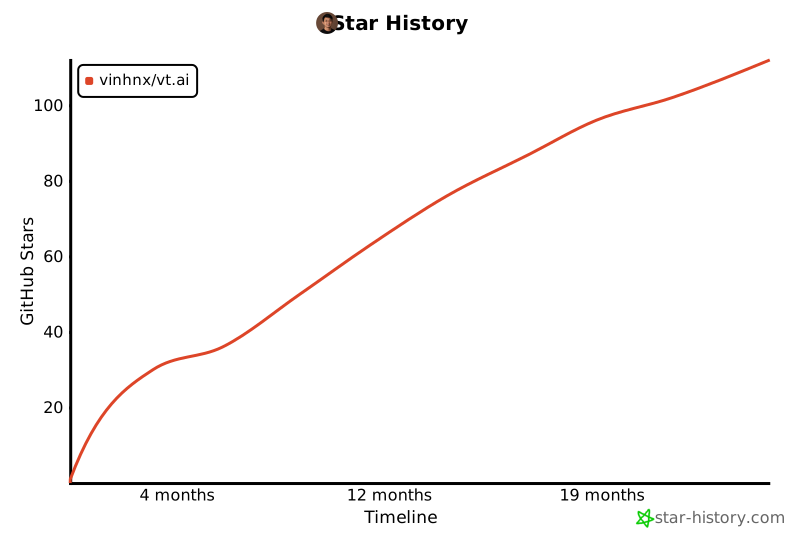
Star History
License
VT.ai is available under the MIT License.
Release history Release notifications | RSS feed


Download files
Download the file for your platform. If you're not sure which to choose, learn more about installing packages.
Source Distribution
Built Distribution
Filter files by name, interpreter, ABI, and platform.
If you're not sure about the file name format, learn more about wheel file names.
Copy a direct link to the current filters
File details
Details for the file vtai-0.7.7.tar.gz.
File metadata
- Download URL: vtai-0.7.7.tar.gz
- Upload date:
- Size: 1.1 MB
- Tags: Source
- Uploaded using Trusted Publishing? No
- Uploaded via: twine/6.2.0 CPython/3.11.15
File hashes
| Algorithm | Hash digest | |
|---|---|---|
| SHA256 |
dd481791cb13af6b348e1f17f9dce0ef6e9bcaa338257af524f56e45d028fb00
|
|
| MD5 |
f27b857c2cb1712d22f279821f3685d5
|
|
| BLAKE2b-256 |
169ce0b2678e98c3ed97ba12d0f224f46358686667b17420747fd6820a15eefa
|
File details
Details for the file vtai-0.7.7-py3-none-any.whl.
File metadata
- Download URL: vtai-0.7.7-py3-none-any.whl
- Upload date:
- Size: 383.0 kB
- Tags: Python 3
- Uploaded using Trusted Publishing? No
- Uploaded via: twine/6.2.0 CPython/3.11.15
File hashes
| Algorithm | Hash digest | |
|---|---|---|
| SHA256 |
4fa8750a10ac3697587539757ca05aeef8a8e8ed3a0b486a70cd13dcb85e27b8
|
|
| MD5 |
85313a3cca0663fef19cd2f7cfbcde29
|
|
| BLAKE2b-256 |
ee701f5c79381619d757081e5794cea89ef4fc9caa283157b4327fc8637a1820
|






