
VTK Prompt




A command-line interface and web-based UI for generating VTK visualization code using Large Language Models (Anthropic Claude, OpenAI GPT, NVIDIA NIM, and local models).
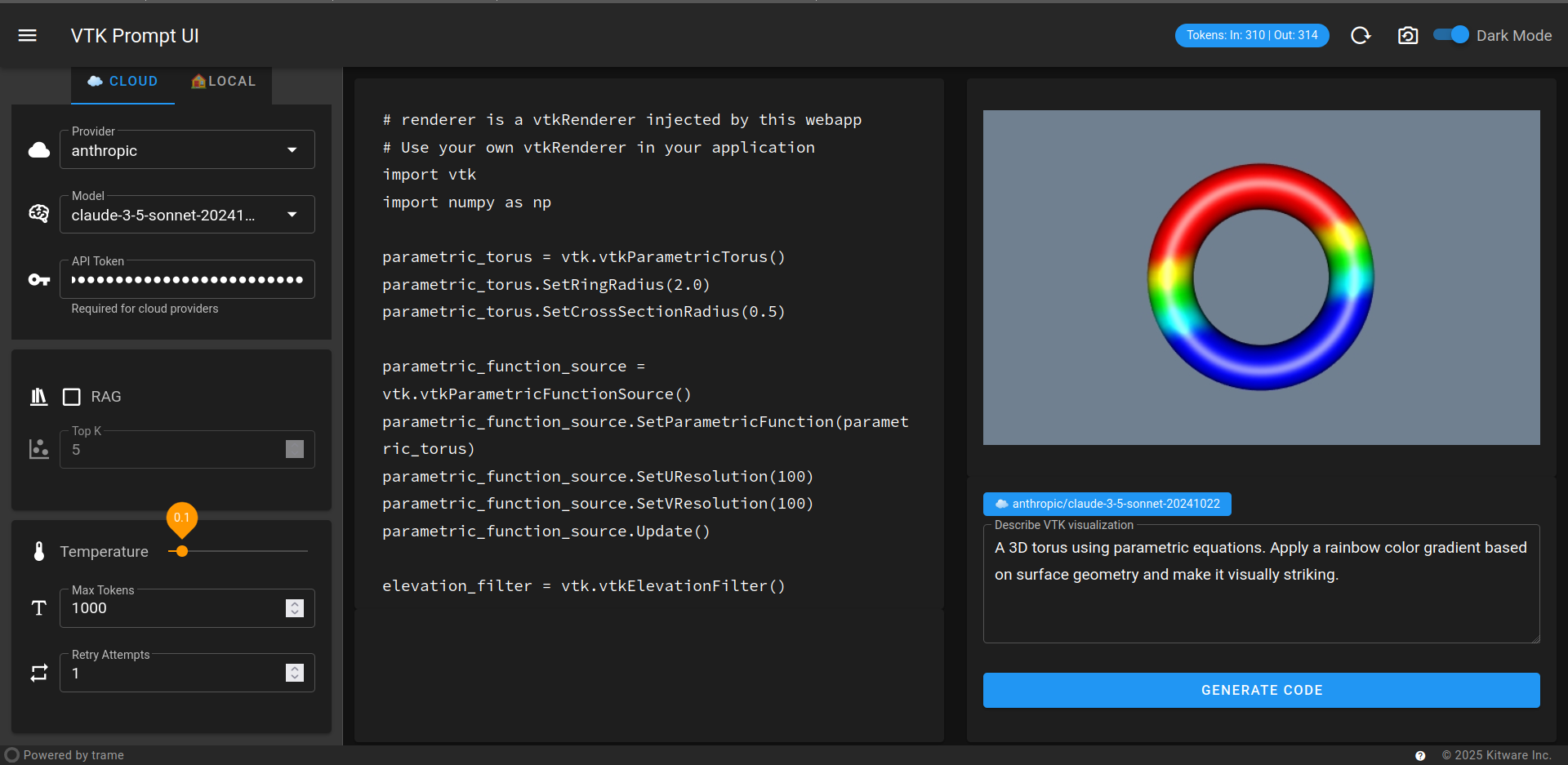
Features
- Multiple LLM providers: Anthropic Claude, OpenAI GPT, NVIDIA NIM, and local models
- Interactive web UI with live VTK rendering
- Retrieval-Augmented Generation (RAG) with VTK examples database
- Real-time visualization of generated code
- Token usage tracking and cost monitoring
- CLI and Python API for integration
Installation
From PyPI (Stable)
pip install vtk-prompt
From TestPyPI (Latest Development)
pip install -i https://test.pypi.org/simple/ --extra-index-url https://pypi.org/simple/ vtk-prompt
From Source
git clone https://github.com/vicentebolea/vtk-prompt.git
cd vtk-prompt
pip install -e .
Quick Start
1. Set up API keys
export ANTHROPIC_API_KEY="your-anthropic-key"
export OPENAI_API_KEY="your-openai-key"  # Optional
2. Launch Web UI (Recommended)
vtk-prompt-ui
Access the UI at http://localhost:8080
3. Or use CLI
# Generate VTK code
vtk-prompt "Create a red sphere"

# With RAG enhancement
vtk-prompt "Create a sphere with custom resolution" --rag

# Different providers
vtk-prompt "Create a blue cube" --provider openai
vtk-prompt "Create a cone" --provider nim --token YOUR_NIM_TOKEN
Usage
Web UI Features
The web interface provides:
- Model selection: Choose between Claude models (Haiku, Sonnet 4) and other providers
- Token control: Adjust maximum tokens for responses
- Usage tracking: Real-time display of input/output tokens and costs
- RAG integration: Toggle retrieval-augmented generation for better results
- Live preview: See VTK visualizations rendered in real-time
- Code export: View, edit, and copy generated VTK code
- Local & cloud support: Both cloud APIs and local model endpoints
Command Line Interface
# Basic usage
vtk-prompt "Create a red sphere"

# Advanced options
vtk-prompt "Create a textured cone with 32 resolution" \
  --provider anthropic \
  --model claude-opus-4-1-20250805 \
  --max-tokens 4000 \
  --rag \
  --verbose

# Using different providers
vtk-prompt "Create a blue cube" --provider openai --model gpt-5
vtk-prompt "Create a cylinder" --provider nim --model meta/llama3-70b-instruct
RAG (Retrieval Augmented Generation)
Enhance code generation with relevant VTK examples:
- Build RAG database (one-time setup):
vtk-build-rag
- Test RAG system (optional):
vtk-test-rag "How to create a cube in VTK"
- Use RAG in queries:
vtk-prompt "Create a vtkSphereSource with texture mapping" --rag
Python API
from vtk_prompt import VTKPromptClient

client = VTKPromptClient()
code = client.generate_code("Create a red sphere")
print(code)
Configuration
Environment Variables
ANTHROPIC_API_KEY- Anthropic Claude API keyOPENAI_API_KEY- OpenAI API key (also used for NVIDIA NIM)
Supported Providers & Models
| Provider | Default Model | Base URL |
|---|---|---|
| anthropic | claude-opus-4-1-20250805 | https://api.anthropic.com/v1 |
| openai | gpt-5 | https://api.openai.com/v1 |
| nim | meta/llama3-70b-instruct | https://integrate.api.nvidia.com/v1 |
| custom | User-defined | User-defined (for local models) |
Custom/Local Models
You can use local models via OpenAI-compatible APIs:
# Using Ollama
vtk-prompt "Create a sphere" \
  --provider custom \
  --base-url http://localhost:11434/v1 \
  --model llama2

# Using LM Studio
vtk-prompt "Create a cube" \
  --provider custom \
  --base-url http://localhost:1234/v1 \
  --model local-model
CLI Reference
usage: vtk-prompt [-h] [--provider {anthropic,openai,nim,custom}]
                  [-m MODEL] [-k MAX_TOKENS] [-t TOKEN] [--base-url BASE_URL]
                  [-r] [-v] [--collection COLLECTION] [--database DATABASE]
                  [--top-k TOP_K] input_string

Generate VTK visualization code using Large Language Models

positional arguments:
  input_string          Description of the VTK visualization to generate

options:
  -h, --help            Show this help message and exit
  -m MODEL, --model MODEL
                        Model name to use
  -k MAX_TOKENS, --max-tokens MAX_TOKENS
                        Maximum number of tokens to generate
  -t TOKEN, --token TOKEN
                        API token (defaults to environment variable)
  --base-url BASE_URL   Base URL for API (for custom/local models)
  -r, --rag             Use Retrieval Augmented Generation
  -v, --verbose         Show generated source code
  --provider {anthropic,openai,nim,custom}
                        LLM provider to use

RAG Options:
  --collection COLLECTION
                        Collection name for RAG (default: vtk-examples)
  --database DATABASE   Database path for RAG (default: ./db/codesage-codesage-large-v2)
  --top-k TOP_K         Number of examples to retrieve (default: 5)
Available Commands
vtk-prompt- Main CLI for code generationvtk-prompt-ui- Launch web interfacevtk-build-rag- Build RAG database from VTK examplesvtk-test-rag- Test RAG functionalitygen-vtk-file- Generate VTK XML filesrag-chat- Interactive RAG chat interface
Contributing
Contributions are welcome! Please feel free to submit a Pull Request.
For detailed development instructions, see DEVELOPMENT.md which covers:
- Setting up the development environment
- Running tests and linting
- Developer mode for the web UI
- Code formatting and type checking
- Pre-commit hooks
- Fork the repository
- Create your feature branch (
git checkout -b feature/amazing-feature) - Commit your changes (
git commit -m 'Add some amazing feature') - Push to the branch (
git push origin feature/amazing-feature) - Open a Pull Request
License
This project is licensed under the MIT License - see the LICENSE file for details.
Architecture
- Core: Python package with CLI and API
- UI: Trame-based web interface with VTK rendering
- RAG: ChromaDB + Llama Index for code example retrieval
- Providers: Unified interface for multiple LLM APIs
Links
Made with care for the VTK and scientific visualization community.
1 maintainer

Metadata
1 maintainer
Release files for vtk-prompt 0.1.0
For a detailed explanation of source distributions (sdists) and built distributions (wheels), please see the package formats documentation.
Source distribution (sdist)
| File | Size | Uploaded | |
|---|---|---|---|
| vtk_prompt-0.1.0.tar.gz | 791.7 kB | Details |
Built distribution (wheel)
| File | Interpreter | ABI | Platform | Reset |
|---|---|---|---|---|
| vtk_prompt-0.1.0-py3-none-any.whl | Python 3 | none | any | Details |
Total release size: 829.5 kB
Release files / vtk_prompt-0.1.0.tar.gz
| Download URL | vtk_prompt-0.1.0.tar.gz |
|---|---|
| Size | 791.7 kB |
| Tags | Source |
|
SHA-256 checksum How to use checksums |
a33164ba6aa22845fc230e7453c2c4d783adaa710a7e805d14759fae06901581
|
|
BLAKE2b-256 checksum How to use checksums |
2d25cc3bd422e412d1d9cb19a71f244d19e76d2c2656470dfb98238b2b5a0eab
|
| Upload date | |
|
Uploaded using Trusted Publishing? What is trusted publishing? |
Yes |
| Uploaded via |
twine/6.1.0 CPython/3.13.7
|
Provenance
Provenance describes where a file came from. On PyPI, provenance is shared via attestations, which provide a verifiable record of the build or publishing details. View details, limitations and caveats.


PyPI Publish Attestation
PyPI verified that this artifact, at this checksum, originated from the publisher listed below.
Signed by GitHub Actions, verified by PyPI on Oct 24, 2025.
Transparency logRelease files / vtk_prompt-0.1.0-py3-none-any.whl
| Download URL | vtk_prompt-0.1.0-py3-none-any.whl |
|---|---|
| Size | 37.8 kB |
| Tags | Python 3 |
|
SHA-256 checksum How to use checksums |
120ea07a603d85fdf2c6fb85b55cd993a9293fef4f44396164efb6b6ac5c361e
|
|
BLAKE2b-256 checksum How to use checksums |
a1da44ead723596eb9d4d5d79ac94dd5666f986b9af56678ef9aee83a7419c91
|
| Upload date | |
|
Uploaded using Trusted Publishing? What is trusted publishing? |
Yes |
| Uploaded via |
twine/6.1.0 CPython/3.13.7
|
Provenance
Provenance describes where a file came from. On PyPI, provenance is shared via attestations, which provide a verifiable record of the build or publishing details. View details, limitations and caveats.
PyPI Publish Attestation
PyPI verified that this artifact, at this checksum, originated from the publisher listed below.
Signed by GitHub Actions, verified by PyPI on Oct 24, 2025.
Transparency log













