

Generate self-contained HTML vulnerability reports from Cloudsmith, Trivy, Grype and Snyk. Every report is a single file that opens with no network access.


Installation
Install from PyPI (Currently in beta):
pip install vulnly
Or with Homebrew on macOS and Linux:
brew install fullstackspectrum/vulnly/vulnly
Features
- Fully offline reports — a single HTML file with fonts, charting library and logo embedded. No CDN, no web fonts, no outbound requests when opened, so reports work on airgapped hosts and keep working once archived
- Supports multiple scanner sources: Cloudsmith (both the v1 CLI scan output and the v2 OSV advisory API), Trivy, Grype, and Snyk (auto-detected or via
--sourceflag) - Repository summary reports — automatically detects Cloudsmith repo-level summaries and generates a dedicated overview report with package status breakdown, aggregate vulnerability counts, and per-package detail table
- Dark and light colour themes via
--themeflag, plus an in-report toggle so readers can switch without regenerating - Interactive doughnut charts showing severity or status distribution (Chart.js, bundled)
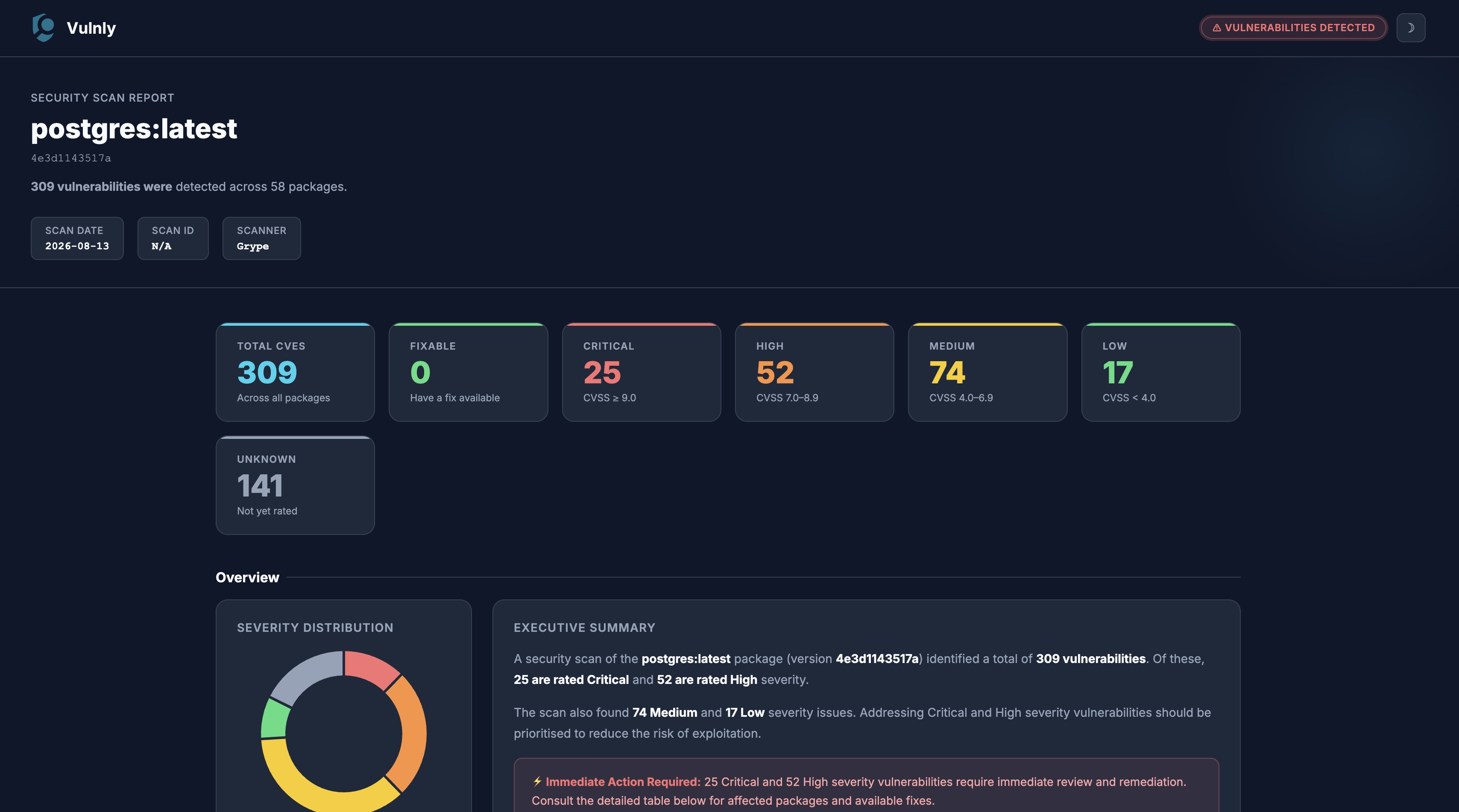
- Severity stat cards (Total, Critical, High, Medium, Low, Unknown) and a count of findings that have a fix available
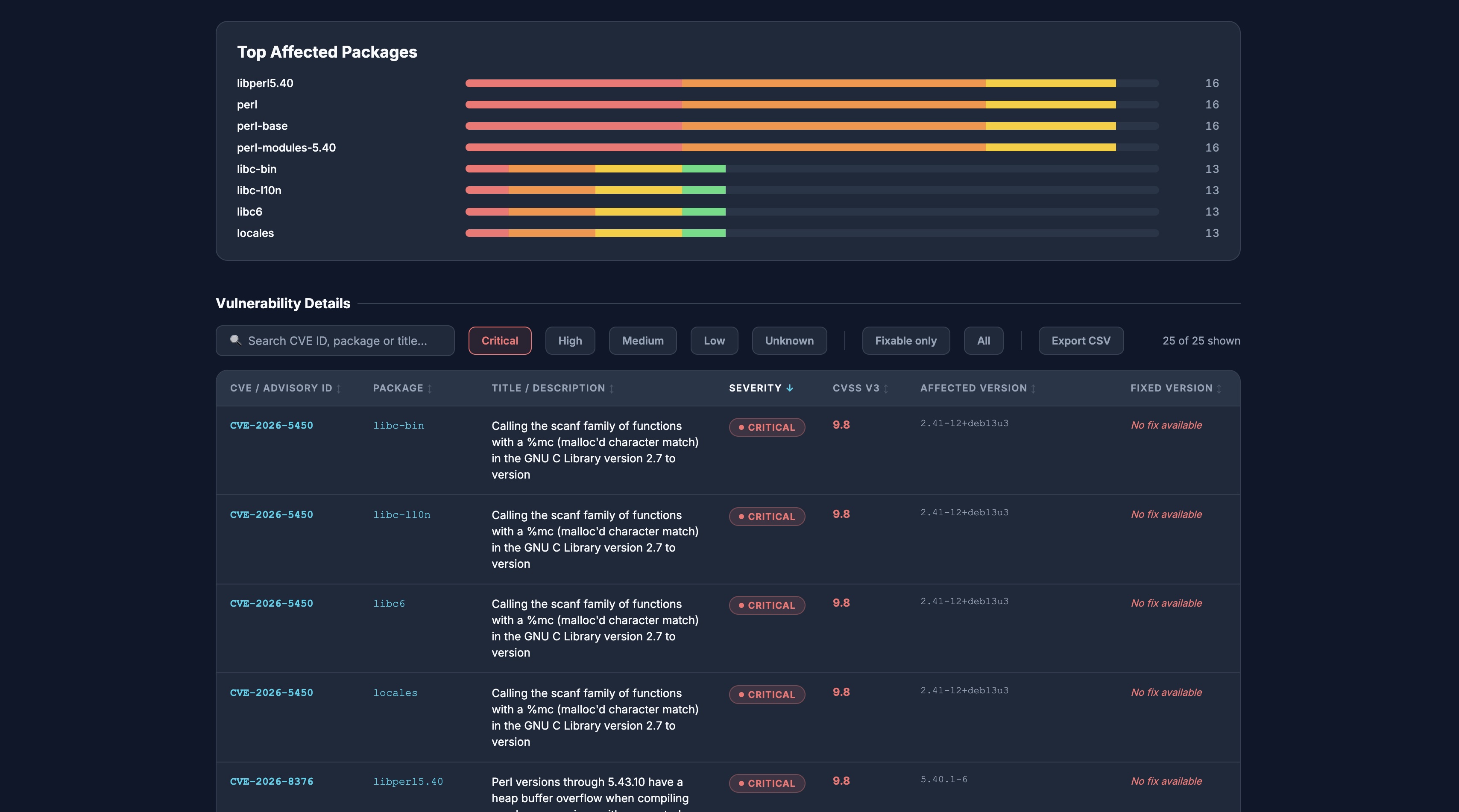
- Top affected packages — a ranked breakdown showing where findings are concentrated, since one bad dependency usually dominates a scan
- Auto-generated executive summary, with an alert that distinguishes urgent findings from routine ones and from a clean scan
- Client-side search, severity filters and a fixable-only toggle, with sortable columns and pagination so large reports stay usable
- CSV export of the current filtered view, safe to open in a spreadsheet
- Automatic linking for CVE IDs (NVD) and GHSA IDs (GitHub Advisories)
- Customisable logo — supply via
--logo, embedded in the report as a data URI - Accepts input from a file or stdin (
-), making it easy to pipe from other tools - Input validation with helpful warnings for malformed data
- Zero external dependencies — uses only the Python standard library
Quick Start
vulnly sample_data.json
This reads sample_data.json and writes the report to reports/ (the default output directory).
Specify the scanner source
The tool auto-detects the input format, but you can be explicit:
vulnly scan.json --source trivy
vulnly scan.json --source grype
vulnly scan.json --source snyk
vulnly scan.json --source cloudsmith
vulnly scan.json --source cloudsmith-osv
If --source is specified and the input doesn't match the expected format, the tool exits with a clear error message.
Repository summary reports
Cloudsmith repo-level summary JSON is automatically detected and generates a dedicated repository overview report:
vulnly repo_summary.json
The output includes package status cards (vulnerable / no issues / not scanned), aggregate vulnerability severity breakdown, a status distribution chart, and a searchable/filterable package table.
Specify a custom output path
vulnly sample_data.json -o my_report.html
Custom logo
Use the --logo flag to supply a custom logo image. It will be embedded directly in the HTML report header as a base64 data URI:
vulnly sample_data.json --logo my-company-logo.png
Logo requirements:
| Constraint | Limit |
|---|---|
| Max file size | 2 MB |
| Max dimensions | 512 × 512 px |
| Recommended size | 128 × 128 px to 256 × 256 px |
| Supported formats | .png, .jpg, .jpeg, .gif, .svg, .webp, .ico |
If a custom logo exceeds the file size or dimension limits, a warning is printed and the default Vulnly logo is used instead.
If no --logo is provided, the built-in Vulnly logo is used.
Theme
Choose the theme the report opens in — dark is the default:
vulnly sample_data.json --theme light
vulnly sample_data.json --theme dark
Every report also carries both palettes, so readers can switch with the toggle in the report header regardless of which theme it was generated in. Their choice is remembered per browser.
Read from stdin
Pipe JSON directly from another command:
cat scan_output.json | vulnly -
Cloudsmith CLI
Pipe vulnerability scan results directly from the Cloudsmith CLI:
cloudsmith vulnerabilities WORKSPACE/REPO/PACKAGE_IDENTIFIER --output-format json | vulnly -
Cloudsmith vulnerabilities API (v2, OSV)
The v2 vulnerabilities endpoint serves OSV advisory records for a package, and supersedes the v1 data the CLI command returns. It answers with advisories alone and names no package, so pass the package identity yourself:
curl -s -H "X-Api-Key: $CLOUDSMITH_API_KEY" \
  "https://api.cloudsmith.io/v2/packages/PACKAGE_SLUG_PERM/vulnerabilities/" \
| vulnly --source cloudsmith-osv - \
    --repository WORKSPACE/REPO --package log4j --package-version 2.14.1
The endpoint paginates (page, page_size) and filters server-side by
threat_level, cvss_min/cvss_max, vulnerability_id and is_malware.
Whatever a page contains is what the report covers, so raise page_size if
you want everything in one report.
Trivy
Scan an image with Trivy and pipe directly to Vulnly:
trivy image -f json nginx:latest | vulnly --source trivy -
Grype
Scan an image with Grype and pipe directly to Vulnly:
grype nginx:latest -o json | vulnly --source grype -
Snyk
Test a container image with Snyk and pipe directly to Vulnly:
snyk container test nginx:latest --json | vulnly --source snyk -
Example report
The scan summary — severity and fixable counts, the distribution chart, and an executive summary whose alert reflects whether anything is actually urgent:
Further down, the findings themselves — where they are concentrated, then a sortable table with search, severity and fixable filters, and CSV export:
Usage
usage: vulnly [-h] [-v] [-o OUTPUT] [--logo LOGO]
              [--theme {dark,light}] [--source SOURCE]
              [--package PACKAGE] [--package-version PACKAGE_VERSION]
              [--repository REPOSITORY]
              input

Generate an HTML vulnerability report from a JSON input file.

positional arguments:
  input                 Path to the JSON file containing vulnerability
                        data (use '-' for stdin)

options:
  -h, --help            show this help message and exit
  -v, --version         show program's version number and exit
  -o, --output OUTPUT   Output HTML file path (default: auto-generated
                        from package metadata)
  --logo LOGO           Path to a custom logo image (embedded in the
                        report as a data URI)
  --theme {dark,light}  Report colour theme (default: dark)
  --source SOURCE       Scanner source format: cloudsmith, cloudsmith-osv,
                        grype, snyk, trivy (auto-detected if omitted)
  --package PACKAGE     Package name to show in the report (overrides the
                        input)
  --package-version PACKAGE_VERSION
                        Package version to show in the report (overrides
                        the input)
  --repository REPOSITORY
                        Repository path to show in the report (overrides
                        the input)
The three metadata flags override whatever the input format supplied. They
exist for cloudsmith-osv, whose payload is advisory data carrying no package
identity, but they apply to any source.
Environment variables
| Variable | Effect |
|---|---|
VULNLY_NO_UPDATE_CHECK |
Set to any value to skip the PyPI version check. |
The version check is skipped automatically when stderr is not a terminal, so it makes no network request in CI or when output is piped.
Offline reports
A generated report is a single HTML file that makes no network requests when opened. Everything it needs is embedded:
| Asset | Source | Licence |
|---|---|---|
| Charting | Chart.js 4.4.0, bundled and inlined | MIT |
| Typography | Inter, variable font covering weights 400–800 | SIL OFL 1.1 |
| Logo | Embedded as a data URI | — |
This means reports render identically on airgapped hosts and in restricted browser environments, and keep rendering years later when a CDN URL would have moved. It also means opening a report tells no third party that you did.
CVE and GHSA identifiers still link out to NVD and GitHub Advisories, but those are ordinary links — nothing is fetched unless the reader clicks one.
The generator itself contacts the network only for its PyPI version check,
which can be disabled with VULNLY_NO_UPDATE_CHECK as described above.
Input JSON Format
The generator accepts multiple input formats — it auto-detects which one you provide, or you can specify explicitly with --source.
1. Cloudsmith package format
Pass raw JSON output from the Cloudsmith CLI. The tool extracts namespace, repository, package metadata, scan target, and all vulnerabilities automatically.
The expected structure has a top-level data object containing package, scans, etc.:
{
    "data": {
        "created_at": "2025-06-09T08:39:20.441354Z",
        "identifier": "TZR5N4HaO7nTclhz",
        "package": {
            "name": "log4j",
            "url": "https://example.com/packages/my-org/java/wAoMy00juV6N/",
            "version": "28a05d8e..."
        },
        "scans": [
            {
                "target": "Java",
                "type": "jar",
                "results": [
                    {
                        "vulnerability_id": "CVE-2021-45046",
                        "severity": "Critical",
                        "title": "DoS in log4j 2.x...",
                        "package_name": "org.apache.logging.log4j:log4j-core",
                        "affected_version": { "version": "2.8.1" },
                        "fixed_version": { "version": "2.16.0, 2.12.2" },
                        "cvss_scores": null
                    }
                ]
            }
        ]
    }
}
2. Cloudsmith OSV format (v2 API)
Pass the response from GET /v2/packages/{package_slug_perm}/vulnerabilities/.
The tool reads Cloudsmith's precomputed best_severity (falling back to the
raw OSV severity arrays), the affected package name and ecosystem, and the
version ranges:
{
    "results": [
        {
            "id": "GHSA-jfh8-c2jp-5v3q",
            "summary": "Remote code execution in Log4j2 via JNDI lookup",
            "package_name": "org.apache.logging.log4j:log4j-core",
            "is_malware": false,
            "best_severity": {
                "type": "CVSS_V3",
                "label": "critical",
                "cvss": { "base_score": 10.0 }
            },
            "affected": [
                {
                    "package": {
                        "ecosystem": "Maven",
                        "name": "org.apache.logging.log4j:log4j-core"
                    },
                    "ranges": [
                        {
                            "type": "ECOSYSTEM",
                            "events": [
                                { "introduced": "2.0-beta9" },
                                { "fixed": "2.15.0" }
                            ]
                        }
                    ]
                }
            ]
        }
    ]
}
Two things differ from the v1 scan output, both inherent to OSV rather than choices the tool makes:
- Affected version is a range, such as
>=2.0-beta9 <2.15.0, not the version present in the package. OSV describes which versions an advisory applies to; it does not record what was installed.GITcommit ranges are skipped in favour ofSEMVER/ECOSYSTEMones, and a record with no ranges falls back to its enumeratedversions. - The payload names no package. Use
--package,--package-versionand--repositoryto fill in the report header.
Records flagged is_malware are reported as Critical — they carry no CVSS
vector, so they would otherwise sort below genuinely lesser findings. Vendor
threat levels outside the five report severities (important, moderate,
negligible, unimportant, none) are mapped onto them.
3. Cloudsmith repository summary format
Pass the repo-level summary JSON from Cloudsmith. This is auto-detected and produces a repository overview report instead of a per-package vulnerability report:
{
    "data": {
        "owner": "my-org",
        "packages": [
            {
                "package": "cloudsmith.io/jdk:9ea72e62...",
                "slug_perm": "XXVmdsZn7OEh",
                "status": "vulnerable",
                "vulnerabilities": {
                    "critical": 0,
                    "high": 0,
                    "low": 1,
                    "medium": 2,
                    "unknown": 0
                }
            },
            {
                "package": "cloudsmith.io/jdk:5659dd01...",
                "slug_perm": "Ft30zuSymLol",
                "status": "no_issues_found",
                "vulnerabilities": {
                    "critical": 0,
                    "high": 0,
                    "low": 0,
                    "medium": 0,
                    "unknown": 0
                }
            }
        ],
        "repository": "chainguard"
    }
}
The report includes status cards (vulnerable, no issues, not scanned), aggregate severity totals, a doughnut chart of package status, and a filterable package table.
Package status values: vulnerable, no_issues_found, no_scan.
4. Trivy format
Pass Trivy's JSON output (trivy image -f json). The tool maps ArtifactName, Results[].Vulnerabilities[], CVSS scores, and fix versions:
trivy image -f json nginx:latest > trivy-output.json
vulnly trivy-output.json
5. Grype format
Pass Grype's JSON output (grype -o json). The tool maps matches[], artifact metadata, CVSS scores, and fix versions:
grype nginx:latest -o json > grype-output.json
vulnly grype-output.json
6. Snyk format
Pass Snyk's JSON output (snyk container test --json). The tool maps vulnerabilities[], CVSS scores, CVE identifiers, and fix versions. Duplicate vulnerability paths are automatically deduplicated:
snyk container test nginx:latest --json > snyk-output.json
vulnly snyk-output.json
7. Simplified format
A flat JSON structure is also supported for custom integrations:
{
    "scan_date": "2026-03-13",
    "repository": "my-org/production-repo",
    "package_name": "my-application",
    "package_version": "1.4.2",
    "package_format": "Docker",
    "scan_target": "debian 9.4",
    "package_size": "~77.4 MB",
    "scan_id": "TZR5N4HaO7nTclhz",
    "vulnerabilities": [
        {
            "severity": "critical",
            "identifier": "CVE-2026-1234",
            "package": "openssl",
            "affected_version": "1.1.1t",
            "fixed_version": "1.1.1u",
            "title": "Heap buffer overflow in OpenSSL",
            "cvss": 9.8
        }
    ]
}
Top-level fields
| Field | Required | Description |
|---|---|---|
scan_date |
Yes | Date the scan was performed (YYYY-MM-DD) |
repository |
Yes | Namespace/repository path (e.g. my-org/production-repo) |
package_name |
Yes | Name of the scanned package |
package_version |
Yes | Version of the scanned package |
package_format |
No | Package format (e.g. Docker, Maven). Defaults to Unknown |
scan_target |
No | Scan target OS/platform (e.g. debian 9.4). Defaults to Unknown |
package_size |
No | Human-readable package size (e.g. ~77.4 MB). Defaults to Unknown |
scan_id |
No | Unique scan identifier. Defaults to N/A |
vulnerabilities |
Yes | Array of vulnerability objects |
Vulnerability object fields
| Field | Required | Description |
|---|---|---|
severity |
Yes | One of critical, high, medium, low (case-insensitive) |
identifier |
Yes | CVE ID or other identifier (e.g. GHSA-...). CVE IDs are auto-linked to NVD; GHSA IDs are linked to GitHub Advisories |
package |
Yes | Name of the affected dependency |
affected_version |
No | The vulnerable version |
fixed_version |
No | The version containing the fix, or "N/A" / omit if no fix is available |
title |
No | Short description of the vulnerability. Auto-generated if omitted |
cvss |
No | CVSS v3 score as a number (e.g. 9.8). Displayed as N/A if omitted |
Requirements
- Python 3.10+
Terminal Output
The script prints a severity breakdown after generating the report:
Report generated: reports/nginx_latest_nginx_latest_a72860cb95fd_grype_vulnerability_report.html (3 vulnerabilities)
  CRITICAL: 1  MEDIUM: 1  LOW: 1
A clean scan says so explicitly:
Report generated: reports/chainguard_nginx_latest_..._trivy_vulnerability_report.html (0 vulnerabilities)
  No vulnerabilities found.
When no -o is specified, reports are saved to the reports/ subfolder. This directory is git-ignored by default.
Security
Vulnly treats scanner output as untrusted: advisory titles and package names come from vulnerability feeds, and reports are shared and archived. Generated reports load nothing from the network, scanner text is never rendered as markup, and CSV exports are inert in a spreadsheet.
To report a vulnerability in Vulnly itself, see SECURITY.md.
License
This project is licensed under the Apache License 2.0 — see the LICENSE file for details.
1 maintainer

Metadata
1 maintainer
Release files for vulnly 1.1.1
For a detailed explanation of source distributions (sdists) and built distributions (wheels), please see the package formats documentation.
Source distribution (sdist)
| File | Size | Uploaded | Provenance | |
|---|---|---|---|---|
| vulnly-1.1.1.tar.gz | 209.1 kB | With provenance | Details |
Built distribution (wheel)
| File | Interpreter | ABI | Platform | Reset |
|---|---|---|---|---|
| vulnly-1.1.1-py3-none-any.whl | Python 3 | none | any | Details |
Total release size: 387.4 kB
Release files / vulnly-1.1.1.tar.gz
| Download URL | vulnly-1.1.1.tar.gz |
|---|---|
| Size | 209.1 kB |
| Tags | Source |
|
SHA-256 checksum How to use checksums |
ecd7bd61588ba288d94fb0d215b6b6f08c91de4dbad8e8b1f251878289b9db34
|
|
BLAKE2b-256 checksum How to use checksums |
fd90c5b7620ba453cfbb2b0b052f5f9de630d4797779f67eca3bdc323f26366b
|
| Upload date | |
|
Uploaded using Trusted Publishing? What is trusted publishing? |
Yes |
| Uploaded via |
twine/7.0.0 CPython/3.13.16
|
Provenance
Provenance describes where a file came from. On PyPI, provenance is shared via attestations, which provide a verifiable record of the build or publishing details. View details, limitations and caveats.


PyPI Publish Attestation
PyPI verified that this artifact, at this checksum, originated from the publisher listed below.
Signed by GitHub Actions, verified by PyPI on Oct 25, 2026.
Transparency logRelease files / vulnly-1.1.1-py3-none-any.whl
| Download URL | vulnly-1.1.1-py3-none-any.whl |
|---|---|
| Size | 178.3 kB |
| Tags | Python 3 |
|
SHA-256 checksum How to use checksums |
954c9d87ba8d051dec84302a0776366e3f329f5e07b0e6804366ed9f7091459e
|
|
BLAKE2b-256 checksum How to use checksums |
7170cb464e87fd48583953e2a6e01c1c78613423e48ed07696b8d73c7081a71e
|
| Upload date | |
|
Uploaded using Trusted Publishing? What is trusted publishing? |
Yes |
| Uploaded via |
twine/7.0.0 CPython/3.13.16
|
Provenance
Provenance describes where a file came from. On PyPI, provenance is shared via attestations, which provide a verifiable record of the build or publishing details. View details, limitations and caveats.
PyPI Publish Attestation
PyPI verified that this artifact, at this checksum, originated from the publisher listed below.
Signed by GitHub Actions, verified by PyPI on Oct 25, 2026.
Transparency logSecurity for vulnly 1.1.1
Provenance
Provenance describes where a file came from. On PyPI, provenance is shared via attestations, which provide a verifiable record of the build or publishing details. View details, limitations and caveats.
Full provenance
All 2 files in this release have been uploaded with provenance metadata.
Attestation for vulnly-1.1.1.tar.gz
PyPI Publish Attestation
PyPI verified that this artifact, at this checksum, originated from the publisher listed below.
Signed by GitHub Actions, verified by PyPI on Oct 25, 2026.
Transparency logA note on package security
PyPI is a repository for distributing packages, not a service for auditing them. While third-party security researchers and our staff do their best to detect and remove malicious packages, PyPI cannot guarantee the quality, security or suitability of any given package.
To learn more about protecting yourself from malicious actors, visit our package security documentation.














