
VulnPilot
Open-source, local-first vulnerability operations for security teams.
VulnPilot takes a Nessus export, cross-references it against CISA KEV and FIRST EPSS, and produces a deterministic priority-ranked list of what to fix first. It tracks SLA compliance, manages exceptions, generates audit evidence for SOC 2 and ISO 27001, and verifies remediation — all on your local machine. Your scan data never leaves your network.






Quick Start
pip install vulnpilot
vulnpilot update-feeds
vulnpilot analyze scan.csv
VulnPilot downloads the latest public threat intelligence, analyzes your Nessus scan locally, and ranks findings by actual exploitation risk. No API keys. No cloud upload. No account required.
What's in Community v1.2.0
The current stable release of VulnPilot. Everything below ships in the base pip install:
- Composite risk scoring — KEV (40%) + EPSS (35%) + CVSS (15%) + Severity (10%)
- Remediation verification —
vulnpilot verifydiffs a new scan against history; classifies findings as fixed, still open, or new - SLA compliance tracking — per-severity deadlines with configurable policy; breach detection with approved/expired/unexcused classification
- Exception register — CSV-based approval tracking with
*wildcards and CIDR ranges; exceptions surface as audit findings when expired or missing - Actionable remediation ticket export —
verify --export-tickets FILE --ticket-format generic-csv|json|jira-csvwrites governance-classified audit findings to a ticket-ready file - Audit evidence packs — one-command Markdown output mapped to SOC 2 CC7.1 and ISO 27001 A.8.8
- HTML report — self-contained, shareable report with executive summary and prioritized findings table
- Posture trend —
vulnpilot trendshows total findings, KEV count, and critical count across all recorded scans - JSON output —
--jsonon every command for pipeline integration andjqconsumption - CI gate —
--fail-on-breachexits 2 when unexcused SLA breaches exist - Scanner abstraction — pluggable parser interface; Qualys, Rapid7, and OpenVAS parsers can be added without touching core logic
- Local scan history — every run recorded to
~/.vulnpilot/history.db; never transmitted - Workspaces —
--workspace NAMEkeeps a separate history per client or environment - Imported scans —
analyze --scan-daterecords an older scan with its stated scan date, clearly marked as imported - Explicit baselines —
verify --exclude-run IDstops a scan from being compared against itself afteranalyze
Docs: Quick Start · Evidence · Trend & History · Scoring · FAQ
Screenshots
See it in action:
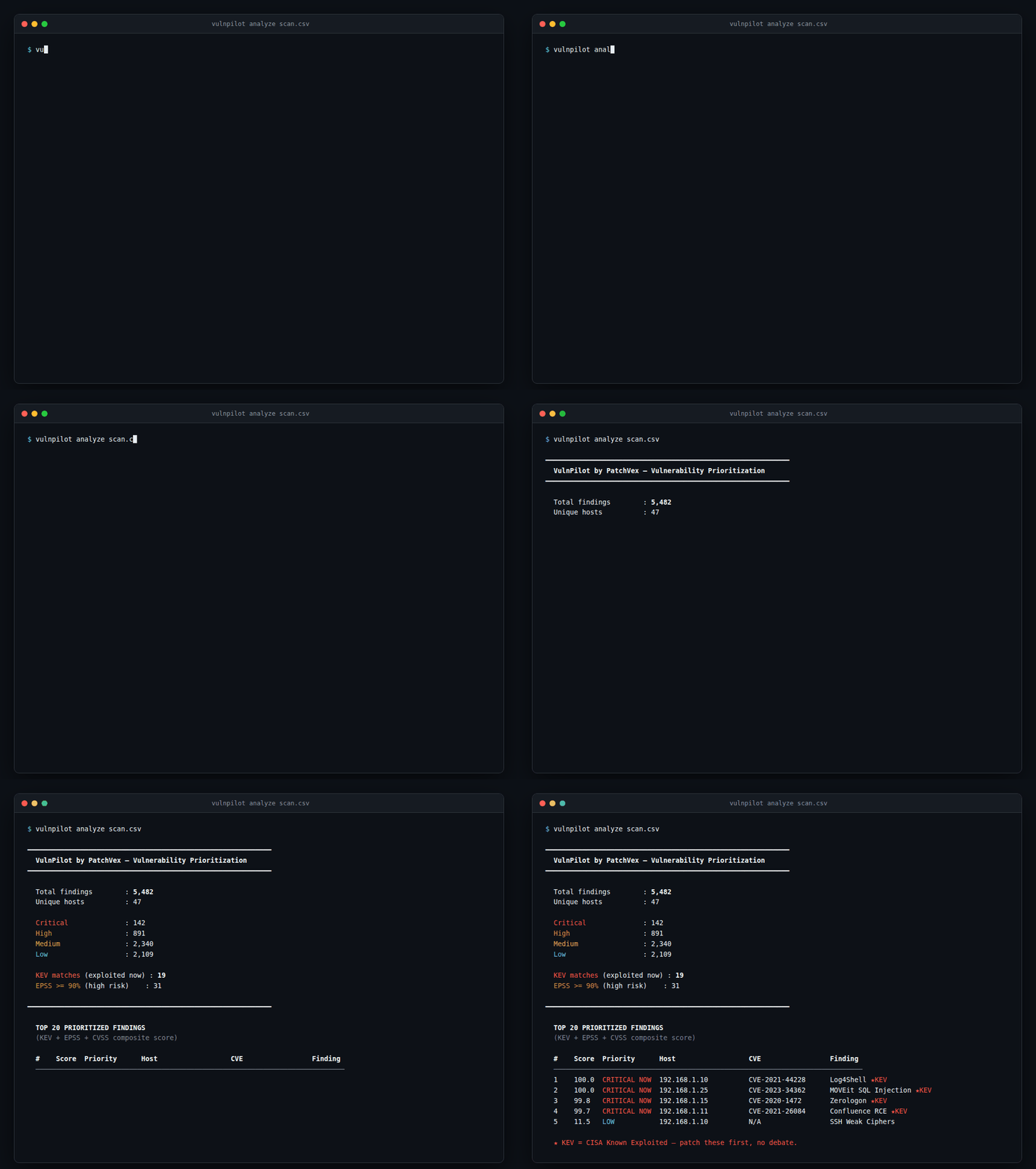
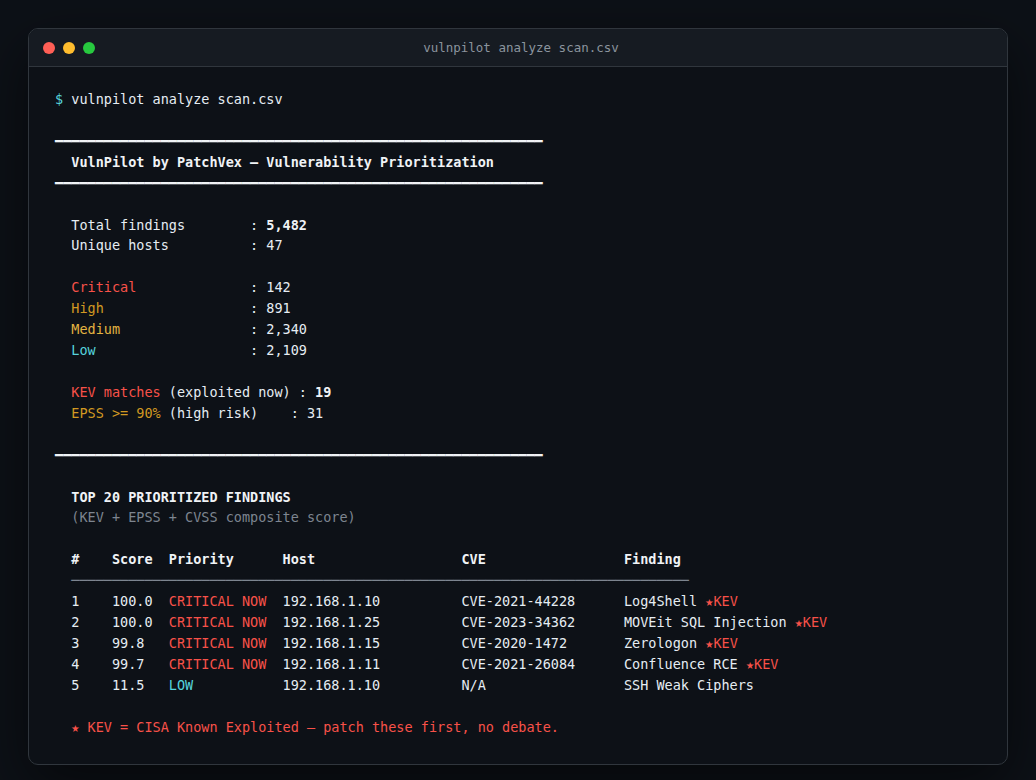
Terminal output — |
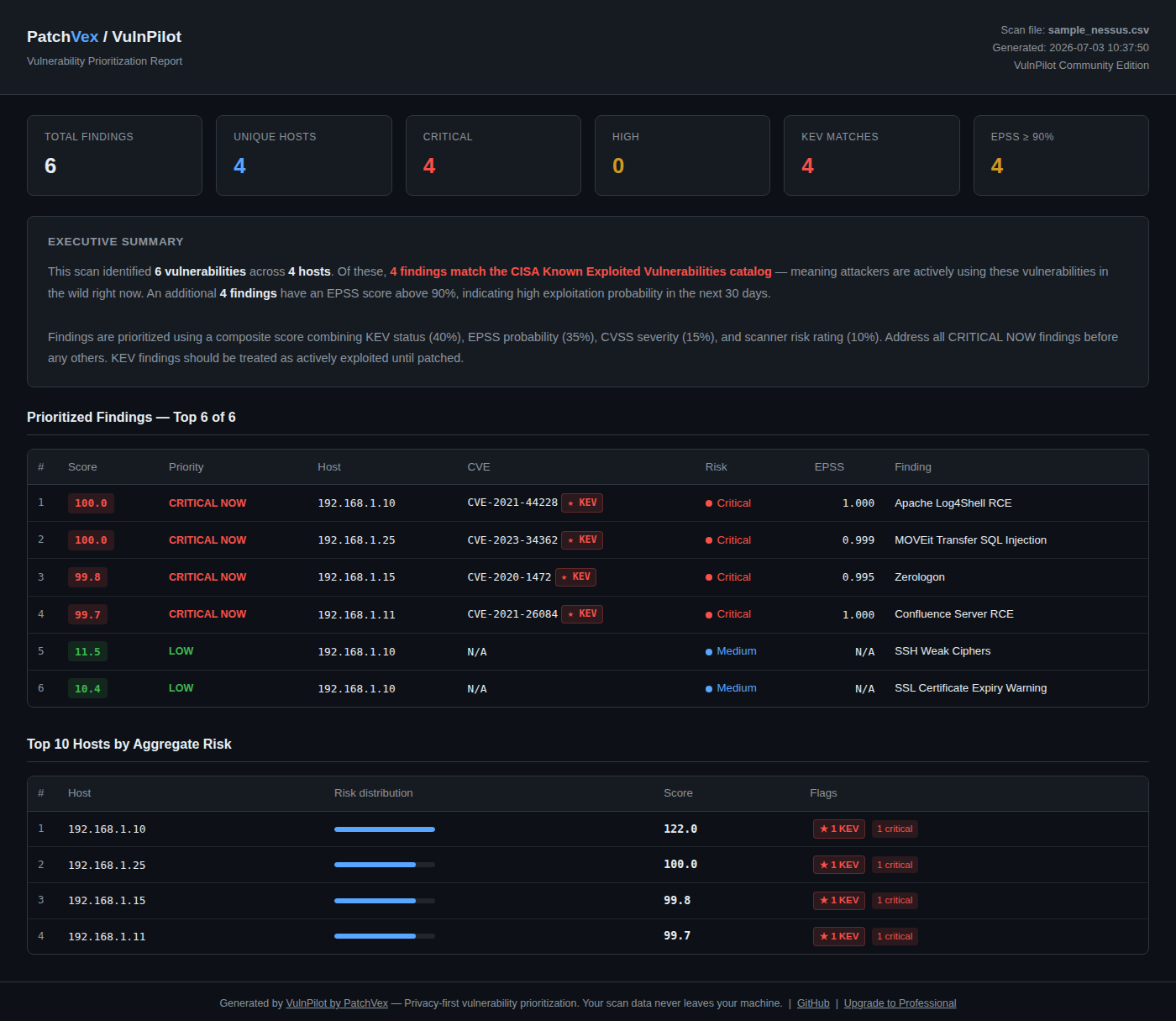
HTML report — |
View the full sample report → — real output from data/sample/sample_nessus.csv, not a mockup.
The problem
Security teams often spend hours manually triaging scan results. Your Nessus export contains thousands of findings. CVSS says hundreds are Critical. The real question — which ones are actively being exploited right now?
And when the audit comes — SOC 2, ISO 27001, HIPAA, DPDP — the question changes: can you prove how you prioritize and remediate?
VulnPilot answers both, in seconds, using real-world exploit data.
Why VulnPilot?
| Instead of | VulnPilot |
|---|---|
| Sorting by CVSS score alone | KEV + EPSS + CVSS composite scoring |
| Manual triage taking hours | Automated prioritization in seconds |
| Scrambling for audit evidence | One-command SOC 2 and ISO 27001 evidence packs |
| Spreadsheets to track SLA compliance | Per-finding SLA tracking against configurable policy |
| No documented exception process | Exception register with approval tracking and audit flags |
| Uploading scans to cloud services | Local-first — data never leaves your machine |
| Enterprise-only platforms | Open source, MIT licensed — free to use and self-host |
CVSS-only prioritization is why triage takes hours
A typical mid-size scan flags hundreds of findings as CVSS Critical (9.0+). Teams can't patch all of them this sprint, so CVSS alone gives no way to pick the first ten. It also has two structural problems:
- It ignores exploitation. CVSS scores severity if exploited — it says nothing about whether anyone actually is. A 9.8-scored bug sitting unexploited for years and a 7.5-scored bug being mass-exploited this week can score the same or backwards.
- It doesn't move. A CVSS score is fixed at publication. EPSS is recalculated daily as real-world exploitation activity changes, and KEV is updated the moment CISA confirms active exploitation — CVSS alone can't reflect that a quiet CVE went hot last Tuesday.
In the sample scan above, CVSS alone flags 4 of 6 findings as Critical (9.0+) — offering no way to rank them against each other. VulnPilot's composite score shows all 4 are CISA KEV — confirmed exploited in the wild — and ranks them 99.7–100, while CVSS-only triage would have you eyeballing four "Critical" rows with no tiebreaker.
VulnPilot's answer: blend confirmed exploitation (KEV), predicted exploitation probability (EPSS), and severity (CVSS) into one deterministic, re-runnable score — so "what's Critical" turns into "what's actually urgent, and in what order."
How it works
vulnpilot analyze scan.csv
Output:
━━━━━━━━━━━━━━━━━━━━━━━━━━━━━━━━━━━━━━━━━━━━━━━━━━━━━━━━━━━━
  VulnPilot by PatchVex — Vulnerability Prioritization
━━━━━━━━━━━━━━━━━━━━━━━━━━━━━━━━━━━━━━━━━━━━━━━━━━━━━━━━━━━━
  Total findings        : 5,482
  Unique hosts          : 47
  Critical              : 142
  KEV matches           : 19
  EPSS >= 90%           : 31
━━━━━━━━━━━━━━━━━━━━━━━━━━━━━━━━━━━━━━━━━━━━━━━━━━━━━━━━━━━━

  #    Score   Priority      Host              CVE                Finding
  ───────────────────────────────────────────────────────────────────────
  1    100.0   CRITICAL NOW  192.168.1.10      CVE-2021-44228     Log4Shell ★KEV
  2    100.0   CRITICAL NOW  192.168.1.25      CVE-2023-34362     MOVEit SQL Injection ★KEV
  3    99.8    CRITICAL NOW  192.168.1.15      CVE-2020-1472      Zerologon ★KEV
  4    99.7    CRITICAL NOW  192.168.1.11      CVE-2021-26084     Confluence RCE ★KEV
  5    11.5    LOW           192.168.1.10      N/A                SSH Weak Ciphers

  ★ KEV = CISA Known Exploited Vulnerability — highest remediation priority
        based on active exploitation in the wild.
VulnPilot cross-references your findings against three data sources — all processed locally:
| Source | What it tells you |
|---|---|
| CISA KEV | Confirmed exploited in the wild right now |
| FIRST EPSS | Probability of exploitation in next 30 days |
| CVSS | Severity context and baseline scoring |
Composite score = KEV (40%) + EPSS (35%) + CVSS (15%) + Severity (10%)
Audit Evidence
Auditors across SOC 2, ISO 27001, HIPAA and DPDP ask for the same thing: proof of a documented, risk-based vulnerability management process. The most common audit gap is showing thousands of findings with no evidence of how they are prioritized, tracked, and resolved.
VulnPilot generates that evidence in one command:
# SOC 2 CC7.1 evidence pack
vulnpilot analyze scan.csv --evidence soc2

# ISO 27001 Annex A 8.8 evidence pack
vulnpilot analyze scan.csv --evidence iso27001
The evidence pack includes:
- Scan metadata — timestamped, with source file reference
- The documented prioritization methodology (KEV / EPSS / CVSS weights)
- Prioritized findings with KEV flags
- Framework control mapping statement (SOC 2 CC7.1 or ISO 27001 A.8.8)
- Management review and sign-off block
- SLA compliance and exception register — when run via
vulnpilot verify
Output is a clean Markdown file — convert to PDF with your tool of choice and hand it to your auditor.
Currently supported: SOC 2 (CC7.1), ISO 27001 (A.8.8). DPDP and HIPAA packs are on the roadmap.
SLA Policy Configuration
SLA thresholds are configurable per severity. The defaults are:
| Severity | Remediation deadline |
|---|---|
| Critical | 7 days |
| High | 30 days |
| Medium | 90 days |
| Low | 180 days |
To customize, create ~/.vulnpilot/sla.yaml:
# VulnPilot SLA policy — days to remediate by severity
critical: 7
high: 30
medium: 90
low: 180
VulnPilot reads this file automatically on every verify run. If the file does not exist, the defaults above apply. Use --sla-config FILE to pass a per-client policy at invocation time.
Ticket Export
vulnpilot verify already tells you exactly which findings need action — a breached SLA with no valid exception on file. Historically, turning that into work meant retyping every CVE, host, and priority into your ticketing system by hand. --export-tickets closes that gap: it writes the same governance-classified findings to a file you can import directly.
# Generic CSV — importable into Jira, ServiceNow, Linear, or any tool with CSV import
vulnpilot verify new_scan.csv --exceptions exceptions.csv --export-tickets tickets.csv

# JSON — for scripting your own integration
vulnpilot verify new_scan.csv --exceptions exceptions.csv \
    --export-tickets tickets.json --ticket-format json

# Jira-oriented CSV column set (see limitations below)
vulnpilot verify new_scan.csv --exceptions exceptions.csv \
    --export-tickets tickets.csv --ticket-format jira-csv
What gets exported. Exactly the findings verify's own Governance Summary already flags as audit findings: SLA-breached with no exception on file, or with an exception that has expired. Findings that are fixed, within SLA, approaching SLA, breached-but-formally-approved, or have no history yet are never exported — this reuses the same classification verify already computes, not a second definition of "actionable."
Formats:
| Format | Use case |
|---|---|
generic-csv (default) |
Universal — any tool with CSV import (Jira, ServiceNow, Linear, Trello, spreadsheets) |
json |
Scripting your own integration or pushing to a tool with no CSV importer |
jira-csv |
Jira's built-in CSV importer column set (Summary, Issue Type, Priority, Description, Labels, plus finding metadata) |
Generic CSV / JSON schema (schema_version: 1): summary, priority, score, host, port, plugin_id, cve, finding, severity, cvss, epss, kev, days_open, sla_days, sla_status, due_in_days, governance_status, exception_ticket_ref, exception_approver, exception_expiry, description, remediation.
Limitations — read before relying on jira-csv. This is a ticket-ready export, not a Jira integration: there is no API call, no credentials, and no connection to Jira at all. The jira-csv format targets Jira's default "External System Import" column set — it does not account for custom fields, required fields specific to your project's issue-type screen, or non-default workflows. Verify the import against a test project before relying on it. For anything beyond CSV import, use --ticket-format json and script your own push.
Local Scan History
Every analysis run is automatically recorded to a local SQLite database at ~/.vulnpilot/history.db — on your machine only, never transmitted.
Why this matters: SOC 2 Type II audits require evidence that your process operated consistently over a 6–12 month observation period. VulnPilot starts building your evidence trail from your very first scan.
Importing older scans. To load scans that ran before you started using VulnPilot, give the date the scanner actually ran:
vulnpilot analyze q1_scan.csv --scan-date 2026-01-15
The import is recorded as a new run at the time you import it; the scan date is stored alongside it and never replaces the recording time. So:
- History order,
verifybaselines and SLA clocks follow recording order. An import is the most recent run until the next one, so the nextverifycompares against it (pass its run ID to--exclude-runif you don't want that), and an imported finding's SLA clock starts when it was imported, not on the scan date. vulnpilot trendlists the import on the day it was recorded and marks itimported; scan date ….- Evidence packs state the scan date and the import time separately, and count how many runs were imported.
An import is not a substitute for records kept at the time; your auditor decides how much weight to give it. --scan-date must be YYYY-MM-DD and not in the future; it is available on analyze only.
Use vulnpilot verify to diff a new scan against history, and vulnpilot trend to view your posture over time.
Separate history per client. If you scan more than one client or environment, give each its own workspace so their scans are never compared with each other:
vulnpilot analyze acme_scan.csv --workspace acme
vulnpilot verify acme_new_scan.csv --workspace acme --sla-config clients/acme_sla.yaml
vulnpilot trend --workspace acme
Each workspace keeps its own history at ~/.vulnpilot/workspaces/<name>/history.db; without --workspace the shared ~/.vulnpilot/history.db is used as before. Workspace names are case-insensitive — Acme and acme are the same workspace. History run IDs (for verify --exclude-run) are numbered per workspace.
Why local-first?
Many organizations prohibit uploading vulnerability scan data to third-party cloud services. VulnPilot performs all analysis locally on your machine.
        Public Threat Intelligence
    +-------------------------------+
    |  CISA KEV      FIRST EPSS     |
    +---------------+---------------+
                    |
            vulnpilot update-feeds
                    |
        ~/.vulnpilot/feeds/ (local cache)
                    |
            vulnpilot analyze
                    |
    Nessus CSV (Local Machine Only)
                    |
       Composite Risk Engine
                    |
    Prioritized Findings + Evidence Pack
Only public threat intelligence feeds are downloaded. No API keys required. Your scan data never leaves your machine.
Install
pip install vulnpilot
Tested on Python 3.10, 3.11, and 3.12. Zero runtime dependencies — pure stdlib.
Usage
# Download latest KEV and EPSS feeds
vulnpilot update-feeds

# Analyze a Nessus CSV export
vulnpilot analyze scan.csv

# Generate a SOC 2 audit evidence pack
vulnpilot analyze scan.csv --evidence soc2

# Generate an ISO 27001 audit evidence pack
vulnpilot analyze scan.csv --evidence iso27001

# Verify remediation against your previous scan
# Requires at least one earlier scan in history (seed it once with 'vulnpilot analyze')
vulnpilot verify new_scan.csv

# Verify with exception register
# Classifies SLA breaches as approved, expired, or unexcused (audit finding)
vulnpilot verify new_scan.csv --exceptions exceptions.csv

# Verify + evidence pack with full governance section
vulnpilot verify new_scan.csv --exceptions exceptions.csv --evidence soc2

# Posture trend across all recorded scans
vulnpilot trend

# Evidence pack with custom output path
vulnpilot analyze scan.csv --evidence soc2 --evidence-out q3_evidence.md

# Export HTML report
vulnpilot analyze scan.csv --html report.html

# Show top N hosts by aggregate risk
vulnpilot analyze scan.csv --top-hosts 5

# Use local feed files
vulnpilot analyze scan.csv --kev ./kev.json --epss ./epss.csv.gz

# Disable colour output (for CI pipelines)
vulnpilot --no-colour analyze scan.csv

# Output findings as JSON (suppresses terminal output)
vulnpilot analyze scan.csv --json
vulnpilot verify new_scan.csv --json
vulnpilot trend --json
vulnpilot update-feeds --json   # progress messages go to stderr

# Use a per-client SLA policy instead of the default ~/.vulnpilot/sla.yaml
vulnpilot verify new_scan.csv --sla-config clients/acme_sla.yaml

# Keep each client's scan history separate
vulnpilot verify new_scan.csv --workspace acme

# Exit 2 if audit findings exist — use as a CI pipeline gate
# Exit 0 = clean, 1 = tool error (including a mistyped flag), 2 = breach found
vulnpilot verify new_scan.csv --fail-on-breach
CI/CD integration
Use --json and --fail-on-breach to wire VulnPilot into a pipeline.
How the baseline works. Every analyze and every successful verify records the scan to local history. verify compares the new scan against the most recent scan already in history, then records the new scan so it becomes the baseline for the next run. The very first scan has nothing to compare against, so seed history once with analyze; verify exits 1 if no earlier scan exists.
# Once, on the first scan: seed history
vulnpilot analyze first_scan.csv

# Every later scan: verify it directly — verify records the run itself.
# Exit 0 = clean, 1 = tool error / no baseline, 2 = breach found (SLA breach with no valid exception)
vulnpilot verify new_scan.csv --json --fail-on-breach > vulnpilot-verify.json
Do not run analyze and then verify on the same scan without telling verify — the scan would be recorded by analyze and then compared against itself. If you need analyze output for the same scan first, pass the history run ID it reports to --exclude-run:
vulnpilot analyze new_scan.csv --json > vulnpilot-analyze.json
RUN_ID="$(jq -r '.history_id' vulnpilot-analyze.json)"
vulnpilot verify new_scan.csv --exclude-run "$RUN_ID" --json --fail-on-breach > vulnpilot-verify.json
Writing to files instead of piping through tee keeps verify's exit code as the step's exit code. If analyze could not record the scan, history_id is null and verify rejects it with exit 1.
Per-client SLA policies work with both flags:
vulnpilot verify new_scan.csv \
  --sla-config clients/acme_sla.yaml \
  --exceptions clients/acme_exceptions.csv \
  --fail-on-breach \
  --json
HTML Report
Generate a shareable, self-contained HTML report:
vulnpilot analyze scan.csv --html report.html
The report includes:
- Executive summary with KEV and EPSS highlights
- Prioritized findings table with colour-coded risk scores
- Top 10 hosts by aggregate risk with visual score bars
How scoring works
The scoring algorithm is deterministic, transparent, and fully documented.
| Signal | Weight | Source |
|---|---|---|
| CISA KEV match | 40% | Known exploited in the wild |
| FIRST EPSS score | 35% | Exploitation probability |
| CVSS base score | 15% | Severity context |
| Scanner risk rating | 10% | Nessus severity label |
The composite score is intentionally opinionated. Known exploited vulnerabilities receive the greatest weight because active exploitation is a stronger predictor of remediation priority than severity alone. Any KEV finding scores a minimum of 75 regardless of other factors.
The weighting model is intentionally transparent and may evolve based on community feedback and real-world usage.
Note
VulnPilot provides prioritization guidance to assist remediation workflows. Final remediation decisions should always consider asset criticality, business context, exploit mitigations, and organizational risk tolerance.
Privacy by design
- Scan data processed entirely on your local machine
- No account required
- No cloud upload, ever
- No telemetry or analytics
- No API keys required
- Works air-gapped after initial feed download
- Scan history stored locally at
~/.vulnpilot/history.db— your machine only, delete it anytime. New history files are created readable by your user only (on Linux/macOS) - Open source — inspect every line of code
Feed updates
VulnPilot pulls two public datasets:
- CISA KEV — Known Exploited Vulnerabilities catalog (maintained by CISA)
- FIRST EPSS — Exploit Prediction Scoring System (updated daily by FIRST.org)
Feeds are cached at ~/.vulnpilot/feeds/ on your machine. No API keys required.
vulnpilot update-feeds
Automated feed synchronization via GitHub Actions is not currently implemented. Run vulnpilot update-feeds yourself whenever you want fresh data (for example from a scheduled job on your own machine).
Supported scanners
| Scanner | Status |
|---|---|
| Nessus (.csv export) | ✅ Supported |
| Qualys | Planned |
| Rapid7 | Planned |
| OpenVAS | Planned |
| Microsoft Defender | Planned |
| AWS Inspector | Planned |
Roadmap
v0.1.0 — Released ✅
- Nessus CSV parser
- CISA KEV enrichment
- FIRST EPSS enrichment
- Composite risk scoring
- Prioritized terminal output
- GitHub Actions daily feed automation — shipped in v0.1.0 but never worked (every run failed and nothing used the repository copy); removed, not currently implemented
v0.2.0 — Released ✅
- HTML report export
v0.3.0 — Released ✅
- SOC 2 audit evidence pack —
--evidence soc2 - Local scan history (foundation for verification and trends)
v0.4.0 — Released ✅
- Remediation verification —
vulnpilot verify(✓ Verified Fixed / ● Still Open / + New) - Scan-scope guard — hosts missing from a new scan are never counted as fixed
- Posture trend —
vulnpilot trend
v0.5.0 — Released ✅
- ISO 27001 (Annex A 8.8) audit evidence pack —
--evidence iso27001 - SLA compliance tracking in
vulnpilot verify— per-severity breach detection - Exception register integration —
verify --exceptions exceptions.csv - Governance summary section in all evidence packs (framework-agnostic)
v0.6.0 — Released ✅
-
--jsonoutput onanalyzeandverify— machine-readable JSON, pipeable tojq -
--sla-config FILE— per-invocation SLA policy override for per-client workflows - SLA breach as CI exit code gate —
verify --fail-on-breachexits 2 when audit findings exist
v1.0.0 — Released ✅
- Stable Community release — production/stable classifier, all findings always shown
- Scanner abstraction layer — pluggable
ScannerABC; adding new parsers requires only a new file - All product data paths standardized to
~/.vulnpilot/ - HTML report cleaned — polished standalone output, no commercial messaging
-
--evidencemessages routed tostderrwhen--jsonis active — clean JSON stream guaranteed -
ARCHITECTURE.md— public source of truth for module layout, scoring formula, and extension points
v1.1.0 — Released ✅
- Actionable remediation export —
verify --export-tickets FILE --ticket-format generic-csv|json|jira-csv
v1.2.0 — Released ✅
- CLI reads scans through the scanner registry (
vulnpilot.parser.parse) -
--workspace— separate history per client or environment -
analyze --scan-date— import older scans, marked as imported -
verify --exclude-run— explicit baseline exclusion;analyzereports the history run ID - Wildcard and CIDR exception matching
-
--jsonon every command; JSON-only stdout; usage errors exit1
Later
- DPDP and HIPAA evidence packs
- Qualys CSV support
- Weekly digest
- Direct Jira / ServiceNow / Slack API integration (credentialed push — builds on the ticket export schema above, not yet implemented)
Future development priorities are driven by community feedback and real-world usage.
Requirements
- Python 3.10, 3.11, or 3.12
- pip
- Internet connection for feed updates (air-gapped use supported after initial download)
- Nessus .csv export file
Contributing
Issues, bug reports, and pull requests are welcome.
- Bug reports and feature requests: github.com/PatchVex/vulnpilot/issues
- Discussions: github.com/PatchVex/vulnpilot/discussions
- Security disclosures: security@patchvex.com
Good first issues are labelled good first issue in the issue tracker. Please search existing issues before opening a new one.
Developer setup
After cloning, run this once to activate the pre-push test gate:
git config core.hooksPath .githooks
The hook runs python3 -m pytest tests/ before every push and is safe to share — it contains no absolute paths.
Acknowledgements
VulnPilot uses publicly available threat intelligence published by:
Thank you to both organizations for maintaining these community resources.
License
MIT License — see LICENSE for details.
Free to use, modify, and distribute. Commercial use permitted.
About PatchVex
VulnPilot is built and maintained by PatchVex.
PatchVex builds privacy-first workflow tools for security and DevSecOps teams. Our products help engineers spend less time managing vulnerability data and more time fixing the issues that matter.
- Website: patchvex.com
- Email: hello@patchvex.com
- GitHub: github.com/PatchVex
1 maintainer

Release files for vulnpilot 1.2.0
For a detailed explanation of source distributions (sdists) and built distributions (wheels), please see the package formats documentation.
Source distribution (sdist)
| File | Size | Uploaded | |
|---|---|---|---|
| vulnpilot-1.2.0.tar.gz | 87.3 kB | Details |
Built distribution (wheel)
| File | Interpreter | ABI | Platform | Reset |
|---|---|---|---|---|
| vulnpilot-1.2.0-py3-none-any.whl | Python 3 | none | any | Details |
Total release size: 141.5 kB
Release files / vulnpilot-1.2.0.tar.gz
| Download URL | vulnpilot-1.2.0.tar.gz |
|---|---|
| Size | 87.3 kB |
| Tags | Source |
|
SHA-256 checksum How to use checksums |
98c482ac9073437202ae794e1e0c86d7abaa4f1022da13159882bfe7aa2fb49b
|
|
BLAKE2b-256 checksum How to use checksums |
6890b21bb0f1b4a4512fce917171489a632268f985395ac0d302d6356b3776fc
|
| Upload date | |
|
Uploaded using Trusted Publishing? What is trusted publishing? |
No |
| Uploaded via |
twine/7.0.0 CPython/3.12.3
|
Release files / vulnpilot-1.2.0-py3-none-any.whl
| Download URL | vulnpilot-1.2.0-py3-none-any.whl |
|---|---|
| Size | 54.1 kB |
| Tags | Python 3 |
|
SHA-256 checksum How to use checksums |
8337ea1ed1241c0aaddb7cfad84087648d380364aa4d7cacfd9d26c70e3aa956
|
|
BLAKE2b-256 checksum How to use checksums |
dc5a45673b221f1a7eb38a41528a22dd8780e9c3809be476609e8f68e2959add
|
| Upload date | |
|
Uploaded using Trusted Publishing? What is trusted publishing? |
No |
| Uploaded via |
twine/7.0.0 CPython/3.12.3
|














