
Decrypts WhatsApp .crypt12, .crypt14 and .crypt15 files, given the key.

Project description
WhatsApp Crypt Tools
Decrypts WhatsApp .crypt12, .crypt14 and .crypt15 files, given the key file or the 64-characters long key.
The key file is named "key" if the backup is crypt14 or
"encrypted_backup.key" if the backup is crypt15 (encrypted E2E backups).
The output result is either a SQLite database
or a ZIP file (in case of wallpapers and stickers).
This is the only thing this script does.
Those who are looking for a complete suite for
WhatsApp forensics, check out whapa.
Quickstart
Cloud - Google Colab
If you do not want to install programs in your computer, you can run this program in Google Colab . (This version is not controlled by me.)
Local - Jupyter
If you are familiar with Jupyter (read here if you're not), you can use the notebook version of the program.
Local
You can install this script as a package through pip. Just use:
python -m pip install wa-crypt-tools
Usage
usage: decrypt14_15.py [-h] [-f] [-nm] [-bs BUFFER_SIZE] [-ng] [-np]
                      [-ivo IV_OFFSET] [-do DATA_OFFSET] [-v]
                      [keyfile] [encrypted] [decrypted]

Decrypts WhatsApp backup files encrypted with crypt12, 14 or 15

positional arguments:
 keyfile               The WhatsApp encrypted_backup key file or the hex
                       encoded key. Default: encrypted_backup.key
 encrypted             The encrypted crypt12, 14 or 15 file. Default:
                       msgstore.db.crypt15
 decrypted             The decrypted output file. Default: msgstore.db

options:
 -h, --help            show this help message and exit
 -f, --force           Makes errors non fatal. Default: false
 -nm, --no-mem         Does not load files in RAM, stresses the disk more.
                       Default: load files into RAM
 -bs BUFFER_SIZE, --buffer-size BUFFER_SIZE
                       How many bytes of data to process at a time. Implies
                       -nm. Default: 8192
 -ng, --no-guess       Does not try to guess the offsets, only protobuf
                       parsing.
 -np, --no-protobuf    Does not try to parse the protobuf message, only
                       offset guessing.
 -ivo IV_OFFSET, --iv-offset IV_OFFSET
                       The default offset of the IV in the encrypted file.
                       Only relevant in offset guessing mode. Default: 8
 -do DATA_OFFSET, --data-offset DATA_OFFSET
                       The default offset of the encrypted data in the
                       encrypted file. Only relevant in offset guessing mode.
                       Default: 122
 -v, --verbose         Prints all offsets and messages
Examples, with output
Crypt15
decrypt14_15 ./encrypted_backup.key ./msgstore.db.crypt15 ./msgstore.db
[I] Crypt15 key loaded
[I] Database header parsed
[I] Done
or
decrypt14_15 b1ef5568c31686d3339bcae4600c56cf7f0cb1ae982157060879828325257c11 ./msgstore.db.crypt15 ./msgstore.db
[I] Crypt15 key loaded
[I] Database header parsed
[I] Done
Crypt14
decrypt14_15 ./key ./msgstore.db.crypt14 ./msgstore.db
[I] Crypt12/14 key loaded
[I] Database header parsed
[I] Done
Crypt12
decrypt14_15 ./key ./msgstore.db.crypt12 ./msgstore.db
[I] Crypt12/14 key loaded
[I] Database header parsed
[I] Done
I had to use --force to decrypt
Please open an issue.
Not working / crash / etc
Please open an issue and attach:
- Output of the program (both with and without --force)
- Hexdump of keyfile
- Hexdump of first 512 bytes of encrypted DB
I will happily accept pull requests for the currently open issues. :)
Where do I get the key(file)?
On a rooted Android device, you can just copy
/data/data/com.whatsapp/files/key
(or /data/data/com.whatsapp/files/encrypted_backup.key if backups are crypt15).
If you enabled E2E backups, and you did not use a password
(you have a copy of the 64-digit key, for example a screenshot),
you can just transcribe and use it in lieu of the key file parameter.
There are other ways, but it is not in the scope of this project
to tell you.
Issues asking for this will be closed as invalid.
Last tested version (don't expect this to be updated)
Stable:
2.22.15.74
Beta:
2.23.8.25
Protobuf classes generation
You can replace the provided generated protobuf classes with your own.
In order to do that, download the protoc 21.0 from
here.
After that put protoc in the proto folder and run:
./protoc *.proto --python_out=.
We then need to manually patch the generated classes to fix import errors.
Open prefix_pb2.py and C14_cipher_pb2.py
Add proto. after any import keyword.
For example:
import C14_cipher_version_pb2 as C14__cipher__version__pb2
becomes
import proto.C14_cipher_version_pb2 as C14__cipher__version__pb2
Donations
Thank you so much to each one of you!
- 🎉🎉🎉 courious875 🎉🎉🎉
Credits:
Original implementation for crypt12: TripCode
Some help at the beginning: DjEdu28
Actual crypt14/15 implementation with protobuf: ElDavoo
Help with crypt14/15 footer: george-lam
Pip package implementation: Mikel12455
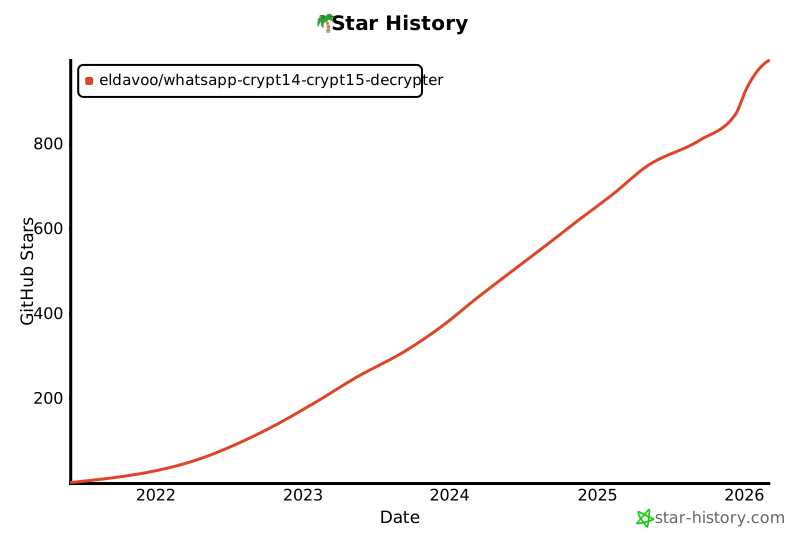
Stargazers over time
Release history Release notifications | RSS feed


Download files
Download the file for your platform. If you're not sure which to choose, learn more about installing packages.
Source Distribution
Built Distribution
Filter files by name, interpreter, ABI, and platform.
If you're not sure about the file name format, learn more about wheel file names.
Copy a direct link to the current filters
File details
Details for the file wa-crypt-tools-0.0.8.tar.gz.
File metadata
- Download URL: wa-crypt-tools-0.0.8.tar.gz
- Upload date:
- Size: 46.1 kB
- Tags: Source
- Uploaded using Trusted Publishing? No
- Uploaded via: twine/4.0.2 CPython/3.11.2
File hashes
| Algorithm | Hash digest | |
|---|---|---|
| SHA256 |
1f9b9254ab66711fb167e0968297d4c85f9874efece1507b615eabd195f7f7ff
|
|
| MD5 |
7e7fc71db69c4b6231444118900e67b0
|
|
| BLAKE2b-256 |
e2dfa3346af81e2552539b06f9bd0fc011b5733eb14905fbe636151e19c254ca
|
File details
Details for the file wa_crypt_tools-0.0.8-py3-none-any.whl.
File metadata
- Download URL: wa_crypt_tools-0.0.8-py3-none-any.whl
- Upload date:
- Size: 32.4 kB
- Tags: Python 3
- Uploaded using Trusted Publishing? No
- Uploaded via: twine/4.0.2 CPython/3.11.2
File hashes
| Algorithm | Hash digest | |
|---|---|---|
| SHA256 |
170fa6c293353c34e6f9cea9d5d31abd463397bef26ec62d8d8d480de79b8e93
|
|
| MD5 |
0ee64e6aeac9513eb003e3a4dd088170
|
|
| BLAKE2b-256 |
a3ccd04bf2b82dfb687fece886655a1aeb286fc4a8810af7cecdd5d4ac3ca19e
|






