
Human-like input automation framework for Windows

Project description
WabiSabIO
"Perfect" your input automation through injected imperfections
wabisabio is an input automation Python library for Windows keyboard and mouse inputs with the specific goal of making inputs appear more human-like. The framework features center-biased coordinate and timing randomization, curved mouse movement, destination overshoot and correction, and idle mouse jitter to model the small imperfections that naturally emerge during human interaction.
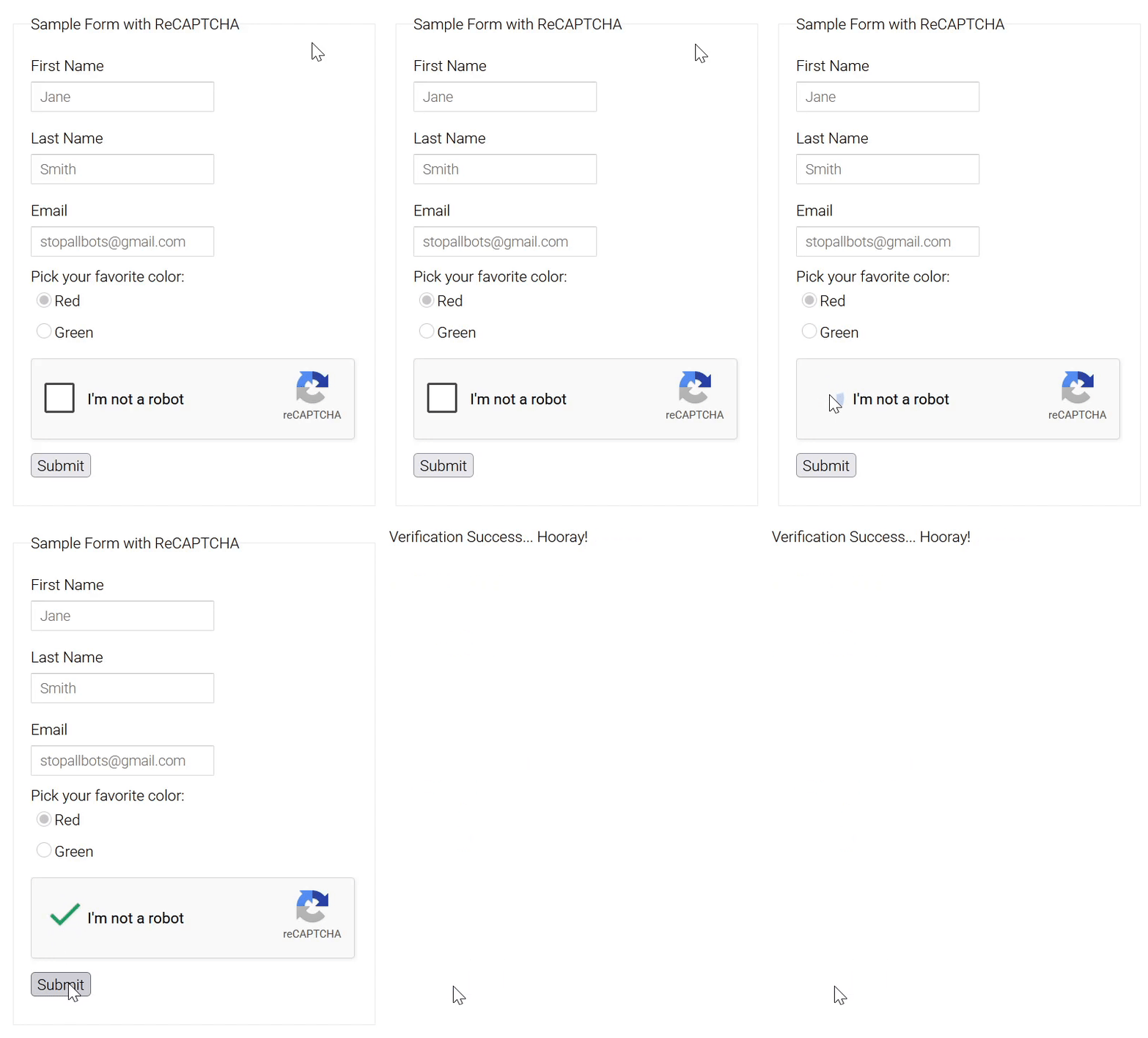
*Fire hydrant image recognition module sold separately.
Introduction
Most keyboard and mouse automation libraries optimize for one thing: reliably interacting with a user interface. The resulting inputs are typically fast, precise, and perfectly repeatable, making them easy to distinguish from those of a real user through even relatively simple behavioral analysis.
A common response is to introduce randomness by varying delays, mouse speed, cursor landing location, or path generation. While this reduces consistency, it often produces its own unrealistic behavior: human input is not uniformly random. Users tend to aim near the center of targets, maintain relatively consistent movement characteristics, occasionally overshoot a destination, and naturally alternate between periods of activity and inactivity.
This observation led to an interesting question:
How much more human can synthetic input appear using nothing more than a handful of statistical distributions and simple geometric techniques?
wabisabio is an attempt to answer that question.
Rather than generating deterministic input and injecting randomness afterward, the library models many of the small imperfections that naturally emerge during human interaction. Mouse movement follows Bézier curves with hand tremor, destination overshoot and correction, timing delays are sampled from configurable statistical distributions, and higher-level primitives provide composable building blocks for constructing more natural interaction patterns while remaining lightweight and easy to understand.
Design Philosophy
Humans are consistent in their inconsistency.
When using a UI, people tend to aim near the center of targets, follow recognizable movement patterns, and occasionally overshoot. While the specifics vary person to person, the tendencies do not.
A simple example: if a valid click region spans 100×100 pixels, a basic script might pick a random (x, y) coordinate uniformly from that space. While this is technically random, the implication is that users click the corners just as often as the center. They don't. People aim for the middle of a target and drift from it with decreasing probability the further out you go. It's center-biased, not flat.
wabisabio treats randomness the same way. Instead of uniform noise, its primitives sample from configurable distributions: shape, spread, and center are all adjustable by the caller.
The goal is behavior that looks like a person with habits rather than a script rolling dice.
The heatmaps shown below were generated using 10,000 sampled coordinates from each distribution:
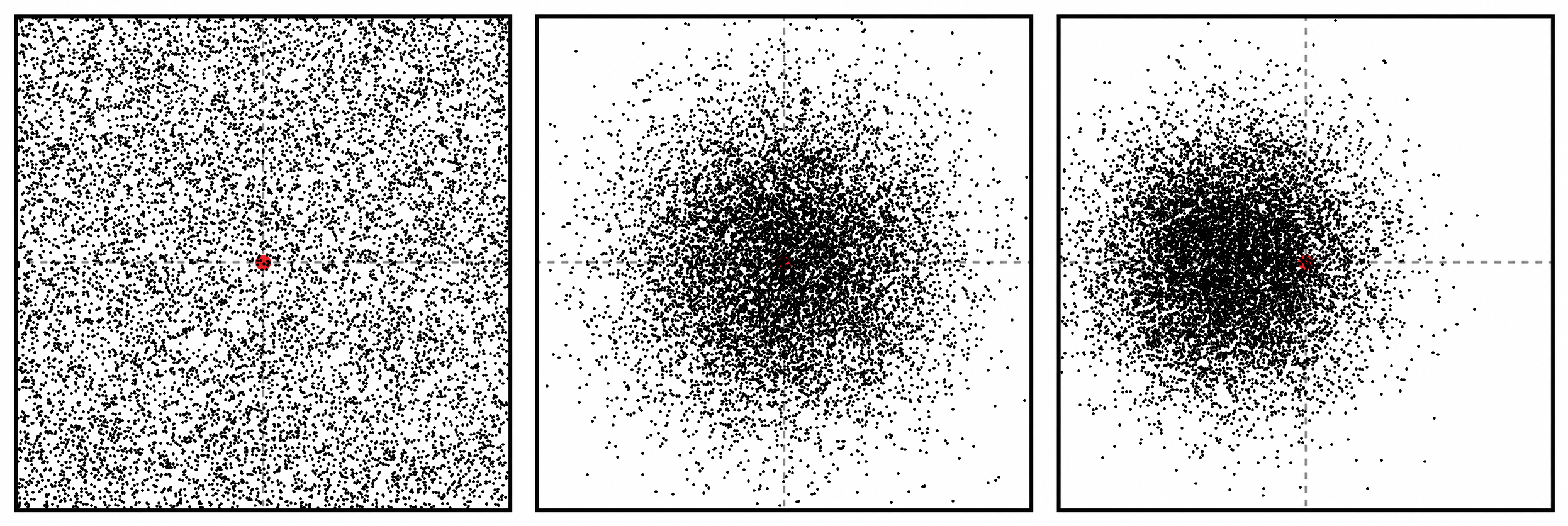
The following examples generate the three distributions shown above:
# Uniform sampling (every valid coordinate is equally likely)
random_x = random.randint(center_x - radius_x, center_x + radius_x)
random_y = random.randint(center_y - radius_y, center_y + radius_y)

# Center-biased sampling (default)
random_x, random_y = wabisabio.randomize_coordinate_within_range(
    center_x,
    center_y,
    radius_x=radius_x,
    radius_y=radius_y,
)

# Customized distribution
random_x, random_y = wabisabio.randomize_coordinate_within_range(
    center_x,
    center_y,
    radius_x=radius_x,
    radius_y=radius_y,
    sigmas_to_edge_x=3.6, # Narrower horizontal spread
    sigmas_to_edge_y=3.6, # Narrower vertical spread
    bias_x=-0.3,          # Left-biased target selection
)
While pixel landing coordinate randomization is one of the easiest behaviors to visualize, the same statistical distributions are used throughout the library and are applied to:
- Micro-delays between actions (e.g., moving a mouse before clicking)
- Action timing delays
- Mouse click and keystroke hold durations
- Mouse movement speed (relative to travel distance)
- Mouse movement curvature
- Primitive functions for center-biased randomization
Together, these primitives provide lightweight building blocks for constructing more natural input patterns.
Installation
wabisabio requiures Python 3.9 or higher.
pip install wabisabio
Alternatively, clone this repo and build it locally:
git clone https://github.com/sam-howle/WabiSabIO.git
cd wabisabio
pip install .
Usage
The following table provides a brief overview of the functions exposed by wabisabio. Optional parameters have been omitted for brevity and are documented in the corresponding sections linked below.
| Function | Description |
|---|---|
move_mouse(dest_x, dest_y) |
Move mouse from current position to the supplied (x, y) screen coordinates taking a curved path |
press_key(key) |
Presses the supplied key and releases after a short, randomized delay |
left_click() |
Performs a left click and releases after a short, randomized delay |
right_click() |
Performs a right click and releases after a short, randomized delay |
lagged_press_key(key) |
Same as press_key(), but with randomized delays before and/or after the event |
lagged_left_click() |
Same as left_click(), but with randomized delays before and/or after the event |
lagged_right_click() |
Same as right_click(), but with randomized delays before and/or after the event |
modifier_key_press(modifier, key) |
Presses one or more modifier keys (e.g. "shift", "ctrl"), then presses key, then releases all in reverse order with randomized delays between each event |
modifier_left_click(modifier) |
Same as left_click(), but holds one or more modifier keys for the duration of the click |
modifier_right_click(modifier) |
Same as right_click(), but holds one or more modifier keys for the duration of the click |
type_string(input_string) |
Types the supplied string character by character with human-like inter-key delays. Handles shift-required characters and special keys (\n, \t, \b) automatically |
toggle_key_preflight_check() |
Ensures toggle keys (CapsLock, ScrollLock, NumLock) are in the desired state before automation begins. Defaults to all off. |
randomize_coordinate_within_range(x, y, radius_x, radius_y) |
Returns a gaussian-randomized (x, y) screen coordinate based on a center pixel (x, y) and an x and y radius (total pixels from center on each axis) |
randomize_coordinate_within_square(x, radius) |
Same as randomize_coordinate_within_range(), but uses x for both center coordinates and one shared radius |
clamped_gauss_randint(min_int, max_int) |
Returns a gaussian-distributed random integer clamped to [min_int, max_int]. Center values are more probable than edge values |
clamped_gauss_randfloat(min_val, max_val) |
Same as clamped_gauss_randint(), but returns a float |
start_jitter() |
Causes the mouse cursor to periodically jitter 1-3 pixels, simulating a human hand resting on a mouse. Shares a mutex with move_mouse() and will not interfere with it. Resumes automatically after movement completes. Runs indefinitely until stop_jitter() is called |
stop_jitter() |
Disables the jitter thread. Call start_jitter() again to resume |
rsleep(min_time, max_time) |
Delays execution for a random duration between min_time and max_time over a clamped gaussian distribution, making center values more common |
rsleep(min_time) |
When called with only min_time, the max sleep duration is automatically set to 40% above the supplied value |
Mouse Movement
Mouse movement is performed using the move_mouse() function. It moves the cursor along a procedurally generated curve starting at the cursor's current position:
move_mouse(dest_x, dest_y, speed_multiplier=1.0, mouse_hz=500, speed_sigmas_to_edge=3, speed_bias=0.0, jitter_intensity=10, friction=5)
# Move mouse to (750, 300)
move_mouse(750, 300)
Optional parameters
speed_multiplierfloat- Scales mouse movement speed. A value of1.2is 20% faster,0.5is half speed. Note that deviating too far from the default of1.0may produce visually unnatural movement. You do not need to account for travel distance - the function automatically scales speed relative to distance, as humans naturally move slower for short distances and faster for long ones.mouse_hzint- Simulated mouse polling rate. Affects how many points the cursor visits along the movement curve, not the speed of travel. Stick to common polling rates:125,250,500,1000. Only supply this if you know what you are doing.jitter_intensityint- Controls the intensity of per-point micro-noise applied to the movement curve, simulating natural hand tremor. Higher values produce more visible noise. The noise is angle-aligned to the direction of travel at each point, so it looks physically natural rather than random. Scales automatically with movement distance and speed.speed_sigmas_to_edgefloat- Controls how tightly the randomized speed clusters around the center of the speed range. Higher values produce less variance. See Statistical Primitives for a detailed explanation.speed_biasfloat- Biases the randomized speed toward the faster or slower end of the range. Accepts values between-1.0(bias toward slow) and1.0(bias toward fast).frictionfloat- Controls brief friction-based snags during movement. Higher values make snags more likely, particularly at lower local movement speeds. A snag briefly holds the cursor before it skips forward along the generated curve. Defaults to5; pass0or a negative value to disable snagging.
Mouse Clicks
Click
Performs a left or right click and releases after a short, randomized hold duration.
left_click(sigmas_to_edge=3, bias=0.0)
right_click(sigmas_to_edge=3, bias=0.0)
left_click()
right_click()
Optional parameters
sigmas_to_edgefloat- Controls how tightly the randomized hold duration clusters around the center of the hold range. Higher values produce less variance. See Statistical Primitives.biasfloat- Biases the randomized hold duration toward the shorter or longer end of the range. Accepts values between-1.0(bias toward short) and1.0(bias toward long).
Lagged Click
Same as left_click() / right_click(), but with randomized delays before and/or after the click event. Useful for simulating reaction time or a natural pause after clicking.
lagged_left_click(prelag=0.1, postlag=0.1, sigmas_to_edge=3, bias=0.0, prelag_sigmas_to_edge=3, prelag_bias=0.0, postlag_sigmas_to_edge=3, postlag_bias=0.0)
lagged_right_click(prelag=0.1, postlag=0.1, sigmas_to_edge=3, bias=0.0, prelag_sigmas_to_edge=3, prelag_bias=0.0, postlag_sigmas_to_edge=3, postlag_bias=0.0)
# Left click with default pre and post delays (between 0.1 and 0.2 seconds)
lagged_left_click()

# Left click with a custom pre-delay range of 0.2 to 0.5 seconds & default postlag delay.
lagged_left_click(prelag=(0.2, 0.5))

# Right click with no post-delay
lagged_right_click(postlag=None)
All lagged_ functions are functionally equivalent to calling rsleep() before and after a non-lagged version of the respective action. For example:
  rsleep(0.2, 0.3)
  left_click()
  rsleep(0.2, 0.3)

  # Functionally equivalent to:
  lagged_left_click(prelag=(0.2, 0.3), postlag=(0.2, 0.3))
The lagged_ versions of the click and key-press input functions were created to prevent the need to constantly call rsleep() before and after each action. Take note that two lagged_ calls right next to each other will apply both the postlag of the first call and the prelag of the second call additively. This can be avoided by passing postlag=None on the first call or prelag=None on the second.
Optional parameters
prelagfloat | tuple[float, float] | None- Delay before the click. A single float sets the minimum, with max automatically set 0.1 seconds higher. A tuple sets an explicit(min, max)range. PassNoneto disable.postlagfloat | tuple[float, float] | None- Delay after the click. Behaves identically toprelag.prelag_sigmas_to_edge/prelag_bias- Controls the distribution of the pre-delay. See Statistical Primitives.postlag_sigmas_to_edge/postlag_bias- Controls the distribution of the post-delay. See Statistical Primitives.
Keyboard Input
Key Press
press_key(key, sigmas_to_edge=3, bias=0.0)
# Press the 'e' key
press_key('e')

# Press the F5 key
press_key('f5')
Optional parameters
-
sigmas_to_edgefloat- Controls how tightly the randomized key hold duration clusters around the center of the hold range. Higher values produce less variance. See Statistical Primitives for a detailed explanation. -
biasfloat- Biases the randomized hold duration toward the shorter or longer end of the range. Accepts values between-1.0(bias toward short) and1.0(bias toward long).
Lagged Key Press
Same as press_key(), but with randomized delays before and/or after the keypress event. Useful for simulating reaction time before a keypress, or a natural pause after.
lagged_press_key(key, prelag=0.1, postlag=0.1, sigmas_to_edge=3, bias=0.0, prelag_sigmas_to_edge=3, prelag_bias=0.0, postlag_sigmas_to_edge=3, postlag_bias=0.0)
# Press 'e' with default pre and post delays (between 0.1 and 0.2 seconds)
lagged_press_key('e')

# Press 'e' with a custom pre-delay range of 0.2 to 0.5 seconds & default postlag delay.
lagged_press_key('e', prelag=(0.2, 0.5))

# Press 'e' with no post-delay
lagged_press_key('e', postlag=None)
lagged_press_key() follows the same rsleep()-equivalence and additive-stacking behavior as the lagged click functions — see Lagged Click above for details.
Optional parameters
prelagfloat | tuple[float, float] | None- Delay before the keypress. A single float sets the minimum, with max automatically set 0.1 seconds higher. A tuple sets an explicit(min, max)range. PassNoneto disable.postlagfloat | tuple[float, float] | None- Delay after the keypress. Behaves identically toprelag.prelag_sigmas_to_edge/prelag_bias- Controls the distribution of the pre-delay. See Statistical Primitives.postlag_sigmas_to_edge/postlag_bias- Controls the distribution of the post-delay. See Statistical Primitives.
Modifier Key Press
Presses one or more modifier keys, then presses the target key, then releases everything in reverse order with randomized delays between each event.
modifier_key_press(modifier, key, min_time=0.03, max_time=0.08, sigmas_to_edge=3, bias=0.0)
# Ctrl+C
modifier_key_press('ctrl', 'c')

# Ctrl+Shift+T
modifier_key_press(['ctrl', 'shift'], 't')
Optional parameters
min_time/max_timefloat- The minimum and maximum delay between each modifier down, key press, and modifier up event.sigmas_to_edge/bias- Controls the distribution of the inter-event delays. See Statistical Primitives.
Modifier Click
Same idea as modifier_key_press(), but for mouse buttons. Holds one or more modifier keys for the duration of the click, then releases them in reverse order.
modifier_left_click(modifier, min_time=0.03, max_time=0.08, sigmas_to_edge=3, bias=0.0)
modifier_right_click(modifier, min_time=0.03, max_time=0.08, sigmas_to_edge=3, bias=0.0)
# Shift+click
modifier_left_click('shift')

# Ctrl+right-click
modifier_right_click('ctrl')

# Ctrl+Shift+click
modifier_left_click(['ctrl', 'shift'])
Optional parameters
min_time/max_timefloat- The minimum and maximum delay between the modifier down, click, and modifier up events.sigmas_to_edge/bias- Controls the distribution of the inter-event delays. See Statistical Primitives.
Type String
Types a string character by character with human-like inter-key delays. Handles shift-required characters (!, @, #, etc.) and special keys (\n, \t, \b) automatically. CapsLock state is not accounted for. Use toggle_key_preflight_check() to ensure it is off before calling if needed.
type_string(input_string, speed_multiplier=1.0, sleep_sigmas_to_edge=1.5, sleep_bias=-0.3, hold_sigmas_to_edge=3, hold_bias=0.0)
type_string("Hello, world!")
type_string("But I like how mine's a little off-center. It's got 'Wabi Sabi.'")
Optional parameters
speed_multiplierfloat- Scales the inter-key delay. A value of1.2types 20% faster,0.5types at half speed.sleep_sigmas_to_edge/sleep_bias- Controls the distribution of the delay between keystrokes.hold_sigmas_to_edge/hold_bias- Controls the distribution of the key hold duration.
Toggle Key Preflight Check
Ensures toggle keys are in the desired state before automation begins. Useful to call at the start of a script to guarantee a known keyboard state.
toggle_key_preflight_check(capslock=False, scrolllock=False, numlock=False)
# Ensure CapsLock and NumLock are off before starting
toggle_key_preflight_check(capslock=False, numlock=False)
Idle Mouse Behavior
When a human hand rests on a mouse, it naturally produces small involuntary movements. start_jitter() replicates this behavior by periodically nudging the cursor 1-3 pixels in a random direction while
idle.
start_jitter()
stop_jitter()
# Start idle jitter at the beginning of your script
start_jitter()

# ... automation code ...

# Stop jitter when done
stop_jitter()
start_jitter() and move_mouse() share a mutex, so jitter will never interfere with an in-progress mouse movement and will automatically resume once the cursor is no longer in motion. You do not need
to call stop_jitter() before calling move_mouse().
stop_jitter() permanently disables the jitter thread until start_jitter() is called again.
Coordinate Randomization
Humans do not click the exact center of a UI element every time. These functions return a gaussian-randomized coordinate within a defined area, useful for picking a natural click target within a button or other UI element.
randomize_coordinate_within_range(x, y, radius_x, radius_y, sigmas_to_edge_x=3, sigmas_to_edge_y=3, bias_x=0.0, bias_y=0.0)
randomize_coordinate_within_square(x, radius, sigmas_to_edge=3, bias_x=0.0, bias_y=0.0)
# Randomize a click target within a 40x20 pixel button centered at (500, 300)
x, y = randomize_coordinate_within_range(500, 300, 40, 20)
move_mouse(x, y)
left_click()

# Randomize within a square centered at (500, 500)
x, y = randomize_coordinate_within_square(500, 30)
move_mouse(x, y)
left_click()
randomize_coordinate_within_square() is a convenience wrapper for randomize_coordinate_within_range() for square-shaped areas centered at (x, x), where the x and y radii are equal.
Optional parameters
sigmas_to_edge_x/sigmas_to_edge_yfloat- Controls how tightly the randomized coordinate clusters around the center on each axis. Higher values produce less variance. See Statistical Primitives for a detailed explanation.bias_x/bias_yfloat- Biases the randomized coordinate toward one side of the area on each axis. Accepts values between-1.0and1.0.
Timing Utilities
Random Sleep
Delays script execution for a randomized duration over a clamped gaussian distribution, making center values more probable than edge values.
rsleep(min_time, max_time=None, sigmas_to_edge=3, bias=0.0)
# Sleep between 0.5 and 1.5 seconds
rsleep(0.5, 1.5)

# Sleep between 0.5 and 0.7 seconds (max auto-set to 40% above min)
rsleep(0.5)
When called with only min_time, the max duration is automatically set to 40% above the supplied value.
Optional parameters
sigmas_to_edgefloat- Controls how tightly the randomized sleep duration clusters around the center of the range. Higher values produce less variance. See Statistical Primitives for a detailed explanation.biasfloat- Biases the randomized duration toward the shorter or longer end of the range. Accepts values between-1.0(bias toward short) and1.0(bias toward long).
Statistical Primitives
These functions underpin all randomization in the library. They return values over a clamped gaussian distribution, meaning results cluster naturally around the center of the supplied range rather than being uniformly distributed. Edge values are possible but rare.
Conceptually, picture a bell curve stretched across min_val and max_val that peaks at the center of the range by default. Most samples land near that peak, and the odds drop off the further out you go. sigmas_to_edge is just how many standard deviations are squeezed between the peak and each edge. Higher values compresses the curve into a tall, narrow spike (edge values become very rare), while a lower value flattens it out (edges become more plausible, closer to uniform).
bias shifts the peak itself toward one edge without changing its shape: 1.0 peaks at max_val, -1.0 peaks at min_val, and 0.0 keeps it centered. This is what produces the off-center heatmap shown earlier. A left-biased target isn't randomness with a left-skewed cutoff. Rather, it's the same bell curve, just recentered.
clamped_gauss_randfloat(min_val, max_val, sigmas_to_edge=3, bias=0.0)
clamped_gauss_randint(min_int, max_int, sigmas_to_edge=3, bias=0.0)
# Returns a float between 0.5 and 1.5, center values most likely
value = clamped_gauss_randfloat(0.5, 1.5)

# Returns an integer between 1 and 10, center values most likely
value = clamped_gauss_randint(1, 10)
Optional parameters
sigmas_to_edgefloat- Controls the spread of the distribution. Higher values tighten the distribution around the center, making edge values rarer. Lower values flatten it, making edge values more common. Defaults to3, meaning the edges of the range sit at 3 standard deviations from the mean.biasfloat- Shifts the center of the distribution toward one end of the range. Accepts values between-1.0(bias toward minimum) and1.0(bias toward maximum). Defaults to0.0(no bias).
Lower-level Control
While wabisabio provides higher-level helpers for common interaction patterns, it also re-exports the underlying _down and _up primitives from scanput. This allows more specialized behavior to be constructed without introducing an additional dependency or import.
These primitives can be freely composed with the rest of the wabisabio API. Functions such as key_down(key), key_up(key), left_down(), left_up(), right_down(), and right_up() make it easy to implement interaction patterns that extend beyond the built-in helpers.
from wabisabio import (
  left_down, # Does not require direct import of scanput
  left_up,   # Same as above.
  rsleep,
  randomize_coordinate_within_range,
  move_mouse
)

UI_button_x, UI_button_y = 775, 1010
UI_radius_x, UI_radius_y = 10, 20

# Click & drag to a specific, randomized coordinate
left_down()
rsleep(0.25, 1.15)
x, y = randomize_coordinate_within_range(UI_button_x, UI_button_y, UI_radius_x, UI_radius_y)
move_mouse(x, y, speed_multiplier=1.2)
rsleep(0.1, 0.25)
left_up()
And that's basically it.
Have fun & play nice.


Download files
Download the file for your platform. If you're not sure which to choose, learn more about installing packages.
Source Distribution
Built Distribution
Filter files by name, interpreter, ABI, and platform.
If you're not sure about the file name format, learn more about wheel file names.
Copy a direct link to the current filters
File details
Details for the file wabisabio-0.2.4.tar.gz.
File metadata
- Download URL: wabisabio-0.2.4.tar.gz
- Upload date:
- Size: 25.0 kB
- Tags: Source
- Uploaded using Trusted Publishing? No
- Uploaded via: twine/6.2.0 CPython/3.14.3
File hashes
| Algorithm | Hash digest | |
|---|---|---|
| SHA256 |
ef6e5cdc0198468b809015adeac557e7495a097459f83f6f2cfc0b655390251c
|
|
| MD5 |
e00d7816857ed03894cf57a06a48643b
|
|
| BLAKE2b-256 |
5c2f5df7303c2aba7c6194742e4e98ca77018b41997cb6417649d5c89538e8a8
|
File details
Details for the file wabisabio-0.2.4-py3-none-any.whl.
File metadata
- Download URL: wabisabio-0.2.4-py3-none-any.whl
- Upload date:
- Size: 18.5 kB
- Tags: Python 3
- Uploaded using Trusted Publishing? No
- Uploaded via: twine/6.2.0 CPython/3.14.3
File hashes
| Algorithm | Hash digest | |
|---|---|---|
| SHA256 |
219622a750c95ad3d3f7b0cd872ed0459c0ba27a901af0c6d4cf997ba1baa6a6
|
|
| MD5 |
8a1b5ed49be73166c7f36e07f7967201
|
|
| BLAKE2b-256 |
da54ac2af09e443797fd404e191e1434ee6e43f4929726eb5bd5847e35596803
|






