
A podcast preprocessing library for aligning, normalizing, and transcribing audio files.


Project description
Waddle 🦆
Waddle is an open-source podcast production toolkit that converts raw audio recordings into production-ready episodes. Originally created for RubberDuck.fm, Waddle automates common podcast production tasks.
It handles multi-speaker audio alignment, noise removal, transcription, and chapter generation. Waddle provides a structured workflow for podcast production.
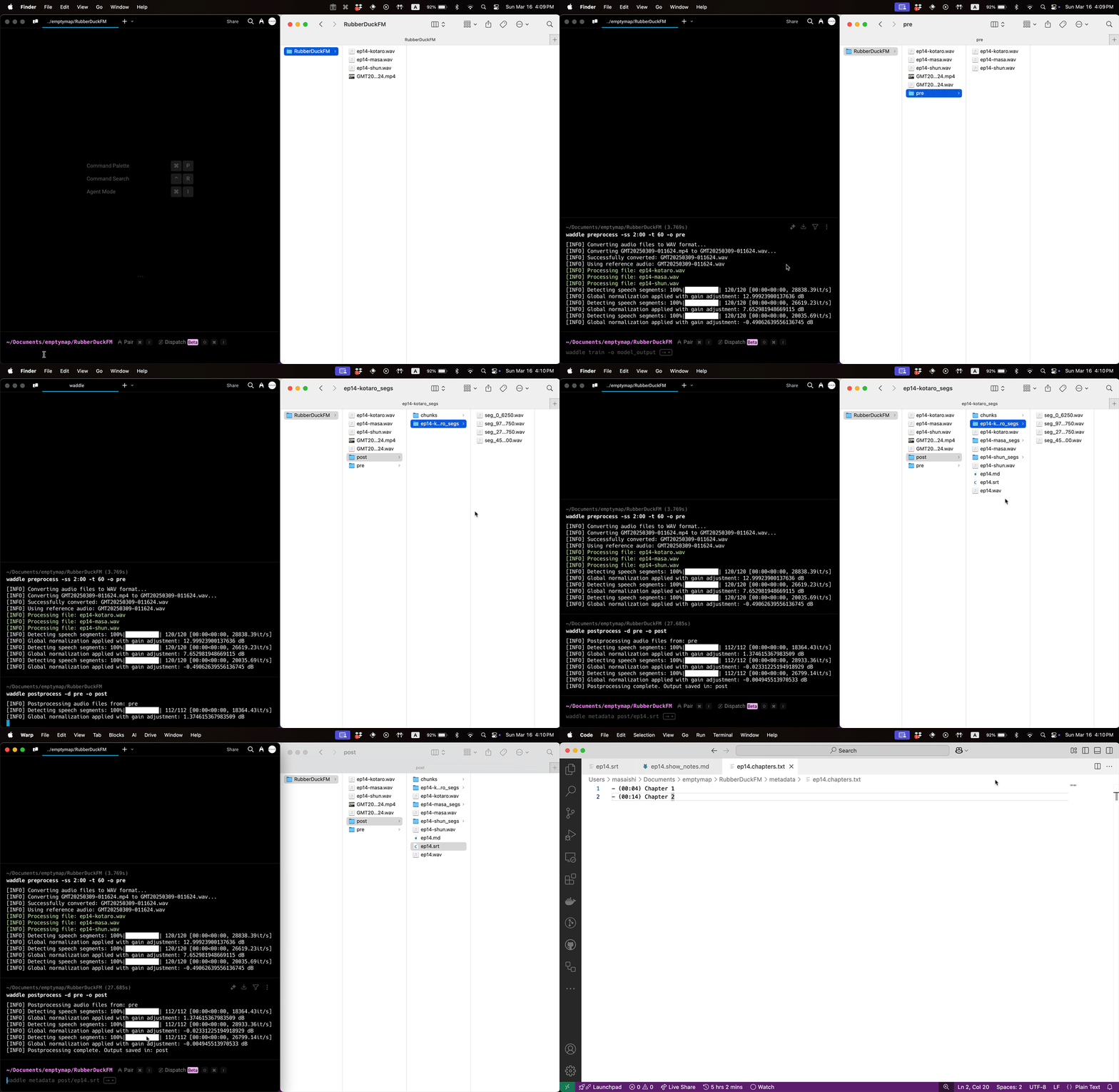
Features
- Alignment: Automatically synchronizes the audio files of each speaker to ensure they are perfectly aligned with the reference audio.
- Normalization: Ensures consistent audio quality by normalizing audio levels.
- Remove Noise: Cleans up audio by reducing background noise for clearer output using
DeepFilterNet. - Subtitle Generation: Generates SRT subtitle files for transcription using
whisper.cpp. - Metadata Generation: Processes annotated SRT files to create chapter markers and show notes for podcast episodes.
Prerequisites
Waddle requires Python 3.13 or higher. All other dependencies can be installed automatically using the waddle install command.
Installation
Quick Start (Recommended)
-
Install waddle via pip:
pip install waddle-ai
-
Install all required tools and dependencies:
waddle install -
You're ready to use Waddle!
Manual Installation (Optional)
If you prefer to install dependencies manually:
-
Python 3.13 or higher:
- Install Python from python.org.
-
FFmpeg:
- MacOS:
brew install ffmpeg
- Ubuntu/Debian:
sudo apt update
sudo apt install ffmpeg
- Windows:
- Download and install FFmpeg from FFmpeg Downloads.
- Ensure FFmpeg is added to your system's PATH.
- MacOS:
-
Dependencies for compiling
whisper.cpp:-
CMake:
- MacOS:
brew install cmake
- Ubuntu/Debian:
sudo apt update
sudo apt install cmake
- MacOS:
-
fmt:
- MacOS:
brew install fmt
- Ubuntu/Debian:
sudo apt update
sudo apt install libfmt-dev
- MacOS:
-
Development Installation
For developers who want to contribute to Waddle, see CONTRIBUTING.md for detailed setup instructions.
Waddle Flow
Waddle Flow is the recommended workflow for podcast production using Waddle. It follows a structured approach through five stages, each with its own directory:
Initialize Project
First, create a new project with the 5-stage folder structure:
waddle init EPISODE_NUM
cd EPISODE_NUM
This creates the following directories:
0_raw/- Raw audio files1_pre/- Preprocessed audio files2_edited/- Manually edited audio files3_post/- Post-processed audio files4_meta/- Metadata files
Stage 0: Raw (0_raw/)
Place your original audio recordings here:
- Upload each speaker's audio files using the naming convention:
ep{N}-{SpeakerName}.[wav|aifc|m4a|mp4]- Example:
ep1-Alice.wav,ep1-Bob.aifc
- Example:
- Include a reference audio file that covers the entire podcast. The reference file name must start with
GMT(e.g., a Zoom recording)- Example:
GMT-recording.wav
- Example:
Stage 1: Preprocessed (1_pre/)
Use the preprocess command to align and clean audio files:
waddle preprocess
This stage produces aligned and cleaned audio files.
Stage 2: Edited (2_edited/)
Manual editing stage for fine-tuning:
- Edit files from
1_pre/using your preferred audio editor - Remove unwanted sections, adjust levels, add effects
- If you want to edit with transcription, you can run
waddle preprocess -trto generate SRT files for each speaker.
- If you want to edit with transcription, you can run
- Save edited files here
Stage 3: Post-processed (3_post/)
Use the postprocess command to finalize audio:
waddle postprocess
This stage produces:
- Final merged audio
- Transcription (SRT files)
Stage 4: Metadata (4_meta/)
Edit the SRT files in 3_post/ to add chapter markers and show notes. Then, generate podcast metadata:
waddle metadata
This stage produces:
- Chapter markers
- Show notes
- MP3 with embedded metadata
Then you can upload the final audio and metadata to your podcast hosting platform.
Complete Workflow Example
# Initialize project
waddle init my-podcast
cd my-podcast

# Place raw files in 0_raw/
cp ~/recordings/* 0_raw/

# Stage 1: Preprocess
waddle preprocess

# Stage 2: Manual editing (use your audio editor such as Audacity)
# Edit files from 1_pre/ and save to 2_edited/

# Stage 3: Post-process
waddle postprocess

# Edit 3_post/{episode_name}.srt to add chapter markers and show notes
# Example:
#
# 1
# 00:00:00.000 --> 00:00:03.000
# alice: Welcome to our podcast!
#
# # Programming Discussion
#
# 2
# 00:00:03.000 --> 00:00:06.000
# bob: Today we'll discuss programming.
#
# - [Rust Language](https://rust-lang.org)

# Stage 4: Generate metadata
waddle metadata
Commands
-
init- Initialize a new waddle project with folder structure:waddle init [project_name]
project_name(optional): Name of the project directory. If not provided, creates folders in the current directory.- Creates the following folder structure:
0_raw/- Raw audio files1_pre/- Preprocessed audio files2_edited/- Manually edited audio files3_post/- Post-processed audio files4_meta/- Metadata files
-
install- Install all required tools and dependencies:waddle installAutomatically installs FFmpeg, CMake, fmt, DeepFilterNet, and whisper.cpp based on your platform (macOS/Linux).
-
single- Process a single audio file:waddle single path/to/audio.wav -o ./output
-o, --output: Directory to save the output (default:./out).-ss: Start time in seconds for the audio segment (default: 0.0).-t, --time: Duration in seconds for the output audio (default: None).-wo, --whisper-options: Options to pass to Whisper transcription (default:-l ja). You can change the default language by modifying src/config.py.-nnr, --no-noise-remove: Skip removing noise from the audio. (no value required)
-
preprocess- Process multiple audio files:waddle preprocess-d, --directory: Directory containing audio files (default:0_raw).-o, --output: Directory to save the output (default:1_pre).-ss: Start time in seconds for the audio segment (default: 0.0).-t, --time: Duration in seconds for the output audio (default: None).-wo, --whisper-options: Options to pass to Whisper transcription (default:-l ja).-nnr, --no-noise-remove: Skip removing noise from the audio. (no value required)-r, --reference: Path to the reference audio file (used in multi-file mode).-c, --comp-duration: Duration in seconds for alignment comparison (default: 1200.0s).-nc, --no-convert: Skip converting audio files to WAV format. (no value required)-tr, --transcribe: Transcribe the processed audio files. (no value required)
-
postprocess- Process aligned audio files:waddle postprocess-d, --directory: Directory containing audio files (default:2_edited).-o, --output: Directory to save the output (default:3_post).-ss: Start time in seconds for the audio segment (default: 0.0).-t, --time: Duration in seconds for the output audio (default: None).-wo, --whisper-options: Options to pass to Whisper transcription (default:-l ja).
-
metadata- Generate metadata from an annotated SRT file:waddle metadatasource(optional): Path to the annotated SRT file (default: looks for SRT files in3_post/).-i, --input: Path to the input audio file. If not specified, it will look for an audio file with the same name.-o, --output: Directory to save the metadata and audio files (default:4_meta).
Annotated SRT Format
When using the metadata command, your SRT file should include annotations:
# Chaptermarkers define chapters (up to 6 levels with #)- Chapter starts at the next SRT timestamp and ends before the next chapter
- Any other text is considered show notes
- Empty lines are ignored
- Use
;to add newlines in show notes (the;will be deleted)
Example
# Introduction

1
00:00:00.000 --> 00:00:03.000
alice: Welcome to our podcast!

2
00:00:03.000 --> 00:00:06.000
bob: Today we'll discuss programming.

## Topic 1: Rust

3
00:00:06.000 --> 00:00:09.000
alice: Let's talk about Rust.

- [Rust Language](https://rust-lang.org)
;
Great for systems programming!

4
00:00:09.000 --> 00:00:12.000
bob: I love its memory safety.

# Conclusion

5
00:00:12.000 --> 00:00:15.000
alice: Thanks for listening!
Output Files
The above example would generate these files:
- chapters.txt:
- (00:00) Introduction
- (00:06) Topic 1: Rust
- (00:12) Conclusion
- show_notes.md:
- [Rust Language](https://rust-lang.org)

Great for systems programming!
- The chapter markers would also be embedded in the MP3 metadata for podcast apps
Contributing
Want to contribute to Waddle? We welcome contributions! Please see CONTRIBUTING.md for detailed development setup, testing guidelines, and contribution workflows.
License
This project is licensed under the MIT License - see the LICENSE file for details.


Download files
Download the file for your platform. If you're not sure which to choose, learn more about installing packages.
Source Distribution
Built Distribution
Filter files by name, interpreter, ABI, and platform.
If you're not sure about the file name format, learn more about wheel file names.
Copy a direct link to the current filters
File details
Details for the file waddle_ai-0.1.5.tar.gz.
File metadata
- Download URL: waddle_ai-0.1.5.tar.gz
- Upload date:
- Size: 65.9 kB
- Tags: Source
- Uploaded using Trusted Publishing? Yes
- Uploaded via: uv/0.7.13
File hashes
| Algorithm | Hash digest | |
|---|---|---|
| SHA256 |
0f22d675dd481027bfa5c667dbaeaa1aa89f0445ed788ebb9830f46568d01592
|
|
| MD5 |
d64c6894c8afbff57e3efdaa79fd32af
|
|
| BLAKE2b-256 |
0bf6d92bac63bcc1d6b098b7a849c7973ba8e6ebb8d29e9fff168f9238c10392
|
File details
Details for the file waddle_ai-0.1.5-py3-none-any.whl.
File metadata
- Download URL: waddle_ai-0.1.5-py3-none-any.whl
- Upload date:
- Size: 46.0 kB
- Tags: Python 3
- Uploaded using Trusted Publishing? Yes
- Uploaded via: uv/0.7.13
File hashes
| Algorithm | Hash digest | |
|---|---|---|
| SHA256 |
2d3a07bb7a264767580c5d9a661159dbde578bb851501944b407e5161fa93e1f
|
|
| MD5 |
d3fbd125c1652e31ede218b3212f5cb7
|
|
| BLAKE2b-256 |
d3737616edc79a2ad9025ffbf0616ec3b481e5427152d19834579727931ed418
|






