

MCP server for integrating WAGO PLCs with the WDx REST API

Project description

wago-plc-mcp-server - bridge WAGO PLCs to AI agents

Docker Hub License: MPL-2.0 MCP Tools Fleet tested

wago-plc-mcp-server

MCP server that connects WAGO PLCs to LLM agents via the WDx/WDA REST API.

Ask an AI assistant to read sensor values, change configuration, trigger firmware updates, or monitor entire PLC fleets - with no custom code.


Quick navigation: What it does · What to ask it · Connecting Clients · Quick Start · FAQ · Deployment Paths · Tool Reference · Configuration


New to WAGO, MCP, or WDA? Start here

You know PLCs - TIA Portal, Studio 5000, EcoStruxure, ladder/structured text, fieldbuses. You've never touched a WAGO controller or heard of "MCP" or "WDA." Here's the 60-second translation.

What WAGO is: A PLC vendor, same category as Siemens/Rockwell/Schneider. Their controllers (PFC200, PFC300, Edge Controller) run a CODESYS-based runtime - your IEC 61131-3 program logic looks the same as on any other CODESYS-compatible PLC.

What WDA/WDx is: Every WAGO controller exposes a REST API called WDA (WAGO Device Access) for system and diagnostic management - firmware version, network config, service health, status LEDs, reboot/firmware-update control. Think of it as the machine-readable equivalent of TIA Portal's Online & Diagnostics view or Studio 5000's Controller Properties - not a fieldbus, not OPC-UA, and not access to your control program's I/O data.

What MCP is: Model Context Protocol - a standard way for an AI assistant (Claude, etc.) to call a fixed set of defined "tools" against a system, instead of you writing custom integration code for every request. This repo implements an MCP server that turns the WDA REST API into 13 tools an AI assistant can call directly: read a parameter, write a parameter, run a method, poll a watchlist of values, etc.

What this project actually does: Bridges WDA → MCP, so you can ask an AI assistant things like "what firmware version is PLC .10 running?" or "is the NTP service healthy on all 16 PLCs?" in plain English, and it calls the right WDA endpoint(s) for you - no REST client, no custom script.

[!IMPORTANT] What this does NOT do:

  • It is WAGO-only - there's no Siemens S7, Rockwell Logix, or Schneider Modicon driver here.
  • It does not read or write your control program's I/O tags, real-time process values, or PLC memory. Field I/O still goes through OPC-UA, Modbus TCP, or WAGO I/O-Check - see What values can be monitored for exactly what WDA does expose.
  • It is not an HMI/SCADA replacement - there's no graphical front end, just tool calls an AI assistant makes on your behalf.
Term Plain meaning Closest thing you already know
WDA / WDx WAGO's REST API for system/diagnostic management TIA Portal Online & Diagnostics, Studio 5000 Controller Properties
MCP Protocol letting an AI assistant call a fixed set of "tools" A structured API contract - but invoked by an LLM instead of your own code
Parameter A single named value on the PLC (firmware version, an LED state, a service flag) A diagnostic/status tag - not a control-program I/O tag
Method A remote action you can trigger (e.g. sync NTP time, trigger reboot) An RPC / "execute" command, similar to an online action in TIA/Studio 5000
Watchlist A server-side list of parameters the PLC keeps "open" so repeated reads are cheap Closest analog: a Watch Table (TIA) or Trend window (Studio 5000) - but polled by the AI agent, not displayed live in a GUI grid

New here and just want to see it work? Jump to the Demo section - short recordings of the exact kind of conversation described above, running against real hardware.


Architecture & Workflow

No one - neither the human asking the question nor the AI assistant answering it - needs to know WAGO parameter IDs or WDA's schema upfront. describe_plc, find_parameters, and find_methods let the agent discover what's actually available on each PLC live, the same way a new hire would explore an unfamiliar controller's diagnostics for the first time. That's the core problem this project solves: turning "I have no idea what this fleet of PLCs exposes" into a plain-English answer, without writing a custom integration for every question in advance.

%%{init: {'theme':'base', 'themeVariables': {
  'primaryColor':'#1F2837',
  'primaryTextColor':'#ffffff',
  'primaryBorderColor':'#6EC800',
  'lineColor':'#6EC800',
  'secondaryColor':'#EFF0F1',
  'secondaryTextColor':'#1F2837',
  'secondaryBorderColor':'#A5A8AF',
  'tertiaryColor':'#FFFFFF',
  'tertiaryTextColor':'#1F2837',
  'tertiaryBorderColor':'#DEDFE1',
  'fontFamily':'Segoe UI, Helvetica, Arial, sans-serif',
  'clusterBkg':'#EFF0F1',
  'clusterBorder':'#A5A8AF',
  'edgeLabelBackground':'#1F2837'
}}}%%
flowchart TB
    subgraph Clients["AI clients (any MCP client works)"]
        direction LR
        CD("Claude Desktop<br/>(stdio, via wago_proxy.py)")
        CC("Claude Code<br/>(direct HTTP)")
        OC("OpenClaw<br/>(direct HTTP)")
    end

    CD & CC & OC -- "Bearer token" --> MCP

    subgraph Server["wago-plc-mcp-server - Docker, port 6042"]
        direction LR
        MCP("13 MCP tools<br/>find_parameters · get_parameter<br/>set_parameters · invoke_method<br/>create/read_watchlist · …")
        Guard("Bearer auth · rate limiting<br/>hash-chained audit log")
        MCP --- Guard
    end

    MCP --> FAN("WDA Bearer token + TLS<br/>parallel, semaphore-bounded<br/>fans out to every registered PLC<br/>tested with 16 · no hard ceiling below 100+")

    FAN --> P1 & P2 & P3 & P4 & P5 & P6 & Pn

    subgraph Fleet["WAGO PLC fleet - each class can be 1 unit or 100s"]
        direction LR
        P1("CC100<br/>751-9301 · 751-940x")
        P2("PFC100 Gen 2<br/>750-811x")
        P3("PFC200 Gen 2<br/>750-8210 · 750-8211<br/>750-8212 · 750-8217")
        P4("PFC300<br/>750-8302")
        P5("Edge Controller<br/>752-8303/8000-0002")
        P6("WP400<br/>762-34xx")
        Pn("TP600<br/>762-4/5/6xxx")
    end

What actually happens when you ask a fleet-wide question, e.g. "which PLCs are running outdated firmware?":

  1. You ask the AI client (Claude Desktop, Claude Code, OpenClaw, or any other MCP-compatible client) in plain English - no parameter IDs, no WDA knowledge required.
  2. The assistant picks the right tool(s) - here, list_plcs to enumerate the fleet, then get_parameters_bulk to read 0-0-version-firmwareversion from every PLC in one call.
  3. The server fans the request out to each registered PLC in parallel (semaphore-bounded, WAGO_MAX_CONCURRENT_REGISTRATIONS), opening a WDA session per PLC with its own Bearer token and TLS settings.
  4. Each PLC answers independently - a slow or unreachable CC100 doesn't block the other 15 (or 100+) PLCs in the fleet from responding.
  5. Results are aggregated back into one answer - the assistant reconciles per-PLC values into the single fleet-wide answer you actually asked for, e.g. "3 of 16 PLCs are on FW28 or older: .14, .19, .22."

The "fleet" in that walkthrough isn't one of each device class. It's whatever you actually have on the floor: 50 PFC200s on a production line, 10 PFC300s in a packaging cell, 200 Edge Controllers across a multi-site rollout, WP400 panels on machine fronts, TP600 HMIs on operator stations, or any mix. The fan-out model treats every registered IP identically regardless of device class, so the same single question scales from a single test rack to a plant-wide fleet without any code change.

Demoed end to end with 16 PLCs of mixed device class/firmware on a single rack; the parallel fan-out model has no architectural ceiling that caps it well below 100+.


Supported Hardware

Device Article Numbers Notes
CC100 751-9301 · 751-9401 · 751-9402 · 751-9403 Slow ARM CPU - set WAGO_TIMEOUT_SECONDS=45
PFC100 Gen 2 750-8110 (ECO) · 750-8111 · 750-8112 (RS-232/485) · 750-8112/025-000 (XTR)
PFC200 Gen 2 750-8210 · 750-8211 (SFP) · 750-8212 (Serial) · 750-8216 (Telecontrol) · 750-8217 (4G)
PFC300 750-8302
Edge Controller 752-8303/8000-0002 Exposes CODESYS runtime state via WDA (0-0-plcruntime-* parameters)
WP400 762-34xx series Web panel only — 189 WDA params, no CODESYS, no BACnet, no I/O bus. HMI-unique: display brightness/orientation/screensaver (0-0-display-*), integrated browser startpage + reconnect (0-0-integratedwebbrowser-*), touch cleaning mode
TP600 762-42xx · 762-43xx · 762-52xx · 762-53xx · 762-62xx · 762-63xx Full PLC+HMI — 410 WDA params. Has CODESYS3 runtime (0-0-codesys3-*), BACnet, cloud connectivity, serial. Plus all WP400 display/browser params, front LED (0-0-frontled-enabled), acoustic feedback (0-0-touchpanel-acousticfeedback-enabled)

Requires firmware build ≥ 28 (FW28) with WDx/WDA REST API enabled. Tested up to 04.09.01 (FW31).


Features

  • 13 MCP tools - discover, read, write, invoke methods, monitor
  • Fleet-wide parallel reads - query one parameter across all PLCs in a single tool call
  • Server-side watchlists - efficient repeated polling without repeated handshakes
  • Enum resolution - raw integer enum values translated to human-readable labels
  • Writeability pre-validation - read-only parameters rejected before hitting the PLC
  • Fuzzy parameter search - find parameters by keyword without knowing exact IDs (up to 255 results)
  • Dual transport - Streamable HTTP (default) or SSE, switched via env var
  • Docker-first - single container, host networking for routed PLC subnets

Security

Feature Status Details
Bearer auth on /mcp Auto-generated key; Docker Secret + env override; /health exempt
Rate limiting 60 req / 60 s per source IP; 429 with Retry-After
Auth failure alerts WARNING per failure; ERROR alert at 10 consecutive failures from same IP
WDA Bearer token auth Credentials sent once; cached token refreshed reactively on 401
Hash-chained audit log Every write is a tamper-evident JSON-lines entry with prev SHA-256
Default password warning Startup WARNING if factory default password detected
TLS - WDA connections ⚙️ Off by default; enable with WAGO_TLS_CA or per-PLC Docker Secret
TLS - MCP endpoint ⚙️ Off by default; enable with MCP_TLS_CERT + MCP_TLS_KEY
CycloneDX SBOM Published alongside every release image
Docker Secrets PLC passwords, MCP key, TLS certs all mountable as secrets
CVE scanning Weekly grype scan on SBOM; HIGH/CRITICAL fails CI
Dependabot Weekly PRs for pip, Docker, and GitHub Actions dep updates

For the vulnerability disclosure policy, patch SLA, and support lifetime see SECURITY.md.


Demo

Short screen recordings of the server driving real WAGO controllers from Claude Desktop, end to end. The use cases below are collapsed by default - expand the one you want to see rather than loading every animation at once.

Overview - connecting Claude Desktop and a first interaction

Overview demo

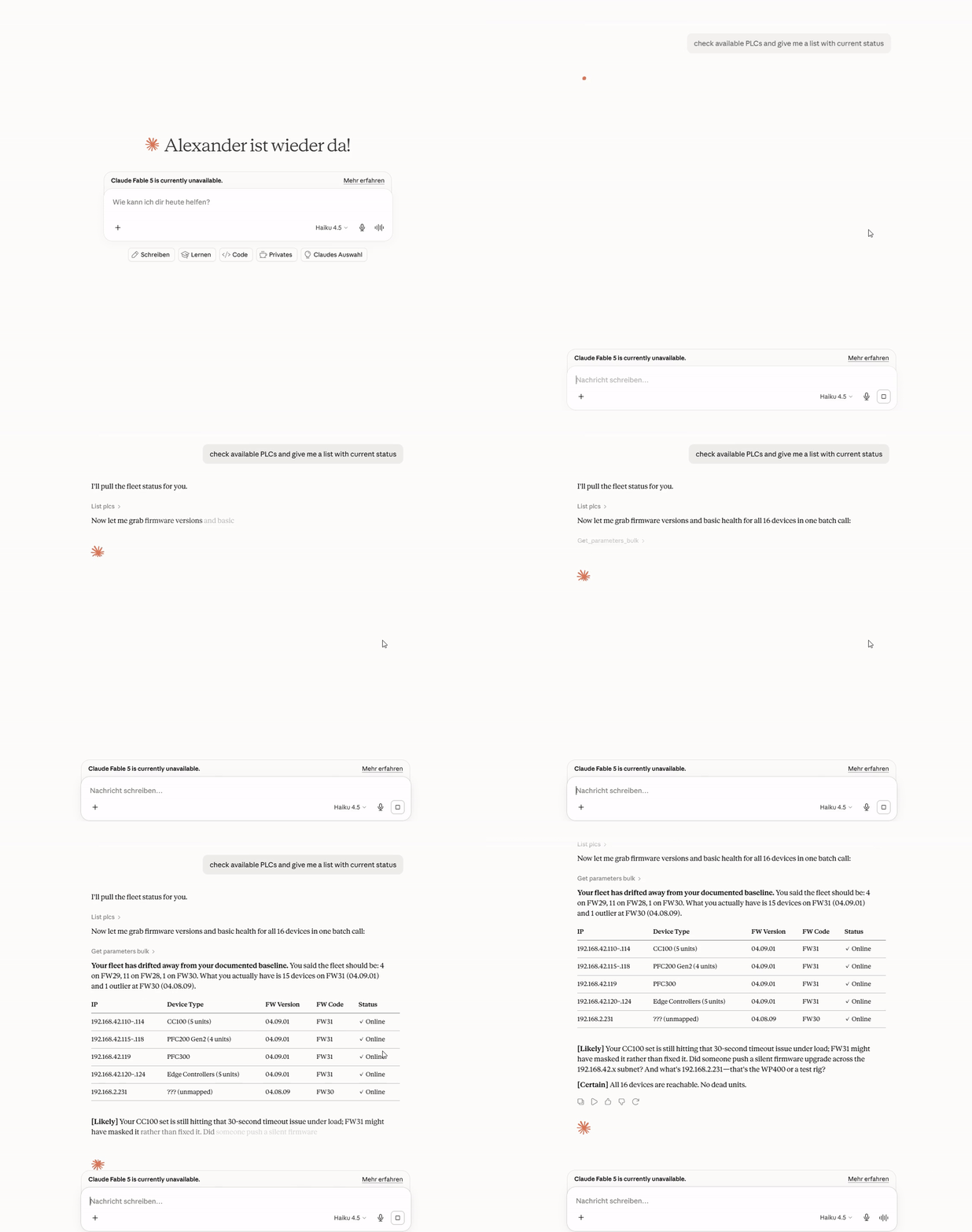
Use case 1 - fleet-wide health report across all 16 PLCs

Asks the agent to reconcile a "health report" across the fleet - listing all PLCs, bulk-fetching firmware versions, and probing device types to figure out what's actually running where before trusting any conclusions.

Use case 1 demo

Use case 2 - Edge Controller: building a CPU/LED health watchlist

Asks the agent to set up a watchlist monitoring CPU/service health and LED diagnostic state on the Edge Controllers, then read it back - including the agent pushing back to clarify ambiguous requirements before touching anything, and discovering the actual parameter IDs via find_parameters rather than guessing.

Use case 2 Edge Controller demo

Use case 2 - PFC300: building a CPU/LED health watchlist

The same health-watchlist workflow as above, run against a PFC300 instead - shows the same parameter-discovery process landing on different actual parameter names for an equivalent capability.

Use case 2 PFC300 demo

Use case 3 - detecting and fixing NTP drift fleet-wide

Asks the agent to sync NTP time on any PLC that's drifted. The agent checks NTP status across the entire fleet first, identifies which PLCs are actually affected (stuck clocks, wrong timezone offsets), and only then invokes the time-sync method on the specific units that need it.

Use case 3 demo

See Connecting Clients below for the setup shown in these recordings, including the config screenshot and connected-state screenshot.


Connecting Clients

Once the server is running (see Quick Start below), connect your AI assistant client to it. The steps below apply to any deployment - Docker, Windows .exe, or uvx.

Claude Desktop

  1. Add the server entry to your Claude Desktop config file. The exact JSON snippet depends on your deployment path - see Deployment Paths for the config block that matches your setup.
  2. Fully quit Claude Desktop - not just close the window, but exit the application entirely.
  3. Relaunch Claude Desktop.

You should see either a hammer icon in the toolbar showing 13 tools available, or the server listed under Settings → Connectors (labelled Konnektoren in some versions):

wago-plc connected in Claude Desktop

If the server does not appear:

  • Check the server process is running: docker ps | grep wmcp (or verify your Windows .exe or uvx process)
  • Confirm the API key in your config file matches the key printed at server startup
  • Test that the server is reachable from your machine: curl http://localhost:6042/health

Claude Code (terminal / IDE extensions)

Add .mcp.json to your project root:

{
  "mcpServers": {
    "wago-plc": {
      "type": "http",
      "url": "http://<server-host>:6042/mcp",
      "headers": { "Authorization": "Bearer <your-api-key>" }
    }
  }
}

Run claude mcp list to confirm the server appears in the list.

Other clients (ChatGPT Desktop, n8n, OpenAI API)

Any client that supports the MCP streamable-HTTP transport connects to http://<host>:6042/mcp with the header Authorization: Bearer <key>. For older clients that use the SSE transport, set TRANSPORT=sse in .env and point at /sse instead of /mcp.


What can I ask it?

Type your question or task in plain English. The AI assistant figures out which parameters to read or write and handles the WDA API calls - no parameter IDs or REST knowledge required on your end.

Fleet-wide checks

What you type What happens
"Which PLCs are running firmware older than build 31?" Reads the firmware version from every registered controller in parallel and lists the ones that are behind
"Are NTP and Docker running on all Edge Controllers?" Reads the service running-flags across the fleet and highlights any that are stopped
"Show the diagnostic LED states on all PLCs" Reads the SYS, RUN, and fieldbus LED text strings from every unit - useful when you cannot walk the floor
"Is any controller showing a fault or error state?" Cross-checks LED diagnostic strings and error parameters fleet-wide

Single-controller diagnostics

What you type What happens
"What firmware version is running on 192.168.1.14?" Reads the firmware version parameter from that unit
"List all network settings on Edge Controller .19" Searches parameters by keyword and returns matching names with current values
"Is the CODESYS program loaded and running on PFC300 .22?" Reads the CODESYS runtime state parameter
"What NTP server is configured on PLC .10?" Reads the NTP client configuration parameters

Configuration changes and remote actions

What you type What happens
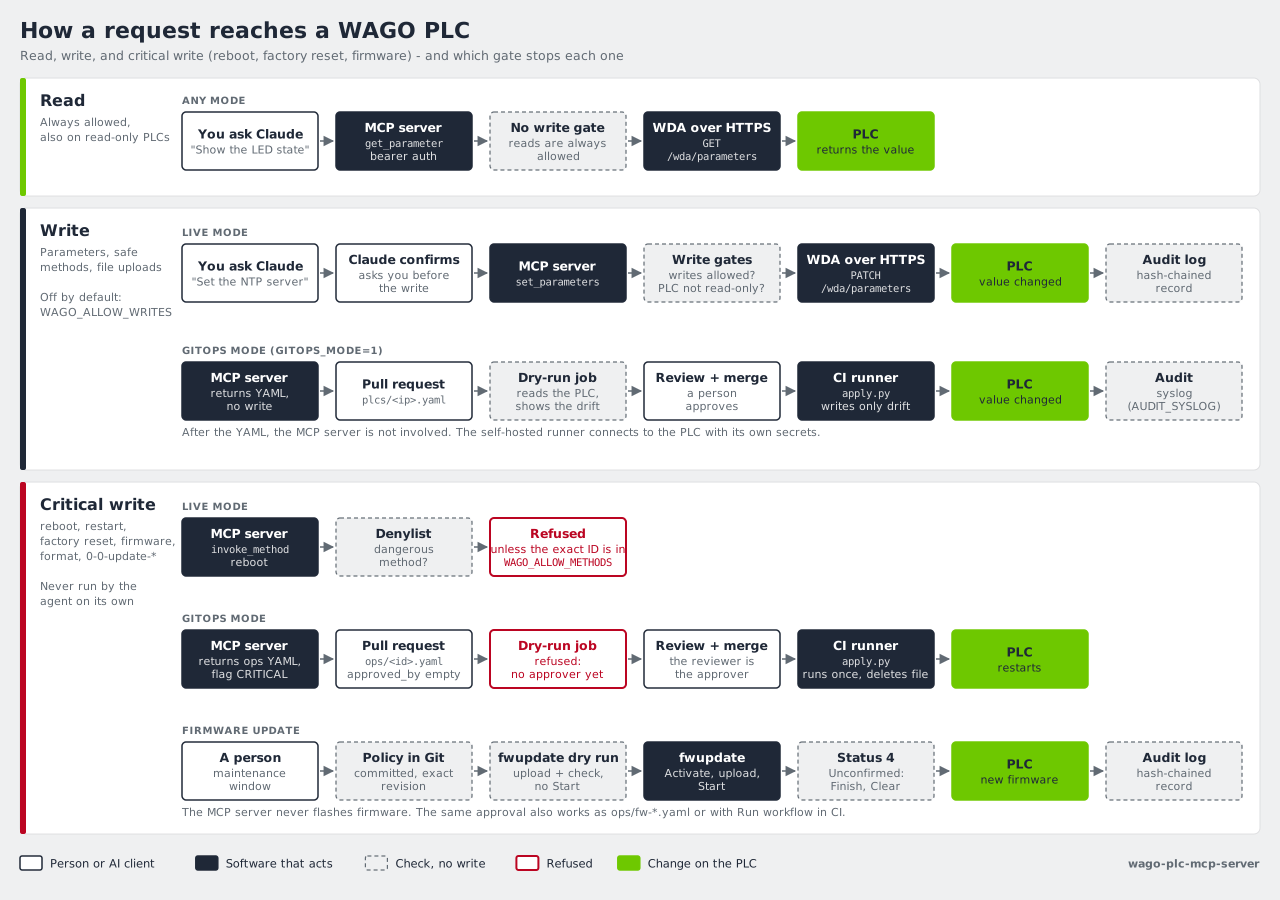
"Set the NTP server to 192.168.0.1 on all PLCs in building A" Writes the NTP server address after you confirm; every write is recorded in the audit log with timestamp and your key
"Trigger an NTP time sync on the three controllers that showed clock drift" Invokes the NTP sync action only on the units that need it - checks status first, then acts
"Enable SSH on controller .14 for remote maintenance access" Finds the SSH enable parameter and writes it after your confirmation
"Start a firmware update on PFC200 .11 and monitor the progress" Invokes the firmware update method and polls the progress parameter until complete

Ongoing monitoring

What you type What happens
"Set up a health monitor for the packaging line PLCs" Creates a server-side monitoring list on each PLC combining LED states, service running-flags, and cloud connection status - one HTTP request per poll cycle instead of one per parameter
"Track the firmware update progress on all 12 PLCs" Polls the update status and progress parameters across the fleet

[!NOTE] The assistant asks for your confirmation before writing any value to a controller. You stay in control of what gets changed and when.


Quick Start

1. Clone and configure

git clone https://github.com/WagoAlex/wago-plc-mcp-server.git
cd wago-plc-mcp-server
cp _env .env

Edit .env with your PLC details.

Small fleet — comma-separated IPs:

WAGO_PLC_HOSTS=192.168.1.10,192.168.1.11,192.168.1.12
DEFAULT_PLC_USERNAME=admin
PORT=6042
WAGO_TIMEOUT_SECONDS=45

Large fleet — host file (recommended for hundreds of PLCs):

Create data/fleet.txt on the host (one IP per line, # comments supported):

# Production floor A
192.168.1.10
192.168.1.11
192.168.1.12

# Production floor B
192.168.2.10
# 192.168.2.11   decommissioned

Then reference it in .env:

WAGO_PLC_HOSTS_FILE=/app/data/fleet.txt
DEFAULT_PLC_USERNAME=admin
PORT=6042
WAGO_TIMEOUT_SECONDS=45

Both WAGO_PLC_HOSTS and WAGO_PLC_HOSTS_FILE can be set at the same time — all discovered IPs are merged. Fleet changes require a container restart; the audit log persists across restarts on the ./data volume.

[!TIP] For fleets with mixed passwords, use per-PLC overrides: PLC_PASSWORDS_192_168_1_11=secret (IP with underscores).

2. Create the PLC password secret

mkdir -p secrets
echo "your-plc-password" > secrets/plc_default_password.txt
chmod 600 secrets/plc_default_password.txt

3. Start

docker compose up -d
docker logs wmcp -f

The container uses network_mode: host so it can reach PLCs on routed subnets directly. On first boot the server prints the auto-generated API key - copy it now:

════════════════════════════════════════════════════════════════════════
  MCP API KEY - COPY THIS NOW (shown once; stored in ./data/mcp_api_key)

  Bearer 7290f42b…

  .mcp.json:
    "headers": {"Authorization": "Bearer 7290f42b…"}

  Regenerate:  docker exec wmcp python src/mcp_keygen.py
════════════════════════════════════════════════════════════════════════

Registration: 3/3 ready
MCP server listening on http://0.0.0.0:6042/mcp (Streamable HTTP)
[tls] WDA TLS verification DISABLED - set WAGO_TLS_CA=... to enable.
[tls] MCP endpoint TLS DISABLED - set MCP_TLS_CERT + MCP_TLS_KEY to enable.
[audit] Hash chain seeded from existing audit log

[!NOTE] The two [tls] warnings are expected on a default install. See TLS Configuration to enable.

4. Verify

TOKEN="<your-api-key>"

curl -X POST http://localhost:6042/mcp \
  -H "Content-Type: application/json" \
  -H "Accept: application/json, text/event-stream" \
  -H "Authorization: Bearer $TOKEN" \
  -d '{"jsonrpc":"2.0","method":"initialize","params":{"protocolVersion":"2025-11-25","capabilities":{},"clientInfo":{"name":"test","version":"1.0"}},"id":1}'

# Health check (no token required)
curl http://localhost:6042/health

5. Install the WAGO skill (recommended)

The bundled skill file gives the AI assistant detailed knowledge of WAGO-specific parameter names, safe-operation guidance, and tool behaviour. It is the difference between a generic AI response and one that correctly identifies the right WDA parameter for your question first time.

mkdir -p ~/.claude/skills
cp -r wago-plc-skill ~/.claude/skills/   # end-user skill for Claude Desktop and Claude Code

The assistant picks it up automatically the next session - no server restart needed. See Install a project skill for all three skill variants (end-user, autonomous agents, and server contributors).


Frequently Asked Questions

Can the AI modify my control program or process I/O values?

No. The WDA REST API - the interface this server uses - is the system management layer of the WAGO controller. It has no access to the CODESYS runtime, PLC variables, fieldbus I/O, or anything in your control program. Think of it as the Online & Diagnostics view in TIA Portal or the Controller Properties panel in Studio 5000 - not the I/O monitor or Watch Table.

Field I/O still goes through OPC-UA, Modbus TCP, or WAGO I/O-Check as before. This server does not touch any of those paths.

What can it actually read and write on a controller?

System-level configuration and diagnostic values exposed by WDA: firmware version, NTP server and sync settings, SSH enable/disable, network interface configuration, service running-flags, LED states, reboot control, and firmware update execution. A full parameter list per device class is in the docs/ reference files.

The assistant will not write a value without your explicit confirmation.

Does the server need internet access after the initial setup?

No. The Docker image is pulled from Docker Hub once during setup. After that, all traffic is local: AI client → MCP server (port 6042) → PLCs (port 443 HTTPS). No cloud calls, no telemetry, no external connections. Suitable for air-gapped OT networks once the Docker image has been transferred to the host.

What if the AI writes a wrong value?

Every write is recorded in a tamper-evident audit log: timestamp, parameter ID, the value written, and which API key made the change. Entries are hash-chained so deletions are detectable after the fact. See Audit Log for how to tail and verify the log.

For most WDA parameters - NTP settings, SSH toggle, LED configuration - a wrong value is correctable by writing the correct value again. For potentially disruptive actions such as firmware update or reboot, the assistant asks for your explicit confirmation before executing.

Can multiple engineers share one server?

Yes. Deploy one Docker container on a host reachable from the OT network. Each engineer connects their own Claude Desktop or Claude Code to http://<server>:6042/mcp. The server handles concurrent sessions. Use a shared API key or provision individual keys per engineer for per-person traceability in the audit log.

Our PLCs have different passwords. How do we configure that?

Use per-PLC password overrides in .env alongside the fleet-wide default:

DEFAULT_PLC_PASSWORD=wago             # applied to all PLCs unless overridden

PLC_PASSWORDS_192_168_1_11=secret     # override for this unit (IP with underscores)
PLC_PASSWORDS_192_168_1_15=other

What firewall rules does IT need to open?

Direction Source Destination Port Protocol
Inbound to MCP server Engineer workstations / AI client machines MCP server host 6042 TCP
Outbound from MCP server MCP server host WAGO PLC IPs 443 TCP (HTTPS)

The Docker container uses network_mode: host, so it reaches PLCs on routed subnets exactly the same way any management workstation running on that host would. No additional routing changes are needed beyond what already allows that host to reach the PLC subnets.

Which WAGO firmware version is required?

Firmware build ≥ 28 (version string 04.xx.xx(28) or later). Check the build number in the controller's web interface under Device Information, or ask the assistant: "What firmware version is PLC 192.168.x.x running?" Tested up to 04.09.01 (FW31).


API Key Management

The server resolves the MCP API key in priority order:

  1. Docker Secret /run/secrets/mcp_api_key - highest trust, recommended for production
  2. Env var MCP_API_KEY - dev override
  3. Persisted file ./data/mcp_api_key - auto-generated on first boot, survives container recreations via volume mount
  4. Auto-generate - generates a new key if none of the above exist

Regenerate the key:

docker exec wmcp python src/mcp_keygen.py
docker restart wmcp   # pick up new key

Use a Docker Secret instead:

echo "$(openssl rand -hex 32)" > secrets/mcp_api_key.txt
chmod 600 secrets/mcp_api_key.txt
# Uncomment mcp_api_key in docker-compose.yml, then:
docker rm -f wmcp && docker compose up -d

TLS Configuration

Both TLS legs are opt-in. The server starts without TLS and logs a startup warning for each disabled leg.

WDA connections (server → PLC)

WAGO PLCs use HTTPS with self-signed certificates. Three options:

Option A - Per-PLC cert pinning (recommended for self-signed certs)

# Extract the cert from each PLC
openssl s_client -connect 192.168.1.10:443 </dev/null 2>/dev/null \
  | openssl x509 > secrets/plc_cert_192_168_1_10

# Declare the secret in docker-compose.yml, then restart
docker rm -f wmcp && docker compose up -d

The server detects plc_cert_<ip_underscored> Docker Secrets automatically - no extra env var needed.

Option B - Private CA bundle (recommended for managed fleets)

WAGO_TLS_CA=/run/secrets/wago_ca.pem

Option C - System trust store (only if PLC certs are CA-signed)

WAGO_TLS_CA=true

MCP endpoint (client → server)

# Generate a self-signed cert for dev
openssl req -x509 -newkey rsa:4096 \
  -keyout secrets/mcp_tls_key.pem \
  -out secrets/mcp_tls_cert.pem \
  -days 365 -nodes -subj "/CN=wago-mcp"
chmod 600 secrets/mcp_tls_key.pem

Declare the secrets in docker-compose.yml, then set:

MCP_TLS_CERT=/run/secrets/mcp_tls_cert
MCP_TLS_KEY=/run/secrets/mcp_tls_key
# MCP_TLS_KEY_PASSWORD=   # only if key is password-protected

When TLS is active, update your client URLs from http:// to https://.


Deployment Paths

Five ways to run and connect this server. Pick the one that fits your environment - they can coexist (e.g. Docker for the plant, uvx for your dev laptop).

Path Best for Requires Fleet size
Docker Plant server, shared multi-user fleet Docker host on the OT network Any
Windows .exe OT engineer laptop, air-gapped Windows Nothing - zero dependencies Small
uvx / PyPI Developer machine, any OS uv installed Small-medium
IDE Cursor, VS Code + Copilot uv installed Small
HTTP remote ChatGPT, OpenAI API, n8n automation Running server reachable over network Any

Config file examples for every path: deploy/configs/


Docker (recommended for shared fleets)

One server, many clients. PLCs register once at startup and stay connected.

cp _env .env          # edit PLC IPs, password, API key
docker compose up -d

Connect any client to http://<host>:6042/mcp with Authorization: Bearer <key>.

Claude Code / .mcp.json:

{
  "mcpServers": {
    "wago-plc": {
      "type": "http",
      "url": "http://localhost:6042/mcp",
      "headers": { "Authorization": "Bearer <your-api-key>" }
    }
  }
}

See Quick Start for the full Docker setup.


Windows .exe (OT engineer laptop)

Self-contained bundle. No Python, no package manager, no internet after first build.

What to ship to the engineer:

wago-mcp-server.exe   ← the MCP server (start this first)
wago-proxy.exe        ← Claude Desktop bridge (auto-launched)
.env                  ← pre-filled: PLC IPs, password, API key
claude_desktop_config.json  ← pre-filled: path to proxy.exe + matching key

Build the .exe files (run once, on any Windows machine with Python 3.11+):

deploy\windows\build.bat

Output lands in dist\windows\. Run deploy\windows\setup.bat in that folder to configure .env and get the Claude Desktop JSON snippet.

%APPDATA%\Claude\claude_desktop_config.json (→ deploy/configs/claude-desktop-windows-exe.json):

{
  "mcpServers": {
    "wago-plc": {
      "command": "C:\\wago-mcp\\wago-proxy.exe",
      "env": {
        "WAGO_MCP_URL": "http://localhost:6042/mcp",
        "WAGO_MCP_API_KEY": "your-api-key"
      }
    }
  }
}

Example, as seen editing the file directly in VS Code:

claude_desktop_config.json example

Fully quit and relaunch Claude Desktop. Depending on your Claude Desktop version you'll see either a hammer icon with the tool count, or the server listed under Settings → Connectors (some versions label this panel "Konnektoren"):

wago-plc connected in Claude Desktop


uvx / PyPI (developer or power user)

Runs the full server locally in stdio mode - no Docker, no proxy, no persistent process. Starts fresh each Claude session (PLCs re-register on connect, adds a few seconds).

Requires: uv — a single binary, no Python install needed.

%APPDATA%\Claude\claude_desktop_config.json (→ deploy/configs/claude-desktop-uvx.json):

{
  "mcpServers": {
    "wago-plc": {
      "command": "uvx",
      "args": ["wago-plc-mcp-server"],
      "env": {
        "TRANSPORT": "stdio",
        "WAGO_PLC_HOSTS": "192.168.1.10,192.168.1.11",
        "DEFAULT_PLC_USERNAME": "admin",
        "DEFAULT_PLC_PASSWORD": "wago",
        "WAGO_TIMEOUT_SECONDS": "45",
        "LOG_LEVEL": "WARNING"
      }
    }
  }
}

For a large fleet use WAGO_PLC_HOSTS_FILE pointing to a text file instead of listing IPs inline. Prefer Docker for fleets > 20 PLCs to avoid per-session re-registration.


IDE (Cursor, VS Code)

Same as uvx above but using the IDE's MCP config file instead of Claude Desktop.

Cursor.cursor/mcp.json in the project root (→ deploy/configs/cursor-and-vscode.json):

{
  "servers": {
    "wago-plc": {
      "command": "uvx",
      "args": ["wago-plc-mcp-server"],
      "env": {
        "TRANSPORT": "stdio",
        "WAGO_PLC_HOSTS": "192.168.1.10",
        "DEFAULT_PLC_USERNAME": "admin",
        "DEFAULT_PLC_PASSWORD": "wago"
      }
    }
  }
}

VS Code + Copilot.vscode/mcp.json, same structure as Cursor.


HTTP remote (ChatGPT API, n8n, OpenAI)

Platforms that speak MCP over HTTP connect directly to the running server - no proxy, no uvx. Requires the Docker or persistent server deployment.

ChatGPT Desktop — Settings → MCP Servers → Add:

URL:    http://plc-gateway.plant.internal:6042/mcp
Header: Authorization: Bearer <your-api-key>

OpenAI Responses API (see deploy/configs/chatgpt-openai.md):

response = client.responses.create(
    model="gpt-4o",
    tools=[{
        "type": "mcp",
        "server_url": "http://plc-gateway.plant.internal:6042/mcp",
        "server_label": "wago-plc",
        "headers": {"Authorization": "Bearer <your-api-key>"}
    }],
    input="List all PLCs and their firmware versions."
)

n8n — HTTP Request node or MCP node pointing at http://<host>:6042/mcp.

For legacy SSE transport set TRANSPORT=sse in .env and point at /sse instead of /mcp.


Recommended: install a project skill

This repo ships three skills for three different audiences. Install the one that matches who (or what) is talking to the server - they're not interchangeable:

Skill For Covers
wago-plc-skill/SKILL.md End users in Claude Desktop / Claude Code who just want to ask for PLC data in plain English, with no prior MCP/Docker/REST knowledge Natural-language tool mapping, when to use a watchlist vs a one-off read, safety/confirmation guidance, plain-language troubleshooting
wago-plc-agent-skill/SKILL.md Autonomous agents / orchestration pipelines calling the tools programmatically Tool I/O contracts, batching/concurrency limits, error and partial-failure shapes, retry/idempotency rules, watchlist lifecycle
wago-quickref/SKILL.md Contributors developing this MCP server itself The underlying WDA REST/HTTP behaviour - pagination encoding, the parameter-errors-as-data-attributes flag, device-class inference, raw payload shapes

Install any of them the same way - copy the relevant directory into your skills folder:

mkdir -p ~/.claude/skills
cp -r wago-plc-skill ~/.claude/skills/            # end users
cp -r wago-plc-agent-skill ~/.claude/skills/      # autonomous agents
cp -r wago-quickref ~/.claude/skills/wago-plc-mcp-server  # contributors

Project-local instead of user-global: swap ~/.claude/skills for .claude/skills in any of the commands above.

The assistant picks up installed skills automatically next session - no restart of the MCP server required.


Tool Reference

Discovery

Tool Description
list_plcs List all registered PLC IPs
describe_plc(plc_ip) Capability counts + feature names + device_class, expected_parameter_count, parameter_count_ok (cached, no network call)

Parameters

Tool Description
find_parameters(plc_ip, query, writeable_only, user_settings_only, limit) Search by keyword
get_parameter(plc_ip, parameter_id) Read one value, enum labels resolved
get_parameters_bulk(requests) Read one param from N PLCs in parallel
set_parameters(plc_ip, parameters) Write one or more parameters (bulk PATCH)

Methods

Tool Description
find_methods(plc_ip, query, limit) Search by keyword
get_method(plc_ip, method_id) Fetch inArgs/outArgs schema
invoke_method(plc_ip, method_id, arguments, wait) Execute (sync or async)
get_method_run(plc_ip, method_id, run_id) Poll async run status

Watchlists

Tool Description
create_watchlist(plc_ip, parameter_ids, timeout_seconds) Register a server-side monitoring list on the PLC
read_watchlist(plc_ip, watchlist_id) Return current values for all watched parameters (resets timeout)
delete_watchlist(plc_ip, watchlist_id) Release the watchlist immediately rather than waiting for timeout

Why watchlists exist

The WDA REST API is stateless - every get_parameter call opens a new HTTPS connection to the PLC, negotiates TLS, and fetches a single value. For occasional lookups this is fine. For repeated polling of a fixed set of parameters across a fleet, the overhead compounds quickly: reading 10 parameters from 15 PLCs every 30 seconds means 150 HTTPS round-trips per cycle.

Watchlists solve this at the protocol level. On create_watchlist, the PLC registers the parameter set internally and assigns a numeric ID. Subsequent read_watchlist calls return all current values in a single request, with no per-parameter overhead. The watchlist persists on the PLC until either delete_watchlist is called or the inactivity timeout expires - whichever comes first.

What values can be monitored

The WDA is the system management layer of the PLC, not the real-time process image. Field I/O (digital inputs, analog sensor values, output states from attached I/O modules) is served by the CODESYS runtime via OPC-UA, Modbus TCP, or WAGO I/O-Check - not via WDA.

What WDA does expose as live, poll-worthy values:

Category Example parameters Typical use
Service health 0-0-ntpclient-isrunning, 0-0-docker-isrunning, 0-0-ssh-isrunning, 0-0-openvpn-isrunning Detect silently stopped services
LED & fault state 0-0-ledstates-1-diagnosticinformation (SYS), 0-0-ledstates-4-diagnosticinformation (RUN), 0-0-ledstates-5-diagnosticinformation (CAN/fieldbus) Mirror the physical status LEDs; surface diagnostic text without physical access
Firmware update 0-0-firmwareupdate-status, 0-0-firmwareupdate-progress, 0-0-firmwareupdate-errorcause Track OTA update progress across a fleet
Reboot state 0-0-reboot-status Detect a pending or in-progress reboot
CODESYS runtime 0-0-codesys3-applications Confirm a PLC program is loaded and running
Cloud connectivity 0-0-cloudconnections-1-status-connected, 0-0-cloudconnections-1-status-filllevel, 0-0-cloudconnections-1-status-errorinformation Monitor WAGO Cloud or MQTT broker reachability and queue depth
System time 0-0-systemtime-now Verify clock synchronisation after NTP updates

A watchlist combining the LED diagnostic strings, service isRunning flags, and cloud connection status gives a complete operational health snapshot per PLC in a single HTTP call - suitable for a 30-second polling loop driven by an AI agent, an n8n workflow, or a custom dashboard.

Example workflows

Read firmware version from all PLCs in one call:

get_parameters_bulk([
  {"plc_ip": "192.168.1.10", "parameter_id": "0-0-version-firmwareversion"},
  {"plc_ip": "192.168.1.11", "parameter_id": "0-0-version-firmwareversion"}
])

Sync NTP time on a PLC:

find_methods("192.168.1.10", "ntp")
→ ["0-0-ntpclient-updatetime"]

invoke_method("192.168.1.10", "0-0-ntpclient-updatetime", wait=True)
→ {"status": "done", "run_id": "1", "out_args": {}}

Poll operational health repeatedly:

create_watchlist("192.168.1.10", [
  "0-0-ledstates-1-diagnosticinformation",   # SYS LED
  "0-0-ledstates-4-diagnosticinformation",   # RUN LED
  "0-0-ledstates-5-diagnosticinformation",   # CAN/fieldbus LED
  "0-0-ntpclient-isrunning",
  "0-0-docker-isrunning",
  "0-0-cloudconnections-1-status-connected",
  "0-0-firmwareupdate-status"
], timeout_seconds=300)
→ {"watchlist_id": "1", "parameters": [...]}

read_watchlist("192.168.1.10", "1")   # call every 30 s - one HTTP round-trip
delete_watchlist("192.168.1.10", "1") # explicit cleanup when done

Fetching raw parameter data directly (curl)

For bulk exports, debugging, or building a contract-test cassette, you can bypass the MCP layer and query the WDA REST API on a PLC directly. The WDA hard-caps pagination at 255 entries per page regardless of the requested limit, so a full parameter dump on most device classes needs two pages. Always include parameter-errors-as-data-attributes=true - without it, a single unreadable parameter returns a 500 for the entire page.

IP=192.168.42.124   # set to your target PLC
OUT=wda-parameters-${IP}.json

{
  curl -sk -u "admin:wago" -H "Accept: application/vnd.api+json" --max-time 90 \
    -G --data-urlencode "parameter-errors-as-data-attributes=true" \
       --data-urlencode "page[limit]=255" \
       --data-urlencode "page[offset]=0" \
    "https://${IP}/wda/parameters"
  curl -sk -u "admin:wago" -H "Accept: application/vnd.api+json" --max-time 90 \
    -G --data-urlencode "parameter-errors-as-data-attributes=true" \
       --data-urlencode "page[limit]=255" \
       --data-urlencode "page[offset]=255" \
    "https://${IP}/wda/parameters"
} | jq -s '{data: (map(.data) | add)}' > "$OUT"

echo "Saved $(jq '.data | length' "$OUT") parameters to $OUT"

Notes:

  • Replace admin:wago with the real credentials for the target PLC - never commit a file containing them.
  • The fixed offsets 0 and 255 cover up to 510 parameters, which is sufficient for all currently supported device classes (CC100, PFC100 G2, PFC200, PFC300, Edge Controller, WP400, TP600 - max observed is 410 on TP600). Add an offset=510 page if a future device class exceeds that.
  • jq -s '{data: (map(.data) | add)}' merges the two pages' data arrays into a single JSON:API-shaped document instead of two concatenated payloads.
  • page[limit] / page[offset] must be passed via --data-urlencode (or an equivalent query-param encoder) - embedding literal brackets in the URL string is silently ignored by the WDA and causes an infinite page-0 loop.

Audit Log

Every write operation (set_parameters, invoke_method) is appended to /app/audit.log as a tamper-evident JSON line. Each entry includes a prev field - the SHA-256 of the previous entry - forming a hash chain:

Entry 1  {"ts":"…","action":"set_parameters",…,"prev":"0000…0000"}  ← genesis
            │  sha256
            ▼
Entry 2  {"ts":"…","action":"invoke_method",…,"prev":"a3f1…c2d8"}
            │  sha256
            ▼
Entry 3  {"ts":"…","action":"set_parameters",…,"prev":"7b2e…91fa"}

Full example entry:

{"ts":"2026-06-12T09:14:22+00:00","action":"set_parameters","plc":"192.168.1.10","agent":"key-7290f42b","result":"ok","prev":"a3f1c2d8…","params":[{"id":"0-0-ntpclient-updateinterval","value":600}]}

The agent field is key-<first 8 chars of API key>, linking each write to the bearer token used.

Tail the live log:

docker exec wmcp tail -f /app/audit.log

Verify chain integrity:

docker exec wmcp python src/audit_verify.py
# → [PASS] Chain intact - 42 entries verified (/app/audit.log)

# For a rotated segment (supply the hash of the last line of the previous file):
docker exec wmcp python src/audit_verify.py --log /app/audit.log.1 --seed <hex>

Exit code 0 = chain intact. Exit code 1 = tampered or missing entries.


Configuration Reference

Variable Default Description
WAGO_PLC_HOSTS - Comma-separated PLC IPs
DEFAULT_PLC_USERNAME admin Shared username
DEFAULT_PLC_PASSWORD wago Shared password (use Docker Secret instead)
PLC_PASSWORDS_<ip_underscores> - Per-PLC password override
MCP_API_KEY - Bearer token for /mcp; auto-generated if absent
WAGO_TLS_CA - WDA TLS: false (off), true (system CA), or path to CA bundle
MCP_TLS_CERT - Path to TLS cert for MCP endpoint (enables HTTPS when set with key)
MCP_TLS_KEY - Path to TLS private key for MCP endpoint
MCP_TLS_KEY_PASSWORD - Password for encrypted TLS private key (optional)
AUDIT_LOG_FILE /app/audit.log Audit log path inside container
SYSLOG_HOST - Syslog/SIEM receiver hostname or IP; enables audit forwarding when set
SYSLOG_PORT 514 Syslog receiver port
SYSLOG_TCP false true = TCP (reliable), false = UDP
TRANSPORT streamable-http streamable-http or sse
HOST 0.0.0.0 Bind address
PORT 6042 Listen port
WAGO_TIMEOUT_SECONDS 45 Per-PLC HTTP timeout in seconds
WAGO_PAGE_LIMIT 500 Pagination page size
WAGO_MAX_CONCURRENT_REGISTRATIONS 5 Parallel PLC init limit
LOG_LEVEL INFO DEBUG / INFO / WARNING / ERROR
LOG_FILE /app/mcp_server.log Debug log path inside container

Requirements

  • Docker 24+ with Compose v2
  • WAGO PLC with WDx/WDA REST API enabled (firmware build ≥ 28 / FW28)
  • Network route from Docker host to PLC subnets

For Claude Desktop proxy: Python 3.11+ and fastmcp on the client machine.


Releases

Pre-built images are published on Docker Hub. A CycloneDX SBOM is published alongside every release image. docker compose up -d pulls the latest automatically.


Security & CRA Compliance

This project targets compliance with the EU Cyber Resilience Act (Regulation 2024/2847).

Document Purpose
SECURITY.md Vulnerability reporting, patch SLA, support lifetime
docs/threat-model.md STRIDE risk assessment
docs/cra-compliance-matrix.md Annex I requirements → evidence mapping
docs/eu-declaration-of-conformity.md CRA Article 28 self-declaration
docs/technical-file.md CRA Article 31 technical file index

License

Mozilla Public License 2.0

Project details


Download files

Download the file for your platform. If you're not sure which to choose, learn more about installing packages.

Source Distribution

wago_plc_mcp_server-2.1.1.tar.gz (76.6 kB view details)

Uploaded Source

Built Distribution

If you're not sure about the file name format, learn more about wheel file names.

wago_plc_mcp_server-2.1.1-py3-none-any.whl (46.3 kB view details)

Uploaded Python 3

File details

Details for the file wago_plc_mcp_server-2.1.1.tar.gz.

File metadata

  • Download URL: wago_plc_mcp_server-2.1.1.tar.gz
  • Upload date:
  • Size: 76.6 kB
  • Tags: Source
  • Uploaded using Trusted Publishing? No
  • Uploaded via: uv/0.11.11 {"installer":{"name":"uv","version":"0.11.11","subcommand":["publish"]},"python":null,"implementation":{"name":null,"version":null},"distro":{"name":"Ubuntu","version":"24.04","id":"noble","libc":null},"system":{"name":null,"release":null},"cpu":null,"openssl_version":null,"setuptools_version":null,"rustc_version":null,"ci":null}

File hashes

Hashes for wago_plc_mcp_server-2.1.1.tar.gz
Algorithm Hash digest
SHA256 79a48c057ea7ce9c0211172947451354be7408d9e718cc1219c47fdb5df0f2f5
MD5 79174edd0cded2e973ec8f94d36019f4
BLAKE2b-256 4f358b20d81379ac6434e448809d39027b3ef806ace589c7ee7c3012633b9a57

See more details on using hashes here.

File details

Details for the file wago_plc_mcp_server-2.1.1-py3-none-any.whl.

File metadata

  • Download URL: wago_plc_mcp_server-2.1.1-py3-none-any.whl
  • Upload date:
  • Size: 46.3 kB
  • Tags: Python 3
  • Uploaded using Trusted Publishing? No
  • Uploaded via: uv/0.11.11 {"installer":{"name":"uv","version":"0.11.11","subcommand":["publish"]},"python":null,"implementation":{"name":null,"version":null},"distro":{"name":"Ubuntu","version":"24.04","id":"noble","libc":null},"system":{"name":null,"release":null},"cpu":null,"openssl_version":null,"setuptools_version":null,"rustc_version":null,"ci":null}

File hashes

Hashes for wago_plc_mcp_server-2.1.1-py3-none-any.whl
Algorithm Hash digest
SHA256 037746af49ccd69af03405758ec01ca87fef169ca5c661b7031c3bfe3fe927b6
MD5 cc3299ad0a4077b81644b2b056c68cbc
BLAKE2b-256 ba7aa2df316207c959b40cb41f6808e5fcba44b7e135f88dda7c64cf099e9264

See more details on using hashes here.

Supported by

AWS Cloud computing and Security Sponsor Datadog Monitoring Depot Continuous Integration Fastly CDN Google Download Analytics Pingdom Monitoring Sentry Error logging StatusPage Status page