
Wagtail cookie consent
A cookie consent banner for Wagtail. Our ultimate goal is everything you need to do to set up the banner, you do through the Wagtail admin.
Claude Code was used with oversight by the maintainer.
Summary of Purpose
“Wagtail cookie consent” adds a cookie consent banner to a Wagtail site, and tells the rest of the page what each visitor chose. Who sees the banner, which categories it asks about and what it says are set in the admin UI.
The banner is vanilla-cookieconsent, which ships inside the package, so nothing loads from a third party.
It doesn't block or load other scripts for you, and it doesn't delete cookies another script has set: your analytics or other code acts on the visitor's choice (see Acting on the choice). It also doesn't decide what your site has to ask about; check the rules that apply to your site.
Progress so far
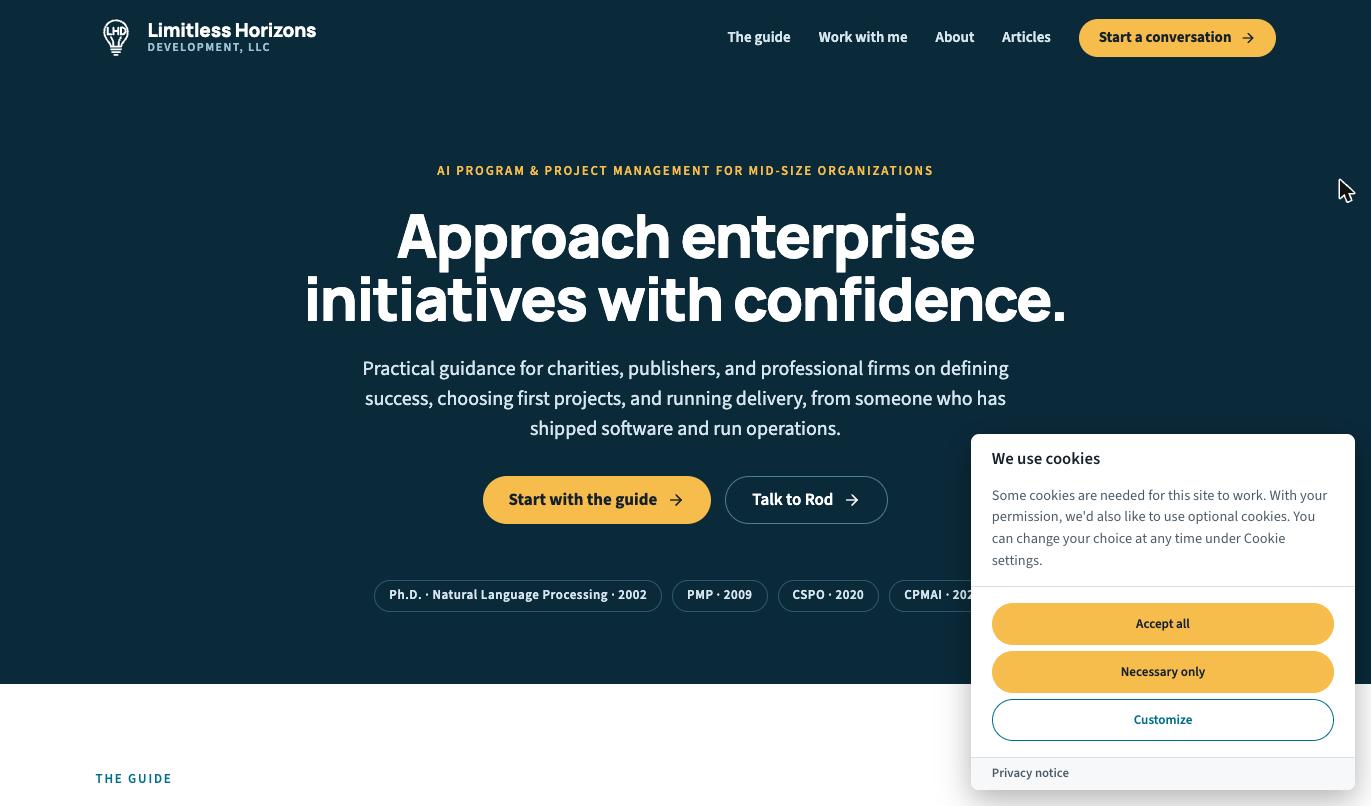
- A banner on a visitor's first visit, with Accept all, Necessary only and Customize. Accepting and refusing are equally easy, and the category switches start off.
- The choice is remembered for 182 days, in a cookie on the visitor's device.
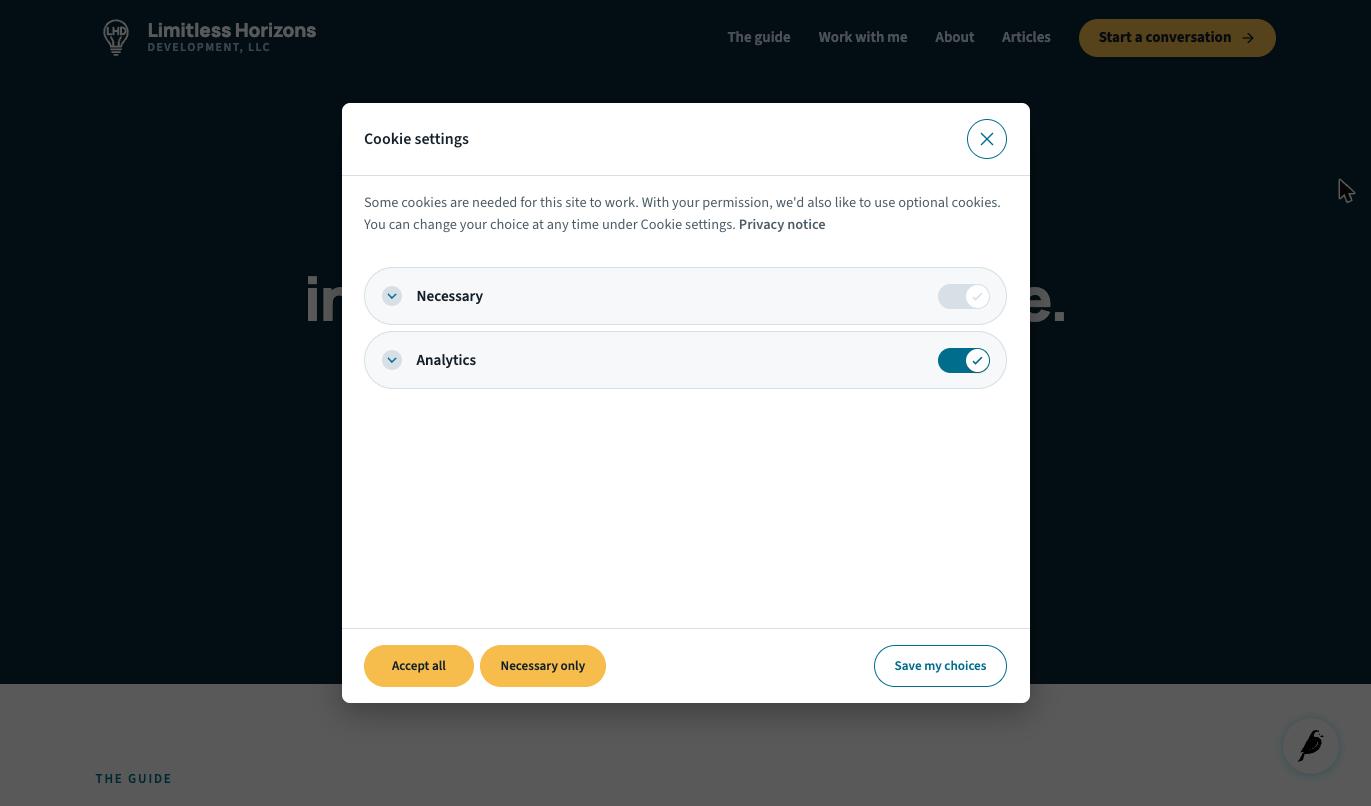
- A Cookie settings link reopens the choices, so a visitor can change or withdraw them at any time.
- The choice is announced to the page when it's made, when it changes, and on each later page load.
- The banner is kept out of preview views automatically (non-configurable).
- Settings available under Settings → Cookie consent, per the table below.
The banner on a visitor's first visit, here with a site's own colors:
The choices that Customize and the Cookie settings link open:
Settings reference
Each site has its own settings, under Settings → Cookie consent.
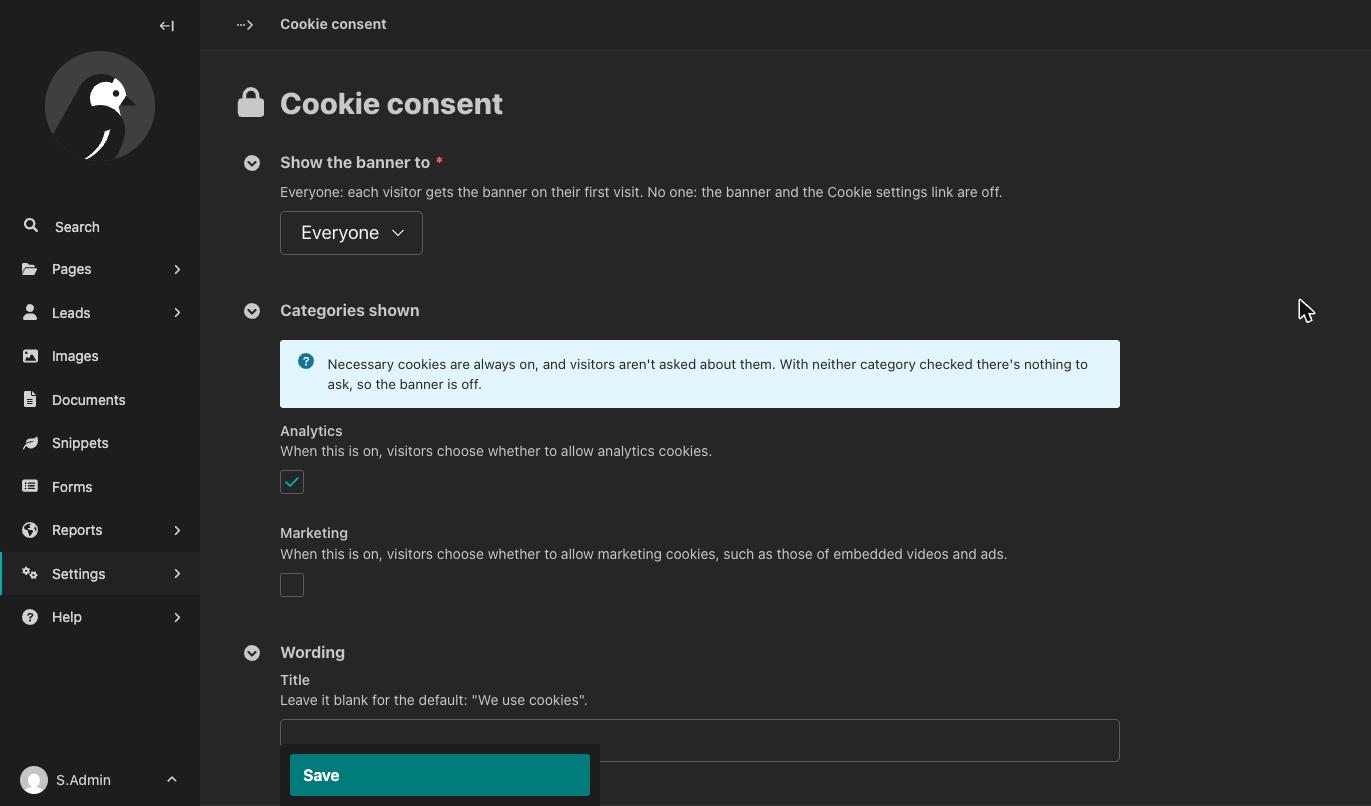
| Setting | Default | What it does |
|---|---|---|
| Show the banner to | Everyone | Everyone: each visitor gets the banner on their first visit. No one: the banner and the Cookie settings link are off. |
| Categories shown: Analytics | On | When on, visitors choose whether to allow analytics cookies. |
| Categories shown: Marketing | On | When on, visitors choose whether to allow marketing cookies, such as those of embedded videos and ads. |
| Title | Blank | The banner's title. Blank means the default, “We use cookies”. |
| Text | Blank | The banner's text. Blank means the default text. |
| Privacy notice | None | A page the banner links to. |
Show only the categories your site uses. With neither checked there's nothing to ask, so the banner is off. Necessary cookies are always on, and visitors aren't asked about them.
When you change the categories shown, visitors who've already chosen are asked again.
Requirements
- Wagtail 7.4, 8.0 or 8.1, with the Python and Django versions each of them supports
wagtail.contrib.settings, which comes with Wagtaildjango.template.context_processors.requestin your template settings. Wagtail's project template has it. Without it, the banner doesn't load.
Installation
-
Install the package:
pip install wagtail-cookie-consent
-
Add it to
INSTALLED_APPS, withwagtail.contrib.settings:INSTALLED_APPS = [ # ... "wagtail.contrib.settings", "wagtail_cookie_consent", # ... ]
-
Create its table:
python manage.py migrate
-
Add the banner to
<head>in your base template, and the Cookie settings link where you want it, such as the footer:{% load wagtail_cookie_consent %} <!doctype html> <html> <head> <meta charset="utf-8"> {% cookie_consent %} ... </head> <body> ... <footer>{% cookie_settings_link %}</footer> </body> </html>
-
In the Wagtail admin, go to Settings → Cookie consent and choose the categories your site uses.
The banner's scripts and stylesheet are among the package's static files. On a deployed site, run collectstatic after you install or upgrade the package, as for any app's static files.
Usage
The Cookie settings link
{% cookie_settings_link %} renders a button that reopens the visitor's choices. Give it your own label and HTML attributes:
{% cookie_settings_link "Cookies" class="footer-link" %}
It has to come from this tag, or carry the same data-cc="show-preferencesModal" attribute, so it can't be an ordinary link an editor adds in the CMS. When the banner is off, the tag renders nothing.
Acting on the choice
The banner announces the visitor's choice as a wagtail-cookie-consent:change event on document. Its detail has true or false for each category your site shows:
document.addEventListener("wagtail-cookie-consent:change", (event) => {
  if (event.detail.analytics) {
    // The visitor allows analytics cookies.
  }
});
The event is sent when the visitor chooses, when they change their choice, and on each page load once a choice is stored. Before a visitor has chosen, no event is sent.
A stored choice is announced as soon as {% cookie_consent %} runs, and again once the banner has loaded. Add your listener before {% cookie_consent %} to hear it at the earliest, and make it safe to run more than once.
wagtail-google-tag listens for this event and updates Google's Consent Mode with it. Put {% google_tag %} before {% cookie_consent %}.
Colors
The banner's colors come from vanilla-cookieconsent's CSS variables. Set them in your own stylesheet, loaded after {% cookie_consent %}:
#cc-main {
  --cc-bg: #ffffff;
  --cc-primary-color: #1f2937;
  --cc-btn-primary-bg: #0f766e;
  --cc-btn-primary-hover-bg: #115e59;
}
Its documentation lists the variables.
Templates outside your base template
A template that doesn't extend your base template, such as a 404 page, needs the banner too:
{% load wagtail_cookie_consent %}
...
{% cookie_consent %}
Automated browsers
The banner hides itself from automated browsers and crawlers. To see it in browser tests, set this in your test settings:
WAGTAIL_COOKIE_CONSENT_HIDE_FROM_BOTS = False
Content Security Policy
Everything loads from your own static files: there are no third-party addresses and no inline scripts.
Troubleshooting
- No banner on the page: “Show the banner to” is “No one”, no category is checked, the page is a preview, or
collectstatichasn't run. Runpython manage.py checktoo: it warns when the request isn't in the template context. - No banner, though it's on: you've already chosen. Use the Cookie settings link, or delete the
cc_cookiecookie. - No banner in browser tests: see Automated browsers.
Privacy notes
The visitor's choice is stored in a cookie named cc_cookie on their own device, for 182 days. It's a cookie of your own site. The package doesn't read it on the server, keeps no record of choices, and sends nothing to a third party.
Links
License
BSD-3-Clause. See LICENSE.
vanilla-cookieconsent is included under the MIT license. Its license is in the package, next to its files.
1 maintainer

Metadata
1 maintainer
Release files for wagtail-cookie-consent 0.1.1
For a detailed explanation of source distributions (sdists) and built distributions (wheels), please see the package formats documentation.
Source distribution (sdist)
| File | Size | Uploaded | Provenance | Actions |
|---|---|---|---|---|
| wagtail_cookie_consent-0.1.1.tar.gz | 28.7 kB | With provenance | Details for wagtail_cookie_consent-0.1.1.tar.gz |
Built distribution (wheel)
| File | Interpreter | ABI | Platform | Actions Reset |
|---|---|---|---|---|
| wagtail_cookie_consent-0.1.1-py3-none-any.whl | Python 3 | none | any | Details for wagtail_cookie_consent-0.1.1-py3-none-any.whl |
Total release size: 61.3 kB
Release files / wagtail_cookie_consent-0.1.1.tar.gz
| Download URL | wagtail_cookie_consent-0.1.1.tar.gz |
|---|---|
| Size | 28.7 kB |
| Tags | Source |
|
SHA-256 checksum How to use checksums |
58f2f357be615f109e2e7f96880081a5c5e30bdbde5af5ad5fe0ddffd58d5f6b
|
|
BLAKE2b-256 checksum How to use checksums |
22107c5577d462bcd19797feb8763e56731eb7100cc50d7a5e8aaac35d083944
|
| Upload date | |
|
Uploaded using Trusted Publishing? What is trusted publishing? |
Yes |
| Uploaded via |
twine/7.0.0 CPython/3.13.16
|
Provenance
Provenance describes where a file came from. On PyPI, provenance is shared via attestations, which provide a verifiable record of the build or publishing details. View details, limitations and caveats.


PyPI Publish Attestation
PyPI verified that this artifact, at this checksum, originated from the publisher listed below.
Signed by GitHub Actions, verified by PyPI on Nov 12, 2026.
Transparency logRelease files / wagtail_cookie_consent-0.1.1-py3-none-any.whl
| Download URL | wagtail_cookie_consent-0.1.1-py3-none-any.whl |
|---|---|
| Size | 32.5 kB |
| Tags | Python 3 |
|
SHA-256 checksum How to use checksums |
8bf774df581a3df1f1ca97016f77fe19a59ea2f08a99d9058800662e0b4c40a8
|
|
BLAKE2b-256 checksum How to use checksums |
20a53b3e7e7fb72ac42011c0ed9453a498fb07537641ac45333152b147dbd712
|
| Upload date | |
|
Uploaded using Trusted Publishing? What is trusted publishing? |
Yes |
| Uploaded via |
twine/7.0.0 CPython/3.13.16
|
Provenance
Provenance describes where a file came from. On PyPI, provenance is shared via attestations, which provide a verifiable record of the build or publishing details. View details, limitations and caveats.
PyPI Publish Attestation
PyPI verified that this artifact, at this checksum, originated from the publisher listed below.
Signed by GitHub Actions, verified by PyPI on Nov 12, 2026.
Transparency logSecurity for wagtail-cookie-consent 0.1.1
Provenance
Provenance describes where a file came from. On PyPI, provenance is shared via attestations, which provide a verifiable record of the build or publishing details. View details, limitations and caveats.
Full provenance
Both files in this release have been uploaded with provenance metadata.
Attestation for wagtail_cookie_consent-0.1.1.tar.gz
PyPI Publish Attestation
PyPI verified that this artifact, at this checksum, originated from the publisher listed below.
Signed by GitHub Actions, verified by PyPI on Nov 12, 2026.
Transparency logA note on package security
PyPI is a repository for distributing packages, not a service for auditing them. While third-party security researchers and our staff do their best to detect and remove malicious packages, PyPI cannot guarantee the quality, security or suitability of any given package.
To learn more about protecting yourself from malicious actors, visit our package security documentation.














