
StreamField code blocks for the Wagtail CMS with real-time Highlight.js Syntax Highlighting.

Project description
Wagtail Highlight.js
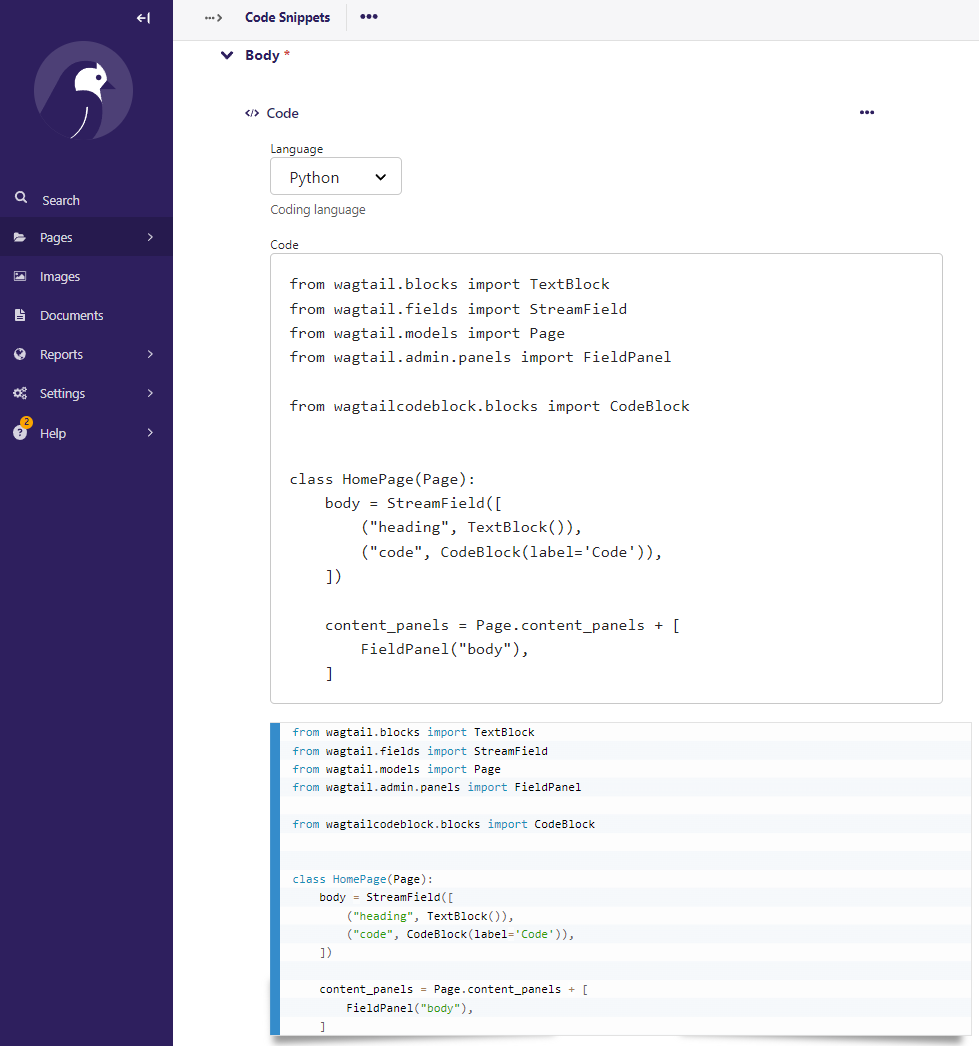
Wagtail Code Block is a syntax highlighter block for source code for the Wagtail CMS. It features real-time highlighting in the Wagtail editor, the front end, and support for Highlight.js themes.
It uses the Highlight.js library both in Wagtail Admin and the website.
Example Usage
First, add wagtailcodeblock to your INSTALLED_APPS in Django's settings. Here's a bare bones example:
from wagtail.blocks import TextBlock
from wagtail.fields import StreamField
from wagtail.models import Page
from wagtail.admin.panels import FieldPanel

from wagtailcodeblock.blocks import CodeBlock


class HomePage(Page):
    body = StreamField([
        ("heading", TextBlock()),
        ("code", CodeBlock(label='Code')),
    ])

    content_panels = Page.content_panels + [
        FieldPanel("body"),
    ]
You can also force it to use a single language or set a default language by providing a language code which must be included in your WAGTAIL_CODE_BLOCK_LANGUAGES setting:
bash_code = CodeBlock(label='Bash Code', language='bash')
any_code = CodeBlock(label='Any code', default_language='python')
Screenshot of the CMS Editor Interface
Installation & Setup
To install Wagtail Code Block run:
# Wagtail 4.0 and greater
pip install wagtailcodeblock

# Wagtail 3.x
pip install wagtailcodeblock==1.28.0.0

# Wagtail 2.x
pip install wagtailcodeblock==1.25.0.2
And add wagtailcodeblock to your INSTALLED_APPS setting:
INSTALLED_APPS = [
    ...
    'wagtailcodeblock',
    ...
]
Django Settings
Line Numbers
Line numbers are enabled by default, but can be disabled in Django's settings:
WAGTAIL_CODE_BLOCK_LINE_NUMBERS = False
Copy to clipboard
Copy to clipboard is enabled by default, but can be disabled in Django's settings:
WAGTAIL_CODE_BLOCK_COPY_TO_CLIPBOARD = False
Themes
TODO: rewrite themes section
Wagtail Code Block defaults to the PrismJS "Coy" theme, which looks good with Wagtail's CMS editor design. You can choose a different theme by configuring WAGTAIL_CODE_BLOCK_THEME in your Django settings. PrismJS provides several themes:
- None: Default
- 'coy': Coy
- 'dark': Dark
- 'funky': Funky
- 'okaidia': Okaidia
- 'solarizedlight': Solarized Light
- 'twilight': Twilight
For example, in you want to use the Solarized Light theme: WAGTAIL_CODE_BLOCK_THEME = 'solarizedlight'
If you want to use the Default theme: WAGTAIL_CODE_BLOCK_THEME = None
Languages Available
You can customize the languages available by configuring WAGTAIL_CODE_BLOCK_LANGUAGES in your Django settings. By default, it will be set with these languages, since most users are in the Python web development community:
WAGTAIL_CODE_BLOCK_LANGUAGES = (
    ('bash', 'Bash/Shell'),
    ('css', 'CSS'),
    ('diff', 'diff'),
    ('html', 'HTML'),
    ('javascript', 'Javascript'),
    ('json', 'JSON'),
    ('python', 'Python'),
    ('scss', 'SCSS'),
    ('yaml', 'YAML'),
)
Each language in this setting is a tuple of the PrismJS code and a descriptive label. If you want use all available languages, here is a list:
WAGTAIL_CODE_BLOCK_LANGUAGES = (
    ('abap', 'ABAP'),
    ('abnf', 'Augmented Backus–Naur form'),
    ('actionscript', 'ActionScript'),
    ('ada', 'Ada'),
    ('antlr4', 'ANTLR4'),
    ('apacheconf', 'Apache Configuration'),
    ('apl', 'APL'),
    ('applescript', 'AppleScript'),
    ('aql', 'AQL'),
    ('arduino', 'Arduino'),
    ('arff', 'ARFF'),
    ('asciidoc', 'AsciiDoc'),
    ('asm6502', '6502 Assembly'),
    ('aspnet', 'ASP.NET (C#)'),
    ('autohotkey', 'AutoHotkey'),
    ('autoit', 'AutoIt'),
    ('bash', 'Bash + Shell'),
    ('basic', 'BASIC'),
    ('batch', 'Batch'),
    ('bison', 'Bison'),
    ('bnf', 'Backus–Naur form + Routing Backus–Naur form'),
    ('brainfuck', 'Brainfuck'),
    ('bro', 'Bro'),
    ('c', 'C'),
    ('clike', 'C-like'),
    ('cmake', 'CMake'),
    ('csharp', 'C#'),
    ('cpp', 'C++'),
    ('cil', 'CIL'),
    ('coffeescript', 'CoffeeScript'),
    ('clojure', 'Clojure'),
    ('crystal', 'Crystal'),
    ('csp', 'Content-Security-Policy'),
    ('css', 'CSS'),
    ('css-extras', 'CSS Extras'),
    ('d', 'D'),
    ('dart', 'Dart'),
    ('diff', 'Diff'),
    ('django', 'Django/Jinja2'),
    ('dns-zone-file', 'DNS Zone File'),
    ('docker', 'Docker'),
    ('ebnf', 'Extended Backus–Naur form'),
    ('eiffel', 'Eiffel'),
    ('ejs', 'EJS'),
    ('elixir', 'Elixir'),
    ('elm', 'Elm'),
    ('erb', 'ERB'),
    ('erlang', 'Erlang'),
    ('etlua', 'Embedded LUA Templating'),
    ('fsharp', 'F#'),
    ('flow', 'Flow'),
    ('fortran', 'Fortran'),
    ('ftl', 'Freemarker Template Language'),
    ('gcode', 'G-code'),
    ('gdscript', 'GDScript'),
    ('gedcom', 'GEDCOM'),
    ('gherkin', 'Gherkin'),
    ('git', 'Git'),
    ('glsl', 'GLSL'),
    ('gml', 'GameMaker Language'),
    ('go', 'Go'),
    ('graphql', 'GraphQL'),
    ('groovy', 'Groovy'),
    ('haml', 'Haml'),
    ('handlebars', 'Handlebars'),
    ('haskell', 'Haskell'),
    ('haxe', 'Haxe'),
    ('hcl', 'HCL'),
    ('http', 'HTTP'),
    ('hpkp', 'HTTP Public-Key-Pins'),
    ('hsts', 'HTTP Strict-Transport-Security'),
    ('ichigojam', 'IchigoJam'),
    ('icon', 'Icon'),
    ('inform7', 'Inform 7'),
    ('ini', 'Ini'),
    ('io', 'Io'),
    ('j', 'J'),
    ('java', 'Java'),
    ('javadoc', 'JavaDoc'),
    ('javadoclike', 'JavaDoc-like'),
    ('javascript', 'JavaScript'),
    ('javastacktrace', 'Java stack trace'),
    ('jolie', 'Jolie'),
    ('jq', 'JQ'),
    ('jsdoc', 'JSDoc'),
    ('js-extras', 'JS Extras'),
    ('js-templates', 'JS Templates'),
    ('json', 'JSON'),
    ('jsonp', 'JSONP'),
    ('json5', 'JSON5'),
    ('julia', 'Julia'),
    ('keyman', 'Keyman'),
    ('kotlin', 'Kotlin'),
    ('latex', 'LaTeX'),
    ('less', 'Less'),
    ('lilypond', 'Lilypond'),
    ('liquid', 'Liquid'),
    ('lisp', 'Lisp'),
    ('livescript', 'LiveScript'),
    ('lolcode', 'LOLCODE'),
    ('lua', 'Lua'),
    ('makefile', 'Makefile'),
    ('markdown', 'Markdown'),
    ('markup', 'Markup + HTML + XML + SVG + MathML'),
    ('markup-templating', 'Markup templating'),
    ('matlab', 'MATLAB'),
    ('mel', 'MEL'),
    ('mizar', 'Mizar'),
    ('monkey', 'Monkey'),
    ('n1ql', 'N1QL'),
    ('n4js', 'N4JS'),
    ('nand2tetris-hdl', 'Nand To Tetris HDL'),
    ('nasm', 'NASM'),
    ('nginx', 'nginx'),
    ('nim', 'Nim'),
    ('nix', 'Nix'),
    ('nsis', 'NSIS'),
    ('objectivec', 'Objective-C'),
    ('ocaml', 'OCaml'),
    ('opencl', 'OpenCL'),
    ('oz', 'Oz'),
    ('parigp', 'PARI/GP'),
    ('parser', 'Parser'),
    ('pascal', 'Pascal + Object Pascal'),
    ('pascaligo', 'Pascaligo'),
    ('pcaxis', 'PC Axis'),
    ('perl', 'Perl'),
    ('php', 'PHP'),
    ('phpdoc', 'PHPDoc'),
    ('php-extras', 'PHP Extras'),
    ('plsql', 'PL/SQL'),
    ('powershell', 'PowerShell'),
    ('processing', 'Processing'),
    ('prolog', 'Prolog'),
    ('properties', '.properties'),
    ('protobuf', 'Protocol Buffers'),
    ('pug', 'Pug'),
    ('puppet', 'Puppet'),
    ('pure', 'Pure'),
    ('python', 'Python'),
    ('q', 'Q (kdb+ database)'),
    ('qore', 'Qore'),
    ('r', 'R'),
    ('jsx', 'React JSX'),
    ('tsx', 'React TSX'),
    ('renpy', 'Ren\'py'),
    ('reason', 'Reason'),
    ('regex', 'Regex'),
    ('rest', 'reST (reStructuredText)'),
    ('rip', 'Rip'),
    ('roboconf', 'Roboconf'),
    ('robot-framework', 'Robot Framework'),
    ('ruby', 'Ruby'),
    ('rust', 'Rust'),
    ('sas', 'SAS'),
    ('sass', 'Sass (Sass)'),
    ('scss', 'Sass (Scss)'),
    ('scala', 'Scala'),
    ('scheme', 'Scheme'),
    ('shell-session', 'Shell Session'),
    ('smalltalk', 'Smalltalk'),
    ('smarty', 'Smarty'),
    ('solidity', 'Solidity (Ethereum)'),
    ('sparql', 'SPARQL'),
    ('splunk-spl', 'Splunk SPL'),
    ('sqf', 'SQF: Status Quo Function (Arma 3)'),
    ('sql', 'SQL'),
    ('soy', 'Soy (Closure Template)'),
    ('stylus', 'Stylus'),
    ('swift', 'Swift'),
    ('tap', 'TAP'),
    ('tcl', 'Tcl'),
    ('textile', 'Textile'),
    ('toml', 'TOML'),
    ('tt2', 'Template Toolkit 2'),
    ('twig', 'Twig'),
    ('typescript', 'TypeScript'),
    ('t4-cs', 'T4 Text Templates (C#)'),
    ('t4-vb', 'T4 Text Templates (VB)'),
    ('t4-templating', 'T4 templating'),
    ('vala', 'Vala'),
    ('vbnet', 'VB.Net'),
    ('velocity', 'Velocity'),
    ('verilog', 'Verilog'),
    ('vhdl', 'VHDL'),
    ('vim', 'vim'),
    ('visual-basic', 'Visual Basic'),
    ('wasm', 'WebAssembly'),
    ('wiki', 'Wiki markup'),
    ('xeora', 'Xeora + XeoraCube'),
    ('xojo', 'Xojo (REALbasic)'),
    ('xquery', 'XQuery'),
    ('yaml', 'YAML'),
    ('zig', 'Zig'),
)
Running the Test Suite
Clone the repository, create a venv, pip install -e .[dev] and run pytest.
Release Notes & Contributors
- This is fork of wagtailcodeblock.
Project Maintainers
- John Higgins (https://github.com/johnmatthiggins)


Download files
Download the file for your platform. If you're not sure which to choose, learn more about installing packages.
Source Distribution
Built Distribution
Filter files by name, interpreter, ABI, and platform.
If you're not sure about the file name format, learn more about wheel file names.
Copy a direct link to the current filters
File details
Details for the file wagtail_hljs-0.1.0.tar.gz.
File metadata
- Download URL: wagtail_hljs-0.1.0.tar.gz
- Upload date:
- Size: 13.5 kB
- Tags: Source
- Uploaded using Trusted Publishing? No
- Uploaded via: poetry/1.8.3 CPython/3.11.11 Darwin/23.4.0
File hashes
| Algorithm | Hash digest | |
|---|---|---|
| SHA256 |
2f0038345e153bb7caed419f98d279bea1c91665f4d45c7e4ecdcef7fd100a79
|
|
| MD5 |
11156e3a99ef18f4110c97a4e560f8d4
|
|
| BLAKE2b-256 |
84562f1f28132b19241d3eff7a5d04e229083fd0321aea1538450adbfb136af0
|
File details
Details for the file wagtail_hljs-0.1.0-py3-none-any.whl.
File metadata
- Download URL: wagtail_hljs-0.1.0-py3-none-any.whl
- Upload date:
- Size: 12.8 kB
- Tags: Python 3
- Uploaded using Trusted Publishing? No
- Uploaded via: poetry/1.8.3 CPython/3.11.11 Darwin/23.4.0
File hashes
| Algorithm | Hash digest | |
|---|---|---|
| SHA256 |
0c704d627ae3936a923630f30548e9a1f9dd4ec121e0a5914ff7db9365b14aa2
|
|
| MD5 |
36c0a5cefa77355939be04b5ad4bcc80
|
|
| BLAKE2b-256 |
290ae0706a68554804676fbcb489c5a0682157ec3a38fdbe3fd8ee1e9d553191
|






