
wagtail-kanban-content-calendar
A kanban board and content calendar for Wagtail pages, inside the Wagtail admin.
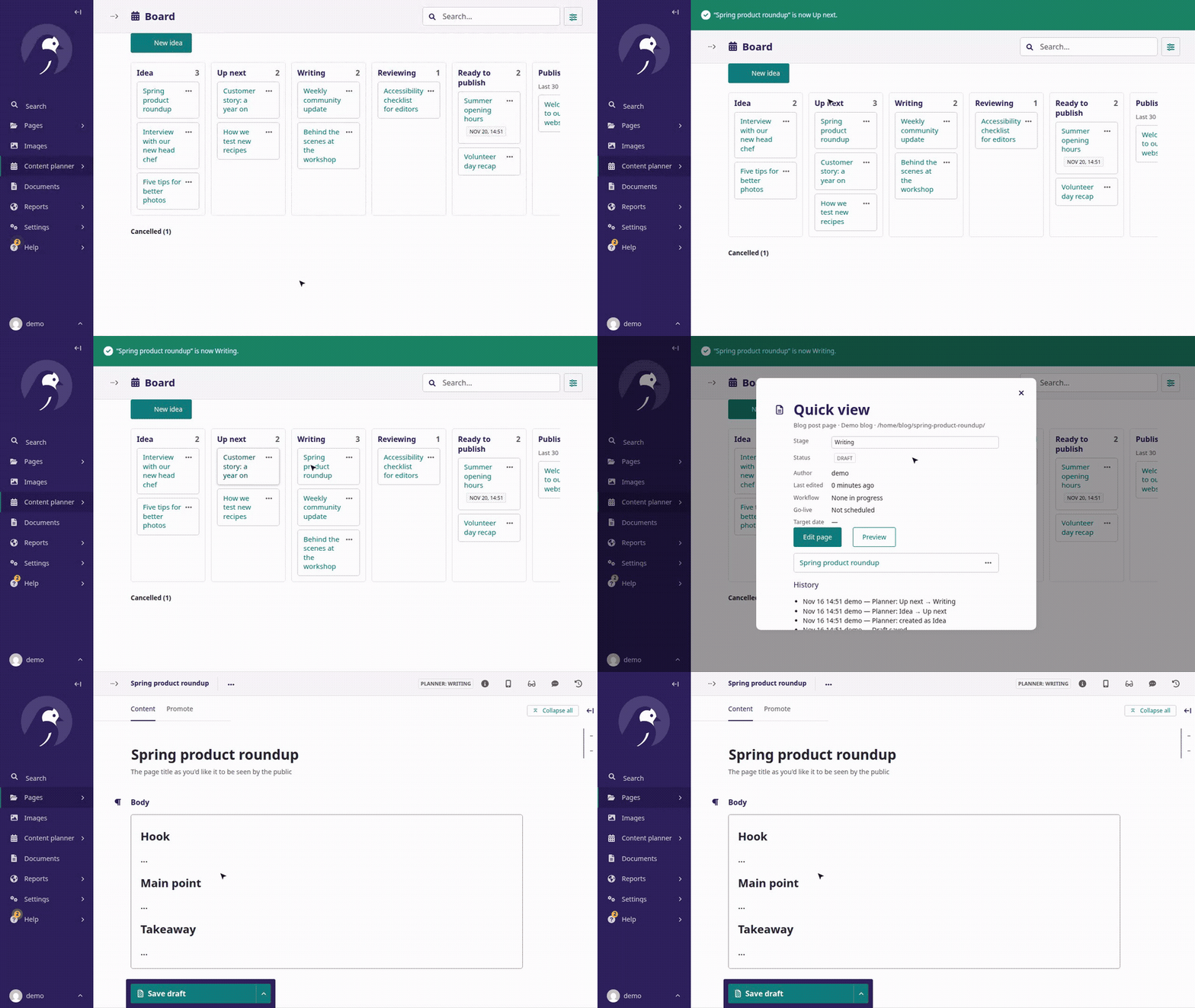
Plan your content where it already lives. Every card is a real Wagtail page, and every move runs one of Wagtail's own actions: save a revision, submit to a workflow, schedule, publish or unpublish. Each move is recorded in the page's history under the person who made it.
Features
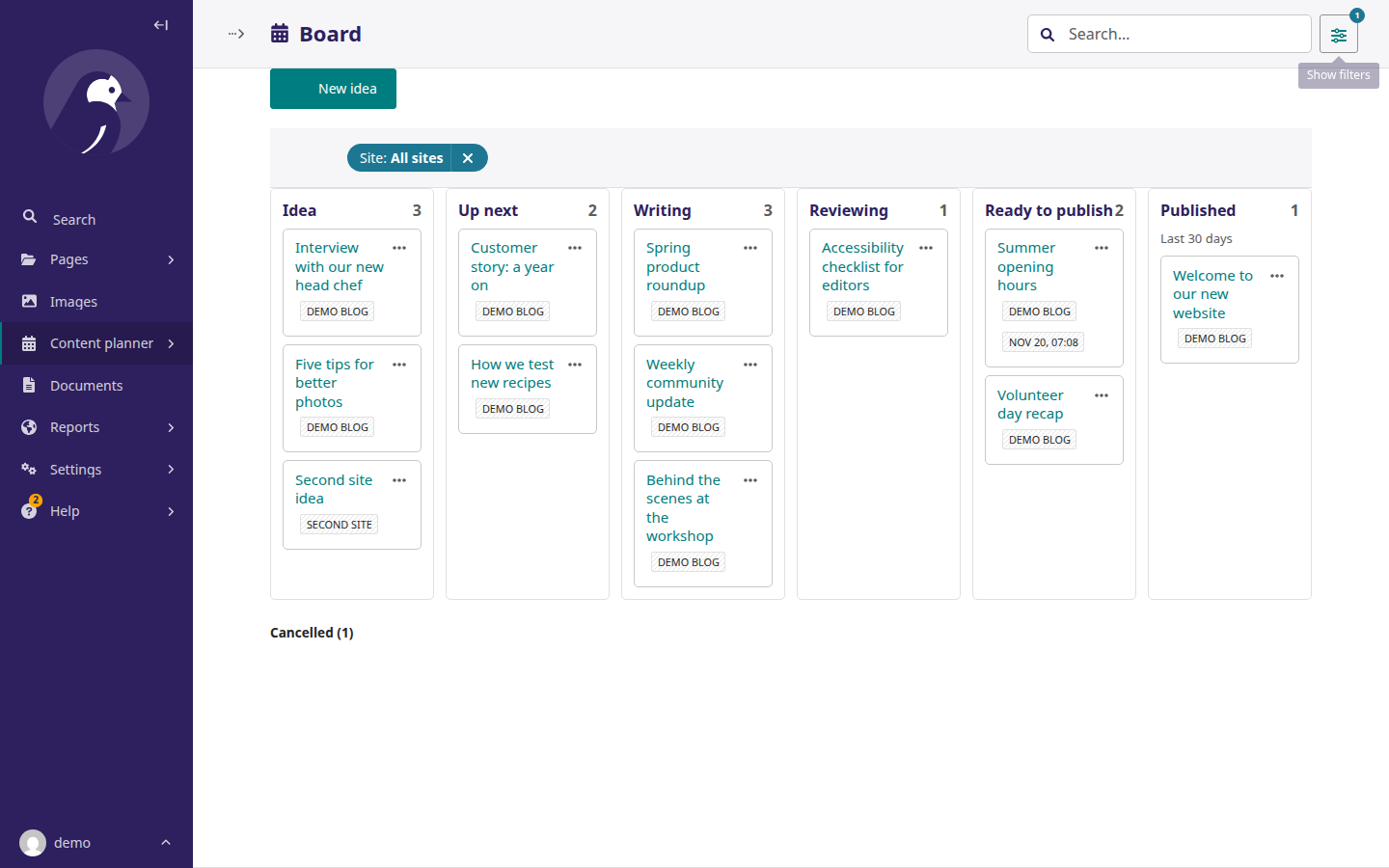
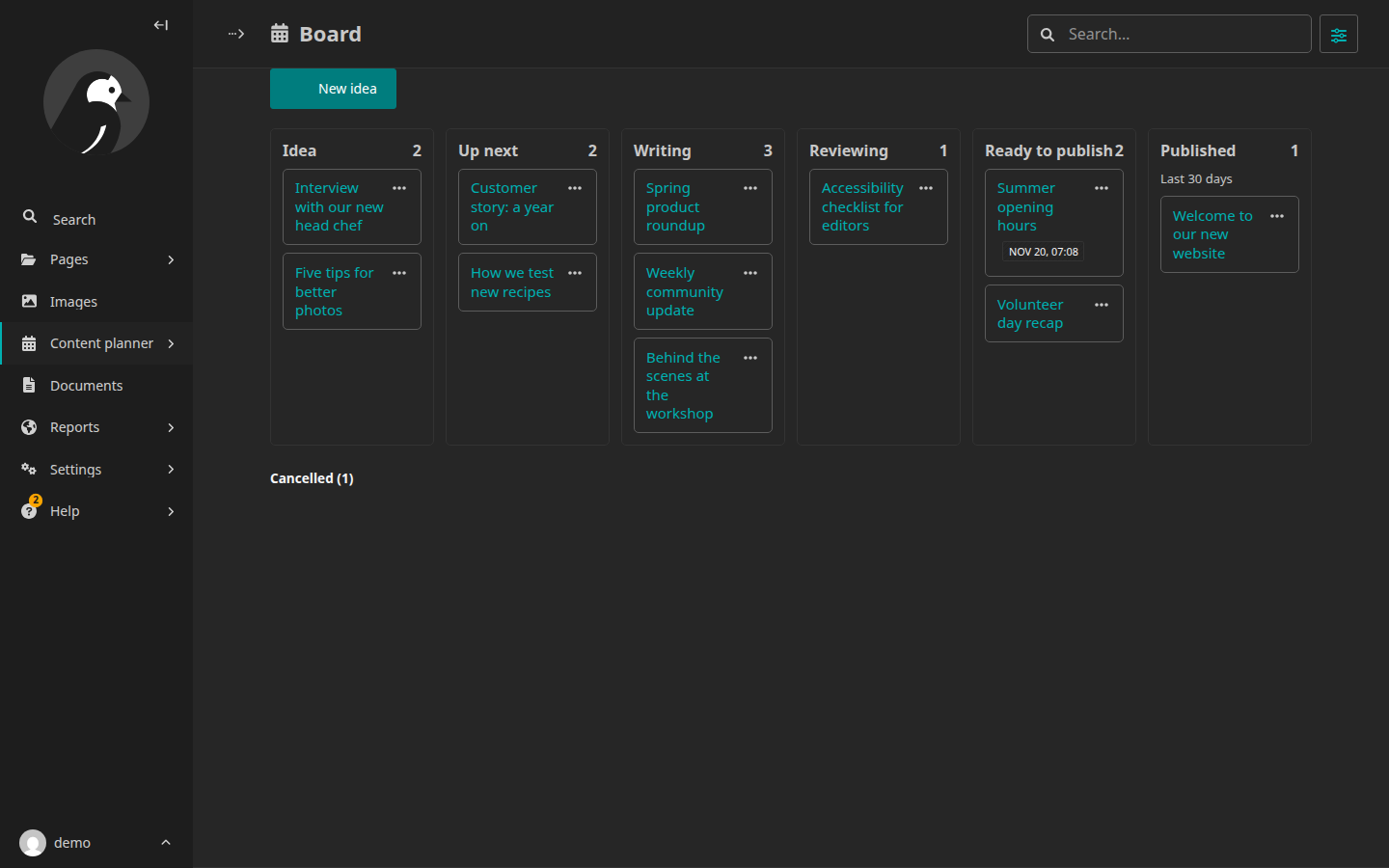
- Board: Idea → Up next → Writing → Reviewing → Ready to publish → Published, plus Cancelled. Drag a card or use its ⋯ menu; without JavaScript, every card has a plain Move form.
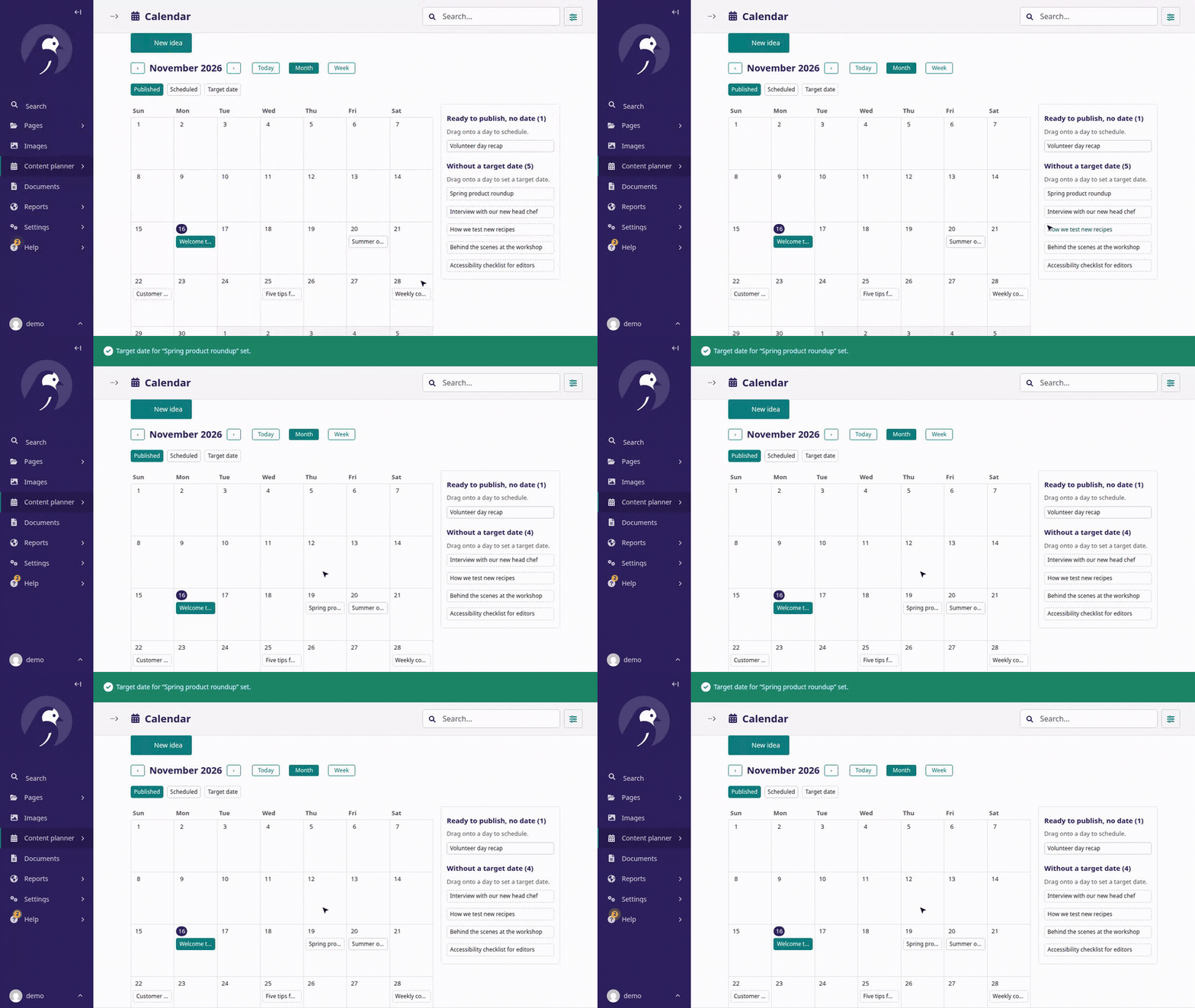
- Calendar: month and week views. Drag onto a day to schedule a page or set a target date.
- One site or all sites: a board and calendar per site, or every site you can edit at once.
- In the editor: the stage shows in the page header, and stage moves appear in the Publish menu.
- Dashboard: an "Up next / This week" panel and a count of pages scheduled this week.
- Any page type: you choose which page models are tracked.
- Wagtail's rules: page permissions, locks, workflows and scheduled publishing work as in the normal editor.
- Looks like Wagtail: admin templates, Stimulus controllers, colour tokens, icons and themes. No front-end build and no extra JavaScript dependencies.
| All sites | Dark theme |
|---|---|
 |
 |
The wiki has the user guide.
How it works
flowchart LR
    new([New idea]) --> idea[Idea]
    idea --> next[Up next] --> write[Writing]
    write --> review[Reviewing]
    review -->|approved| ready[Ready to publish]
    review -.->|changes requested| write
    ready -->|go-live time, or Publish now| live[Published]
    live -.->|unpublish| write
    idea & next & write & review & ready -.->|cancel| cancelled[Cancelled]
| Stage | Where the stage comes from |
|---|---|
| Published | The page is live |
| Reviewing | A Wagtail workflow is in progress (or a plain stage, if you turn workflows off) |
| Ready to publish | A revision is scheduled (or approved and waiting for a date) |
| Idea, Up next, Writing, Cancelled | The add-on's own table, one row per page; your page models are never changed |
Requirements
| Supported | |
|---|---|
| Python | 3.11+ |
| Django | 5.2+ |
| Wagtail | 7.4 LTS+ (every release that still gets security fixes) |
| Database | PostgreSQL and SQLite (tested); other databases Wagtail supports should work |
Installation
-
Install the package:
pip install wagtail-kanban-content-calendar
-
Add it to
INSTALLED_APPS, together with Wagtail's settings app if you don't already use it:INSTALLED_APPS = [ # ... "wagtail.contrib.settings", "wagtail_kanban_content_calendar", ]
-
Tell it which page types to track, and which field a new idea's starter text goes into:
WAGTAIL_KANBAN_PAGE_MODELS = {
    "blog.BlogPage": {"body_field": "body"},  # RichTextField
    "news.NewsPage": {
        "body_field": "content",
        "starter_block": "paragraph",
    },  # StreamField
}
-
Create the tables and check the configuration:
python manage.py migrate
python manage.py check      # reports a misconfigured WAGTAIL_KANBAN_PAGE_MODELS
-
In the admin:
- Settings → Groups: give editors "Can use the content planner".
- Settings → Content planner (per site): choose Where new ideas go.
-
Make sure scheduled publishing runs. Wagtail publishes scheduled pages only when its command runs, for example from cron every few minutes:
*/5 * * * * /path/to/venv/bin/python /path/to/manage.py publish_scheduled
The board, calendar and dashboard warn you when a scheduled page is more than 15 minutes overdue.
All settings are listed on the wiki's Settings page.
Upgrading
pip install -U wagtail-kanban-content-calendar, then python manage.py migrate. See CHANGELOG.md.
Removing it: python manage.py migrate wagtail_kanban_content_calendar zero, then take it out of
INSTALLED_APPS. Your pages are untouched.
Contributing
git clone https://github.com/JR91387/wagtail-kanban-content-calendar.git && cd wagtail-kanban-content-calendar
python -m venv .venv && . .venv/bin/activate
pip install -e . --group dev
pytest                                   # SQLite; DATABASE_URL=postgres://... for PostgreSQL
uvx --with tox-uv tox                    # every supported Wagtail and Django version
python testmanage.py migrate && python testmanage.py createcachetable
python testmanage.py planner_demo   # demo pages in every stage; log in as demo / demo-password
python testmanage.py runserver
Bug reports and pull requests are welcome; see CONTRIBUTING.md. Report security issues privately as described in SECURITY.md.
Thank you
- Wagtail and its contributors, for a CMS whose hooks, workflows and scheduled publishing made this possible without changing a line of Wagtail.
- cookiecutter-wagtail-package, the official add-on template this project started from.
- wagtail-calendar, the earlier calendar add-on for the Wagtail admin, which showed how useful a content calendar inside Wagtail can be.
License
MIT. See LICENSE.
1 maintainer

Metadata
1 maintainer
Release files for wagtail-kanban-content-calendar 0.2.0
For a detailed explanation of source distributions (sdists) and built distributions (wheels), please see the package formats documentation.
Source distribution (sdist)
| File | Size | Uploaded | Provenance | Actions |
|---|---|---|---|---|
| wagtail_kanban_content_calendar-0.2.0.tar.gz | 35.0 kB | With provenance | Details for wagtail_kanban_content_calendar-0.2.0.tar.gz |
Built distribution (wheel)
| File | Interpreter | ABI | Platform | Actions Reset |
|---|---|---|---|---|
| wagtail_kanban_content_calendar-0.2.0-py3-none-any.whl | Python 3 | none | any | Details for wagtail_kanban_content_calendar-0.2.0-py3-none-any.whl |
Total release size: 83.1 kB
Release files / wagtail_kanban_content_calendar-0.2.0.tar.gz
| Download URL | wagtail_kanban_content_calendar-0.2.0.tar.gz |
|---|---|
| Size | 35.0 kB |
| Tags | Source |
|
SHA-256 checksum How to use checksums |
8154a2d22326c3fedf36cf7e1b54bc539810f459052aee3c716c5ea5cccdd61a
|
|
BLAKE2b-256 checksum How to use checksums |
2c9447f06b05cd6e1aedefb9353b39845a813514c3705d48b2f2c2caa595196c
|
| Upload date | |
|
Uploaded using Trusted Publishing? What is trusted publishing? |
Yes |
| Uploaded via |
twine/7.0.0 CPython/3.13.16
|
Provenance
Provenance describes where a file came from. On PyPI, provenance is shared via attestations, which provide a verifiable record of the build or publishing details. View details, limitations and caveats.


PyPI Publish Attestation
PyPI verified that this artifact, at this checksum, originated from the publisher listed below.
Signed by GitHub Actions, verified by PyPI on Nov 16, 2026.
Transparency logRelease files / wagtail_kanban_content_calendar-0.2.0-py3-none-any.whl
| Download URL | wagtail_kanban_content_calendar-0.2.0-py3-none-any.whl |
|---|---|
| Size | 48.1 kB |
| Tags | Python 3 |
|
SHA-256 checksum How to use checksums |
9f23488bfc88a8cea90b4586a9a8641cec3d771a4eddc194d4139b0baa116955
|
|
BLAKE2b-256 checksum How to use checksums |
c2945c96957bc4dcb97952c7da4be71b7d49528ea8105edd0e18d3576987cc1e
|
| Upload date | |
|
Uploaded using Trusted Publishing? What is trusted publishing? |
Yes |
| Uploaded via |
twine/7.0.0 CPython/3.13.16
|
Provenance
Provenance describes where a file came from. On PyPI, provenance is shared via attestations, which provide a verifiable record of the build or publishing details. View details, limitations and caveats.
PyPI Publish Attestation
PyPI verified that this artifact, at this checksum, originated from the publisher listed below.
Signed by GitHub Actions, verified by PyPI on Nov 16, 2026.
Transparency logSecurity for wagtail-kanban-content-calendar 0.2.0
Provenance
Provenance describes where a file came from. On PyPI, provenance is shared via attestations, which provide a verifiable record of the build or publishing details. View details, limitations and caveats.
Full provenance
Both files in this release have been uploaded with provenance metadata.
Attestation for wagtail_kanban_content_calendar-0.2.0.tar.gz
PyPI Publish Attestation
PyPI verified that this artifact, at this checksum, originated from the publisher listed below.
Signed by GitHub Actions, verified by PyPI on Nov 16, 2026.
Transparency logA note on package security
PyPI is a repository for distributing packages, not a service for auditing them. While third-party security researchers and our staff do their best to detect and remove malicious packages, PyPI cannot guarantee the quality, security or suitability of any given package.
To learn more about protecting yourself from malicious actors, visit our package security documentation.













