
This project has been archived by its maintainers, and is no longer receiving any updates.




⚠️ This package is deprecated and no longer maintained. Its code has been merged into wagtail-polymath, which supports both KaTeX and MathJax. Please migrate:
pip uninstall wagtail-katex
pip install wagtail-polymath
See #7 for background.
Math typesetting for Wagtail CMS powered by KaTeX.
This package is forked from gatensj/wagtail-draftail-katex.
This package contains svg icon from Font Awesome, which is licensed under the CC BY 4.0 License.
Quick Start
Installation
Install the package using the following command:
pip install wagtail-katex
Add wagtailkatex to the INSTALLED_APPS section in your settings.py file:
INSTALLED_APPS = [
    ...
    "wagtailkatex",
    ...
]
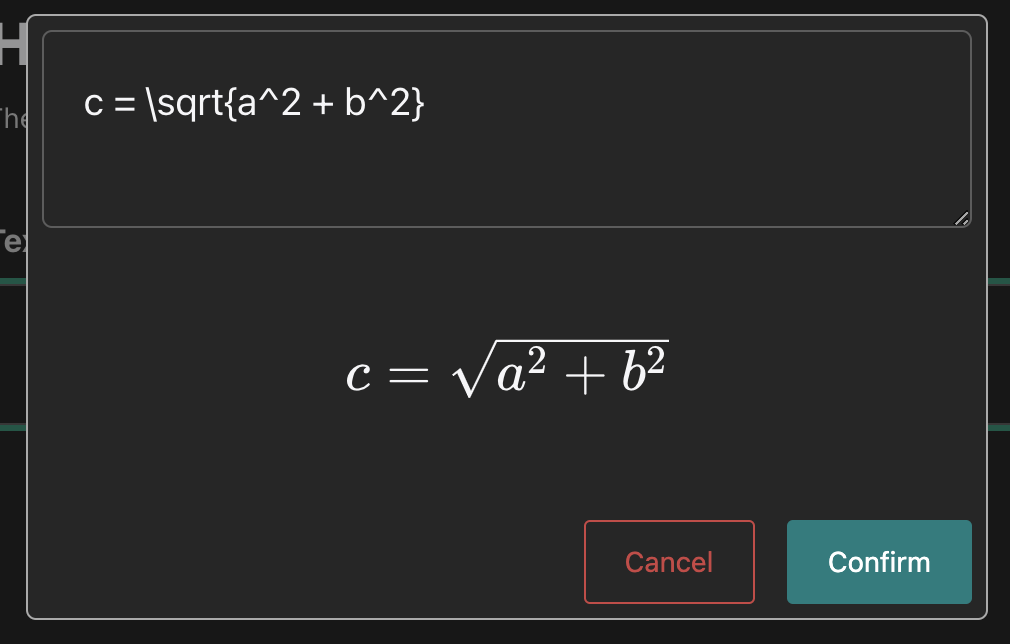
Add RichTextField to your page model, then you should find the math typesetting
icon in the toolbar of rich-text editor in Wagtail admin views.
Template rendering
Add required assets to your page template:
{% load wagtailkatex %}

<link rel="stylesheet" href="{% wagtailkatex_media 'css' %}" />
<script src="{% wagtailkatex_media 'js' %}"></script>
<script src="{% static 'wagtailkatex/wagtailkatex-template.js' %}"></script>
The page content contains KaTeX embed should render properly.
Config
The KaTeX library is linked directly to a CDN distribution by default.
If you want to change to the nearby server,
the path could be specified in the settings.py file:
WAGTAILKATEX_SETTINGS = {
    "js": [
        "https://cdn.jsdelivr.net/npm/katex@0.16.10/dist/katex.min.js",
        "https://cdn.jsdelivr.net/npm/katex@0.16.10/dist/contrib/auto-render.min.js",
    ]
    "css": [
        "https://cdn.jsdelivr.net/npm/katex@0.16.10/dist/katex.min.css"
    ],
}
Alternatively, you can make your own copy in the static folder and serve it as Django static files:
WAGTAILKATEX_SETTINGS = {
    "js": [
        "my_app/katex.min.js",
        "my_app/auto-rdner.min.js",
    ],
    "css": [
        "my_app/katex.min.css"
    ],
}
1 maintainer

Metadata
1 maintainer
Release files for wagtail-katex 0.0.8
For a detailed explanation of source distributions (sdists) and built distributions (wheels), please see the package formats documentation.
Source distribution (sdist)
| File | Size | Uploaded | Provenance | Actions |
|---|---|---|---|---|
| wagtail_katex-0.0.8.tar.gz | 13.0 kB | Without provenance | Details for wagtail_katex-0.0.8.tar.gz |
Built distribution (wheel)
| File | Interpreter | ABI | Platform | Actions Reset |
|---|---|---|---|---|
| wagtail_katex-0.0.8-py3-none-any.whl | Python 3 | none | any | Details for wagtail_katex-0.0.8-py3-none-any.whl |
Total release size: 27.9 kB
Release files / wagtail_katex-0.0.8.tar.gz
| Download URL | wagtail_katex-0.0.8.tar.gz |
|---|---|
| Size | 13.0 kB |
| Tags | Source |
|
SHA-256 checksum How to use checksums |
10a61e3712d9f6b78f9f5d6432437e3bca77d3f790e4387574f6e493cbf17bce
|
|
BLAKE2b-256 checksum How to use checksums |
a997ac240750cc931b69d28ee792005a0ea7b19fba78617089ae7331f3d49ba7
|
| Upload date | |
|
Uploaded using Trusted Publishing? What is trusted publishing? |
No |
| Uploaded via |
twine/7.0.0 CPython/3.14.6
|
Release files / wagtail_katex-0.0.8-py3-none-any.whl
| Download URL | wagtail_katex-0.0.8-py3-none-any.whl |
|---|---|
| Size | 15.0 kB |
| Tags | Python 3 |
|
SHA-256 checksum How to use checksums |
554eeab110533a88c0a7ad65310024258be2e401e344e7c1ff470ca19ef7ddb7
|
|
BLAKE2b-256 checksum How to use checksums |
9d33776ef361bf82676c939f83b83e593c20d4865870d0097156db63a87d43f0
|
| Upload date | |
|
Uploaded using Trusted Publishing? What is trusted publishing? |
No |
| Uploaded via |
twine/7.0.0 CPython/3.14.6
|
Security for wagtail-katex 0.0.8
Provenance
Provenance describes where a file came from. On PyPI, provenance is shared via attestations, which provide a verifiable record of the build or publishing details. View details, limitations and caveats.
No provenance found
None of the files in this release were uploaded with provenance metadata.
A note on package security
PyPI is a repository for distributing packages, not a service for auditing them. While third-party security researchers and our staff do their best to detect and remove malicious packages, PyPI cannot guarantee the quality, security or suitability of any given package.
To learn more about protecting yourself from malicious actors, visit our package security documentation.














