
wagtail-markdown: Markdown fields and blocks for Wagtail



Tired of annoying rich text editors getting in the way of your content input? Wish Wagtail worked more like a wiki? Well, now it can.
wagtail-markdown provides Markdown field support for Wagtail.
Specifically, it provides:
- A
wagtailmarkdown.blocks.MarkdownBlockfor use in StreamFields. - A
wagtailmarkdown.fields.MarkdownFieldfor use in Page models. - A
markdowntemplate tag.
The rendered Markdown is based on python-markdown, but with several
extensions to make it actually useful in Wagtail:
- Code highlighting.
- Inline links.
- Inline Markdown preview using EasyMDE
- Tables
These are implemented using the python-markdown extension interface.
Installation
Available on PyPI - https://pypi.org/project/wagtail-markdown/.
Install using pip (pip install wagtail-markdown), poetry (poetry add wagtail-markdown) or your package manager of choice.
After installing the package, add wagtailmarkdown to the list of installed apps in your settings file:
# settings.py

INSTALLED_APPS = [
    # ...
    "wagtailmarkdown",
]
Configuration
All wagtail-markdown settings are defined in a single WAGTAILMARKDOWN dictionary in your settings file:
# settings.py

WAGTAILMARKDOWN = {
    "autodownload_fontawesome": False,
    "allowed_tags": [],  # optional. a list of HTML tags. e.g. ['div', 'p', 'a']
    "allowed_styles": [],  # optional. a list of styles
    "allowed_attributes": {},  # optional. a dict with HTML tag as key and a list of attributes as value
    "allowed_settings_mode": "extend",  # optional. Possible values: "extend" or "override". Defaults to "extend".
    "extensions": [],  # optional. a list of python-markdown supported extensions
    "extension_configs": {},  # optional. a dictionary with the extension name as key, and its configuration as value
    "extensions_settings_mode": "extend",  # optional. Possible values: "extend" or "override". Defaults to "extend".
    "link_rel": None,  # optional. Possible value: "noopener noreferrer". Defaults to None.
    "tab_length": 4,  # optional. Sets the length of tabs used by python-markdown to render the output. This is the number of spaces used to replace with a tab character. Defaults to 4.
}
Note: allowed_tags, allowed_styles, allowed_attributes, extensions and extension_configs are added to the
default wagtail-markdown settings.
Custom FontAwesome Configuration - autodownload_fontawesome
The EasyMDE editor is compatible with FontAwesome 5. By default, EasyMDE will get version 4.7.0 from a CDN. To specify your own version, set
# settings.py

WAGTAILMARKDOWN = {
    # ...
    "autodownload_fontawesome": False,
}
Get the desired FontAwesome version. For the latest version you can use:
curl -H "Content-Type: application/json" \
-d '{ "query": "query { release(version: \"latest\") { version } }" }' \
https://api.fontawesome.com
then add the following to a wagtail_hooks module in a registered app in your application:
# Content of app_name/wagtail_hooks.py
from wagtail import hooks
from django.conf import settings
from django.utils.html import format_html


@hooks.register("insert_global_admin_css")
def import_fontawesome_stylesheet():
    elem = '<link rel="stylesheet" href="{}path/to/font-awesome.min.css">'.format(
        settings.STATIC_URL
    )
    return format_html(elem)
Note that due to the way EasyMDE defines the toolbar icons it is not compatible with Wagtail FontAwesome
Using with django-compressor
You may have your own SCSS sources that you want to precompile on the fly. We can invoke django-compressor to fetch our Font Awesome SCSS sources like this:
# Content of app_name/wagtail_hooks.py
from compressor.css import CssCompressor
from wagtail import hooks
from django.conf import settings
from django.utils.html import format_html


@hooks.register("insert_global_admin_css")
def import_fontawesome_stylesheet():
    elem = '<link rel="stylesheet" type="text/x-scss" href="{}scss/fontawesome.scss">'.format(
        settings.STATIC_URL
    )
    compressor = CssCompressor("css", content=elem)
    output = ""
    for s in compressor.hunks():
        output += s
    return format_html(output)
Markdown extensions - extensions/extension_configs
You can configure wagtail-markdown to use additional Markdown extensions using the extensions setting.
For example, to enable the Table of Contents and Sane Lists extensions:
WAGTAILMARKDOWN = {
    # ...
    "extensions": ["toc", "sane_lists"]
}
Extensions can be configured too:
WAGTAILMARKDOWN = {
    # ...
    "extension_configs": {"pymdownx.arithmatex": {"generic": True}}
}
Allowed HTML - allowed_styles / allowed_attributes / allowed_tags
wagtail-markdown uses nh3 to sanitise the input. To extend the default nh3 configurations, you can add your own allowed tags, styles or attributes:
WAGTAILMARKDOWN = {
    # ...
    "allowed_tags": ["i"],
    "allowed_styles": ["some_style"],
    "allowed_attributes": {"i": ["aria-hidden"]},
}
Syntax highlighting
Syntax highlighting using codehilite is an optional feature, which works by
adding CSS classes to the generated HTML. To use these classes, you will need
to install Pygments (pip install Pygments), and to generate an appropriate
stylesheet. You can generate one as per the Pygments documentation, with:
from pygments.formatters import HtmlFormatter

print(HtmlFormatter().get_style_defs(".codehilite"))
Save the output to a file and reference it somewhere that will be picked up on pages rendering the relevant output, e.g. your base template:
<link rel="stylesheet" type="text/css" href="{% static 'path/to/pygments.css' %}">
EasyMDE configuration
You can customise the EasyMDE options. To do this,
create a JavaScript file in your app (for example my_app_name/static/js/easymde_custom.js) and add the following:
window.wagtailMarkdown = window.wagtailMarkdown || {};
window.wagtailMarkdown.options = window.wagtailMarkdown.options || {};
window.wagtailMarkdown.options.spellChecker = false;
This overrides a specific option and leaves any other ones untouched. If you want to override all options, you can do:
window.wagtailMarkdown = window.wagtailMarkdown || {};
window.wagtailMarkdown.options = {
    spellChecker: false,
}
To make sure that your JavaScript is executed, create a hook in my_app_name/wagtail_hooks.py:
from django.templatetags.static import static
from django.utils.html import format_html

from wagtail import hooks


@hooks.register("insert_global_admin_js", order=100)
def global_admin_js():
    """Add /static/js/admin/easymde_custom.js to the admin."""
    return format_html('<script src="{}"></script>', static("js/easymde_custom.js"))
Inline links
wagtail-markdown supports custom inline links syntax:
| Link to | Syntax | Notes |
|---|---|---|
| Pages | [title](page:PAGE_ID) |
PAGE_ID is the page ID |
| Documents | [title](doc:DOCUMENT_ID) |
DOCUMENT_ID is the document ID |
| Media | [title](media:MEDIA_ID) |
Needs wagtailmedia. MEDIA_ID is the media item ID |
| Images |  |
Renders an image tag. IMAGE_ID is the image ID |
| ↳ with class attribute |  |
adds class="the-class-name" to the |
| ↳ with rendition filter |  |
Uses the same format as generating renditions in Python |
| ↳ class name and filter can be stacked |  |
Previously we supported custom link tags that used the target object title. They had the following form:
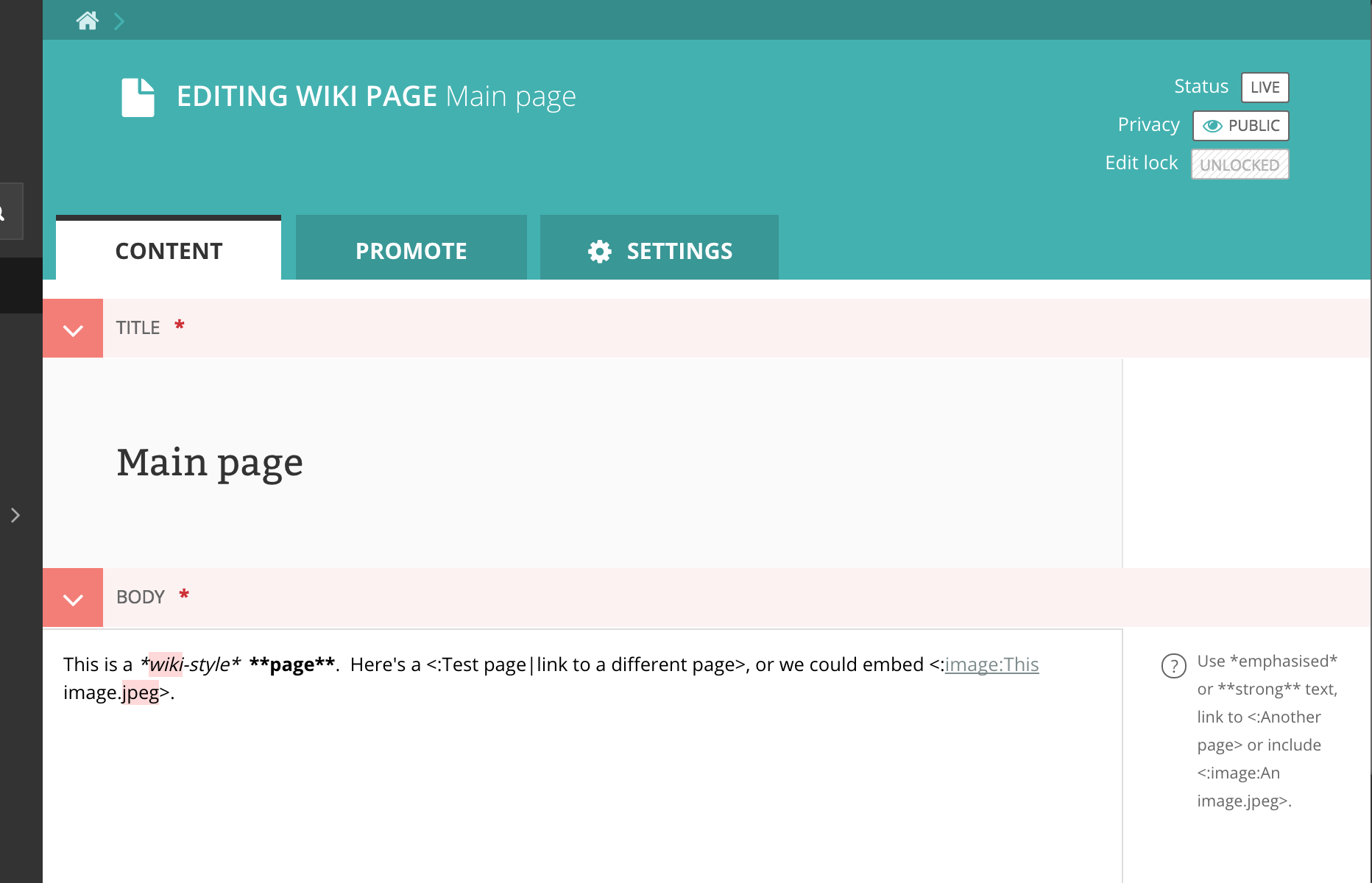
<:My page name|link title>or<:page:My page title><:doc:My fancy document.pdf><:image:My pretty image.jpeg>,<:image:My pretty image.jpeg|left>(leftclassname),<:image:My pretty image.jpeg|right>(rightclassname),<:image:My pretty image.jpeg|full>(full-nameclassname),<:image:My pretty image.jpeg|width=123>(outputs a rendition withwidth-123, and classleft)
⚠️ these types of tags are not reliable as titles can and will change. Support for will be removed in the future.
Inline tags
wagtail-markdown supports the following custom inline tags: ~TEXT~ and ~~TEXT~~ for strikethrough. The resulting
markup is <del>TEXT</del>. Note that with this, the default allowed tags include del and ins.
Usage
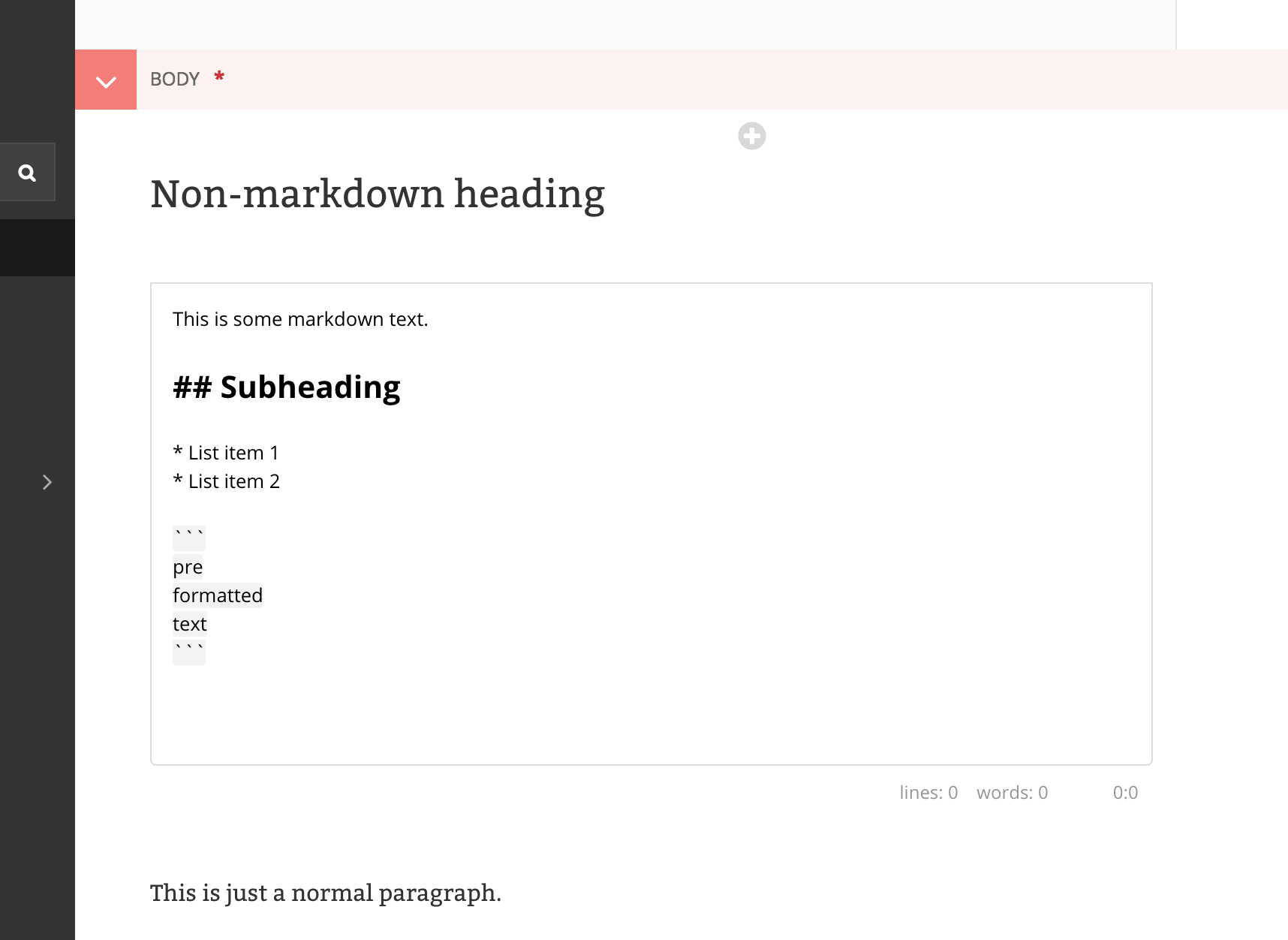
You can use it as a StreamField block:
from wagtail.blocks import StreamBlock

from wagtailmarkdown.blocks import MarkdownBlock


class MyStreamBlock(StreamBlock):
    markdown = MarkdownBlock(icon="code")
    # ...
Or use as a page field:
from wagtail.admin.panels import FieldPanel
from wagtail.models import Page

from wagtailmarkdown.fields import MarkdownField


class MyPage(Page):
    body = MarkdownField()

    content_panels = [
        FieldPanel("title", classname="full title"),
        FieldPanel("body"),
    ]
And render the content in a template:
{% load wagtailmarkdown %}
<article>
{{ self.body|markdown }}
</article>
Compatibility
wagtail-markdown supports Wagtail 7.0 and above, python-markdown 3.3 and above.
Contributing
All contributions are welcome!
Installation
To make changes to this project, first clone this repository:
git clone git@github.com:torchbox/wagtail-markdown.git
cd wagtail-markdown
With your preferred Python virtual environment activated, install testing dependencies:
pip install -e '.[testing]' -U
pre-commit
Note that this project uses prek / pre-commit. To set up locally:
Using pre-commit:
# if you don't have it yet
$ pip install pre-commit
# go to the project directory
$ cd wagtail-markdown
# initialize pre-commit
$ pre-commit install

# Optional, run all checks once for this, then the checks will run only on the changed files
$ pre-commit run --all-files
Using prek:
# if you don't have it yet, globally
$ pip install prek
# go to the project directory
$ cd wagtail-markdown
# initialize prek
$ prek install

# Optional, run all checks once for this, then the checks will run only on the changed files
$ prek run --all-files
How to run tests
To run all tests in all environments:
tox -p
To run tests for a specific environment:
tox -e python3.13-django5.2-wagtail7.4
or, a specific test
tox -e python3.13-django5.2-wagtail7.4 -- tests.testapp.tests.test_admin.TestFieldsAdmin
2 maintainers


Release files for wagtail-markdown 0.15.0
For a detailed explanation of source distributions (sdists) and built distributions (wheels), please see the package formats documentation.
Source distribution (sdist)
| File | Size | Uploaded | |
|---|---|---|---|
| wagtail_markdown-0.15.0.tar.gz | 127.4 kB | Details |
Built distribution (wheel)
| File | Interpreter | ABI | Platform | Reset |
|---|---|---|---|---|
| wagtail_markdown-0.15.0-py3-none-any.whl | Python 3 | none | any | Details |
Total release size: 256.5 kB
Release files / wagtail_markdown-0.15.0.tar.gz
| Download URL | wagtail_markdown-0.15.0.tar.gz |
|---|---|
| Size | 127.4 kB |
| Tags | Source |
|
SHA-256 checksum How to use checksums |
08d58177a6f015c99d2597f681d6f8c276df5d7f74721ab24996d4582a2426da
|
|
BLAKE2b-256 checksum How to use checksums |
7e2acb5233b65ca355d39f16c58c110f1ad4b04a378843d39a8a85d2cb087b7a
|
| Upload date | |
|
Uploaded using Trusted Publishing? What is trusted publishing? |
Yes |
| Uploaded via |
twine/7.0.0 CPython/3.13.14
|
Provenance
Provenance describes where a file came from. On PyPI, provenance is shared via attestations, which provide a verifiable record of the build or publishing details. View details, limitations and caveats.


PyPI Publish Attestation
PyPI verified that this artifact, at this checksum, originated from the publisher listed below.
Signed by GitHub Actions, verified by PyPI on Sep 7, 2026.
Transparency logRelease files / wagtail_markdown-0.15.0-py3-none-any.whl
| Download URL | wagtail_markdown-0.15.0-py3-none-any.whl |
|---|---|
| Size | 129.1 kB |
| Tags | Python 3 |
|
SHA-256 checksum How to use checksums |
f8980596b1baf3c5b932caae18fbc591b2f49ee34249cb5896ab172793c5b41f
|
|
BLAKE2b-256 checksum How to use checksums |
96b7fc84a17ec7fac373dfaf2f3682ceea5ecaae22d2f5ec44784e70c74c9b5d
|
| Upload date | |
|
Uploaded using Trusted Publishing? What is trusted publishing? |
Yes |
| Uploaded via |
twine/7.0.0 CPython/3.13.14
|
Provenance
Provenance describes where a file came from. On PyPI, provenance is shared via attestations, which provide a verifiable record of the build or publishing details. View details, limitations and caveats.
PyPI Publish Attestation
PyPI verified that this artifact, at this checksum, originated from the publisher listed below.
Signed by GitHub Actions, verified by PyPI on Sep 7, 2026.
Transparency log













