
wagtail-mptt-comments
Nested, threaded comments with MPTT hierarchy, multi-layer anti-spam protection, and an AJAX bulk moderation dashboard for Wagtail CMS.
Features
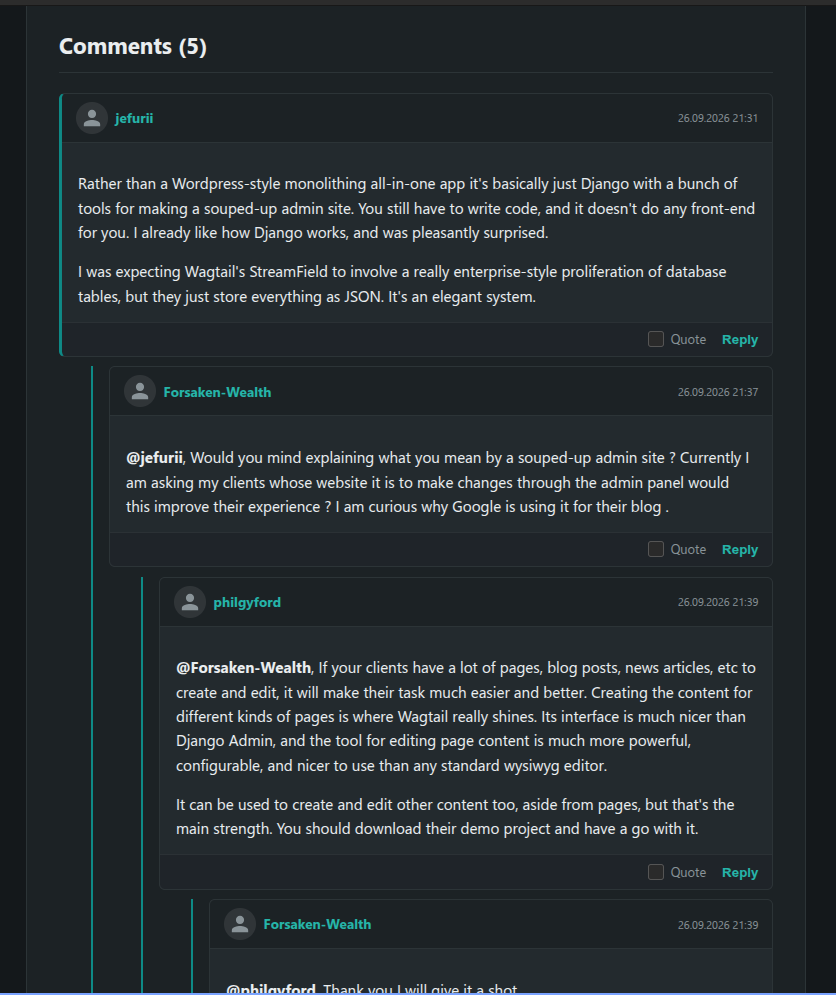
- Hierarchical Threading: Fast nested comment trees powered by
django-mptt, with a configurable max nesting depth. - Wagtail Multi-Site Support: Built-in support for multi-domain setups. Sidebar widgets and listings automatically isolate comments per site without data leaking between domains.
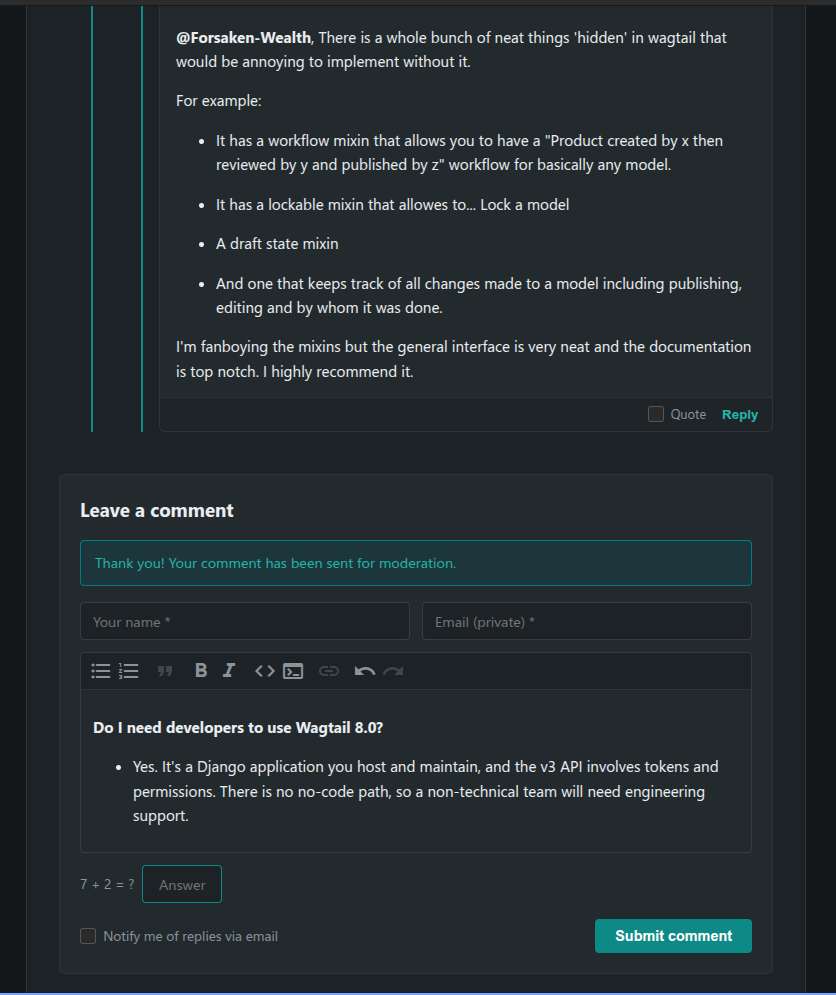
- Three-Layer Spam Protection:
- Transparent honeypot traps.
- Form submission speed verification (blocks instant bot auto-fillers).
- Built-in lightweight math captcha for guest commentators.
- Author Roles & Badges: Automatically distinguishes guests, registered members, moderators, and admins based on
is_staff/is_superuserand configurable moderator groups — rendered as a role badge next to each comment. - Theme-Aware Avatars: Uses the user's profile picture when available, or a neutral inline SVG placeholder that inherits its color via
currentColor— so it stays readable on any background, light or dark, instead of a hardcoded PNG silhouette. - Deep Linking: Every comment gets a real
id="comment-<pk>"anchor, so links like/page/#comment-42(used after posting a reply, or shared directly) actually scroll to and highlight the right comment. - Reply Notifications: Optional "notify me on reply" checkbox — when someone replies to a comment, its author gets an email if they opted in.
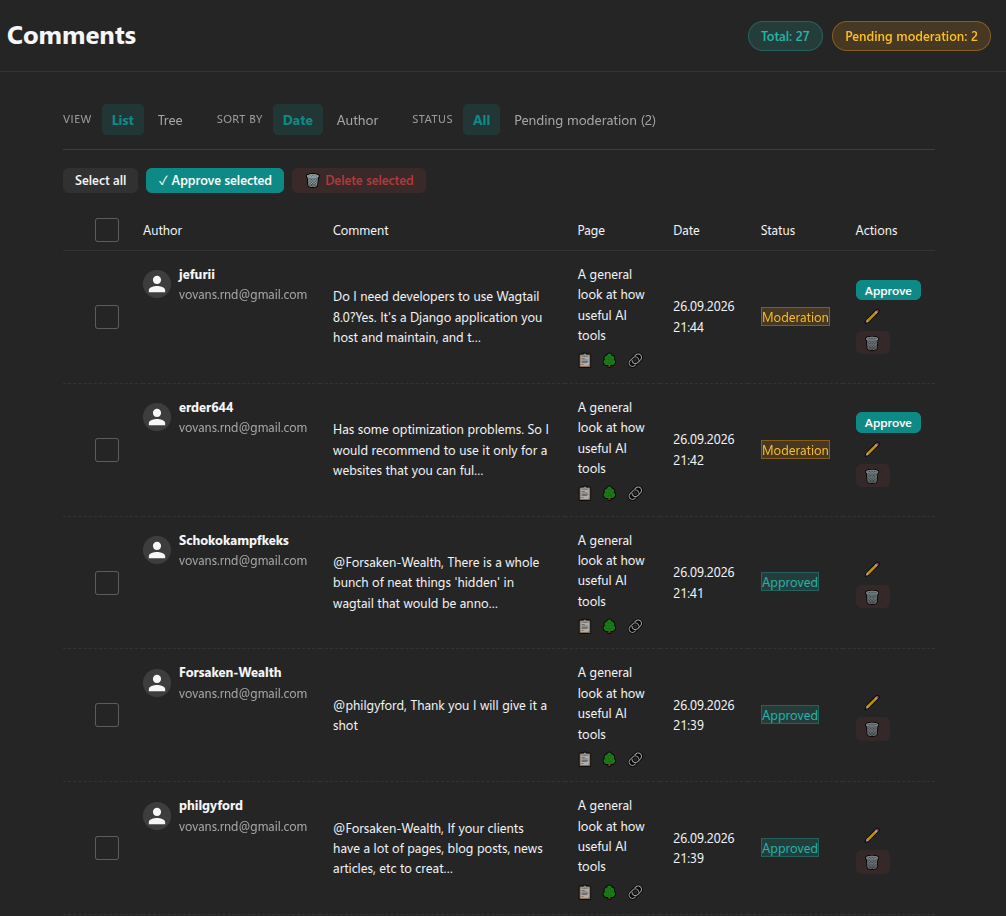
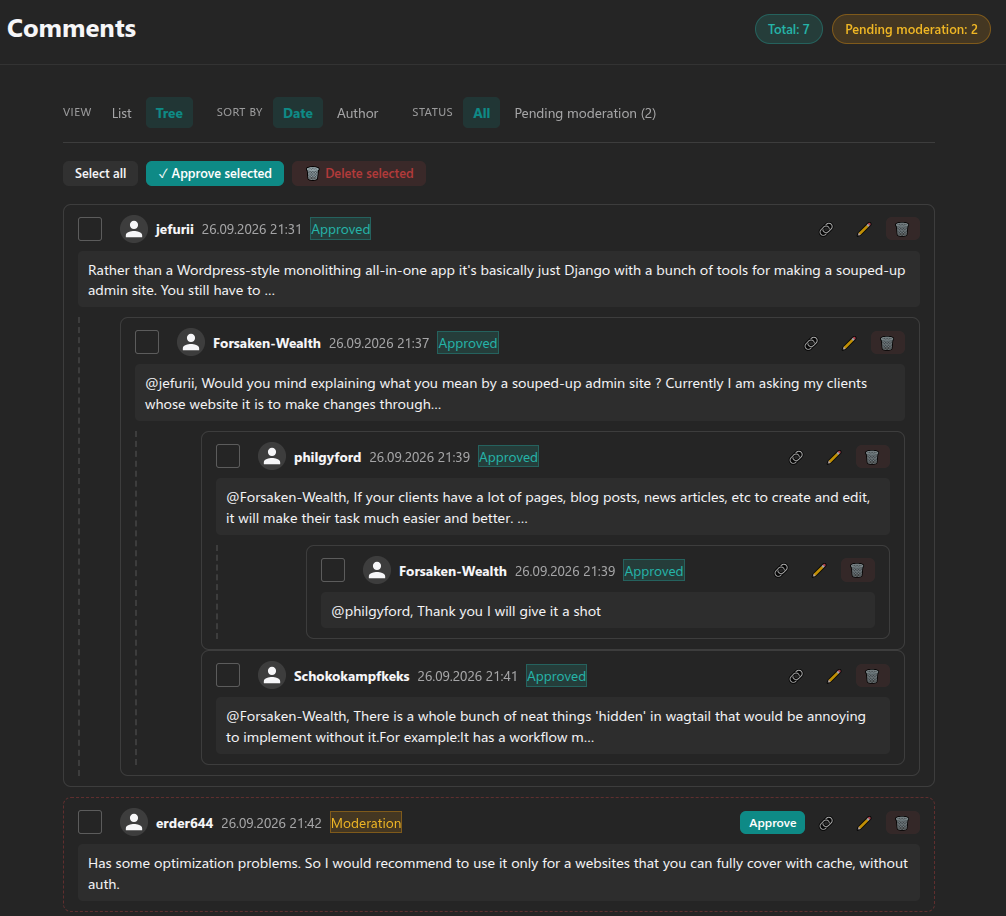
- Wagtail Admin Dashboard:
- List and interactive tree moderation views.
- AJAX bulk approval and deletion.
- In-place admin responses, shown publicly beneath the original comment.
- Fully theme-aware admin UI — respects Wagtail's light/dark theme instead of imposing its own palette.
- WYSIWYG Rich Text: Integrated with
django-prose-editor(bold, italics, quotes, lists, links, code blocks). - Ready-to-use Frontend Styles: Clean, modular CSS themed entirely through CSS custom properties (
--mptt-accent,--mptt-bg, etc.) — override them from your own stylesheet to match your site's palette in a couple of lines.
Installation
pip install wagtail-mptt-comments
Add required apps to INSTALLED_APPS in your settings.py:
INSTALLED_APPS = [
    ...
    "mptt",
    "wagtail_mptt_comments",
    ...
]
Include URLs in urls.py:
from django.urls import include, path

urlpatterns = [
    ...
    path("comments/", include("wagtail_mptt_comments.urls")),
    ...
]
Run database migrations:
python manage.py migrate
Optional settings
# settings.py

# Send an email to DEFAULT_FROM_EMAIL whenever a new comment is posted.
COMMENTS_NOTIFY_ADMINS = True

# Auto-approve guest comments instead of sending them to moderation.
# Authenticated users are always auto-approved.
COMMENTS_MODERATION = True  # default: True (guests go to moderation)

# Group names whose members get the "Moderator" badge on their comments.
COMMENTS_MODERATOR_GROUPS = ["Moderators"]

SITE_NAME = "My Site"
DEFAULT_FROM_EMAIL = "noreply@example.com"
Rendering in Templates
1. Comments Block on Page
In your page template (e.g. blog_page.html), simply load the tags and call render_comments:
{% extends "base.html" %}
{% load mptt_comment_tags %}

{% block content %}
    <h1>{{ page.title }}</h1>

    <!-- This tag automatically loads the comment tree and the reply form -->
    {% render_comments page %}
{% endblock %}
2. Latest Comments Sidebar Widget
To display recent comments in a sidebar or footer (automatically filtered by the current site in multi-site setups):
{% load mptt_comment_tags wagtailcore_tags %}

{% get_latest_comments 5 as latest_comments %}
<ul class="latest-comments-widget">
    {% for comment in latest_comments %}
        <li>
            <a href="{% pageurl comment.page %}#comment-{{ comment.id }}">
                <strong>{{ comment.display_author_name }}</strong>:
                <span>{{ comment.content|striptags|truncatewords:10 }}</span>
            </a>
        </li>
    {% endfor %}
</ul>
Theming
Override the CSS custom properties from your own stylesheet (loaded after comments.css) to match your site's design — no need to touch the plugin's files:
.article-container {
    --mptt-bg: #1c2226;
    --mptt-card-bg: #1c2226;
    --mptt-accent: #0e8a86;
    --mptt-accent-hover: #26b5a9;
    --mptt-text: #eaeef0;
    --mptt-border: #2c3437;
}
Recommended Complementary Packages
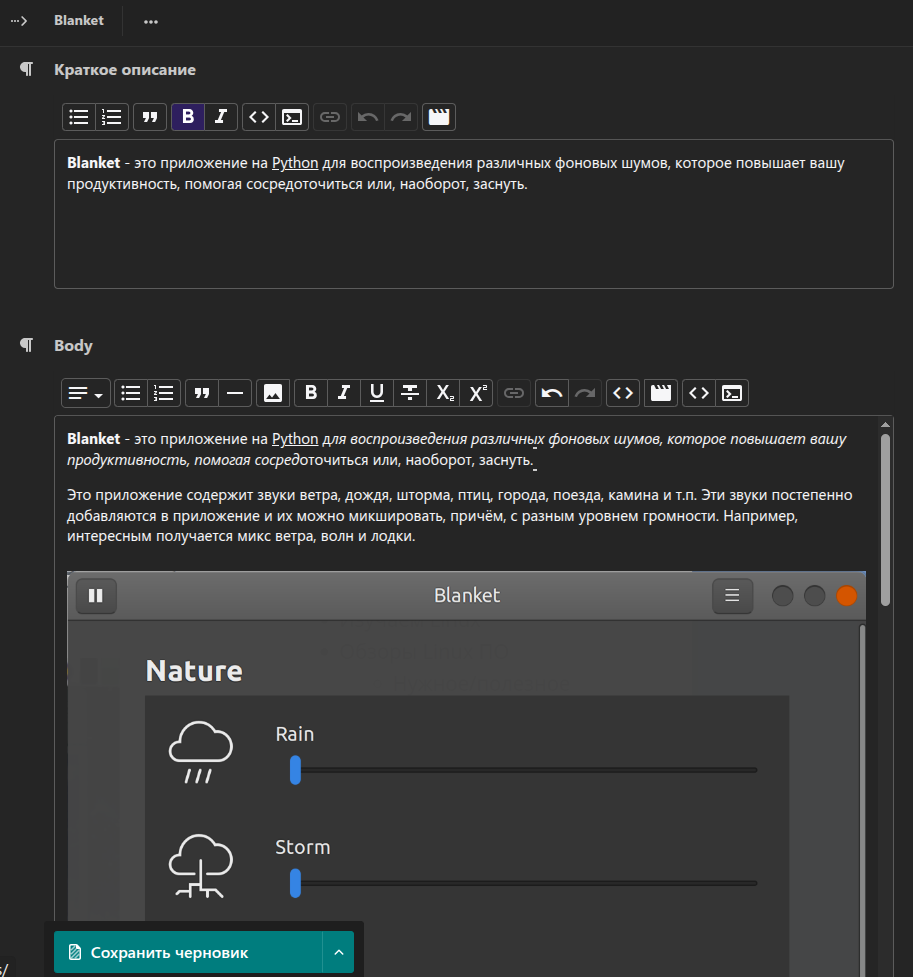
- wagtail-prose-editor-images: Add a native Wagtail Image Chooser button to the prose editor.
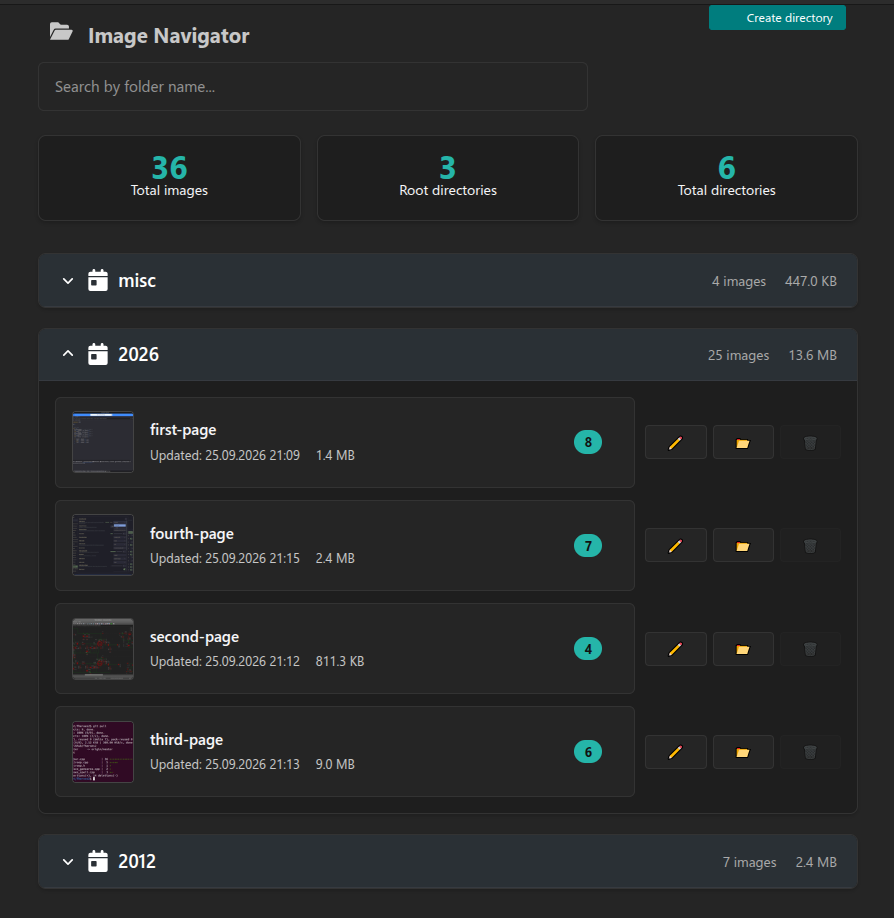
- wagtail-image-directories: Organize uploaded images into structured
year/slugfolders on disk.
Case Study & Background
Read the full story behind the migration and architecture on our blog: Vs-Svet.ru / ZenWay.ru.
1 maintainer

Metadata
1 maintainer
Release files for wagtail-mptt-comments 0.2.0
For a detailed explanation of source distributions (sdists) and built distributions (wheels), please see the package formats documentation.
Source distribution (sdist)
| File | Size | Uploaded | |
|---|---|---|---|
| wagtail_mptt_comments-0.2.0.tar.gz | 45.6 kB | Details |
Built distribution (wheel)
| File | Interpreter | ABI | Platform | Reset |
|---|---|---|---|---|
| wagtail_mptt_comments-0.2.0-py2.py3-none-any.whl | Python 2, Python 3 | none | any | Details |
Total release size: 99.6 kB
Release files / wagtail_mptt_comments-0.2.0.tar.gz
| Download URL | wagtail_mptt_comments-0.2.0.tar.gz |
|---|---|
| Size | 45.6 kB |
| Tags | Source |
|
SHA-256 checksum How to use checksums |
823a039131804180171fff6d8942bfdf4882f6ba72f023b77823fd30fa2996e8
|
|
BLAKE2b-256 checksum How to use checksums |
c31b8520e669bac6bd8720ceae214063c535def9dc63c822ae51768149173579
|
| Upload date | |
|
Uploaded using Trusted Publishing? What is trusted publishing? |
No |
| Uploaded via |
python-requests/2.34.2
|
Release files / wagtail_mptt_comments-0.2.0-py2.py3-none-any.whl
| Download URL | wagtail_mptt_comments-0.2.0-py2.py3-none-any.whl |
|---|---|
| Size | 54.0 kB |
| Tags | Python 2 Python 3 |
|
SHA-256 checksum How to use checksums |
c2be24a8e3a8db2bd402ba25cd5276bd5b69030f3afd34b3c3fe23ded5b5f326
|
|
BLAKE2b-256 checksum How to use checksums |
e894f5931da73f2c87927306707e94d3d63a5503b91069f00e0752a12342eadc
|
| Upload date | |
|
Uploaded using Trusted Publishing? What is trusted publishing? |
No |
| Uploaded via |
python-requests/2.34.2
|














