
Non-admin Draftail
Wagtail ships with a lovely WYSIWYG editor called Draftail. The catch is that it only lives inside the Wagtail admin. The moment you want it on a regular Django form page (a job board, a comment box, a "write your own post" page), you're on your own.
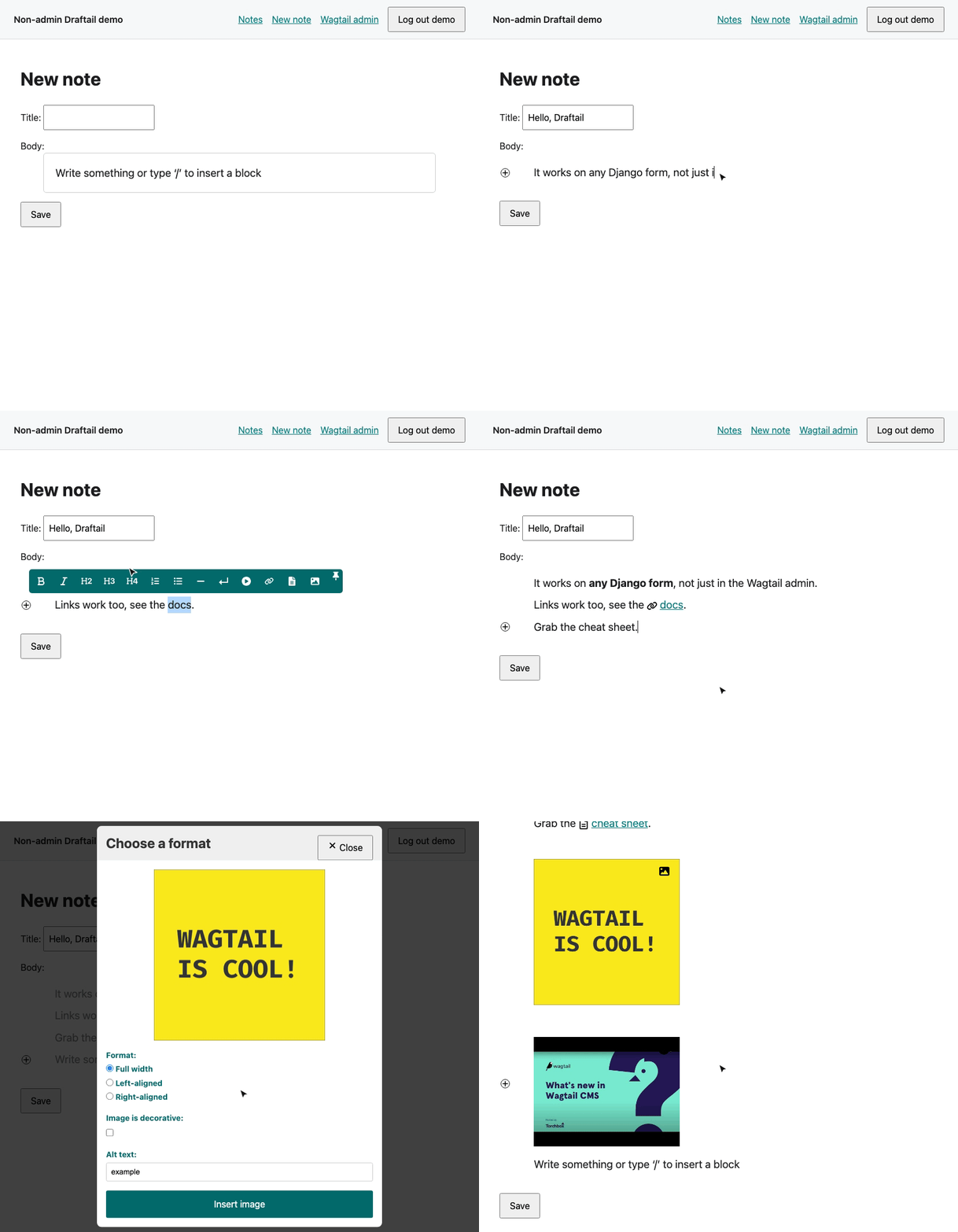
That's why I built Non-admin Draftail. It takes Draftail out of the admin and lets you drop it into any Django form, images, documents, embeds and links included. All you need is Wagtail installed, with its admin and documents URLs routed.
Links
Supported versions
| Package version | Wagtail | Django | Python |
|---|---|---|---|
| 1.0.x | 7.4 LTS and 8.x | 5.2+ | 3.11+ |
| 0.20.0 | 7.0.1 to 7.x (< 8) | 4.2+ | 3.10+ |
| 0.18.x | 5.0+ | 3.2+ | 3.8+ |
Within those ranges, any Python and Django combination that Wagtail itself supports should work. If you're on Wagtail 7.0 to 7.3, stay on 0.20.0. One caveat: on Wagtail 7.2 and 7.3, 0.20.0's upload forms don't prefill the title from the file name.
Installation
-
Install the package:
uv add wagtail-non-admin-draftail
# or
pip install wagtail-non-admin-draftail
-
Add it to
INSTALLED_APPS, next to Wagtail's own apps:INSTALLED_APPS = [ # ... "wagtail_non_admin_draftail", "wagtail.embeds", "wagtail.documents", "wagtail.images", "wagtail.admin", "wagtail", # ... ]
-
Include the package's URLs in your root
urls.py. The editor's modals (link, image, document and embed choosers) are served from here. The package also relies on Wagtail's own admin URLs (for the editor's icons and translations, and the image format step) and documents URLs (for document uploads and for document links in your content). If your project already uses the Wagtail admin, you have those:from django.urls import include, path from wagtail.admin import urls as wagtailadmin_urls from wagtail.documents import urls as wagtaildocs_urls urlpatterns = [ # ... your other URL patterns path("admin/", include(wagtailadmin_urls)), path("documents/", include(wagtaildocs_urls)), path( "non-admin-draftail/", include( "wagtail_non_admin_draftail.urls", namespace="wagtail_non_admin_draftail" ), ), ]
-
Load the editor's assets on every page that shows the editor. You need two things in your template:
wagtail_non_admin_draftail/draftail_media.htmlloads Wagtail's core admin scripts, the modal code and the editor styles.{{ form.media }}loads the editor itself (draftail.js) and any scripts your rich-text features need.
Don't skip the second one.
{{ form }}renders your fields but never outputs their media, so without{{ form.media }}the page shows a plain hidden input and no editor at all.Here's how I do it. Give your
base.htmla block inside<head>:<!DOCTYPE html> <html lang="en"> <head> ... {% block wagtail_non_admin_draftail_head %}{% endblock wagtail_non_admin_draftail_head %} </head> <body> {% block content %}{% endblock content %} </body> </html>
Then fill that block in the template that renders your form:
{% extends "base.html" %}

{% block wagtail_non_admin_draftail_head %}
    {% include "wagtail_non_admin_draftail/draftail_media.html" %}
    {{ form.media }}
{% endblock wagtail_non_admin_draftail_head %}

{% block content %}
    <form method="post">
        {% csrf_token %}
        {{ form }}
        <button type="submit">Save</button>
    </form>
{% endblock content %}
-
Use
NonAdminDraftailRichTextAreaas the widget for your rich-text field. That's it. Read on for the details.
Usage
With a model form
Say you have a model with a Wagtail RichTextField:
from django.db import models
from wagtail.fields import RichTextField


class JobPost(models.Model):
    title = models.CharField(max_length=255)
    body = RichTextField()
Point the field at the widget in your ModelForm:
from django import forms

from wagtail_non_admin_draftail.widgets import NonAdminDraftailRichTextArea


class JobPostForm(forms.ModelForm):
    class Meta:
        model = JobPost
        fields = ["title", "body"]
        widgets = {"body": NonAdminDraftailRichTextArea}
With no arguments, the widget gives you Wagtail's default feature set: headings, lists, bold, italic, links, document links, images,
embeds and so on. To narrow it down, pass a list, for example NonAdminDraftailRichTextArea(features=["bold", "italic", "link"]).
With a plain form, no model needed
You don't need a model at all. The widget turns what the editor submits into Wagtail's rich-text HTML, so a regular forms.Form works
just fine:
from django import forms

from wagtail_non_admin_draftail.widgets import NonAdminDraftailRichTextArea


class FeedbackForm(forms.Form):
    message = forms.CharField(widget=NonAdminDraftailRichTextArea)
form.cleaned_data["message"] then holds HTML such as <p data-block-key="x7k2p">Plain <b>form</b></p>, ready to store or send
wherever you like.
Showing the saved content
Rich text is stored in Wagtail's database format, so render it with the richtext filter. It turns image, document and page
references into real <img> and <a> tags and renders embeds:
{% load wagtailcore_tags %}

{{ job_post.body|richtext }}
Inserting images and embeds
In current Wagtail versions, the Image and Embed buttons live in the floating toolbar that appears when you select some text. On an
empty line, type / to open the command palette and pick a block from there.
A complete example
The repo has a small demo site with a notes app that wires everything up exactly as described above. If something doesn't click,
demo/notes/templates/notes/note_form.html
and demo/notes/forms.py
are the best places to look. CONTRIBUTING.md
explains how to run it.
Configuration
Images and documents uploaded through the editor are saved to Wagtail's image and document libraries, in a collection called "Public uploads". The collection is created the first time someone opens an upload modal. To use a different name, set this in your settings:
WAGTAIL_NON_ADMIN_DRAFTAIL_PUBLIC_COLLECTION_NAME = "Visitor uploads"
Access model
The editor's modals let people upload files to your site, so I keep them locked down:
- Every package view needs a logged-in user. Anonymous requests are redirected to your
LOGIN_URL. Pages that show the editor should require login too. Otherwise an anonymous visitor's toolbar buttons don't open anything, and the editor locks up while it waits for a modal that never comes. - Uploads always go to the public-uploads collection. Any logged-in user can upload images and documents there, and pick a display format for any image in that collection.
- Only public-uploads images can be re-opened. When someone edits an image that's already in the content, the format modal only looks in the public-uploads collection. An image an admin inserted from another collection returns a 404 there, so frontend users can't pull renditions of your private images.
- Keep the collection name unique. The collection is looked up by name. If two collections share that name (for example, a nested one an admin created), the image and document modals fail to open until you rename one of them.
Extending the editor
NonAdminDraftailRichTextArea is Wagtail's own DraftailRichTextArea with the modal URLs pointed at this package. So everything from
Wagtail's Extending the Draftail editor guide works here too:
custom inline styles, blocks, entities and controls. Register them with the register_rich_text_features hook in a wagtail_hooks.py.
For example, here's a "mark" (highlighter) button, adapted from the Wagtail docs:
# wagtail_hooks.py
from wagtail import hooks
from wagtail.admin.rich_text.converters.html_to_contentstate import (
    InlineStyleElementHandler,
)
from wagtail.admin.rich_text.editors.draftail.features import InlineStyleFeature


@hooks.register("register_rich_text_features")
def register_mark_feature(features):
    features.register_editor_plugin(
        "draftail",
        "mark",
        InlineStyleFeature({"type": "MARK", "label": "☆", "description": "Mark"}),
    )
    features.register_converter_rule(
        "contentstate",
        "mark",
        {
            "from_database_format": {"mark": InlineStyleElementHandler("MARK")},
            "to_database_format": {"style_map": {"MARK": "mark"}},
        },
    )
    features.default_features.append("mark")
Features that ship JavaScript, like a live word count, register their scripts on the feature. Those scripts reach the page through
{{ form.media }}, which is one more reason not to skip it. The Wagtail guide's
sentence counter is a good starting
point for a word counter. I've checked that both kinds of feature work outside the admin.
Troubleshooting
The editor doesn't appear, and I only see an empty field. Check that the page includes both
wagtail_non_admin_draftail/draftail_media.html and {{ form.media }} (see step 4 of the installation). Also look for JavaScript errors
in the browser console.
The page with the form fails with NoReverseMatch. If the error mentions wagtail_non_admin_draftail, the package's URLs aren't
included (see step 3). If it names a wagtailadmin_* URL, Wagtail's admin URLs aren't routed.
A toolbar button does nothing, the editor stops responding, and the browser console shows a JSON parse error (in Chrome,
Unexpected token '<'). The visitor isn't logged in. The package's views redirected the modal's request to your login page, and
the editor got HTML where it expected JSON. Make the page require login (see Access model).
An image I didn't upload can't be edited. That's the access model at work: only images in the public-uploads collection can be re-opened from the frontend.
Contributing
Bug reports, ideas and pull requests are very welcome. To try the package locally, clone the repo and run just install, then
just demo for the demo site. CONTRIBUTING.md
has the full setup, including creating a user and running the tests.
If this package saves you time, consider giving the repo a ⭐️. It really helps others find it.
Created by
1 maintainer

Metadata
1 maintainer
Release files for wagtail-non-admin-draftail 1.0.1
For a detailed explanation of source distributions (sdists) and built distributions (wheels), please see the package formats documentation.
Source distribution (sdist)
| File | Size | Uploaded | Provenance | |
|---|---|---|---|---|
| wagtail_non_admin_draftail-1.0.1.tar.gz | 18.7 kB | With provenance | Details |
Built distribution (wheel)
| File | Interpreter | ABI | Platform | Reset |
|---|---|---|---|---|
| wagtail_non_admin_draftail-1.0.1-py3-none-any.whl | Python 3 | none | any | Details |
Total release size: 48.3 kB
Release files / wagtail_non_admin_draftail-1.0.1.tar.gz
| Download URL | wagtail_non_admin_draftail-1.0.1.tar.gz |
|---|---|
| Size | 18.7 kB |
| Tags | Source |
|
SHA-256 checksum How to use checksums |
dafb77884e090deeaa330af189e3164482ecb90a413a0b9970606f7c53671ce7
|
|
BLAKE2b-256 checksum How to use checksums |
ab2440b42c58c936f5190dc1e7635e4ee3c3e336108e30ec1a4b729309b9675a
|
| Upload date | |
|
Uploaded using Trusted Publishing? What is trusted publishing? |
Yes |
| Uploaded via |
twine/7.0.0 CPython/3.13.14
|
Provenance
Provenance describes where a file came from. On PyPI, provenance is shared via attestations, which provide a verifiable record of the build or publishing details. View details, limitations and caveats.


PyPI Publish Attestation
PyPI verified that this artifact, at this checksum, originated from the publisher listed below.
Signed by GitHub Actions, verified by PyPI on Oct 14, 2026.
Transparency logRelease files / wagtail_non_admin_draftail-1.0.1-py3-none-any.whl
| Download URL | wagtail_non_admin_draftail-1.0.1-py3-none-any.whl |
|---|---|
| Size | 29.6 kB |
| Tags | Python 3 |
|
SHA-256 checksum How to use checksums |
cf55f55b405178351d8379c09f96508e646c20f43d959041f988d7668afb6f18
|
|
BLAKE2b-256 checksum How to use checksums |
dad871894d1366d1fd8c4dc2a42639b7474a034b977e5b352b1999d27386fd22
|
| Upload date | |
|
Uploaded using Trusted Publishing? What is trusted publishing? |
Yes |
| Uploaded via |
twine/7.0.0 CPython/3.13.14
|
Provenance
Provenance describes where a file came from. On PyPI, provenance is shared via attestations, which provide a verifiable record of the build or publishing details. View details, limitations and caveats.
PyPI Publish Attestation
PyPI verified that this artifact, at this checksum, originated from the publisher listed below.
Signed by GitHub Actions, verified by PyPI on Oct 14, 2026.
Transparency logSecurity for wagtail-non-admin-draftail 1.0.1
Provenance
Provenance describes where a file came from. On PyPI, provenance is shared via attestations, which provide a verifiable record of the build or publishing details. View details, limitations and caveats.
Full provenance
All 2 files in this release have been uploaded with provenance metadata.
Attestation for wagtail_non_admin_draftail-1.0.1.tar.gz
PyPI Publish Attestation
PyPI verified that this artifact, at this checksum, originated from the publisher listed below.
Signed by GitHub Actions, verified by PyPI on Oct 14, 2026.
Transparency logA note on package security
PyPI is a repository for distributing packages, not a service for auditing them. While third-party security researchers and our staff do their best to detect and remove malicious packages, PyPI cannot guarantee the quality, security or suitability of any given package.
To learn more about protecting yourself from malicious actors, visit our package security documentation.














