
A comprehensive SEO toolkit for Wagtail CMS (Dual License: MIT for core, Proprietary for pro features)
Verified details
These details have been verified by PyPIProject links
GitHub Statistics
Maintainers

Project description
Wagtail SEO Toolkit
A comprehensive SEO auditing and optimization plugin for Wagtail CMS that helps you identify and fix SEO issues across your website.
📋 Table of Contents
- 🚀 Features
- 📸 Screenshots
- 🛠 Installation
- ⚙️ Configuration
- 🚀 Usage
- 🔧 Advanced Configuration
- 🛠 Development
- 📊 Performance Considerations
- 📝 Changelog
- 📄 License
- 🙏 Acknowledgments
🚀 Features
🔍 SEO Best Practices Checks
- Title & Meta Tags: Check for missing, duplicate, or suboptimal meta tags
- Content Analysis: Analyze content length, readability, and structure
- Header Structure: Validate H1-H6 hierarchy and usage
- Image Optimization: Check for missing alt text, proper sizing, and optimization
- Schema Markup: Validate structured data implementation
- Mobile Optimization: Ensure mobile-friendly design and viewport settings
- Internal Linking: Analyze internal link structure and distribution
- Content Freshness: Track content publication and modification dates
⚡ PageSpeed Insights Checks (Optional)
- Performance Metrics: Get Core Web Vitals and performance scores
- Accessibility Checks: Identify accessibility issues
- Best Practices: Check for security and modern web standards
- SEO Performance: Analyze technical SEO factors
- Per-Page-Type Optimization: Efficiently audit multiple pages of the same type
🎯 Smart Issue Management
- Issues Export: Export list of issues to Excel/CSV
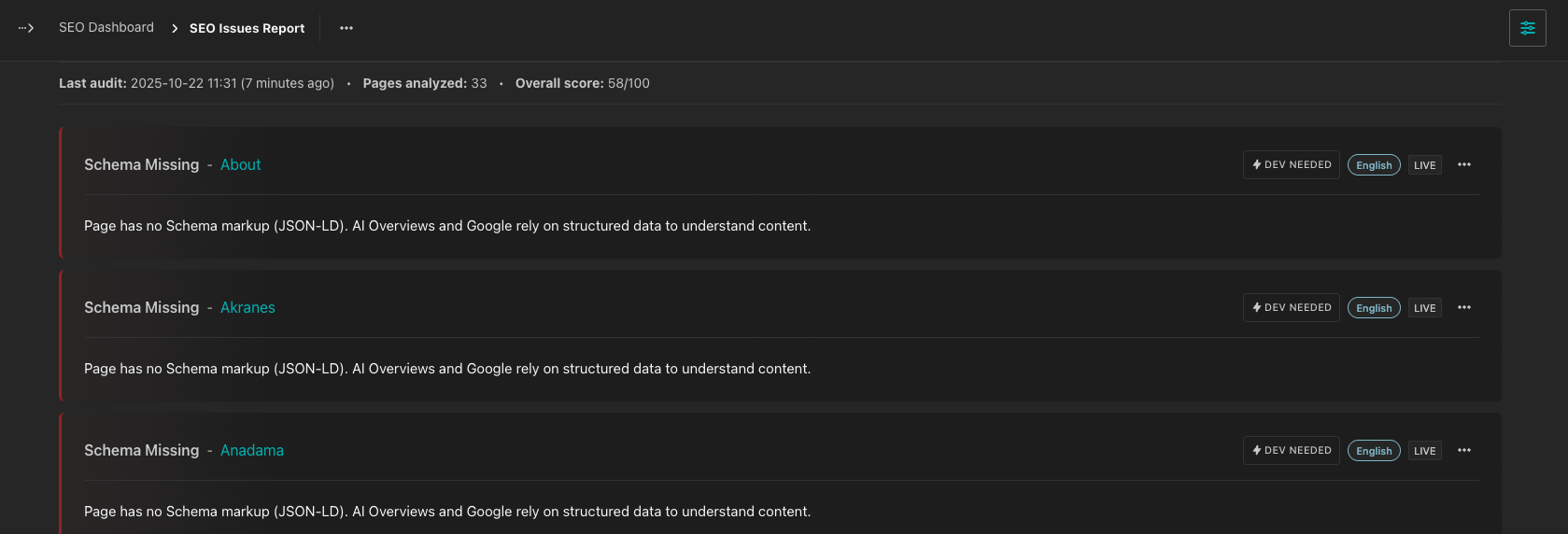
- Developer vs Content Issues: Clear distinction between technical and content fixes
🔧 Flexible Configuration
- PageSpeed Settings: Control API usage and optimization
- Button Visibility: Control audit button visibility in admin
- Dev Fix Filtering: Show only content-editable issues
🤩 [PRO] Bulk meta editor
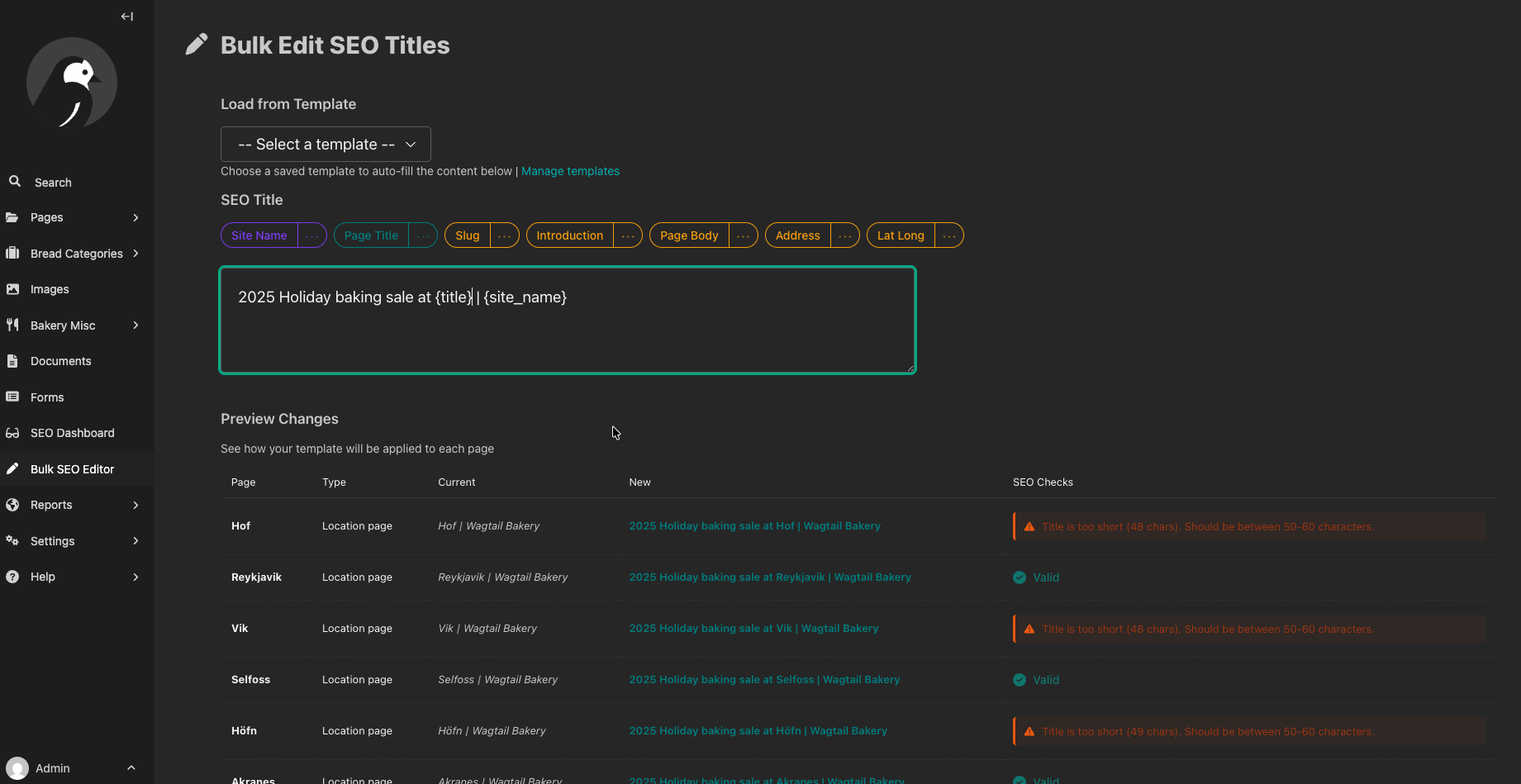
- Multi-Page Editing: Edit SEO titles and meta descriptions for hundreds of pages at once instead of manually editing each one
- Smart Templates: Use placeholders like
{title} | {site_name}or{introduction[:100]}to create consistent metadata patterns across your site - Issue-Based Filtering: Jump directly to pages with specific SEO issues from the dashboard for quick fixes
- Live Validation: Real-time character counting and validation ensures your metadata meets SEO best practices
- Automatic Template Integration: Enable middleware to automatically apply bulk editor changes to rendered meta tags without modifying your existing template tags across multiple pages
📸 Screenshots
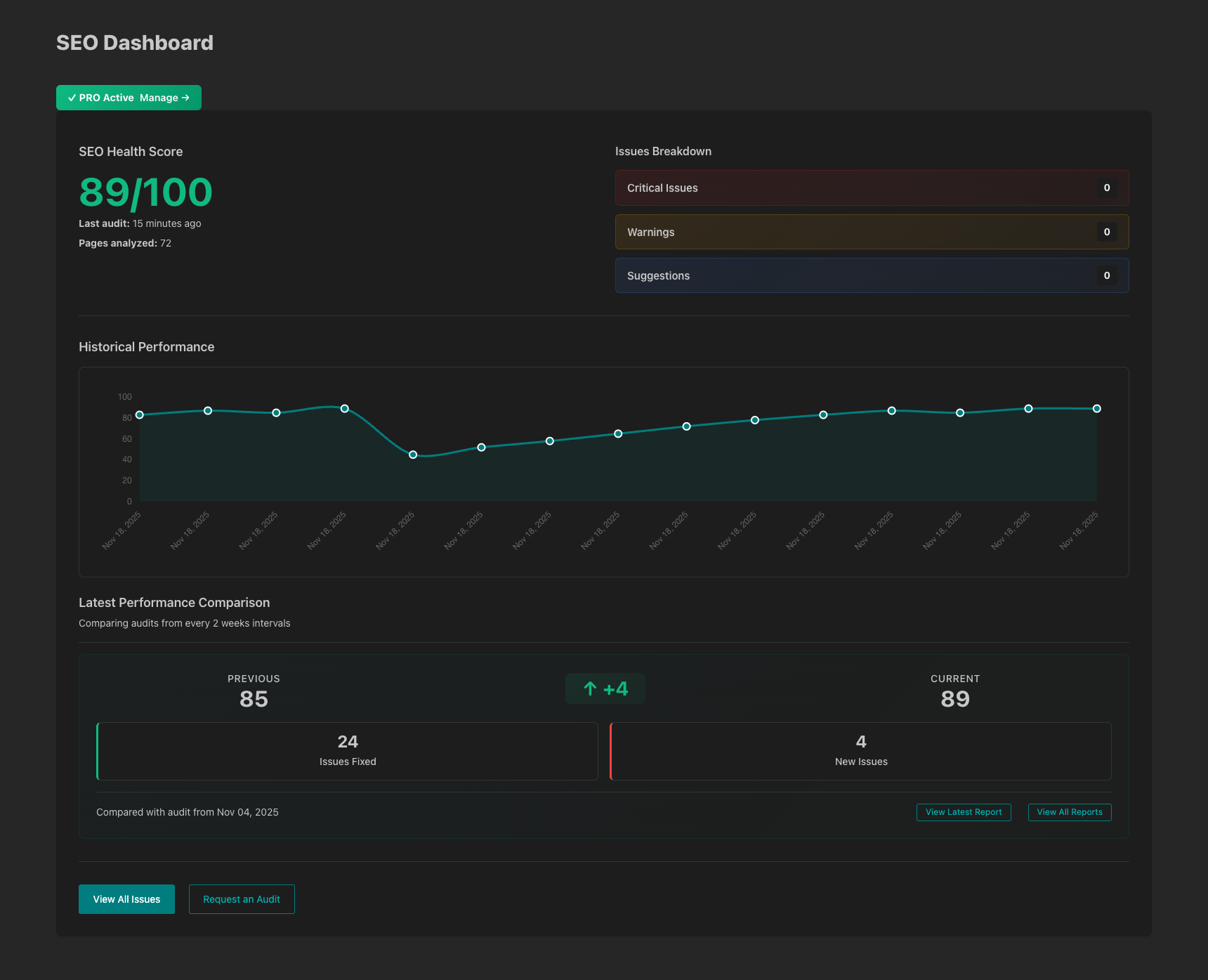
SEO Dashboard
Issues Report
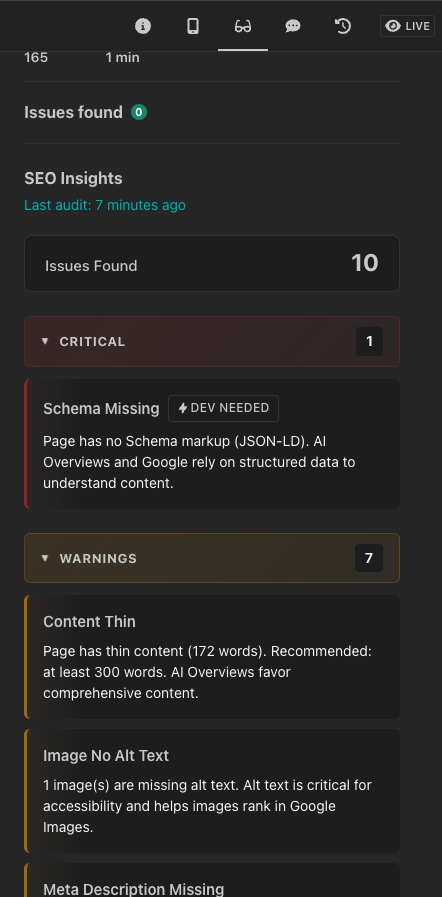
Page Sidebar
Bulk editor
🛠 Installation
Prerequisites
- Wagtail 6.4+
Install via pip
pip install wagtail-seotoolkit
Add to your Django settings
# settings.py
INSTALLED_APPS = [
    # ... other apps
    'wagtail_seotoolkit',
]
Run migrations
python manage.py migrate
(Optional) Enable middleware
MIDDLEWARE = [
    ...
    # SEO Toolkit Middleware - Must be after Wagtail's middleware
    "wagtail_seotoolkit.middleware.SEOMetadataMiddleware",
]
How the bulk editor works with middleware:
The bulk editor works on the basic page fields seo_title and search_description. When the middleware is enabled, it will replace the rendered meta tags in your HTML output with the new versions applied from the bulk editor. This enables you to start using bulk editor features without modifying all of the template tags across multiple pages - the middleware automatically intercepts and updates the meta tags at render time.
Placeholder Processing Modes:
You can control how placeholders (like {title}, {site_name}, etc.) are processed using the WAGTAIL_SEOTOOLKIT_PROCESS_PLACEHOLDERS setting:
-
True(default, recommended): Placeholders are stored in the database and processed at runtime by the middleware. This means your SEO metadata stays dynamic - if a page title changes, the SEO title automatically updates. Requires middleware to be enabled. -
False: Placeholders are processed immediately when saving and the final values are stored in the database. This creates static metadata that won't update if page content changes. Use this if you don't want to use the middleware or need static values.
⚙️ Configuration
All Settings
# settings.py

# SEO Toolkit Configuration
WAGTAIL_SEOTOOLKIT_SHOW_AUDIT_BUTTON = True  # Show audit button in admin (default: False)
WAGTAIL_SEOTOOLKIT_INCLUDE_DEV_FIXES = True  # Include developer-required fixes (default: True)

# Bulk Editor / Middleware Configuration
WAGTAIL_SEOTOOLKIT_PROCESS_PLACEHOLDERS = True  # Process placeholders at runtime via middleware (default: True)
                                                  # If False, placeholders are processed once when saving

# PageSpeed Insights Configuration (Optional - must be manually enabled)
# Note: PageSpeed checks are disabled by default and must be manually enabled
WAGTAIL_SEOTOOLKIT_PAGESPEED_API_KEY = "your-api-key-here"  # Get from Google
WAGTAIL_SEOTOOLKIT_PAGESPEED_ENABLED = True  # Enable PageSpeed checks
WAGTAIL_SEOTOOLKIT_PAGESPEED_DRY_RUN = False  # Use real API calls
WAGTAIL_SEOTOOLKIT_PAGESPEED_PER_PAGE_TYPE = True  # Optimize API usage
Getting a PageSpeed API Key
- Visit Google PageSpeed Insights API
- Create a new project or select existing one
- Enable the PageSpeed Insights API
- Create credentials (API key)
- Add the key to your settings
🚀 Usage
Running Audits
This plugin exposes 2 management commands seoaudit and run_scheduled_audits those commands needs to be executed by some process. Smiliarly to publish_scheduled.
Option 1: User-Requested Audits (Recommended)
To allow users to request audits through the admin interface:
-
Enable the audit button:
# settings.py
WAGTAIL_SEOTOOLKIT_SHOW_AUDIT_BUTTON = True
-
Set up periodic task to process scheduled audits:
python manage.py run_scheduled_audits
WARNING: First audit needs to be started manually with seoaudit command.
Option 2: Automated Audits
Set up a scheduled task to run audits automatically:
python manage.py seoaudit
🔧 Advanced Configuration
Filtering Dev Fixes
For content editors who shouldn't see technical issues:
# settings.py
WAGTAIL_SEOTOOLKIT_INCLUDE_DEV_FIXES = False
This will hide all issues that require developer intervention, showing only content-related issues.
PageSpeed Optimization
The WAGTAIL_SEOTOOLKIT_PAGESPEED_PER_PAGE_TYPE setting optimizes PageSpeed API usage for sites with many pages of the same type:
# settings.py
WAGTAIL_SEOTOOLKIT_PAGESPEED_PER_PAGE_TYPE = True  # Enable optimization (default: False)
How it works:
- When
True: Tests PageSpeed on only one page per page type (e.g., one BlogPage, one ProductPage) - When
False: Tests PageSpeed on every individual page - Result propagation: PageSpeed issues found on the test page are applied to all pages of that same type
Example:
- Site has 50 BlogPage instances and 30 ProductPage instances
- With optimization: 2 PageSpeed API calls (1 for BlogPage + 1 for ProductPage)
- Without optimization: 80 PageSpeed API calls (1 for each page)
Benefits:
- Cost savings: Dramatically reduces Google PageSpeed API usage
- Faster audits: Significantly faster completion times
- Same accuracy: PageSpeed issues are typically consistent across pages of the same type
When to use:
- Sites with many pages of the same type
- When PageSpeed API costs are a concern
- For faster audit execution
🛠 Development
Setting up Development Environment
You can start developing with this plugin using the bakerydemo project that includes this plugin enabled:
# Clone the repository
git clone https://github.com/your-org/wagtail-seotoolkit.git
cd wagtail-seotoolkit

# Start the development environment with Docker
docker-compose up

# The plugin will be available at http://localhost:8000/admin/
# Login with: admin / changeme
📊 Performance Considerations
PageSpeed API Limits
- Google PageSpeed Insights API has rate limits
- Use
WAGTAIL_SEOTOOLKIT_PAGESPEED_PER_PAGE_TYPE = Truefor large sites - Consider running audits during off-peak hours
🗺️ Roadmap
We are in the Phase 2 - free tier showing you what's broken and first pro feature Bulk editor.
Coming Very Soon (Phase 2 Further development - Pro Tier)
- JSON-LD Editor - Visual editor for structured data
- Daily Monitoring - Automated audits with email alerts when issues are detected
- Historical Tracking - See how your SEO health improves over time
Coming Also Quite Soon (Phase 3 - AI)
- AI-Powered Optimization - GPT-generated meta descriptions optimized for search
- Smart Internal Linking - Automatic suggestions for related content
- Content Scoring - AI analysis for search visibility and user engagement
- Competitive Analysis - See how your pages compare to competitors
Interested in Pro features? Let us know what would be most valuable → GitHub Discussions
🤝 Contributing
This is an early release and we want your feedback!
Found a bug? Open an issue
Have a suggestion? Start a discussion
What We're Looking For Feedback On:
- Are the checks finding real, actionable issues?
- What SEO checks are we missing?
- Does the bulk fixing is worth paying for?
- How's the performance on large sites (1000+ pages)?
💬 Support
- Issues: GitHub Issues
- Discussions: GitHub Discussions
- Email: hello@wayfdigital.com
📝 Changelog
Version 0.1.1
- Initial release
- Comprehensive SEO auditing
- PageSpeed Insights integration
- Wagtail admin integration
- Configurable settings
Version 0.1.2
- Fix CSRF bug
Version 0.1.3
- Further improvements to CSRF fixes
Version 0.2.0
- First pro feature - Bulk editor!
- Subscription management from the plugin
- License update
Version 0.2.1
- README update
Version 0.2.2
- Bulk editor fixes
Version 0.2.3
- Fix checks bypassing the middleware processing resulting in false positives
📄 License
This project uses dual licensing:
Core Features (MIT License)
The following features are licensed under the MIT License and are free and open source:
- ✅ SEO audit engine and all checkers (title, meta, content, headers, images, schema, mobile, links, freshness, PageSpeed)
- ✅ Management commands (
seoaudit,run_scheduled_audits) - ✅ SEO audit models and data structures
- ✅ Dashboard and issues reporting (read-only views)
- ✅ Side panels showing SEO checks on page editor
License: See LICENSE-MIT for full MIT license text.
Pro Features (WAYF Proprietary License)
The following features require a paid subscription and are licensed under the WAYF Proprietary License:
- 🔒 Bulk Metadata Editor - Edit SEO titles and meta descriptions for hundreds of pages at once
- 🔒 SEO Templates - Create reusable metadata templates with placeholders
- 🔒 Metadata Middleware - Automatically apply bulk editor changes to rendered pages
- 🔒 Subscription Management - License verification and instance management
- 🔒 Advanced Placeholder System - Dynamic field placeholders for metadata templates
License: See LICENSE-PROPRIETARY for full proprietary license terms.
Source Available: The source code for pro features is available for reference, security review, and transparency, but modification and redistribution are prohibited without permission from WAYF.
Usage Rights
- ✅ Core features: Free to use, modify, and redistribute under MIT license
- ✅ Pro features: Free to use with a valid subscription, but modification and redistribution are restricted
- ✅ Commercial use: Both core and pro features can be used in commercial projects
- ✅ Contributions: Welcome for core features; pro feature contributions require WAYF approval (see CONTRIBUTING.md)
Getting a Pro License
Pro features require an active subscription. You can obtain the pro license directly from the plugin UI after installation.
Author: WAYF
Copyright: ©2025 WAYF DIGITAL SP. Z O.O.
🙏 Acknowledgments
- Built for the Wagtail CMS community
- Inspired by modern SEO best practices
- Special thanks to early testers and contributors
- Special thanks to all the contributors to the bakerydemo
- Bakery demo is used only for the development environment for this project, it's not redistributed with the package
⭐ If this tool saves you time, please star the repo and share it with other Wagtail users!
Made with ❤️ by WAYF
About WAYF: We build tools for modern web development. Check out our other projects at wayfdigital.com
Project details
Verified details
These details have been verified by PyPIProject links
GitHub Statistics
Maintainers
Release history Release notifications | RSS feed


Download files
Download the file for your platform. If you're not sure which to choose, learn more about installing packages.
Source Distribution
Built Distribution
Filter files by name, interpreter, ABI, and platform.
If you're not sure about the file name format, learn more about wheel file names.
Copy a direct link to the current filters
File details
Details for the file wagtail_seotoolkit-0.2.3.tar.gz.
File metadata
- Download URL: wagtail_seotoolkit-0.2.3.tar.gz
- Upload date:
- Size: 112.1 kB
- Tags: Source
- Uploaded using Trusted Publishing? Yes
- Uploaded via: twine/6.1.0 CPython/3.13.7
File hashes
| Algorithm | Hash digest | |
|---|---|---|
| SHA256 |
e45feb9d3fb8a44ff6dc7bcc45bb2accb2c89789efef554570e78d5efb7c72df
|
|
| MD5 |
40d30dd228e4cb6e2e0a1012032853c5
|
|
| BLAKE2b-256 |
32b3dd87b1ddcc886ee457d7cfffd7f3e41867a10be5f66b6feb5780c29cdf57
|
Provenance
The following attestation bundles were made for wagtail_seotoolkit-0.2.3.tar.gz:
Publisher:
pypi-publish.yml on wayfdigital/wagtail-seotoolkit
-
Statement:
-
Statement type:
https://in-toto.io/Statement/v1 -
Predicate type:
https://docs.pypi.org/attestations/publish/v1 -
Subject name:
wagtail_seotoolkit-0.2.3.tar.gz -
Subject digest:
e45feb9d3fb8a44ff6dc7bcc45bb2accb2c89789efef554570e78d5efb7c72df - Sigstore transparency entry: 681780595
- Sigstore integration time:
-
Permalink:
wayfdigital/wagtail-seotoolkit@863c4ed607e1ba5cc281cb1b4048447a52ea0fd1 -
Branch / Tag:
refs/tags/v0.2.3 - Owner: https://github.com/wayfdigital
-
Access:
public
-
Token Issuer:
https://token.actions.githubusercontent.com -
Runner Environment:
github-hosted -
Publication workflow:
pypi-publish.yml@863c4ed607e1ba5cc281cb1b4048447a52ea0fd1 -
Trigger Event:
release
-
Statement type:
File details
Details for the file wagtail_seotoolkit-0.2.3-py3-none-any.whl.
File metadata
- Download URL: wagtail_seotoolkit-0.2.3-py3-none-any.whl
- Upload date:
- Size: 153.9 kB
- Tags: Python 3
- Uploaded using Trusted Publishing? Yes
- Uploaded via: twine/6.1.0 CPython/3.13.7
File hashes
| Algorithm | Hash digest | |
|---|---|---|
| SHA256 |
7f2f361315cd1d54783b047c63bb1e1cf405e749b78b862d527a19a01ea3ae83
|
|
| MD5 |
974415f423abb412ec6db28179d156dd
|
|
| BLAKE2b-256 |
cca33f41473e548f5e8dcbcc04375ec0c86bd8c8f62283ef029d7ed73fdc29ac
|
Provenance
The following attestation bundles were made for wagtail_seotoolkit-0.2.3-py3-none-any.whl:
Publisher:
pypi-publish.yml on wayfdigital/wagtail-seotoolkit
-
Statement:
-
Statement type:
https://in-toto.io/Statement/v1 -
Predicate type:
https://docs.pypi.org/attestations/publish/v1 -
Subject name:
wagtail_seotoolkit-0.2.3-py3-none-any.whl -
Subject digest:
7f2f361315cd1d54783b047c63bb1e1cf405e749b78b862d527a19a01ea3ae83 - Sigstore transparency entry: 681780606
- Sigstore integration time:
-
Permalink:
wayfdigital/wagtail-seotoolkit@863c4ed607e1ba5cc281cb1b4048447a52ea0fd1 -
Branch / Tag:
refs/tags/v0.2.3 - Owner: https://github.com/wayfdigital
-
Access:
public
-
Token Issuer:
https://token.actions.githubusercontent.com -
Runner Environment:
github-hosted -
Publication workflow:
pypi-publish.yml@863c4ed607e1ba5cc281cb1b4048447a52ea0fd1 -
Trigger Event:
release
-
Statement type:






